
Blog
Advantages of Live Chat: Boost Your Business in 2026
By
Nelson Uzenabor

85% customer satisfaction is the statistic that should change how organizations think about live chat. In widely cited benchmark data, live chat scores ahead of email support at 82%, and it doesn't just make customers happier. 40% of buyers who used live chat were more likely to make an online purchase, and 38% said they made their purchase because of the chat itself, according to this live chat benchmark roundup.
That's why the conversation around the advantages of live chat has shifted. This isn't about adding a small widget so customers can ask where their order is. Used well, live chat becomes a conversion assistant, a lead qualification layer, a support cost lever, and a source of customer intelligence you can act on.
Most companies still deploy chat reactively. A visitor asks a question, an agent answers it, and the interaction ends. The stronger model is different. You place chat where intent is highest, automate the repetitive parts, route serious opportunities fast, and use transcript data to improve pages, offers, and support workflows over time.
Table of Contents
Why Live Chat Is No Longer Optional for Growth
Live chat used to be treated like a support convenience. That framing is outdated. Buyers now expect answers while they're still deciding, not hours later after momentum is gone.
The strongest advantage of live chat is timing. It lets a business respond in the exact moment a visitor hesitates on pricing, gets stuck at checkout, questions a feature, or needs reassurance before booking. If that moment passes, the opportunity often goes with it.
For growth teams, this matters because most website friction isn't dramatic. It's small uncertainty. A shipping question. A compatibility concern. A request for proof that a tool fits a use case. Phone support is too heavy for many of those moments, and email is too slow. Chat fits the middle ground.
Practical rule: Treat live chat as part of your revenue path, not just your support stack.
The strategic shift is even bigger now that chat can be AI-augmented. A chat layer can greet visitors after hours, handle repetitive questions, capture lead details, and pass a clean summary to a human when the conversation needs judgment. That turns chat into coverage, qualification, and insight collection all at once.
There's also a competitive angle. When two companies offer similar products, the one that resolves uncertainty faster often wins. That's especially true for e-commerce, SaaS, travel, education, and service businesses where buying decisions happen on-page and often outside normal office hours.
If you want the full advantages of live chat, the question isn't whether to install a widget. It's whether your chat setup is designed to reduce friction, increase intent capture, and help your team learn from every conversation.
Elevate Customer Experience and Drive Conversions
Live chat affects conversion most when it shows up at points of hesitation, not as a generic widget pasted across the site.
Buyers rarely abandon because they need a long conversation. They leave because one unresolved question breaks momentum. On a pricing page, that question might be contract length or implementation time. On a product page, it might be sizing, compatibility, or delivery. On a demo page, it is often whether the product fits their use case well enough to justify the next step.
Why immediacy changes buyer behavior
Speed matters because buying intent fades fast. If a visitor has to switch channels, wait for an email, or book a call for a basic question, the business creates work where the buyer wanted clarity.
Chat keeps the decision on the page.
That changes more than response time. It changes what the business can learn in the moment. A strong chat setup surfaces repeated objections, identifies where copy is unclear, and shows which questions appear right before conversion stalls. That makes chat useful for both support and growth. Teams can use those transcripts to refine pricing pages, tighten FAQ content, and train AI prompts around the objections that block revenue.
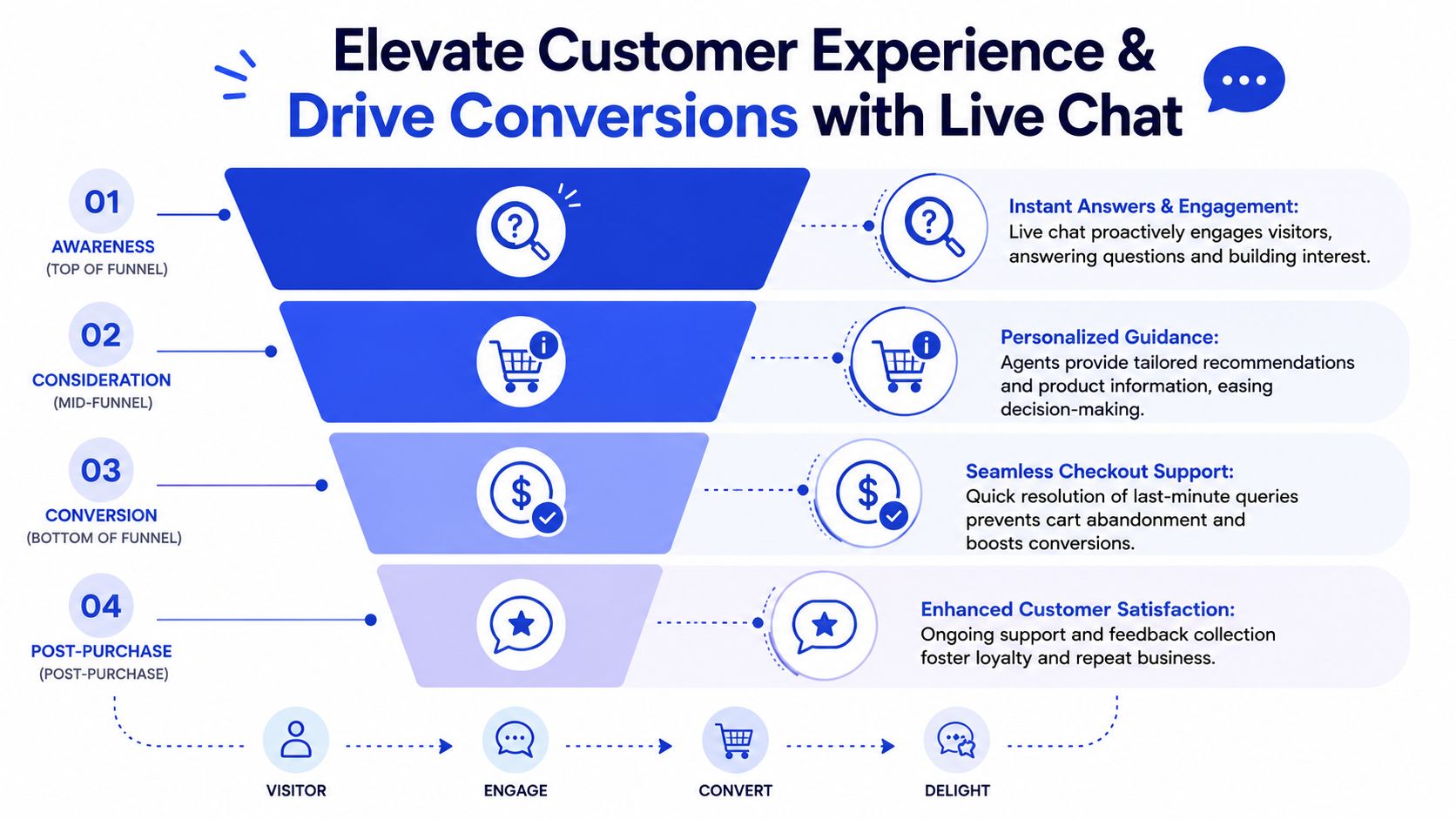
The effect continues after purchase. Setup questions, order issues, account access problems, and renewal concerns all influence whether a customer stays confident in the decision they just made. Teams that want chat to support revenue over the full customer journey usually connect it to a broader customer support workflow instead of treating it as a disconnected inbox.
Where chat has the biggest conversion impact
The highest-return placements usually sit where intent and friction meet:
Checkout pages: Questions about shipping dates, fees, returns, or promo codes can stop a sale minutes before payment.
Pricing pages: Prospects want plan guidance, billing clarity, and confirmation that a feature is included before they book or buy.
Product comparison pages: Buyers need help understanding differences that marketing copy often oversimplifies.
Demo and trial pages: Prospects want reassurance about onboarding, integrations, and time to value.
High-intent service pages: Visitors may be ready to book, but still need answers about availability, scope, or turnaround time.
The practical mistake is deploying the same chat experience everywhere. A homepage visitor may need direction. A pricing-page visitor needs qualification and objection handling. A return-customer on the account page needs fast resolution. The prompt, routing logic, and fallback path should change based on page intent.
For higher-value sales, that matters even more. An AI assistant can collect company size, use case, budget range, and urgency before a human joins. That gives sales or support context without making the buyer repeat themselves, and it turns chat into a qualification layer instead of a reactive support queue.
Buyers do not need an impressive support moment to convert. They need a relevant answer while intent is still high.
Used this way, live chat improves customer experience and creates a clearer path to revenue. It removes friction, captures buying signals, and gives the team direct visibility into the objections that shape conversion.
Achieve More with Less Through Operational Efficiency
Support leaders often like live chat for one reason before any other. It gives the team a way to handle more demand without copying the staffing model of phone support.
An experienced live chat agent can handle 4 to 6 conversations simultaneously, while phone support handles one call at a time. Reports cited in Kayako's analysis of live chat pros and cons also note that companies may pay 15% to 33% less per interaction than with phone support.
Why chat scales differently from phone support
That concurrency changes the economics of service. A phone queue expands one call per available person. Chat lets teams absorb routine volume more flexibly, especially when many questions are short, repetitive, and easy to route.
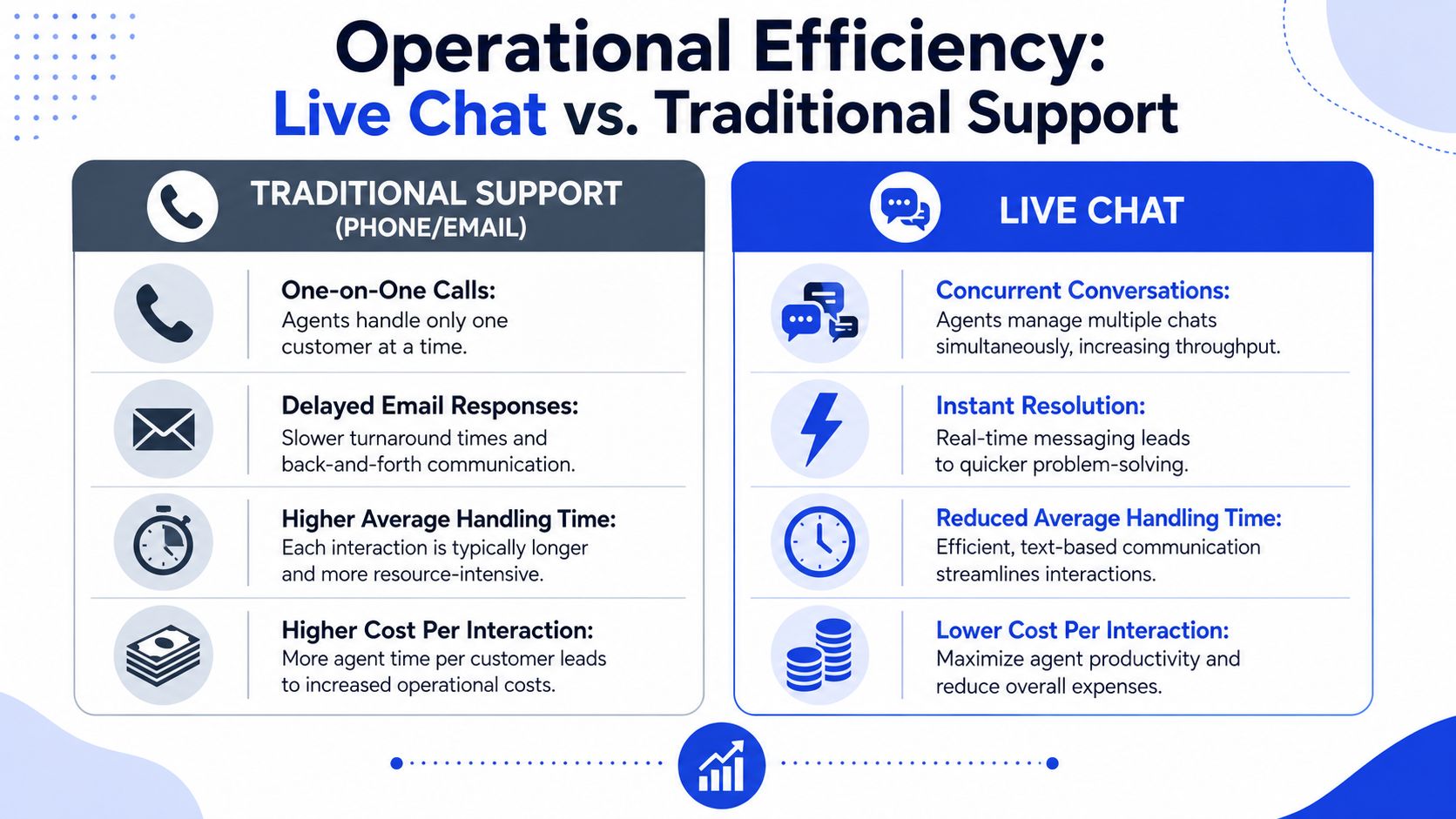
The operational gain doesn't come from asking agents to multitask endlessly. It comes from matching the channel to the work. A refund exception with a frustrated customer may need focused human attention. A basic order-status question, plan clarification, or simple product FAQ does not.
Here's the useful comparison:
Support mode | How work gets handled | Practical consequence |
|---|---|---|
Phone | One agent to one customer | Higher staffing pressure during peaks |
Asynchronous back and forth | Slower resolution and delayed decision making | |
Live chat | Concurrent conversations in one interface | Better throughput when issues are straightforward |
What efficient teams actually do
Teams get the efficiency benefits when they design for them. That usually means:
Using macros carefully: Save time on recurring answers, but adapt the wording to the customer's situation.
Routing by intent: Send billing to finance support, product setup to success, and commercial questions to sales.
Triggering chat selectively: Offer help on pages where hesitation is costly.
Capturing context early: Ask for order ID, company size, or product area before a human joins.
The operational upside is real, but it isn't automatic. Chat works best when the workflow removes repetitive effort and preserves agent time for exceptions, escalations, and revenue-critical conversations.
The AI Revolution 24 7 Coverage and Smart Lead Qualification
The biggest change in live chat isn't that it got faster. It's that it can now stay useful when nobody is online.
Recent coverage emphasizes 24/7 assistance through automation and AI, proactive outbound messaging, and deeper integration with other tools, which allows live chat to provide always-on help even when agents are offline and capture demand that would otherwise be lost, as explained in Intercom's overview of live chat benefits.
How always on chat changes the economics
That matters because many high-intent visits happen outside business hours. Someone lands on your pricing page from a paid campaign at night. A traveler asks about a booking policy on the weekend. A prospective student compares programs before work. Without coverage, those conversations often disappear.
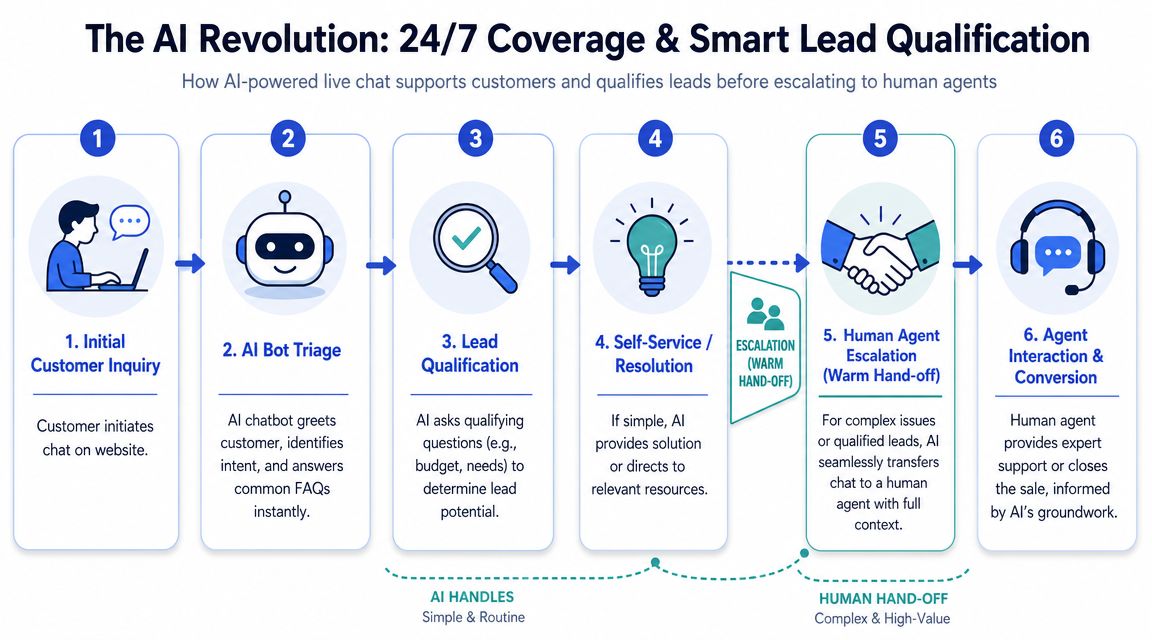
AI changes the operating model by handling the first layer well. It can greet the visitor, identify intent, answer common questions, gather details, and decide whether the conversation needs a human handoff. That's much better than a passive form that says someone will respond later.
A useful implementation rule is simple:
Let AI handle FAQs, basic guidance, and data collection.
Escalate to humans for emotional, complex, or high-value conversations.
Preserve the full conversation history so the handoff feels continuous.
Later in the workflow, tools such as an AI reply generator for support teams can help agents respond consistently once a conversation reaches a human.
Here's a quick visual walkthrough of the model in action:
How to qualify leads inside the conversation
Live chat becomes more than support. It becomes a qualification engine.
Instead of opening with “How can we help?”, a smarter flow asks questions that reveal intent and fit. For example:
For SaaS: team size, use case, current tools, urgency
For agencies: project scope, timeline, service needed
For education: program interest, start window, location
For e-commerce: product preference, constraints, purchase deadline
A strong AI chat flow doesn't try to close every conversation. It separates quick answers from real opportunities and routes each one correctly.
One option in this category is ChatGrow, which lets businesses train an AI support agent on website and product content, define qualification logic, and escalate conversations with summarized context. That kind of setup is useful when the business wants both support deflection and lead capture in the same interface.
The practical takeaway is straightforward. If your chat only reacts, you're using a fraction of its value. If it qualifies, routes, and covers off-hours traffic, it starts contributing directly to pipeline and revenue operations.
Strategic Deployment and Measuring What Matters
A live chat widget on every page sounds all-encompassing. In practice, it often creates noise. The better approach is selective deployment.
Put chat where intent is highest
Start with the pages where questions block revenue or create repeat support load. For most businesses, that means pricing, checkout, product detail, comparison, booking, demo, and onboarding pages.
Different pages need different chat behavior:
Pricing pages: Prompt with plan guidance or qualification questions.
Checkout pages: Offer help with payment, shipping, or returns.
Feature pages: Clarify fit, integrations, or setup effort.
Help pages: Deflect repetitive tickets with fast answers and links to self-service content.
This is also where transcript analysis becomes strategically useful. Chat platforms provide real-time monitoring and rich customer insight data, including behavior, preferences, and pain points. Every interaction can be logged, tagged, and analyzed, turning support into a continuous feedback loop for optimizing the website and support workflows, as noted in Better Proposals' live chat best practices guide.
Track business outcomes, not widget activity
A lot of teams watch chat volume, average response time, and total conversations. Those metrics are fine, but they're not enough to prove value.
Measure the outcomes that connect chat to the business:
Chat-influenced conversions: Which purchases or demo requests happened after a chat interaction?
Qualified lead rate: How many conversations matched your sales criteria?
First-contact resolution: How often did the issue end in one session?
Escalation quality: Did the transcript and summary help the next team act quickly?
Repeated friction themes: Which questions keep showing up because the site or offer is unclear?
A simple operating rhythm helps. Review transcripts weekly. Tag recurring objections. Update FAQs, macros, bot flows, and page copy based on what customers ask.
When five customers ask the same question in chat, that's usually a website problem before it's a support problem.
The companies that get the most from live chat don't just answer faster. They use conversation data to improve the pages that generated those questions in the first place.
Common Pitfalls and How to Implement Live Chat Correctly
Live chat has a wide performance gap between a careful rollout and a sloppy one. That's why some teams love it and others think it created more work.
The critical point is this: live chat only delivers strong ROI when it deflects repetitive, high-volume questions and when agents can handle multiple chats at once. A live chat session can be 20% to 50% cheaper than a phone call, but only if the operating model is designed correctly to avoid increasing workload, according to Lime Technologies' discussion of live chat benefits.
What breaks most live chat rollouts
The first failure is understaffing. If you launch chat but leave visitors waiting, you create a worse experience than a clearly stated support form.
The second is over-automation. Bots are useful for triage, repetitive questions, and after-hours coverage. They're frustrating when they block access to a human for billing disputes, nuanced product questions, or sensitive complaints.
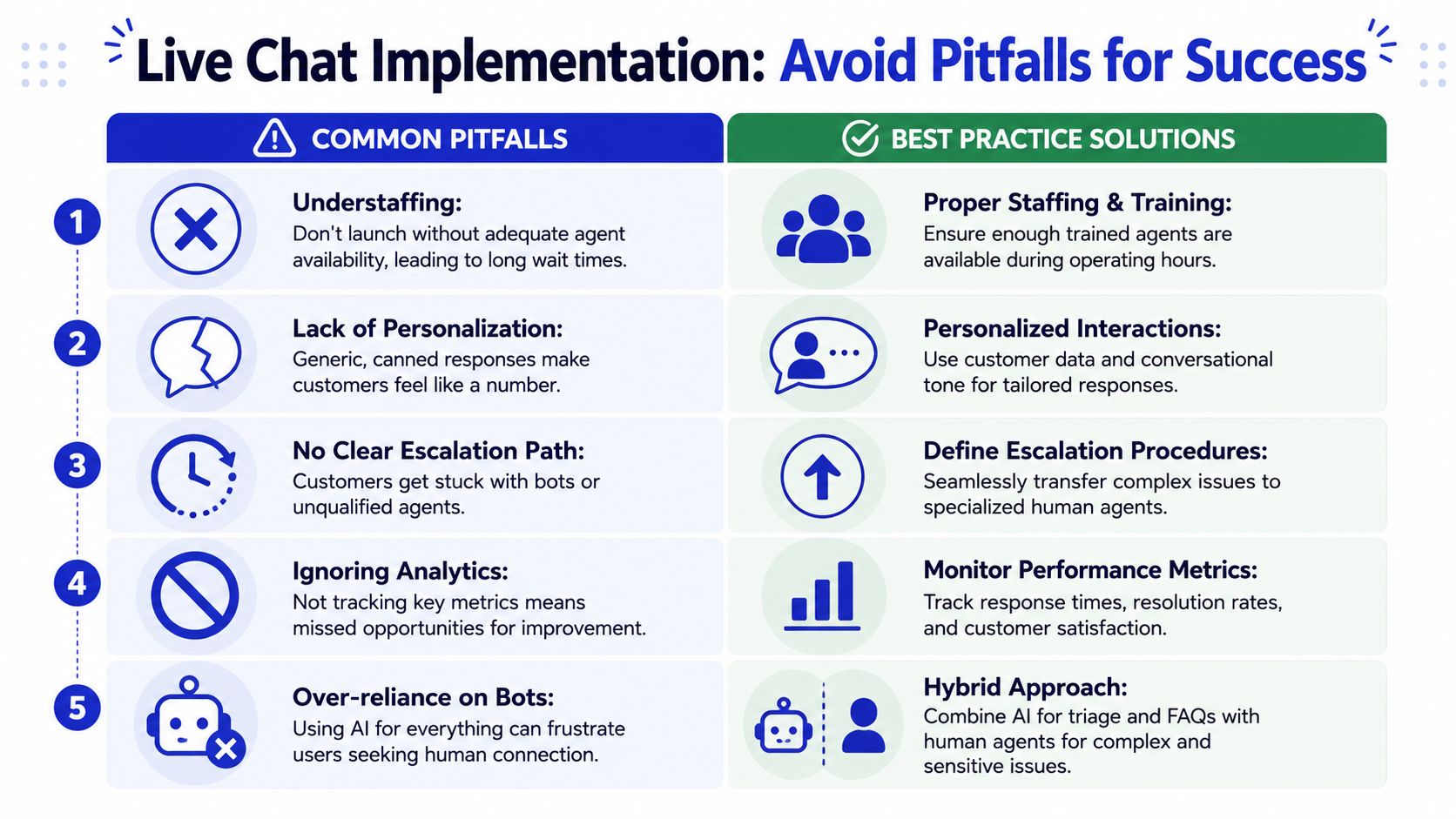
A third issue is bad scripting. Teams often confuse efficiency with sameness. Macros are useful, but customers still need replies that reflect their context, not generic text pasted into every conversation.
Common mistakes usually look like this:
Chat everywhere: The widget appears on low-intent pages and creates unnecessary conversations.
No handoff logic: The bot collects information but doesn't route the case cleanly.
No ownership: Marketing installs chat, support inherits it, and nobody defines goals.
No transcript review: The team misses patterns that could improve the site or reduce tickets.
A workable operating model
The fix is less glamorous than people expect. It's process design.
Start with channel rules. Decide what chat should solve immediately, what it should collect, and what it should escalate. Then write playbooks for each path.
A practical model often includes:
Tier 1 via AI or macros for repetitive questions and simple guidance.
Tier 2 human support for exceptions, account issues, and nuanced product questions.
Sales escalation when the visitor shows clear buying intent.
Feedback loop so repeated chat themes update help content and page copy.
You also need visible expectations. If human agents are only available during certain hours, say so. If the bot can collect details for follow-up, make that clear. Customers are usually fine with boundaries. They dislike ambiguity.
The best live chat setups feel fast because the workflow is clear, not because every message is answered by a person in seconds.
Finally, protect quality under concurrency. Just because an agent can juggle several chats doesn't mean every queue should be pushed to the maximum. The right load depends on issue complexity, agent experience, and how much personalization the conversation requires.
The companies that implement live chat correctly usually do one thing consistently. They design the operating model before they scale the channel.
From Support Tool to Strategic Business Asset
The old view of live chat was narrow. It existed to answer questions that might otherwise become tickets. That still matters, but it misses where the channel now creates the most value.
The strongest advantages of live chat sit across multiple functions at once. It improves customer experience in moments of hesitation. It helps teams operate more efficiently when repetitive demand is routed properly. It extends coverage beyond business hours through AI. It captures intent signals and qualification data while the buyer is still engaged.
It also creates a feedback system that is often underutilized. Every transcript shows where customers get confused, what objections slow deals down, and which pages create unnecessary support load. That makes chat useful far beyond the support desk.
For many businesses, the next step isn't adding more channels. It's making one channel smarter. A live chat program tied to escalation logic, intent capture, and a sales agent workflow can support revenue, service, and learning at the same time.
If your current chat setup only reacts to inbound questions, there's still a lot of value left on the table. The better model is proactive, selective, and measurable.
If you want to turn chat into an always-on support and qualification layer, ChatGrow gives you a practical starting point. You can train an AI agent on your site content, deploy it on high-intent pages, define lead qualification questions, and route conversations to your team with context when a human should take over.
Related Posts
Continue Reading
More articles from the ChatGrow Team.


