
Blog
Choosing AI Customer Service Software: 2026 Guide
By
Nelson Uzenabor

Your team answers the same questions every day. Where's my order? How do I change my plan? Do you support this feature? Can I talk to someone right now?
At first, that feels manageable. Then volume creeps up. Nights and weekends start filling with support pings. Sales inquiries sit unanswered because the team is buried in routine requests. One frustrated customer gets stuck waiting, another gives up, and your best people spend their day repeating information that already exists on your website.
That's the point where most SMBs start looking at AI customer service software. Not because it's trendy, but because manual support stops scaling long before the business does. The software can help, but buying it is the easy part. The hard part is choosing a platform that won't break trust after launch.
Table of Contents
The End of Never-Ending Customer Questions
For a small ecommerce brand, the pattern is usually obvious. Traffic rises, orders rise, and support volume rises with it. Nothing is technically wrong, but the inbox never clears because customers keep asking the same things in slightly different ways.
A SaaS company feels it differently. The team isn't swamped by shipping questions. It gets buried in onboarding, billing, integrations, and “can your product do this?” requests. Those conversations matter, but they don't all require a human to type every response from scratch.
The cost isn't only payroll. It's delay, inconsistency, and lost focus. Sales and support start competing for the same people. Good agents burn time on low-value repetition instead of solving the cases that need judgment.
Practical rule: If your team is answering routine questions manually across multiple channels, you don't have a staffing problem first. You have a systems problem.
AI customer service software gives you a way to absorb that repetitive load without hiring for every spike in demand. Done well, it creates breathing room. Customers get answers right away, agents step in only when needed, and managers can finally see where support demand is coming from instead of reacting to it all day.
That said, not every implementation helps. Some tools answer quickly but poorly. Others deflect tickets while creating messy handoffs that make human follow-up worse. The useful conversation isn't whether AI belongs in support anymore. It's whether your setup improves resolution quality, or just hides the queue.
What Is AI Customer Service Software Exactly
Most owners hear “AI” and picture either a basic chatbot or an expensive enterprise system. In practice, modern AI customer service software sits somewhere in the middle. It behaves more like a digital support teammate that you can train on your own business materials.
Think of it as a trainable digital teammate
Instead of hard-coding every response, you give the system source material. That usually includes your FAQ pages, product documentation, pricing information, policy pages, and help center content. The AI uses that material to understand what customers are asking and return an answer in natural language.
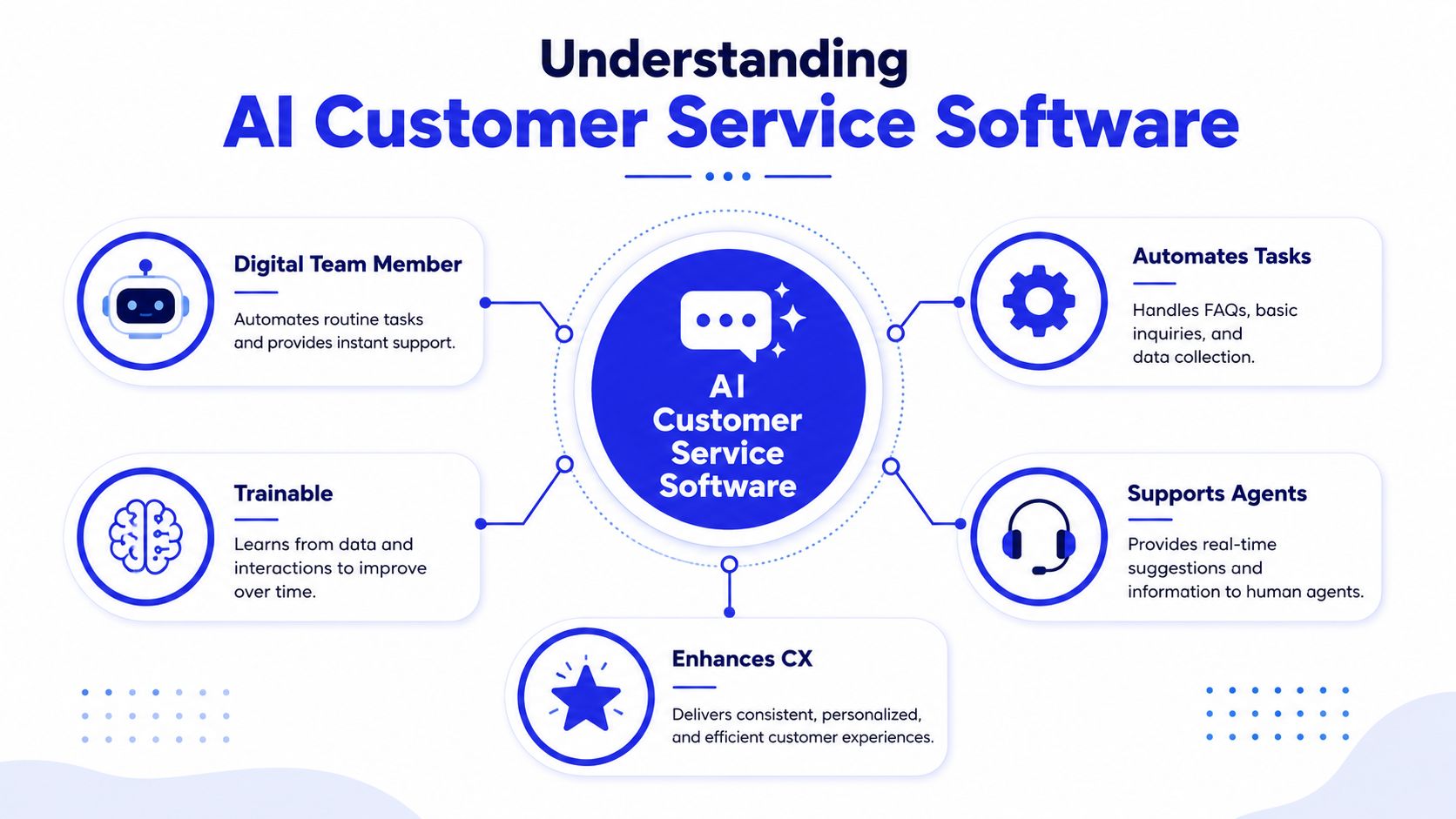
A useful mental model is this:
It listens for intent. Customers rarely phrase questions the way you wrote them in your FAQ.
It searches approved business knowledge. Good systems stay grounded in your real content.
It responds conversationally. The answer sounds natural instead of reading like a keyword match.
It routes or escalates when needed. The system shouldn't pretend every question is simple.
If you're still getting familiar with the category, this guide to AI for small business support gives a practical overview of where AI agents fit for smaller teams.
The underlying terms matter less than the result. Natural language processing helps the system understand what the customer means. Generative AI helps it compose a useful answer. The platform layer handles deployment, controls, analytics, and escalation.
A quick walkthrough helps clarify what the software is trying to do in real use:
Why this category is growing so quickly
Businesses aren't buying these tools as experiments anymore. The AI for Customer Service market was valued at USD 12.58 billion in 2024 and is projected to reach USD 73.99 billion by 2032, with a 24.92% CAGR, according to SNS Insider's market outlook.
That growth makes sense if you've managed a support queue. AI customer service software doesn't replace the need for people. It changes where people spend their time. Routine questions get handled instantly. Human agents focus on exceptions, edge cases, and emotionally sensitive situations.
The strongest platforms also support sales and qualification. A visitor asking about pricing, implementation, or product fit is often just as valuable as a support user asking for help. That's why the category is broader than “chatbot software.” It's really part support desk, part intake layer, part workflow engine.
Core Features and Tangible Business Benefits
The easiest way to evaluate AI customer service software is to ignore the marketing labels and ask what the system changes in operations. A feature matters only if it saves time, improves quality, or prevents customers from dropping off.
The features that matter in daily operations
The modern feature set is fairly consistent across serious platforms. What varies is execution.
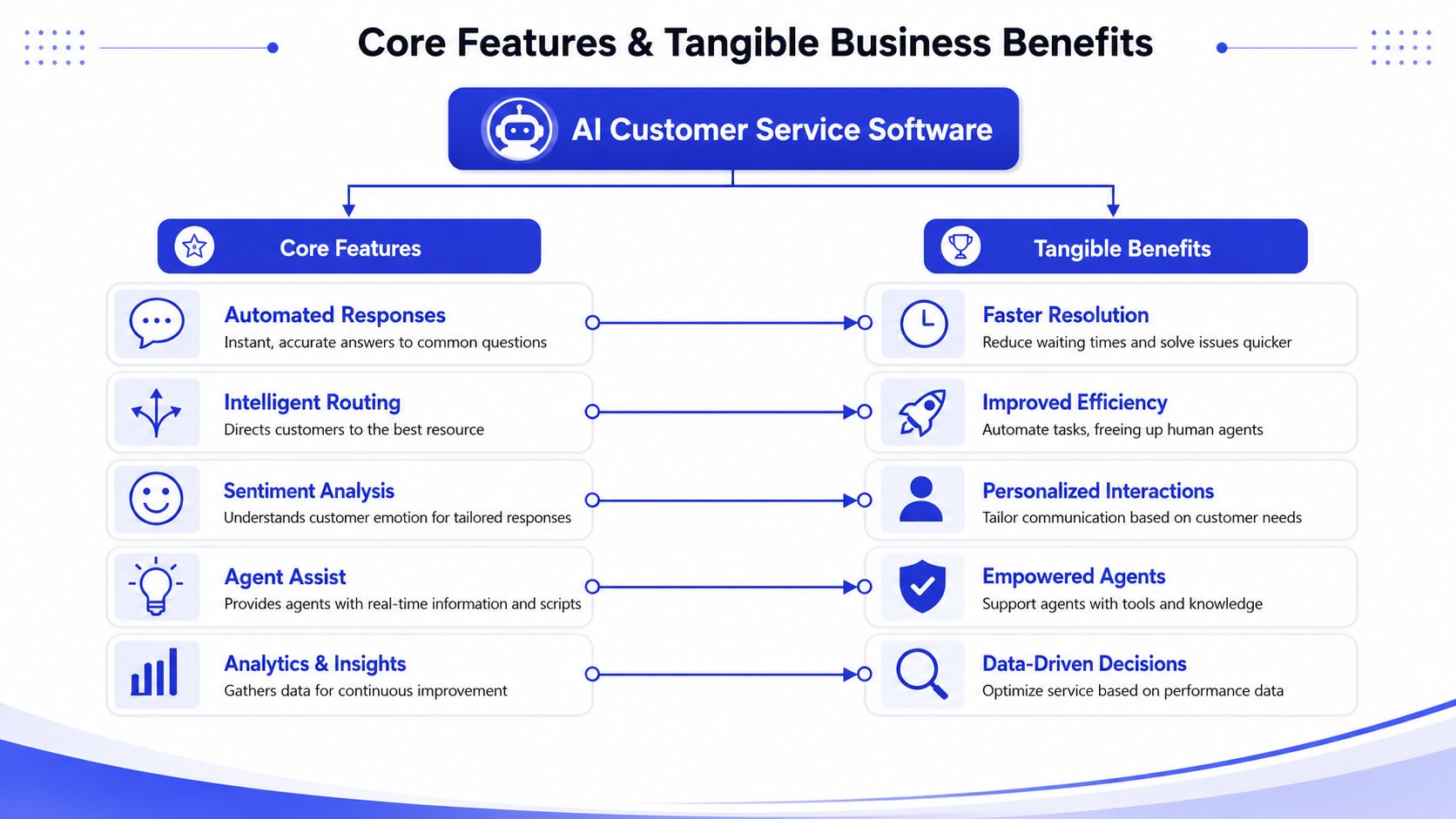
Here are the capabilities worth caring about:
Automated answers: The system should handle common questions instantly and stay grounded in approved information.
Intent recognition: It needs to understand what the customer wants, not just match obvious keywords.
Routing and triage: Some conversations belong in billing, some in support, some in sales. Good routing cuts wasted back-and-forth.
Agent assist: When a human joins, the platform should surface context, prior messages, and likely next steps.
Analytics: You need visibility into what customers ask, where the AI succeeds, and where it fails.
For teams comparing designs and flows, this write-up on practical AI agent applications is useful because it ties features to actual support and qualification scenarios. It also helps to review examples of good conversation structure, especially if you're shaping your own flows and prompts. Chat widget behavior, fallback language, and escalation wording all matter, which is why this guide to AI chatbot design is worth reading before rollout.
What those features change for the business
The cost logic is one reason adoption keeps rising. Gartner benchmarks the median cost of self-service at $1.84 per contact versus $13.50 for agent-assisted interactions, a 7x difference, and AI is already capable of resolving 75% of inquiries without human help, as compiled in these AI customer service statistics.
That doesn't mean every company should chase maximum deflection. It means every unnecessary handoff is expensive.
A practical way to think about benefits:
Feature | Operational result | Business effect |
|---|---|---|
Automated answers | Faster replies to routine questions | Fewer missed leads and less queue buildup |
Intent recognition | More accurate first response | Less customer frustration |
Routing | Better assignment to the right team | Fewer transfers and less agent waste |
Agent assist | More context for live agents | Better continuity when humans step in |
Analytics | Clear view of failure points | Smarter process improvements |
Fast answers help, but relevant answers are what reduce workload.
The strongest ROI usually comes from a bundle of smaller improvements. A shorter queue. Fewer repetitive tickets. Better consistency in responses. More time for agents to solve complex issues. Better capture of high-intent visitors who would otherwise leave before talking to sales.
That's why feature checklists alone are misleading. Two vendors can both claim “AI support” and still produce very different outcomes once the volume hits and edge cases show up.
A Buyer's Checklist for Choosing Your Platform
Buying the wrong platform is expensive in a very specific way. You don't just waste subscription spend. You create operational debt. The team starts working around the tool, customers get uneven experiences, and the system becomes one more thing to manage.
Questions worth asking before you buy
Start with the basics your team will feel every day.
Ask vendors these questions directly:
How is the AI trained?
If training requires heavy manual setup, your system will go stale fast. You want simple ingestion from your website, help center, and core documentation.How easy is it to update content?
Support teams change policies, pricing, and product details constantly. If updates are slow, accuracy will drift.What happens when the AI can't solve the issue?
This question matters more than most demos suggest. You're looking for structured escalation, not a generic transfer.Which channels does it support today?
Website chat is common, but many SMBs also need email, forms, or messaging channels to work cleanly with the same knowledge base.What reporting do we get?
The tool should show resolved topics, failure patterns, escalations, and unanswered questions in a way your team can act on.How much operational work does this create for us?
Good software lowers workload. Bad software creates a review job no one has time to own.
A separate perspective on choosing the right support platform can help if you're balancing AI capability with standard helpdesk requirements.
A simple evaluation table
Most SMBs don't need a giant scorecard. A simple pass/fail framework works better.
Buying criterion | What good looks like | Warning sign |
|---|---|---|
Training | Fast import from real business content | Vendor relies on manual scripting |
Escalation | Summary, context, and captured details | “Transfer to agent” with no context |
Integrations | Connects to current support workflow | Requires tool replacement to work |
Reporting | Clear operational insights | Vanity metrics only |
Ease of use | Non-technical team can maintain it | Needs ongoing specialist support |
One market signal supports the investment case. The average ROI for AI customer service investment is $3.50 for every $1 spent, and AI handles 60% to 80% of routine queries like billing and order status, according to eDesk's analysis of AI customer service ROI. That upside is real, but only if the platform fits your team's workflow instead of fighting it.
Your Implementation and Integration Roadmap
Most failed AI support rollouts start too broad. A company tries to automate everything at once, pushes the bot across every page, and then spends weeks cleaning up confusing conversations. A narrower launch usually works better.
Start small and keep the first launch narrow
Begin with the highest-volume, lowest-risk topics. For many SMBs, that means account basics, pricing questions, shipping policies, billing FAQs, or common product how-tos.
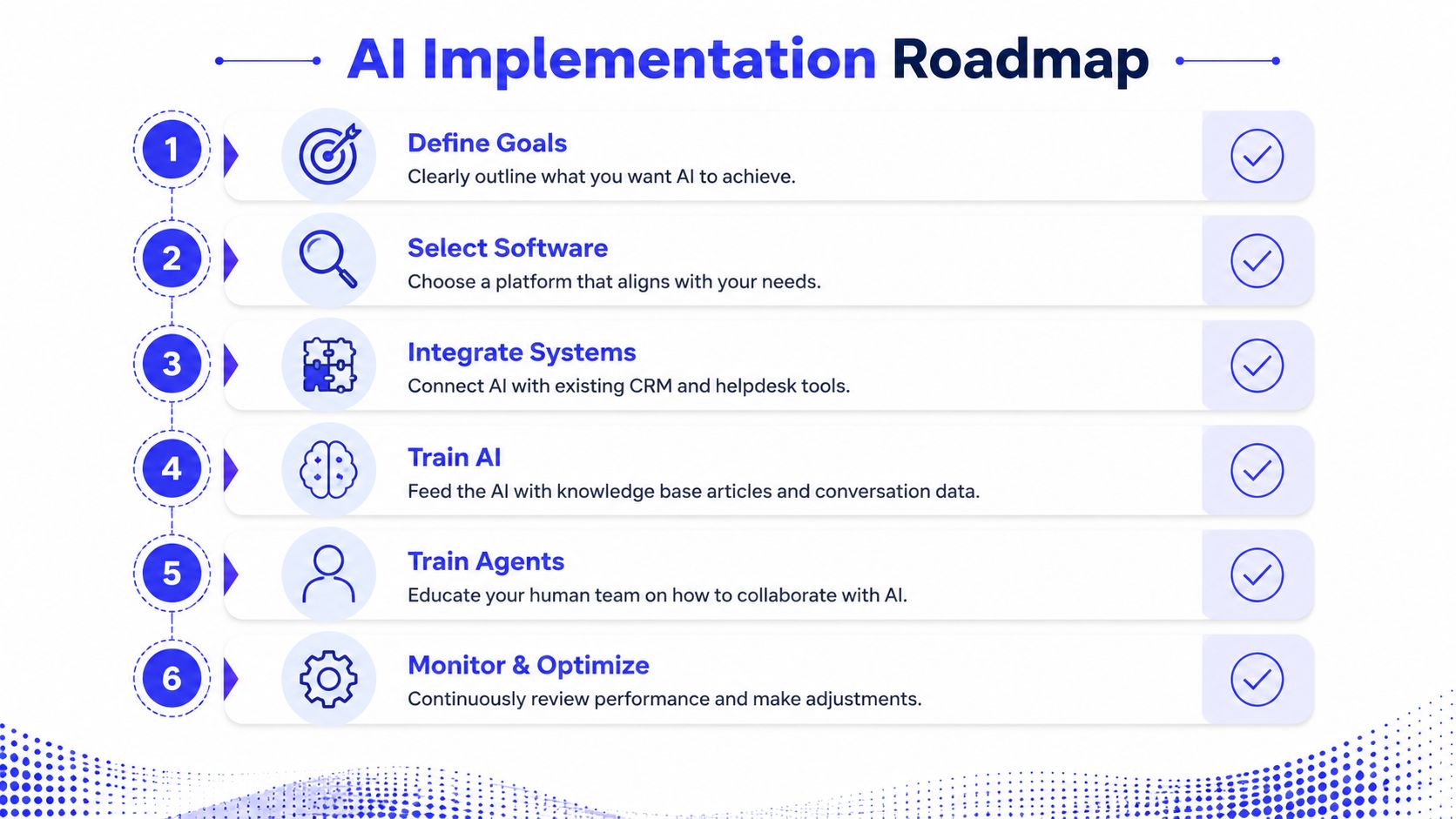
A practical rollout sequence looks like this:
Gather the right source material: Use your most current FAQ, docs, pricing pages, return policy, onboarding material, and product pages.
Define clear goals: Decide whether phase one is about support deflection, faster lead response, better after-hours coverage, or a mix.
Set escalation rules early: Don't leave handoff behavior as an afterthought.
Deploy on a focused set of pages: Product, pricing, checkout, or help pages usually provide cleaner early signals than a full-site launch.
Review transcripts fast: The first live conversations will reveal missing content and weak prompts quickly.
If your support operation already depends on customer records and multiple systems, this guide to customer data integration is a useful companion before connecting an AI layer.
Build the operating routine early
The best implementations treat launch as the start of an operating process, not the finish line.
A platform like Chatgrow is a good example of the setup style SMBs should look for. It lets teams train an agent on website and knowledge content, define qualification logic, deploy it to live pages, and update it as the business changes. That kind of workflow matters because the team maintaining support usually doesn't have time for a heavy technical project.
A simple weekly routine is often enough:
Review failed or escalated conversations
Update missing answers in the source material
Check whether qualification prompts are capturing useful details
Tighten escalation triggers where the AI is overreaching
Look for repeated customer phrasing and retrain around it
Launch with a narrow scope, then widen coverage after the transcripts prove the system is answering the right questions for the right reasons.
That operating rhythm is where implementation either becomes sustainable or gradually starts slipping.
Avoiding Pitfalls and Ensuring Long-Term Success
Most vendor content spends its time on ticket deflection. That's understandable because deflection is easy to sell. It sounds efficient, measurable, and clean. But two failure points determine whether AI customer service software improves support after launch: handoff quality and training data drift.
Bad handoffs break customer trust fast
A poor handoff is worse than no automation at all. The customer explains the problem to the AI, gets stuck, finally reaches a person, and then has to repeat everything because the agent receives no useful context.
That's not a small issue. Poor AI escalation summaries cause over 30% of repeat contacts when an AI fails, because the human agent lacks context, as discussed in this analysis of AI-powered customer service risks.
What a good handoff should include:
Reason for escalation: Why the AI stopped.
Customer intent: What the customer was trying to do.
Key facts collected: Order details, account context, product involved, urgency.
Conversation summary: A short brief the agent can use immediately.
If the human agent starts with “Can you explain that again?”, the automation probably made the experience worse.
Many SMBs find themselves trapped in AI loops. The bot keeps rephrasing, the customer keeps getting annoyed, and the business counts it as “automation” even though the issue isn't resolved.
Training data drift is the silent failure mode
The second problem is quieter. The AI performs well at launch because it was trained on current content. Then your business changes. Prices shift, a feature gets renamed, a return policy changes, or a new plan goes live. The bot keeps answering with old information unless someone updates the training data and retrains the model.
The same source notes that AI accuracy can degrade by 25%+ within six months without continuous retraining because of data drift. That's the failure mode most SMBs underestimate.
A durable maintenance pattern looks like this:
Risk area | What causes it | What to do |
|---|---|---|
Stale pricing answers | Product or plan changes | Refresh pricing sources immediately |
Outdated policy guidance | Return or billing policy updates | Retrain after policy edits |
Wrong feature descriptions | Product roadmap changes | Sync docs and support content |
Broken trust | Customers spot outdated answers | Review transcripts and patch quickly |
The common mistake is assuming the AI only needs training once. In practice, it needs ownership. Someone has to decide what changed, what content became unreliable, and what conversations show the system losing the plot.
Long-term success doesn't come from the fanciest model. It comes from disciplined handoffs, fresh source data, and an honest review process that catches failures early.
Real-World Impact and Measuring Your ROI
The most useful way to judge AI customer service software is by asking what workload it removes and what customer experience it protects.
How this looks across different SMB models
An ecommerce brand typically uses it to absorb repetitive post-purchase questions, keep support responsive outside business hours, and route exceptions like damaged orders or unusual refund cases to people.
A SaaS company often gets more value from a mix of support and pre-sales coverage. The AI handles plan questions, feature basics, onboarding clarifications, and account requests, while the team focuses on technical issues and higher-value conversations.
An agency or service business can use the same layer as intake. Visitors ask about services, timelines, fit, and pricing. The system qualifies the request, gathers context, and sends a cleaner follow-up path to the team.
What matters in each case is less about “having AI” and more about where the software sits in the workflow. When it answers common questions well, captures intent, and hands off cleanly, support stops being a constant interruption.
What to measure after go-live
You don't need an advanced analytics stack to tell whether the rollout is working. Start with a handful of operational questions:
Are routine conversations being resolved without creating confusion?
Are agents receiving better context when they take over?
Are customers asking the same unanswered questions repeatedly?
Are high-intent visitors getting responses quickly enough?
Is the support team spending more time on exceptions than repetition?
Teams that want a more structured review process should pay close attention to conversation patterns over time. This article on chatbot analytics is a useful reference for deciding what to track and how to spot weak answers before they become recurring issues.
The broader point is simple. AI customer service software works when it reduces repetitive load without lowering trust. For SMBs, that usually matters more than flashy demos or oversized feature lists. The right system won't just deflect tickets. It will make support more consistent, protect your team's time, and create a cleaner path from question to resolution.
If you want to see how Chatgrow handles website-trained support agents, lead qualification, smart escalation, and ongoing retraining in one workflow, it's worth reviewing as part of your shortlist. The useful test isn't the demo. It's whether your team can launch it quickly, keep it current, and trust the handoff when the AI reaches its limit.
Related Posts
Continue Reading
More articles from the ChatGrow Team.


