Blog
Help Desk Automation: Your Guide to a Smarter Support Team
By
Nelson Uzenabor

Your team is answering the same questions every day. Customers ask where their order is, how to reset a password, whether a plan includes a feature, or why they can't log in. At night and on weekends, those questions still arrive. By Monday morning, the inbox is fuller, response times slip, and your best people spend their day clearing routine requests instead of solving important ones.
That's the point where many business owners start looking at help desk automation. Not because they want a flashy AI project, but because they want the support desk to stop acting like a bottleneck.
Done well, help desk automation works like a dependable front-desk coordinator. It greets people, sorts requests, answers common questions, gathers missing details, and hands complex issues to the right person with context attached. Your team still matters. They just stop wasting time on work a system can handle faster and more consistently.
Table of Contents
Your Guide to Help Desk Automation in 2026
If your support desk feels busier than it used to, you're not imagining it. Customers expect quick answers, internal teams expect instant help, and small businesses are trying to deliver both without hiring a huge service operation.
That pressure explains why help desk automation keeps moving from “interesting idea” to standard operating tool. The market itself shows how quickly businesses are taking it seriously. The global helpdesk automation market is projected to grow from $8.13 billion in 2025 to $28.06 billion by 2030, at a 27.1% CAGR, according to The Business Research Company's helpdesk automation market report.
For a business owner, that matters for one reason. Buyers are getting used to immediate responses. If your competitors can answer common questions instantly and you can't, the difference shows up in customer experience and, in some cases, in lost sales.
Practical rule: Automate the repeatable work so your people can handle the valuable work.
Help desk automation isn't only for internal IT teams. It also applies to SaaS support, e-commerce questions, appointment requests, lead qualification, onboarding help, and after-hours inquiries that would otherwise sit untouched until morning.
Here's what most owners want from it:
Fewer repetitive tickets: Common requests get answered without waiting for an agent.
Better routing: Issues reach the right person faster.
More consistent responses: Customers get the same answer every time.
Coverage outside business hours: Questions don't pile up overnight.
Cleaner handoffs: Human agents see the issue history instead of starting cold.
The advantage isn't replacing staff. It's protecting your team's attention. When the system handles the easy, predictable work, your humans can spend their time on exceptions, judgment calls, and conversations that influence retention or revenue.
What Is Help Desk Automation Really
A customer sends a billing question at 9:14 p.m. Another asks how to reset a password. A third wants to know whether you serve their location before they book a call. In a manual help desk, all three wait in the same line until someone on your team opens them, sorts them, and decides what to do next.
Help desk automation changes that line into a sorting system. Simple requests can be answered right away. Requests that need approval can collect the right details first. High-value sales or service conversations can go to a person while the customer is still engaged.
That distinction matters for more than support costs. A well-run system lowers repetitive workload and response times, but it can also protect lead quality, reduce drop-off, and help your team respond faster to buying signals. For many SMBs, that is the difference between automation that saves money and automation that also supports growth.
A manual desk versus an automated one
A manual help desk works like a checkout lane with one cashier doing everything. One person listens, decides what the issue is, asks follow-up questions, finds the right answer, and then either solves it or passes it along.
An automated help desk works more like a smart self-service counter. It recognizes the request, pulls the right article, starts a workflow, gathers missing information, routes the issue, and brings in a person when the case calls for judgment, context, or persuasion.
Analysts at TechTarget explain that service desk automation can cover the full support flow, including intake, classification, routing, resolution, and escalation through workflows, RPA, and AI-supported self-service, as shown in TechTarget's service desk automation examples.
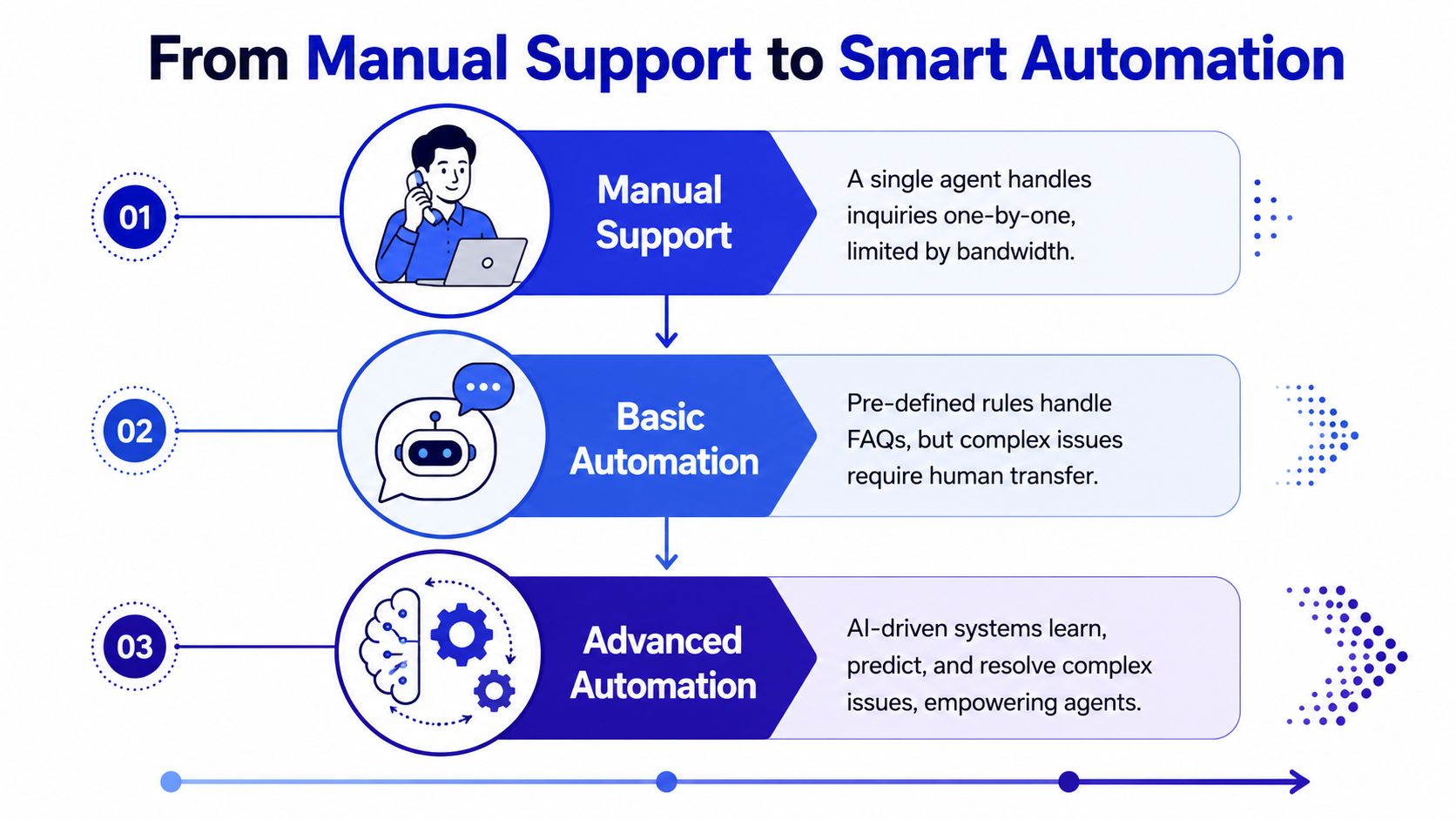
Some owners hear "automation" and picture only a chatbot on a website. That is one visible part of the setup. The bigger value often sits behind the screen in the rules, routing, knowledge, and handoff process.
If you want a wider view of systems that can take action across workflows instead of only replying to prompts, this overview of what is agentic automation is useful background.
The three working parts
Most help desk automation that functions effectively in practice rests on three parts. If one is weak, the whole system feels clumsy.
Automated ticket handling
This is the traffic control layer. A request comes in, the system identifies the topic, sets priority, sends it to the right queue, and triggers the next step.
Example: a customer writes, "I need to change my billing email." The system recognizes the request type, asks for the account details needed to verify the change, and routes it to billing if approval is required.
Good ticket handling does more than save agent time. It also protects revenue. A product question from a ready-to-buy prospect should not sit in the same pile as a routine password reset.
A living knowledge base
This is the system's memory. Articles, policies, setup instructions, refund rules, product guides, and troubleshooting steps all live here.
If that memory is stale, the automation gives stale answers. If it is current and well organized, the automation becomes faster, more accurate, and easier to trust.
A weak knowledge base does not only slow agents down. It trains your automation to give weak answers.
User-facing assistance
This is the part customers or employees notice first. It might be a chat widget, an in-app assistant, or a self-service portal that suggests answers before a ticket is created.
The best front-end experience feels less like a wall and more like a receptionist who knows when to answer directly and when to bring in the right person. If someone asks a common support question, the system should solve it quickly. If someone asks about pricing, eligibility, or a time-sensitive order issue, the system should collect context and move that conversation to a human without friction.
For a broader look at how these customer-facing tools fit into the bigger service experience, this guide to automated customer service systems is a useful companion.
A simple test helps here. Can your setup resolve common requests cleanly, and when it cannot, does it make the human handoff easier while preserving information that helps your team close the issue or win the customer?
How AI Supercharges Your Help Desk
Basic automation follows instructions. AI adds interpretation.
That difference matters because customers rarely describe problems in neat, pre-labeled language. One person writes “can't access account,” another says “locked out,” and a third says “login broken.” A rule-based system may treat those as different requests. AI can recognize that they point to the same issue.
Rules first, then understanding, then assistance
The easiest way to understand AI in help desk automation is to see it as three levels of capability.
Level | What it does | Simple example |
|---|---|---|
Rule-based triggers | Follows predefined instructions | Routes any ticket containing “password” to IT |
NLP intent routing | Understands the meaning behind phrasing | Treats “I can't sign in” and “I'm locked out” as the same problem |
AI copilot | Assists the human agent in real time | Pulls customer history and suggests the next response |
According to Decagon's guide to help desk automation, expert-tier systems operate across those three tiers, and AI copilots can reduce diagnostic time by up to 40% in enterprise environments.
Here's the practical difference:
Rules are rigid: Useful for predictable requests.
NLP is flexible: Better when customers use messy language.
Copilots support humans: They don't replace the agent. They reduce lookup time, summarization work, and repetitive writing.
If you're evaluating AI outputs, reliability matters more than novelty. A useful companion read is this guide to getting trusted answers, especially if you're thinking about how teams should validate AI-generated information before acting on it.
You can also see how this wider category connects to service workflows in this article on automated customer service.
Why this matters to a business owner
You don't need advanced AI for every ticket. In fact, many businesses start with straightforward tasks like FAQ responses, ticket triage, and standard handoffs.
What AI changes is the ceiling. Instead of stopping at “if this keyword appears, send the ticket there,” your system starts recognizing intent and assisting the agent with context.
That has three immediate effects:
Customers spend less time repeating themselves
Agents waste less time switching tabs
Complex issues start with better context
Use the simplest level of automation that solves the problem well. Don't force AI into jobs that a clean rule can handle.
For small and mid-sized companies, that principle saves money and frustration. You don't need a futuristic setup. You need the right level of intelligence for the job in front of you.
The Business Benefits and ROI of Automation
Software features aren't the reason to invest in help desk automation. Results are.
The strongest business case usually starts with repetitive inquiries. If your team keeps answering the same questions, every manual reply carries a labor cost, an opportunity cost, and a delay cost.
What changes on the cost side
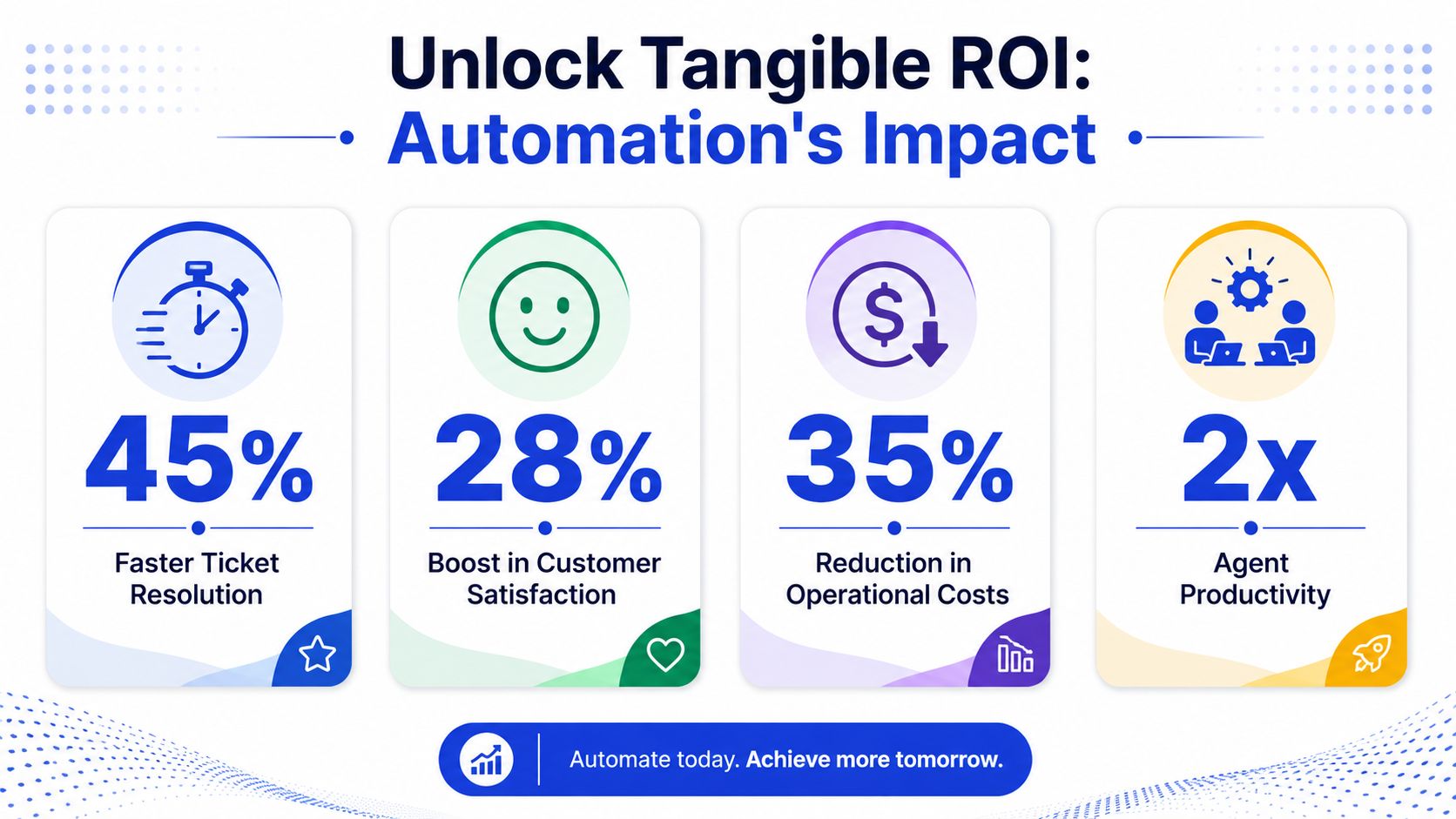
The economics get easier to see when you compare manual handling with automated handling. Data compiled in ProProfs Desk's help desk statistics roundup shows that 22% of total service desk tickets can be resolved at practically no cost when automated, compared with $22 to manually handle a single ticket.
That same source reports that AI-driven chatbots can handle up to 80% of routine inquiries, and companies using AI for tier-1 support resolve 65% of issues without any human intervention.
Those numbers explain why automation often pays back fastest in high-volume support environments. The more often the same request appears, the more valuable automation becomes.
For owners who want to compare automation more broadly across business processes, LicenseTrim's automation insights offer a helpful operations-focused perspective.
What changes on the people side
ROI isn't only financial. It also shows up in the quality of work your team gets to do.
When agents stop answering routine requests all day, they can focus on escalations, exceptions, and customer conversations where nuance matters. That shift affects morale. The same ProProfs Desk source reports that customer service agents working with AI systems see a 69% improvement in job satisfaction.
That point is easy to underestimate. Support teams don't burn out only because volume is high. They burn out because too much of the work is repetitive and low-value.
A useful way to think about ROI is to separate it into two buckets:
Direct operational return: lower handling cost, less manual triage, faster routine service
Indirect business return: quicker responses, steadier service quality, and more human attention available for sensitive or high-value conversations
When you measure both, help desk automation stops looking like a cost-cutting project and starts looking like operational infrastructure.
Your 5-Step Implementation Roadmap
Most failed automation projects don't fail because the software is weak. They fail because the rollout is too broad, too rushed, or disconnected from real support patterns.
A better approach is to build it the way you'd train a strong new operations hire. Start with the obvious tasks. Give clear instructions. Review performance. Expand gradually.
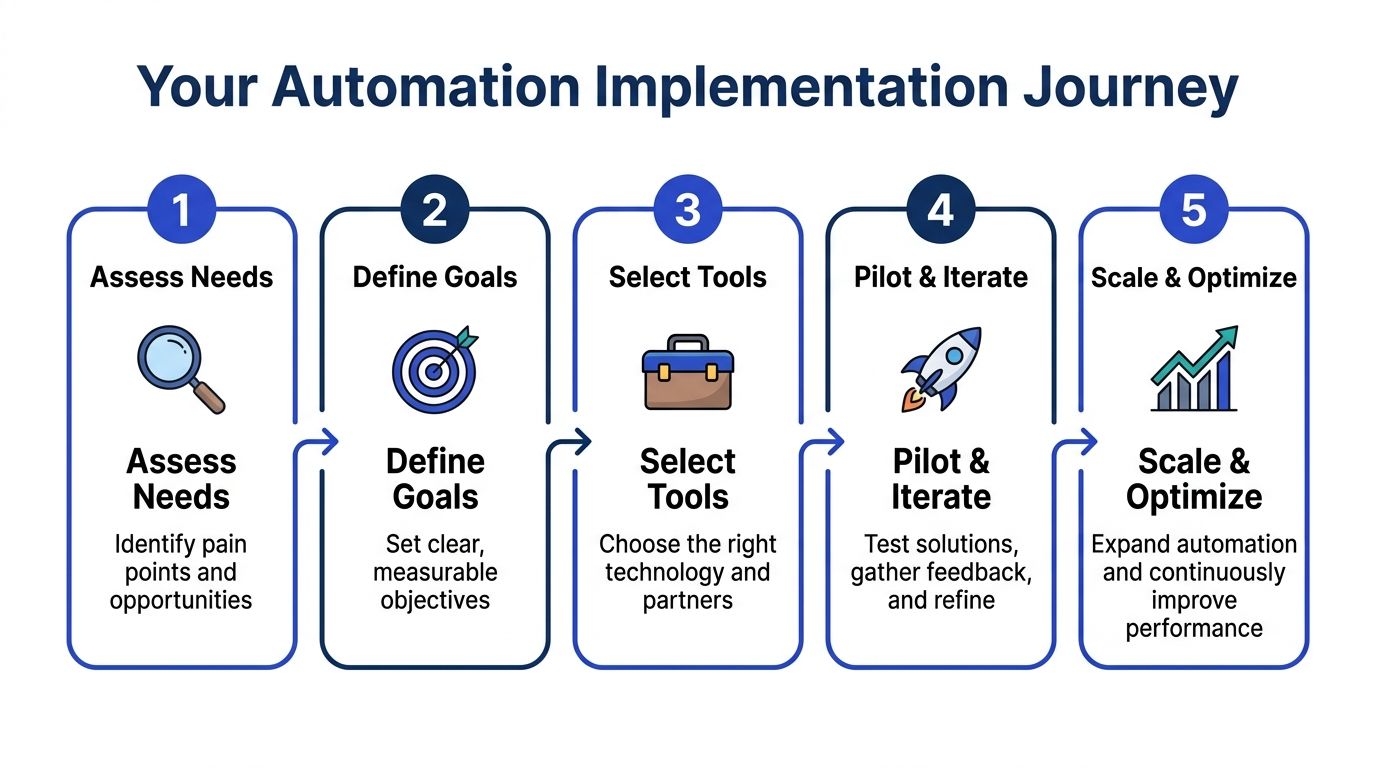
Here's a simple roadmap.
Step 1 and Step 2
1. Audit your incoming requests
Open your last batch of support conversations and sort them into groups. Don't start with software demos. Start with patterns.
Look for:
Repeated questions: Shipping status, password resets, billing changes, appointment details
Routing headaches: Requests that often land with the wrong team
Slow handoffs: Cases where agents must ask for basic missing details before they can help
This gives you your first automation candidates.
2. Define business goals before tool selection
A surprising number of teams buy a platform first and decide success criteria later. Reverse that.
Choose a few outcomes that matter to the business. For example:
Service goals: Faster first response, cleaner routing, more self-service resolution
Team goals: Less repetitive workload, better queue management
Commercial goals: Better lead capture from chat, fewer missed after-hours inquiries
If support and sales overlap in your business, connect those goals early. Strong customer data integration makes handoffs much cleaner because the system can connect the conversation with account or lead context.
Field advice: If you can't explain why a workflow should be automated in one sentence, don't automate it yet.
A short video can help you think through the rollout process before you begin:
Step 3 through Step 5
3. Build the knowledge base before the clever workflows
Automation needs a reliable source of truth. Clean up your FAQs, policy pages, setup instructions, pricing explanations, and escalation rules.
This work feels unglamorous, but it's where a lot of implementation success is won.
4. Launch a narrow pilot
Pick one or two high-volume use cases first. Good early candidates are routine support questions, simple intake forms, and straightforward routing logic.
Keep the pilot narrow enough that your team can review every failure and improve it quickly.
5. Refine the handoff to humans
The handoff is where many systems feel broken. Don't just send the conversation to a person. Send the summary, collected details, account context, and what the system already tried.
That's what makes automation feel helpful rather than obstructive.
A solid rollout usually looks like this:
Find repeatable requests
Set clear outcomes
Clean the knowledge source
Pilot a small workflow
Tune based on real conversations
That sequence keeps your project grounded in reality instead of vendor promises.
How to Measure Automation Success
Here, most advice falls short.
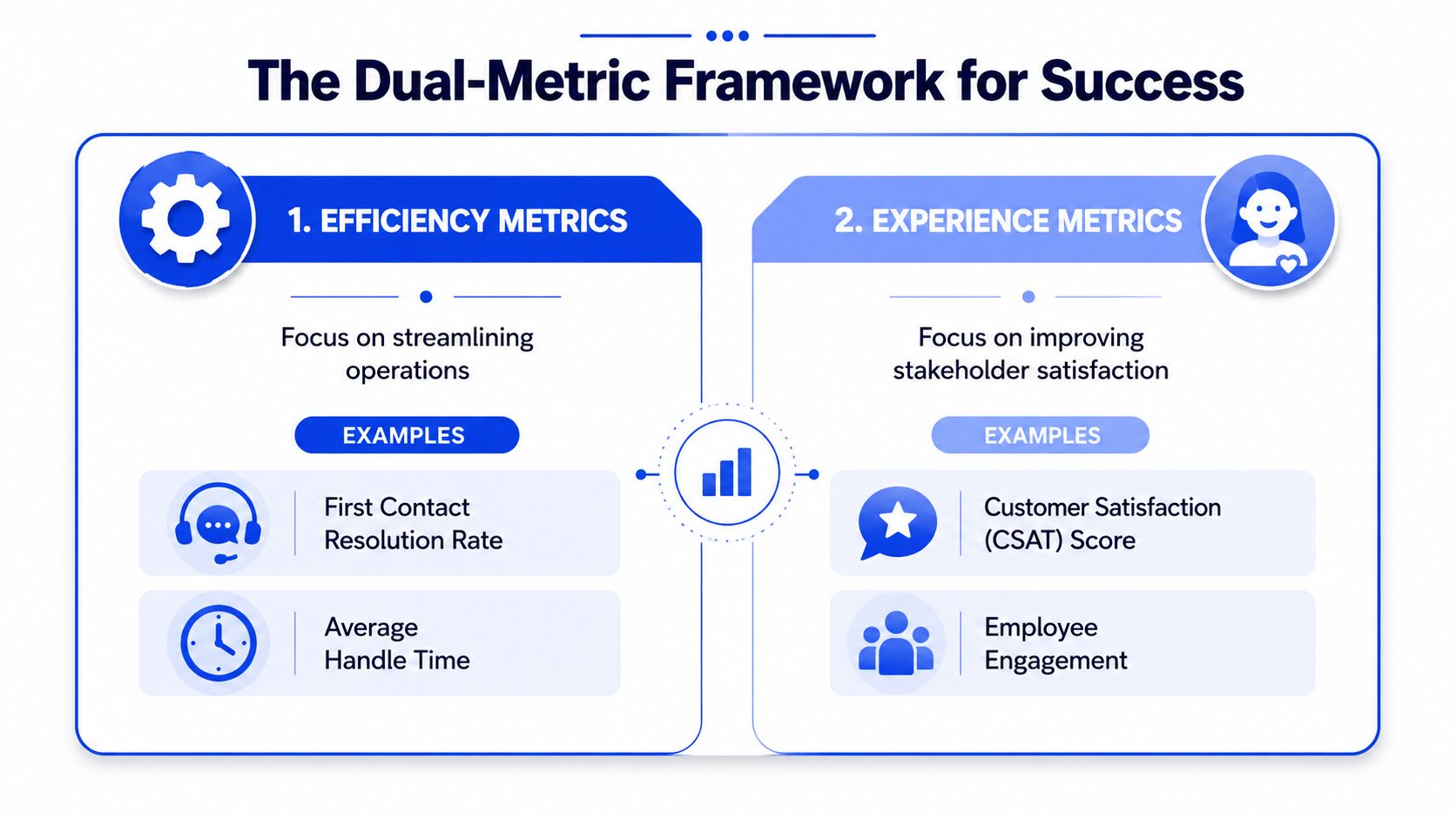
Many teams measure help desk automation with service metrics alone. Those matter, but they're incomplete for SMBs, especially in SaaS and e-commerce where support conversations often blend into buying decisions.
Track efficiency without missing growth
A key measurement gap still exists in the market. According to ITSM.tools on automation and AI for the service desk, 68% of customer service leaders report improved efficiency, but most frameworks still fail to measure business outcomes like lead qualification and revenue.
That's the missing half of the scorecard.
If your automated chat helps visitors choose a plan, answers objections, or routes high-intent prospects to sales, then “fewer tickets” is not the whole story. You also need to know whether automation supports or hurts buying behavior.
A useful companion resource is this guide to customer service key performance indicators, especially if you want to build a cleaner reporting view across teams.
A simple scorecard for SMBs
Use two groups of measures.
Efficiency measures
These tell you whether the operation is running better.
Ticket deflection: How many routine issues never need a human
First contact resolution: How often the first interaction solves the issue
Queue quality: Whether tickets reach the right team with the right details
Agent workload mix: Whether people are spending less time on repetitive work
Growth and experience measures
These tell you whether automation supports the business, not just the queue.
Lead quality from chat: Are qualified prospects coming through the automated path?
Conversion behavior on high-intent pages: Do buyers move forward after interacting with automation?
Escalation quality: When a prospect or customer reaches a human, is the handoff useful?
Customer sentiment in important conversations: Are people getting help, or feeling blocked?
If automation lowers ticket volume but harms buying conversations, it isn't succeeding. It's hiding the cost somewhere else.
For SMBs, that dual-metric view is the most practical way to judge performance. Measure the desk like an operator, but measure the conversation flow like a business owner.
Common Pitfalls and Best Practices
Most help desk automation disappoints for predictable reasons. The good news is that they're avoidable.
Mistakes that cause frustration
One common mistake is trying to automate everything at once. That usually creates weak answers, messy routing, and a support team that no longer trusts the system.
Another problem is treating automation like a one-time setup. It isn't. Product details change, pricing changes, policies change, and customer language changes with them.
A third issue is poor escalation design. If customers have to repeat the whole story after the bot fails, the automation has added friction instead of removing it.
Practices that make automation useful
A better approach looks like this:
Start narrow: Pick a small set of repeatable requests and get those right first.
Protect high-stakes conversations: Send sensitive, emotional, or high-intent interactions to humans sooner.
Review real transcripts: Look at where the system confused intent, missed context, or gave incomplete guidance.
Train the system continuously: Update your knowledge source the same way you'd update agent training materials.
Design handoffs carefully: Make sure human agents receive summaries and key details, not just a transferred chat.
The simplest mental model is this: treat your automation like a junior team member with excellent stamina and no common sense unless you teach it well. It can do a lot. But it needs structure, review, and ongoing coaching.
If you want to put these ideas into practice, Chatgrow helps businesses launch AI support agents that answer common questions, qualify leads, and escalate cleanly when a human should step in. It's a practical option for teams that need better support coverage and stronger conversation handling without building a complex system from scratch.
Related Posts
Continue Reading
More articles from the ChatGrow Team.


