Blog
Automated Customer Service: A Guide for SMBs in 2026
By
Nelson Uzenabor

Your inbox is full. The same five questions keep coming in. Someone wants to know if you ship internationally. Someone else can't find your pricing. A lead submits a form at 10:43 p.m., then buys from a competitor before your team logs in the next morning.
That's where most SMB owners are right now. Not in a futuristic AI lab. In the middle of repetitive support work, inconsistent follow-up, and after-hours revenue leaks.
Automated customer service fixes that when it's set up well. Think of it as a digital front desk for your business. It greets visitors, answers common questions, gathers details, routes people to the right place, and knows when to call in a human. For a small team, that's not a luxury. It's how you stay responsive without hiring ahead of demand.
Table of Contents
Why Every SMB Needs an Automation Strategy Now
A typical small business doesn't lose control all at once. It happens in small moments. A support email sits unanswered until lunch. A chat gets missed after business hours. A team member spends half the day answering repeat questions instead of handling the issue that requires judgment.

That's why automated customer service has shifted from “nice to have” to operating necessity. By 2025, roughly 88% of organizations had adopted AI in at least one business function, and about 80% of companies were either already using or planning to use AI-powered chatbots for customer service, according to these AI customer service adoption statistics. The same market roundup projects the AI customer service market will grow from $12.06 billion in 2024 to $47.82 billion by 2030, a 25.8% CAGR.
For an SMB owner, those numbers matter for one reason. Your competitors aren't waiting for perfect conditions. They're putting some form of always-on service in place now.
What this looks like in real life
A local service business uses automation to answer scheduling questions and collect job details overnight. An ecommerce store handles return-policy questions instantly instead of making buyers hunt through footer links. A SaaS company routes pricing questions one way and technical issues another, so the sales inbox doesn't become the support queue.
Practical rule: If your team answers the same question often, that question should not depend on a person being awake.
The payoff isn't just speed. It's capacity. Automation lets a five-person company behave like a larger one on the front end, without pretending every interaction should be handled by a bot. The best SMB setups are selective. They automate routine work, protect staff time, and create a cleaner path to human help when the issue is nuanced.
Understanding Automated Customer Service Technology
Automated customer service sounds more technical than it really is. For most SMBs, it's best understood as a digital front-desk agent. It listens first, figures out what the person needs, gives the best available answer, and routes the conversation if the request is too complex or too sensitive.
The digital front desk model
Good systems don't work like old FAQ widgets that just match keywords. The basic workflow is simpler and smarter than that. According to IBM's explanation of customer service automation, effective systems follow a sequence: capture the customer's message, classify intent with NLP, generate or retrieve a response, then escalate or execute an action.
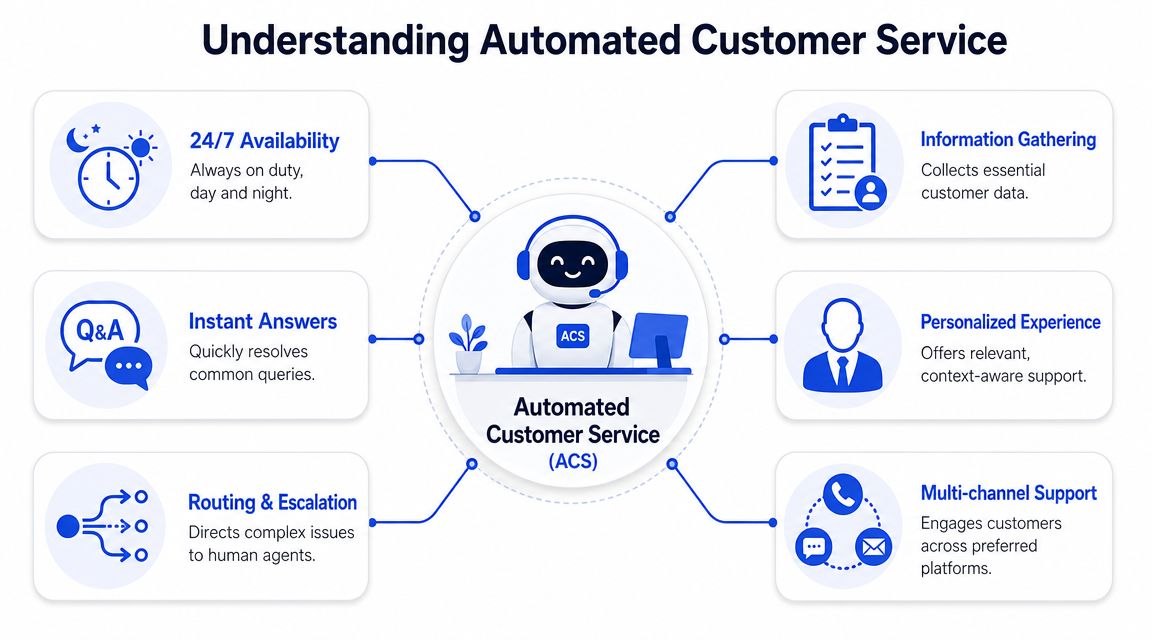
NLP, or natural language processing, is the part that matters most in practice. It helps the system understand intent, not just words. If a customer writes “Where's my package?” or “Has my order shipped yet?” the system should treat those as the same request. That's the difference between a useful assistant and a frustrating search box.
If you need to create a cleaner starting point for those answers, an AI FAQ generator can help turn scattered support knowledge into something your automation can effectively use.
The four core tools SMBs actually use
Most SMB implementations come down to four components. You may not need all of them on day one.
AI chatbots and virtual agents
These sit on your website, in-app experience, or messaging channels. They answer routine questions, collect lead details, and guide visitors toward the next action. For an ecommerce store, that might mean handling shipping, returns, and product availability. For a SaaS business, it might mean pricing, onboarding steps, or plan comparisons.IVR for phone support
Interactive voice response isn't glamorous, but it still matters if customers call you. A good IVR setup helps callers reach billing, service, or sales without bouncing between people. A bad one traps them in menus. For SMBs, the win is simple routing and clear escape paths to a real person.Automated ticketing and classification
This is the back-office side. Instead of one shared inbox where everything lands in a pile, the system tags incoming issues, assigns priority, and routes tickets to the right queue. That cuts manual triage and reduces the odds that urgent messages get buried under routine ones.Proactive email and SMS workflows
Not every support interaction starts with a complaint. Automated updates can confirm bookings, share order status, remind customers about appointments, or send follow-up instructions. Used well, these prevent tickets from being created in the first place.
The biggest improvement usually doesn't come from “adding AI.” It comes from removing friction in the first 30 seconds of a customer interaction.
What works is orchestration. The chatbot gathers context. The ticket system records it. Routing sends it to the right person if needed. Email or SMS closes the loop. When those parts talk to each other, the customer feels continuity. When they don't, your business charges the customer an effort tax.
The Core Business Benefits of Service Automation
At 4:45 p.m., your team is still answering order status questions while three sales inquiries sit untouched and a frustrated customer is waiting for a billing fix. That is the practical business case for automation. It protects time, protects revenue, and reduces the cleanup work that piles up when every request lands on a person first.
Cost savings matter, but SMB owners should look at labor quality too. According to AmplifAI's customer service statistics roundup, AI agents have been reported to cut cost per call by 50%, reduce resolution time by up to 30%, and handle a large share of simple issues. The practical takeaway is straightforward. If software acts as a digital front desk for routine questions, your team gets pulled into fewer low-value interactions.
That does not mean automating everything.
The strongest setups are selective. Order tracking, appointment reminders, password resets, FAQ responses, and lead qualification usually belong in automation. Complaint handling, sensitive billing disputes, retention conversations, and exceptions usually need a human earlier. SMBs that ignore this line end up paying an automation tax. The bot collects partial information, the customer repeats it to an agent, and your team spends extra time repairing a bad handoff.
Used well, service automation improves the business in four concrete ways:
Lower service cost per request because staff spend less time answering the same basic questions.
Faster response times because customers get immediate help on common issues instead of waiting in a queue.
Better staff utilization because experienced employees work on exceptions, sales opportunities, and relationship-saving moments.
More consistent service because routine answers follow the same logic every time.
The staffing benefit is usually larger than owners expect. In small companies, one interrupted employee can slow down three workflows at once. Automation reduces those interruptions. Support gets fewer repetitive tickets. Sales gets quicker attention on high-intent leads. Operations stops serving as the fallback inbox for every unclear request.
A good AI sales agent for lead qualification and front-line conversations can help here too, especially when inbound demand mixes support questions with buying intent.
Consistency is the other advantage that tends to show up after launch. Human service varies by memory, training, and energy level. Automation gives the same approved answer every time on topics that should be standardized, then routes edge cases to a person. That reduces preventable mistakes without forcing customers into a script when their issue is intricate.
The strategic question is not how much you can automate. It is what you should leave human. SMBs get the best ROI when automation handles the predictable layer and your team handles the moments where judgment, empathy, or negotiation change the outcome.
How to Measure Automated Service Performance
A bot that answers messages isn't automatically useful. You need to know whether it solved the issue, handed off at the right moment, or subtly annoyed customers. Measurement is what separates a live system from a productive one.
The KPIs that matter first
Start with a small scorecard. If you track too many metrics, you'll miss the pattern that needs attention.
First Contact Resolution
This tells you whether the customer got what they needed in the first interaction. For an SMB, that usually means fewer repeat contacts and less cleanup work for the team.Containment Rate
This measures how often automation resolves the request without human intervention. If containment is low on simple topics, your content or flow design probably needs work.Escalation Rate
This shows how often the system passes the conversation to a human. High escalation isn't always bad. It can mean your guardrails are sensible. It becomes a problem when customers escalate because the bot is confused, not because the issue is complex.CSAT or customer feedback after the interaction
This gives you a reality check. A workflow may look efficient internally while customers hate using it.Drop-off points
These show where people abandon the flow. If users disappear after the second question, that part of the script may be too rigid or too demanding.
Essential Automated Customer Service KPIs
KPI | What It Measures | Why It Matters for SMBs |
|---|---|---|
First Contact Resolution | Whether the issue was solved in the initial interaction | Reduces repeat workload and keeps small teams from revisiting the same case |
Containment Rate | How often automation completes the request without a person | Shows whether your bot is actually removing volume from the queue |
Escalation Rate | How often conversations move to a human agent | Helps you spot poor intent matching or healthy human fallback |
CSAT | How satisfied customers feel after the interaction | Keeps efficiency from masking a bad experience |
Drop-off Rate | Where users abandon the flow | Reveals confusing dialogue steps and weak handoff design |
Response Time | How quickly the system replies | Important for coverage, especially after hours |
Resolution Rate | How many total issues reach a completed outcome | Helps you judge whether the workflow is useful, not just active |
A practical operating rhythm works better than one-time reporting. Review logs weekly. Look for repeated failed intents, repeated escalations, and the pages or channels where automation performs worst. Those patterns tell you where to retrain, rewrite, or simplify.
Track outcomes, not activity. A high chat volume number can hide a weak service experience.
If you manage these metrics consistently, automated customer service becomes easier to improve. You stop debating whether the system “feels helpful” and start seeing where it earns its place.
Your Step-by-Step Implementation Guide
Most SMBs get stuck because they try to launch a complete automation program all at once. That's expensive, slow, and usually unnecessary. A better approach is narrow scope, clear goals, and a fast feedback loop.
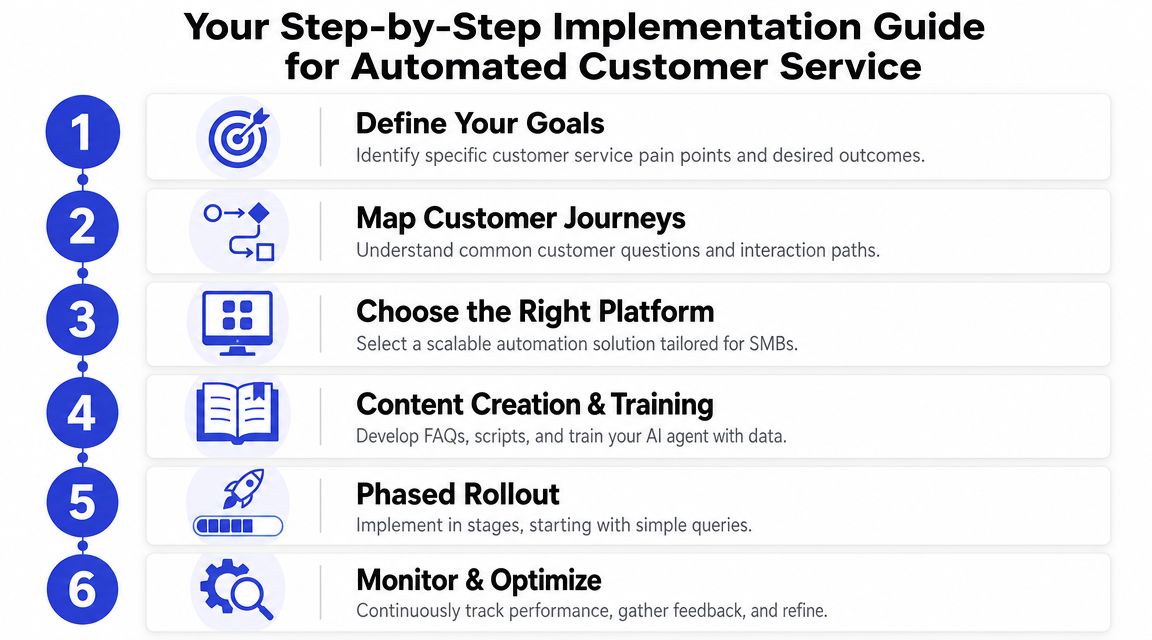
Start with one business problem
Pick the problem that hurts most right now. Don't start with “we need AI.” Start with a service bottleneck.
Examples include:
After-hours lead loss on pricing or contact pages
Repeat support questions about returns, onboarding, or appointment rules
Messy triage in a shared inbox where urgent and routine issues mix together
Slow first response during seasonal spikes or team absences
Once the problem is clear, map the customer journey around it. What does the customer ask first? What information do you need? What counts as solved? What should always go to a person?
Build the workflow before you buy more software
The best automation stacks combine chatbots, IVR, self-service, ticket classification, and skill-based routing in one operating flow, with regular review of conversation logs to improve containment, as described in RingCentral's guide to automated customer service systems.
That sounds enterprise-heavy, but the SMB version is straightforward:
Choose one entry point
Start on a high-intent page like pricing, contact, returns, or booking.Use existing content first
Pull from your FAQ page, help docs, product pages, and internal call notes. Don't wait to create a perfect knowledge base before launching.Design the first five flows
Focus on the questions your team answers constantly. Shipping. Billing. Setup steps. Availability. Refund policy. Those are your first automation candidates.Define escalation triggers
If confidence is low, if the customer asks twice, or if the issue is account-specific, move it to a human.
A short walkthrough helps make the process concrete before rollout:
Launch narrow and improve fast
Roll out in phases, not everywhere at once.
First, launch on one page or channel. Then watch the logs. You're looking for three things: where the system gives weak answers, where customers ask for a human, and where routing breaks down. Those are design problems, not reasons to scrap the whole project.
A simple vendor checklist also helps before you commit:
What to check | Why it matters |
|---|---|
Knowledge source support | You need to train from content you already own |
Escalation options | The system must hand off cleanly to email, ticketing, or live staff |
Reporting visibility | You need logs, outcomes, and clear failure points |
Multi-channel support | Your customers may start on web chat but expect continuity elsewhere |
Ease of editing | SMB teams need to change answers without a developer |
The companies that get value fastest don't automate the most. They automate the most repetitive slice first, then improve based on real conversations.
Common Automation Pitfalls to Avoid
A customer asks a simple question in chat, gets three irrelevant replies, finally reaches your team, and has to repeat everything from the top. That is the failure pattern SMBs feel first. The tool may be cheap, but the handoff cost is not.
That cost is the automation tax. It shows up when automation saves your team a minute and wastes five minutes of the customer's time. The bot misses the intent. It asks for details the customer already entered. It passes the case to a person without the conversation history, so your staff starts a second intake instead of solving the problem.
For a small business, that tax hits twice. Customers get frustrated, and your team still does the work.
AWS found that 89% of consumers say accurate responses matter most, and that people value understanding over raw speed, according to AWS's analysis of what consumers think about automated customer service. That matches what operators see every day. Customers will use automation if it gives the right answer and hands off cleanly when it should.
The practical fix is simple:
Pass the full conversation forward so the human agent sees the request, prior answers, and collected details
Ask for the minimum information needed before handoff
Give customers a clear path to a person instead of burying it
Route sooner when confidence is low or the issue affects money, access, or trust
A bad handoff wipes out the value of a fast first response.
The second mistake is over-automation. A lot of SMB owners ask, "What can I automate?" The better question is, "What should stay human?" That is where strategy starts.
Billing disputes, cancellation saves, sensitive account problems, and emotionally charged complaints usually need a person. In those cases, the customer is not only looking for information. They want judgment, flexibility, and reassurance that someone understands the stakes. If a bot handles that poorly, it does more than miss the answer. It makes the business feel indifferent.
Harvard Business Review makes that case in its article on the parts of customer service that should never be automated. For SMBs, this matters more than enterprise feature lists. Good automation acts like a digital front desk. It greets, triages, answers routine questions, and brings the right person in with context. It should not become a wall between the customer and help.
A simple decision rule works well:
Automate this | Keep this human |
|---|---|
FAQs and status checks | Escalated complaints |
Basic appointment or order questions | Sensitive billing conflicts |
Routine account updates | Complex exceptions |
Repetitive intake and form collection | High-stakes retention conversations |
If you want a practical model for that split, this guide to AI customer support for SMB teams is a useful reference.
The businesses that get the best ROI do not automate the most. They automate the repeatable front-desk work, protect the moments where trust matters, and treat handoff quality as part of the system, not an afterthought.
Getting Started with Your First AI Agent
The best first deployment is small enough to manage and useful enough to prove value fast. Don't start with your entire support operation. Start where buyer intent or repeat support volume is already obvious.
A practical first week looks like this:
Choose one narrow use case
Pick a high-traffic page or one repeat support category. Pricing, returns, booking, and onboarding are common starting points.Train on content you already trust
Use your FAQ page, product pages, help docs, and standard support replies. Keep the scope tight so the answers stay clean.Watch the conversations for one week
Review what people asked, where the system handled it well, and where human escalation was the better outcome.
If you want a simple place to begin, an AI customer support setup for SMB teams can help you launch one focused agent before you expand into broader automation.
The most useful mindset is hybrid, not replacement. Let automation handle the front desk work. Let people handle the parts that need judgment, empathy, and flexibility. That's where SMBs get the best ROI from automated customer service without creating the friction that turns customers away.
If you want to put this into practice quickly, ChatGrow is built for exactly this SMB use case. You can train an AI agent on your website, FAQs, pricing, and product pages, deploy it on high-intent pages, and give customers instant answers around the clock. It also supports smart escalation, so when a conversation needs a human, your team gets the context instead of a cold handoff.
Related Posts
Continue Reading
More articles from the ChatGrow Team.


