
Blog
Customer Service Software for Small Business: 2026 Guide
By
Nelson Uzenabor

You're probably dealing with support in too many places at once. A customer emails from your contact form. Another sends a DM on Instagram. Someone opens the site chat with a pricing question while you're trying to answer yesterday's inbox. Nothing feels catastrophic on its own, but together it creates a slow leak. Missed replies, delayed follow-ups, repeated answers, and prospects who leave before anyone gets back to them.
That's where customer service software for small business stops being a nice-to-have. It gives a lean team one place to manage conversations, one system to preserve context, and one layer of automation so the same questions don't keep landing on human shoulders. In 2026, the bigger shift is that these platforms aren't limited to support. Modern AI agents can answer questions, qualify buyers, book next steps, and hand off the right context to your team without forcing you into an enterprise project.
Table of Contents
Why Your Small Business Needs This Software Now
Small business owners usually wait too long to formalize support. They keep using shared inboxes, personal phones, DMs, and sticky-note processes because each channel feels manageable until volume stacks up. Then service gets reactive. Sales questions sit unanswered. Existing customers repeat themselves. Your team spends more energy finding context than solving problems.
That delay has a cost. It doesn't just make the day messier. It makes your business slower than buyers expect and less reliable than repeat customers want.
The urgency is visible in the market itself. The global customer service software market was valued at USD 10.5 Billion in 2021 and is projected to reach USD 58.1 Billion by 2030, with a 21.1% CAGR according to Acumen Research and Consulting's customer service software market analysis. For a small business owner, that matters for one reason. Competitors are digitizing support and treating it as core infrastructure, not back-office admin.
What changes when you install the right system
A solid platform does three jobs at once:
It protects revenue by making sure pre-sale questions get answered quickly.
It protects retention by giving returning customers consistent support.
It protects owner time by removing repetitive work from the team.
Older help desks mostly organized incoming issues. Modern platforms do more. They can route conversations, surface customer history, suggest answers, and run AI agents that stay active when your staff is offline.
Practical rule: If customers have to wait for basic answers about pricing, delivery, availability, or next steps, support is already affecting sales.
For small teams, that's the key shift. Customer service software for small business is no longer just a ticket queue. Done well, it becomes part support desk, part memory system, and part conversion layer.
That matters most when you don't have spare headcount. You need software that fits the team you have now, connects to tools you already use, and improves both service and revenue without creating a second full-time job to manage it.
What Is Customer Service Software Really
Often, "customer service software" is associated with a "ticketing system." That's too narrow.
A better way to think about it is this. It's the upgrade from a messy desk full of loose notes, open tabs, and half-remembered conversations into a single mission control center for customer communication.
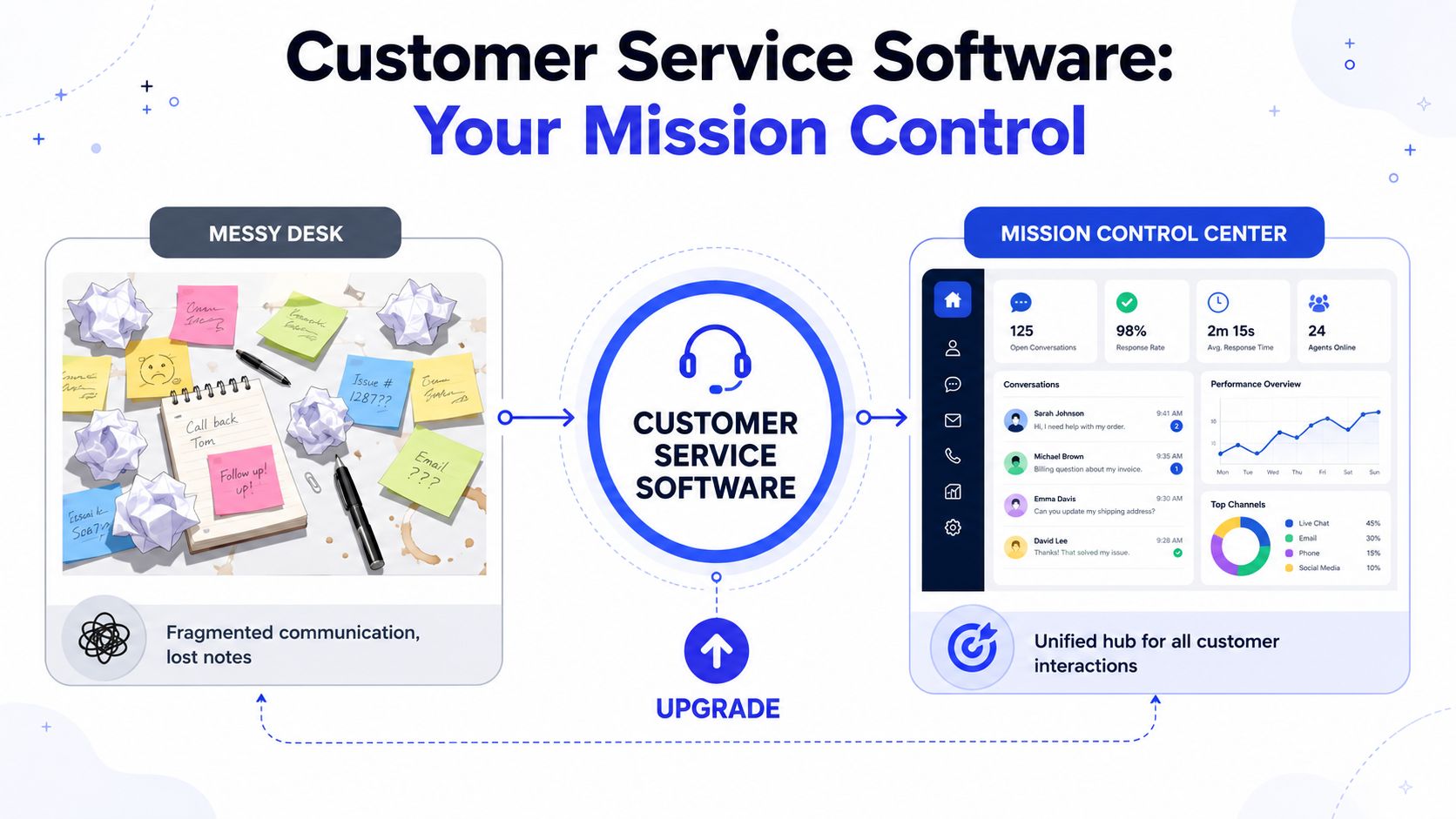
From scattered messages to one operating system
In older setups, support lives in fragments. The contact form goes to one inbox. Social messages stay inside each platform. Chat transcripts may not connect to email at all. Whoever responds first often has no idea what happened last time.
Modern customer service software for small business fixes that fragmentation. Instead of asking “where did that conversation happen,” the team works from one hub that collects messages, tracks ownership, and keeps the thread tied to the customer.
If you want a good baseline on current help desk software applications, Dokly's overview is useful because it shows the traditional role of help desks before you layer in newer AI and automation capabilities. For a broader platform view, this guide to a customer support platform is also helpful when you're comparing simple inbox tools against more complete service systems.
The three parts that matter
A lot of feature lists are noisy. For a small business, I'd reduce the whole category to three parts.
A unified hub
This is the shared workspace. Email, site chat, social, SMS, or contact forms feed into one queue. The value isn't just convenience. It prevents duplicate replies, missed handoffs, and “I thought someone answered that” failures.
An automation engine
This handles the repetitive layer. It can send an instant acknowledgment, tag incoming questions, route order issues to operations, and answer common questions without waiting for a human. That's where small teams start to feel real relief.
A customer memory
This is the record of past interactions. When someone comes back next week, the team can see what they asked, what they bought, what issue was opened, and what was promised. That context changes the quality of the response.
A help desk tracks issues. A modern service platform tracks relationships around those issues.
That distinction matters because support is rarely isolated. A billing question may turn into a retention moment. A product question may turn into a sale. A return request may reveal a packaging problem that keeps generating tickets.
When a system stores context and automates the routine layer, your team can spend its time where judgment matters. That's the practical definition worth using.
Must-Have Features for a Lean Small Business
Small businesses don't need the longest feature list. They need the shortest list that solves the biggest daily problems. When you evaluate customer service software for small business, focus on what helps a lean team reply faster, stay consistent, and stop losing leads in the cracks.
Research tied to SMB adoption shows the payoff can be meaningful. Businesses adopting customer service and CRM systems saw a 20% to 30% improvement in effectiveness, the majority reported saving 5 to 10 work hours per week, and the majority that adopted a CRM saw sales revenue increase by 21% to 30%, according to this HeraldOnline summary of the findings.

Features that save time first
If your team is small, time savings comes before everything else.
Shared omnichannel inbox. This is the foundation. Everyone sees the same queue, can assign ownership, and can follow the same thread across channels.
Basic ticketing or case management. You need statuses, ownership, priorities, and a clean way to see what's open versus resolved.
Canned responses and templates. These reduce the drag of typing the same answer repeatedly, while keeping replies consistent.
Simple automation rules. Start with routing, tagging, and auto-replies. You don't need a giant workflow map on day one.
Without these basics, even a smart AI layer won't help much because the team still works in chaos.
Features that improve service quality
Speed matters, but consistency matters just as much.
A good platform should give agents the history of prior conversations, purchases, or issues in the same workspace. That's how you avoid asking customers to restate the problem every time they contact you.
The second quality lever is self-service. A knowledge base works because many customer questions are repeated and predictable. When customers can find answers on their own, the team keeps more time for exceptions, escalations, and high-value interactions.
Good support software doesn't make your team sound robotic. It makes sure your team doesn't have to reinvent the same answer all day.
A short buying checklist
Use this quick screen when comparing tools:
What to check | Why it matters |
|---|---|
Shared inbox across core channels | Stops missed messages and duplicate work |
Ticket assignment and status tracking | Creates accountability without complexity |
Knowledge base support | Deflects repetitive questions |
Rule-based automation | Cuts manual triage |
Customer history in one view | Improves reply quality |
CRM or store integrations | Keeps service tied to revenue and orders |
Reporting on response and resolution | Helps you manage performance |
The mistake I see most often is paying for enterprise functions the team won't touch while skipping the basics that reduce everyday friction. Buy for daily use, not for vendor demos.
Decoding Pricing Models and Hidden Costs
Pricing for customer service software can look straightforward until the second invoice arrives. Small businesses usually compare headline prices and miss the charges tied to setup, integrations, usage, or support access. That's why cheap tools can become expensive fast, and expensive tools can still be worth it if the total cost is predictable.
How vendors usually charge
Most tools fall into one of three models.
Per-user per month is the simplest. You pay for each agent seat. This works well when conversation volume is steady and your team size is the main cost driver.
Usage-based pricing charges around activity, such as conversations, automations, or AI interactions. This can be efficient for a tiny team with modest volume, but bills can swing when campaigns launch or seasonal demand hits.
Tiered plans bundle features into packages. This looks clean on pricing pages, but the key consideration is whether the features you need sit in the tier you can afford.
If you're also comparing front-desk automation or phone coverage, this breakdown of SkipCalls AI receptionist pricing is a useful companion because it shows how usage, features, and service limits can shape total cost in adjacent categories. For a broader AI support lens, this guide to AI customer service software helps frame what you should expect to pay for automation versus standard help desk functions.
Costs that show up after you sign
Buyers get caught here.
Look closely at these line items before you commit:
Onboarding fees. Some vendors require paid setup or implementation packages.
Integration access. Connecting your CRM, ecommerce stack, or communication channels may require a higher plan.
Data migration. Importing past tickets, FAQ content, or customer records can cost extra.
Premium support. Faster vendor response times are often gated behind upgraded plans.
AI add-ons. The base plan may include the inbox, but not the automation layer you needed.
A simple rule helps here. Don't ask “What does this plan cost?” Ask “What will it cost once we connect our real workflow?”
If a platform only works after three paid add-ons, the base price is marketing, not budgeting.
For small teams, predictable spend often beats theoretical savings. A tool that costs slightly more each month but includes the channels, automations, and integrations you'll use is usually easier to manage than one that starts cheap and expands through surcharges.
Your Simple Four-Step Implementation Roadmap
Most failed rollouts don't fail because the software is bad. They fail because the business tries to wire everything together at once. Small teams feel pressure to connect every channel, build every workflow, and automate every edge case before launch. That's where momentum dies.
A phased approach is the better path, especially because 70% of businesses cite integration capabilities as a top requirement according to Useresponse's guide to customer service software. The practical problem is that small teams still struggle to connect new AI agents and service tools to older systems. Start narrow, get live, then expand.
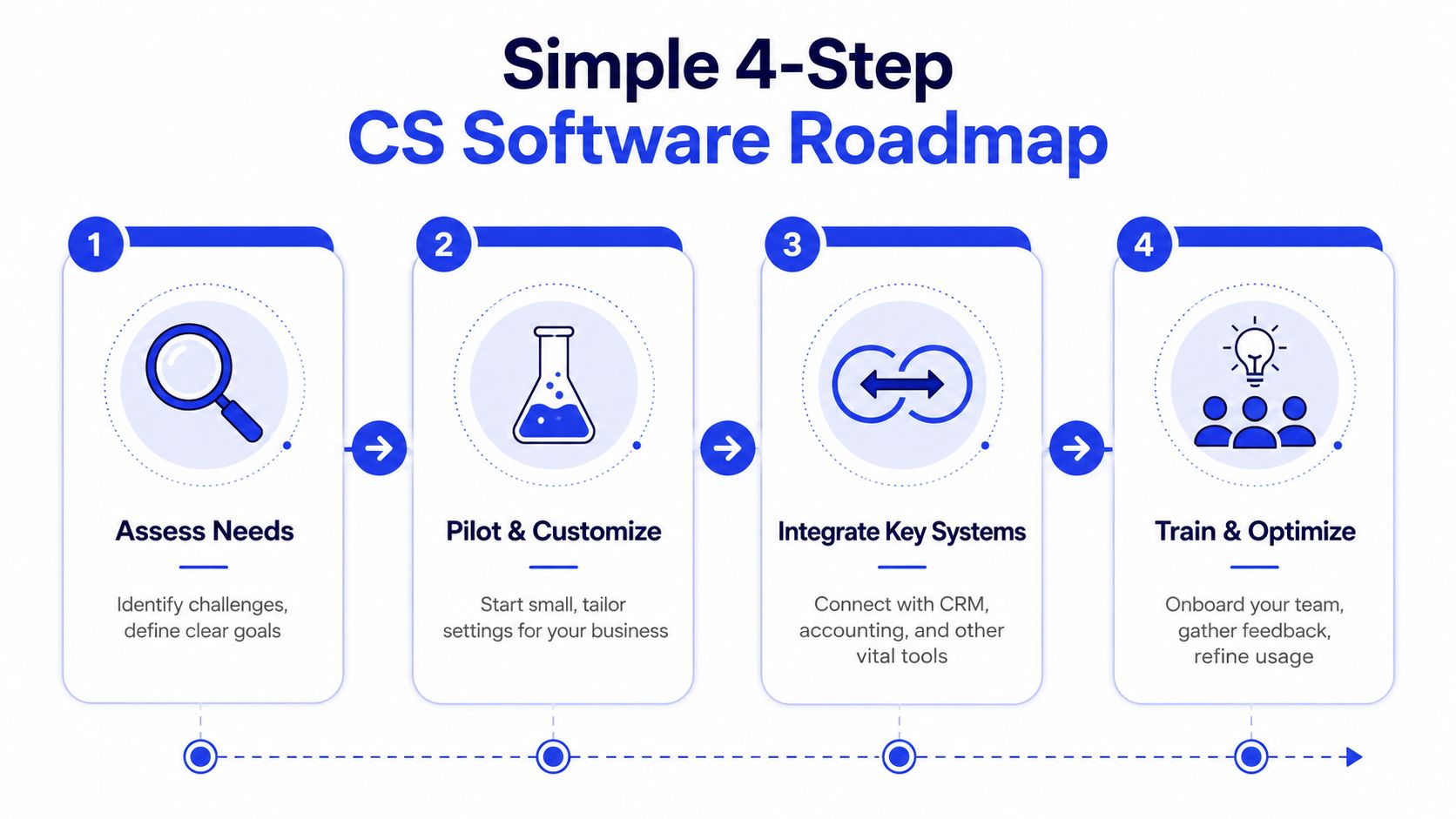
Step 1 and Step 2
Step 1 is to connect only your primary channels. For most small businesses, that means the main support email and the website chat widget. If social DMs drive a lot of inquiries, add one social channel too. Ignore the rest for now.
Step 2 is to seed the knowledge base with your most common questions. Don't overbuild it. Start with the questions customers ask before buying and the issues they raise most after purchase. Shipping, pricing, returns, setup, account access, appointment details, and turnaround times usually belong here first.
A practical data-integration plan matters at this stage. If you're mapping what should sync first, this guide to customer data integration is a useful reference for deciding which systems need to talk to each other immediately and which can wait.
Step 3 and Step 4
Step 3 is basic automation. Add simple rules that tag conversations, route them by topic, and trigger instant acknowledgment messages. If AI is part of your setup, let it answer common questions and gather key details before handoff.
Step 4 is team onboarding through role-play. Don't hand your staff a login and hope for the best. Run short practice scenarios. One person acts as the customer. Another handles the response. Test common cases, handoffs, and escalation paths.
Here's the sequence I recommend for week one:
Go live with two channels so the queue stays visible and manageable.
Publish a compact FAQ set based on repeat questions, not internal assumptions.
Automate the obvious such as routing by topic or product line.
Review transcripts daily for the first week and refine tags, articles, and handoff rules.
Launching with fewer connections and cleaner workflows beats launching with every connection and constant confusion.
That's how small teams get value in days instead of turning implementation into a long, expensive side project.
Top Software Options and Our Recommendation for 2026
The right tool depends on what kind of pressure your team feels most. Some businesses mainly need order and accountability. Others need faster setup. More are now looking for AI that doesn't just answer support questions but also qualifies demand after hours.
Here's a practical comparison of three common options for customer service software for small business.
A practical comparison
Tool | Strong fit for | Main strength | Main trade-off |
|---|---|---|---|
Zendesk | Growing teams with more complex service operations | Mature support workflows, automation, and broad service features | Can feel heavier for very small teams |
Freshdesk | Small teams that want familiar help desk structure | Straightforward ticketing and service management | Less focused on revenue-generating AI use cases |
Chatgrow | Teams that want AI support plus lead qualification on high-intent pages | AI agents trained on your content, instant answers, and lead capture workflows | Best when you already know where AI should assist buyers or support requests |
The AI performance ceiling is what makes this category different now. Modern platforms can resolve up to 80% of routine interactions independently, and integrating AI chatbots with automated ticket categorization can reduce average response times from 12 hours to under 5 minutes, according to Zendesk's service platform overview.
That changes the buying criteria. It's no longer enough to ask whether a tool can log tickets. Ask whether it can handle routine demand without losing brand voice, and whether it can pass structured context to a human when the issue gets more nuanced.
What stands out in 2026
The biggest gap in many small-business guides is that they still treat AI as an FAQ bot. In practice, many teams now want software that can answer product questions, collect qualification details, and route serious prospects to a salesperson or founder with a useful summary attached.
That's where a tool like Chatgrow fits. It lets businesses create AI agents trained on their own website, pricing, FAQ, and product content, then deploy those agents on pages where buyers are actively comparing options. For a small team, that's useful because the same system can handle repetitive support questions and capture intent signals from prospective customers.
If you're using Zendesk and want better visibility into analytics quality and implementation data, this resource on how to integrate Zendesk for analytics QA is worth reviewing alongside your stack decisions.
A quick product walkthrough helps make the category more concrete:
My recommendation is simple. If your main problem is service complexity across a larger team, look at established platforms with deeper ticketing structure. If your bigger problem is that support and sales questions arrive after hours and go unanswered, prioritize a platform with deployable AI agents, clean handoff logic, and simple setup.
Measuring Success and Avoiding Common Pitfalls
Once the system is live, don't drown in dashboards. A small business usually needs three measures to know whether the software is doing its job.
The three metrics worth watching
First Response Time tells you how quickly customers hear back. That matters because speed shapes trust early, especially for pre-sale questions.
Resolution Rate tells you whether conversations get finished instead of bouncing around. If resolution stays weak, routing or ownership is usually the core problem.
Customer Satisfaction gives you a direct read on whether the experience felt useful. It won't explain every operational issue, but it will tell you whether customers feel the difference.
Platform features should support those metrics directly. Integrated knowledge base tools can lead to a 50% reduction in support ticket volume, and omnichannel routing can reduce agent fatigue by 40% by cutting tool-switching, according to RingCentral's customer service software overview. In practice, fewer repetitive tickets and less context switching usually improve both response quality and team consistency.
Mistakes that quietly reduce value
The most common mistakes after launch are operational, not technical:
Letting the knowledge base go stale so the AI or team relies on outdated answers.
Over-automating too early before you've seen enough real conversations.
Ignoring handoff quality when AI escalates to a person without enough context.
Tracking activity instead of outcomes by focusing on volume instead of response, resolution, and satisfaction.
Review a small batch of conversations every week. You'll spot weak articles, broken routing, and missed sales opportunities faster than any dashboard alone.
The software creates the structure. The value comes from tuning it.
If you want a practical starting point, Chatgrow is built for small teams that need AI agents to answer questions, qualify leads, and hand off conversations with context instead of forcing a heavyweight support stack. It's worth considering if you want customer service software that supports both service and revenue without a complicated rollout.
Related Posts
Continue Reading
More articles from the ChatGrow Team.


