
Blog
Chatbot Natural Language Processing Explained
By
Nelson Uzenabor

Chatbot natural language processing takes messy human text and turns it into clear actions for support and sales teams. Instead of forcing customers to click through rigid menus, it helps bots figure out what someone actually wants, pull out the important details, and reply in a way that makes sense.
Consider how a basic keyword bot works. It acts like a receptionist who only looks for a single word on a visitor's badge. If you say the magic word, it rings a bell. But the moment you add context, change your tone, or ask a follow-up, it falls apart.

Chatbot natural language processing works more like a seasoned, multilingual receptionist. This person reads the badge, listens to your tone, asks clarifying questions, and sends you to the right department without missing a beat.
This receptionist role breaks down into two core functions:
Natural Language Understanding (NLU): Converts a sentence into structured meaning.
Natural Language Generation (NLG): Converts structured decisions back into clear, human phrasing.
Together, they create a straightforward pipeline that transforms raw text into actions and responses.
Quick Reference Table
Here is a quick look at how these pieces fit together inside a chatbot:
NLP Component | What It Does Inside a Chatbot |
|---|---|
Utterance Normalization | Cleans text so variants like "refunds" and "Refund?" match |
Tokenization | Breaks sentences into analyzable pieces |
Intent Classification | Decides what the user wants (billing, returns, feature info) |
Entity Extraction | Pulls specifics like order numbers, dates, or product names |
Dialogue Management | Keeps context across turns and handles follow-ups |
Response Generation | Produces the outgoing message in brand voice |
Grounding / Retrieval | Looks up exact facts from your knowledge base before replying |
"NLP turns noisy human language into structured signals a business can act on." Think of this as the core value proposition in a single sentence.
Core Benefits
When this system works well, the immediate benefits show up fast:
Faster resolution because intents route work correctly
Fewer handoffs since entities supply needed details early
Better conversion when chat qualifies leads and summarizes for sales
How This Shapes The Rest Of The Guide
So, where do you go from here? Start with NLU to capture intent and entities. From there, apply retrieval or generation depending on how much accuracy and brand control you need. If you want to see which techniques reduce fallback rates and speed up deployment, check out the latest research on best NLP development for productivity.
This framework—understand, structure, act, and speak—is exactly how Chatgrow turns website content into on-brand answers and qualified leads without requiring a massive engineering team.
Table of Contents
How Intent Recognition and Entity Extraction Shape Conversations
Comparing Model Types And Trade-Offs For Production Chatbots
Training Data and Knowledge Sources That Keep Chatbots Sharp
Frequently Asked Questions About Chatbot Natural Language Processing
How Intent Recognition and Entity Extraction Shape Conversations
Intent recognition is essentially a chatbot figuring out what someone actually wants from a brief, often messy message. Imagine a good receptionist who hears a half-formed sentence and instantly knows which department to send you to. That first guess sets the tone for the entire interaction and whether the person walks away happy or frustrated.
Entity extraction is what fills in the blanks. It pulls out the concrete details—product names, dates, quantities, plan types—that turn a vague intent into something actionable. When intent and entities work together, the bot can fill in the necessary slots and move the conversation forward without needing a human to step in.
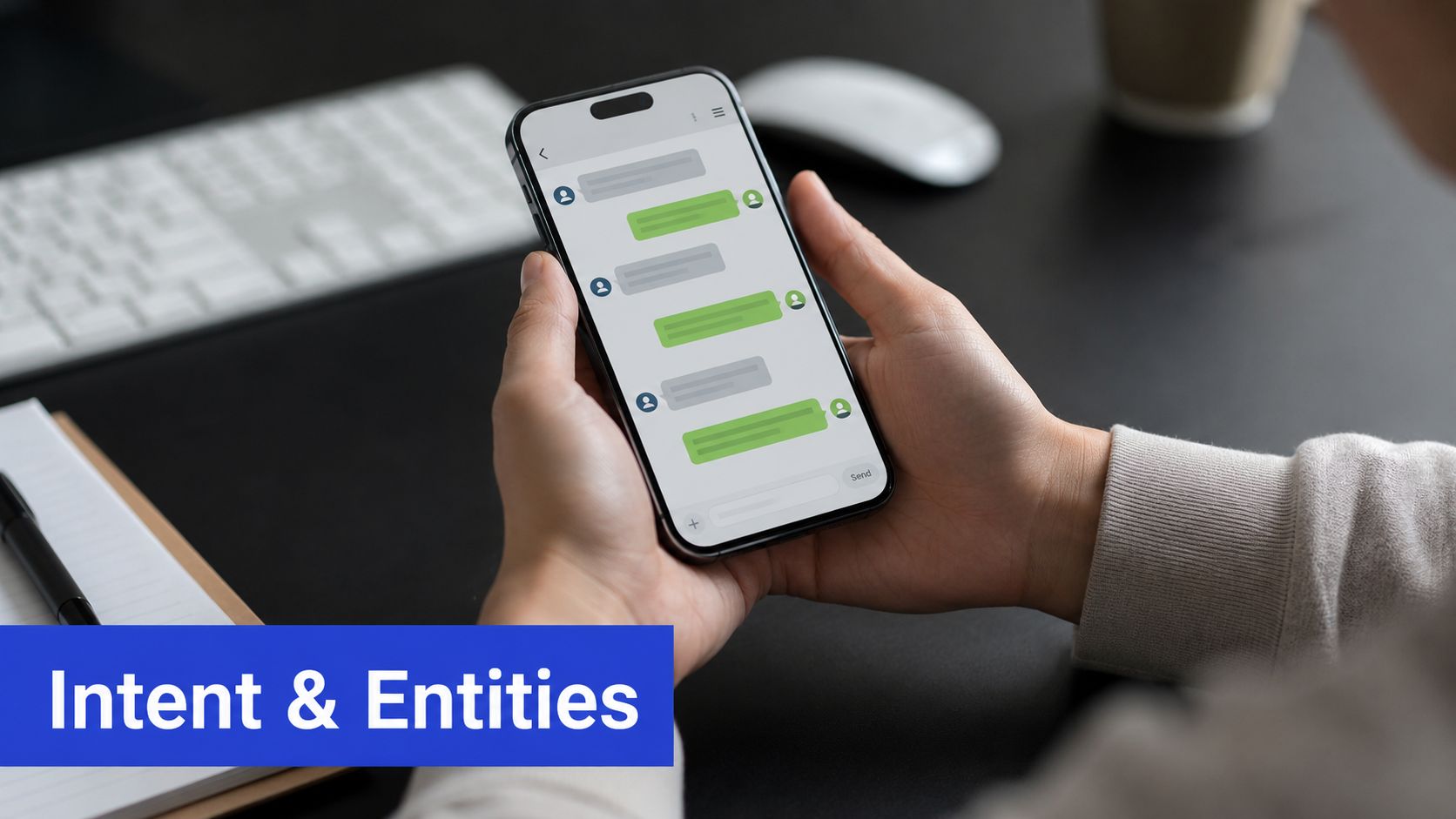
How a Vague Question Becomes a Routed Answer
Let's look at a real exchange. A user types, "I need to change my plan." The bot guesses the intent is BillingChange, but it still needs to know which plan and when. So it asks, "Which plan are you moving from and to?" The user replies, "Standard to Pro, next month." Now the entities are clear: PlanFrom=Standard, PlanTo=Pro, Start=next month. The bot can trigger the right workflow immediately.
This slot-filling pattern cuts down on back-and-forth and speeds up resolution, often slashing support ticket times significantly. Capturing entities early also means fewer handoffs, because the support team gets structured data right from the start.
Key Insight: Follow-up questions aren't a sign of failure. They're the built-in mechanism that resolves ambiguity and sharpens accuracy.
Common Failure Modes and Fixes
Things don't always go smoothly, but the problems are predictable.
Overlapping intents
Problem: "I want a refund and a new subscription" triggers both
RefundandPurchaseintents.Fix: Use hierarchical intent models with confidence thresholds to properly split multi-intent messages.
Missing entities
Problem: A user says "reschedule" without providing a date.
Fix: Build in mandatory slot prompts and use context windows to recall information from earlier in the conversation.
Low confidence and fallbacks
Problem: The model returns a weak intent score and fires off a generic "I didn't understand that" response.
Fix: Ask a targeted clarifying question instead of defaulting straight to a human agent.
Entity mislabeling
Problem: The system maps "Pro" to a product name instead of a plan tier.
Fix: Implement contextual entity linking against your product catalogs and a synonyms list.
Practical Trade-Offs for Business Outcomes
Every design choice has a ripple effect on your metrics. Short, accurate dialogs with well-captured entities tend to increase containment rates and lower cost per ticket. On the other hand, setting conservative intent thresholds reduces false positives but can mean more follow-up questions—finding the right balance depends on whether you're optimizing for conversion or efficiency. For multi-step tasks like booking or billing, context windows that remember several turns back are invaluable.
Tips for getting started:
Begin with a small, focused set of high-value intents and real sample utterances.
Add entities that map directly to your business objects, like SKUs and plan IDs.
Keep a weekly eye on intent confidence and fallback rates to know exactly what needs retraining.
"When intent and entity systems work together, chatbots shift from guesswork to predictable routing that shortens resolution time and increases conversion."
Seeing this in action—like the plan change example above—shows how chatbot natural language processing directly moves the needle on containment rate and lead qualification speed. That's exactly the kind of outcome Chatgrow is built to deliver.
Comparing Model Types And Trade-Offs For Production Chatbots
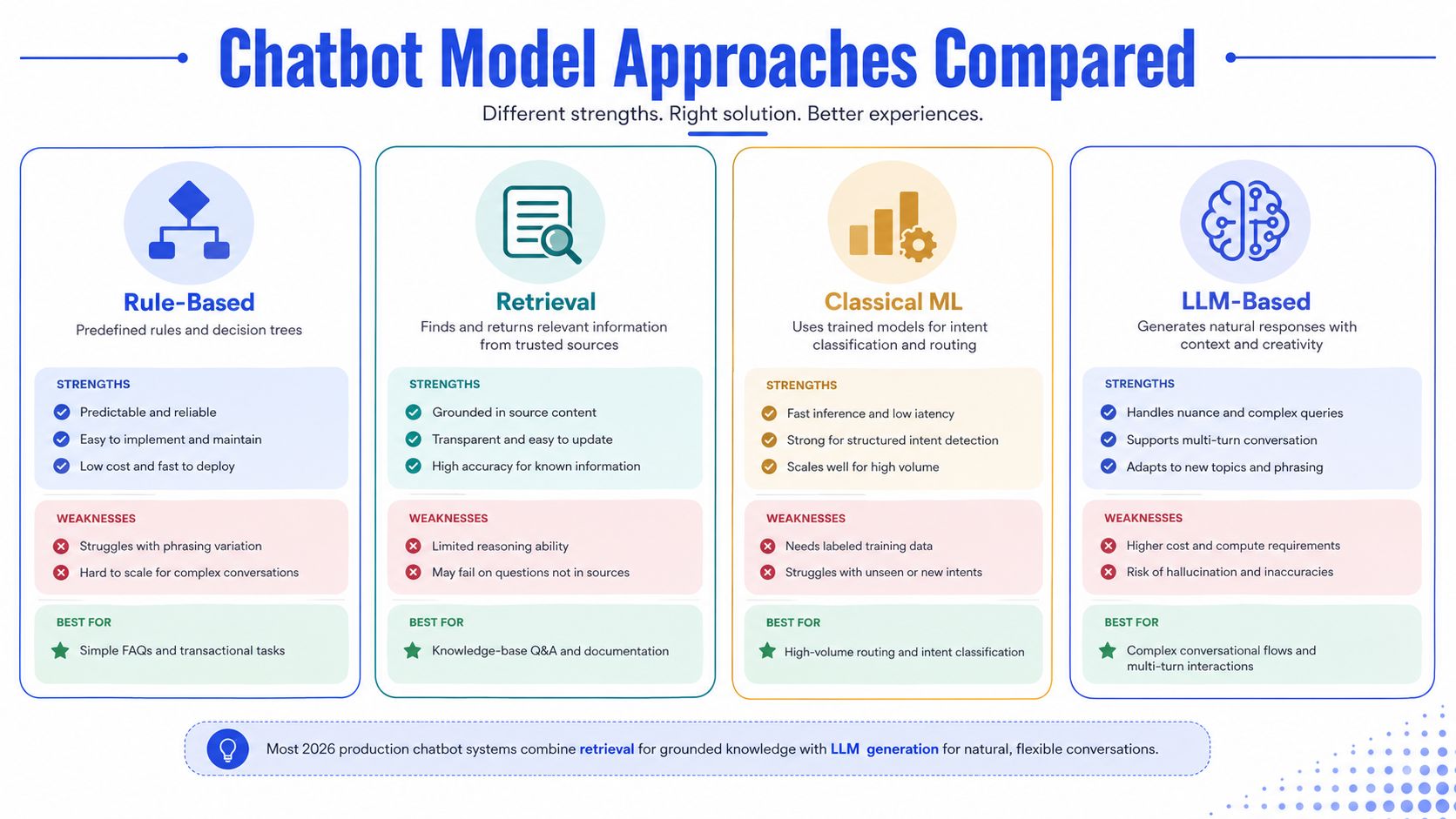
Production chatbots rarely rely on a single technique. Think of your options as tools in a toolbox—each one handles a different class of problem. Rule-based systems are your screwdriver: predictable, cheap, and perfect for simple FAQs. Retrieval models work like a librarian pulling exact passages from your knowledge base. Classical ML classifiers act as a conveyor belt, fast and repeatable for intent routing. Large language models are the flexible craft knife, capable of shaping nuanced replies but demanding careful handling.
Chatbot Model Approaches Compared
Here's how the four main approaches stack up when you're evaluating them for real-world deployment:
Approach | Strengths | Weaknesses | Best Fit |
|---|---|---|---|
Rule-Based | Extremely low cost, deterministic outputs, near-zero latency | Fragile to phrasing variation, struggles with multi-turn context | Short, high-precision FAQ flows and regulatory disclaimers |
Retrieval | Grounded answers tied to source text, easy to audit, lower hallucination risk | Limited reasoning beyond provided docs, depends entirely on source quality | Knowledge-base Q&A and policy lookups where accuracy matters |
Classical ML | Fast inference and high throughput, well-understood metrics like precision and recall | Needs labeled data and ongoing feature maintenance as your product evolves | Intent routing at scale, chat triage, and structured slot-filling |
LLM Generation | Handles nuance, paraphrase, and multi-turn context; reduces authoring for varied prompts | Higher compute cost, latency variability, and hallucination risk without grounding | Complex flows, conversational sales, and summarization tasks |
Most deployments in 2026 pair retrieval with LLM generation. Retrieval grounds the facts, while the LLM crafts fluent replies and handles edge cases. This hybrid approach cuts hallucinations significantly while keeping responses feeling natural rather than robotic.
Practical Trade-Offs To Consider
Your priorities should drive the architecture. If latency and cost control are paramount, lean on classical classifiers and retrieval. If experience quality and multi-turn handling matter most, bring in an LLM with strict grounding and prompt constraints.
Here's a straightforward process for choosing your architecture:
Map your high-value intents and determine which ones need factual grounding.
Measure what latency and per-message cost your business can tolerate.
Prototype hybrid flows and log hallucination and fallback rates from real conversations.
"Guardrails are non-negotiable" — even advanced models need monitoring and human-in-the-loop escalation to catch drift before it impacts customers.
Understanding agentic automation, including LLM agent architectures, helps when evaluating these trade-offs. See how agentic automation works for further context.
Chatgrow, for example, uses retrieval over curated site content to maintain accuracy, then layers LLM generation on top to improve tone and qualification. Hallucination mitigation and escalation workflows sit at the core of their production safety model—a pattern worth emulating regardless of which tools you choose.
Training Data and Knowledge Sources That Keep Chatbots Sharp
Real chatbot performance depends entirely on the sources you feed it. The chart below breaks down how different production models rely on specific data types and what each approach needs to maintain accuracy.
For a production-ready bot, you are mainly looking at website pages, FAQs, help-center articles, product catalogs, and customer-facing documents like manuals and PDFs. A retrieval layer pulls from these sources to give answers backed by actual facts, not guesses.
Where Training Data Comes From
Start with public pages and support docs since they mirror what customers read first. Bring in structured data like product catalogs, pricing tables, and CRM fields so the bot can link entities accurately. Don't forget conversation logs and ticket transcripts; these capture the exact phrasing and real utterances people use.
Website content covers the bases for product and pricing questions.
Help articles provide step-by-step procedures that keep escalations down.
PDFs and manuals handle the gaps for technical or compliance queries.
High-quality, authoritative sources directly correlate with better answers and fewer hallucinations.
Practical Chatgrow Workflow
Train on the site: ingest public pages and help articles to build a retriever index.
Define lead qualification triggers: map intents and entities to conversion signals.
Deploy to high-intent pages: place the agent where visitors are most likely to convert.
Continuously retrain: schedule incremental indexing as content updates happen.
Example: a pricing page update should trigger a re-index within 24–72 hours so the bot reflects current offers.
Example: new SKU launches require adding product catalog rows and synonyms to avoid mislabeling.
Best Practices Checklist
Maintain a single canonical knowledge source and strip out duplicates.
Tag content by authority level so retrieval prioritizes official docs.
Version control major help-center changes and re-run tests after updates.
Keep a synonyms list for brand terms, plan tiers, and SKU aliases.
Log fallback queries and add targeted articles or Q&A for the top 20 queries monthly.
"Garbage knowledge in means wrong answers out" — content freshness and source authority determine answer quality.
Maintenance Tips and Metrics
Monitor containment rate, fallback rate, and escalation frequency weekly.
Retrain or re-index after any product, pricing, or policy change.
Use small labeled datasets from actual conversations to tune intent classifiers without doing a full rebuild.
If you want to dig deeper into the setup process, check out our guide on how to build a chatbot.
Sticking to a disciplined ingestion and retraining schedule keeps your NLP sharp, on-brand, and aligned with your current offerings—no need to rebuild from scratch.
Turning Conversations Into Conversions With Smart NLP

Smart NLP bridges the gap between casual browsing and actual conversions by pairing accurate intent detection with escalation workflows that respect everyone's time.
Think of Smart Intent as the sales associate who already knows your catalog inside and out — someone who picks up not just what a visitor is asking for, but which specific product page or pricing tier caught their attention. That precision means fewer clumsy handoffs and better conversion rates on pages where people are already close to buying.
Smart escalation acts like a well-run front desk. Before the conversation reaches a person, it gathers the essentials: what the caller wants, key details like names or dates, how confident the system is, and what pages the visitor had open. That summary gets passed along so whoever picks up the phone isn't starting from scratch. Responses feel faster, and people notice.
How Businesses Get Real Value
E-commerce
Use Smart Intent to spot purchase-ready visitors on product pages and at checkout. What you get: higher cart conversion and fewer abandoned checkouts.SaaS
Route trial users who show upgrade signals toward pricing conversations and demo bookings that match their needs. What you get: better trial-to-paid numbers and lead lists that aren't full of dead weight.Agencies and Consultants
Put branded agents across client sites and funnel escalation summaries to one dashboard. What you get: consistent service and the ability to scale without hiring endlessly.Travel and Education
Pull dates, destinations, and course codes directly from the conversation, then hand off verified leads when your team's actually available. What you get: fewer missed bookings and quicker enrollment processing.
"Chatgrow converts conversations into actionable leads by matching intent to the right workflow and delivering concise summaries when people need a human."
Practical Deployment Path
Train Smart Intent on your site content and top-performing pages.
Define lead qualification rules tied to intents and entity patterns.
Deploy on high-intent pages like pricing, checkout, or course enrollment.
Build escalation templates that include only what humans actually need to see.
Quick Tips to Maximize ROI
Start with 5–10 high-value intents to measure containment and conversion quickly without overcomplicating things.
Set confidence thresholds that decide when the bot should pass things to a person versus asking one more clarifying question.
Tag escalations by reason. You'll spot patterns fast, and eventually you can automate the repetitive handoffs entirely.
Metric to Watch | Why It Matters |
|---|---|
Containment Rate | Measures answers kept in-bot, reducing load on support |
Escalation Time | Shorter summaries speed human resolution |
Conversion from Chat | Directly ties chatbot activity to revenue |
Read also: Dive deeper into AI Chatbot Design to see how conversational UX choices amplify these technical gains.
When NLP mechanics plug directly into business workflows, the picture gets clearer: fewer tickets, faster human responses, and a measurable lift in conversions where it actually counts.
Evaluation Metrics And Fixes For Common NLP Pitfalls
Measuring how well a chatbot understands language isn't something you can eyeball. You need repeatable metrics tied to what actually matters for the business and the people using the bot.
Here are the ones worth tracking:
Intent accuracy — does the bot correctly figure out what the user is trying to do?
Entity F1 score — how well it pulls out specifics like product SKUs, dates, or account numbers, balancing both misses and false picks.
Containment rate — the share of conversations wrapped up without a human ever stepping in.
Fallback rate — the flip side, showing how often the bot simply doesn't know what to say.
Escalation rate — how frequently conversations get handed off, and crucially, why.
CSAT — whether users walk away satisfied after the chat.
Conversion on qualified leads — connecting chat performance directly to revenue.
Key Metrics Table
Metric | What To Watch |
|---|---|
Intent Accuracy | Track by intent and overall; spot low-performing intents under 85% |
Entity F1 Score | Prioritize entities tied to conversion like plan IDs or order numbers |
Containment Rate | Aim to improve this monthly with targeted content updates |
Fallback Rate | Investigate spikes—often the earliest signal of thin training data |
Escalation Rate | Compare escalations by intent to find workflow gaps |
CSAT | Use post-chat surveys to link technical metrics to human perception |
Conversion Rate | Measure conversion among chats that passed qualification rules |
Insight High fallback or low containment often predict revenue leakage long before CSAT drops.
Monitoring and Diagnostic Workflow
Set up automated dashboards that show intent confidence distributions alongside the top fallback phrases. From there, pull samples of low-confidence conversations and dig into what went wrong. When you're weighing whether to retrain the model or improve your knowledge base, A/B test the two approaches and measure the actual lift.
Step 1: Log every query with intent, confidence, entities, and the page context where it happened.
Step 2: Each week, review the top 50 fallbacks and top 20 misclassified intents.
Step 3: Tag each issue by root cause and assign the fix to the right person.
Common Pitfalls and Concrete Fixes
High fallback rates from thin training content
Add 50–200 real user utterances per weak intent, and prioritize content that feeds retrieval rather than hoping the model generalizes.
Hallucinations from ungrounded generation
Force retrieval grounding before any answer is generated, include provenance snippets so users can verify sources, and restrict free-form generation for anything factual.
Brand voice drift from unconstrained prompts
Lock down tone with prompt templates and a style guide. Run post-generation filters to catch anything that sounds off-brand before it reaches the user.
Entity mislabeling or synonyms gaps
Keep a living synonyms list and tie entities directly to product catalog IDs so the bot recognizes "subscription," "plan," and "membership" as the same concept.
Escalation noise because of missing context
Enrich escalation handoff templates with the page URL, intent confidence score, and extracted entities so agents don't waste time re-asking questions.
"Monitor small, actionable slices weekly and run deeper audits monthly."
Recommended Cadence and Next Steps
Daily: Live error alerts for major regressions that need immediate attention.
Weekly: Dashboard check covering fallback, containment, and the top mislabels.
Monthly: Sample-based quality audit plus retraining sessions for the weakest intents.
Quarterly: Architecture review and a look at performance against business-level KPIs.
Want to go deeper on measuring conversational impact? Read also: Learn more about chatbot analytics in our article (https://chatgrow.co/blog/chatbot-analytics).
Frequently Asked Questions About Chatbot Natural Language Processing
What Makes Chatbot Natural Language Processing Different From Basic Rule-Based Bots
NLP chatbots understand meaning, not just keywords.
Think of a rule-based bot as a scanner looking for exact badge matches — it only catches what you explicitly programmed. NLP systems actually read intent and extract entities, so they handle varied phrasing and follow-up questions naturally.
The payoff? Fewer dead-end replies and more conversations that resolve inside the bot without human intervention.
How Practical Is Chatbot NLP for Small Businesses
Small teams can deploy genuinely useful NLP today without breaking the bank.
Platforms that train on your own website content can start answering common queries within days. In my experience, training on your FAQ and pricing pages often cuts repetitive support tickets almost immediately.
Practical takeaway: Start with a focused set of 5–10 high-value intents. Prove the ROI there before you scale.
How Long Does Initial Training Typically Take
Initial setup depends on scope and how clean your existing content is.
For a single bot covering your core pages, expect a first working pass in 24–72 hours if your content is well-structured. Labeling sample utterances for intents adds a couple of days on top of that.
The bottom line — you can be testing and iterating within the first week, not months.
How Do I Judge Whether My Chatbot NLP Is Performing Well
Track a handful of business-linked metrics every week: containment rate, fallback rate, and intent accuracy.
Also keep an eye on escalation time and conversion rates for qualified leads to understand revenue impact.
When fallback rates spike, drill into the top phrases and add 50–200 real utterances for each weak intent as a quick fix. Then close the loop: set a weekly review to triage top fallbacks and schedule a monthly retrain for low-accuracy intents.
What Common Mistakes Should I Avoid When Deploying Chatbot NLP
First, don't feed stale or low-authority content into your retrieval indexes — the bot will confidently repeat outdated information.
Second, avoid relying solely on free-form generation for factual answers without retrieval grounding. That's how you get confident-sounding but completely wrong responses.
Finally, balance your intent thresholds so the bot asks one clarifying question before escalating to a human. Too aggressive and you frustrate visitors; too cautious and you overload your team.
Practical insight: Small, focused experiments that measure containment and conversions deliver faster learning than ambitious enterprise-wide rollouts.
If you want to turn conversations into qualified leads with a workflow that's already proven, give Chatgrow a try: https://chatgrow.co
Related Posts
Continue Reading
More articles from the ChatGrow Team.


