Blog
How to Build a Chatbot: A Practical Guide for 2026
By
Nelson Uzenabor

The most popular advice on how to build a chatbot is also the fastest way to waste time. “Upload your FAQ, connect a model, and go live” sounds efficient, but it produces bots that answer shallow questions and stumble the moment a real customer phrases something differently.
A useful chatbot starts earlier. It starts with deciding which conversations matter, what information the bot can trust, and when a human should step in. That's why the strongest builds follow an Intent-First design strategy and a Break-It-First testing protocol. One protects relevance. The other protects customer experience.
If you run a small business, that should be good news. You don't need a giant AI team to do this well. You need a clear mission, clean source material, practical escalation rules, and the discipline to improve the bot after launch.
Table of Contents
Why Most Chatbots Fail and How Yours Will Succeed
The fastest way to waste money on a chatbot is to treat it like a document upload tool.
Many small businesses do exactly that. They paste in website copy, upload a few PDFs, and expect the bot to answer customer questions with judgment, accuracy, and restraint. Then the bot starts guessing, misses the actual customer goal, and turns a support channel into a trust problem.
That failure pattern has less to do with model quality than build discipline. Teams usually run into trouble for three concrete reasons. They never define the few intents the bot should handle well, they feed it messy or low-trust source material, and they skip the failure paths that matter when the bot is uncertain.
That is why this guide starts with an Intent-First approach and a Break-It-First testing protocol. A useful bot is not the one that talks the most. It is the one that handles a narrow set of customer jobs reliably, stays inside policy, and hands off cleanly when confidence drops.
If you are still working out how raw documents become usable bot training material, this guide for specialized chatbot education gives helpful context on preparing content the model can use well.
Your chatbot works like a front-line employee with limited authority. Give it a job, approved answers, and clear escalation rules. Skip that structure, and it becomes a polite obstacle that frustrates buyers and creates extra work for your team.
I have seen early chatbot projects recover quickly once the owner stops asking, "What can this bot answer?" and starts asking, "Which customer intents are worth automating first?" That shift changes the build. It also changes the ROI, because your business starts measuring task completion, deflection, lead capture, or booking support instead of generic chat volume.
You can see the same pattern in strong chatbot best practices for business deployments. The winners scope tightly, curate sources, and review logs after launch instead of assuming the first version is good enough.
What works and what doesn't
Approach | What usually happens |
|---|---|
Upload generic documents and hope | The bot answers inconsistently and invents connections between unrelated content |
Start with one business job | The bot becomes useful faster because success is easier to define and measure |
Use real customer phrasing | Intent recognition improves because the wording matches how people actually ask |
Skip handoff design | Customers get stuck when the bot cannot complete the task |
Review live conversations after launch | Weak answers and missed intents become visible and fixable |
Successful chatbot projects are rarely broader. They are usually narrower, stricter, and tested harder before they reach customers.
Define Your Chatbot's Mission and Core Intents
The fastest way to waste a chatbot budget is to start with content instead of a job. If your bot has no clear mission, it turns into a miscellaneous answer box that handles easy questions and fumbles the moments that matter, like pricing, refunds, booking, or account help.
The right starting question is operational. What should this bot reliably handle for your business in the next 90 days?

Pick one job first
Choose a primary role tied to a business outcome. For a SaaS company, that could be trial questions and demo routing. For ecommerce, it is often order status, returns, and product fit. For a service business, it may be quote qualification and booking.
I usually push owners to write the mission in one sentence. "Handle pre-sales pricing questions and route qualified demo requests" is usable. "Help customers with anything" is not, because you cannot train, test, or measure it properly.
Practical rule: If you can't describe your chatbot's job in one sentence, your scope is too wide.
A clear mission also tells you what systems the bot may need to access. If the bot is expected to answer order status or account-specific questions, plan for customer data integration for chatbot workflows early. If you skip that step, you end up promising personalized help with no way to deliver it.
Find the intents that matter
The Intent-First approach starts with real customer requests, not bot scripts. Analysts and practitioners who study chatbot design repeatedly point to the same failure pattern. Projects spend time polishing greetings and writing generic Q&A, but they do not rank the actual intents that drive support load, lead flow, or revenue (RN Digital).
Start with evidence from your own business:
Support inboxes: Find repeated requests that consume staff time every week.
Live chat transcripts: Capture the exact language customers use, including vague or messy phrasing.
Sales call notes: Surface buying questions, objections, and qualification signals.
Contact forms: Show what people ask right before they convert or drop off.
Site search logs: Reveal intent in blunt terms that polished marketing copy often hides.
If you want a clean way to organize source material while defining intents, use the same discipline you would use for documentation. Markdown Converters' guide is useful for structuring knowledge into categories that are easier to map to intent groups later.
A practical first pass is enough. Pull a few weeks of conversations, group similar requests together, and rank them by business value plus frequency. That last part matters. A low-volume pricing question may deserve higher priority than a high-volume but low-stakes FAQ if it affects sales.
Define each intent in plain language
Each intent needs a short definition, the inputs required to answer it, and the outcome that counts as success. Keep the wording simple enough that a support lead or office manager could review it and say, "Yes, that is what customers mean."
For example:
Pricing inquiry
The customer wants plan, package, or quote information.Order status
The customer wants an update on a purchase already made.Return policy
The customer wants eligibility, timelines, or process details.Demo request
The visitor shows buying intent and should be qualified.
This exercise looks basic. It is also the point where weak projects start to show themselves. If an intent cannot be defined clearly, the bot will struggle to detect it. If success is vague, your team will argue after launch about whether the bot is helping.
Write success rules before you build
For each intent, decide three things before anyone writes flows or uploads documents:
What the user is trying to get done
What information the bot needs to answer well
What outcome counts as success
Those rules prevent a common mistake. A bot can produce fluent answers and still fail the business goal. A support bot succeeds by resolving or routing correctly. A lead bot succeeds by collecting the right context and sending qualified opportunities to your team.
Use a simple planning sheet.
Intent | User goal | Data needed | Good outcome |
|---|---|---|---|
Pricing inquiry | Understand cost or packages | Pricing page, plan details, sales rules | User gets accurate info or is routed to sales |
Demo request | Speak with your team | Name, email, company context | Qualified lead reaches your team |
Return policy | Confirm eligibility and next step | Policy page, exceptions, process | User gets clear instructions |
Product fit | Know whether product suits their need | Product pages, use cases, constraints | User gets recommendation or human help |
One more rule is worth adopting early. Break these intents before launch. Try vague wording, incomplete questions, edge cases, and requests that should trigger a human handoff. If your bot only works when the customer asks the question exactly the way you expected, you do not have a useful chatbot yet. You have a demo.
Curate Your Chatbot's Knowledge Base
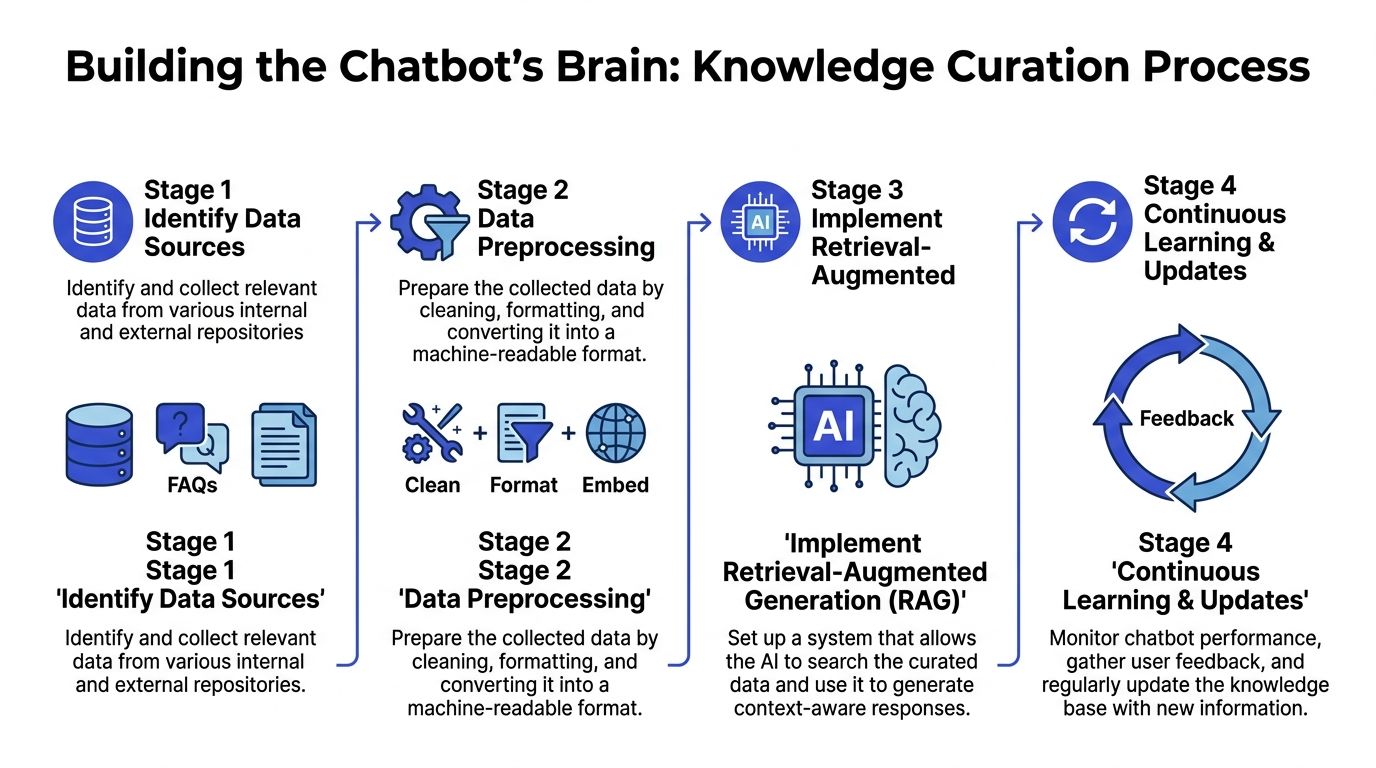
A chatbot does not get smarter because you fed it more files. It gets more dangerous. Some projects go off the rails when teams upload every policy, slide deck, and old help doc they can find, then hope the model sorts it out. In practice, that creates conflicting answers, stale guidance, and confident mistakes.
Build a library, not a dump folder
If you want grounded answers, give the bot a smaller set of approved material it can trust. For your business, that usually means current website pages, help center articles, policy documents, pricing rules, and internal notes your team already uses to answer customers correctly.
Historical transcripts can help too, but use them carefully. They are useful for spotting recurring questions and real customer language. They are a poor source of truth if agents gave inconsistent answers or worked around outdated policies.
Start with content that passes three tests:
Current: No expired offers, retired features, or old process steps
Consistent: One clear answer for each policy or business rule
Owned: Someone on your team is responsible for keeping it accurate
This is the part many first-time builds skip. They treat ingestion like setup work instead of editorial work. The result is a bot that sounds polished while pulling from messy inputs.
Pair trusted content with real customer phrasing
Approved answers are only half the job. Your bot also needs examples of how customers ask the question. A pricing page may say "plans and billing," while the customer says, "What will this cost my team?" Those should lead to the same answer.
For each core intent, collect a spread of real phrasing from support tickets, sales chats, emails, and call notes. Include short questions, vague requests, and incomplete messages. If you only train around polished FAQ wording, your bot will perform well in a demo and disappoint in production.
For a pricing intent, examples might include:
How much does it cost?
What is your monthly price?
Do you offer annual billing?
Can I get a quote for 20 users?
Which plan fits a small team?
That is one reason the "just upload a PDF" approach fails. PDFs may contain approved information, but they rarely reflect the language customers use when they are confused, in a hurry, or comparing options.
Clean, current source material beats a larger archive of mixed-quality documents.
If your content lives across web pages, docs, and exported notes, Markdown Converters' guide offers a practical way to structure and standardize material before import.
Choose a setup you can maintain
The right stack is the one your team can keep accurate after launch. Your bot should retrieve business-specific content before answering, let you update that content without rebuilding everything, and give you a way to review failures and correct gaps.
If answers depend on account status, order history, or subscription level, plan for customer data integration for chatbots early. Otherwise, the bot may give a technically correct answer that is wrong for that specific customer.
A practical setup for many SMBs uses a platform that can ingest website content, FAQs, pricing pages, and product documentation, while also supporting handoff and review workflows. Chatgrow is one example. The point is not the brand. The point is choosing a system your team can update without turning every content change into a mini implementation project.
Design Smart Conversations and Escalation Paths
A useful chatbot does not try to answer everything. It identifies the user's intent quickly, moves the conversation toward a clear outcome, and hands off at the right moment.
That is the practical side of Intent-First design. You are not writing a fake human script. You are building a decision system for your business.

A good chatbot guides instead of guessing
Start with the intents you defined earlier, then design the shortest path for each one. If someone wants pricing, help them narrow the question. If they want a demo, collect the minimum details your team needs to follow up. If they raise a billing dispute or ask about something account-specific, stop the bot from improvising and route the conversation to a person.
Many first chatbot projects go wrong because the team focuses on answers, but not on flow control. The result is a bot that sounds capable right up until the moment the conversation gets messy.
A useful lead-qualification flow often looks like this:
User signal | Bot action | Reason |
|---|---|---|
“I want a demo” | Ask for name, work email, and need | Capture routing info without over-questioning |
“Can you help me choose a plan?” | Ask one clarifying question | Narrow scope before recommending |
“This charge is wrong” | Escalate | Billing disputes are sensitive |
“I need to talk to a person” | Escalate immediately | Respect explicit preference |
Short flows win.
If your bot asks too many questions, users leave. If it asks too few, your team gets escalations with no context and has to start over.
Write down the handoff rules
In client audits, I often find escalation handled as an informal idea instead of an operating rule. The bot has a handoff button, but nobody has defined when it should trigger, what information it should collect first, or which conversations should never stay automated.
Put those rules in writing before launch.
Good escalation triggers usually include:
Direct human requests: “Agent,” “representative,” or “someone from your team.”
Sensitive topics: Billing disputes, legal issues, cancellations with retention risk, account-specific complaints.
Repeated confusion: The bot fails to resolve the issue after multiple attempts.
Low-confidence situations: The wording is unclear or conflicts with available customer data.
Strong negative sentiment: The customer is frustrated and the risk of making things worse is high.
A chatbot builds trust by knowing when to stop.
You will make better handoff decisions if you map the conversation across the wider customer experience, not just the chat window. Teams working through that exercise often benefit from dynamic user journey maps because they show where automation helps and where a human should step in.
Keep escalation useful for your team
A weak escalation tells the customer to contact support. A useful escalation passes context to the right person.
When the bot hands off, it should send a short summary with:
What the customer wants
What the bot already asked or attempted
Any details the customer already shared
Why the conversation was escalated
That summary saves time for your team and lowers friction for the customer. Nobody wants to repeat their issue after already explaining it once.
This is also the point where overdesigned chatbot personalities cause problems. Long greetings, filler lines, and forced jokes slow down resolution. For most small businesses, a bot should sound clear, calm, and competent. Personality is fine, but only after the system can recognize intent, recover from confusion, and hand off cleanly.
Test, Deploy, and Survive Your First 30 Days
Most chatbot launches fail to meet expectations. The bot goes live, basic questions work, and the team assumes the system is ready. Then customers start asking in shorthand, with typos, weird phrasing, missing context, or impatience. That's when the true test begins.
The safest way to launch is to attack your own bot before customers do.
Break it before customers do
A lot of teams test with polished, expected questions. Real users don't talk that way. Good pre-launch testing includes weird phrasing, slang, typos, and incomplete requests because those are the inputs that expose weak intent handling and poor fallback behavior. That “break-it” strategy is often missing from beginner guides, even though it's critical for graceful degradation in real use (Spur).
Try prompts like these during testing:
Messy phrasing: “need price for team asap”
Typos: “do u have retrun policy”
Ambiguity: “can you do that for us?”
Context carryover: “when will it arrive?” after an earlier order discussion
Frustrated tone: “this doesn't answer my question”
You're looking for three things:
Recognition failures: The bot misses the intent.
Answer failures: The bot identifies the topic but answers weakly.
Recovery failures: The bot gets confused and doesn't recover cleanly.
Launch small on purpose
After internal testing, don't expose the bot to everyone at once. A phased pilot is safer. One practical rollout pattern is routing only 5% to 10% of website traffic to the chatbot first so your team can watch fallback patterns and escalation behavior before scaling (SupportGPT).
That limited launch gives you room to patch glaring holes, especially the conversations where the bot effectively says it doesn't know.
Another architecture guide adds useful deployment safeguards for more mature setups, including shadow testing new models for 48 hours, setting circuit breakers at a 5% error rate, and precomputing answers for the 100 most common queries to keep latency under 2 seconds (Sitebot). Small businesses won't always implement every safeguard on day one, but the principle holds. Roll out cautiously, compare behavior, and protect the customer experience.
Treat the first month like a repair window
The first month after launch is not a celebration phase. It's a tuning phase.
Review transcripts constantly and tag issues by category:
Failure type | What to do |
|---|---|
Bot didn't understand the question | Add new training examples for that intent |
Bot answered with outdated info | Fix the source document |
Bot should have escalated sooner | Tighten the escalation rule |
Bot asked too many questions | Simplify the flow |
Bot missed follow-up context | Improve memory or session handling |
A production approach also includes a review rhythm. Teams are advised to review low-confidence responses weekly and analyze conversation trends monthly, with the first 2 to 3 months focused heavily on fallbacks and filling common gaps from the pilot phase. In mature deployments, that work has been associated with lower human escalation rates, by up to 40% according to the cited industry overview (EBM).
If you want to know how to build a chatbot that survives contact with real users, this is the answer. Launch smaller than you want, inspect more than you think you need to, and fix failures while the audience is still limited.
Measure What Matters and Optimize for Growth
A chatbot earns its keep by reducing workload, capturing better leads, or increasing completed customer actions. If you cannot tie performance to one of those outcomes, you are tracking noise.
That matters because the "just upload a PDF" approach usually fails here first. A bot may answer plenty of questions and still miss the intents that drive revenue or save your team time. Intent-first design gives you a cleaner way to measure success. You can judge each core intent by whether it reached the right result.
Track business outcomes by intent
Use a short scorecard your team can review in a few minutes.
For most small businesses, these are the metrics worth watching:
Containment rate: Did the bot finish the job without a human stepping in?
Qualification rate: Did it collect the information your sales or support team needs?
Intent completion rate: Did users who came in with a clear goal reach the right endpoint?
CSAT or conversation rating: Did the interaction feel useful from the customer's side?
Escalation quality: When the bot handed off, did your staff receive the transcript, customer details, and stated intent?
Intent completion rate deserves special attention. If your bot handles appointment booking, quote requests, return questions, and basic product comparisons, measure those flows separately. A blended average can hide a weak spot that frustrates customers every day.
Run a weekly review that leads to changes
Review sessions should produce decisions, not observations.
Set a weekly cadence and answer four practical questions:
Which intents are failing most often?
Which replies are technically correct but still causing drop-off?
Which handoffs should happen earlier?
Which repeated questions deserve a new intent, a better answer, or a hard rule?
This is also where the Break-It-First mindset keeps paying off. Do not just review successful conversations. Pull the ugly ones. Look at vague questions, mixed-intent requests, emotional complaints, and edge cases your team did not expect. Those failures show you where your chatbot is costing trust.
A clean reporting setup helps. A dashboard that groups fallbacks, completions, abandoned chats, and handoffs by intent is more useful than scrolling through hundreds of raw transcripts. If you want a practical framework, this guide to chatbot analytics and optimization covers the reporting views that make review faster.
Optimize one bottleneck at a time
Do not rewrite the whole bot every week.
Pick one issue with clear business impact. Improve the answer, tighten the routing rule, add missing examples, or change the escalation threshold. Then watch what happens over the next review cycle. This keeps your team focused and makes it easier to see which changes helped.
That is how chatbot programs improve in practice. Small fixes, tied to specific intents, repeated consistently.
If you want a practical way to put this into action, Chatgrow gives you a way to train a business-specific support or lead-qualification agent on your website, pricing pages, FAQs, and product content, define escalation behavior, deploy it on high-intent pages, and improve it over time with reporting and retraining.
Related Posts
Continue Reading
More articles from the ChatGrow Team.