Blog
How to Train a Chatbot for Real Business Results
By
Nelson Uzenabor

Monday morning starts with the same problem it did last week. A 12-person DTC skincare brand is handling 400 weekly chats, agents are re-answering the same shipping question 90 times, and three promising leads disappear because nobody responds within eight minutes. The team doesn't need another generic FAQ widget. It needs a support agent that answers the right questions, qualifies useful prospects, and knows when to involve a person.
That's what how to train a chatbot should mean in practice. Training isn't a one-time upload followed by a launch announcement. It's a continuous loop of scoping, knowledge curation, prompt design, evaluation, deployment, monitoring, and retraining. Modern chatbot training often depends on large-scale instruction data rather than raw conversation logs alone. A survey of LLM datasets describes chatbot-oriented corpora ranging from roughly 700,000 instruction-conversation pieces to more than 3,000,000 training samples and over 139 million post-response pairs in one split, illustrating why broad coverage of intents, tones, and phrasing matters (dataset survey).
You'll learn how to define intents, assemble a clean business knowledge base, write grounded prompts, test unseen conversations, create lead-qualification handoffs, and use deflection, lead quality, and answer accuracy to decide what changes next. If you want broader product context before building, this founder guide to chatbot deployment is a useful companion, particularly for thinking through ownership, integrations, and launch decisions.
Table of Contents
What Training a Chatbot Actually Means in 2026
A trained chatbot has three separate capabilities. It must recognize what a visitor is trying to do, retrieve the correct business information, and respond within policy and brand voice. A bot that sounds natural but cites an old return rule isn't trained well. Neither is a bot that answers shipping questions accurately but sends every qualified lead into a dead-end form.
The training loop behind useful answers
Start by defining the business outcome. For support, that might mean resolving common questions without human intervention. For sales, it might mean collecting only the details a representative needs for a relevant follow-up. For both, the bot needs a safe route to escalation.
A practical loop looks like this:
Scope the job: State the agent's purpose in one sentence and name its boundaries.
Collect knowledge: Bring in approved pages, policies, FAQs, product details, and representative conversations.
Map intents: Group real user messages by the job they're trying to complete.
Write instructions: Define source rules, tone, refusal behavior, clarification questions, and handoff triggers.
Test and release: Compare responses against unseen examples before exposing the bot to real traffic.
Review and retrain: Tag failures, update the right layer, and compare the new version with the previous one.
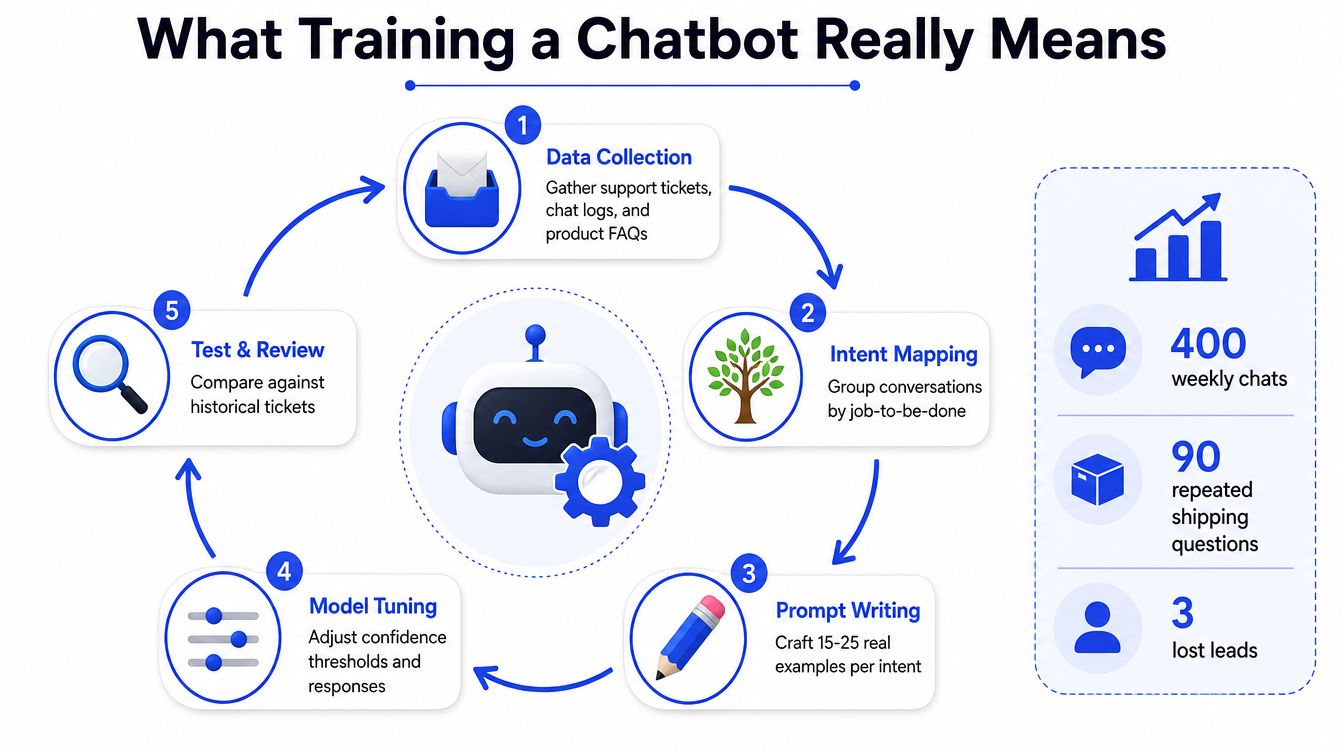
The important distinction is between training data and operating data. Your product documentation teaches the bot what is true. Conversation reviews show where customers are confused, where retrieval fails, and where the business has undocumented rules. Don't dump every transcript into the knowledge base. Curate the source material, label the failure, and make one controlled change at a time.
Practical rule: Optimize for a correct resolution or a clean escalation, not for a longer conversation.
Planning the Agent and Gathering the Right Knowledge
Begin with a sentence that a new teammate could understand. “Qualify inbound leads and answer shipping questions for an ecommerce business” is workable. “Help customers with everything” isn't a scope. It creates ambiguous routing, weak fallback behavior, and pressure for the bot to improvise.
Write the boundary before collecting documents. List the questions the agent must answer, then list the questions it must refuse or transfer. For a support agent, that might include order status, delivery windows, returns, product compatibility, and account access. For a sales agent, it might include pricing, fit, implementation, availability, and demo requests. Mark high-risk topics, including legal disputes, urgent safety concerns, sensitive account actions, and exceptions that require human approval.
Build a source hierarchy
Collect material from the places your team already trusts:
Public product pages: Use current descriptions, specifications, availability language, and compatibility details.
Pricing and checkout pages: Resolve contradictions before the bot sees them. A promotional landing page shouldn't override the active purchase flow.
Support transcripts: Pull recurring questions, misunderstood terms, failed handoffs, and customer wording.
Policies and FAQs: Include returns, cancellations, shipping, privacy, warranties, and service limits.
Internal runbooks: Add escalation rules and operational instructions that customers won't find on the website.
Clean the material aggressively. Remove expired promotions, duplicate versions, contradictory statements, and irrelevant internal commentary. Strip personal information from transcripts, and keep only the conversational context needed to teach intent or response behavior. Guidance on quality compliance for ML datasets is useful here because data quality involves more than volume. Provenance, consistency, privacy, and reviewability all affect whether a model can use the material safely.
A knowledge base should be traceable, not mysterious. The Chatgrow knowledge base guide provides relevant context for organizing the information an agent retrieves. In Chatgrow, map each uploaded document or source URL to a knowledge tag. When an answer goes wrong, you should be able to identify the source behind it, check whether that source changed, and update the responsible owner instead of blindly retraining everything.
Designing Intents, Prompts, and Brand Voice
Intent design is where vague business goals become usable chatbot behavior. Group messages by the customer's job, not by the words they happen to use. “Where's my package?”, “Can you track my order?”, and “My delivery hasn't arrived” may belong to order_status, while “Can I get my money back?” belongs to refund_request.
Use the actual language in your transcripts. For each important intent, collect 15 to 25 real examples from customer conversations, as specified in the training workflow. Textbook examples are usually too neat. Customers omit context, use shorthand, change topics mid-message, and describe the symptom rather than the underlying request.

Give every intent a controlled response path
Each intent prompt should specify four things:
Role: What the agent is responsible for.
Sources: Which approved knowledge it can use.
Response behavior: Tone, length, formatting, and required details.
Failure path: What it must ask, refuse, or escalate when information is missing.
A strong instruction might tell the bot to answer only from retrieved business sources, cite the relevant source paragraph internally or visibly according to your setup, ask a clarifying question when intent confidence is low, and escalate when the request involves an exception. Don't instruct it to “be helpful” without defining what helpful means. That wording often produces confident guesses.
Make the voice observable
Give the agent a short persona description, three examples of what it should say, and three examples of what it shouldn't say. “Friendly” needs boundaries. A legal-services brand may want warmth without slang. A skincare company may want plain explanations without promising a result the product documentation doesn't support.
Test the prompt against awkward inputs, not just clean FAQs. Include partial questions, spelling errors, competing intents, requests for unavailable discounts, and out-of-scope topics. This video can help teams visualize intent and response design before they build the full flow:
Keep the system prompt versioned in Chatgrow so each test run has a known configuration. If you're deciding between prompt changes, retrieval improvements, and custom model training options for startups, start with the least invasive change that fixes the observed failure. Fine-tuning won't repair an outdated pricing page, and a larger prompt won't solve missing source content.
Training Cycles, Testing, and Evaluation Signals
Treat each release as an experiment. Fix the input set, define pass criteria, and separate approved source content from labeled intent examples. Maintain distinct training, validation, and regression sets. Reusing training conversations for evaluation rewards memorization rather than generalization. Evaluation guidance notes that apparent accuracy can reach 100% on memorized training data, so an unseen test set is necessary. For limited datasets, use 5-fold or 10-fold cross-validation to validate reliability instead of relying on small samples (evaluation notes).
Keep test conversations close to real customer language. Add spelling errors, incomplete requests, competing intents, edge cases, and previously failed interactions to the regression set. This makes each retraining cycle answer a practical question: did the bot improve deflection rate, lead quality, or answer accuracy without creating new failures?
Test three layers separately
Retrieval testing checks whether the system found the correct source. A missing or incorrect source cannot be fixed by rewriting the final answer.
Intent testing checks routing. Track intent accuracy and slot accuracy when a flow requires details such as an order number, product name, location, or timeline.
Response testing checks whether the answer is correct, grounded, complete, safe, and useful. Dialogue evaluation research covers task success, average reward, turn count, intent accuracy, slot accuracy, and automated measures including BLEU, ROUGE, METEOR, and embedding similarity (dialogue evaluation review). Use these measures as signals, not replacements for human review.
Use an evaluation prompt such as:
Given this verified business context and conversation, select the correct intent, cite the source, answer within policy, and escalate when information is missing or the request is high risk.
Set release gates for critical intents, prohibited answers, and handoff scenarios. Base thresholds on risk tolerance and the existing baseline, not on a universal benchmark. Review false positives, unsupported claims, confidence gaps, and conversations requiring human correction. Chatbot analytics helps organize these findings into a repeatable review process, so each cycle connects observed failures to measurable changes in bot performance.
Deployment, Lead Qualification, and Smart Escalation
A bot shouldn't arrive everywhere at once. Start with low-risk questions, keep the human fallback visible, and watch real conversations before expanding its scope. The widget should help customers find answers without hiding contact details, disrupting navigation, or creating an inaccessible interface.
Lead qualification needs its own design. Decide which fields change the next sales action, then remove everything else. Depending on the business, useful fields may include company size, purchase timeline, budget range, location, and the problem the visitor is solving. The bot shouldn't conduct an intake interview just because a form has more fields.
Route by intent and context
Routing rules need more than keywords. A visitor asking, “Can you lower the price?” might be a price objection, a qualification opportunity, or a request for an unavailable promotion. Repeated requests for a discontinued product need a different response from a high-intent buyer comparing active plans.
Use one-question-at-a-time qualification:
Ask one question at a time, acknowledge the answer, then request the next missing field. Never imply that a meeting is confirmed until the scheduling link is submitted.
The agent should preserve answers already given. Asking for the same company size twice makes the bot look disconnected and increases abandonment. After qualification, pass a concise summary to the team, including identity, stated need, captured answers, sentiment, and previous attempts to resolve the issue.
Escalate by risk and frustration
Escalation isn't failure. It's a product behavior that protects the customer and the business. Transfer immediately for urgent safety issues, legal disputes, refunds above the business's approval limit, sensitive account concerns, or repeated bot failure. If a user asks for a person, the bot should acknowledge that request rather than continuing to defend its own answer.
Before opening the widget to traffic, test the live flow with the team inbox, CRM fields, notifications, consent language, and scheduling process. A technically correct answer still fails operationally if the handoff disappears in an unmonitored inbox or the sales representative receives no usable context.
Monitoring, Continuous Retraining, and Common Failure Patterns
The first weeks after launch reveal gaps in the business as much as gaps in the model. Customers ask about undocumented exceptions, use internal product names, combine support and sales questions, and expose contradictions between pages that different teams maintain.
Review conversations in batches. Tag each failure by cause, then fix the correct layer:
Missing knowledge: Add or revise an approved source.
Wrong intent: Adjust the intent boundary and add real examples.
Poor retrieval: Improve tags, source structure, or document relevance.
Conflicting policy: Assign one authoritative rule and retire the other.
Weak instruction: Rewrite the system prompt or refusal path.
Bad handoff: Change the trigger, summary fields, or routing destination.
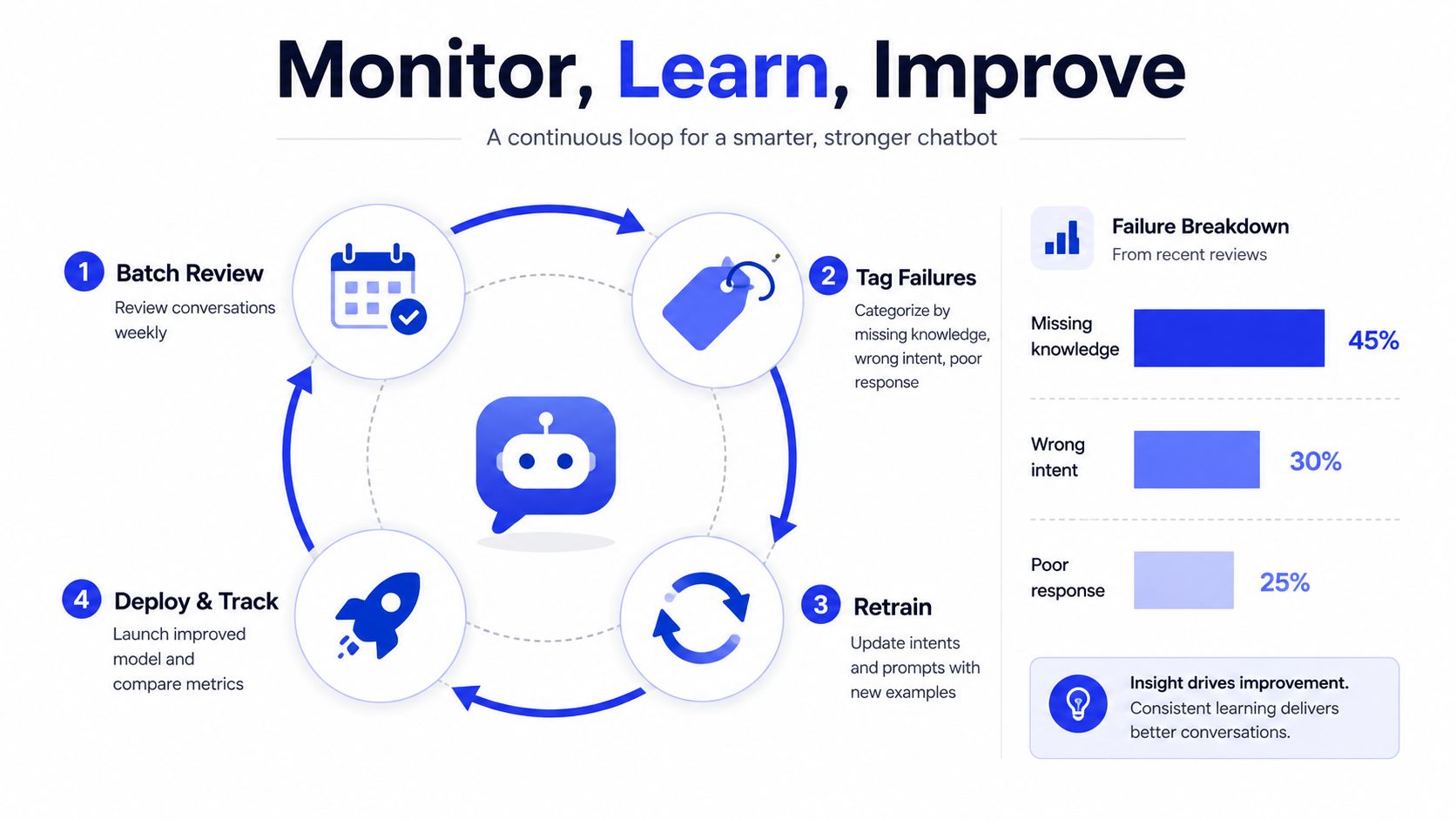
Don't retrain after every awkward sentence. First determine whether the issue is a one-off wording problem, a knowledge gap, or a repeated pattern that deserves a new intent and regression examples. Common failure patterns include quoting an old policy, inventing a feature, sounding too sales-focused, asking for information already provided, and continuing after a customer requests a human.
Make review part of operations
A weekly ritual should examine unanswered questions, escalation rate, lead quality, customer feedback, and newly approved source material. Keep resolved failures with their labels, assign an owner to each change, and compare the new version against the previous one. A chatbot monitoring workflow is useful when review needs to move from occasional troubleshooting to accountable operations.
Use a review prompt like this:
Classify the final response as correct, incomplete, unsafe, or misrouted. Identify the missing fact, conflicting rule, or failed handoff condition, and suggest one test case for the next release.
Schedule a regular retraining cycle, while applying urgent corrections immediately when pricing, policy, or legal information changes. One 2026 guide recommends tying chatbot training to documentation updates, auditing at least every 30 days, and reviewing low-confidence or escalated conversations weekly (maintenance guidance). The cadence matters less than ownership. Someone must be responsible for approving sources, changing prompts, running regression tests, and signing off the release.
A 30-Day Rollout Checklist and the Metrics That Matter
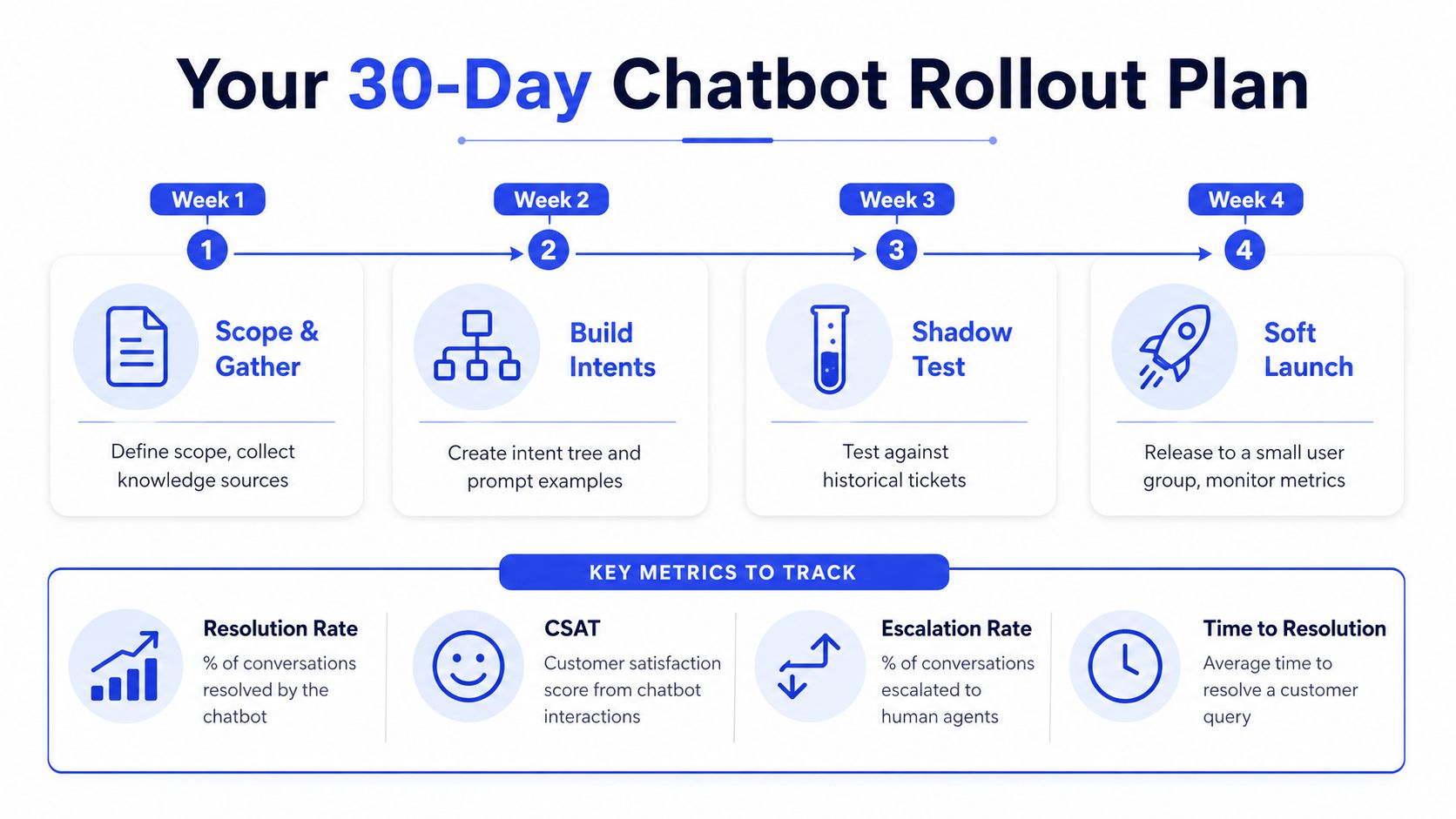
A workable rollout connects each build activity to a decision signal. Use the first week to define scope and gather approved sources. Watch unanswered questions and source conflicts. In the second week, build the intent tree, add real examples, and check whether routing matches the conversations your team receives.
During the third week, shadow-test against historical tickets and unseen examples. Review retrieval, intent routing, answer accuracy, prohibited responses, and escalation behavior. In the fourth week, soft-launch to a limited audience with a visible human fallback, then compare deflection, lead quality, and customer feedback with the previous support workflow.
Keep the dashboard tied to outcomes
Track four operating measures:
Answer accuracy: Spot-check factual answers against approved sources and label them correct, incomplete, unsafe, or unsupported.
Deflection rate: Count conversations resolved without human involvement, while excluding conversations that should have escalated.
Lead qualification rate: Measure whether contacts handed to sales meet the agreed qualification standard and progress into the next sales action.
CSAT after chat: Review satisfaction alongside the transcript, because a fast answer can still be unhelpful or poorly routed.
There isn't one universal retraining threshold. Trigger a review when accuracy falls on a critical intent, unsupported answers appear, escalation increases without a clear business reason, qualified leads decline, or CSAT drops against your established baseline. Store the metric definition with the dashboard so the team doesn't change what “resolved” means.
A weekly review can stay simple: top failed intents, source changes, unsafe or unsupported answers, escalation reasons, qualified leads, CSAT comments, and the next approved test cases. Keep those views together in Chatgrow's reporting workspace where the team can review conversations, qualification outcomes, escalations, and support performance without treating launch as the finish line.
Chatgrow lets you train an agent on your website, pricing pages, FAQs, and product content, then configure lead qualification and human escalation around the workflows your team already uses. Visit Chatgrow, build a focused first agent, and use the resulting conversations to start a measured retraining loop rather than guessing what to improve.
Related Posts
Continue Reading
More articles from the ChatGrow Team.


