
Blog
No Code Automation: A Practical Guide for SMBs and Agencies
By
Nelson Uzenabor

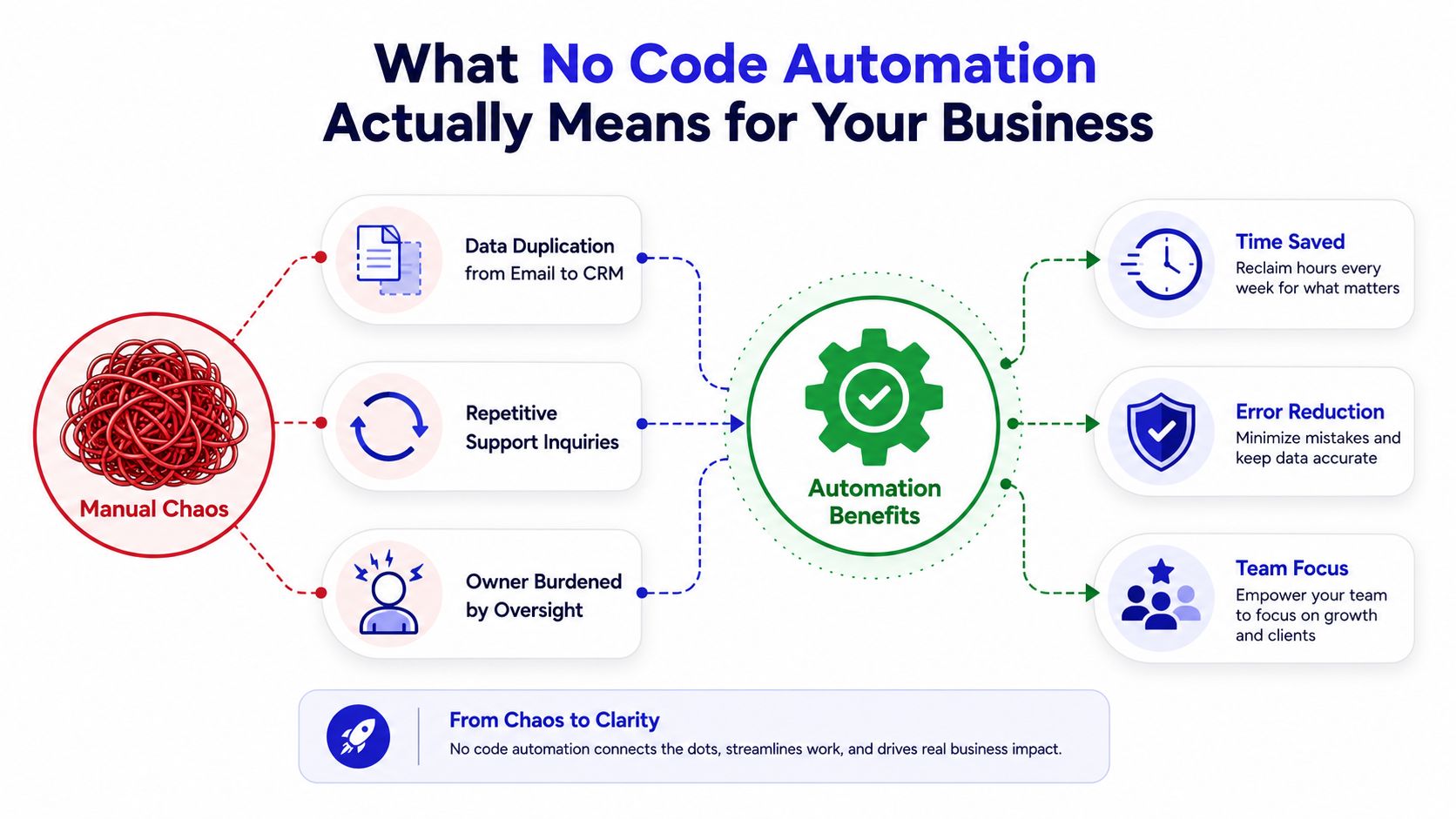
Monday morning at a 12-person agency rarely starts with strategy. Account managers copy lead details from email into a CRM, a support rep answers another “where's my order?” message, and the owner reconciles Shopify payouts by hand. Nobody chose those tasks, but they still consume the attention that should go toward selling, serving, and improving the business.
No-code automation gives a non-developer a visual way to connect business events, rules, and actions without writing traditional scripts. The category grew from earlier visual programming and fourth-generation language concepts into mainstream cloud tools that business users can operate themselves, as IBM's overview of no-code development explains. The important shift isn't that software can automate work. It's that the person closest to a broken process can now redesign it.
The practical payoff isn't “saving time” in the abstract. It's moving repetitive work away from revenue-producing people and creating dependable handoffs. A small team can use the approach to ship a support deflector, a lead qualifier, and an order follow-up loop, then measure whether those workflows improve customer response, sales focus, and recovered purchases.
Table of Contents
What No Code Automation Means for Your Business
A form submission arrives, a customer asks about an order, or a payment needs follow-up. No-code automation turns that event into a defined sequence: identify what starts the process, apply the relevant rule, then complete the next action. The workflow can create a CRM record, notify a salesperson, update a customer, or send the case to a person.
This differs from a single feature inside an off-the-shelf SaaS product. Shopify's shipping notification is built in. A workflow that watches Shopify, checks support history, updates the CRM, and routes an exception to a team inbox is composable. You control the process design while the connected tools supply the data and actions.
The revenue impact depends on that design. A support workflow can reduce repetitive questions through customer service automation. A lead workflow can qualify inquiries before sales follow up. An order workflow can recover attention after checkout. Track those outcomes, not automation volume.
No-code automation also differs from classic robotic process automation, or RPA. RPA imitates a person's actions across screens and legacy interfaces. No-code workflows usually connect applications through events, APIs, webhooks, and structured data. They are easier to adjust when a process changes, while screen-based bots can depend on a page layout or desktop session.
Start with the process, not the platform
Before opening Zapier, Make, n8n, or another builder, document the manual sequence:
Trigger: What event starts the work?
Decision: Which conditions change the route?
Action: What should the team or customer receive?
Exception: When must a human take over?
Record: Where should the result be stored?
A practical guide to how no-code automation works explains this trigger, logic, and action model. Add an owner, an error alert, and a review point before publishing the workflow. Those controls prevent silent failures as more staff build automations.
Start with one stable, repetitive process. Do not automate “support” or “sales” as broad categories. On Monday morning, choose a narrow outcome, such as answering order-status questions from approved information or routing qualified form submissions to the right owner. Then measure response load, qualified leads, or recovered purchases.
How No Code Automation Became a Mainstream Stack
A small agency can now route a qualified lead, flag an urgent support request, or recover an abandoned checkout without waiting for a developer. That shift did not come from one breakthrough tool. It came from visual programming, fourth-generation languages, and hobbyist services that connected simple personal tasks, followed by cloud computing, drag-and-drop builders, and pre-built components. By the late 2000s and early 2010s, businesses could assemble workflows with less custom code.

The buyer changed with the technology. Early tools mainly reduced coding effort for developers. Current platforms let operations, marketing, support, and sales teams build directly. That access can improve support deflection, lead qualification, and checkout recovery, provided the workflow has an owner and a defined failure path.
According to Worldmetrics adoption and market data, 72% of enterprises had adopted no-code or low-code tools by 2023, up from 45% in 2020, a 27-point increase. The combined market reached about $13.2 billion in 2023, up from $8.9 billion in 2020, with projections of $18.4 billion in 2024 and $52.0 billion by 2026. Treat these figures as directional market evidence, not a substitute for evaluating your own workflow economics.
Gartner's forecast projected that 70% of new applications would be built with low-code or no-code technologies by 2025, up from less than 25% in 2020 (IBM's discussion of the forecast). A forecast does not prove that every company reached that level of maturity. It does explain why visual workflow building now belongs in operating-stack decisions, alongside support systems, sales tools, and checkout infrastructure.
The modern stack has three layers
Visual builders, such as Zapier, Make, and n8n, connect systems and express workflow logic.
Data sources, including CRMs, help desks, forms, ecommerce platforms, inboxes, and internal databases, provide business context.
AI reasoning classifies intent, extracts information, drafts content, or recommends a route.
Visual builders create speed, data sources supply context, and AI handles ambiguity. The trade-off is operational: teams can add these layers faster than they document permissions, ownership, testing, and failure handling. Set those controls before automation spreads across departments. On Monday morning, assign one owner to each revenue-facing workflow and require an alert when it stops, misroutes a lead, or sends an unapproved customer response.
The Three Building Blocks of Every No Code Automation
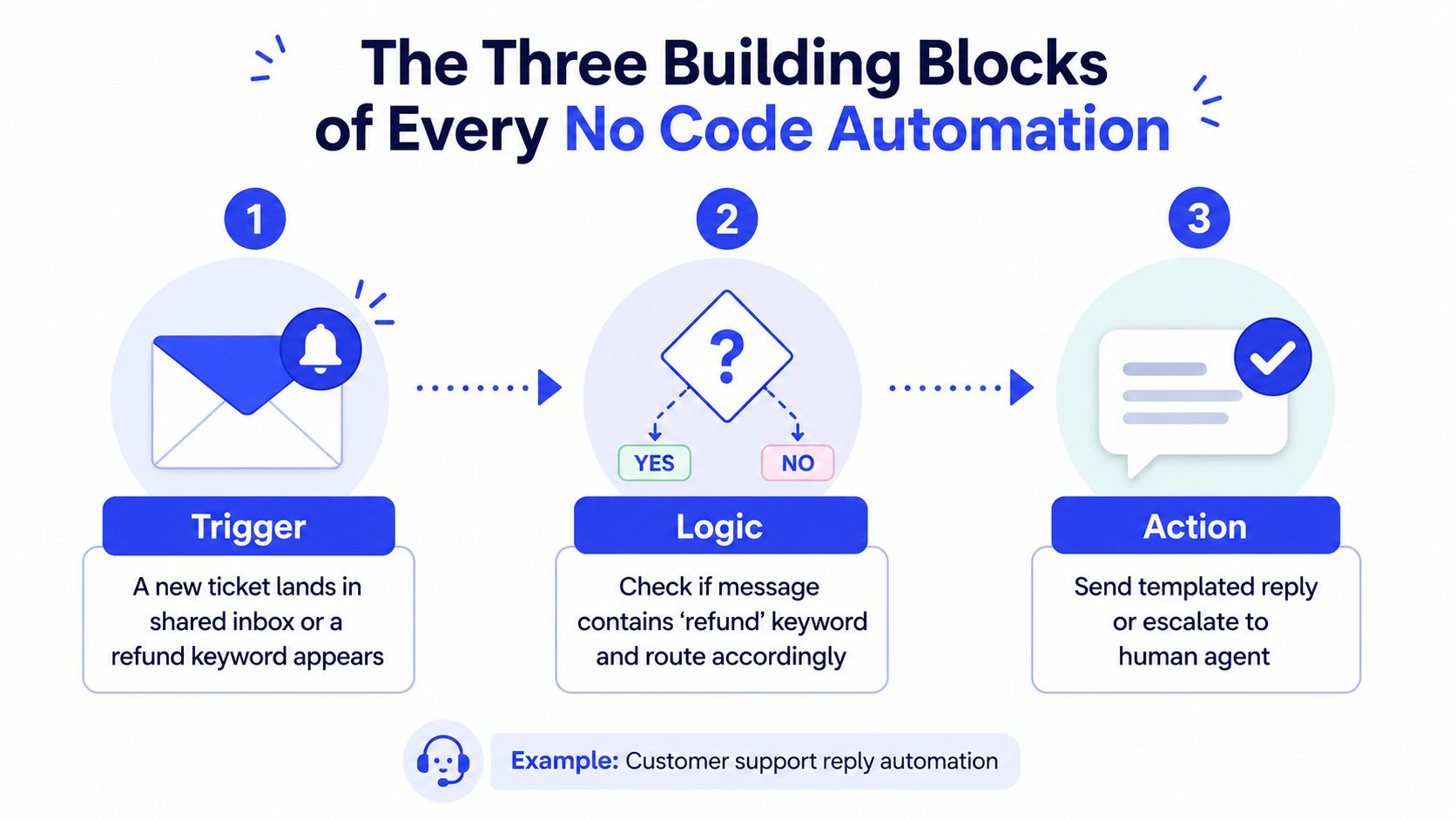
Every workflow can be reduced to trigger, logic, and action. If a builder can't make those elements visible, you'll struggle to explain the automation to the next person who has to maintain it.
Trigger
The trigger is the event that starts execution. For a support workflow, it might be a new message in a shared inbox, a ticket created in a help desk, or a chat message containing a refund-related term. The trigger should be specific enough to avoid unnecessary runs and reliable enough to capture every relevant event.
Check the trigger's timing and payload before building anything else. Does it run immediately or on a schedule? Does it include the customer's email, order number, account identifier, and message text? If the trigger omits a field the next step needs, the workflow will either fail or make a risky guess.
Logic
Logic turns raw input into a decision. Basic logic uses filters and branches. A support workflow might separate billing issues from technical problems, detect an urgent complaint, check whether an order is still in transit, or route a refund request to finance.
AI can handle less structured input by classifying intent, drafting a response, or scoring sentiment. It shouldn't receive unlimited authority just because it can produce an answer. Define the allowed sources, the confidence rule, the maximum number of attempts, and the conditions that require human review.
Action
The action changes the business state. It can send an approved reply, add context to the CRM, create a task, post a notification, or escalate the conversation. A useful n8n social media automation node example shows how visual nodes can represent individual operations inside a larger workflow. For customer conversations, a no-code chatbot builder can sit at the front of the process, provided the escalation path is monitored.
Practical rule: Every automated action needs a visible owner, an error path, and a record of what happened.
Silent failures usually appear at the boundaries. An authorization token may expire. A field name may change. An AI step may return an unexpected format, create a loop, or send a confident answer without enough context. Design the three blocks separately, test each handoff, and reuse the same lens for support, lead qualification, and order follow-up.
High Value Workflows You Can Launch This Quarter
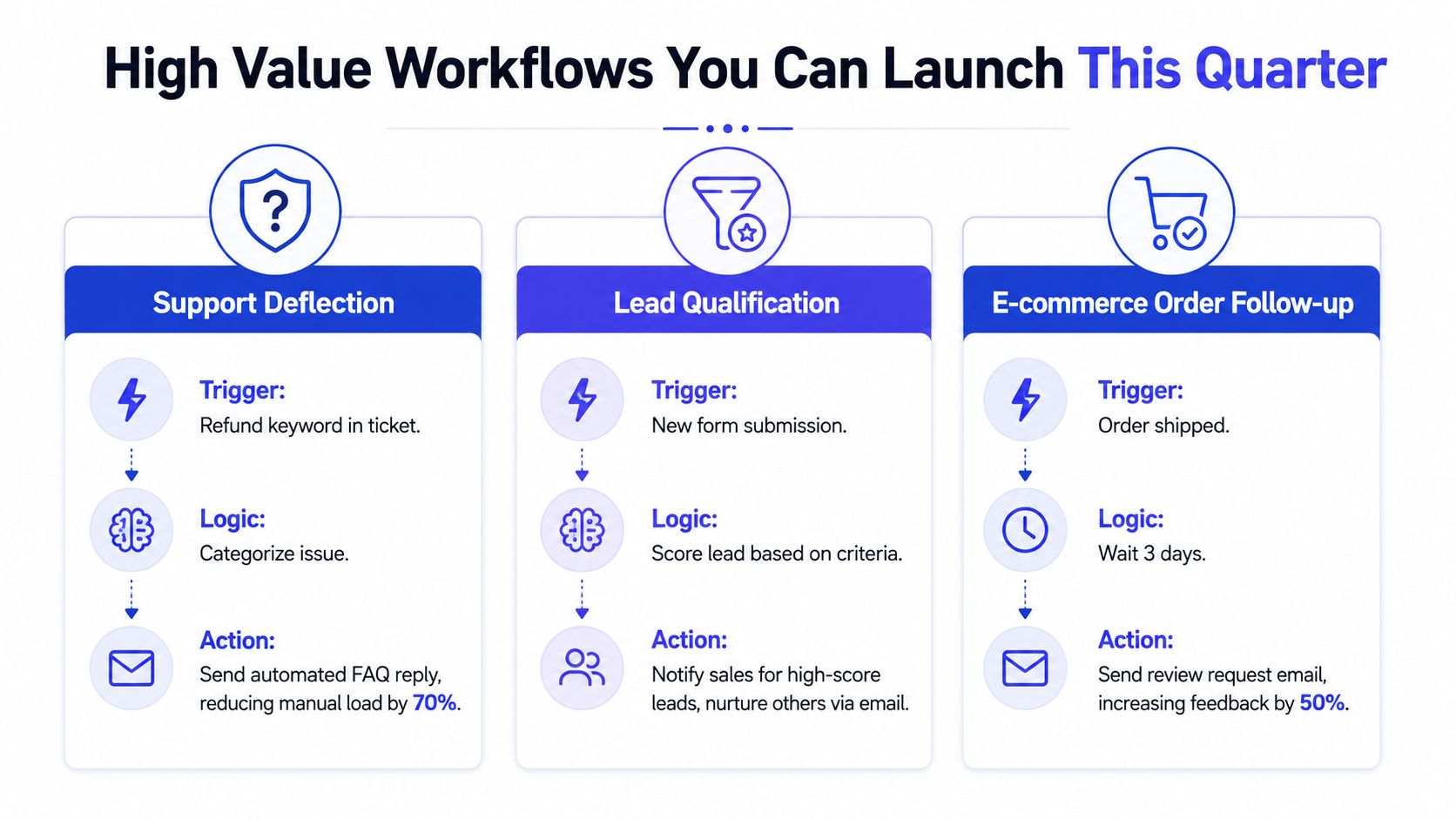
The strongest first automations connect directly to money or customer experience. They don't merely move data between apps. They decide who gets attention, what a customer hears, and which purchase opportunities receive follow-up.
Support deflection
A support rep receives a ticket asking about delivery status or a refund. The workflow identifies the intent, retrieves approved order or account context, and prepares a response using the business's documented policy. Straightforward requests can receive an automated answer. Ambiguous cases, angry customers, missing order details, or policy exceptions should move to a human with a concise summary.
The critical design choice is not the chatbot interface. It's the handoff rule. Define which questions the system can answer, what information it may use, and what it must never promise. Log the original question, the source used, the response, and the escalation reason so the team can improve the knowledge base instead of guessing.
Lead qualification
A prospect submits a form. Rather than sending every submission to the same sales queue, the workflow checks the fields that matter to your ideal customer profile, enriches the record when appropriate, and routes the result. A high-fit lead can alert the right account executive and create a follow-up task. A poor-fit or early-stage lead can enter a nurture sequence without occupying a seller's immediate attention.
Use explicit branches for missing information. If the company size is blank, don't automatically assign a low score. Send the record to a review queue or ask the prospect for the missing detail. Teams building nurture programs can use this lead nurturing automation guidance to connect qualification with a longer follow-up sequence.
E-commerce order follow-up
An order workflow starts when a purchase is created, shipped, delivered, refunded, or left incomplete. Each event deserves its own condition. An abandoned checkout can trigger a reminder, but a completed order must be removed from that sequence. A shipping update should include the correct order reference. A review request should wait until the customer has had a reasonable opportunity to receive the product.
Refunds create the edge cases that expose weak designs. Exclude refunded orders from promotional follow-ups, suppress duplicate messages, and route delivery complaints to support rather than asking for a review. Keep a durable order identifier across Shopify, the email platform, and the support system so the workflow can recognize the same customer journey.
The controlled n8n study linked to workflow automation execution results reported 20 manual executions averaging 185.35 seconds and 25 automated executions averaging 1.23 seconds, implying about a 151-times reduction in execution time. It also recorded a 5% manual error rate compared with zero observed errors in the automated path. That result applies to a stable, repeatable workflow under controlled conditions, not to every business process. It does support a practical conclusion: automate predictable sequences first, then add judgment and exceptions carefully.
Choosing the Right Approach for SMBs and Agencies
Tool selection should follow operational reality, not a feature checklist. Ask who can own the workflow, how much variation the process contains, how sensitive the data is, and whether the automation is internal or part of a client deliverable.
Approach | Best Fit | Monthly Cost Band | Time to First Workflow | Maintenance Owner | Key Risk |
|---|---|---|---|---|---|
DIY no-code builder | A small team with one capable operations generalist and common app connections | Varies by vendor and usage | Short | Internal builder | Vendor lock-in and neglected maintenance |
Embedded AI agent | A high-volume support or qualification process that benefits from managed intelligence | Varies by provider and usage | Short to moderate | Internal owner plus provider | Incorrect answers, access mistakes, and unclear escalation |
Agency-built system | Multi-tool workflows, custom data models, or automations sold as a managed service | Custom | Moderate to long | Agency, with client participation | Dependency on the agency and difficult handover |
DIY builders
Choose a DIY builder when one person understands the process from beginning to end and can review it regularly. Zapier fits straightforward connections across common applications. Make is more suitable when the workflow needs branches and data transformations. n8n is attractive when a technical operator wants more control, self-hosting options, or the ability to extend workflows.
The hidden cost is ownership. A workflow that takes an afternoon to build can still require future testing, connector updates, permission reviews, and exception handling. If nobody has that responsibility, DIY is the wrong path.
Embedded AI agents
An embedded agent makes sense when one customer-facing process dominates attention. Support questions, lead qualification, and website guidance are reasonable candidates because the agent can use approved content and escalate conversations that need a person. This approach reduces builder work, but it doesn't remove the need for knowledge-base maintenance, review samples, and clear boundaries.
Agency-built systems
Use an agency when the process spans several systems, requires custom data structures, or will be delivered to multiple clients. Agencies can standardize templates and provide ongoing support, but document every workflow so the client isn't trapped by an undocumented implementation. Agree on access, ownership, change requests, and exit procedures before launch.
Start with the least complex option that can meet the operational requirement. Upgrade only when the process proves it needs more control.
A 30 60 90 Day Rollout Roadmap
No-code programs fail when teams automate a large, unstable process before they understand it. A phased rollout keeps the first experiment small and makes the evidence useful.
Days 1 to 30
Pick one workflow with a clear owner and a frequent, repeatable trigger. Document the current steps, systems, exceptions, and baseline measures. A support team might record tickets resolved without human involvement. A sales team might count qualified leads reaching a meeting. An ecommerce team might capture abandoned-cart and follow-up conversions.
Build in a sandbox or with test records. Include duplicate submissions, missing fields, refunds, invalid email addresses, expired credentials, and deliberate escalation cases. The owner for this phase is the process lead, not necessarily the most technical person.
Days 31 to 60
Release the pilot to a controlled slice of real traffic. Assign one person to review execution logs, collect edge cases, and approve changes. Tune routing rules and AI confidence thresholds based on actual failures, not assumptions.
Track:
Support deflection: Conversations resolved without human intervention.
Qualified leads per week: Records that meet your agreed qualification rules.
Recovered revenue: Purchases attributed to abandoned-cart or post-purchase follow-up.
Pause the rollout if customers receive incorrect information, records duplicate, or exceptions disappear into an unmonitored queue. Expand only when the workflow behaves consistently and the owner can explain its decisions.
Days 61 to 90
Add a second workflow only after the first has a documented owner, access controls, error handling, and review history. Create an automation registry with the workflow name, purpose, connected systems, data touched, owner, escalation route, and last review date.
At the end of the quarter, compare results with the manual baseline. Keep workflows that improve a business outcome without increasing customer risk. Refactor workflows that work but remain difficult to inspect. Retire anything that no longer has a business owner.
Pitfalls Governance and the Hidden Cost of Shadow Automation
“No code” describes the build method, not the responsibility level. A visual workflow can still expose customer data, create financial records, send the wrong message, or route valuable leads into a queue nobody checks.
The first failure mode is a governance gap. An employee builds a lead router, changes roles, and leaves. The automation keeps running, but nobody knows why it exists or which rules it follows. Fix that with a registry that records the owner, purpose, connected systems, data category, escalation route, and last-review date.
The second is shadow automation. An employee creates a personal bot to copy prospects into a spreadsheet or send customer information to an AI service. The workflow may solve a local problem while bypassing access controls and review. Require documentation before any automation touches customer, employee, financial, or credential data. Keep permissions tied to roles, not personal accounts.
The third is a fragile integration. A SaaS vendor changes an endpoint, field, permission, or rate limit. The workflow may stop, duplicate records, or continue with incomplete data. Run a scheduled health check against every important connector and alert a named owner when a test fails.
A workflow without an owner is an undocumented business dependency.
Common examples are easy to miss. A lead-routing rule can create duplicate prospects in two CRMs. A chatbot can escalate correctly to an inbox that nobody monitors. An order follow-up can continue after a refund because the refund event never reaches the suppression branch.
Governance doesn't need to become enterprise bureaucracy. Use reusable templates, role-based access, version history, audit logs, and visible execution monitoring. The guidance on defining data policies for automation is useful for turning those controls into an operating practice. Independent governance literature also identifies standardized pipeline templates, access control, policy-driven controls, versioning, audit logs, and observability as important safeguards as citizen-built workflows spread (low-code governance literature).
Measuring Success and Your First Quarter Checklist
Measure business outcomes, not the number of workflows your team has built. Capture the manual baseline before launch, then review the same dashboard every month.
Support deflection rate: Count tickets resolved without human touch, compared with total eligible tickets.
Lead qualification conversion: Compare qualified leads that reach a meeting with the total qualified lead pool.
E-commerce recovery: Track abandoned-cart or post-purchase follow-up conversions using consistent order identifiers.
Set a realistic 30-day target after you understand the baseline. Don't choose a target because another company reported it. Use your own process volume, quality standard, and capacity.
First-quarter checklist:
Select one repetitive workflow.
Name the process owner.
Record the manual baseline.
Audit required integrations and permissions.
Document triggers, rules, actions, and exceptions.
Test duplicate, missing-data, refund, and escalation cases.
Review execution logs monthly.
Decide whether to expand, pause, refactor, or retire.
Pick one repetitive task, log it for one week, and decide whether to automate it before your next planning meeting.
Chatgrow helps SMBs and agencies create no-code customer-support agents trained on website content, FAQs, product pages, and support guidance, with lead qualification and human escalation workflows. Visit Chatgrow to evaluate whether a website agent fits your support or revenue workflow.
Related Posts
Continue Reading
More articles from the ChatGrow Team.


