
Blog
How to Write FAQ
By
Nelson Uzenabor

Your support inbox is busy, prospects keep asking the same pre-sale questions, and your team is answering them one by one in chat, email, and calls. That's usually the point when someone says, “We need an FAQ page.”
They're right, but only partly. A weak FAQ becomes a dumping ground for internal assumptions. A strong FAQ reduces repeat questions, removes friction before checkout or demo booking, and gives AI support tools clean source material they can use. That's the difference that matters now.
Most advice on how to write FAQ content stops at “list common questions and answer them clearly.” That's not enough anymore. Your FAQ has to work for customers, search engines, and the AI agents that increasingly sit between a visitor and your support team.
Table of Contents
Finding the Right Questions Your Customers Actually Ask
The fastest way to write a bad FAQ is to start with a blank page and guess. Internal teams tend to choose questions they want customers to ask, not the ones customers repeat. That produces polished content that nobody needs.
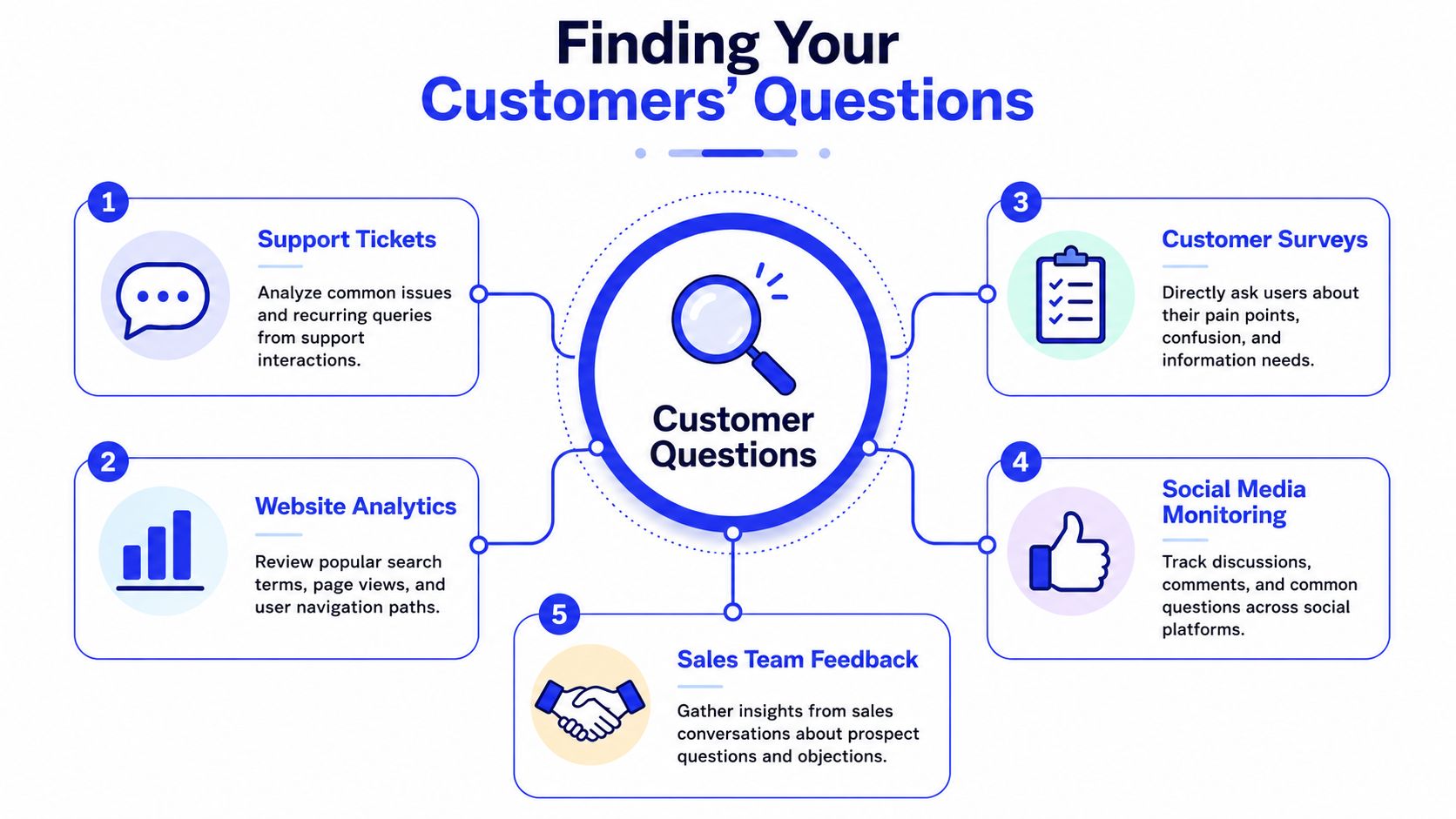
The better approach is operational. Pull questions from the places where confusion already shows up. Towson's guidance is unusually practical here: mine your top 20 to 30 recurring questions from real sources like support tickets, chat logs, and sales feedback, then narrow the final page to a maximum of 10 question-and-answer pairs based on frequency, support cost, business impact, and self-service potential (Towson FAQ writing guidance).
Start with evidence, not brainstorming
If I were auditing a support operation, I'd pull five inputs before writing a single answer:
Support tickets: Look for repeat phrases, not just ticket tags. Customers often describe the same issue in several ways.
Live chat transcripts: These expose moments of hesitation right before a buyer leaves or asks for a human.
Sales call notes: Sales teams hear objections support never sees, especially around pricing, onboarding, contracts, and integrations.
Site search queries: What people type into your own search bar is often more honest than survey feedback.
Social comments and review sites: These reveal wording customers use when they're frustrated, confused, or comparing alternatives.
A useful working rule is to collect the raw customer phrasing first, then normalize it later. If ten people ask “Can I cancel anytime?” and three ask “What's your cancellation policy?”, that's one FAQ candidate, not two.
Practical rule: Don't rewrite the question too early. Customer language is usually more searchable and more useful than internal terminology.
Use a simple prioritization filter
Once you've collected candidates, score each question by the four criteria Towson highlights. Keep it simple in a spreadsheet or Airtable table. You're looking for questions that do at least one of three jobs well: reduce repetitive support work, unblock conversions, or prevent churn-driving confusion.
Here's a lean way to look at it:
Question type | Keep on FAQ page | Move elsewhere |
|---|---|---|
Repeated by support and sales | Yes | Rarely |
Critical before purchase | Yes | Sometimes also on pricing or product pages |
Highly specific edge case | Usually no | Help center or policy page |
Explains a core feature | Maybe | Often better on product page |
Legal or policy detail | Sometimes | Usually dedicated policy page |
That last point matters. Not every common question belongs in an FAQ. Some questions are signals that your product, pricing, shipping, or onboarding pages are missing basic clarity.
A focused FAQ is better than an encyclopedic one. If your page feels like a storage closet for leftover information, cut it down and put the answers where buyers need them.
Writing Clear On-Brand Answers That Build Trust
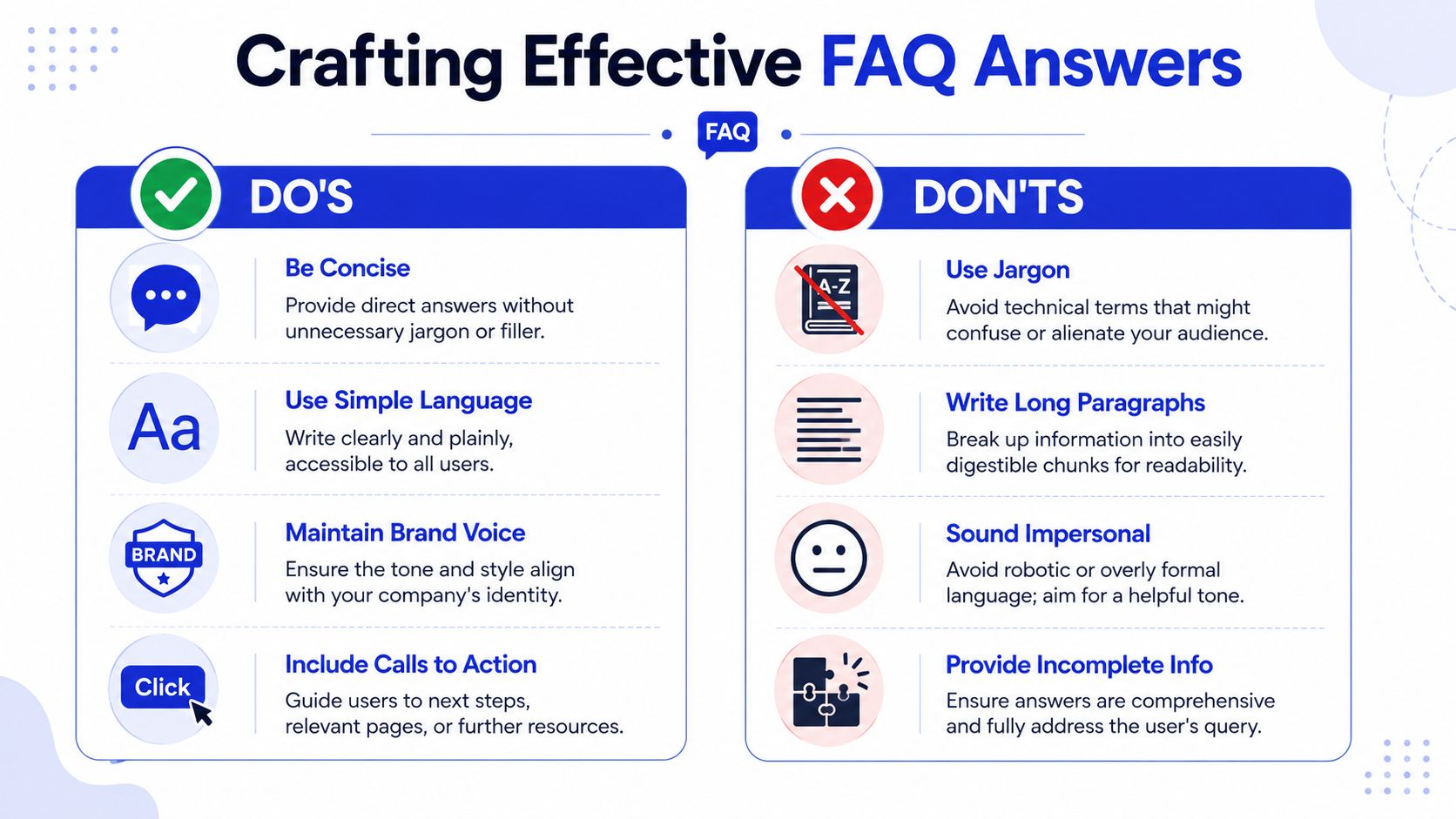
Most FAQ answers fail for one reason. They delay the answer. The user asks a direct question and gets a paragraph of throat-clearing, policy language, or brand fluff before the answer appears.
That doesn't work for busy customers, and it doesn't work for search visibility either. Dewstack recommends keeping each response to 40 to 60 words and at a Grade 8 reading level or lower, with answers beginning directly with the solution (Dewstack FAQ writing best practices).
Use a tight answer format
A reliable FAQ answer usually has three parts:
Direct answer first. Lead with yes, no, can, can't, includes, doesn't include, ships, renews, or whatever resolves the question immediately.
One useful qualifier. Add the condition, exception, timeline, or scope that prevents follow-up confusion.
Next step. Point to the action the user should take if they need more detail.
That structure keeps answers compact without sounding abrupt. It also protects your brand voice. Helpful brands don't need to be chatty. They need to be clear.
A few writing habits make a visible difference:
Use the customer's words: If buyers say “refund,” don't switch to “remittance reversal process.”
Prefer concrete nouns: “Billing date,” “trial end,” and “tracking email” beat abstract language.
Cut internal qualifiers: Phrases like “depending on your unique use case” usually add fog, not clarity.
Keep tone consistent: A SaaS brand can sound brisk. A healthcare provider may need more reassurance. Both can still be plainspoken.
Before and after example
Here's the kind of FAQ answer I see all the time:
We strive to provide customers with a flexible cancellation experience and, depending on plan type and account status, you may be eligible to discontinue service through your account settings or by contacting support for additional assistance.
That answer sounds official. It also forces the user to decode it.
A better version:
Yes, you can cancel from your account settings. Your access continues until the end of the current billing period. If you're on an annual contract or need invoice changes before cancellation, contact support first.
The second version does four things well. It answers the question in the first sentence, uses plain language, sets an expectation, and tells the user when they need help.
Clear answers reduce distrust. Vague answers create another ticket.
If you're teaching a team how to write FAQ content, have them read every answer aloud. Anything that sounds like legal review copy, product marketing copy, or internal Slack language needs another pass.
Structuring Your FAQ Page for Scannability and SEO
Even strong answers won't help if the page is hard to scan. Users arrive with one specific question in mind. They want to find it fast, confirm the answer, and move on.
That's why layout matters almost as much as writing. Group related questions into clean categories, use collapsible sections if the page is getting visually dense, and keep the labels obvious. “Billing,” “Shipping,” “Returns,” “Setup,” and “Security” work better than clever names.

Build for scanning first
A useful FAQ page usually shares a few traits:
Question-first formatting: Make each question visually distinct.
Logical grouping: Don't mix account access with shipping delays and enterprise procurement.
Expandable accordions: Helpful when the page would otherwise become a wall of text.
Strong internal pathways: Some answers should link to a fuller page, not carry all the burden themselves.
If you need inspiration for the kinds of user-facing prompts that deserve answers, Humantext.pro's essential questions is a good reference point. It's useful because it shows how practical, customer-centered question framing differs from internally phrased documentation.
One more structural decision matters. Some questions belong on a product page, pricing page, returns page, or onboarding guide instead of in a standalone FAQ. A page that tries to answer everything often hides the most important answers.
Add the technical layer
Once the page is readable, add the markup. HelpCrunch notes that FAQPage schema markup helps search engines and AI agents parse Q&A structures quickly, and that visibility in generative results can suffer when the content isn't marked up (HelpCrunch FAQPage schema guidance).
That doesn't mean schema fixes weak content. It means clean content and clean structure should be machine-readable too.
A practical implementation checklist:
Match visible content: Your schema should reflect the exact questions and answers on the page.
Use one canonical version: Don't publish near-duplicate FAQs across multiple URLs.
Keep categories human-facing: Schema supports parsing, but page architecture still drives usability.
Review how the page behaves on mobile: Accordions that are elegant on desktop often become frustrating on phones.
If you're also thinking about automation on top of your FAQ, it helps to understand how the content will feed a support bot. This walkthrough on using an FAQ chatbot is useful because it shows the operational side, not just the SEO side.
A short explainer can help teams that are new to the concept:
Powering AI Support Agents with Your FAQ Content
A static FAQ page solves only one problem. It gives visitors a place to self-serve if they choose to browse for answers.
An AI support agent changes the model. Instead of waiting for the customer to hunt through a page, the system pulls from your approved answers and responds in the moment. That turns FAQ writing from content production into knowledge design.

Why static FAQs now underperform
A lot of FAQ pages were built for search snippets and basic support deflection. That's still part of the job, but it's no longer enough. Today your answers may be consumed by site search, chat interfaces, AI Overviews, support copilots, and retrieval systems inside customer service platforms.
That means the answer has to be reusable outside the page where it lives.
MQLMagnet's analysis is useful here: AI bots prefer structured, concise answers with named entities, and the recommended format for AI Overview visibility is 2 to 4 sentence answers in the 40 to 80 word range that open with the direct answer and close with a forward-looking statement (MQLMagnet on AI-citable FAQ formatting).
Many teams get stuck when they write either for humans alone or for search engines alone. AI support systems need something more disciplined. Answers must be short enough to quote, specific enough to trust, and constrained enough to avoid improvisation.
The best FAQ answer for AI use is one a support rep would approve without editing.
Write answers AI agents can reuse safely
When you want FAQ content to power an AI support agent, write each answer as if it might be retrieved by itself, with no surrounding page context. That changes how you draft.
A usable answer should include:
A direct opening: Start with the answer, not a welcome sentence.
The named thing: Include the product, plan, policy, or feature name when relevant.
A guardrail: State the condition or exception that keeps the answer accurate.
A next action: Tell the user what to click, review, or contact if they need the full workflow.
For example, “How do I change my billing date?” shouldn't be answered with “Billing changes may be available based on account status.” A better answer names the path, the constraint, and the escalation point.
If you're thinking beyond a single page and into a broader content system, this explainer on What is an AI CMS? is worth reading. It helps clarify why structured source content matters when AI systems pull answers from multiple assets, not just one FAQ URL.
The same principle applies when you generate or refine question-and-answer pairs at scale. A purpose-built tool such as an AI FAQ generator can speed up drafting, but it still needs strong source material and human review. Automation is only as good as the policies, product details, and edge cases you feed it.
If your FAQ content can't support an AI agent safely, it probably isn't clear enough for customers either.
Measuring Iterating and Avoiding Common Pitfalls
Publishing an FAQ page isn't the finish line. It's the start of a maintenance job. Product details change, policies drift, and yesterday's top question disappears while a new one starts flooding chat.
That's why FAQ ownership matters. Someone needs to review the page, compare it against live support conversations, and decide what stays, what moves, and what gets deleted. Dewstack recommends quarterly reviews to update outdated information and remove duplicates (Dewstack on keeping FAQ content fresh).
What to review after launch
I'd review an FAQ with the same discipline used for a support macro library. Look for signs that the page is helping, but also signs that it's masking a content problem elsewhere.
Use a simple review checklist:
Support signal: Are agents still answering the same questions manually?
Conversion friction: Are prospects asking pre-sale questions that belong on pricing or product pages?
Accuracy check: Do policy, feature, and billing answers still match the live experience?
Navigation quality: Can users find the right answer quickly, or are categories doing too much work?
Escalation gaps: Which questions still require a human because the answer is too vague or risky?
For KPI ideas, this guide to customer service performance indicators is helpful because it frames FAQ performance as part of the broader support system, not as a standalone content asset.
When to remove an FAQ entirely
This is the part most “how to write FAQ” guides skip. Sometimes the best FAQ is no FAQ at all.
Government digital guidance has explicitly argued for replacing FAQs with descriptive, topic-based content integrated into main pages because FAQs often create content gaps instead of solving them (British Columbia government FAQ guidance).
That's a useful challenge for any business owner. If customers keep asking “What's included?”, “How long does setup take?”, or “Do you work with Shopify?”, those may not be FAQ issues. They may be product page issues.
Try an elimination audit:
Keep as FAQ | Merge into core page |
|---|---|
Short answer, broad demand | Core buying detail |
Repeated support question | Product explanation |
Quick policy clarification | Pricing, shipping, or onboarding detail |
Useful in chat retrieval | Better understood in a fuller narrative |
If removing a question from the FAQ would make the main journey clearer, move it.
A lean FAQ that supports the main site is healthier than a large FAQ that compensates for weak core pages.
Frequently Asked Questions About Writing FAQs
How many questions should one FAQ page include?
Keep it focused. A practical cap is 10 question-and-answer pairs, which helps prevent overload and keeps attention on the issues that matter most (Towson FAQ writing guidance). If you have more, split them by topic or move some answers into product, policy, or help center pages.
What if we don't know the full answer yet?
Don't fake certainty. Publish only what your team can stand behind, then route the user to the right next step. A short answer with a clear escalation path is better than a polished answer that creates false expectations.
Should FAQ answers link to other pages?
Yes, when the next step needs more detail than the FAQ should carry. Good FAQ links move the user into pricing, onboarding, returns, or policy pages without forcing them to start over. The link should finish the task, not just send them somewhere “related.”
Should every business have a standalone FAQ page?
No. If your top questions are really missing buying details, setup information, or policy explanations, put those answers directly on the relevant pages. Use an FAQ when people benefit from a fast self-service layer. Don't use it to hide information that should already be visible.
How often should FAQ content be reviewed?
Review it on a schedule, not only when someone complains. A regular quarterly pass helps catch outdated answers, duplicate questions, and new issues before they pile up in support.
If you want your FAQ content to do more than sit on a page, Chatgrow helps turn it into a live support system. You can train an AI agent on your FAQs, product pages, and pricing content so visitors get instant, on-brand answers around the clock, while your team spends less time repeating the same responses.
Related Posts
Continue Reading
More articles from the ChatGrow Team.


