Blog
FAQ Chatbot: The Ultimate Guide for SMBs & E-Commerce
By
Nelson Uzenabor

You're probably dealing with the same pattern every week. Customers ask when their order will arrive, whether you offer refunds, how pricing works, or which plan they need. Your team answers fast at first, then the backlog grows, replies get inconsistent, and simple questions start eating the time you wanted to spend on sales, product work, or actual customer relationships.
That's the point where an FAQ chatbot stops sounding like a trendy software category and starts looking like a practical hire. Done well, it acts like a front-desk teammate who never sleeps, gives consistent answers, and knows when to bring in a human. Done poorly, it becomes another thing customers try once and avoid forever.
The difference usually isn't the launch. It's what happens after launch. Most guides talk about setup. Fewer talk about keeping the bot accurate as your pricing changes, your shipping policy shifts, or your product evolves. That's where the long-term value lives.
Table of Contents
What Is an FAQ Chatbot and Why Is Everyone Talking About It
A FAQ chatbot is a support tool that answers common questions through conversation instead of making people dig through a page of links. A customer types “Where's my order?” or “Do you offer annual billing?” and the bot replies with the most relevant answer from your help content, product pages, or policy documents.
For a small business owner, that matters because repetitive questions aren't just annoying. They interrupt real work. If your inbox keeps filling with the same dozen requests, your team ends up doing copy-and-paste support all day instead of solving bigger problems.

Older chatbots felt rigid because they followed scripted paths. Modern ones are different. They use AI to understand intent, so customers don't need to guess your exact wording. That shift is a big reason the category has moved from “nice to have” to mainstream business software.
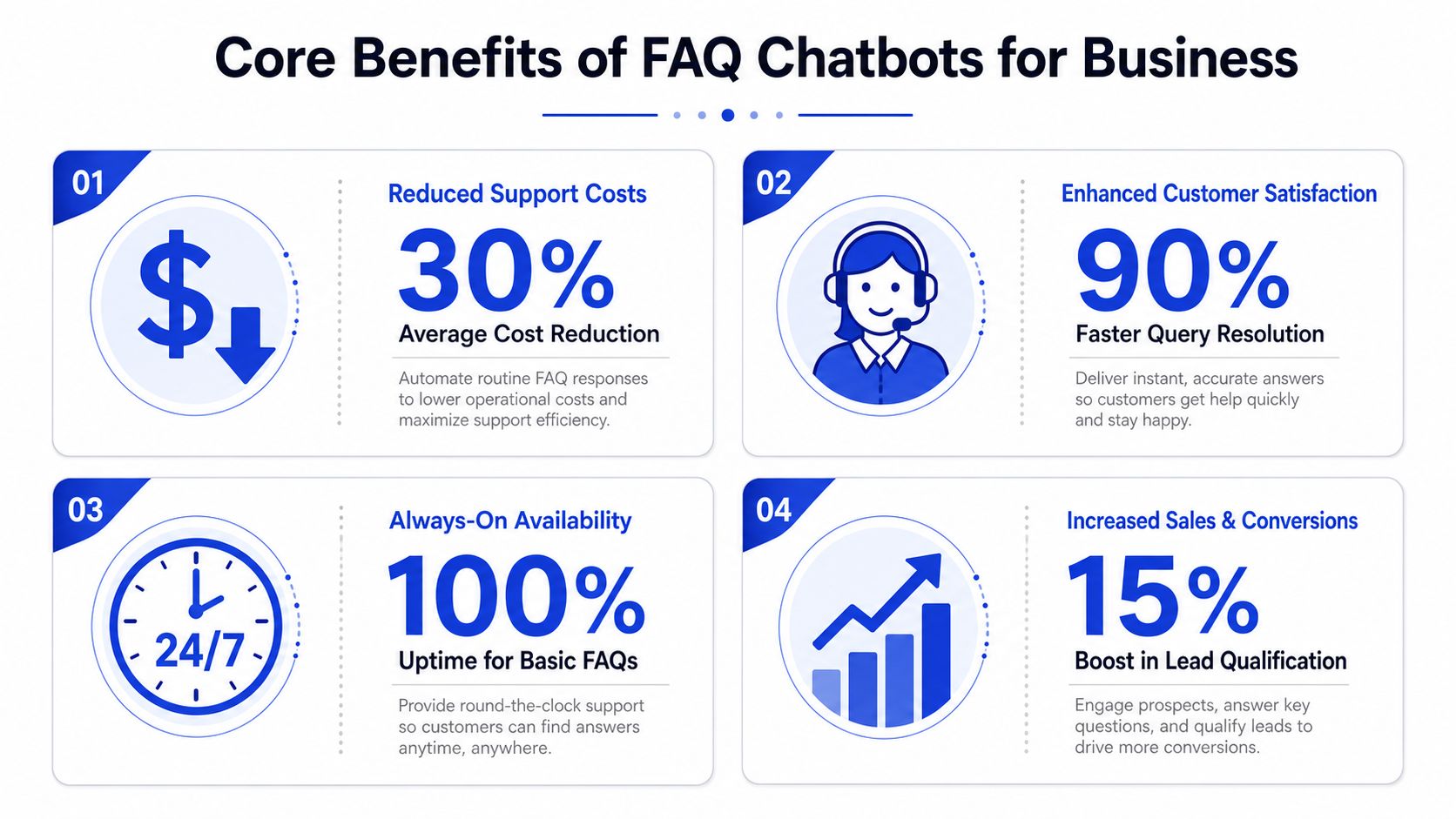
The business momentum is real. The global chatbot market reached approximately $11.8 billion in 2026, a 23.2% jump from 2025, according to Tidio's chatbot statistics roundup. The same source notes that businesses report up to 30% cost savings in customer support operations. If you want a broader look at how companies are using this kind of automation, this overview of chatbots in business is a useful companion read.
Why this tool is getting attention now
The timing makes sense. Customers expect fast replies, even when your team is offline. At the same time, many businesses can't justify hiring more support staff just to answer routine questions.
An FAQ chatbot sits right in the middle of that problem. It handles the simple, repeatable stuff immediately, then passes tougher cases to a person.
A good FAQ chatbot doesn't replace your team. It protects your team's time.
A simple way to think about it
Consider the difference between a printed store directory and a helpful employee at the entrance. One makes people search. The other listens, points them in the right direction, and helps them move forward faster.
That's why everyone's talking about it. Not because the idea is new, but because the technology is finally useful enough for everyday business.
The Core Benefits of an FAQ Chatbot for Your Business
The value of an FAQ chatbot usually shows up in three places first. Your support team spends less time on repetition. Customers get answers without waiting. Website visitors stay engaged instead of leaving when they hit a question.
It cuts routine support work
If you sell online, run a SaaS product, or manage a service business, you already know your “greatest hits” questions. Shipping times. Returns. Account setup. Billing changes. Appointment details.
Those are ideal chatbot tasks because they're repetitive, important, and usually answerable from existing content. You're not asking the bot to improvise. You're asking it to retrieve and present known answers quickly.
That efficiency matters because customer behavior has already shifted. 67% of consumers worldwide have used a chatbot in the last year, according to Conferbot's chatbot statistics page. The same source says 90% of customer queries are resolved in fewer than 11 messages.
It improves the customer experience
Customers rarely care whether the answer comes from a human or a bot. They care whether it's fast, clear, and correct.
If someone lands on your pricing page at night and has one last question before buying, a bot can help in that moment. If a shopper wants to know whether a product is returnable before checking out, immediate clarity can prevent hesitation.
A useful FAQ chatbot helps in a few specific ways:
Always available: It can answer basic questions outside business hours.
Consistent replies: It doesn't forget policy details or phrase things differently from one rep to another.
Less friction: Customers don't have to open a ticket for simple issues.
Here's a quick explainer if you want to see the concept in action:
It can support sales, not just support
Business owners sometimes frame chatbots as a cost-control tool only. That's too narrow.
An FAQ chatbot can answer pre-sale questions on product, pricing, shipping, setup, and fit. Those aren't support-only conversations. They often sit right before a buying decision. When a visitor gets a useful answer right away, they're more likely to continue.
Practical rule: Put your chatbot where buying hesitation happens. Pricing pages, product pages, checkout, and demo pages usually matter more than your homepage.
What this means for you
If your team keeps answering the same questions manually, you're paying human attention for work that software can handle. That doesn't mean every conversation should be automated. It means repetitive questions shouldn't consume your best people.
The strongest FAQ chatbot setups create a simple division of labor. The bot handles the common questions. Your team handles the nuanced ones.
FAQ Chatbot vs Live Chat vs Knowledge Base
A lot of business owners compare these tools as if they're substitutes. They're not. They solve different parts of the same support problem.
A knowledge base is self-serve reading. Live chat is direct human conversation. An FAQ chatbot sits between them. It gives conversational answers using your existing knowledge, and it can route the customer to a person when needed.
Choosing Your Support Tool
Feature | FAQ Chatbot | Live Chat | Knowledge Base |
|---|---|---|---|
Availability | Available around the clock for common questions | Usually tied to team coverage | Available around the clock |
Response style | Conversational, instant, guided | Human, flexible, nuanced | Static articles and pages |
Best for | Repetitive questions, first-response triage, simple pre-sale help | Complex issues, emotional cases, exceptions | Customers who prefer to browse and read |
Scalability | Handles many conversations at once | Limited by staff capacity | Scales well, but customers do the searching |
Setup effort | Requires training on your content and review over time | Requires staffing and processes | Requires writing and organizing articles |
Main weakness | Can miss edge cases if content is weak or outdated | Can be expensive to scale | Many users won't search well or find the right article |
When an FAQ chatbot is the better fit
An FAQ chatbot makes sense when customers know what they want to ask, but don't want to hunt for the answer. It's especially useful when the same questions appear over and over, and when those answers already exist somewhere in your business.
For example:
E-commerce stores often need instant answers on returns, delivery, sizing, and order steps.
SaaS companies often field plan, feature, onboarding, and billing questions.
Service businesses often repeat booking, cancellation, location, and eligibility answers.
When live chat still matters
Some conversations need judgment, reassurance, or account-specific handling. Refund disputes, sensitive complaints, unusual edge cases, and frustrated customers usually benefit from a human.
If you're comparing the two directly, this breakdown of what live chat is helps clarify where human chat still wins.
If the question is common and the answer is documented, a chatbot is often enough. If the situation is unusual or emotional, bring in a person.
Where the knowledge base fits
Your knowledge base is the library. The chatbot is the librarian. Without useful articles, policies, and product content behind it, the bot has nothing reliable to work with.
That's why the smartest support setups use all three. The knowledge base stores the answers. The chatbot serves them conversationally. Live chat catches the exceptions.
How an FAQ Chatbot Actually Works Under the Hood
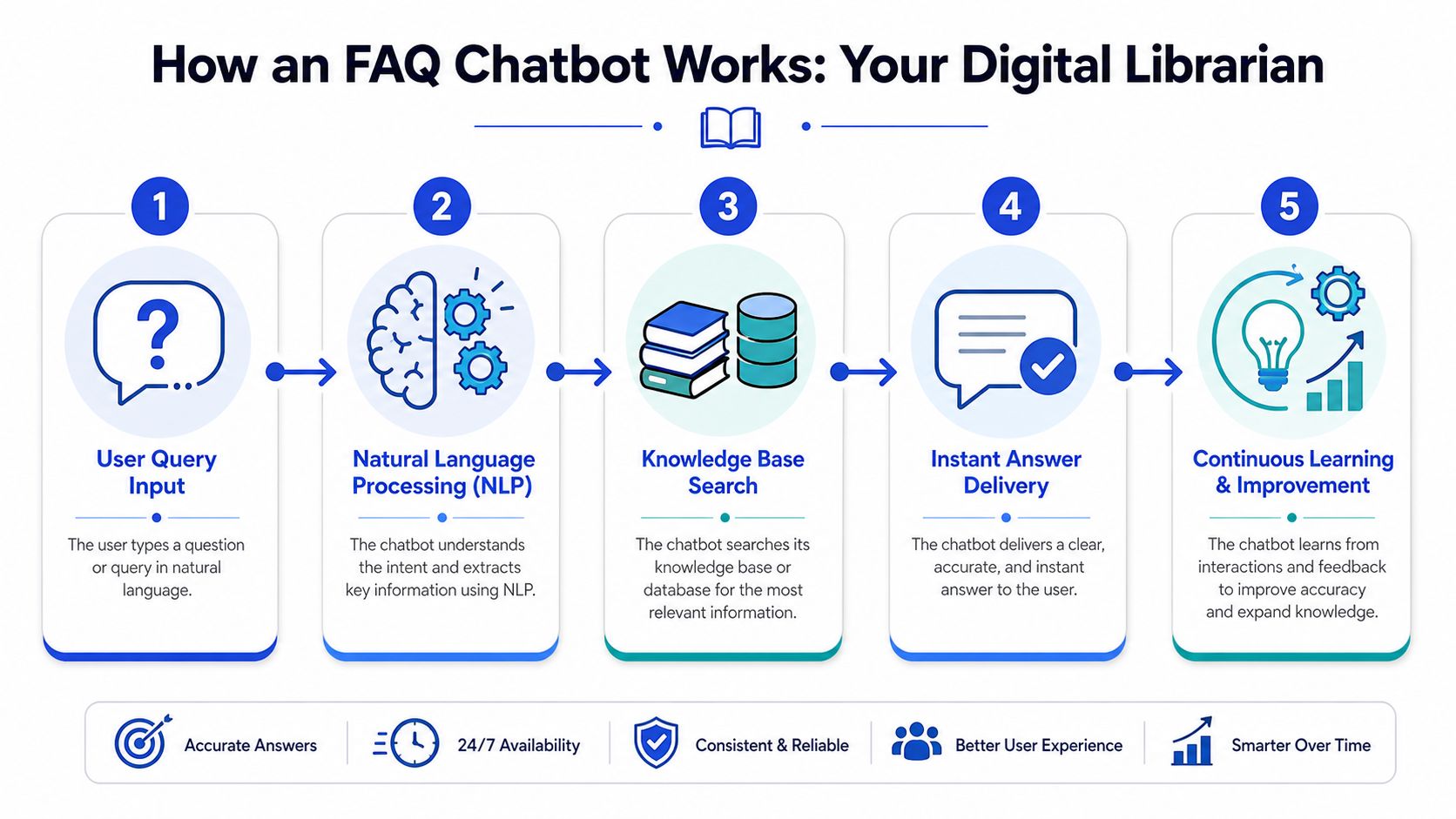
Most modern FAQ chatbots aren't guessing in the way people fear. A good setup works more like a digital librarian than a freewheeling AI assistant. It listens to the question, searches the right sources, and returns the closest reliable answer.
It starts with training
Training doesn't necessarily mean writing code or feeding the bot thousands of examples by hand. In many tools, it means connecting the content you already have:
FAQ pages
Help center articles
Product pages
Pricing pages
Shipping, return, or policy docs
The bot reads that material and builds an internal map of what your business knows. If the source content is clear, the answers tend to be clear. If the source content is vague or outdated, the bot inherits that weakness.
Then it interprets what the customer means
This is where natural language processing, or NLP, comes in. NLP helps the bot understand intent even when the wording is messy.
A customer might ask:
“Can I send this back?”
“What's your return policy?”
“How do refunds work?”
A decent FAQ chatbot should recognize that these are closely related requests and pull from the same return-related source material.
Then it decides whether it should answer on its own
One of the most important settings is the confidence threshold. This is the internal cutoff that tells the system, “I'm confident enough to answer” or “I should escalate this.”
According to Robylon's FAQ chatbot build guide, a common starting range is 0.75 to 0.80. Below that, the bot may invent answers. Above that, too many conversations get pushed to humans. That setting isn't one-and-done. Teams need to tune it over time.
Key judgment call: You don't want a bot that answers everything. You want a bot that answers the right things confidently and steps aside when it should.
In newer systems, retrieval matters more than scripting
Modern FAQ chatbots often use a retrieval approach. In plain English, they search your approved content first, then generate a clean reply from that material instead of improvising from nowhere.
A useful pattern looks like this:
Customer asks a question
The bot searches your documents
It finds the closest matching passage
It replies using that grounded content
If confidence is low, it hands off
Some systems also use citation-first behavior, especially in higher-risk environments. That means the bot should only answer when it can point to a real source inside your knowledge base.
Handoff is part of the design
A reliable FAQ chatbot needs a clean fallback path. When it can't answer, it shouldn't trap the user in loops.
The better pattern is simple:
acknowledge the limit,
collect the missing details,
pass a short summary to your team,
and keep the conversation context intact.
That's what makes the tool feel helpful instead of obstructive.
A Simple Roadmap to Implementing Your First FAQ Chatbot
The first launch doesn't need to be complicated. Most businesses get better results by starting small, covering their highest-frequency questions, and improving from real conversations instead of trying to automate everything at once.
Start with the questions you already know
Open your support inbox, live chat history, contact form submissions, and sales emails. You're looking for recurring patterns, not edge cases.
Write down the topics that come up again and again, such as:
Order and delivery questions: shipping times, tracking, delays
Policy questions: returns, refunds, cancellations
Product and pricing questions: plan differences, features, eligibility
Basic account help: login, billing, setup, password reset
If your team already answers these from saved replies or help docs, that's a strong sign they belong in your chatbot.
Build from existing content, not from scratch
Many businesses slow themselves down by treating chatbot setup like a brand-new writing project. It's usually faster to clean up the content you already have, then train the bot on that material.
For no-code tools, you'll typically connect pages, documents, or FAQ content and review how the bot responds. If you're comparing platforms, look closely at how they handle source management, tone control, and handoff logic. If you want examples of what a clean setup process looks like, this guide to AI chatbot design is a practical reference.
One option in this category is Chatgrow, which lets businesses train support agents on website pages, pricing content, and FAQs, then deploy them to customer-facing pages.
Deploy where questions block action
Don't hide the bot in a corner and hope people find it. Put it where hesitation already exists.
Common high-value locations include:
pricing pages
product detail pages
checkout pages
help center pages
demo or contact pages
A visitor on your careers page probably doesn't need the same support flow as someone comparing plans or deciding whether to buy.
Review conversations and tighten the weak spots
Your first version won't be perfect. That's normal. The goal is to learn quickly from real questions.
A simple review routine looks like this:
Read unresolved chats: Look for questions the bot missed entirely.
Check confusing answers: If customers ask follow-up questions right away, the original reply may be unclear.
Spot missing content: Sometimes the problem isn't the bot. It's the fact that your documentation doesn't answer the question well.
Adjust escalation rules: If the bot is holding onto conversations it should pass along, fix that early.
Launching a chatbot is less like publishing a brochure and more like training a new team member. It gets better with feedback.
Best Practices and Common Pitfalls to Avoid
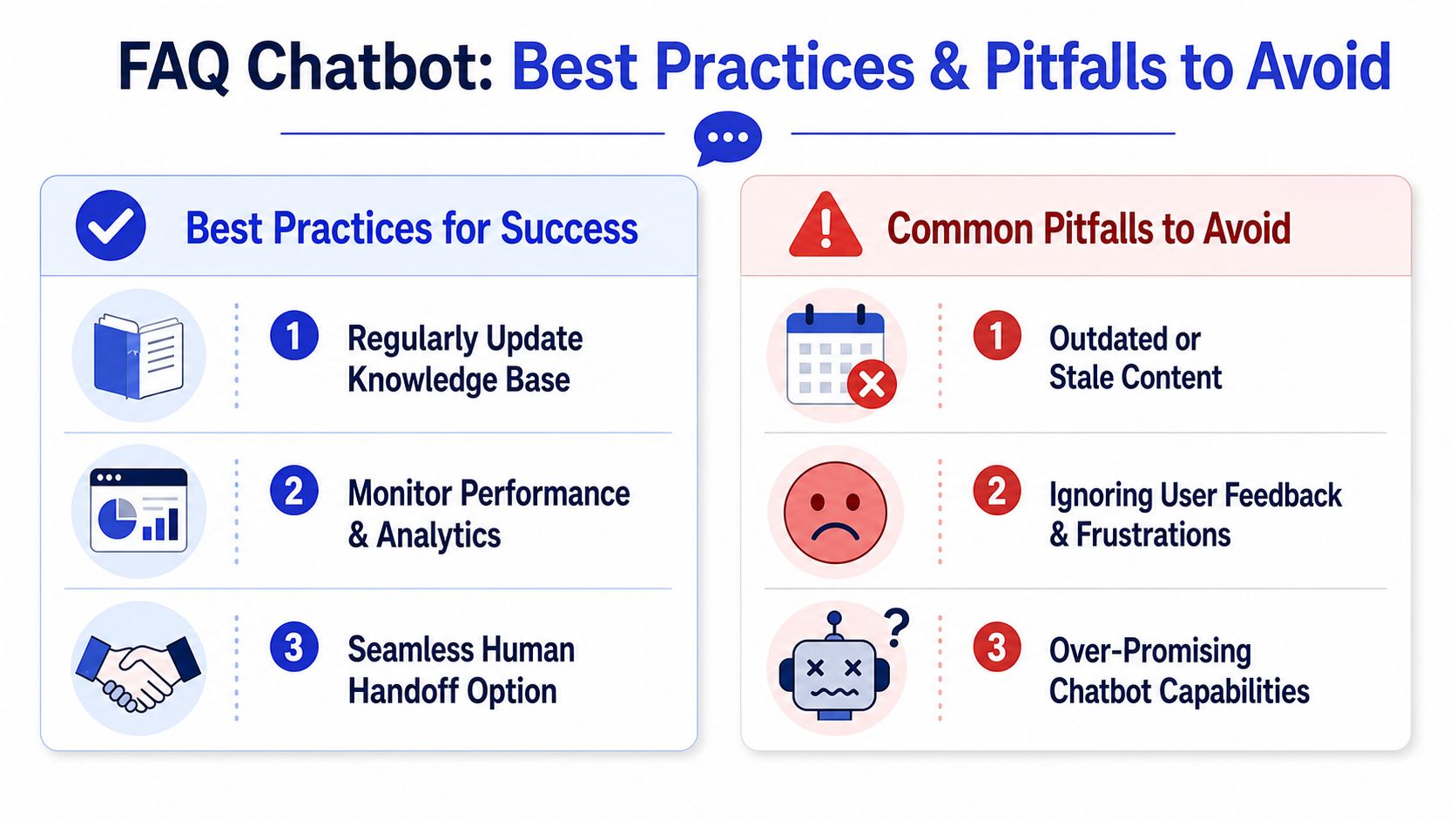
The biggest myth in this category is that you can launch an FAQ chatbot and walk away. You can't. The most common failures happen after setup, when the business changes but the chatbot's knowledge doesn't.
That problem has a name: knowledge base decay.
According to Corebee's FAQ chatbot guide, knowledge base decay causes 60% of chatbot failures, and knowledge bases can become outdated in 3 to 4 weeks as business details change. That's a serious warning for any business with changing pricing, product lines, policies, or promotions.
Best practices that actually matter
Keep the knowledge base fresh
If your refund window changes and the bot still quotes the old policy, the issue isn't AI. It's stale source material.
Create a lightweight content maintenance habit:
Review after business changes: update docs after pricing, shipping, policy, or product changes
Check unanswered questions: add content for recurring gaps
Retire duplicates: conflicting articles confuse the bot and the customer
Measure the right things
Many teams look at chat volume and call it success. That's not enough. You need to know whether the chatbot is resolving questions or merely delaying a handoff.
Useful metrics include:
Resolution rate: how often the bot fully answers the question
Escalation rate: how often it passes the conversation to a person
Customer satisfaction: whether people found the answer helpful
Accuracy patterns: which topics produce the most weak responses
Robylon's guidance also points to weekly tracking of answer accuracy and resolution behavior so teams can spot when the knowledge base needs structural work, not just minor edits.
Make escalation easy
Some businesses treat escalation like failure. Customers don't. They treat it like relief.
If the user wants a person, give them a path to one. In higher-risk settings, that path becomes even more important. A CIDRAP summary of a BMJ Open study reported that 50% of AI chatbot answers to medical questions were inaccurate or incomplete. Even outside healthcare, the lesson is clear. In regulated or high-stakes domains, the bot should rely on strong guardrails, source-backed answers, and refusal behavior when it lacks a reliable match.
Non-negotiable safeguard: If a wrong answer could create financial, legal, safety, or compliance risk, the bot should be conservative and escalate early.
Common mistakes that hurt performance
Treating the chatbot like a human expert
An FAQ chatbot is great at documented, repeatable questions. It's not a substitute for judgment. Don't position it as if it can handle every situation.
Ignoring conversation logs
Your logs show where customers get stuck, which answers create follow-up questions, and which topics your documentation doesn't cover well. Skipping this review means repeating the same mistakes.
Hiding the human option
Nothing frustrates users faster than feeling trapped. If “talk to a person” is hard to find, the customer experience degrades quickly.
Using weak source content
A chatbot can't rescue poor documentation. If your FAQ page is vague, contradictory, or outdated, the bot will reflect that.
A simple maintenance rhythm
You don't need an enterprise operations team to keep an FAQ chatbot healthy. A practical rhythm works:
Frequency | What to review |
|---|---|
Weekly | unresolved chats, odd answers, new question patterns |
After any business change | pricing, product, policy, shipping, promo updates |
Monthly | escalation patterns, content gaps, tone consistency |
That's the long-term optimization most businesses miss. Sustainable ROI doesn't come from launch day. It comes from keeping the answers trustworthy.
Your Checklist for Choosing the Right FAQ Chatbot Solution
By the time you evaluate tools, the main question isn't “Does this platform have AI?” Nearly all of them say that. The better question is whether the tool helps you run the full lifecycle well, from setup to upkeep.
Use this checklist when comparing options:
Can it train on the content you already have
Look for support for website pages, help docs, pricing pages, and FAQs. Rebuilding everything manually creates extra maintenance.Can you see what the bot is getting wrong
You need conversation logs, performance reporting, and a clear view of unanswered or escalated questions.Does it support strong escalation logic
The handoff should be clean, fast, and context-rich. Your team should receive the conversation summary, not a cold transfer.Can you update knowledge easily
If making a policy or pricing change is cumbersome, the bot will drift out of date.Does it fit your tone and workflows
The replies should sound like your business, not like generic software.Will it work where customers ask questions
Think website chat, product pages, help centers, and the other channels your customers already use.
The right FAQ chatbot isn't the one with the flashiest demo. It's the one your team can keep accurate, monitor easily, and trust over time.
If you want a practical way to put this into action, Chatgrow lets you train an AI support agent on your website, pricing, FAQs, and product content, deploy it on high-intent pages, and keep improving it through reporting and retraining. That makes it a useful fit for businesses that want an FAQ chatbot that keeps working after launch, not just on launch day.
Related Posts
Continue Reading
More articles from the ChatGrow Team.


