
Blog
How to Improve CSAT: An Actionable 2026 Playbook
By
Nelson Uzenabor

Your CSAT probably isn't low because your team “needs to care more.” It's usually low because the system around the team is creating friction faster than agents can recover from it. Long waits, vague handoffs, weak help content, badly timed surveys, and automation that feels cold all show up as “support quality” even when the problem sits elsewhere.
That's why most CSAT improvement plans stall. Teams jump straight to scripts, coaching, or survey reminders before they've diagnosed where dissatisfaction starts. If you want to know how to improve CSAT in a way that lasts, you need two things working together: faster resolution and better judgment about when a human should step in.
Table of Contents
First Diagnose Your Real CSAT Problem
A support leader sees CSAT drop three points, pushes the team to answer faster, and still ends the quarter with the same complaints. I have seen that pattern more than once. The score was real, but the diagnosis was wrong.
A single CSAT average is useful for board slides and almost useless for root-cause work. If you want to improve customer happiness in a way that lasts, start by separating speed issues from resolution issues, and simple requests from emotionally loaded ones. That matters even more if you plan to use AI for instant answers while routing complex or sensitive cases to people. If you skip that step, you automate the wrong work.
Stop treating total CSAT as the truth
Start with a 90-day baseline before setting any target. According to OMQ's CSAT guidance, teams should calculate average CSAT over the prior 90 days and avoid setting an improvement goal higher than 8 to 10 percentage points above baseline within a 6-month period. That ceiling is practical. It keeps teams focused on changes they can deliver.
Then break the score apart by the factors that shape the customer experience:
Support channel such as chat, email, phone, and self-service
Inquiry type such as billing, order status, onboarding, cancellations, or technical issues
Customer segment such as new customers, power users, high-value accounts, or trial users
That segmentation usually changes the conversation fast.
A blended score can hide an underlying failure point. Chat may look efficient because it handles a lot of volume quickly, while technical escalations or cancellation requests pull satisfaction down for reasons a top-line average cannot show. Teams that use AI for fast answers need this split even more. AI is often strongest on repetitive, low-emotion requests. It is far less forgiving when context is missing or the customer is already frustrated.
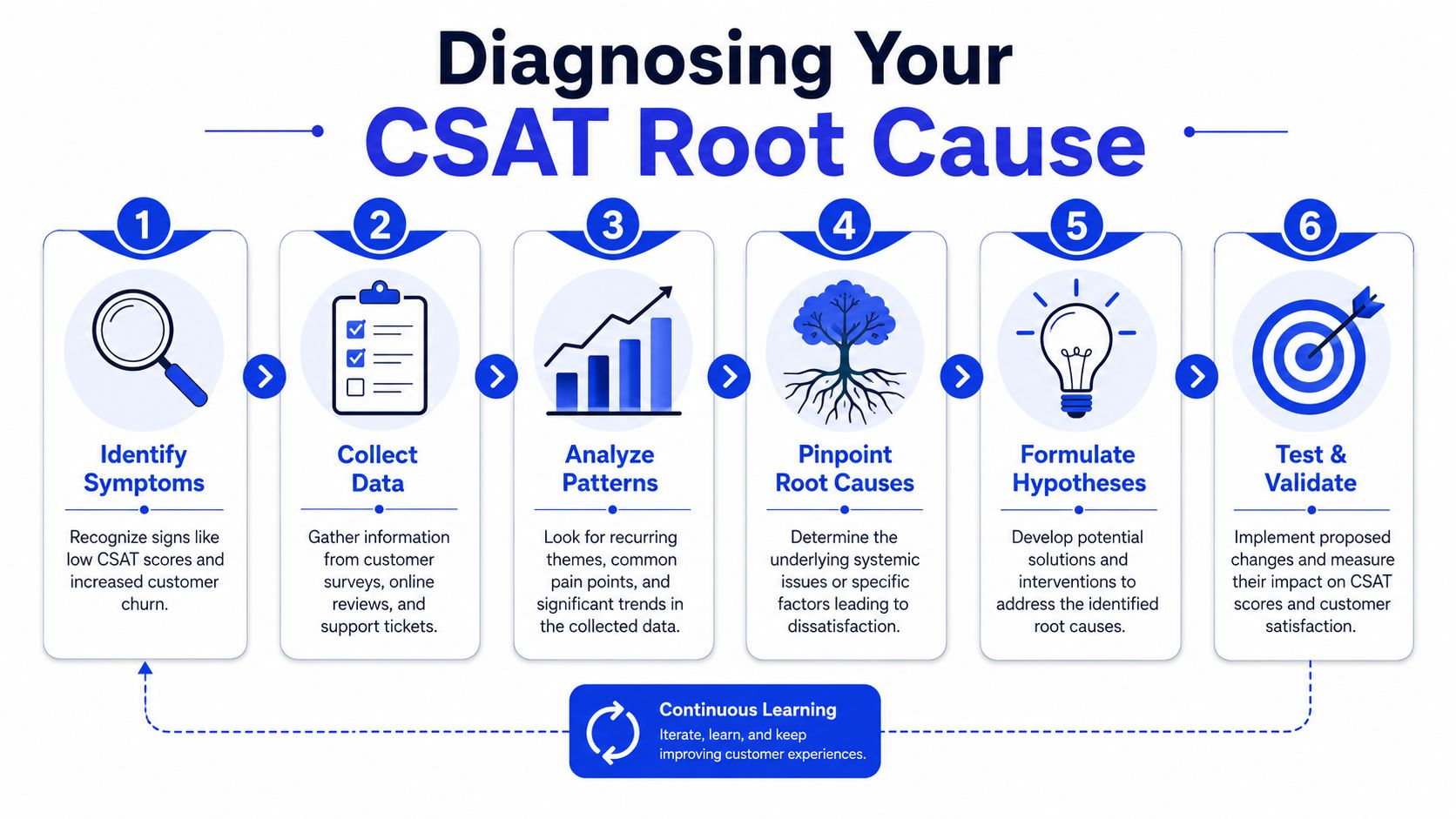
Open-text feedback deserves the same discipline. Read it in batches, tag it consistently, and group repeated themes such as “had to repeat myself,” “article didn't answer my question,” or “agent was fast but didn't solve it.” Patterns in written feedback often explain why a score moved before the score itself becomes statistically obvious. If your team needs a clearer process for coding comments at scale, these qualitative data analysis tools can help standardize the review.
Look for the overlap between volume, friction, and business risk
The best CSAT gains usually come from fixing common failures, not unusual disasters. A low-volume edge case can produce ugly comments and still have little effect on the overall score. A broken billing macro, unclear help article, or weak handoff process can steadily erode CSAT every day.
Use a review process like this:
Rank interaction types by volume
Layer in CSAT by type and channel
Mark the themes that repeat in customer comments
Identify the source of friction, such as policy, tooling, content, or agent judgment
Note where revenue or retention risk is highest
That last step matters. A low score from a trial user and a low score from a long-term expansion account do not carry the same business cost.
Fragmented data also distorts diagnosis. If agents cannot see recent purchases, plan level, past issues, or prior survey responses, they answer with partial context and customers feel it. Teams often chase coaching fixes when the underlying problem is that the system forces customers to restate everything. Better customer data integration practices often improve support quality before you change scripts, staffing, or automation rules.
Recover bad experiences while the context is still fresh
Low ratings need a service recovery workflow, not a weekly reporting ritual. OMQ notes that automated alerts for 1 or 2-rated tickets should trigger immediate follow-up, and that addressing those interactions within 24 to 48 hours is critical for recovering customer sentiment.
That follow-up should be specific and calm. Customers want three things:
A clear explanation of what went wrong
A direct statement of what fix is happening now
Evidence that the issue is less likely to happen again
This work improves more than one unhappy interaction. It shows you whether the problem came from a bad policy, a broken workflow, poor knowledge content, or a case that should have reached a human sooner. That is the foundation of a CSAT program that balances speed with empathy instead of trading one off against the other.
Redesign Surveys for Actionable Feedback
A bad survey program makes smart teams look worse than they are. It also creates the illusion that you're listening when you're really just collecting low-value responses at scale.
Most survey programs create noise
The standard pattern is familiar. Every interaction gets the same survey. Every customer gets asked the same question. Every score gets treated as equally meaningful. That approach is easy to automate and hard to trust.
Existing CSAT guidance often treats timing and frequency as a universal best practice, but SurveyMonkey's discussion of CSAT improvement notes that this one-size-fits-all model can artificially depress scores by up to 12% in high-volume e-commerce or SaaS contexts. That drop doesn't always mean service got worse. Sometimes it means your survey design got lazier.

Survey fatigue is real, but the larger problem is measurement quality. If you ask for feedback after trivial interactions, you over-sample easy wins. If you ask after every touchpoint in a messy issue, customers score the journey, not the moment.
Trigger surveys by journey stage
A better system uses journey-based triggers. That means you don't send the same survey after a password reset that you send after a billing dispute or an escalation.
Use different logic for different moments:
High-friction support events deserve a survey because they expose process weaknesses.
Escalations and complaints deserve a survey because empathy and ownership matter there.
Complex resolution moments deserve a survey because that's where expectations are most likely to break.
Routine, low-stakes interactions often don't need one at all.
Ask for feedback when the interaction reveals something important, not just when the system has an opportunity to send a form.
This is also where question design matters. If you're refining prompts and response design, Otter A/B has a useful piece on survey questions that enhance customer experience and retention.
Write questions your team can act on
Generic feedback creates generic action plans. “How satisfied were you?” is fine as a score question, but you need one short follow-up that reveals why.
Keep it tight. A strong survey usually needs:
One rating question tied to the completed experience
One optional follow-up that invites context in the customer's own words
One internal tag applied behind the scenes, such as issue type or journey stage
Avoid bloated forms. Customers don't want to complete a performance review of your support org. They want to tell you whether their issue was solved and whether the experience felt competent.
When teams ask fewer questions at smarter moments, response quality improves. This also allows product, support, and operations to use the answers.
Prioritize and Implement High-Impact Fixes
Once the root causes are visible, prioritization becomes less political. You stop debating opinions and start deciding where one fix removes the most friction for the customers who matter most to the business.
Start where dissatisfaction hits the business hardest
Not every low score deserves equal urgency. The stronger approach is to fix friction that affects revenue-heavy segments first. SnapCall's guide on improving customer satisfaction notes that the most effective CSAT improvement strategy is to prioritize friction in those segments, and that even small gains in CSAT correlate significantly with recurring revenue and retention.
That usually means mapping the customer journey from first interaction to repeat purchase, then asking a blunt question: where are valuable customers hitting avoidable friction?
A few common examples:
Onboarding customers can't find the right setup article and open duplicate tickets.
Billing customers get bounced between support and finance.
High-intent buyers ask product-fit questions and receive canned responses.
Fix process before blaming people
Teams often assume a CSAT dip means agents need coaching. Sometimes they do. But process failures create more dissatisfaction than individual behavior in most support environments.
Review these first:
Area | What to inspect | What often goes wrong |
|---|---|---|
Routing | How tickets reach the right queue | Misclassified issues create delays and handoffs |
Policies | What agents are allowed to solve | Agents know the fix but can't approve it |
Escalations | How complex cases move upward | Customers repeat context to multiple people |
Follow-up | What happens after partial resolution | Customers hear “we'll update you” and then wait |
If customers keep describing the same frustrating experience, assume the workflow is broken before you assume the team is careless.
Strengthen agent judgment and self-service content
After process, look at the two levers support leaders can influence fastest: agent decision quality and knowledge quality.
For agent training, focus less on scripts and more on judgment. Give agents guidance for moments where tone matters: refund requests, delivery failures, billing disputes, and emotionally charged complaints. A rigid script can lower confidence fast if it ignores the customer's actual state.
For the knowledge base, audit the articles linked in low-CSAT conversations. Look for outdated screenshots, policy contradictions, and content that explains features without solving tasks. The best self-service content answers the question the customer asked, not the one your internal team thinks they should ask.
Three fixes tend to pay off quickly:
Rewrite the top confusing articles using ticket language, not internal jargon.
Create complaint-handling playbooks for the few issues that produce the most anger.
Tighten cross-functional ownership so support, product, and operations all know who fixes what.
CSAT improves when feedback changes the system, not just the scorecard.
Leverage AI for the Speed and Empathy Balance
Customers want fast answers. They also want to feel understood when the issue is messy, expensive, or emotional. Those two needs pull against each other if you deploy automation without clear guardrails.
Use AI where speed matters most
AI is excellent at handling repetitive, rules-based support work. Instant answers reduce wait time, and speed remains one of the strongest drivers of satisfaction in day-to-day support.
That makes AI a good fit for:
FAQ coverage like shipping, returns, plan details, and eligibility questions
Basic account help where the path is known and repeatable
Lead qualification and pre-sales routing on high-intent pages
After-hours support when human coverage would otherwise be thin
The value isn't just lower queue pressure. It's consistency. Good automation gives customers a usable answer immediately and keeps human agents available for cases where interpretation matters more than speed.
A practical walkthrough on support improvements can help teams think through that split between automation and human work. This article on customer service improvement is a solid companion if you're redesigning workflows around that model.
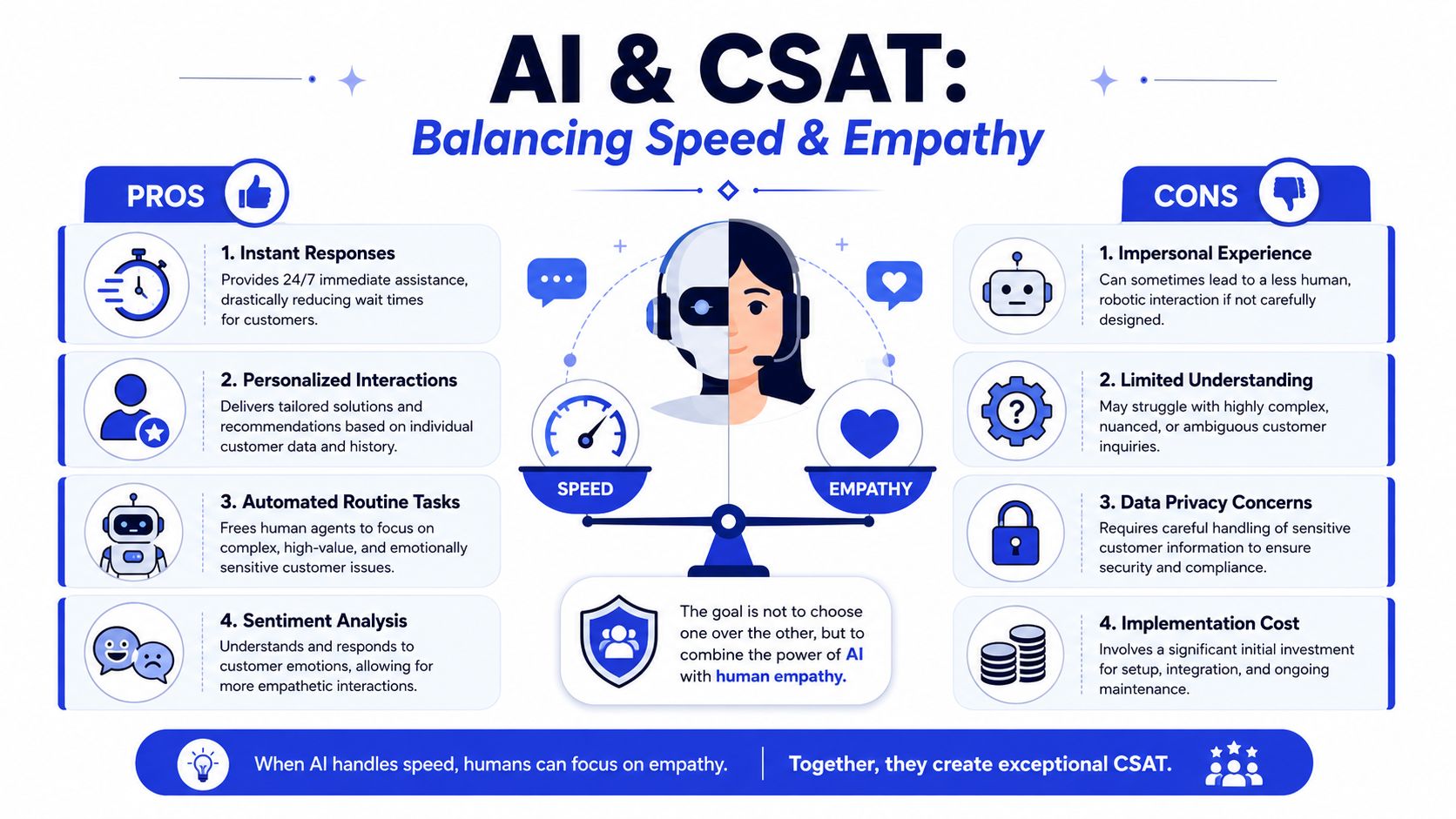
Later in the process, it helps to see the speed-versus-empathy tradeoff visually.
Escalate based on emotional risk, not only complexity
Most automation strategies fail because they escalate only when the bot is confused. That's too narrow. A system can understand the words perfectly and still deliver a bad experience.
Kaizo's analysis of CSAT improvement points to the gap between automation speed and perceived empathy, and notes that purely automated responses can lower CSAT by 15–20% when complex or emotional issues arise. That's the core design challenge.
The better rule is simple. Escalate when the issue carries low-empathy risk, not just low confidence.
Signals worth treating seriously include:
Repeated failed attempts to solve the same issue
Billing conflict or cancellation intent
Language that signals frustration, anxiety, or urgency
Requests involving exceptions, edge cases, or trust repair
One platform built around this model is Chatgrow, which lets teams train AI agents on site content and support material, then use smart escalation to collect context and route conversations that need human follow-up. That setup is useful when you want AI to handle straightforward questions but avoid letting sensitive moments sit inside a robotic loop.
Build an escalation path your team can trust
Automation only helps CSAT if agents trust what lands in their queue. A bad handoff is worse than no handoff because it creates duplicate effort and makes the customer repeat themselves.
A workable AI-to-human path should include:
Intent summary so the agent sees what the customer wants
Prior conversation context so the issue doesn't restart from zero
Reason for escalation so the receiving agent understands the risk
Clear ownership so the customer knows who has the next move
Fast support feels competent. Human support feels reassuring. Strong CSAT programs design for both.
The right balance is surgical. Use AI broadly for speed. Use humans deliberately where judgment, reassurance, and accountability make the difference.
Measure Impact and Systematically Scale Wins
A team ships a faster workflow, first response time drops, and everyone expects CSAT to rise. Two weeks later, the score is flat. In some queues, it is worse.
That usually means the team improved speed without improving the outcome customers care about.
Measure satisfaction after resolution
If you want a signal you can trust, measure CSAT after the issue is resolved. Supplo's guidance on improving CSAT recommends sending the survey only once the ticket is closed. That approach gives a more accurate read on whether the customer felt helped, not just answered.
Fast replies can still produce poor experiences. An instant AI response that misses the issue, or a human reply that buys time without solving anything, often looks fine in an immediate post-chat survey. It looks very different once the customer knows whether the fix held.
Two operating rules make this measurement cleaner:
use a 48-hour cool-down window so frequent contacts do not get hammered with surveys
use stratified random sampling by issue complexity so easy tickets do not drown out the hard ones
I have seen teams miss real dissatisfaction because password resets and shipping questions made the overall score look healthy while billing and account access steadily dragged retention down. Segmenting the sample fixes that blind spot.
Track CSAT beside operational signals
CSAT is an outcome metric. To improve it consistently, pair it with the service metrics that shape the customer experience in the first place.
Here is a practical scorecard to review each week:
KPI | What It Measures | Why It Matters for CSAT |
|---|---|---|
CSAT | Satisfaction with a completed interaction | Shows how customers judged the result and the experience |
First Response Time | How quickly the team replies initially | Slow starts increase uncertainty, especially on urgent issues |
Average Handle Time | How long interactions take to complete | Long times can point to complexity, poor tooling, or avoidable back-and-forth |
Resolution Rate | How often issues are fully solved | Customers reward solved problems, not busy queues |
Reopen Rate | How often resolved issues return | Reopens usually mean the original fix was incomplete or unclear |
Escalation Rate | How often issues move to a higher tier | High escalation can reveal routing, training, or policy gaps |
Self-Service Success | How often customers solve issues without an agent | Strong self-service improves speed without sacrificing convenience |
If you need a tighter reporting model, this guide to customer service key performance indicators is a useful reference for building a scorecard your team will use.
Watch these metrics by segment, not just in aggregate. Compare AI-handled contacts against human-handled ones. Split simple requests from high-empathy or high-risk cases. A blended average can hide the exact trade-off this article is trying to solve: speed improved, but trust did not.
Scale changes only after they hold up in the data
Treat every CSAT improvement like an operational test. Start with one queue, one channel, or one issue type. Keep the test narrow enough that you can tell what changed and why.
A simple scaling cycle works well:
Choose one friction point with meaningful volume
Change one variable at a time
Measure resolved CSAT for that segment
Read the comments for failure patterns and edge cases
Expand only after the gain holds for multiple review cycles
That last step is where teams get sloppy. A change that improves chat CSAT for order-status questions may fail in billing. An AI workflow that performs well on routine how-to requests may hurt satisfaction if it touches disputes or exceptions. Systematic scaling protects you from rolling out a local win that breaks in more sensitive parts of the journey.
The goal is not to chase a prettier dashboard. The goal is to build a support system that gets fast answers to simple questions, routes complex moments to humans early, and measures satisfaction in a way that reflects the full customer experience.
Frequently Asked Questions About Improving CSAT
What counts as a good CSAT score
There isn't a universal “good” score that applies across every business model, channel, and issue type. The more useful benchmark is your own recent baseline, segmented by channel and inquiry type. If you're asking how to improve CSAT, start by improving the weakest high-volume interaction rather than chasing someone else's average.
How often should you send CSAT surveys
Send them often enough to catch patterns, but not so often that customers stop taking them seriously. In practice, that usually means attaching surveys to meaningful resolution moments, escalations, and high-friction stages in the journey. Avoid blasting every interaction just because your help desk can.
What should you do with public negative feedback
Respond quickly, acknowledge the issue plainly, and move the resolution into a private channel when account details are involved. Don't argue in public. A calm, accountable response shows other customers that your team takes ownership.
What's the fastest way to lift CSAT
Start with the interaction types that combine high volume, low satisfaction, and business importance. Then reduce repeat effort for the customer. That might mean faster routing, clearer ownership, better help content, or smarter escalation into a human.
Should AI handle customer support if empathy matters
Yes, but only for the right work. AI is useful for immediate answers, repetitive requests, and after-hours coverage. It should not trap customers inside emotionally flat interactions when the issue calls for discretion, reassurance, or exception handling.
If you want to put this into practice, Chatgrow gives SMBs a way to deploy AI support agents for instant answers while keeping smart escalation in place for conversations that need a human touch. That makes it easier to improve response speed without losing the empathy that protects CSAT.
Related Posts
Continue Reading
More articles from the ChatGrow Team.