Blog
Live Chat for Ecommerce: A Practical Conversion Playbook
By
Nelson Uzenabor

Customers who use live chat are 2.8 times more likely to buy according to Freshworks' 2024 live chat statistics summary. That single number should change how you think about live chat for ecommerce.
This isn't a helpdesk feature first. It's a conversion layer.
Most stores still deploy chat like a support afterthought. They stick a widget in the corner of every page, route everything to the same queue, then judge success by ticket count and agent activity. That's backward. If you care about revenue, you place chat where buying friction happens: product pages, cart, checkout, and select pricing or bundle pages. Then you measure whether it recovers intent, lifts order value, and keeps high-value sessions from leaking out.
Table of Contents
Why Live Chat for Ecommerce Has Become a Revenue Channel
Shoppers who use live chat are 2.8 times more likely to buy, according to Freshworks' 2024 live chat statistics summary. Treat that as a revenue signal, not a support fact.
The winning stores stopped treating chat like a general inbox. They use it to intercept purchase hesitation in real time, on pages where intent is already high and one unanswered question can kill the sale. That shift matters because ecommerce growth is now constrained by conversion efficiency. Traffic costs more, comparison shopping is instant, and buyers leave fast.

Buyer behavior changed first.
Customers expect answers while they are deciding, not after they leave. If a visitor on a product page is unsure about sizing, delivery speed, compatibility, or returns, that is not a support ticket. It is a live conversion moment. Stores that answer inside that moment keep more of the demand they already paid for.
That is why live chat moved into the revenue stack:
Decision speed got shorter: buyers abandon faster when they hit friction
Acquisition got more expensive: wasting high-intent sessions is hard to justify
Chat tools got smarter: page context, cart data, and visitor history can shape the conversation instead of sending everyone into the same queue
Adoption followed. More retailers now run live chat because it helps protect buyer intent at the point where revenue is won or lost, not because they wanted one more support channel.
This changes ownership. Ecommerce managers, lifecycle teams, and growth leads should decide where chat appears, what prompts fire, and which visitors get priority. Support can still handle post-purchase requests. But pre-purchase chat on PDPs, cart, checkout, and bundle pages should be managed like conversion infrastructure.
Measure it that way too:
Recovered revenue: sessions that would likely have dropped but converted after chat
Conversion lift on high-intent pages: product, cart, and checkout sessions influenced by chat
Average order value impact: orders improved through bundles, add-ons, or better product guidance
Qualified conversation rate: chats started from buying intent, not generic service questions
If you want a broader breakdown of the advantages of live chat for online stores, keep one filter in mind. The value is not in handling more conversations. The value is in removing buying friction before the session disappears.
What Live Chat for Ecommerce Actually Does on a Store
Most definitions of live chat are useless because they describe the interface, not the job. On a store, live chat for ecommerce is valuable only if it can read context, act on intent, and pass data back into your stack.
A generic widget says, “How can we help?” Real ecommerce chat says, “I can see you're looking at this product, you have two items in cart, and your question is probably about shipping, fit, stock, or trust.”
The storefront behaviors that matter
A real ecommerce deployment usually handles several jobs at once:
Product and cart awareness: The system recognizes what the visitor is viewing or buying, so answers can reference the actual item, not a canned paragraph.
Behavioral triggering: The widget appears based on signals like hesitation, repeat visits, or friction on a high-intent page.
Intent qualification: A short pre-chat prompt can sort “I need sizing help” from “Where is my order?” before the conversation starts.
Outcome syncing: The conversation should feed your CRM, helpdesk, or reporting layer so your team learns from it.
A lot of teams miss the fourth point. If the chat transcript dies inside the widget, you've learned nothing. If it syncs back to your systems, you can spot recurring objections, broken PDP copy, unclear shipping policies, and weak checkout moments.
Four behaviors that separate ecommerce chat from generic support chat
First, it needs transaction awareness. If a visitor asks about an item in cart, the assistant or agent should know the item without forcing the customer to retype it.
Second, it needs trigger logic. A shopper who has spent time on a product page deserves a different prompt from someone who just landed on a blog post. That's why teams trying to engage customers with live chat effectively usually focus on context, not just availability.
Third, it should support transaction-adjacent actions. That might mean helping with address changes, clarifying shipping options, or handling simple order questions without pushing the shopper into another channel.
Fourth, it should support post-purchase continuity. Good ecommerce chat isn't only about the first sale. It also handles delivery questions, return friction, and repeat-order moments that shape whether customers come back.
A chat widget without page context is just an expensive FAQ.
If you're comparing implementations, start with the storefront unit itself. Chatgrow has a practical overview of what a web chat widget should do. That's the right lens. Judge the widget by whether it helps the store sell and support in context, not by whether it adds another inbox.
The Revenue Impact You Can Expect from Live Chat
A modest conversion lift on high-intent traffic usually beats a big support win on low-intent traffic. That is the right way to judge live chat on an ecommerce store.
Live chat earns revenue by helping shoppers finish decisions they were already close to making. The gain shows up fastest on product pages, cart, and checkout, where a single unanswered question can kill the order. As noted earlier, teams that use chat well often see stronger conversion and purchase rates. The point is not the widget itself. The point is intercepting buying friction before the shopper exits.
How the lift happens
The blockers are usually plain and repetitive. Shipping timing. Return policy clarity. Sizing or compatibility questions. Stock uncertainty. Last-minute trust concerns at checkout.
Chat works because it answers those questions inside the session, on the page where the doubt appears.
A peer-reviewed study on Taobao found that live chat improves traffic-to-sales conversion, with the strongest effect on less informative product pages and higher-value products, according to the Production and Operations Management study. That matches what good operators already know. Chat produces the best return where the product needs explanation, reassurance, or comparison help.
Track commercial outcomes first
If your reporting starts with ticket volume, you are measuring the wrong system. Live chat on a store is a sales assist layer. Judge it with revenue-side KPIs.
KPI | What to expect | Driver | Risk if misdeployed |
|---|---|---|---|
Conversion rate | A measurable lift when chat appears at decision points | Real-time objection handling on PDP, cart, and checkout | Spreading chat across low-intent pages and calling it success |
Purchase completion | More assisted sessions reach checkout completion | Fast answers during the final decision window | Treating chat like a passive inbox instead of an in-session assist |
Average order value | Higher basket value when agents or automation guide fit, bundles, or add-ons | Cart-aware recommendations and product guidance | Running generic scripts with no product context |
Repeat purchase and revisit behavior | Better return rates when post-purchase questions are handled cleanly | Trust built through useful, fast interactions | Solving the first question poorly and lowering confidence |
Satisfaction | Stronger customer sentiment when help is quick and relevant | Lower effort than forcing shoppers into email forms or phone queues | Chasing CSAT while ignoring whether chat improves revenue |
Speed changes the commercial outcome
Slow chat loses sales. Fast chat protects intent.
Independent benchmark reporting says live chat first response time is typically around 1 minute 35 seconds, top ecommerce performers answer in roughly 12 to 30 seconds, and reducing first response from about 2 minutes to under 45 seconds can correlate with a 15% increase in average order value in this ecommerce support benchmark.
That is why routing matters more than coverage. The right conversation has to reach the right destination fast, with page and cart context attached. If you want automation to carry part of that load, an AI agent for ecommerce should answer repeat buying questions immediately and pass complex cases to a human without making the shopper restate everything.
Core Features That Separate Real Ecommerce Chat from Noise
Feature lists are where many teams get distracted. They compare widgets the way people compare project management software. Long checklist, little clarity. That's the wrong buying motion.
For a store, the feature stack should work in layers. Each layer earns its place by removing friction or protecting agent time.
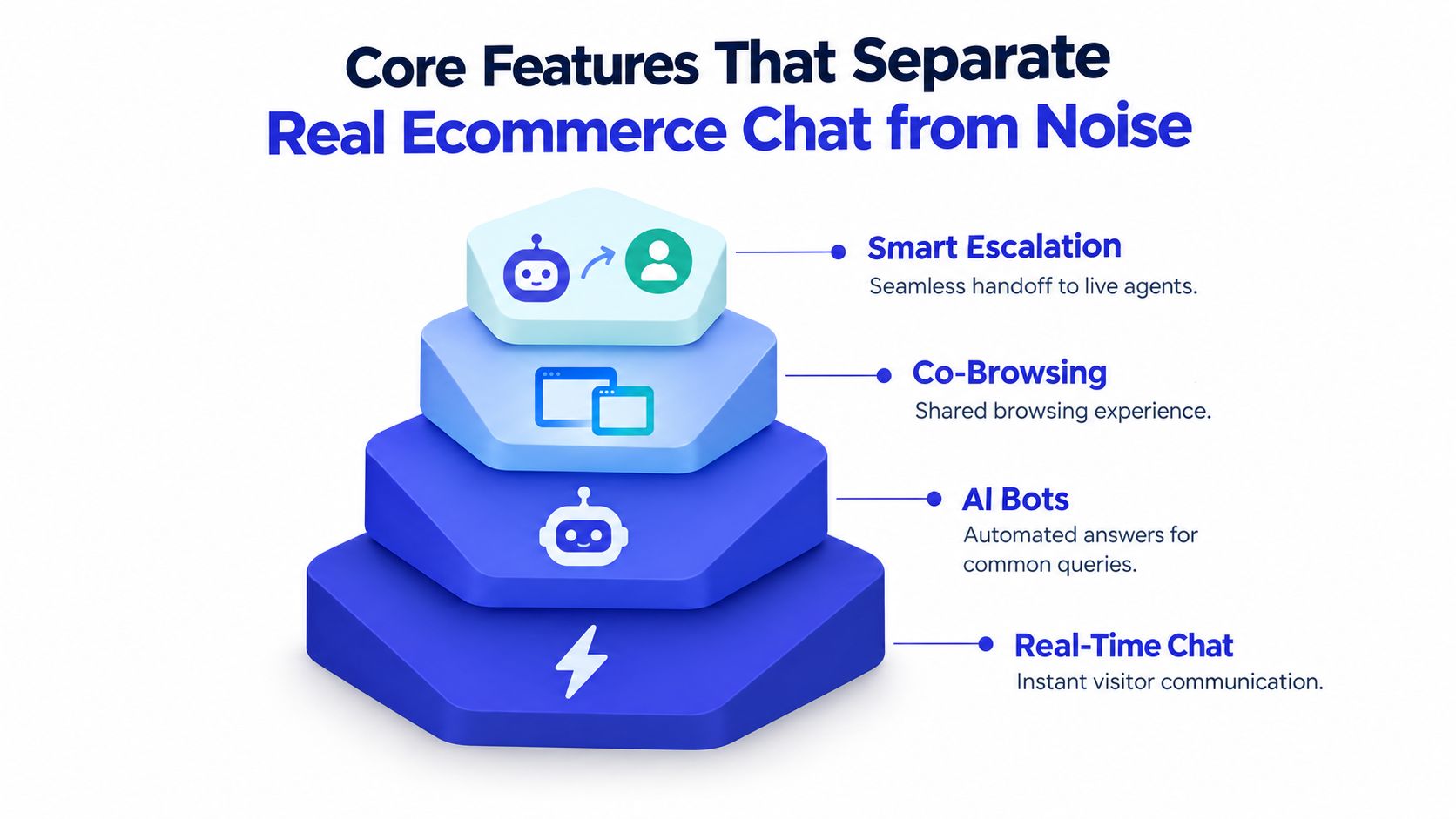
Real-time chat is the foundation
This is the only must-have. Shoppers need a fast path to ask a question without leaving the page. If the widget is slow, clunky on mobile, or hard to dismiss, it's hurting more than helping.
Real-time chat does the basic job well when it captures context and doesn't interrupt too early. A small, well-timed prompt on a PDP beats a giant modal every time.
Bots should remove repetition, not impersonate a closer
Bots are useful when the question is common and the answer is stable. Think shipping windows, return policy, order tracking, sizing guidance, or store policies. That's where automation cuts queue load and keeps response time tight.
Bots are weak when they pretend every conversation is the same. Complex product comparison, edge-case compatibility, or checkout distrust usually need a person.
Use this filter:
Bot-first: repetitive, policy-based, low-risk questions
Human-first: high-value carts, confusion at checkout, nuanced product fit
Hybrid: the bot gathers intent, order details, or product SKU, then passes the full context forward
If the bot can't preserve intent and hand off cleanly, it's not automation. It's a detour.
Co-browsing and escalation justify themselves in narrow moments
Co-browsing doesn't belong everywhere. It earns its keep during checkout recovery, guided configuration, and complex product selection where words alone won't fix the problem. If your product is simple, you may never need it.
Smart escalation matters more often. The handoff should include:
What the shopper asked
What page they're on
What's in the cart
What the bot already tried
Lose that context and the customer has to repeat themselves. That kills trust fast.
The connective tissue is what is overlooked: proactive triggers, visitor segmentation, and CRM syncing. Without those pieces, your chat stack is just disconnected functionality. With them, it becomes a working revenue system.
Where and How to Deploy Chat on High-Intent Pages
Deployment is where most results are won or lost. The question isn't “Should we add chat?” The question is where does chat deserve space on the storefront?
My answer is blunt. Put it on pages where hesitation blocks revenue. Keep it off pages where people are still browsing.
Put chat where money changes hands
Use chat aggressively on:
Page | Chat Placement | Trigger | Routing Rule |
|---|---|---|---|
Product detail page | Near shipping, fit, or review modules | Hesitation after time on page, repeat visit, or variant switching | Route product questions to trained sales or support reps |
Cart | Persistent but quiet corner widget | Exit behavior, shipping hesitation, promo-code confusion | Prioritize carts with higher value or multiple items |
Checkout | Minimal rescue layer, not a giant panel | Stalling at payment or shipping step | Send to fastest available senior queue |
Pricing, bundles, or custom kit pages | Close to comparison or configuration areas | Repeated toggling, back-and-forth behavior | Route to agents who know product combinations |
Don't lead with chat on blog posts, generic category pages, or top-of-funnel landing pages unless you have a very specific reason. On those pages, chat often interrupts research instead of helping conversion.
Trigger design should be tighter than most stores think
Bad triggers feel needy. Good triggers feel timely.
Use simple logic:
Time on page: If someone lingers on a PDP, they may have a real question.
Repeat visits: Returning shoppers often need one last answer before buying.
Cart value: Higher-value carts deserve faster routing and stronger human backup.
Exit intent on cart or checkout: Rescue can matter most.
Keep pre-chat forms short. Email plus one useful field is enough. Ask what they need help with, or whether the question is about the product or an existing order. Anything longer creates friction right when you're trying to reduce it.
The fastest way to ruin live chat for ecommerce is to force a lead form into a buying moment.
Routing should reflect margin and complexity
Every chat doesn't deserve the same path. A store with premium products shouldn't route a high-value checkout stall into the same queue as “where's my order?” traffic.
Skill-based routing is the right model. Priority routing is the second half. If a store is already improving inventory, shipping, and service coordination, these omnichannel fulfilment tactics become even more useful because chat performs better when the rest of the operation is coherent.
For PDPs, I like chat anchored near reviews, shipping details, and sizing content. For checkout, keep it available but restrained. It should feel like a rescue rope, not a distraction.
How to Evaluate Live Chat Solutions and Where Chatgrow Fits
Most vendors sell the same basics with different packaging. Don't overpay for table stakes and don't get impressed by dashboards that stop at support metrics.
Buy with a scorecard tied to revenue influence.
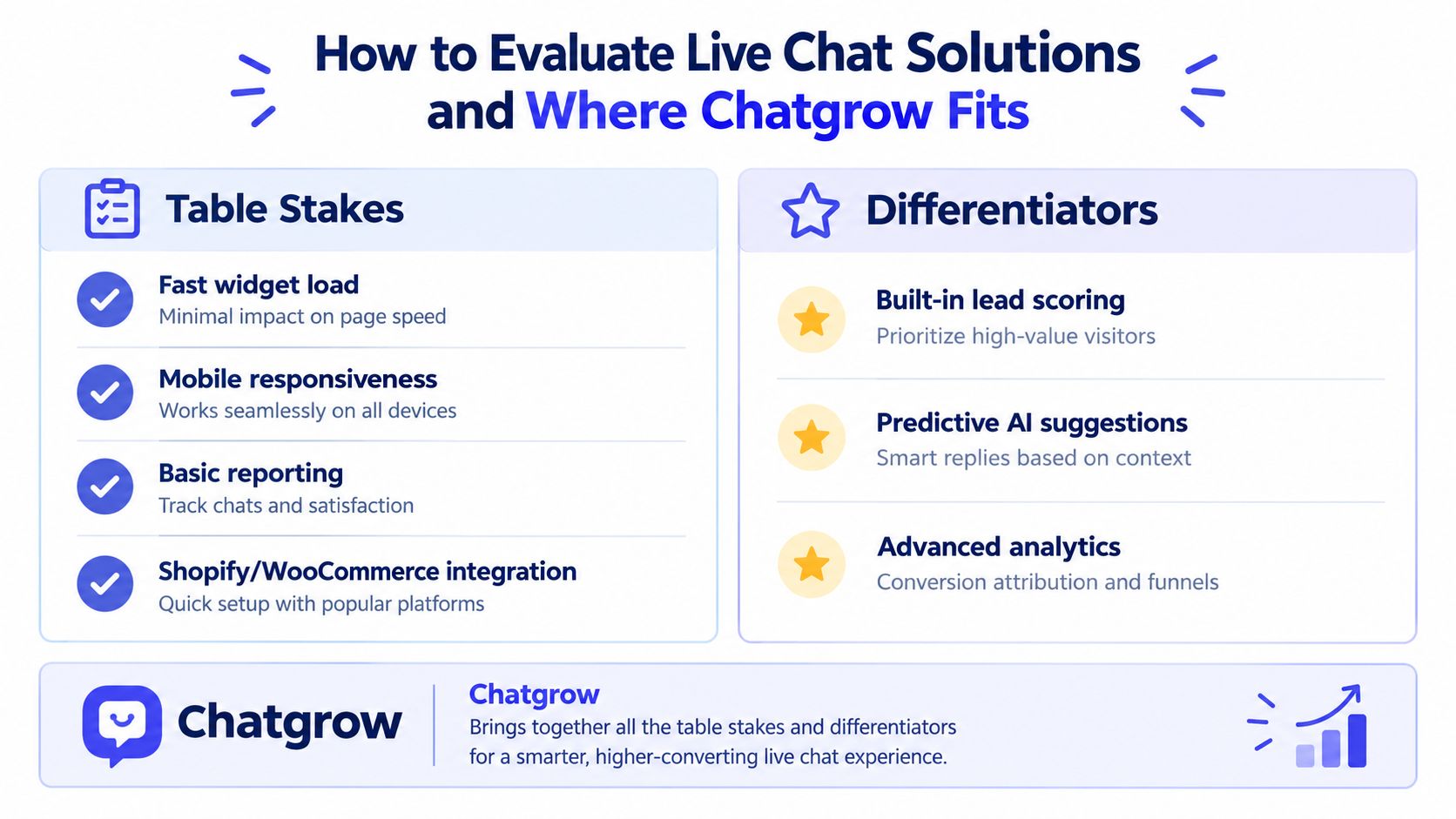
Table stakes you should expect
If a platform can't do these well, move on.
Fast widget load: The chat experience can't drag down the storefront.
Mobile responsiveness: A lot of buying friction happens on phones, so mobile chat quality isn't optional.
Basic reporting: You need conversation volume, routing visibility, and transcript access.
Store integration: Shopify or WooCommerce support should be straightforward.
These aren't differentiators. They're admission requirements.
What actually separates one platform from another
The useful questions are harder.
Can the system trigger by cart and PDP behavior? Can it segment visitors by intent or order state? Can it suggest or automate replies for repeat ecommerce questions? Can it sync with your CRM or helpdesk without messy workarounds? Can you test copy, prompts, and routing rules instead of guessing?
Another critical test is attribution. I want to know whether chats influence recovered orders, higher-value carts, and repeat purchase behavior. I care less about agent handle time unless it's hurting those outcomes.
One option in this category is Chatgrow, which offers AI customer-service agents trained on website content, product pages, pricing, and FAQs, with smart escalation that forwards concise summaries to human teams when follow-up is needed. For ecommerce evaluation, that maps well to cart- and PDP-aware deployment, automated answers for repeat questions, and shared handling between AI and humans.
Run a short pilot before signing anything bigger
A two-week pilot tells you more than a polished demo.
Use a simple checklist:
Install on high-intent pages only
Define routing rules for product, cart, and order questions
Review transcripts weekly
Track influenced conversions and order quality, not just chat volume
Decide what should stay automated and what should escalate
If a vendor can't support that motion, the product probably isn't built for ecommerce revenue work. It's just built to manage conversations.
Your First 30 Days with Live Chat on an Ecommerce Store
The first month shouldn't be about feature depth. It should be about learning where buyers get stuck and fixing those points fast.
Three moves matter most this week:
Install on cart and checkout first: That's where buying intent is already strong and hesitation is expensive.
Route high-intent events differently: Treat cart questions, checkout friction, and high-value sessions as priority conversations.
Connect chat to your order or CRM system: Your team needs enough context to answer quickly and follow up intelligently.
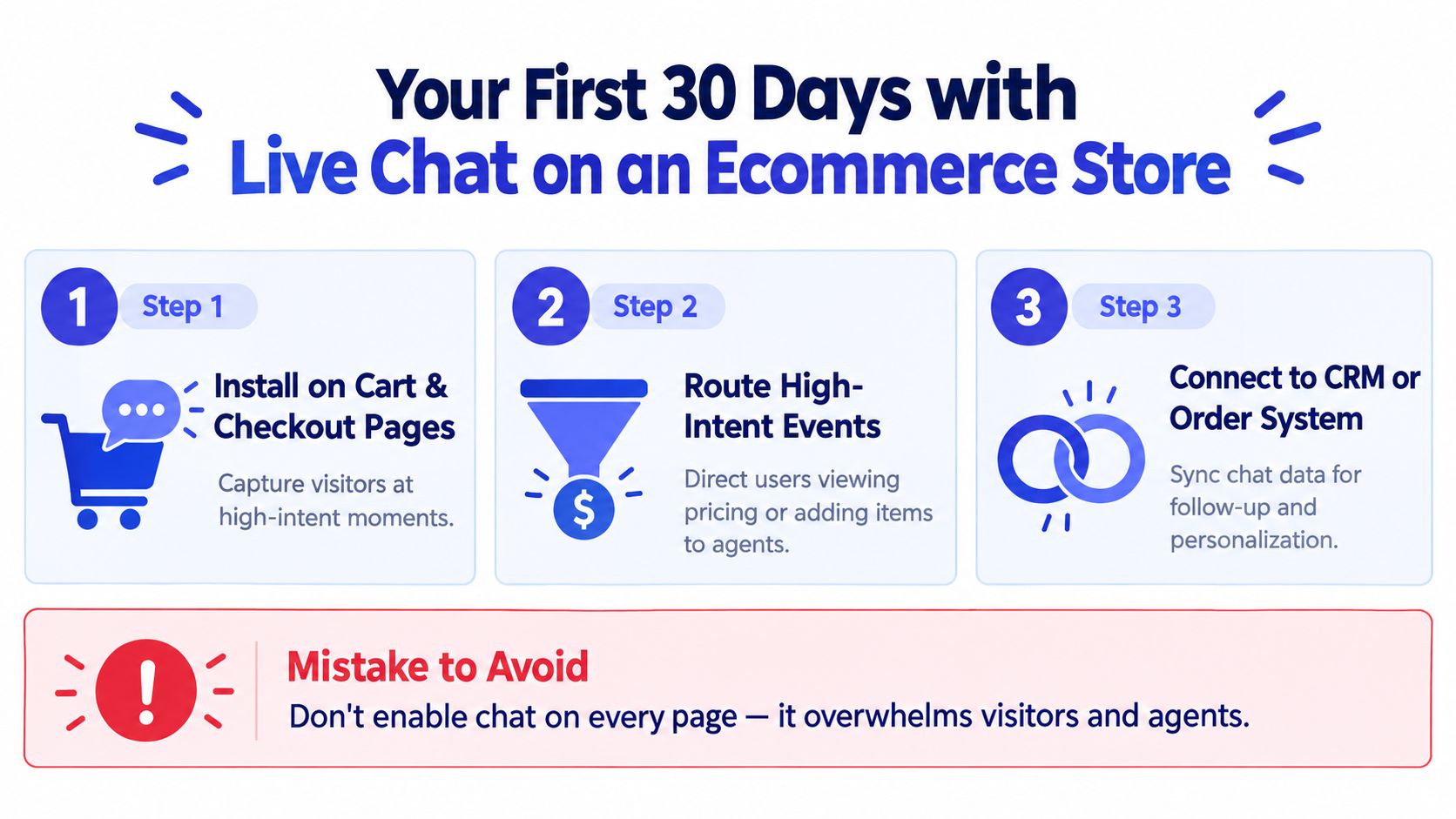
The mistake to avoid is simple. Don't treat chat like a passive support widget sitting in the corner of every page. Treat it like a conversion surface with ownership, placement rules, and weekly transcript review.
Your success metric for the first 30 days should be chat-influenced conversion rate by page type. Look at PDP, cart, and checkout separately. That's how you learn whether deployment is working, whether triggers are premature, and where automation helps versus gets in the way.
Start narrow, learn from real buyer questions, then automate the patterns that repeat.
Quick wins rarely come from piling on more features. They come from placing chat in the right moments, answering fast, and preserving context when a human needs to step in.
If you want to turn live chat into a revenue layer instead of another support queue, Chatgrow gives you AI agents you can train on your store content, FAQs, and product pages, then deploy on high-intent pages with smart escalation when a human should take over. It's a practical fit for stores that need faster answers on PDPs, cart, and checkout without building a complex support operation first.
Related Posts
Continue Reading
More articles from the ChatGrow Team.


