
Blog
What Is a Web Chat Widget? a 2026 Guide for Businesses
By
Nelson Uzenabor
A customer lands on your website at 10:43 p.m. They're ready to buy, but one question stops them. Maybe they want to know if you ship internationally, whether your software integrates with their stack, or which plan fits their team. They look around for help, find only a contact form, and leave.
That moment happens more often than most business owners realize. Your website might be getting visits, product-page views, and checkout intent, but without a fast way to answer questions, some of those visitors disappear before your team ever knows they were there.
That's where a Web Chat Widget earns its place. It's the small chat bubble you see in the corner of a site, but its role is much bigger than that. It gives visitors a direct line to your business while they're still interested, still browsing, and still close to taking action.
This isn't a niche tool anymore. Tidio's live chat statistics roundup says there are over 519,700 live chat widget installations across the top 1 million websites, and on Shopify, the share is estimated at about 6% of stores using live chat. The same source also reports that roughly 15% of website visitors interact with a live chat widget at some point during their visit. That tells you something important. Visitors are used to seeing chat, and many of them use it.
Table of Contents
Introduction The 24 7 Digital Welcome Mat
A web chat widget works like the front desk of your website. It greets visitors, answers simple questions, and helps people get where they need to go without friction. For a small business, that matters because most missed opportunities aren't dramatic. They're small points of confusion that never get resolved.
A shopper may wonder about returns. A SaaS buyer may want to ask about onboarding. A parent exploring an education program may need one detail before submitting an inquiry. If they can ask in the moment, you keep the conversation alive. If they can't, they often postpone the decision or move on.
Why this matters for small businesses
Small teams don't have the luxury of staffing every channel all day. Email inboxes pile up. Phone calls get missed. Contact forms feel slow, especially when the visitor is already on a page with buying intent.
A web chat widget changes that dynamic because it sits where the decision happens. On a pricing page, a service page, a product page, or a checkout page, it gives the visitor a low-effort next step.
Practical rule: If a visitor has to leave the page to get help, you've added friction at the worst possible moment.
There's also a mindset shift here. Many owners think of chat as “another support channel.” In practice, it's often a sales, support, and lead-capture layer all at once. It can answer FAQs, collect contact details, and route urgent or high-value questions to the right person.
The quiet cost of being unavailable
Most websites are open all day, but human support isn't. That gap is where chat helps. Even when your staff is offline, the widget can still guide people, gather context, and make sure no serious inquiry arrives as a blank “Hi, I have a question” email the next morning.
That's why the tool has become so common. Buyers now expect websites to offer immediate help, especially on pages tied to money or commitment. When the widget is set up well, it feels less like a pop-up and more like a helpful employee who knows when to step in and when to stay quiet.
What Exactly Is a Web Chat Widget?
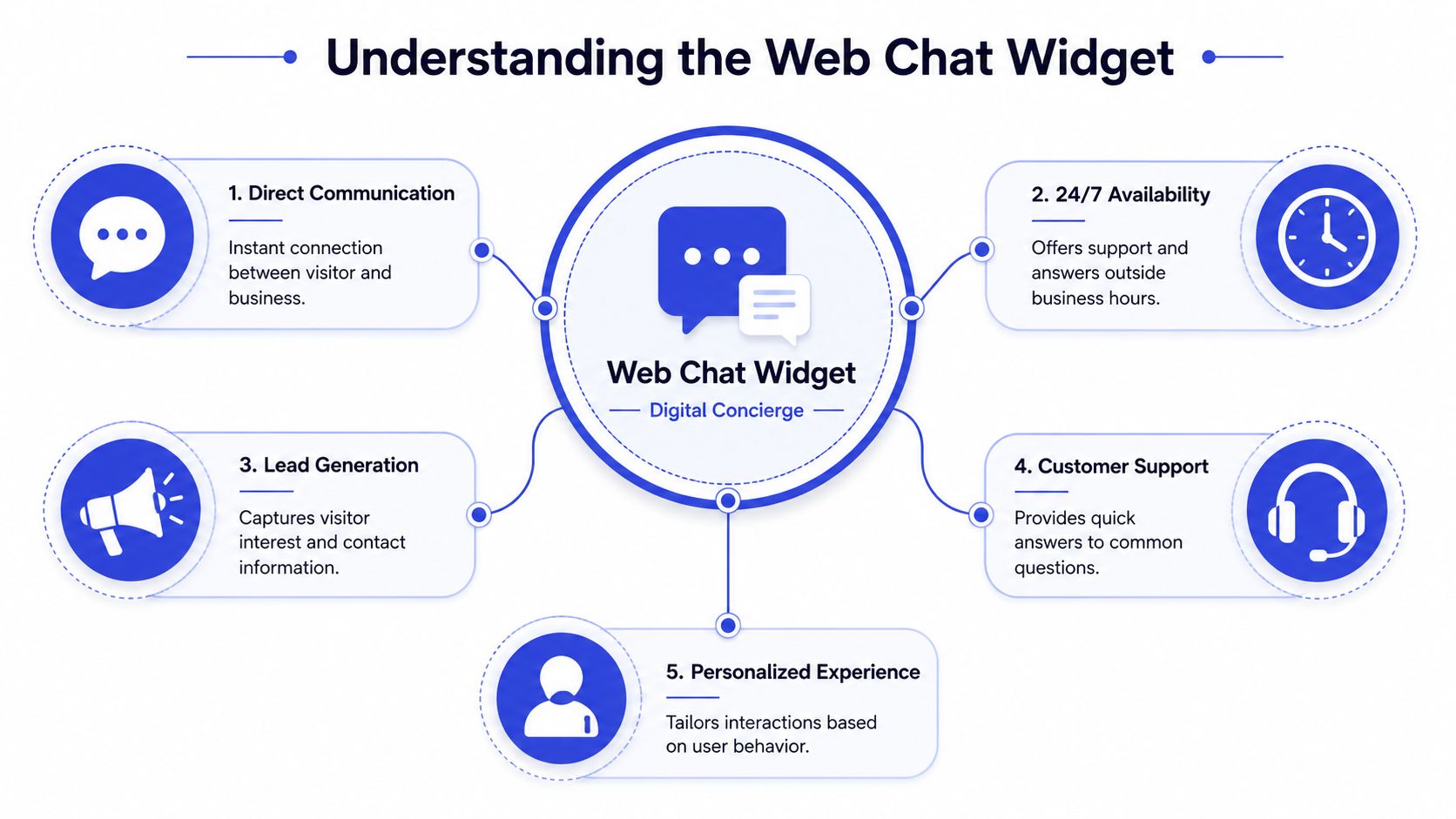
The easiest way to understand a web chat widget is to think of it as a digital storefront clerk. It stands near the entrance, notices when someone looks uncertain, answers routine questions, and calls in a manager when the conversation needs a human.
That's the business view. The technical view is simpler than many people expect.
The simple version
What your visitor sees is the bubble or chat window on the page. They click it, type a question, and get a response. That visible part is lightweight by design, which is one reason it's usually easy to add to a site.
A good widget doesn't force someone to leave the page, open email, or start over somewhere else. It keeps the interaction in context. If a visitor is looking at a product, they can ask from that product page. If they're comparing plans, they can ask from the pricing page.
What happens behind the bubble
The visible widget is only the front end. GetStream's glossary entry on chat widgets explains that a web chat widget is typically a front-end JavaScript component or iframe, while the actual message delivery, session state, and sync logic are handled by a backend chat API or messaging service.
That separation matters more than it sounds.
The front end stays portable: you can place the widget on different pages or sites without rebuilding the system.
The backend carries the heavy load: it tracks conversation state, manages message delivery, and helps maintain continuity.
The same interface can support both AI and humans: the visitor sees one chat window, even if the system behind it switches between automated help and a person.
A small bubble in the corner can connect to a much larger operation behind the scenes.
This is also where people get confused. They assume the widget itself is the whole product. It isn't. The widget is the customer-facing layer. The actual quality of the experience depends on what powers it. If the backend is weak, the experience feels slow, forgetful, or disconnected. If the backend is solid, the conversation can stay coherent across sessions and handoffs.
That's why two chat widgets can look similar on the surface but perform very differently once real customers start using them.
Core Benefits and Tangible ROI of Chat Widgets
A visitor lands on your site at 9:14 p.m. They are interested, a little unsure, and one unanswered question away from leaving. If your chat widget can answer that question, or collect the right context for a fast follow-up, you keep the conversation alive instead of losing it to a competitor.
That is the actual business value.
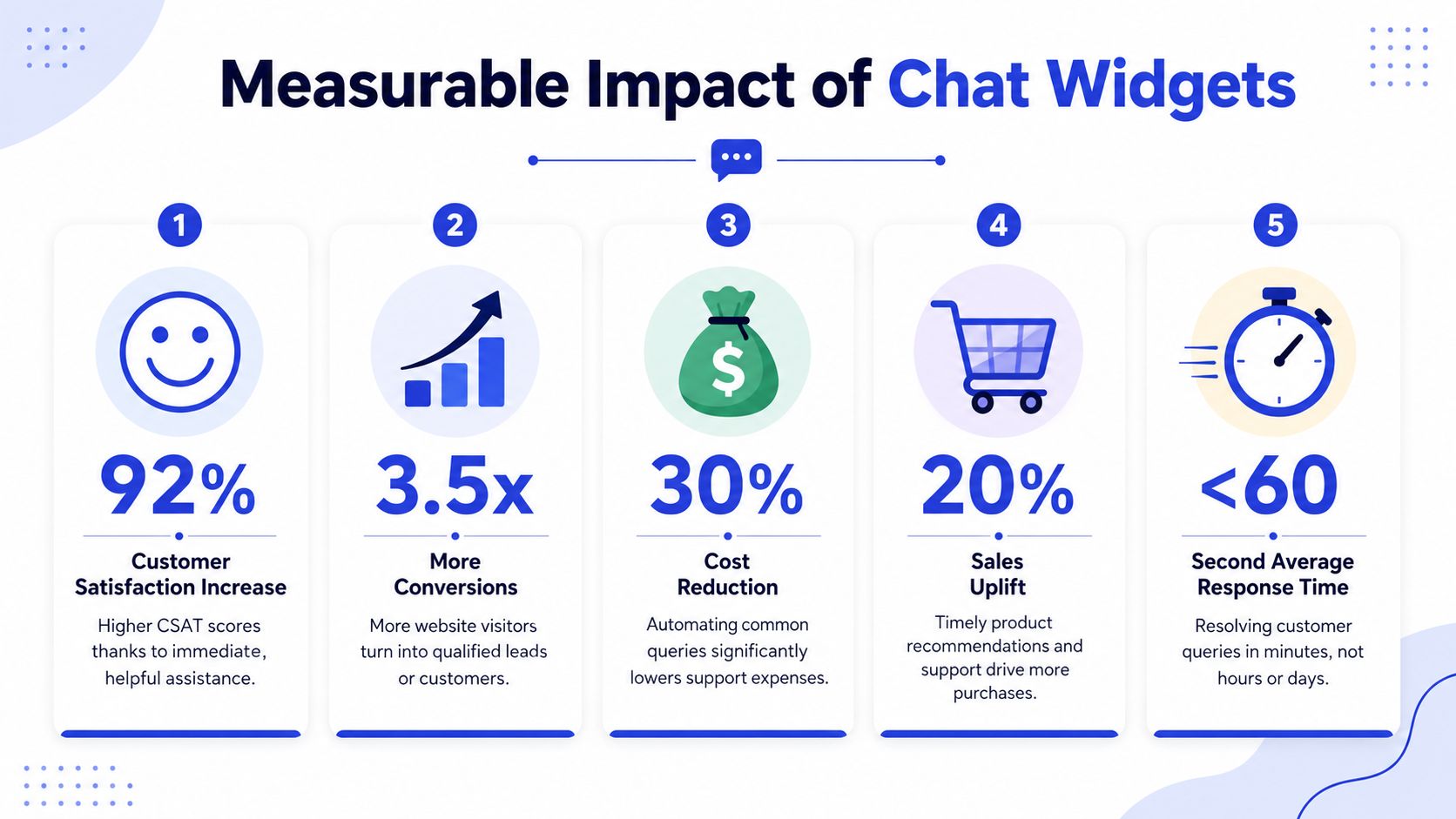
A web chat widget improves more than support speed. It can reduce repetitive workload, help more visitors reach a buying decision, and give your team clearer signals about what customers get stuck on. The payoff is usually spread across sales, service, and operations, which is why simple ROI math often misses part of the picture.
Faster help creates less drop-off
Chat works well because it meets people at the moment they hesitate. They do not have to open a new tab, wait on hold, or commit to a sales call just to ask a basic question.
For a small business owner, that matters in very practical ways. A pricing question can turn into a booked demo. A shipping concern can turn into a completed checkout. A support issue can stay contained instead of becoming a refund request or a bad review.
This short explainer is worth a quick watch before you plan your setup:
ROI comes from fewer dead ends
The easiest way to evaluate chat is to ask where conversations currently break.
If visitors leave because they cannot get a fast answer, chat can recover lost demand. If your team repeats the same questions all day, chat can absorb that traffic and free people for higher-value work. If leads arrive without context, chat can collect the details your sales or support team needs before a human ever joins.
Here is a useful way to break it down:
Support ROI: common questions get handled faster, which reduces ticket volume and repetitive replies.
Sales ROI: high-intent visitors can resolve objections while they are still deciding.
Lead ROI: the widget can capture page context, question history, and contact details for better follow-up.
Operational ROI: conversation logs show where buyers get confused, which can improve your site copy, onboarding, and help content.
The return depends on how the widget is set up
This is the part many businesses miss. A chat widget does not produce strong results just because it is visible on the page. It performs well when the answers are grounded in current business data, the mobile experience is easy to use, and the handoff to a person happens with full context.
Grounding matters because bad answers are expensive. If the bot pulls from outdated pricing, old policies, or incomplete help docs, it creates rework and weakens trust. A good setup uses approved sources so the assistant answers like a trained team member, not a guesser.
Mobile strategy matters too. A large share of visitors will meet your widget on a phone, where space is tight and patience is shorter. If the launcher blocks key buttons, opens too aggressively, or asks for too much typing, people leave. Good mobile chat feels light, quick, and easy to dismiss or reopen.
Human handoff matters just as much. If a customer has to repeat everything after the bot fails, the experience feels broken. If the agent receives the transcript, page context, and intent, the switch feels smooth and the customer gets help faster.
For a broader look at the business case, this guide on live chat benefits for growing companies explains where the gains usually show up first.
Fast answers protect buying intent. Accurate answers and clean handoffs protect trust.
The strongest chat programs do both. They answer simple questions quickly, route edge cases well, and give your team enough context to act without starting from zero. That is how a small bubble in the corner starts producing measurable business value.
Key Features of a Modern Web Chat Widget
Not every web chat widget deserves the word “modern.” Some are still little more than a message box that says, “Leave us a note and we'll reply later.” That can be useful, but it won't solve the harder business problem, which is giving accurate, relevant help in real time and preserving context when a human needs to step in.
Old school chat versus modern chat
Zipchat's 2026 comparison of website chat widgets frames a modern widget differently. It says today's stronger options combine the chat surface with an LLM-powered chatbot, live-catalog or knowledge-base grounding, analytics, and human escalation. It also highlights a key point many buyers miss: the best option isn't just “AI-enabled.” It should reflect current pricing, product, and policy changes, then route complex cases cleanly to people.
That distinction matters because outdated answers create real business risk. If your widget confidently gives old shipping rules, retired plan details, or stale product information, it creates more work instead of less.
Here's the difference in practical terms:
Feature | Traditional Live Chat | Modern AI Widget (e.g., Chatgrow) |
|---|---|---|
Availability | Usually depends on staff hours | Can support visitors around the clock with automation plus human backup |
Answers | Often manual and agent-dependent | Can respond using trained business data and structured knowledge |
Context retention | May be lost during transfers | Better systems preserve the conversation and collected details |
Lead qualification | Usually handled manually | Can ask routing questions before a human joins |
Data freshness | Depends on agent knowledge | Strong setups ground responses in current site or knowledge-base content |
Escalation | Basic handoff | Smarter handoff with summary and intent |
The three details that matter most
First is data grounding. If the AI answers from your current website, help center, catalog, FAQs, or policy content, it's more likely to stay useful. If it relies on vague prompting or static copy, quality slips fast.
Second is handoff quality. When a human takes over, they should receive the full thread, the visitor's question, and any lead details already captured. Your team shouldn't have to restart the conversation with “How can I help you today?”
Third is intent recognition. A modern widget should tell the difference between someone asking for support, someone comparing plans, and someone ready to talk sales. That's where automation becomes operationally helpful instead of merely impressive.
If you want a grounded overview of how automated support works in practice, this article on automated customer service systems is a useful companion.
How to Implement and Integrate a Chat Widget
Installing a web chat widget is usually the easy part. Getting it to work like a real business tool takes a bit more thought. Most businesses go live with one of two paths: a script added to the website, or an app or plugin built for a platform like Shopify or WordPress.
Two common ways to install it
A JavaScript snippet is the common option when you want flexibility. You paste a small piece of code into your site, and the widget loads across the pages you choose. This works well if you want control over placement, triggers, page targeting, or custom behavior.
A platform app or plugin is often easier for non-technical teams. If your site runs on a mainstream platform, the app route can make setup faster and reduce dependency on a developer.
Neither path is automatically better. The right choice depends on how much control you need and how simple you want maintenance to be.
If your setup stops at “the bubble appears,” you've only handled the smallest part of implementation.
Configuration is where the business value grows
Gains come from what you pass into the widget and what you connect it to. Suggestic's AI chat widget documentation shows how configuration hooks can shape routing, analytics, and compliance. Their docs allow UTM parameters to be passed via script or iframe using a chat_utm_* key pattern, which makes acquisition source attribution available inside the chat session.
That's powerful because it means your team can understand where the conversation came from. A visitor from a paid campaign may need a different follow-up than someone who arrived through organic search or a referral page.
The same documentation also includes controls such as disable_image_upload and disable_suggested_replies. Those settings may sound small, but they matter when you need tighter moderation, a more standardized lead flow, or fewer free-form interactions.
A strong implementation usually includes these connections:
CRM integration: send leads and conversation details into the system your sales team already uses.
Help desk connection: route support issues into the queue where agents work every day.
Analytics tagging: preserve campaign and page context so you can learn which traffic sources drive useful conversations.
Knowledge synchronization: keep the answers aligned with current content, not last quarter's details.
For a practical look at why these connections matter, read this piece on customer data integration for support and sales workflows.
When the widget is properly integrated, it stops being a floating add-on. It becomes part of your website, your reporting, and your response process.
Best Practices for Deployment and Optimization
A chat widget can help conversions, or it can annoy people. The difference usually comes down to operating choices that many teams make once and never revisit. Placement, default state, trigger timing, and escalation design shape whether the widget feels helpful or intrusive.
Placement changes by device
Many websites place the widget in the bottom-right corner and call it done. That's common, but it isn't always enough. StoreAgent's guide to chat widget position recommends different defaults by device: bottom-right and open on desktop, but bottom-right and closed on mobile to avoid covering product images or navigation.
That advice is useful because mobile screens punish clutter much more than desktop layouts do. A widget that looks visible and helpful on a laptop can feel obstructive on a phone, especially on product pages or during checkout.
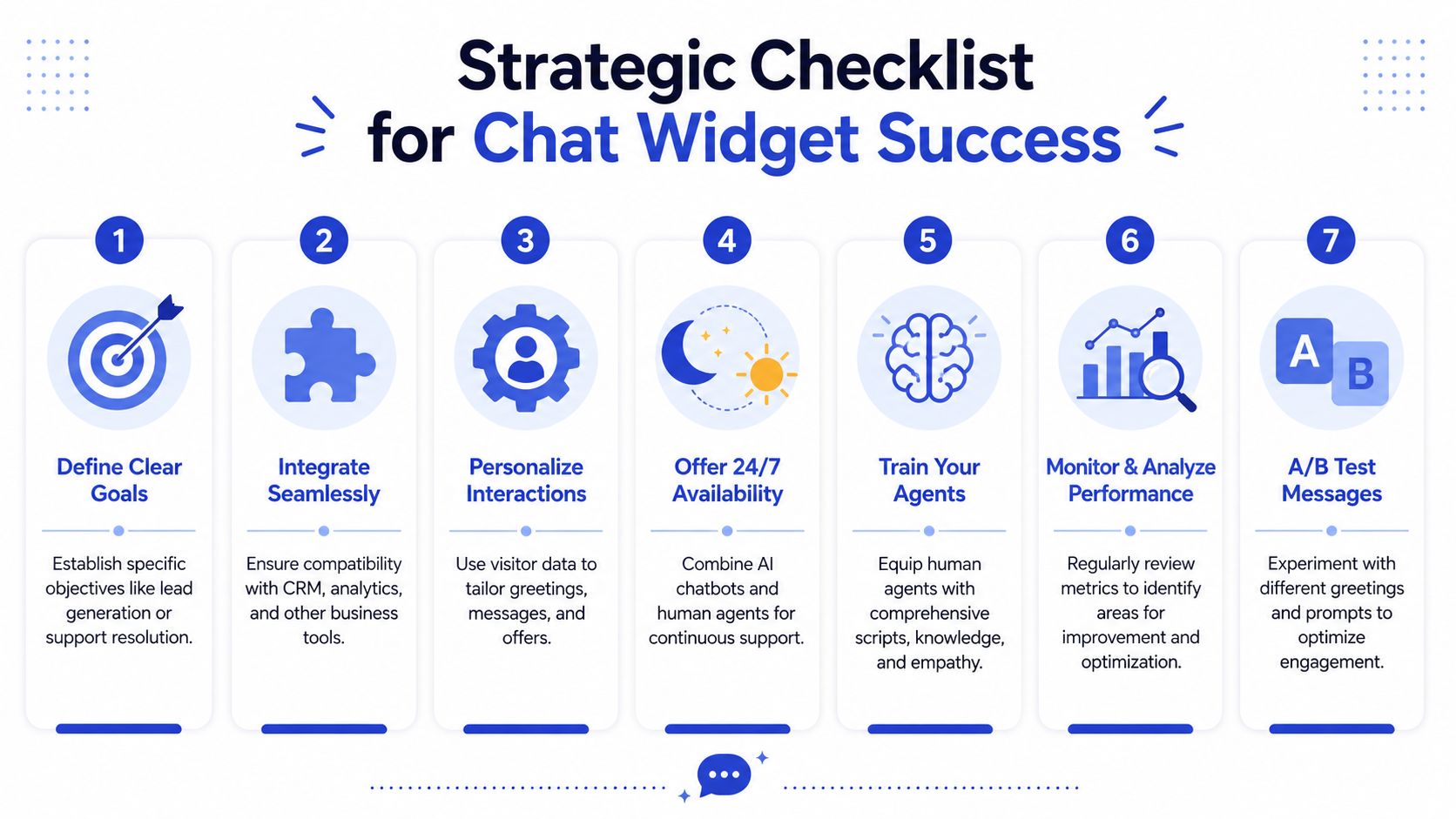
A practical operating checklist
Use this as a working checklist rather than a one-time launch task.
Choose pages by intent: Put stronger chat experiences on pricing, product, booking, demo, and checkout pages. A visitor on your homepage may be browsing. A visitor on your pricing page often has a decision to make.
Write opening prompts carefully: “Need help choosing a plan?” is better than a generic greeting when the page already tells you what the visitor is trying to do.
Keep mobile conservative: Start closed on small screens unless you have a very strong reason not to.
Define handoff rules: Decide which questions stay automated and which ones should move to a person.
Review transcripts regularly: You'll quickly spot recurring questions, missing content, and weak responses.
Train the human side too: Your staff should know how to pick up a chat without making the customer repeat everything.
A chat widget should interrupt uncertainty, not interrupt browsing.
There's another overlooked detail: some teams make the widget too eager. If it opens instantly on every page, people learn to dismiss it. If it appears only when intent is high or confusion is likely, it feels far more relevant.
You'll also get better results when you treat optimization as ongoing operational work. Update answers when pricing changes. Rewrite prompts that feel robotic. Refine escalation paths when your team notices friction. The strongest chat experiences don't come from the initial install. They come from steady tuning after real conversations reveal what visitors need.
Conclusion Making Your Chat Widget a Growth Engine
A web chat widget starts as a small interface element, but it can become one of the most useful systems on your site. It gives visitors an immediate path to ask, clarify, compare, and move forward without leaving the page where their interest began.
For small and mid-sized businesses, that's a practical advantage. You don't need a huge support team to stay responsive. You need a reliable way to answer common questions, capture intent, and route the right conversations to the right people.
The strongest results don't come from choosing a vendor based on surface features alone. They come from getting the operations right. Your widget should use current business information, fit the screen it appears on, and hand off conversations cleanly when a person needs to take over. Those details determine whether chat becomes a help center shortcut, a lead engine, or a source of friction.
That's why a modern web chat widget is no longer just a convenience feature. It's part customer service desk, part sales assistant, and part qualification layer. Done well, it helps you protect demand that already exists on your website.
If people are visiting your high-intent pages today, they're already telling you something. They have questions. They're evaluating fit. They're deciding whether to trust you. A good chat experience makes sure those moments don't go unanswered.
If you want to put this into practice, Chatgrow helps businesses launch AI customer-service agents trained on their website, pricing, FAQs, and product content. You can use it to answer questions instantly, qualify leads, and route complex conversations to your team with better context, so every site visit has a stronger chance of becoming a real opportunity.
Related Posts
Continue Reading
More articles from the ChatGrow Team.


