
Blog
AI Agent for Ecommerce: Maximize ROI & Growth
By
Nelson Uzenabor
If you run an ecommerce store, you already know where margin leaks. It leaks in late-night product questions that never get answered. It leaks when support keeps replying to the same shipping, return, and sizing messages. It leaks when a buyer is one question away from purchasing, but no one is available to help.
That's the practical reason AI agents have moved from curiosity to operating tool. For small and mid-sized brands, an AI agent for ecommerce isn't about chasing hype. It's about covering the hours your team can't cover, answering routine questions without adding headcount, and helping shoppers move forward instead of bouncing.
The shift is happening fast. The global market for AI agents in ecommerce is projected to grow from USD 3.6 billion in 2024 to USD 282.6 billion by 2034, with a 54.7% CAGR, according to Market.us research on AI agents in ecommerce. That kind of expansion usually means one thing for operators: buyers' expectations are changing before many businesses are ready.
Table of Contents
Introduction The End of Missed Opportunities
Most SMB ecommerce teams don't have a traffic problem. They have a response problem.
A shopper lands on a product page and wants to know whether a certain size is in stock, whether shipping will arrive before the weekend, or whether the item can be exchanged if it doesn't fit. Those questions aren't unusual. They're exactly the kinds of buying questions that decide whether the order happens now, later, or never.
The problem is simple. Your support team can't sit on every product page. Your founder can't keep answering DMs. Your sales or support inbox can't serve as the store's real-time conversion layer.
That's where an AI agent for ecommerce earns its keep. It acts like an always-available digital teammate that can answer product questions, handle routine support, guide buyers to the right item, and pass the conversation to a person when the issue needs judgment or empathy.
Practical rule: If a question appears often and the answer exists somewhere in your store, policy docs, catalog, or help center, an AI agent should probably handle it first.
For SMBs, the important shift is this: you no longer need enterprise-scale operations to provide round-the-clock coverage. You need clean knowledge, clear rules, and a platform that can connect your storefront, order data, and support process.
Done well, that means fewer missed conversations, fewer abandoned carts driven by uncertainty, and a support queue that stops drowning in repetitive work.
Done badly, it creates a flashy widget that says a lot without resolving much. The difference comes down to implementation, handoff design, and trust. Those are the parts many vendors gloss over. They're also the parts that determine whether the system improves sales and service or just adds another tool to manage.
What Is an AI Agent for Ecommerce Really
An AI agent for ecommerce is easiest to understand as a digital employee with a narrow job scope and constant availability. It isn't just a chatbot that spits out prewritten responses. It's software that can understand intent, pull from your business content, and respond in a way that matches the situation.

Older chatbots were mostly menu systems in disguise. They worked if the user clicked the right button or used the expected wording. The moment someone asked a layered question, the experience fell apart.
A modern AI agent behaves differently. It can manage a question like, “Do you have this in medium, can it arrive before Friday, and what's the return window if it doesn't fit?” That matters because real shoppers don't separate their intent into neat support categories. They ask whatever they need to ask to feel safe buying.
What separates an agent from a basic bot
The practical distinction comes down to capability:
Intent understanding: It recognizes what the shopper is trying to achieve, not just the exact phrase used.
Context handling: It can use page context, product details, and prior conversation turns to keep the exchange coherent.
Action orientation: It doesn't just answer. It can guide, qualify, escalate, and sometimes trigger backend workflows depending on the platform.
Brand control: It can be trained to sound like your store, not like generic software.
Think of it as a hybrid between a sales associate, support rep, and product specialist.
What it should actually do for an SMB
For a smaller brand, the right AI agent usually handles a focused set of jobs well:
Product guidance: helping shoppers choose the right item, variant, or bundle
Routine service: answering questions about shipping, returns, order status, and policies
Lead capture: collecting details when the conversation points to a higher-value sale or custom request
Escalation prep: passing a clean summary to a human instead of dumping raw chat history
The useful test isn't “Does it use AI?” It's “Can it resolve common buying and support friction without creating new friction?”
If you evaluate it that way, the term becomes less abstract. You're not buying intelligence in the vague sense. You're deploying an operational layer that sits between shopper questions and your team's limited time.
The Business Case Why AI Agents Are No Longer Optional
For most clients, the decision doesn't hinge on whether AI agents are interesting. It hinges on whether they move revenue, reduce service cost, and improve buying experience without creating chaos. That's the right frame.
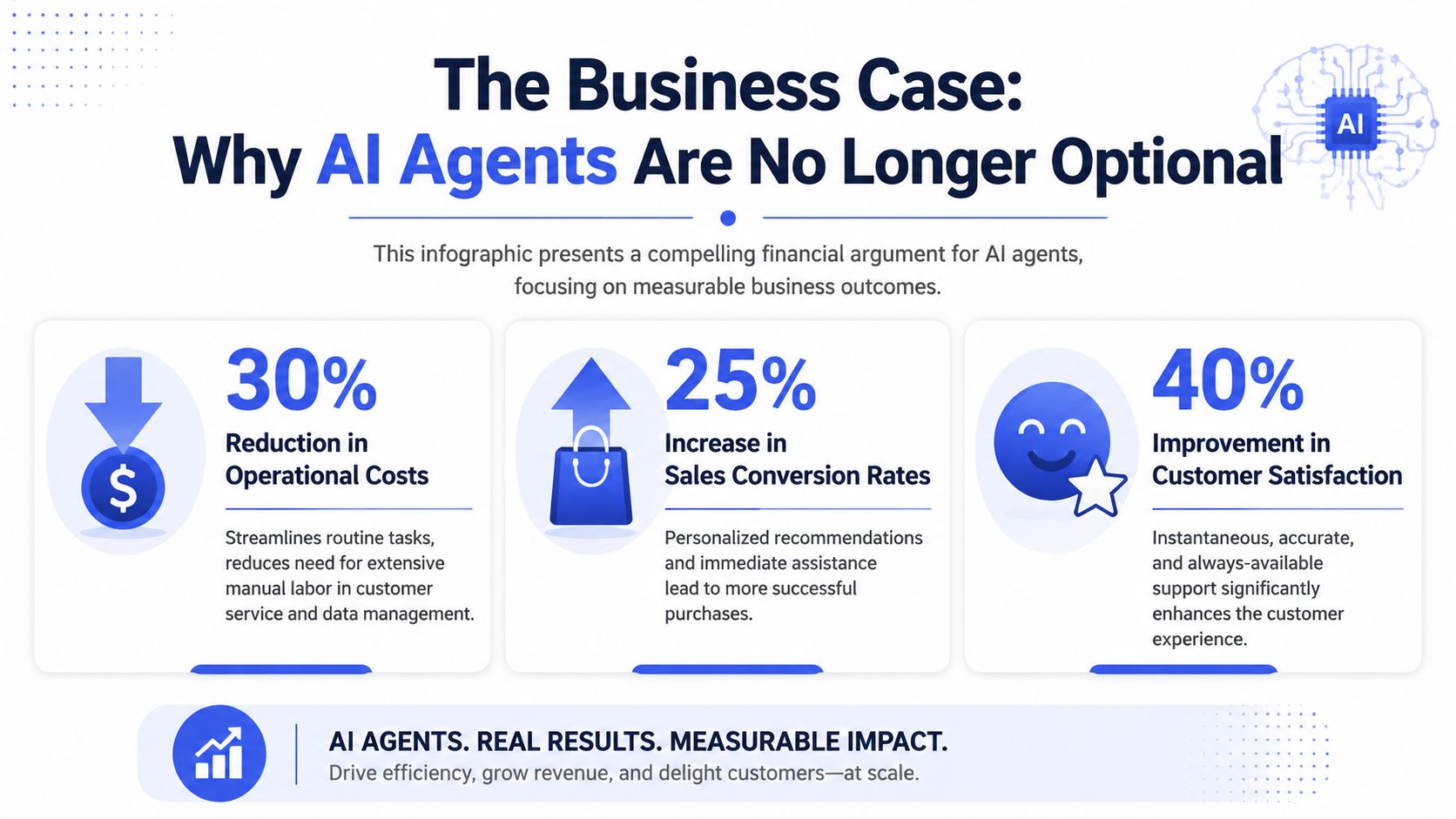
The numbers are strong enough that this has become a business decision, not just a tech one. Companies using AI agents in ecommerce report around 30% higher revenue than competitors, along with 40% to 60% reductions in customer support costs and 15% to 20% increases in conversion rates, according to Mindstudio's analysis of AI agents for ecommerce.
Revenue lift comes from removing hesitation
A lot of ecommerce conversion loss is indecision, not rejection. Buyers hesitate because they can't confirm fit, compatibility, shipping timing, or return risk. An agent closes that gap in the moment.
That immediate response matters most on product pages, cart pages, and high-intent landing pages. If your only path to reassurance is “contact us,” many shoppers won't wait.
Cost savings come from deflecting repeat work
Support teams spend a surprising amount of time on questions that are important but repetitive. Shipping timelines. Return policy. Order updates. Basic product clarifications. Those interactions need accuracy and speed, not deep human investigation.
When the AI agent handles those first, your team can spend its time where people outperform software: exceptions, upset customers, high-value accounts, edge cases, and judgment calls.
Here's the operational payoff in plain language:
Lower queue pressure: Fewer repetitive tickets hit your team.
Better coverage: The store stays responsive after hours and on weekends.
Cleaner workload mix: Humans work on problems worth human attention.
Customer experience improves when speed meets relevance
Customers don't want a lecture. They want the next useful answer. If your AI agent is trained well and grounded in current store information, it gives them that answer instantly.
That's why the business case is stronger than “automation saves time.” It does save time, but it also protects demand that's already present. A visitor who asks a buying question is often telling you they want help moving forward. Treating that interaction as a service cost only misses the larger value.
Operator's view: The fastest ROI usually comes from handling questions that sit close to purchase, not from trying to automate everything at once.
For an SMB, that means the first deployment should usually target one revenue-critical friction point and one high-volume support category. Start where delay is expensive.
AI Agents in Action Real World Use Cases
The easiest way to judge an AI agent for ecommerce is to follow a shopper through the journey and ask one question at each stage: does the agent reduce friction or add it?
A visitor arrives from an ad and lands on a product collection page. They don't know which option fits their needs. A useful agent doesn't dump a long catalog summary. It asks a clarifying question, narrows the choices, and sends the buyer toward the right product.
On the product page, the role changes. Now the customer's concern is confidence. They may ask whether an item is true to size, whether a variant is available, or how it compares to another option. That's not “support” in the narrow sense. It's conversion assistance.
Before purchase and during evaluation
Strong use cases before checkout usually include:
Catalog navigation: helping buyers find the right item faster
Product comparison: answering “which one is better for my use case?”
Purchase reassurance: resolving final objections around availability, shipping, or returns
If you want a broader comparison of conversational tools in this space, this guide on AI chatbot for ecommerce use cases is a useful complement.
At checkout and right after the sale
The checkout moment is where uncertainty gets expensive. A customer may hesitate over delivery timing, payment questions, promo rules, or whether they can edit the order later. A good agent doesn't need to be clever here. It needs to be precise.
After the order, the value often shifts from conversion to service efficiency. “Where is my order?” “Can I change the shipping address?” “What's the return process?” These are ideal interactions for automation if the agent has access to current information and clear escalation rules.
A store doesn't need an agent that talks a lot. It needs one that resolves the next blocker fast.
For high-consideration or assisted selling flows
Some SMBs sell products that don't fit a simple add-to-cart journey. Think custom orders, premium goods, bundled solutions, or products with compatibility questions. In those cases, the agent can act as a qualifier.
It can collect need, timeline, budget sensitivity, product interest, and preferred follow-up channel. Then it routes a cleaner opportunity to a human rep or founder. That's much better than a generic contact form because it captures context while the buyer is engaged.
The pattern that works across all these examples is consistency. The agent should know when to answer, when to guide, and when to get out of the way and bring in a person.
Your Implementation Playbook From Setup to Deployment
Most failed deployments don't fail because the AI is weak. They fail because the setup is lazy. The agent gets launched with thin product data, vague instructions, and no real escalation logic. Then the business decides “AI doesn't work for us.”
The better approach is operational. Build it in stages, and make each stage solve a real store problem.
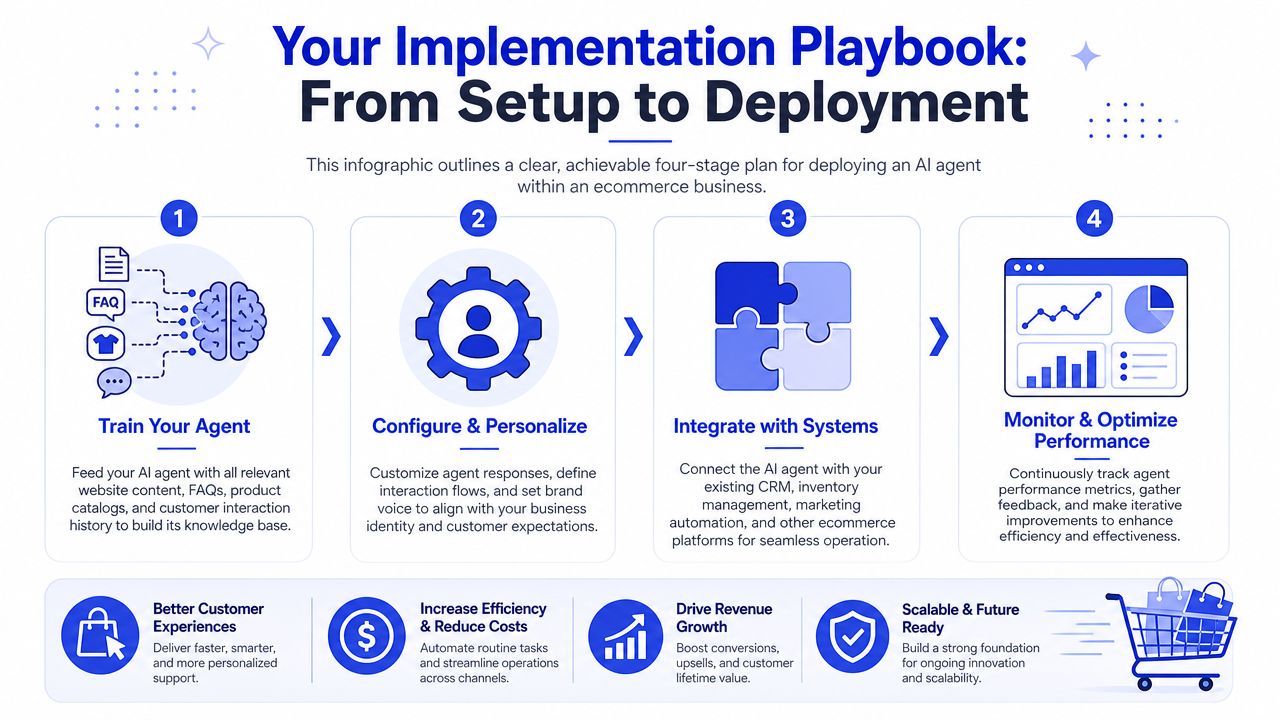
Train on the right data first
Routine ticket resolution depends heavily on data quality and system connection. Ecommerce AI agents can achieve 70% to 90% resolution rates on routine customer service tickets when tightly integrated with real-time product catalogs, order systems, and CRM data, according to ChatBot's write-up on ecommerce AI agent performance.
That should shape your setup priorities. Feed the agent your:
Product catalog: titles, variants, descriptions, availability language
Help content: shipping, returns, warranties, sizing, care, policy pages
Support patterns: the recurring questions your team already answers
Customer context sources: order and CRM data where appropriate
If you're evaluating build approaches, this walkthrough on how to create an AI agent shows the practical sequence clearly.
A short demo helps make the deployment flow more concrete:
Define behavior before you deploy
Before the widget goes live, decide how the agent should behave.
Write its tone. Define what it should never guess about. Set rules for refunds, guarantees, discounts, medical or legal sensitivity if relevant, and escalation triggers. If your team skips this step, the agent may sound polished while still making operationally bad decisions.
Good configuration usually includes:
Brand voice rules so answers sound consistent with your store
Answer boundaries so the agent admits uncertainty instead of inventing
Lead qualification logic for custom inquiries or larger orders
Escalation conditions for anything that needs human review
Deploy where buying friction is highest
Don't launch sitewide on day one unless your knowledge base is unusually clean. Start where friction is obvious.
Good first placements include product detail pages, shipping or returns pages, cart, checkout-adjacent pages, and high-intent campaign landing pages. One focused deployment with clean training usually outperforms a broad rollout with weak grounding.
One practical option in this category is Chatgrow, which lets businesses train support agents on website content, FAQs, pricing, and product pages, then deploy them on high-intent pages and route escalations with summaries.
Iterate with real conversations
The first version won't be perfect. That's normal.
Review transcripts weekly at the start. Look for repeated misses, vague replies, broken routing, and questions your content doesn't answer well. Then update training, prompts, and handoff rules. The stores that get value fastest usually treat the agent like a living workflow, not a one-time install.
Choosing the Right Platform A Practical Evaluation Guide
A lot of platforms look similar in a demo. They answer a few sample questions, show a clean widget, and promise easy setup. The differences show up later, when you need the system to work inside a real operation.
For SMBs, the right buying question isn't “Which vendor has the most features?” It's “Which platform can answer accurately, connect to our stack, and fail safely when it can't?”
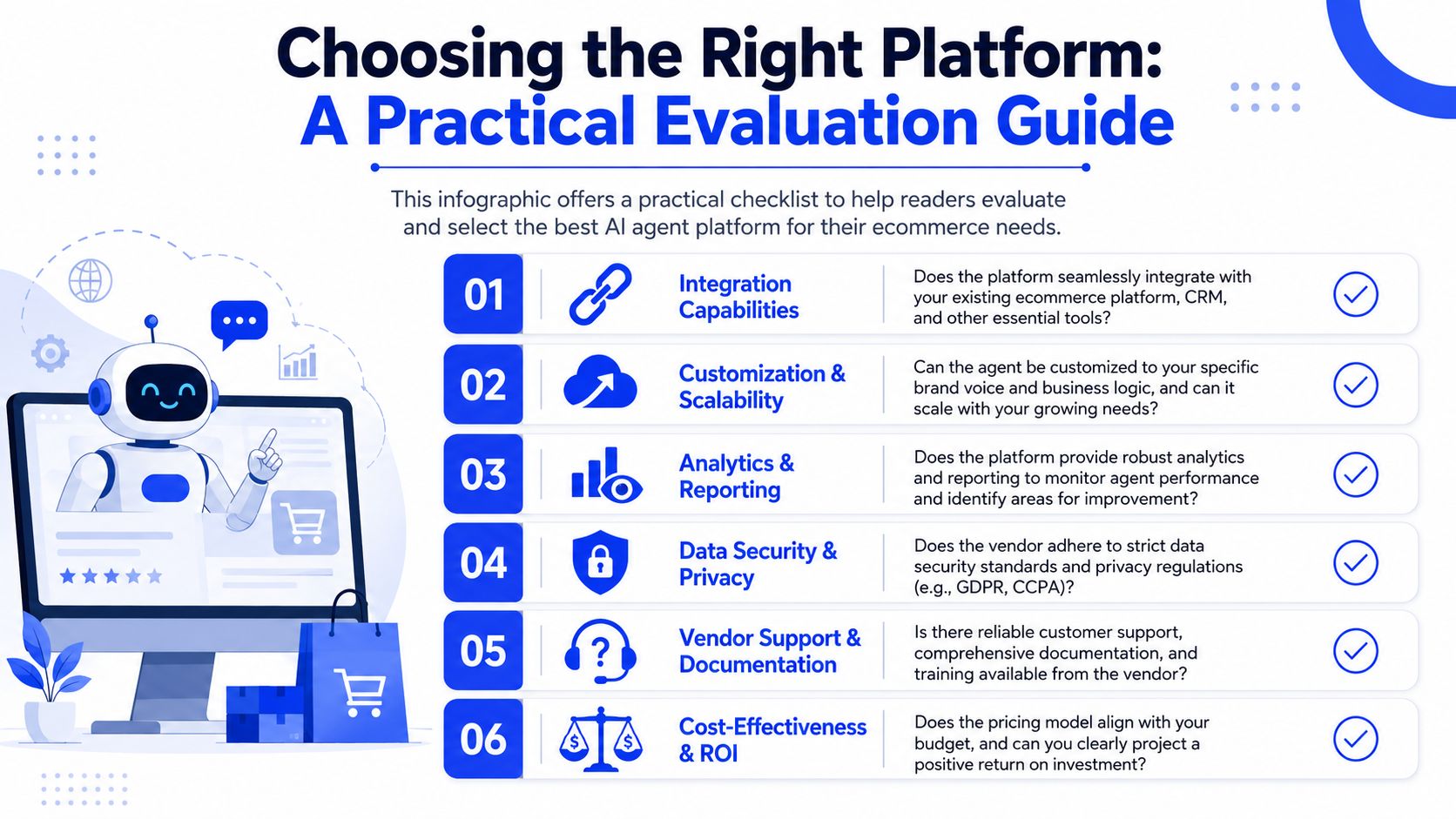
Backend access matters more than many buyers realize. When AI agents are granted programmatic access to backend systems like order management and CRM APIs, they can automate 60% to 85% of rule-based workflows such as status checks and cancellations, according to Constructor's analysis of AI agents in the shopping journey.
What to ask before you sign
Use these questions to separate a basic chat layer from a real agent platform:
Can it connect to live systems? If it can't access catalog, order, or CRM data, it will stay shallow.
How does it handle uncertainty? You want graceful fallback, not confident guessing.
What does escalation look like? A transcript dump isn't a handoff process.
Can it be trained on our actual business content? Generic intelligence won't carry product nuance.
How are analytics presented? You need to see unresolved intents, common questions, and escalation patterns.
Is pricing predictable? SMB teams usually need cost control, not enterprise-style opacity.
Buyer filter: If the platform demo focuses more on conversation style than on data access, workflow control, and escalation, keep digging.
A simple evaluation table
Evaluation area | What good looks like | What to avoid |
|---|---|---|
Knowledge training | Uses your store content, FAQs, and product data | Generic answers with weak grounding |
Integrations | Connects with ecommerce, support, CRM, or order systems | Manual copy-paste maintenance |
Escalation | Passes context, summary, and next action to humans | “Please contact support” dead ends |
Control | Clear rules, tone settings, and response boundaries | Black-box behavior |
Reporting | Shows intents, misses, and workflow gaps | Vanity metrics only |
One more practical point. Don't overbuy.
If you run a lean team, a simpler platform with strong training, usable integrations, and clear reporting often beats an enterprise suite that takes months to configure. The right platform should reduce operational load, not become a project in its own right.
Best Practices for Maximizing Your AI Agent Impact
Teams often get the first win from automation. The larger win comes from workflow design. That's especially true in two areas many articles gloss over: handoff quality and customer trust.
Design handoffs like an operation, not a fallback
Many guides on AI agents for ecommerce fail to address how to properly operationalize the handoff between AI and human agents, and unclear handoffs can lead to 30% to 40% reductions in first-response resolution, according to E2M Solutions on AI agent handoff issues.
That usually happens when the AI stops, the customer repeats themselves, and the human picks up with no context.
A workable handoff system needs rules such as:
Escalate by condition, not frustration alone: send refund exceptions, payment disputes, damaged orders, and emotionally charged issues to people immediately.
Pass a summary, not a transcript wall: include customer intent, what the agent already checked, and what action seems needed.
Assign ownership: someone on the team should clearly own the next response.
Close the loop: review failed escalations weekly and update the logic.
If you want to improve this over time, use conversation reporting and chatbot analytics workflows to spot where the agent is creating repeat contacts or weak transfers.
Make trust visible to the customer
Trust drops when shoppers feel tricked, boxed in, or pushed by automation. It rises when the system is transparent.
That means being direct. Tell users they're chatting with an AI assistant. Make it easy to reach a person. Show what the assistant can help with. If the agent is making recommendations, keep the reasoning simple and relevant. If it can't verify something, it should say so.
A few practices work consistently well:
Use clear disclosure: identify the assistant without making it sound robotic.
Offer a human path early: don't hide the escalation option.
Keep autonomy limited: let the agent guide and assist before you let it act broadly.
Stay on-brand: trust improves when the experience sounds like your business, not outsourced software.
Customers don't expect perfection. They expect clarity, speed, and a fair path to a human when the issue matters.
For most SMBs, the smartest rollout is still the simplest one. Start with one high-intent page or one high-volume support category. Measure quality. Fix handoffs. Tighten the trust signals. Then expand.
If you want to test this without overcommitting, Chatgrow is one option built for that kind of rollout. You can train an AI support agent on your website, FAQs, pricing, and product pages, deploy it on high-intent pages, and use escalation summaries plus reporting to improve performance over time.
Related Posts
Continue Reading
More articles from the ChatGrow Team.


