Blog
NLP and Chatbots for SMBs: Smart Support Guide
By
Nelson Uzenabor

Over 987 million people worldwide use AI chatbots, and usage has grown 92% since 2019 according to the 2026 industry roundup. For small businesses, that's not a novelty figure, it's a signal that customers already expect fast, natural conversation when they reach out for help.
That shift matters because the old keyword bot is easy to spot and easy to abandon. NLP chatbots can do better, they can interpret meaning, handle messy phrasing, and keep enough context to finish the job without forcing a customer to repeat themselves. When that works, support feels lighter for the team and less frustrating for the buyer, which is exactly why platforms like Chatgrow have become practical for SMBs that need customer-service automation without building a language team from scratch.
Table of Contents
How to Design, Test, and Evaluate a Customer-Service Chatbot
Implementation Choices and How to Deploy a Chatbot with Chatgrow
Why NLP Chatbots Matter for Small Businesses Right Now
Customers already expect chat to work like a real conversation. The pressure shows up in support queues, missed leads, and slow response times, especially for small businesses that cannot staff every channel around the clock. That is why NLP matters now, not as a buzzword, but as the part of the system that lets a chatbot understand intent, keep context, and respond in a way that fits the request.
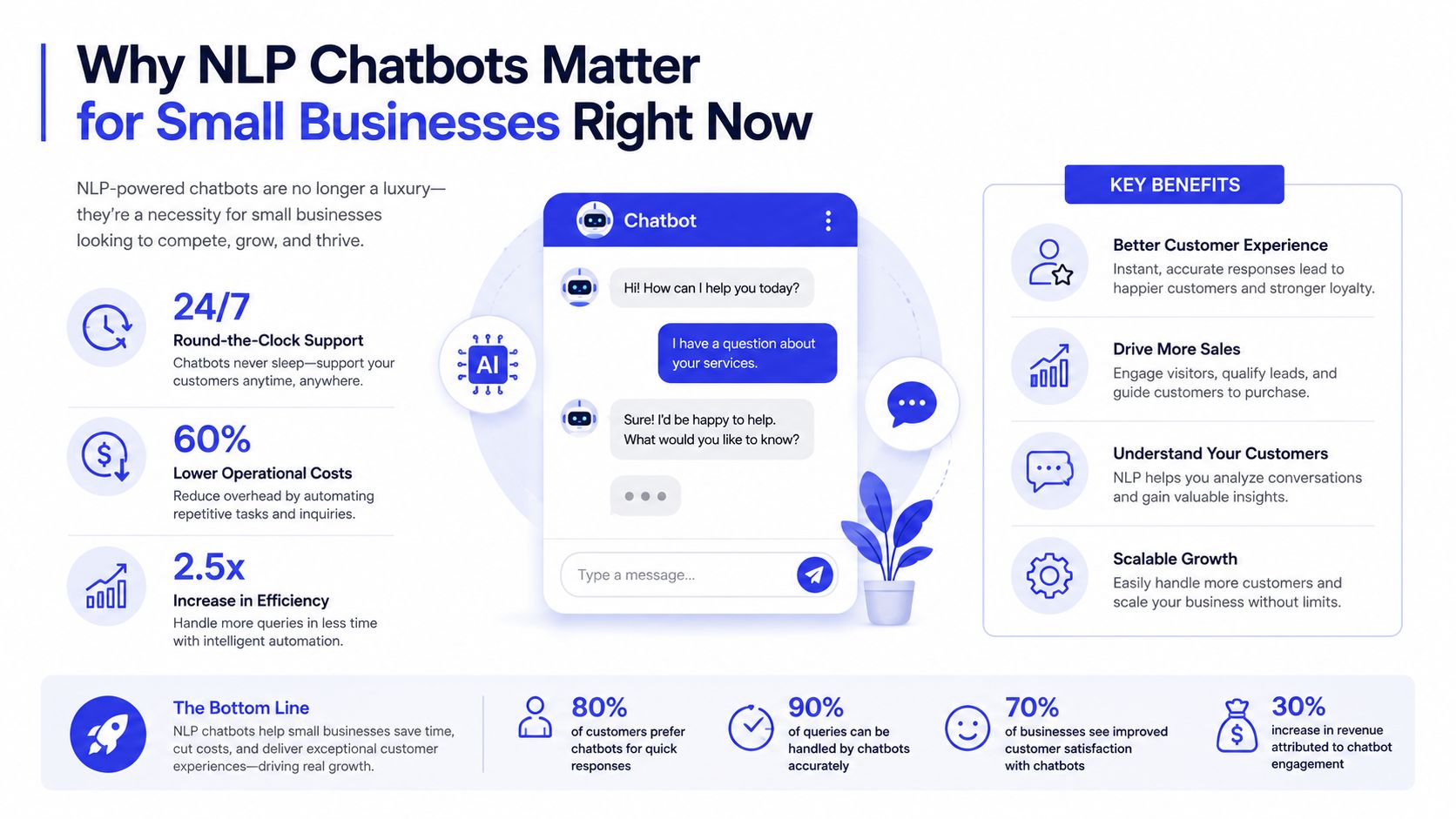
Older rule-based bots broke as soon as a customer phrased something differently, added a typo, or asked two things in one message. They could follow a fixed script, but they could not interpret meaning. NLP changes that by mapping different phrasings to the same business intent, so “Where's my order?”, “I still haven't got my package,” and “tracking says delivered but nothing's here” can all land in the same support flow.
Why the timing is different now
The timing is better because the underlying technology finally handles context well enough for production use. Chatbots and NLP moved from early rule-based systems such as ELIZA in 1966 and earlier pattern-matching approaches, to statistical methods in later decades, and then to deep-learning systems in the 21st century as summarized in the MIT timeline. For small businesses, that shift matters because the customer experience no longer has to feel brittle or scripted.
A practical deployment like Chatgrow uses that progress to turn your website, FAQs, and product pages into a support layer that can answer routine questions and qualify leads. If you want the customer-service angle first, this guide on AI customer support connects the same idea to day-to-day operations.
Practical rule: if a customer can ask the question three different ways, your bot needs NLP, not a keyword list.
The goal for SMBs is narrower than the hype around AI. Reduce repetitive tickets. Answer the first layer of questions right away. Route the rest with enough context that a human can step in without forcing the customer to repeat themselves. If you are also thinking about revenue, the same conversational layer can support sales work too, and build recurring revenue with AI shows how that can fit alongside support.
What NLP Is and How It Powers Chatbots
NLP stands for natural language processing, the part of software that works with human language instead of fixed commands. In a chatbot, that means the system does not just read text as a line of words. It tries to infer what the user means, which details matter, and what action should happen next.
Think like a receptionist, not a search box
A good receptionist does not care whether a caller says, “I need a refund,” “Can I get my money back?”, or “My order never arrived.” The wording changes, but the intent is the same. Intent recognition in NLP works the same way. It maps different phrasings to the same business action so the bot can respond consistently.
That is the gap between a basic bot and a useful one. A keyword matcher might only catch “refund,” while an NLP system can interpret the full sentence and still send the user to returns, billing, or support based on the context around the message. For teams building this kind of flow, a practical reference like the Webtwizz AI chatbot page helps make the architecture easier to picture without forcing people through theory first.
From raw text to a usable action
Once the chatbot understands intent, it can extract structured details from unstructured text. If a customer writes, “I ordered the blue jacket last Tuesday and it still hasn't shipped,” the bot may need to identify the product, the timing, and the fulfillment issue before it can answer correctly. That is the point where NLP stops being abstract and starts affecting production behavior.
Modern chatbots sound more natural because they do not treat each message as an isolated command. They can use context from earlier turns in the conversation, which is what makes follow-up questions feel coherent instead of starting over every time. In practice, that context handling is what keeps a support bot from asking for the same order number twice or sending the user down the wrong path after a clarifying question.
Human language is messy by default. NLP is what lets software handle that mess without making the customer do all the work.
That does not mean the bot understands language the way a person does. It means the system is good enough to turn everyday phrasing into actions your business can automate, which is the standard that matters in production.
The Core NLP Components Inside a Chatbot Pipeline
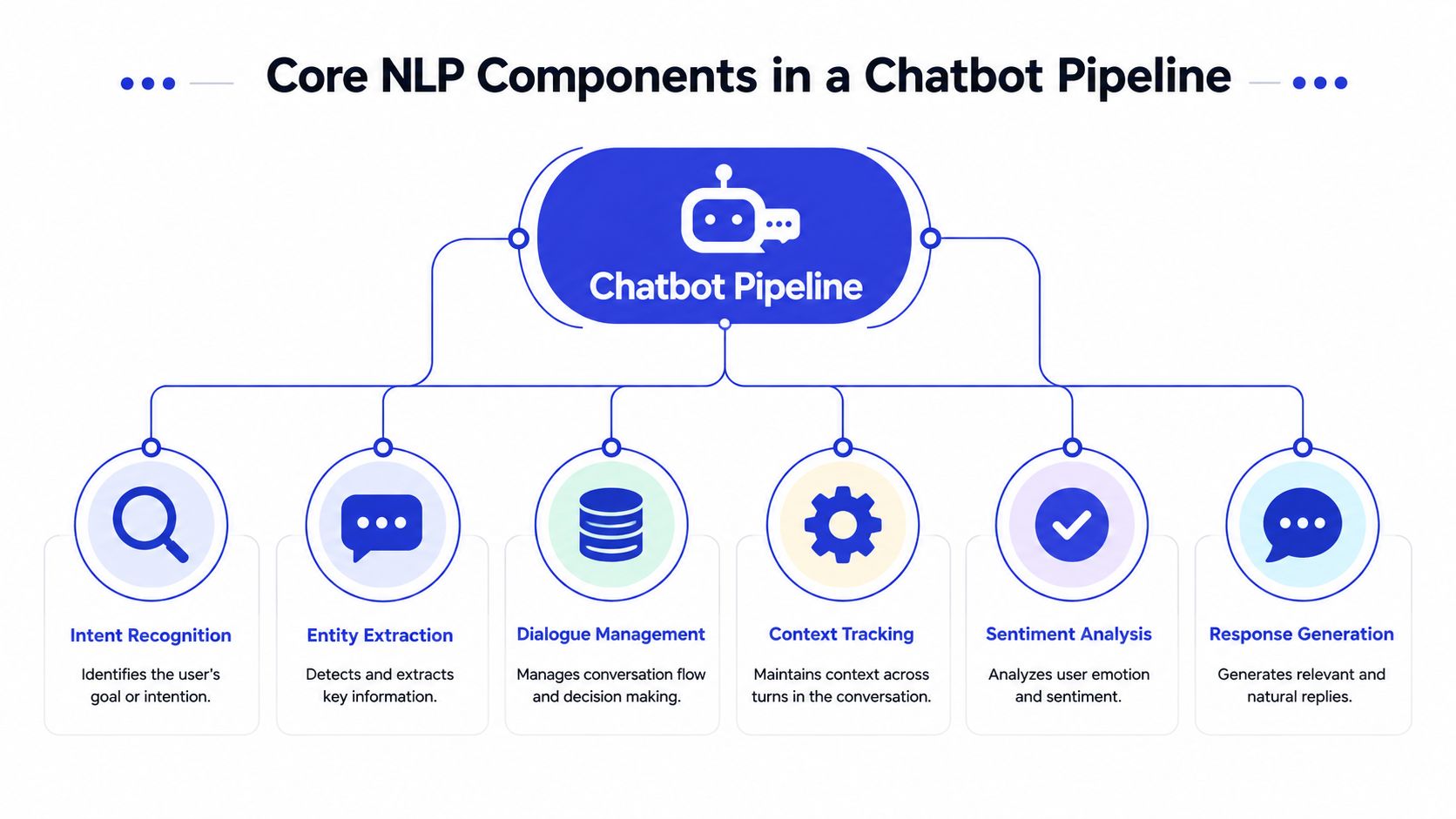
A production chatbot is a chain of smaller tasks, not one magical model. The moment you see it as a pipeline, the build decisions get clearer, because every stage has a job and every weak stage can break the user experience.
What each component does in practice
Intent classification decides what the user is trying to do. A message like “I need to change my shipping address” should land in a different action than “What's your shipping policy?” That distinction sounds obvious, but it's where many bot failures begin.
Named entity recognition pulls out the useful details, like dates, order numbers, product names, or locations. Slot filling then takes those pieces and turns them into the complete set of parameters a backend system needs. If the user says, “Move my consultation to Friday,” the bot still needs the actual date or time window before it can do anything useful.
Dialogue management keeps track of what has already happened in the conversation. If a user already provided their order number, the bot shouldn't ask for it again. Response generation turns the system's decision into a readable reply, either through a template or a generative model.
Operational insight: if intent classification is sloppy, everything downstream gets more expensive because the bot is solving the wrong problem.
A support example, step by step
A customer writes, “I got the wrong size hoodie and want to return it.” The system first classifies the intent as a return request. Then it extracts the product, the item condition, and the implied return action. If the return flow needs an order number, dialogue management remembers to ask for it next instead of restarting from scratch.
That sequence is why NLP and chatbots are strongest when the pipeline is designed end to end. A polished response generator can't rescue bad intent detection, and a clever intent model can still fail if the bot forgets context on the next turn. For SMBs, the lesson is simple, evaluate the whole conversation path, not just the first answer.
NLP Chatbot Architecture and How the Pipeline Connects
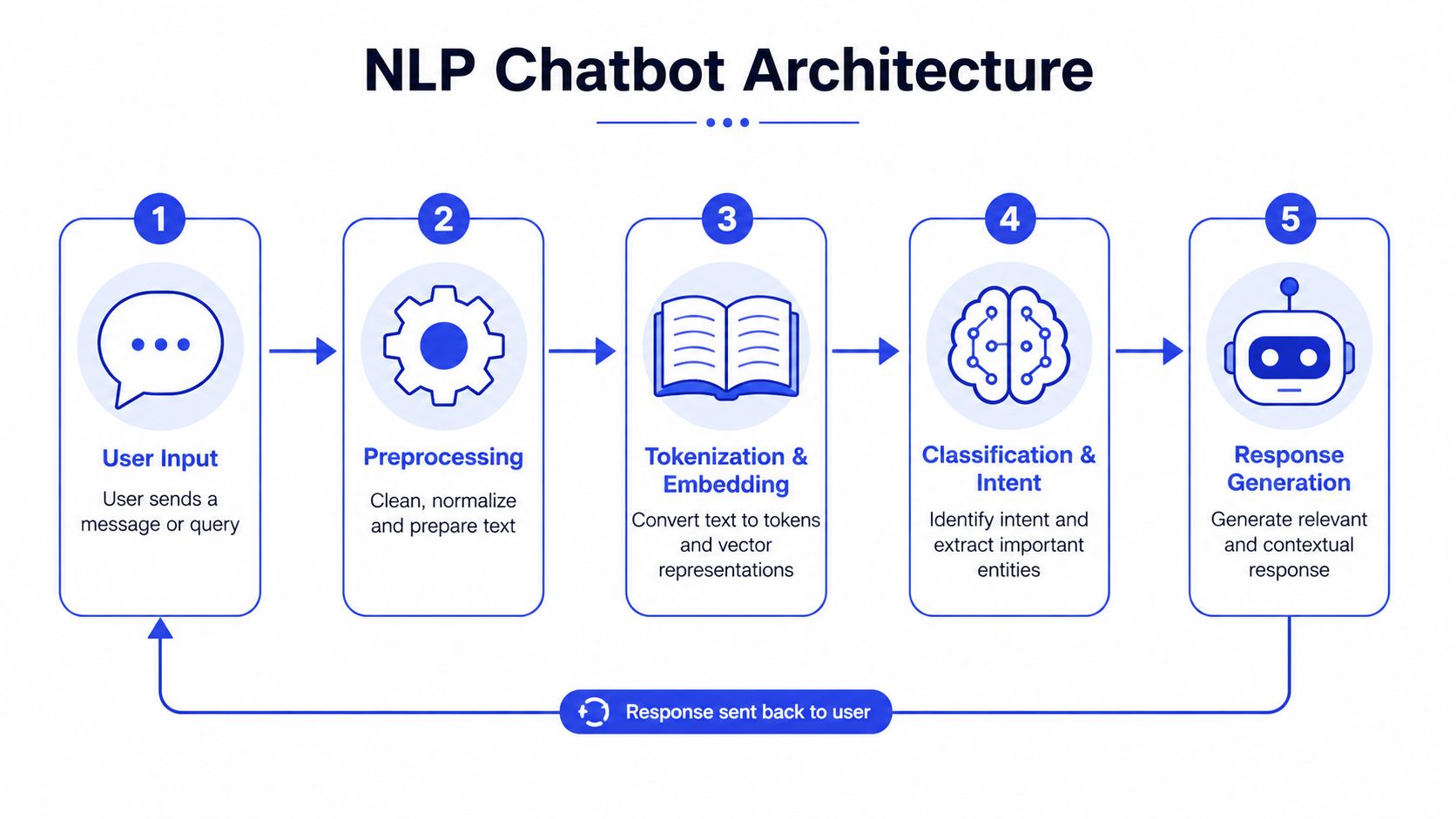
At the architecture level, a chatbot is still doing the same work described above, but the pieces are wired together as a system. The user sends a message, the platform preprocesses it, turns it into tokens or embeddings, classifies the intent, picks a response path, and returns an answer.
Why architecture choices matter
Preprocessing looks simple, but it decides whether typos, punctuation, and awkward phrasing get normalized before classification. Tokenization and embedding turn text into a machine-readable form, and that representation shapes how well the model sees similarity across different phrases. A bot trained on narrow data can look smart in demos and brittle in production.
The Transformer paper, “Attention Is All You Need,” helped define the architecture behind modern large language models and many chatbot systems. That matters in practice because transformers handle context across turns better than older approaches, which makes them more suited to customer-service threads where one answer depends on what was said earlier. The change shows up in the kinds of follow-up questions a bot can handle without losing the thread.
Stored memory or passed context
One deployment choice SMBs often underestimate is where conversational state lives. Some platforms keep dialogue state in memory, while others pass enough context into each turn to preserve continuity. The trade-off is straightforward, more context usually improves continuity, but it also adds storage overhead, higher cost, and more maintenance work.
For businesses that need to connect chat to order systems, account data, or help content, the architecture has to include integration points too. A useful reference on this is customer data integration, because the chatbot only feels intelligent when it can reach the right source of truth.
Modern chatbot platforms hide a lot of this complexity, which is why SMBs can deploy useful agents without hiring an NLP engineer. The platform still needs solid content, accurate intent mapping, and clear escalation rules, but the infrastructure is no longer limited to large teams.
If the architecture cannot preserve context, the customer repeats themselves, and trust drops fast.
How to Design, Test, and Evaluate a Customer-Service Chatbot
A chatbot project becomes useful when someone measures it against real conversations, not just a demo script. The evaluation stack should include intent classification accuracy, fallback and escalation behavior, resolution rate, response latency, and customer satisfaction feedback. Those signals tell you whether the bot is helping or just intercepting messages.

What to watch before launch
Start by testing the bot against your own support logs, not generic sample questions. Real customer language reveals the awkward phrasing, missing context, and shorthand that template prompts usually miss. That's where the model shows whether it can handle ambiguity or only polished inputs.
A simple evaluation table helps SMBs keep the work grounded.
Area | What to check | What it tells you |
|---|---|---|
Intent mapping | Did the bot route the message correctly? | Whether the model understands the request |
Escalation | Did the bot hand off at the right moment? | Whether humans get involved before frustration builds |
Resolution | Did the interaction finish without extra back-and-forth? | Whether the bot actually solved the problem |
Latency | Did the reply arrive fast enough to feel responsive? | Whether the experience feels usable |
CSAT | Did customers rate the interaction well? | Whether the conversation felt effective |
How to turn metrics into a loop
Dashboards matter less than the habits around them. Review failed conversations, group them by intent, and look for repeated confusion in the same topic area. If the bot keeps missing order-change requests but handles FAQs well, the problem is probably the training examples or the intent design, not the whole system.
Chatgrow's smart intent and smart escalation features fit this workflow because they show when the agent understands the message and when it hands off with context. That visibility helps non-technical teams see where the bot is working and where human review is still required.
Rule of thumb: don't celebrate containment if the customer is still unhappy. A contained failure is still a failure.
The best SMB chatbot setups use evaluation as a maintenance habit. Each new support pattern becomes a new test case, and each test case improves the next version.
Common NLP Chatbot Challenges and How to Solve Them
The hardest chatbot problems are usually not flashy model issues. They're ordinary conversation problems, ambiguity, shifting context, and language that doesn't fit cleanly into a training set. The bot either handles that mess or it doesn't.
Ambiguity is the first real test
Users rarely say the same thing twice. They shorten sentences, skip nouns, add typos, and assume the system remembers what happened two turns ago. Keyword-only systems fall apart here because they need the user to speak in the bot's language, not their own.
Modern NLP systems deal with that by normalizing text, tokenizing it into usable units, and using machine-learning classification to rank likely meanings. That doesn't solve everything, but it gives the bot a chance to interpret messy language instead of failing on the first odd phrase.
Context is the harder problem
A second, deeper issue is sustained context across a conversation. Research on chatbot contextualization argues that pattern-recognition NLP alone isn't enough and that domain knowledge has to be part of the interpretation process as noted in the contextualization study. That's the contrarian truth many introductory guides skip, because a bot can classify a sentence correctly and still fail the conversation if it loses the thread.
The evidence gap around underserved users is a reminder that many chatbot datasets still miss real-world complexity. A scoping review found only 18 studies on chatbots for underserved and vulnerable populations, with most published after 2020 and concentrated in a few health domains and groups in the review. That narrow coverage suggests the field still has blind spots, especially where language, access, and trust differ from mainstream customer-support assumptions.
Train for the edge cases you actually expect, not the clean examples that make the dashboard look good.
For SMBs, the best mitigation is boring but effective. Use diverse training examples, review misrouted conversations, and make escalation easy when the bot can't confidently answer. The goal isn't perfection, it's reducing failure modes before they hit customers.
Implementation Choices and How to Deploy a Chatbot with Chatgrow
The biggest implementation decision is whether you want to assemble the pipeline yourself or use a managed platform. Self-hosted systems give you more control, but they also make you own model selection, retraining, logging, and escalation logic. A managed option reduces the setup burden, which is why many SMBs start there.
A practical deployment path
A straightforward rollout usually begins with your highest-value support content. Train the agent on your website, pricing pages, FAQs, and product docs, then define the lead-qualification rules that matter for your sales or support flow. After that, place the bot on high-intent pages where customers already ask predictable questions.
That is the point where a product like Chatgrow fits naturally. It lets teams create and train support agents from existing content, apply smart intent handling, and route complex cases through smart escalation, which keeps the handoff concise for human follow-up.
What to weigh before you choose
If you're comparing build versus buy, use the same lens every time.
Content source: can the platform ingest your website and help articles cleanly?
Escalation quality: does it pass context to a human, or just dump raw chat logs?
Team workflow: can non-technical staff update content without developer help?
Deployment scope: can you start on one page and expand later?
Pricing fit: does the monthly model match your support volume and team size?
For budget context, Chatgrow's plans start at $39 per month with message credits, storage, and team access, plus a seven-day free trial and personalized onboarding. That gives SMBs a concrete starting point without committing to a long build cycle.
If you need a support-specific view of the product flow, the customer support page shows how the platform frames the handoff between automation and human follow-up. In practice, the best deployment is usually the one you can launch, monitor, and improve without turning every change into a project.
Real SMB Use Cases and Next Steps for Getting Started
The best use case is the one that maps to your current pain. For an e-commerce store, an NLP chatbot can handle order-status checks and return questions. For a SaaS company, it can guide onboarding and route feature questions to the right help article or person.
Where SMBs usually see the fastest value
Travel agencies often need consistent answers about bookings, policy changes, and itinerary basics. Educational institutions need a way to answer admissions and program questions outside office hours. Marketing services teams can use the bot to qualify incoming leads before a human joins the conversation.
The pattern is the same across all of them. NLP helps the bot understand what the visitor is trying to do, then the workflow decides whether to answer, collect more detail, or escalate. That combination is what makes the chatbot useful instead of decorative.
A simple launch checklist
Audit your top questions. Start with the recurring support topics your team already sees every week.
Connect your content. Use website pages, FAQs, and product docs as the first knowledge base.
Define intent rules. Decide which requests the bot should answer, qualify, or hand off.
Launch on a high-traffic page. Put it where customers already ask for help or sales guidance.
Review real conversations. Use the logs to fix missed intent, bad phrasing, and weak escalation.
Expand only after it works. Add more topics once the first flow is stable.
The businesses that get the most from chatbots don't overbuild the first version. They deploy a narrow version, learn from actual users, and keep tuning the bot until the handoff feels natural. That's the practical difference between a chatbot that lives in a demo and one that earns its keep.
If you want to turn support traffic into a working chatbot instead of a slide deck, start with Chatgrow, train it on the pages and FAQs you already have, and test it against your real customer questions. Visit Chatgrow to set up a support agent, define your escalation flow, and see how NLP can reduce repetitive work on day one.
Related Posts
Continue Reading
More articles from the ChatGrow Team.