
Blog
Customer Data Integration: A Guide for AI-Powered Support
By
Nelson Uzenabor
A customer buys from you on Tuesday, opens a support chat on Wednesday, and asks a simple question about their order. Your agent sees the chat transcript, but not the purchase. Your CRM shows the deal owner, but not the last support issue. Your email platform knows the customer clicked a renewal campaign, but your help desk doesn't. So the customer repeats themselves, your team guesses, and a routine interaction turns into friction.
That problem shows up long before a company thinks of itself as “doing data integration.” It starts when tools are added one by one. Shopify, HubSpot, Intercom, Stripe, a booking system, a ticketing tool, website forms, maybe a spreadsheet that still runs part of operations. Each tool solves a local problem. Together, they create a customer experience problem.
For SMBs, customer data integration isn't an enterprise vanity project. It's the practical work of making customer context usable across sales, service, and automation, so people and systems can respond with the right information at the right time.
Table of Contents
The Hidden Cost of Disconnected Customer Data
A loyal customer doesn't care that your order data lives in one app and your support history lives in another. They only see the result. They contact support expecting continuity, and instead they get questions you should already know the answer to.
That disconnect hurts in small ways first. Agents ask for order numbers that already exist in the commerce system. Sales reps follow up without knowing an open support issue is still unresolved. Marketing sends “welcome” emails to existing customers because the lifecycle status never synced. None of these mistakes look dramatic on their own. Together, they make the business feel disorganized.
Where the damage shows up first
The first cost is service quality. Support becomes slower because the agent has to collect context manually. The second cost is trust. Customers start to feel like every conversation begins from zero.
Then operational drag sets in:
Agents switch tabs constantly to answer basic questions.
Managers debate whose data is correct instead of fixing the flow.
Automations misfire because one field says “lead” and another says “customer.”
AI tools underperform because they're being asked to act on partial or stale information.
Practical rule: If a customer has to repeat information your business already captured, your systems are integrated poorly, no matter how polished the front end looks.
This is why customer data integration matters. It creates a usable view of the customer across the core business systems. That matters enough that the customer data integration market was valued at USD 5.74 billion in 2026 and is projected to reach USD 9.33 billion by 2030, according to the 2026 customer data integration market report. The growth reflects how strongly companies now tie unified data to omnichannel engagement, personalization, and operational efficiency.
If you're already working on faster support experiences, this is the missing layer behind many of the gains discussed in the advantages of live chat for customer experience. Live chat helps. Contextual live chat helps much more.
What Is Customer Data Integration Really
Customer data integration sounds technical, but the clearest way to think about it is simple. You're building one reliable customer record from many partial records.
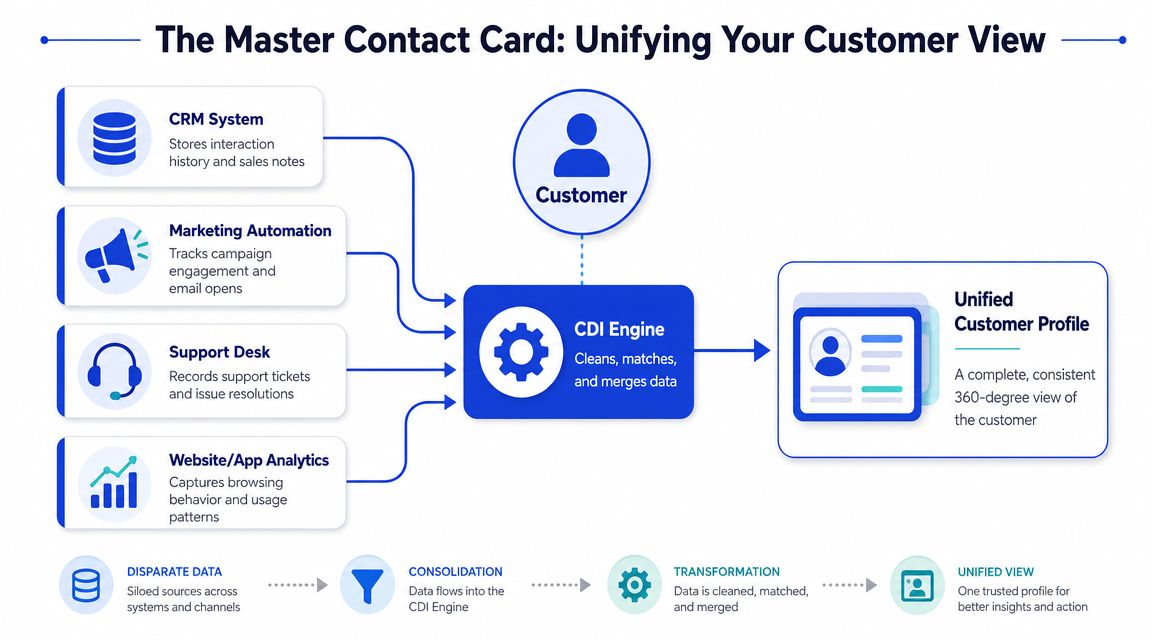
Think in terms of a master contact card
Say you have a friend in your phone. One note has their mobile number. Another has their work email. A calendar invite has their company name. A message thread mentions their preferred meeting times. None of those details are wrong, but they're scattered.
Customer data integration does the same job for a business. It pulls together records from systems like:
CRM for owner, pipeline stage, and account notes
Support desk for tickets, issue history, and resolutions
E-commerce platform for orders, refunds, and subscriptions
Website analytics or forms for page activity, product interest, and lead capture
The goal isn't a pile of imported data. The goal is a coherent profile that gives each team the same customer context.
A good mental model is a master contact card. It doesn't replace every app. It gives every app a cleaner, more complete understanding of who the customer is and what's happened already.
Integration is not the same as aggregation
Many initial projects falter because teams export data from multiple tools into a warehouse or spreadsheet and call it “integrated.” Usually it's just aggregated.
Real integration requires a governed pipeline. Data is extracted from each source, transformed through cleansing, standardization, deduplication, and normalization, then loaded into a central repository or customer data platform. Identity resolution links records across systems to create a resolved customer profile, and that work needs to happen before loading, not after, as explained in Acquia's overview of customer data integration.
Clean data that still refers to the same person three different ways is not a unified customer view. It's a cleaner mess.
That's also why source mapping matters so much. If one app uses “billing_email,” another uses “email,” and a third stores multiple email fields with no priority rule, you need those decisions made upfront. Otherwise the pipeline keeps producing conflicting records at scale.
A short explainer helps if your team needs a visual primer before getting into architecture details:
The Strategic Benefits and ROI of Unified Data
Most SMBs don't need a philosophical case for customer data integration. They need a commercial one. The strongest argument is that connected systems change both retention and revenue behavior.
Why the business case is easier than it looks
In a 2026 industry roundup, 84% of businesses said integrations are “very important” or a “key requirement” for their customers, 98% reported that customers with integrations are less likely to churn, and businesses with five integrations are willing to pay 20% more for the same core product, according to Partnerfleet's integration statistics roundup. For an SMB, that's the signal worth paying attention to. Integration affects what customers stay for and what they'll pay for.
Those numbers line up with what operators see in practice. When customer data connects across support, billing, sales, and product systems, teams stop handling every conversation as if it were new. That lowers friction for the customer and lowers effort for the team.
Where unified data changes day-to-day performance
The impact usually shows up in four places.
Support gets sharper. Agents and automated systems can answer with context, not scripts.
Sales follow-up improves. Reps can see intent signals, account history, and unresolved issues before they reach out.
Marketing becomes less wasteful. Segments reflect real lifecycle states instead of outdated lists.
Leadership gets cleaner reporting. Revenue, retention, and service data stop contradicting each other.
If you're trying to justify the project internally, don't pitch customer data integration as “building a single source of truth.” Many stakeholders hear that as an abstract IT goal. Pitch the specific decisions it improves: routing, prioritization, segmentation, escalation, and service response.
For AI support and lead workflows, this matters even more. A chatbot can only personalize what it can access. If your assistant doesn't know whether the visitor is a trial user, a paying customer, or someone with an unresolved ticket, the conversation quality drops immediately. Teams evaluating lead qualification tools for automated conversations usually discover that the tool choice matters less than the data context behind the tool.
Better automation rarely starts with better prompts. It starts with better customer records.
Choosing Your Customer Data Integration Architecture
Most CDI mistakes happen because teams treat architecture as a technical preference. It's a business decision. The right pattern depends on what you need to optimize: stability, speed, simplicity, or control.
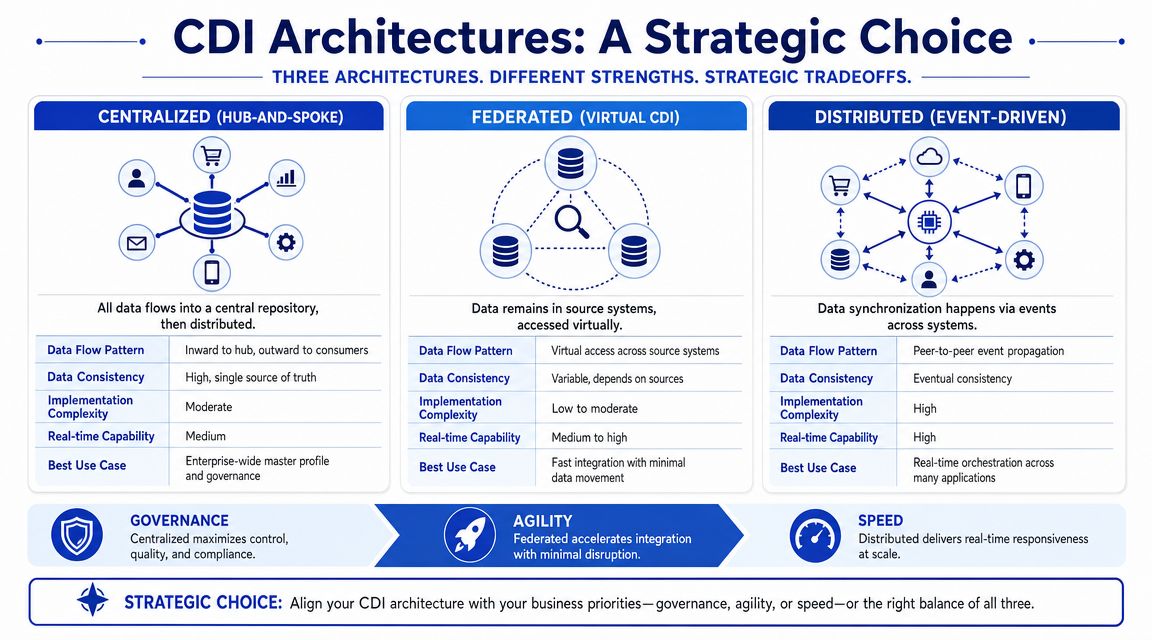
Salesforce describes the three common patterns as consolidation, propagation, and federation, each with trade-offs around latency, duplication, and operational complexity in its customer data integration architecture overview.
Consolidation when stability matters most
With consolidation, you move cleansed customer data into a central repository such as a warehouse or CDP. That repository becomes the main analytical record.
This pattern works well when you need dependable reporting, historical analysis, and cross-functional visibility. It's often the cleanest option for SMBs that have outgrown spreadsheets and ad hoc exports.
The downside is timing. Consolidated systems can lag behind operational reality if sync jobs are too slow or too brittle. A support agent may need the latest order event now, not after the next scheduled load.
Propagation when operational tools need current data
Propagation pushes synchronized copies of customer data into the operational systems people use. The point is to keep CRM, support, commerce, and messaging tools aligned closely enough that each system can act on current information.
This is often the better fit when service workflows depend on fresh status changes. Subscription updated. Refund issued. Ticket escalated. Plan downgraded. If your AI support layer needs to react inside those workflows, propagation usually matters more than a perfect warehouse.
The trade-off is duplication. You'll have multiple copies of important data across apps, so schema discipline and sync rules need to be tighter.
Federation when centralization creates more risk than value
Federation leaves data in the source systems and exposes it virtually when needed. Instead of copying everything into one place, you query or access the source data through a unified layer.
This model can work when centralization is too expensive, too slow to maintain, or too sensitive from a compliance perspective. It's also useful when systems change often and a heavy central model would create constant rework.
The price is complexity at runtime. Virtual access can be elegant on paper and frustrating in operations if source systems are inconsistent, slow, or poorly documented.
Customer Data Integration Architecture Comparison
Architecture | How It Works | Best For | Key Trade-off |
|---|---|---|---|
Consolidation | Cleansed data is moved into a central repository | Reporting, analytics, stable customer views | Better consistency, but more latency for live operations |
Propagation | Customer data is synchronized across operational systems | Support, sales, and service workflows that need current context | Faster action, but more duplication to manage |
Federation | Data stays in source systems and is accessed virtually | Sensitive environments or fast-changing stacks | Less copying, but higher operational complexity |
A practical way to choose is to ask one question first: where does the cost of being wrong hurt most?
If wrong reports hurt most, start with consolidation.
If stale support context hurts most, prioritize propagation.
If copying data creates legal or operational problems, consider federation.
Many SMBs end up with a hybrid. They consolidate for reporting, propagate for operations, and federate for edge cases they don't want to centralize.
Best Practices for Data Quality and Identity Resolution
Integration without data quality control creates a more efficient version of the same mess. You don't want faster bad data. You want trustworthy customer context.
Fix the pipeline before you fix the dashboard
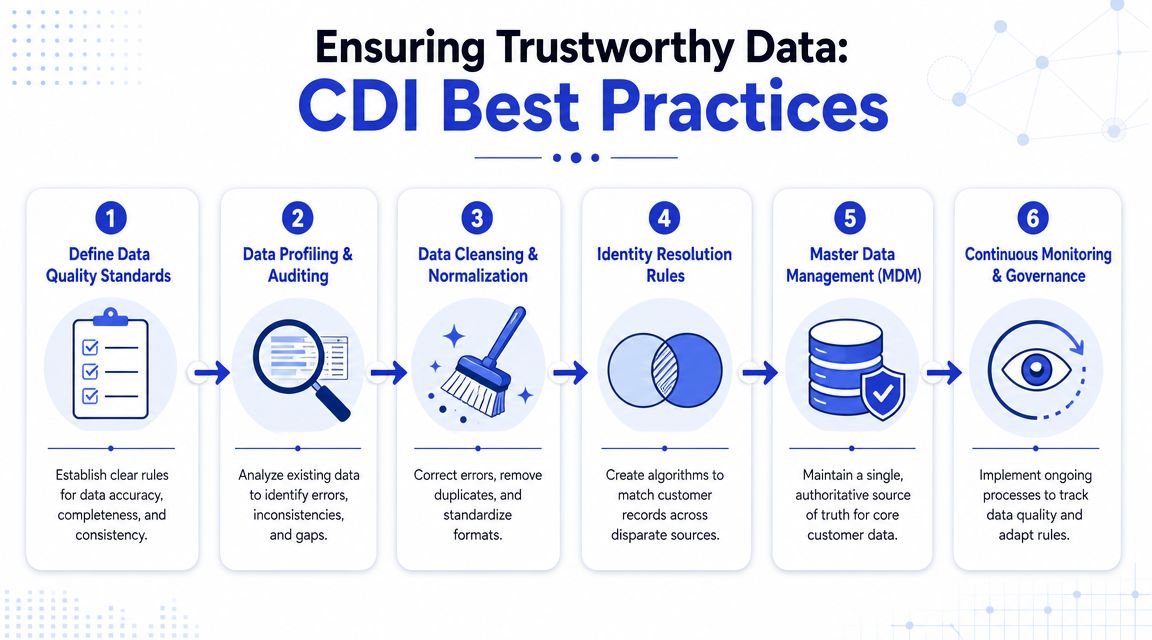
The core sequence is straightforward. Extract data from each source. Transform it through cleansing and standardization. Resolve identities. Then load it into the target system. That order matters because matching records after the fact is much harder once duplicates and conflicting values have already spread.
In practice, that means defining rules before you ingest at scale:
Standardize fields early. Decide how names, phone numbers, plan labels, countries, and timestamps should look before they enter the shared system.
Validate required values. Don't pass half-complete records into the pipeline and hope downstream tools clean them up.
Create source precedence rules. If billing status differs between Stripe and the CRM, one source has to win.
Handle nulls intentionally. Blank values can overwrite good data if your sync logic is careless.
Teams often spend too much time choosing dashboards and too little time choosing validation rules. That's backwards. Reporting problems usually begin upstream.
A reporting issue is often an identity issue wearing a prettier outfit.
Identity resolution is where most projects succeed or fail
Identity resolution links different identifiers to a single customer profile. One person might appear as an email address in your CRM, a phone number in your support tool, a customer ID in Shopify, and a cookie or session ID on your site. Your system has to decide when those records belong to the same person and when they don't.
For SMBs, this is the practical minimum:
Start with deterministic matches. Email, account ID, subscription ID, or another stable identifier.
Add fallback logic carefully. Name plus company, or phone plus postcode, can help but can also merge the wrong records.
Preserve auditability. Teams need to know why a merge happened.
Allow review for edge cases. Some records should be flagged, not auto-merged.
What usually doesn't work is trying to be too clever too early. If your first version attempts complex matching across every channel without clear confidence rules, you'll create false merges that are painful to unwind.
Another mistake is treating “more data” as automatically better. For support and AI workflows, stale browsing events or outdated contact points can pollute the profile. Selective, governed integration is often safer than maximum ingestion.
Powering AI Customer Service with Integrated Data
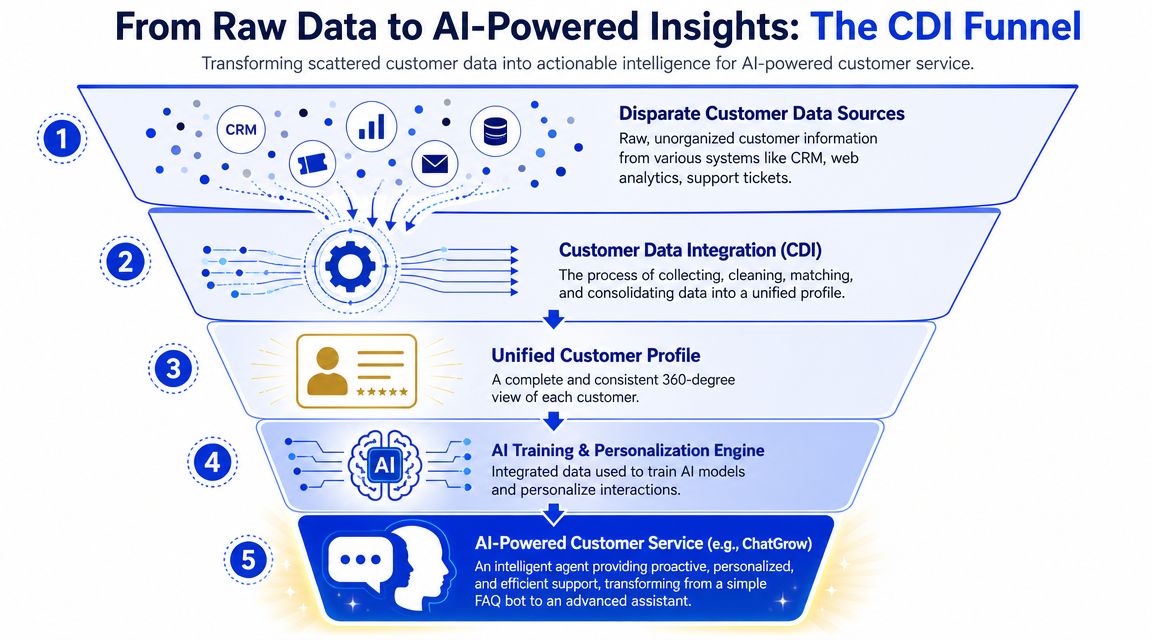
An AI support agent with weak data access is basically a polished FAQ layer. It can answer common questions, but it can't adapt well to customer context. Integrated data changes that.
What AI support can do with the right context
When customer data integration is working, the AI layer can do more useful work without pretending to know more than it should.
It can:
Recognize account status and change the response path for trials, active customers, or former customers.
Reference recent orders or subscriptions when someone asks about delivery, billing, or access.
Use prior support history to avoid asking the customer to repeat basic facts.
Route with better summaries so a human agent gets the problem, recent context, and likely intent in one handoff.
That's the difference between generic automation and operationally useful automation.
One option in this category is Chatgrow's guide to automated customer service. The platform itself lets teams train support agents on website and knowledge-base content, then deploy them to handle FAQs, qualify leads, and escalate conversations. But any tool in this class will only be as good as the data discipline behind it. If the product catalog is outdated, the billing status is unsynced, or the customer profile is fragmented, the agent will reflect those limitations.
What to measure after launch
The first month after rollout should focus less on vanity metrics and more on operational evidence. Look for signs that customer context is improving decisions.
A useful scorecard includes:
Answer quality by scenario. Order questions, billing requests, support escalations, renewals.
Escalation quality. Does the AI pass useful summaries or just dump a transcript?
Context usage. Are conversations clearly using account, order, or history data where appropriate?
Failure patterns. Which missing fields or bad syncs cause the most broken answers?
Good AI support doesn't just answer fast. It answers from context, and it knows when to hand off.
For most SMBs, the biggest win is not replacing agents. It's reducing repetitive questions, collecting structured information before handoff, and making each human interaction start with better context.
Your Customer Data Integration Implementation Checklist
Most first-time CDI projects fail for ordinary reasons. The scope is too broad, ownership is fuzzy, and the team tries to integrate everything at once. A smaller, sharper rollout works better.
A practical rollout sequence for SMB teams
Use this checklist as your starting sequence:
Define one business outcome first. Pick the decision you want to improve. Faster order support, cleaner lead routing, better renewal outreach, fewer duplicate records. Don't start with “unify all customer data.”
Audit your actual systems, not your intended stack. List every source that creates or changes customer information. Include the spreadsheet someone still updates manually. Hidden sources cause ugly surprises later.
Choose architecture based on the use case. If leadership needs consistent reporting, lean toward consolidation. If service tools need fresher context, choose propagation for those workflows. Avoid defaulting to full centralization just because it sounds mature.
Define field ownership and source precedence. Decide which system owns subscription status, order state, customer email, account owner, and support priority. This single step prevents a lot of downstream confusion.
Set privacy and permission rules before launch. Make sure your team knows which customer data should sync, where it can appear, and which workflows need extra controls.
Run a focused pilot. Start with one pipeline and one operational outcome. For example, connect commerce, support, and CRM for post-purchase service. Prove the workflow before adding more sources.
Build governance into weekly operations. Someone has to review failures, merge issues, field drift, and sync exceptions. CDI isn't a one-time setup. It's an operating discipline.
A useful sanity check is simple. If a support lead, a RevOps owner, and a marketer can't explain the same customer record the same way, the model still needs work.
The right first project is boring in the best sense. Clear owner. Narrow scope. Visible operational gain. Then you expand from there.
If you're building AI support and want the front-end experience to reflect real customer context, Chatgrow is one option to evaluate. It lets teams train and deploy AI customer-service agents on their site content and knowledge sources, then refine lead qualification, escalation, and response behavior as their data foundation matures.
Related Posts
Continue Reading
More articles from the ChatGrow Team.


