
Blog
AI Customer Support: A Guide for Growing Businesses
By
Nelson Uzenabor
Your support inbox probably doesn't look broken. It just never goes quiet.
A prospect wants pricing clarification at 10:30 p.m. A customer asks where to find an invoice. Someone else needs a refund policy explained in plain English. Then the same product question arrives again, then again, then again. For most growing businesses, support strain doesn't begin with catastrophic volume. It starts with repetition, uneven response times, and a team spending its best hours on work a system should handle.
That's why AI customer support has stopped being a niche experiment. It's become part of normal operating infrastructure. The global AI for customer service market was valued at USD 13.0 billion in 2024 and is projected to reach USD 83.9 billion by 2033, growing at 23.2% CAGR, according to Grand View Research's AI customer service market report.
For SMBs, the key question isn't whether AI belongs in support anymore. It's how to implement it without creating robotic interactions, frustrating handoffs, or answers that sound nothing like your brand. This is often where many teams encounter difficulties. They don't need another generic chatbot. They need a practical system that handles routine requests well, knows when to step aside, and makes human agents more effective when a conversation gets complicated.
Table of Contents
Introduction Beyond a Simple Chatbot
A lot of owners approach AI customer support with the wrong mental model. They picture a chat bubble in the corner of the site that answers a few FAQs and then annoys everyone else. That version exists, and it's usually what creates skepticism.
A useful AI support system does more than deflect basic questions. It handles repeatable requests consistently, helps qualify serious inquiries, summarizes context before a human steps in, and gives your team breathing room. That changes support from a constant interruption into a managed process.
For an SMB, the appeal isn't just lower effort. It's better use of human attention. Your team shouldn't spend its morning retyping shipping policies, explaining plan differences, or routing simple requests to the right person. Those are exactly the kinds of tasks AI can absorb when it's trained on the right material and governed well.
Practical rule: Don't buy AI customer support to replace your team. Use it to protect your team's time for exceptions, recovery, and revenue-critical conversations.
The businesses that get value from this shift usually start small. They pick a narrow set of support intents, connect reliable knowledge sources, define clear escalation rules, and improve from there. That's very different from asking a bot to “handle support” with no guardrails.
If you're already feeling the pain of delayed replies, inconsistent answers, or a founder inbox full of support spillover, AI customer support is no longer an advanced move. It's becoming standard business plumbing. The smart move is implementing it in a way that keeps the human touch where it matters most.
What Is AI Customer Support Really
Many still describe AI customer support as a chatbot. That's too shallow to be useful.
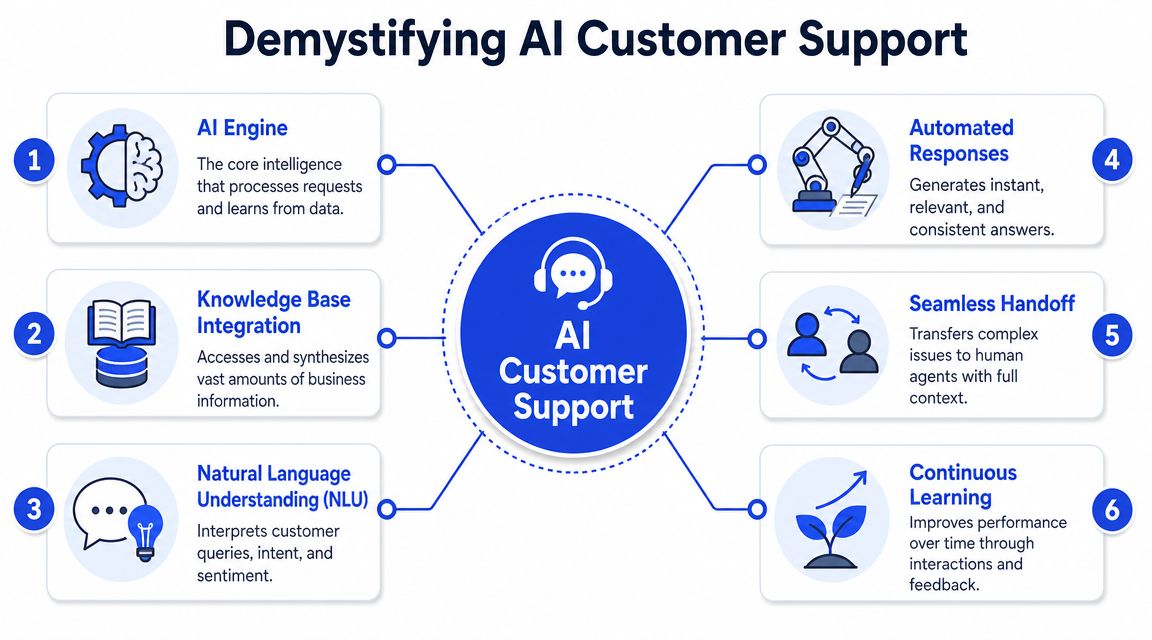
The better analogy is a fast-learning trainee. You give it access to your website, help center, pricing pages, policies, and product documentation. It studies that material quickly, listens to how customers ask for help, and learns to match incoming questions to likely intent. Then it either answers, asks a clarifying question, or routes the conversation to the right human.
It behaves more like a fast trainee than a scripted bot
Under the hood, AI support systems typically combine NLP and machine learning to understand intent, sentiment analysis to detect frustration, and knowledge-base retrieval to generate answers from approved business information. IBM notes that these systems can also improve over time and route inquiries to the best person or team through its overview of AI in customer service.
That matters because real support conversations are messy. Customers don't ask, “Please tell me your refund policy.” They say, “I ordered last week and this still hasn't arrived, can I just cancel?” A rigid bot fails because it looks for exact keywords. A stronger AI system interprets the intent, recognizes urgency, and pulls the right policy or escalation path.
In practice, a well-configured support agent should be able to do work like this:
Interpret phrasing: It understands “Where's my order?” and “Has my shipment gone out yet?” as the same basic need.
Pull approved answers: It responds from your actual policies, docs, and product content instead of improvising wildly.
Keep tone consistent: It can answer in a voice that fits your brand, whether that voice is plainspoken, technical, or warm.
Route by context: It can tell the difference between a billing issue, a pre-sales question, and a frustrated cancellation request.
The handoff logic matters as much as the answer quality
Many first deployments fail. Owners focus on whether the bot can answer questions, but ignore whether it can exit gracefully.
A strong AI customer support setup needs handoff rules for uncertainty, emotional signals, policy-sensitive issues, and high-value commercial moments. If someone is angry, confused, or discussing account-specific exceptions, the right answer often isn't another automated response. It's a human handoff with context attached.
If your bot can answer but can't escalate well, it won't reduce support friction. It will move the friction to a later point in the conversation.
That's why the system design matters more than the chat interface. The useful question isn't “Can AI respond?” It's “Can it respond accurately, stay on brand, and know when to involve a person?”
The Business Case for AI Support and Its ROI
The business case for AI customer support isn't built on novelty. It's built on workload shape.
Support teams deal with a mix of repetitive questions, medium-complexity requests, and edge cases that need human judgment. AI provides an advantage when it takes the first category off the team's plate and improves the handling of the second without pretending it can solve the third alone.
A balanced view matters here. Customers still want access to people. A 2026 consumer survey found 79% of Americans strongly prefer a human over an AI agent, and 89% believe companies should always offer a human option, according to SurveyMonkey's customer service statistics roundup.
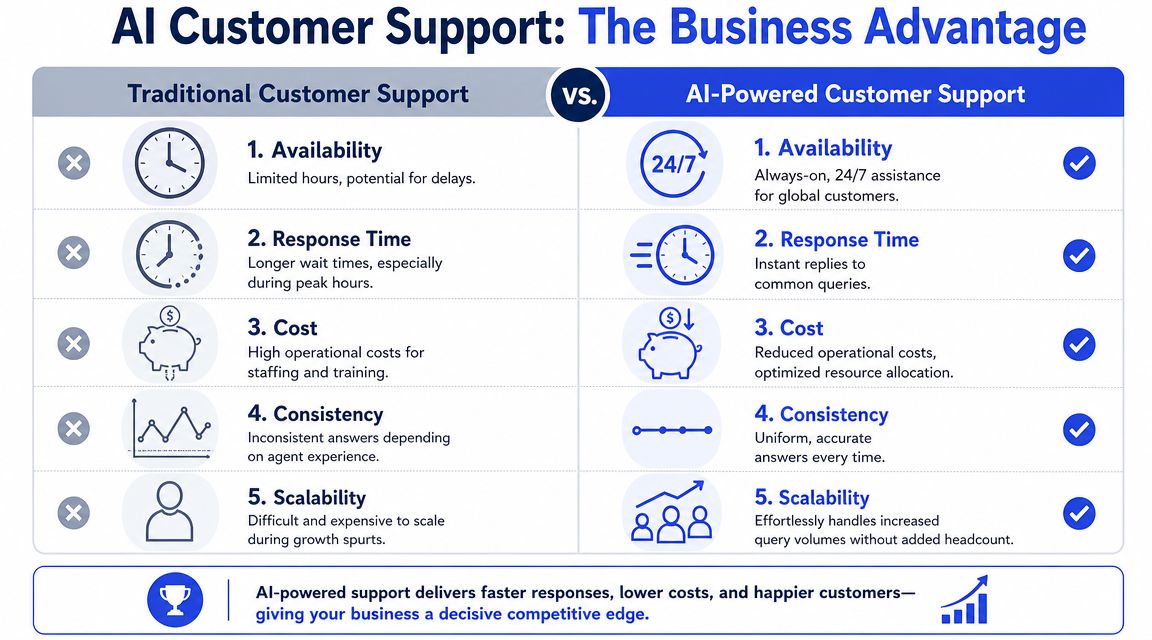
That same source also shows why businesses keep investing anyway. AI-enhanced service improved average response time from 24 to 48 hours down to 2 to 4 hours, an 85% faster response. It reported first-call resolution rising from 68% to 87%, customer satisfaction moving from 72% to 89%, and operational costs falling by 25%.
Why the ROI is operational before it is financial
Most SMBs think about ROI as a cost question first. That's understandable, but incomplete.
The first return usually appears in operations. Customers get answers faster. Agents spend less time copying the same response into ten threads. New staff ramp faster because the system carries approved information more consistently. Managers get cleaner visibility into what customers are asking.
That operational improvement creates financial effects later. You need fewer human minutes per routine request. You can maintain service quality during demand spikes without immediate hiring pressure. You can support visitors outside business hours without leaving leads or buyers waiting.
Here's the practical difference:
Area | Without AI support | With smart AI support |
|---|---|---|
Routine FAQs | Agents answer repeatedly | AI handles first response consistently |
After-hours inquiries | Wait until staff return | Immediate response with escalation path |
Lead qualification | Mixed into general inbox | Intent can be identified earlier |
Complex issues | Humans receive fragmented context | Humans get a cleaner summary and history |
Here's a useful walkthrough of the operating model in action:
Where businesses get the payoff and where they overreach
The payoff is strongest when the volume is repetitive and the source material is stable. Think shipping policies, onboarding steps, account access questions, plan comparisons, appointment logistics, or common product clarifications.
Where teams overreach is trying to automate emotionally sensitive or exception-heavy workflows too early. Refund disputes, service failures, custom contract questions, and complicated troubleshooting often need a human sooner than the bot owner expects.
Reality check: AI support works best when it removes repetitive load and improves triage. It works worst when a business treats it like permission to hide the humans.
That's the difference between AI that saves time and AI that damages trust.
Implementing AI Support in Your Business
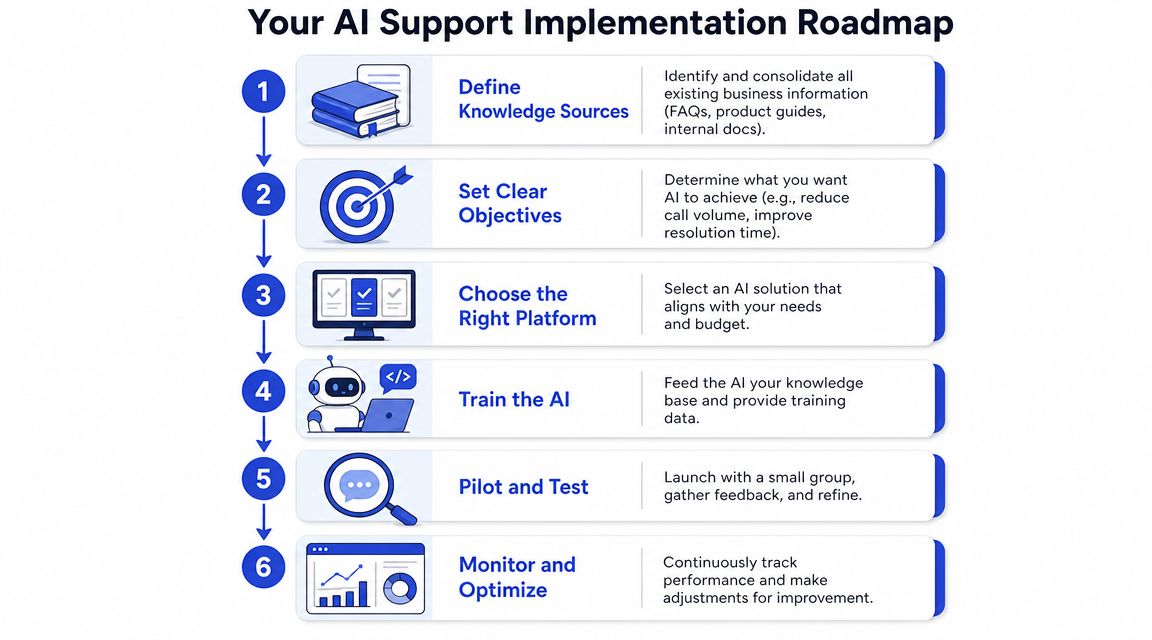
A first deployment should feel boring in the best way. Clear sources. Narrow goals. Strong handoffs. Good review habits. That's what works.
Start with the knowledge the bot can trust
Before you pick settings, audit content. Most AI support problems are knowledge problems wearing a technology costume.
Your agent should be trained on the sources customers need. Usually that means:
Website pages that explain core offers
Product, service, pricing, and plan pages should be current and easy to interpret.Help content that reflects real support demand
FAQs, shipping rules, cancellation policies, onboarding instructions, and billing explanations matter more than broad marketing copy.Internal guidance that can safely be exposed
If your team uses internal macros or approved explanations, those can often improve accuracy when reviewed carefully.
If your business data lives in different places, your first job is consolidation. A practical way to think about it is making sure the AI sees one coherent version of the truth. Therefore, customer data integration for support workflows becomes operationally important.
Design the human handoff before launch
Don't wait until after deployment to figure out escalation. Decide up front what the bot should never try to resolve alone.
A useful escalation policy often includes triggers like:
Frustration signals: Negative sentiment, repeated questions, or messages that clearly show the customer is upset.
High-value intent: Enterprise pricing, partnership requests, demos, or cancellation saves.
Account-specific complexity: Cases that need access to order history, billing adjustments, or unusual exceptions.
Low-confidence moments: When the agent isn't finding a reliable answer from approved content.
The handoff itself matters too. A bad escalation says, “Please contact support.” A good escalation gathers the essentials first. Name, issue type, urgency, order or account context, and a concise summary save your team from restarting the conversation.
Think in journeys, not widgets
A lot of SMBs launch AI support as a website feature and stop there. That's too narrow.
McKinsey notes that roughly 75% of customers use multiple channels and argues that strong AI service strategies focus on redesigning the full journey with smoother handoffs between AI and human agents in its analysis of AI-enabled customer service.
That means your website bot shouldn't live in isolation. It should support the broader customer path. A visitor may begin on a pricing page, continue by email, and later speak with a person. If the AI can't preserve context across those transitions, the customer experiences the system as disconnected even if each piece works well on its own.
A simple rollout plan usually looks like this:
Phase one: Put AI on high-volume, low-risk questions.
Phase two: Add routing and lead qualification on high-intent pages.
Phase three: Improve summaries, handoffs, and channel consistency.
That sequence protects trust while building useful automation.
How to Measure AI Customer Support Performance
Many teams know when support feels bad. Fewer know how to measure whether AI is improving it.
That's where a small KPI stack helps. You don't need a sprawling dashboard at the start. You need a handful of metrics that show whether the system is answering correctly, resolving independently when appropriate, and reducing workload without creating hidden messes downstream.

The four metrics that tell you if the system is healthy
A practical framework is to track response accuracy, containment rate, resolution time, and cost per resolution, as outlined in this guide to AI customer service metrics.
Each metric answers a different management question:
Response accuracy asks whether the bot gave the right answer.
Containment rate asks whether the AI resolved the interaction without human escalation.
Resolution time shows how long it took to reach a useful outcome.
Cost per resolution tells you whether the blended support model is getting more efficient.
If you're building a lightweight review process, sample conversations manually every week. Read them the way a customer would. Was the answer right? Was it complete? Did it sound like your company? Did it escalate when it should have?
What the numbers usually mean in practice
Metrics become useful when you connect them to likely causes.
Metric signal | What it often suggests | What to check next |
|---|---|---|
Low accuracy | Weak source content or bad retrieval | Update docs, remove outdated pages |
Low containment | Missing answers or poor intent handling | Review escalations by topic |
Long resolution time | Too many clarifying turns or poor routing | Tighten prompts and handoff rules |
High cost per resolution | Automation isn't reducing blended workload | Compare AI-resolved vs escalated cases |
A phrase-level review also helps. If customers frequently type things like “I need a human” or “that didn't answer my question,” treat those as operational signals, not complaints to ignore. They usually point to intent classification gaps, poor escalation timing, or weak answer grounding.
A stronger measurement habit is to pair metrics with workflow review. Such pairing makes a broader customer support strategy for AI-assisted teams useful. Don't look at bot performance in isolation. Look at what happens before escalation, during handoff, and after a human takes over.
Bad metrics don't always mean the model is weak. Sometimes they mean the process around the model is sloppy.
That distinction saves a lot of wasted tuning.
Putting It All Together with a Platform Like ChatGrow
Once you understand the moving parts, the implementation path gets simpler. The hard part isn't the existence of the model. It's turning business knowledge, brand voice, and escalation rules into something the system can execute consistently.
What a practical setup flow looks like
A typical setup starts by connecting the sources that already explain your business. That usually includes website pages, FAQs, pricing content, and product or service documentation. The goal isn't to give the system everything. It's to give it the right material in a form that's current and reliable.
Then you define the jobs the agent should do first. For one business, that may be handling support FAQs and routing complex issues. For another, it may be answering buying questions on high-intent pages and collecting lead context before a rep follows up. Narrow use cases are easier to test and safer to improve.
This is the kind of workflow supported by ChatGrow's customer support agent, which lets businesses train agents on website and help content, shape responses around brand voice, and configure escalation paths that collect details before handing conversations to a human.
How brand voice and escalation become operational
This is the step many businesses underestimate. “Sound like us” is not a setting by itself. It has to be translated into rules.
For example, you may want the agent to avoid jargon, keep answers short for first responses, never sound overly casual, and avoid certainty when policy exceptions may apply. You may also want it to treat pre-sales questions differently from support problems. Those are operational choices, not cosmetic ones.
A practical configuration often includes:
Voice guidance
Define tone, vocabulary, formatting preferences, and phrases to avoid.Intent handling
Separate requests like billing help, product questions, sales interest, cancellations, and technical issues.Escalation summaries
Require the system to collect customer details and produce a concise recap for the team.Boundary rules
Prevent the agent from improvising on refunds, legal language, custom pricing, or account-specific decisions.
What owners usually notice after setup isn't that support becomes fully automated. It's that conversations become cleaner. Routine questions stop clogging the queue. Humans enter complex threads with more context. Prospects get faster responses when interest is highest.
That's the smart version of AI customer support. Not invisible humans. Better use of humans.
Common Pitfalls and Your Next Steps
Most AI customer support failures are predictable.
The first is training on weak material. If your policies are outdated, your pricing page is vague, or your help center contradicts what agents tell customers, the bot will mirror that confusion. The second is removing the human exit. Customers don't mind automation nearly as much as they mind getting trapped in it.
The third is chasing full automation too early. Recent industry coverage summarized by CMSWire argues that AI is shifting service work rather than removing it, with agents moving toward complex resolution, service recovery, and oversight roles in its discussion of bots, humans, and the future support split. That's the right frame for SMBs too. Your team's job changes. It doesn't disappear.
A practical first move is to audit the questions your team answers repeatedly every week. Then identify the pages where buying intent or support demand is highest. Those are usually the safest places to pilot.
Keep your first rollout simple:
Audit repetition: List the questions that eat time and have stable answers.
Review source quality: Fix outdated pages before the AI reads them.
Set handoff rules: Decide when the bot must escalate without debate.
Test tone carefully: Make sure the responses sound like your company, not a generic assistant.
Launch narrowly: Start with one journey, then expand once the handoffs work.
You don't need a perfect system on day one. You need a controlled one. That's how you implement AI support smartly and keep the human touch where customers value it.
If you want a practical way to test this model, Chatgrow lets businesses build AI support agents trained on their own website, FAQs, pricing, and product pages, then configure brand voice and human escalation without a heavy technical setup. It's a sensible place to start if you want to pilot AI customer support on a narrow use case and improve from real conversations.
Related Posts
Continue Reading
More articles from the ChatGrow Team.


