
Blog
What Is a FAQ? Essential Guide to FAQs for Business 2026
By
Nelson Uzenabor
Your support inbox is full of questions you've answered before. Customers want to know where an order is, whether a product fits their needs, how billing works, or what happens after they submit a form. Meanwhile, your team keeps copying the same explanations into email, chat, and social messages.
That's the practical reason businesses still need to understand what a FAQ is. A useful FAQ isn't a forgotten page at the bottom of your website. It's a structured knowledge asset that helps customers find answers, helps search engines understand your content, and gives automated support tools reliable information to work from. The difference between a weak FAQ and a strategic one comes down to question selection, retrieval, maintenance, and the next action you offer after each answer.
Table of Contents
What Is an FAQ Page Anyway
An FAQ page, short for frequently asked questions page, gathers recurring customer questions and pairs them with clear, standardized answers. Traditional versions usually present a categorized list covering shipping, returns, pricing, account management, or product use.
While that definition provides a useful starting point, a modern business should treat its FAQ as a self-service communication system. It converts information repeated in support tickets, sales calls, product pages, and chat into a reference that customers and employees can reuse. Customers can check an answer before contacting the team, while employees can give consistent guidance across channels.
The format predates websites. The history of the FAQ format traces its emergence to the early 1980s on Usenet and related mailing lists, where communities needed a practical way to reduce repeated questions. NASA's Eugene Miya created an early FAQ for the SPACE mailing list in 1982. Historical accounts also identify Mark Horton's 1 November 1982 post, “Frequently Submitted Items,” as the first Usenet FAQ.
The original constraints were limited storage, limited network capacity, and repeated conversations. Businesses now operate with different technology, yet the operating logic still applies: answer a recurring question once, then make the answer easy to reuse.
A static FAQ page can answer basic questions, but a stronger program connects that content to search, analytics, support workflows, and conversational tools such as Chatgrow. Those connections can help visitors evaluate an offer, address doubts before purchase, and show the business where documentation or product communication needs improvement. The page becomes maintained knowledge that supports both human service and automated conversations.
The True Purpose of an FAQ Section
A customer reaches checkout, pauses over the return policy, and opens the FAQ. A clear answer can preserve the sale. A vague or outdated one sends that customer to support, a competitor, or nowhere at all. A good FAQ works as a quiet support and sales representative, handling predictable questions while your team focuses on issues that require judgment.
Its strategic value comes from four connected jobs:
Reduce repeated support work: Customers can find answers about delivery, payment, setup, or policies without waiting for an agent.
Build confidence: Direct answers show that the business understands the concerns customers have before they buy.
Remove purchase friction: A visitor who knows how returns, onboarding, or compatibility work has fewer reasons to postpone a decision.
Create reusable knowledge: Support, sales, marketing, and automation systems can work from the same approved answers.

Efficiency is the original design principle
The FAQ format emerged in the early 1980s because online communities needed a reliable way to stop answering identical questions repeatedly. The documented history of Usenet FAQs shows how concise, distributable text became a practical support format before the World Wide Web existed.
The FAQ's original purpose was purely functional: compress repeated support issues into a shareable reference. That principle remains useful for an online store explaining delivery windows, a SaaS company clarifying plan limits, or an agency describing how an engagement begins. The format has changed, but the operating logic has not.
Trust depends on answer quality
Customers experience an FAQ as part of the buying journey, not as an internal efficiency project. Vague answers, irrelevant questions, or details that conflict with the checkout page can increase doubt instead of reducing it.
A strong answer addresses the concern behind the wording. “Do you ship internationally?” may really mean, “Will I face unexpected fees, and how long will delivery take?” “Can I cancel?” may mean, “Will I be locked into a contract?” Write for the decision the customer is trying to make.
Practical rule: Treat every FAQ answer as a chance to remove one specific reason a customer might hesitate.
The FAQ also sets an editorial standard for the rest of your website. If support says one thing, the pricing page says another, and an automated assistant gives a third answer, confidence falls. Keep one approved source of truth, then connect it to search, support workflows, analytics, and conversational tools such as Chatgrow. That turns a static page into maintained knowledge that can support human service, automated conversations, and lead generation without losing ownership of accuracy.
How to Write and Structure an Effective FAQ Page
Start with real customer language, not guesses from a marketing meeting. Review support tickets, sales call notes, live chat transcripts, contact forms, product reviews, and search queries. Group similar questions together, then identify the wording customers use. The question “How long does shipping take?” may be more useful than an internal label such as “fulfillment timeline.”
Build the question set
A practical collection process has several inputs:
Support conversations: Find questions agents answer repeatedly and note the details customers request after the first reply.
Sales objections: Ask sales staff which uncertainties delay decisions, such as implementation effort, contract terms, integrations, or eligibility.
On-site behavior: Review internal search terms, page exits, and unanswered search queries when those reports are available.
Customer vocabulary: Preserve natural phrasing where it helps visitors recognize their own concern.
Product changes: Add questions whenever you launch a plan, policy, feature, or fulfillment process that changes the customer experience.
Don't publish every question you collect. Remove duplicates, combine closely related concerns, and prioritize questions that affect trust, purchase decisions, activation, or support volume.
Write answers for scanning
Put the answer first. Follow with the conditions, exceptions, and next step. A customer shouldn't have to read a company history before discovering whether a return is allowed.
Use plain language and define technical terms. Include concrete details that customers can act on, such as which account menu to open, what information to prepare, or which team to contact. Link to a longer guide when the subject needs depth, but make sure the FAQ answer still gives the visitor a useful response on its own.
Keep the tone consistent with your brand, but don't let personality obscure policy. A friendly sentence is helpful. A playful answer that avoids the actual condition is not.
Design the retrieval path
Many FAQ pages fail because visitors can't find the answer quickly enough, not because the business has no useful information. Nielsen Norman Group's research on FAQ design notes that people use FAQs for more than reading answers, and that navigation and search friction can drive abandonment. SMBs often mistake publishing information for making information retrievable.
Use a structure that supports different browsing habits:
Logical categories: Separate pre-purchase, ordering, delivery, billing, setup, troubleshooting, and account questions.
Visible search: Let customers search using their own wording rather than forcing them to scan every heading.
Descriptive questions: Write headings that identify the concern clearly.
Accessible accordions: Collapsible answers can reduce visual clutter, but don't hide essential information from users or search systems.
Contextual links: Send readers to the relevant return policy, setup guide, pricing page, or contact route.
A clear next action: End answers with a useful step, such as checking an order, starting a trial, or contacting the right team.
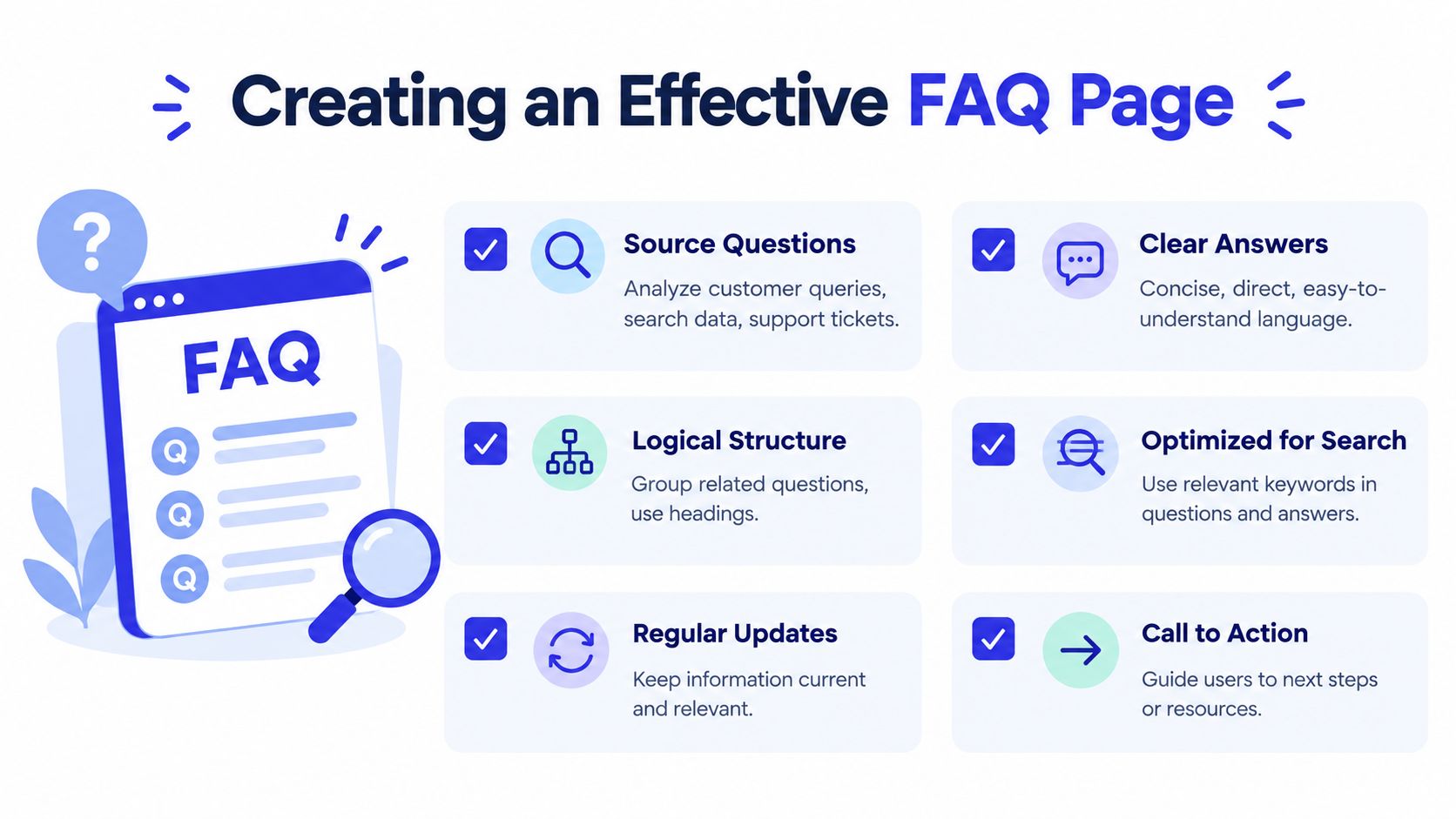
For a deeper writing workflow, use this guide to write an FAQ that answers real customer intent. The page should be easy to maintain as well as easy to read. Assign an owner, record when important answers were reviewed, and connect updates to policy and product releases.
Optimizing Your FAQ Page for Search Engines
FAQ content can attract visitors who search in question form, especially when your answers address specific product, service, or policy concerns. The SEO opportunity doesn't come from adding a random block of questions to every page. It comes from matching useful answers to genuine search intent and presenting the information in a way people and search engines can understand.

Use search language without forcing keywords
Write the question as a customer might ask it. For example, an online store might use “Can I change my delivery address after ordering?” rather than repeating a broad keyword unnaturally. A software company might address “Does this plan include team permissions?” if that concern appears in sales conversations and search behavior.
Each answer should stay focused on the question. Link to the page that provides the authoritative detail, and make sure the linked page agrees with the FAQ. Contradictions create a poor user experience and weaken the usefulness of the content.
Understand FAQPage structured data
Structured data is code that labels page content for search engines. Google's documentation describes FAQ content as a machine-readable page type when it uses FAQPage structured data. The markup should represent a set of Question items, with answers included through mainEntity, so the FAQ functions as both human-facing content and a parseable knowledge object. You can review the implementation requirements in Google's FAQ structured data documentation.
The markup must describe visible, accurate content. Don't add questions that visitors can't see, invent answers solely to target searches, or place unrelated questions at the bottom of a page just to expand its search footprint. Search features can change, so the durable priority is still clear content, semantic headings, accessible HTML, and accurate information.
If you need help generating the technical markup, a tool such as the Raven SEO FAQ schema tool can reduce implementation friction. Review the output before publishing, validate it, and ensure the page's visible questions and answers match the structured data.
A short educational walkthrough can help teams understand how the markup fits into the broader page structure:
Search optimization should support the customer's task, not distract from it. An FAQ that ranks but fails to answer the visitor's question has created a new support problem.
From Static Page to Automated Support Agent
A static FAQ has a basic limitation. It expects customers to recognize the company's categories, choose the right question, read the answer, and know what to do next. That works for straightforward requests, but it breaks down when a visitor uses different wording, asks a follow-up, combines several concerns, or needs a recommendation.
Freshness creates another risk. Policies, pricing, product details, inventory, integrations, and delivery rules change. A page can remain technically published while becoming operationally wrong. Recent contact-center research found that over half of managers said knowledge was updated weekly or more often, while only 17.6% of operators said the knowledge used in live interactions was nearly current, accurate, and trustworthy, as reported in the published contact-center research summary. The gap shows why updating a document isn't enough if the latest version doesn't reach every support channel.
Make the knowledge conversational
An automated support agent uses the FAQ as source material rather than presenting it as a long list. A customer might ask, “I ordered yesterday, but I need it sent somewhere else. What can I do?” The useful response requires intent recognition, relevant policy retrieval, and a practical next step. The system should also know when the question is ambiguous and ask for the missing detail.
A responsible workflow has clear boundaries:
Source control: Store approved answers, product information, pricing, and policies in maintained knowledge sources.
Intent recognition: Map customer wording to the underlying issue rather than relying on exact keyword matches.
Lead qualification: Ask relevant questions when a visitor shows buying intent.
Escalation: Gather context and send a concise summary to a human when the request needs judgment or account access.
Review loops: Inspect unanswered questions, low-confidence responses, and escalations to improve the source content.
Chatgrow can train custom support agents on website pages, pricing, FAQs, and product content, then deploy those agents on customer-facing pages. Its Smart Intent and smart escalation capabilities are designed to interpret requests, respond in a brand voice, and pass useful context to a human when needed. Businesses evaluating broader options can also explore how teams launch production-ready AI agents for support workflows.

The important distinction is between automation and abandonment. An agent shouldn't become an excuse to stop maintaining the FAQ. It should make the FAQ more valuable by exposing gaps, handling natural-language questions, and routing complex conversations with the right context. For implementation guidance, see this resource on building an FAQ chatbot.
Your FAQ Is More Than Just a Page
The practical answer to what is a FAQ has changed. It's still a collection of recurring questions and answers, but its business role is broader. It can reduce repeated explanations, clarify purchase decisions, support search visibility, and supply reliable knowledge to an automated agent.
Treat the page as a living operational asset. Review unanswered questions, update content when policies change, and measure how people use the resource. Modern FAQ platforms track signals such as views, likes, dislikes, and inserted FAQs, which shows that organizations use FAQ content as a performance channel rather than a static publishing task, as summarized in the FAQ reference on analytics and self-service.
A useful FAQ also belongs inside a wider knowledge-management system. Learn how to organize that foundation in this guide to what a knowledge base is. The goal isn't to publish more answers. The goal is to help each customer reach the right answer, trust it, and take the next useful action.
Chatgrow lets you train and deploy custom AI support agents from your website, pricing, product pages, and FAQ content, with lead qualification and human escalation built into the conversation. Visit Chatgrow to turn your existing FAQ knowledge into responsive customer support and lead-generation coverage.
Related Posts
Continue Reading
More articles from the ChatGrow Team.


