Blog
Chat Support Conversation Guide for Modern Support Teams
By
Nelson Uzenabor

At 9 p.m., a founder is still glued to a laptop, juggling three live chats. One customer's Shopify order shows the wrong delivery status, another can't log in to a SaaS account, and a promising prospect wants pricing before booking a demo. The founder knows each answer, but every conversation competes for attention, and none follows the same path.
That's the operational problem behind a chat support conversation. It isn't just a message exchange or a chat widget in the corner of a website. It's a designed system with an intent, a flow, and a measurable outcome. In major markets, live chat has become a mainstream support channel. Industry reporting cited a 2023 survey in which 53% of U.S. online adults had used live chat to get help from a company, and 58% of those users used it specifically for customer service. The same reporting noted that more than 515,000 websites had live chat embedded by the mid-2020s. The live chat statistics overview from Nextiva puts that adoption alongside the operational reality: speed, consistency, and volume now matter as much as friendly wording.
Table of Contents
What a Chat Support Conversation Actually Is
A chat support conversation is a structured exchange between a customer and a business, usually taking place in real time or close to it. The customer arrives with an intent, the responder follows a useful path, and the business records an outcome such as an answer, a solved issue, a qualified lead, or a clear escalation.
That makes chat different from casual messaging. Casual messaging can wander. Support chat needs direction. It also differs from email, where each reply may sit in a queue, and from a help-center search, where the customer has to interpret an article alone. Chat creates immediacy, turn-taking, and context richness. The customer can explain what's wrong, react to a question, and correct the responder without leaving the interaction.
Every conversation has four roles:
The seeker: The customer, shopper, user, or prospect who brings a question and a desired outcome.
The responder: A human agent, bot, or hybrid workflow that interprets the request and replies.
The supporting system: Your help center, product data, order platform, CRM, billing system, and routing rules.
The data trail: Tags, transcript, resolution status, customer sentiment, and next action that help the team improve later.
Small teams get into trouble when they treat only the responder as “support.” If an agent can't see an order record, the issue isn't poor typing. If a bot can't recognize an account deletion request, the issue isn't a missing greeting. The workflow behind the message determines whether the conversation succeeds.
Operational rule: Every chat should answer three questions: Why did the customer contact us, what action did we take, and what should happen next?
A useful guide to live chat support can help teams think through channel setup, but the widget itself is only the entry point. The work is designing the paths behind it. Decide which questions need a direct answer, which require verification, which can be automated, and which must reach a person.
Once those decisions exist, teams can template the exchange, measure it, and improve it. Without them, chat becomes ad hoc typing performed under pressure.
Anatomy of an Effective Chat Support Conversation
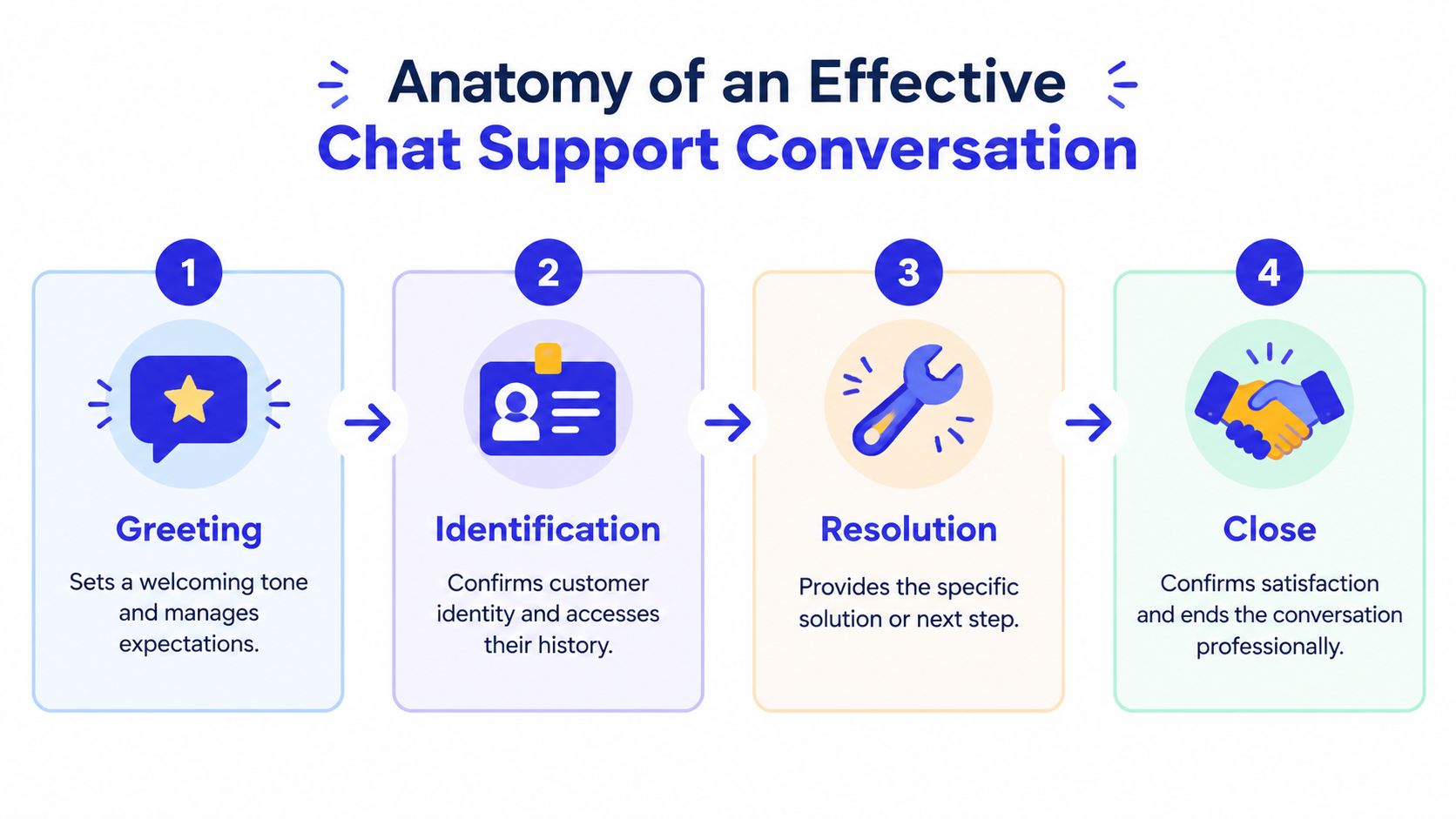
A reliable conversation has four building blocks: greeting, identification, resolution, and close. Each stage has a job. Skip one, and the agent often creates extra turns later.
Greeting
The greeting establishes warmth and manages expectations. It doesn't need to sound clever.
“Hi, I'm Maya. I can help you get back into your account. What happens when you try to sign in?”
That line names the responder, signals ownership, and asks one focused question. Avoid opening with a broad “How can I help?” when your chat launcher already tells you the page or product area involved. Use the available context to reduce work for the customer.
Identification
Identification confirms the customer and defines the request. For a low-risk product question, this may mean confirming the feature. For account, billing, order, or privacy requests, it may require authentication through the appropriate system.
“Can you share the email address on the account?” is better than asking for several details at once. One question per turn makes the exchange feel like a dialogue rather than an interrogation.
Resolution
Resolution is where teams often lose time. Agents jump to a solution before understanding the exact failure. Ask a clarifying question, check the relevant record, then explain the action in plain language.
Consider this short login exchange:
Customer: “I can't log in.”
Agent: “I can help. Are you seeing an error message, or does the sign-in page keep refreshing?”
The agent separates two possible causes instead of sending a generic reset link.Customer: “It says my password is wrong, but I just changed it.”
Agent: “Thanks. I'll check whether the new password was accepted. What email address is connected to the account?”
The agent mirrors the customer's language and asks for one verification detail.Agent: “Your reset went through. Please open a private browser window, go to the sign-in page, and enter the new password manually. I'll stay with you while you test it.”
The agent gives a specific next step and stays accountable.
Close
The close confirms the result and leaves a usable record. Try: “Are you back in now?” followed by “I've noted that the issue was a password reset and private-window sign-in. If it happens again, reply here and we'll continue from this point.”
Keep replies short. Mirror terms the customer uses, avoid stacking instructions, and confirm before taking an irreversible action. Teams improving the commercial side of chat can also review Double My Leads conversion tips, particularly where a support interaction becomes a buying conversation.
Bot, Human, or Hybrid Choosing the Right Conversation Model
Choosing a conversation model starts with three practical questions:
How many chats arrive in a typical day?
How complicated are the questions?
How many agent hours can you reliably staff?
A solo founder with a modest daily queue usually gets more value from a human-first inbox with lightweight automation. Use saved replies for shipping questions, password-reset instructions, and availability checks, but keep the person visible. A bot-led system can create more management work than it removes when the owner still handles every exception.
A growing SaaS team has a different shape. A bot can handle routine password resets, documentation lookups, and routing. Humans should own account-specific troubleshooting, billing disputes, security concerns, and situations where the customer has already tried the standard fix.
High-volume e-commerce teams generally need a hybrid model. Automation can identify an order, provide a tracking link, explain a return policy, or collect the information an agent needs. Escalation should happen when a shipment is lost, a refund is disputed, a customer reports a damaged item, or the conversation becomes emotionally charged.
Model | Best for | Strengths | Watchouts |
|---|---|---|---|
Bot | Repetitive, well-documented questions | Fast replies, consistent answers, continuous availability | Weak with ambiguity, emotion, and exceptions |
Human | Complex, sensitive, or account-specific issues | Judgment, empathy, troubleshooting, trust | Limited coverage, variable phrasing, queue pressure |
Hybrid | Teams balancing volume and risk | Automation for routine intent, human ownership for exceptions | Requires accurate routing and clear handoff rules |
Bots win on speed and consistency, but they fail when they pretend to understand something they don't. Humans win on nuance, but they can't provide unlimited coverage without tradeoffs. Hybrid systems perform well only when the team tunes intent detection and escalation instead of treating them as one-time settings.
A detailed resource on AI chatbot design is useful when you're defining those flows. The rule of thumb is simple: the smaller the team and the more sensitive the request, the more human-led the experience should be; the higher the routine volume, the more useful a hybrid model becomes.
Metrics That Predict Chat Support Success
A chat queue can look healthy while customers still leave frustrated. A short first reply means little if the answer is wrong, the bot closes an unresolved issue, or the customer has to repeat the story after escalation. Read the metrics as parts of a designed system. Speed measures access, quality measures usefulness, and efficiency shows whether the team can handle demand without creating extra work.
Published benchmarks show why response speed matters. One customer-service benchmark reports that 66% of consumers expect a service response within five minutes or less, while live chat is often expected to move faster, with some benchmarks placing the ideal first response below 30 seconds and typical averages around one to two minutes. A 2020 observation of 1,000 live-chat-enabled websites recorded an average wait of 2 minutes 40 seconds and found that 21% of chat requests went unanswered. The customer support effectiveness research summary provides that context.
Metric | What it measures | SME or SaaS benchmark | E-commerce benchmark |
|---|---|---|---|
First response time | Time until a meaningful first reply | Track against published sub-minute live-chat expectations | Track separately for order and pre-sale queues |
Average handle time | Time spent resolving a conversation | Use as a workload signal, not a quality target | Compare by intent, since returns differ from tracking |
CSAT | Customer's satisfaction after contact | Read beside resolution and wait time | Segment by delivery, returns, refunds, and product questions |
First contact resolution | Whether the issue ended in the first interaction | Review by intent and agent | Separate self-service outcomes from agent resolutions |
Deflection | Contacts avoided through useful automation or content | Verify that avoided contacts do not become repeat contacts | Check whether customers still need help after tracking or policy flows |
Numbers need an intent label to become useful. A long return conversation may be reasonable, while a long tracking conversation may signal poor automation. A low escalation rate can mean strong routing, or it can mean that the bot is trapping customers. A high deflection rate matters only when customers do not reopen the same issue through another channel.
Review first response time, queue abandonment, and escalation rate weekly as leading operational signals. Review CSAT, repeat contacts, resolution by intent, and cost per contact monthly, after enough conversations have accumulated to show patterns. Record the intent, channel, first response, bot or human ownership, resolution status, escalation reason, and customer rating from the start.
Use the beyond vanity support metrics perspective to connect agent activity with customer outcomes. Teams can also structure their scorecard around customer service key performance indicators. The strongest scorecard joins speed, correct resolution, and a clean next step. That combination shows whether the conversation design is helping customers, rather than merely making the dashboard look busy.
Ready-to-Use Scripts for SaaS and E-commerce
Scripts work when they guide judgment rather than replace it. Keep the structure consistent, but let the responder adapt the wording to the customer's vocabulary. Use variables such as {first_name}, {order_id}, {plan_name}, and {email} only where the system can populate them reliably.
SaaS onboarding
Greeting: “Hi {first_name}, welcome to {product}. I can help you activate your trial or find the right feature.”
Verification: “Which email did you use to create the account?”
Resolution: “Thanks. I can see you're on {plan_name}. To activate the trial, open Settings, select Workspace, and choose Activate. If you're trying to connect an integration instead, which one are you setting up?”
Close: “Does the activation screen now show as complete? If you tell me what you're building first, I can point you to the most relevant setup guide.”
The tone should stay practical. Don't send three help articles at once. Ask one question, confirm the answer, and give the smallest useful next step.
E-commerce order help
Greeting: “Hi {first_name}, I can check order {order_id} with you.”
Verification: “Can you confirm the email used at checkout?”
Resolution: “Thanks. The latest status is {status}. The next expected update is {next_step}. If the parcel arrives damaged or the status doesn't change, I can route this to our orders team.”
Close: “Does that answer the delivery question? If you need a return, I can explain the policy and collect the details for the next step.”
Don't promise an outcome before checking the record. For refunds or damaged goods, confirm the customer's request before submitting anything. That small pause prevents an agent or bot from acting on the wrong interpretation.
Lead qualification
Greeting: “Hi, thanks for stopping by. Are you comparing plans, or are you looking for a demo?”
Verification: “What type of team would use the product, and which workflow are you trying to improve?”
Resolution: “Based on that, {plan_name} looks like the closest fit because it includes {relevant_capability}. I can help you book a demo, or answer a pricing question first.”
Close: “Would you prefer a demo or a written summary of the plan options?”
Use the same voice in automated and human replies. A handoff feels smooth when the human sees the customer's answers and doesn't repeat the opening question.
Where AI Quietly Improves Every Chat Support Conversation
AI adds the most value in the middle of the workflow, where teams lose time sorting, summarizing, and composing. It doesn't need to impersonate a perfect agent. It needs to recognize the request, prepare useful context, and know when a person should take over.
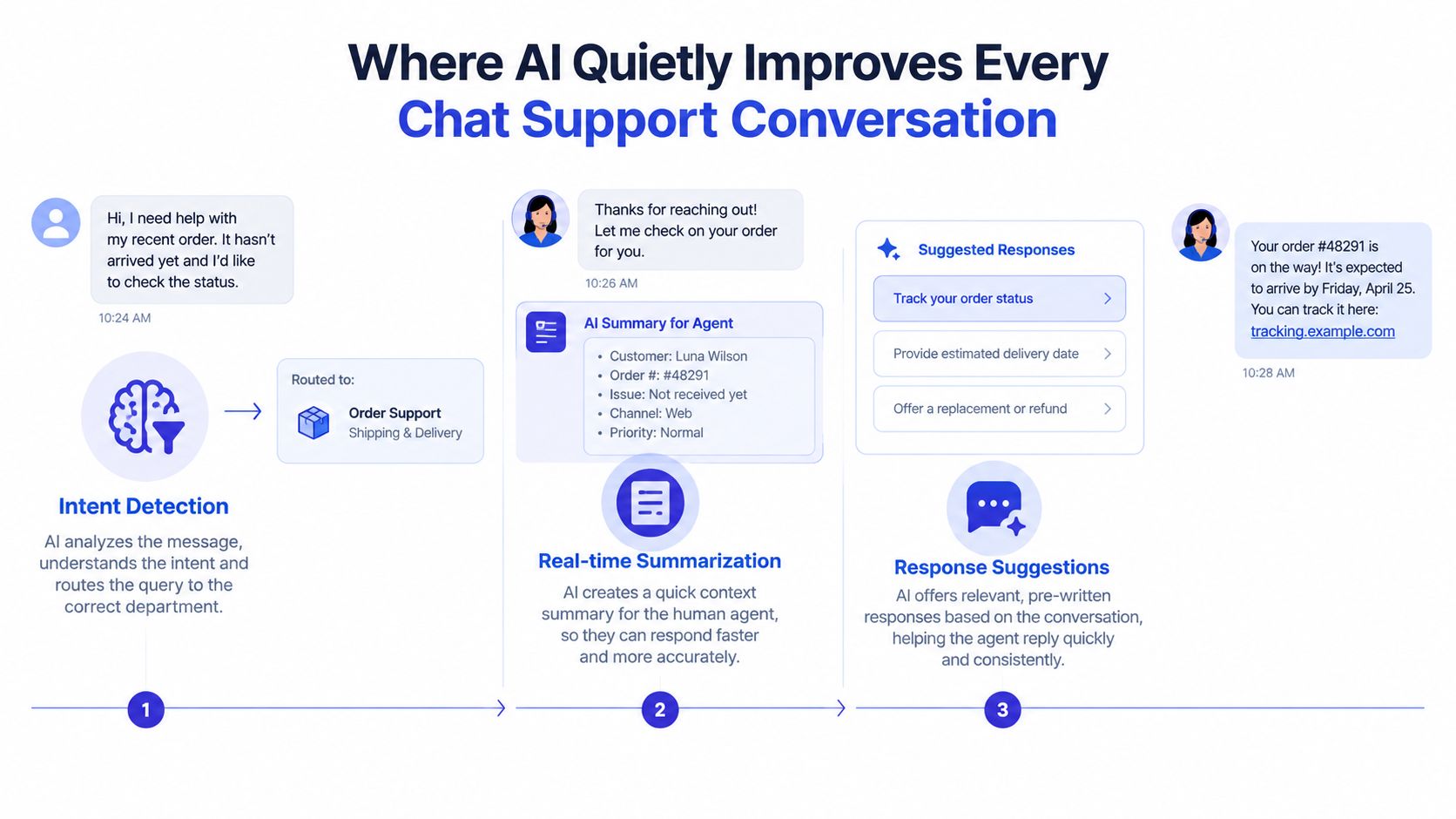
Start with intent detection. A customer asking “Where's my order?” belongs in an order-status flow. “I was charged twice” needs billing review. “Delete my account” may require identity verification, policy handling, and human oversight. Routing works only when the intent labels reflect real conversations, not the categories a product manager invented in a planning document.
Next, use real-time summarization. When a bot hands over a conversation, the agent should receive the customer's stated problem, verified details, steps already attempted, relevant order or account identifiers, and the reason for escalation. The agent shouldn't ask the customer to repeat everything.
A trustworthy handoff sounds like this:
“I've collected the details and I'm bringing in a specialist because this request involves a refund. You won't need to repeat what you've already shared. Jordan can see your order number, the issue you described, and the steps we checked.”
The agent view should show a concise summary, not a transcript dump. The human then acknowledges the context: “I've read the notes about order {order_id} and the duplicate charge. I'll check the payment record now.”
Smart escalation should trigger when the customer repeats the same question, rejects multiple answers, shows clear frustration, or raises a high-stakes topic such as refunds, account deletion, security, or sensitive personal information. AI should compress routine work, not hide the human when trust matters.
Before rollout, evaluate whether a tool can:
Route by intent: Match real customer language to the right workflow.
Summarize accurately: Preserve facts, actions, and unresolved questions.
Escalate with context: Pass the reason and relevant details to an agent.
Control risky actions: Require confirmation or human approval.
Use approved knowledge: Ground replies in current product, policy, and pricing content.
Expose outcomes: Let the team inspect resolution, escalation, and repeat-contact patterns.
Chatgrow is one option that combines trained website content, intent handling, lead qualification, and escalation summaries for customer conversations. Whatever tool you choose, test it against difficult transcripts before exposing it to customers.
Rolling Out Better Chat Conversations in 30 Days
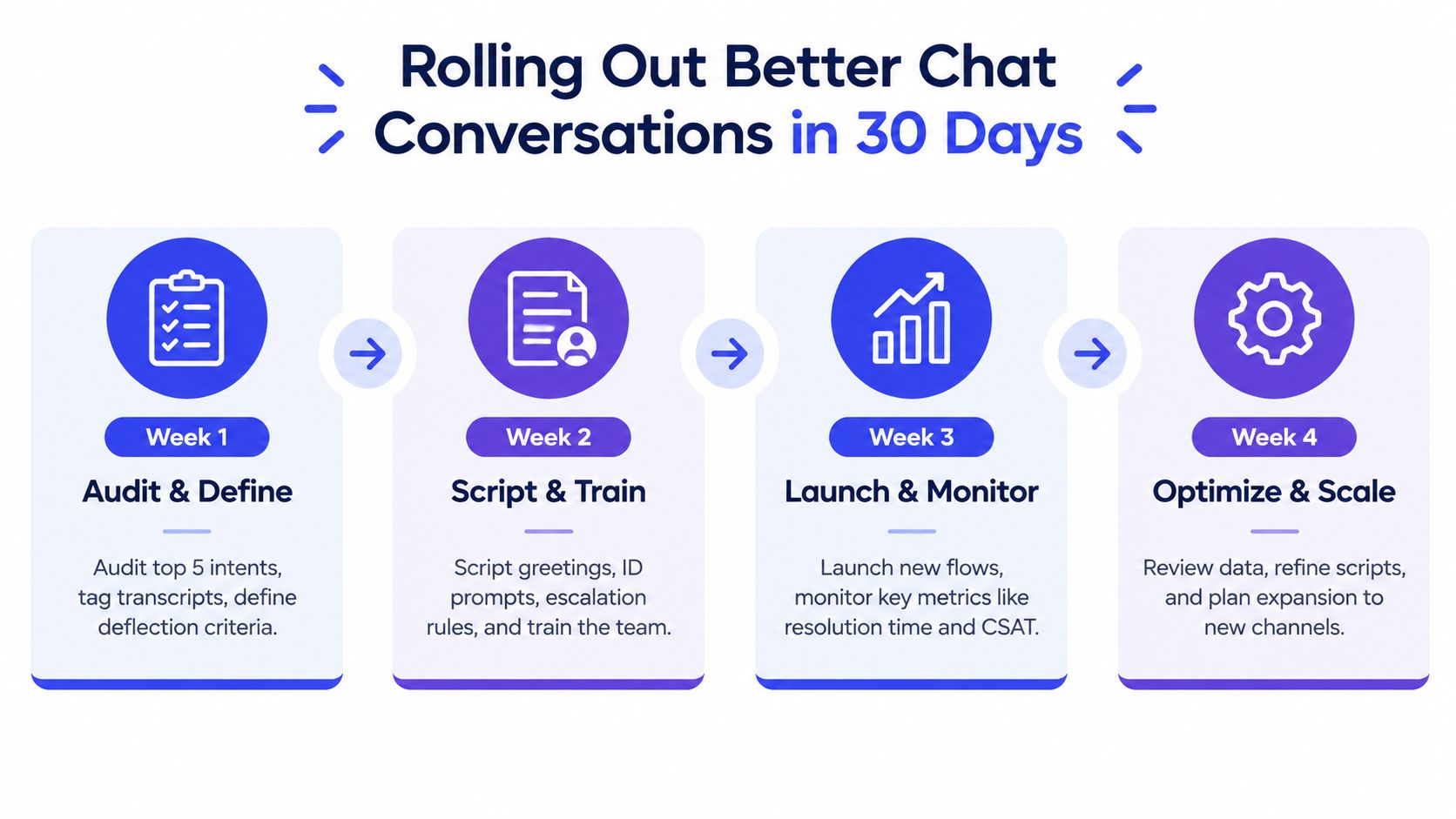
A good rollout starts with conversations your team already handles, not a blank automation canvas. The following sequence gives a small squad enough structure to improve the system without trying to redesign every support path at once.
Week 1
Audit your top five chat intents. Tag recent transcripts by reason, outcome, escalation, and missing information. Define what “deflection” means for your business. A conversation should count as successfully deflected only when the customer gets a usable answer without creating a repeat contact.
Week 2
Write the greeting, identification prompt, resolution path, and escalation handoff for each priority intent. Load the scripts into your chat console, then train agents on when to depart from them. Run role-play scenarios for an easy request, an ambiguous request, and an upset customer.
Week 3
Turn on AI intent detection and summarization in shadow mode. Compare its suggested routing with the route a human would choose, inspect mismatches, and correct the labels or source content. Don't judge the tool only by whether it produces fluent text. Judge whether it chooses the right path.
Week 4
Publish a scorecard covering first response time, CSAT, deflection, resolution, and escalation. Review transcripts behind the numbers. Refine scripts where customers ask the same follow-up question, where agents repeat verification, or where escalations arrive without enough context.
Short FAQ
Do chatbots hurt CSAT?
They can when they block access to a human, give confident wrong answers, or force customers through irrelevant menus. They're less risky when they handle clear intents, disclose what they can do, and escalate with context.
How should a small team staff live coverage?
Start with the hours when customers most often need help, publish those hours clearly, and provide a useful fallback outside coverage. Keep the human queue focused on exceptions instead of making agents retype routine answers.
When should we retire a flow?
Retire or redesign it when customers repeatedly rephrase the same request, abandon after the bot reply, create repeat contacts, or escalate without receiving useful progress. Fix the intent, content, or handoff before adding more automation.
The best chat support conversation is not the one with the most automation. It's the one that gets the customer to the right outcome with the fewest unnecessary turns, while giving your team enough evidence to improve the next interaction.
Chatgrow helps businesses create and deploy custom AI support agents trained on website content, FAQs, pricing, and product pages, with intent handling, lead qualification, and summarized escalation for human follow-up. Visit Chatgrow to explore a practical way to automate routine chat support conversations while keeping your team involved when the issue needs judgment or trust.
Related Posts
Continue Reading
More articles from the ChatGrow Team.


