Blog
Answer and Question: Best Practices for AI Support
By
Nelson Uzenabor

Most Q&A advice starts in the wrong place. It treats the problem as if the hard part is writing a polished answer, then assumes automation fixes the rest. In production, that framing breaks fast, because the actual test of an answer and question system is whether it stays accurate when pricing changes, policies shift, products ship new features, and a human has to take over without making the customer repeat everything.
That's the mindset shift many teams miss. A useful Q&A layer is not a static FAQ dump, and it's not a bot that “replaces” support. It's a workflow that handles routine intent, preserves context, and escalates the rest cleanly. The U.S. Census Bureau teaching materials capture the core logic well, a statistical question is one that can only be answered by collecting data that vary across cases, not by looking up a single fact, which is why support and sales questions often need a system, not a one-line reply (Census Bureau teaching materials).
Table of Contents
Why Most Q&A Strategies Fail Before They Start
The most common mistake is assuming that more automation automatically means better support. It doesn't. If the system answers quickly but routes the wrong intent, cites stale content, or hands off a hot lead with no context, it creates more work than it removes.
Static answers age badly
Teams often build Q&A from a single FAQ page, then forget that pricing pages, product pages, and policy pages change. That's how an answer that looked perfect during launch starts contradicting the current website, and customers notice immediately. The business problem isn't only wrong content, it's trust erosion.
The better frame is answer freshness under change. A good system doesn't just generate text, it keeps its grounding tied to live sources. That's why knowledge bases and retrieval need ongoing maintenance, not a one-time upload. Zendesk's CX trends reporting says 70% of customer experience leaders believe customer expectations are rising faster than their company can keep up, which is exactly why stale answers create such an obvious gap between what users expect and what a bot can safely say (Zendesk CX trends reporting).
Practical rule: if the source page can change without the Q&A system noticing, the answer is already on borrowed time.
A useful comparison is the old forum reply versus a maintained knowledge layer. Jim Dahle's long-running habit of pointing people to reusable, updated posts on The White Coat Investor exists for a reason, repeated questions burn time unless the answer is organized, current, and easy to reuse (The White Coat Investor). Support content works the same way.
More automation is not the goal
The better question is whether the bot should answer, summarize, or escalate. Salesforce's 2024 State of Service report says 88% of service professionals expect generative AI to become more important, but 81% also say customers still prefer humans for complex issues, which is the exact tension teams need to design around. That gap is where most generic chatbot content falls apart.
A video library can help teams think about repeatable question handling, and the video creation FAQ for corporate trainers is a decent example of how structured answers can reduce repetitive explanations without pretending every situation is the same. The lesson isn't “write more content.” It's “design the handoff.”
The Anatomy of a High-Quality Answer and Question Pair

A high-quality pair starts with intent, not wording. If the customer says, “Can I return this after 30 days?”, the system shouldn't answer with a generic refund blurb if the core issue is a warranty exception, a store credit policy, or a product-specific return rule. The question has to map to what the user is trying to do.
Match the question to the real job
In e-commerce, the broken version looks like this, “What is your return policy?” The working version is more specific, “Can I return a opened item bought during a promotion, and does it matter if the order shipped internationally?” That second form surfaces the edge case before the agent gives a risky answer.
In SaaS, the same pattern shows up in onboarding. “How do I connect my account?” is too vague if the need is, “How do I connect Stripe after I already created a workspace?” The narrower question makes it easier to retrieve the right doc, and it keeps the answer from wandering into unnecessary setup steps.
The guide to qualifying questions forms is useful here because it shows how good questions gather the right context without sounding intrusive. That principle carries directly into support flows. A strong question often includes one or two context signals, such as product, plan, stage of use, or order status.
Format the answer for scanning, not just completeness
A converting answer gives the customer the direct response first, then supporting detail. If the answer hides the conclusion inside a long paragraph, users stop reading and ask again. If it's too thin, they don't trust it.
The best answer is usually the shortest one that still makes the next step obvious.
That's why structure matters. Lead with the decision, add the exception, then point to the source or next action. In practice, that means a support reply should often look like a concise statement, followed by one clarifying sentence and one fallback path if the user needs a human. The format reduces friction without pretending every case is identical.
Accuracy and phrasing work together
A technically correct answer can still fail if it sounds abstract or overly formal. “Your request has been received” may be true, but “I've got your request, and a specialist will review the billing details next” feels more usable because it reflects the actual handoff.
The sharpest teams test Q&A pairs by asking whether a stranger would know three things after reading them, what the system understood, what the answer means, and what happens next. If any of those are fuzzy, the pair probably needs a rewrite.
How AI Agents Retrieve and Ground Answers from Live Content
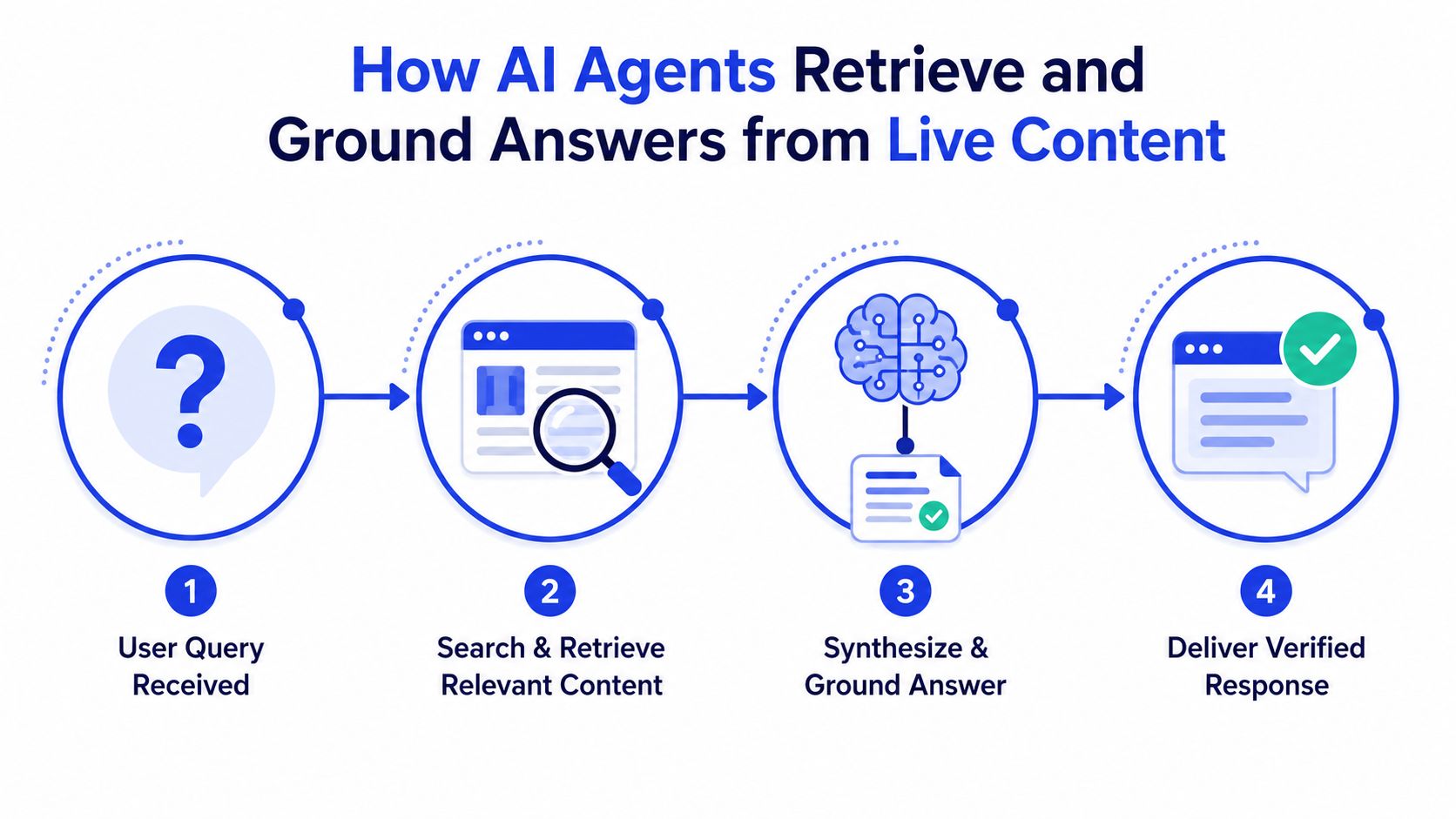
A reliable agent behaves like a librarian, not a guesser. It checks the current shelves, pulls the relevant source pages, and only then writes the response. If the source is missing, the system should stay conservative instead of filling gaps with guesses.
Retrieval is the guardrail
The technical support benchmark TechQA benchmark was built for domain adaptation, which is a reminder that support questions often depend on specialized terminology and documentation rather than generic chat knowledge. In production, retrieval quality matters as much as generation quality.
Source-gating is the control that keeps an agent from freelancing. If the answer has to come from approved pages, the model is less likely to invent policy, pricing, or product behavior. That matters most on pages where a wrong answer can cost a lead, trigger a refund, or send a customer to a competitor.
The strongest systems pull from live pages, knowledge bases, product docs, and pricing content, then synthesize a reply from the current state of those sources. When the source set is narrow and current, the answer usually feels grounded. When the source set is broad, stale, or unlabeled, the response gets slippery fast.
Freshness is part of trust
The problem is not just whether the bot can find an answer today. It is whether that answer still matches the current site next week. A fresh pricing page and an old help article can contradict each other, and the bot will happily pick the wrong one if the retrieval logic is not disciplined.
That is why continuous retraining and content re-indexing matter. They are not nice-to-have operations tasks. They keep the agent aligned with the business as products and policies change. A practical guide to preventing AI hallucinations fits here because it focuses on grounding, verification, and avoiding unsupported output.
Read the system like a source pipeline
Consider the flow directly. User asks. System retrieves. System checks what it is allowed to use. System responds only from that evidence. If you cannot explain where a reply came from, you do not have an answer system, you have a text generator.
The YouTube walkthrough below is useful if you want to see the retrieval idea in motion.
Building Training Data That Survives Real-World Changes
A Q&A library can look clean and still break in production if the training data freezes facts that are going to change. Pricing shifts, policies get revised, and seasonal offers come and go. When those details are copied into every answer, contradictions stack up fast.
Structure for change, not just for launch
Write questions that expose likely edge cases. Instead of “What are your pricing plans?”, include questions about upgrade timing, billing cycles, and trial restrictions. In support, those are the places where customers get stuck, and stale content hurts most there.
Use answers that point to source pages by role, not by fixed wording. If the pricing page is the source of truth, the answer should still direct users there even after the page changes. The wording can stay stable while the facts update underneath it.
The what is a KB guide is relevant because a knowledge base only works when it is treated as a maintained system, not as a document archive. That operating mindset is what many teams miss.
Operational rule: if you update the website but not the Q&A source set, your customer-facing answer layer is now out of sync.
Build review triggers around business changes
The safest cadence is tied to events, not just calendars. If pricing changes, if a policy page is revised, if a product feature ships, or if a promotion launches, the associated answer set needs a check. Otherwise, the agent starts echoing last month's reality.
Teams often wait for a complaint before they review the chatbot. That is too late. A pre-launch and post-change review catches contradictions before customers do, which keeps support volume from becoming self-inflicted.
Match the question to the underlying intent
Training data should include the way customers ask, not just the polished version internal teams prefer. That means short questions, messy questions, and questions with partial context. It also means checking whether the answer still works when the user does not use your product vocabulary.
A good test set includes the weird questions too. Not because every edge case needs a bespoke reply, but because the edge cases reveal where the retrieval logic is brittle. If the agent cannot handle those, it will fail in the same places your revenue team cares about most.
When the actual issue is a warranty exception, a cancellation request, or a billing dispute, the value is in routing and handoff quality. The first answer matters, but the bigger payoff comes from whether the system captures intent cleanly and passes enough context to a human without forcing the customer to start over.
Common Q&A Pitfalls and How to Fix Them
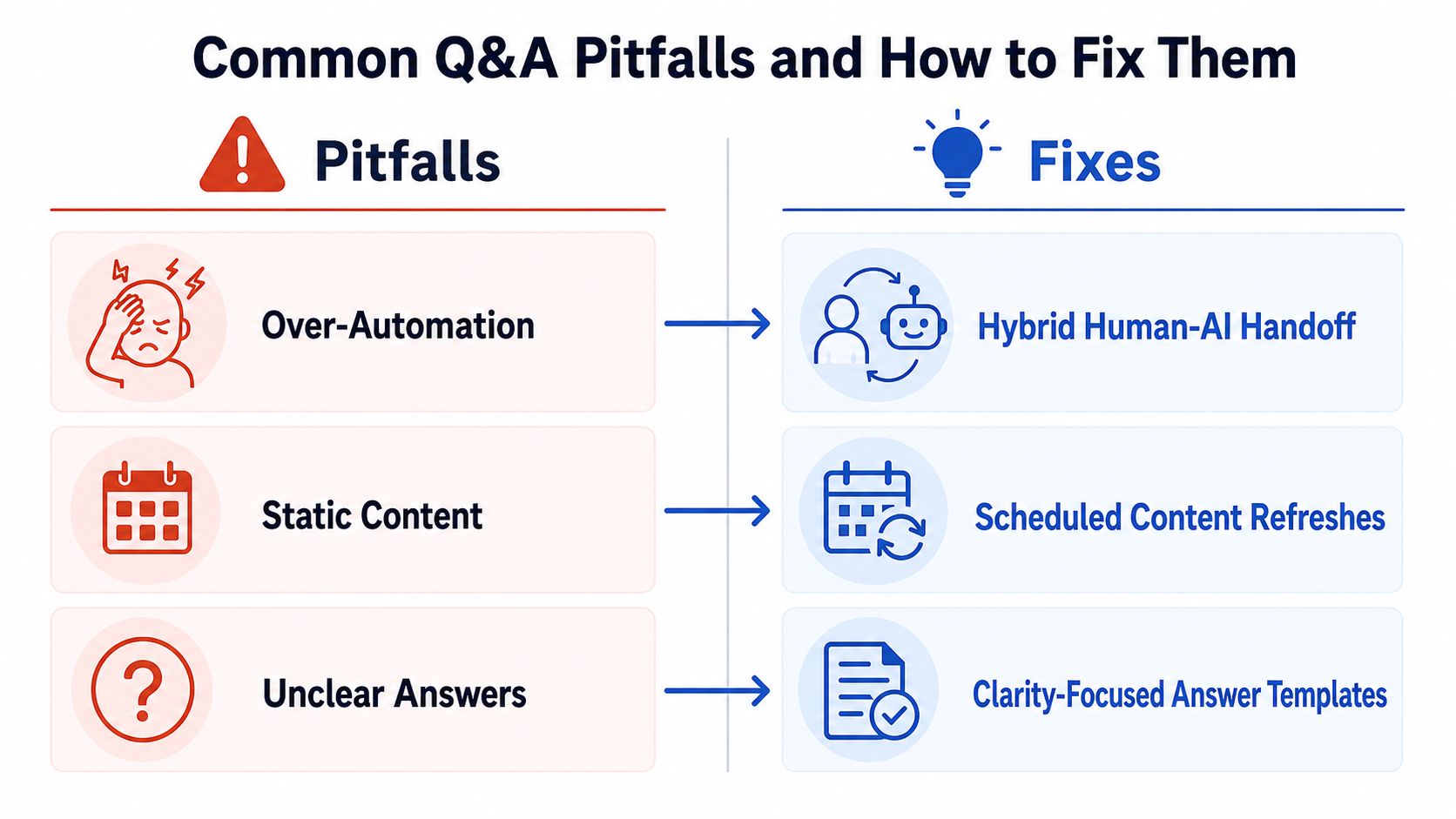
The fastest way to spot a broken Q&A system is to compare what users need with what the bot does. The failure modes are predictable. The fix is usually simpler than teams think, but only if you pay attention to answer decay and handoff quality instead of chasing a perfect first reply.
Over-automation versus selective escalation
Broken approach. The bot tries to handle everything, even when the issue needs judgment. Working approach. The bot handles routine intent, then escalates complex cases with the right context attached.
That distinction matters because technical or emotionally sensitive cases often need a human. If the handoff path treats every request the same, escalations feel robotic even after a rep joins. The hidden cost is not just a bad reply, it is the extra work your team does to reconstruct intent after the bot has already slowed the conversation down.
Static content versus refreshed sources
Broken approach. The answer is copied into multiple templates and never revisited. Working approach. The source of truth stays centralized, and the answer layer pulls from the current version of that content.
Many teams discover their “knowledge base” is really a pile of stale fragments. Once pricing, policy, or product pages change, every duplicate answer becomes a liability. The fix is boring, but it works, set review triggers and align the answer set with the live site. A good FAQ generator for SEO teams can help structure that content, but the process still needs someone watching for drift.
Raw transcript dumps versus concise handoff summaries
Broken approach. A support rep receives a full transcript and has to reconstruct the issue from scratch. Working approach. The system sends a short summary, the user's intent, the product context, and any qualification details already collected.
That difference saves time and avoids repeat explanations. It also makes the human feel like the bot helped instead of handing off its own confusion. In practice, the summary should answer three things, what the user wants, what already happened, and what the human should do next. When the issue is a billing dispute, an account exception, or a frustrated lead, that context is what lets the rep respond cleanly instead of asking the customer to repeat everything.
Chatgrow Q&A Templates for Deployment and Lead Qualification
For teams comparing tools, the useful filter isn't whether an agent can answer. It's whether it can qualify, route, and escalate without creating extra cleanup for the team. Chatgrow's setup fits that model because it can train on your website and product pages, answer common support questions, qualify leads, and pass context into a handoff when needed.
Deployment on high-intent pages
A good first template starts with direct intent capture. On a pricing page, the agent might ask, “Are you looking for support with buying, setup, or a billing question?” That keeps the conversation useful without making the visitor work too hard.
A strong paired answer is short and transactional. If the user says they want setup help, the bot can answer with the relevant starting point, then offer the next step. If the user is pricing-sensitive, the bot can point to the current plan comparison instead of improvising a recommendation.
Lead qualification without the awkward interview
The second template should gather just enough detail to route the lead. A SaaS visitor asking about implementation can be prompted for team size, timeline, or use case, but the conversation has to stay conversational. If the flow feels like a form pretending to be a chat, people drop off.
The best qualifying answers acknowledge the context and move the exchange forward. “That sounds like a fit for a product walkthrough” is better than a long generic pitch because it reflects what the user just said. The FAQ generator for SEO teams is a helpful adjacent reference if you want to see how structured question sets can be generated around intent clusters.
Smart escalation with context attached
The third template is the one many teams underbuild. If the agent can't resolve the issue, it should forward a concise summary that includes the user's goal, the relevant page or product area, and any qualifying details already collected. That lets a human step in without asking the customer to start over.
The handoff should feel like continuity, not a restart.
That's where ROI shows up. Not in the first answer alone, but in the amount of human time the system saves after the first answer fails. A platform like Chatgrow is useful here because it supports training, qualification, and escalation in one workflow, which keeps the operational chain tighter than stitching together separate tools.
Your Framework for Continuous Q&A Optimization
A Q&A system earns its keep when it improves over time. That means you need four things working together, intent routing accuracy, answer freshness, escalation quality, and performance measurement. If one of those breaks, the rest start to wobble.
Measure what matters
Many teams track volume and stop there. That's not enough. You also need to know whether the question landed in the right path, whether the answer stayed aligned with the current source, and whether the human takeover preserved context. Those are the signals that show real operational health.
The internal monitoring habits in the AI agent monitoring guide fit this mindset because monitoring is where the system stops being a prototype and starts behaving like infrastructure. Watch for repeated escalations, confused routing, and source drift.
Scale by specialization
One generic agent can cover a lot of ground at the start. Over time, product support, billing support, and sales qualification often benefit from separate logic. That isn't overengineering, it's specialization based on user intent.
The rule of thumb is simple. If the same agent keeps needing different source sets, different escalation rules, and different success criteria, it's already behaving like multiple agents. Split it before the handoff quality deteriorates.
Keep a tight review loop
Review the answers that fail, the questions that escalate, and the pages that changed. Then update the source set and the templates together. If you only fix one layer, the mismatch comes back.
A practical checklist looks like this. First, audit the top intents on your highest-value pages. Second, compare bot answers against current website content. Third, inspect handoffs for missing context. Fourth, revise the templates that cause repeat explanations.
That's the actual framework. Not “deploy a chatbot,” but build a maintained answer system that can route, ground, and escalate without losing the thread.
If you want an AI support layer that's trained on your site, qualifies leads, and hands off context cleanly when a human is needed, visit Chatgrow and test it against your current FAQ, pricing, and support flows. It's the fastest way to see where your answers hold up and where they're already decaying.
Related Posts
Continue Reading
More articles from the ChatGrow Team.