Blog
How to Prevent AI Hallucinations in Customer Support
By
Nelson Uzenabor

You open Monday's transcript export and spot it immediately. Three customers asked about refunds, and the agent confidently repeated a policy that doesn't exist anywhere on your site. One reply mentions a “14-day no-questions-asked return window,” another invents a shipping exception, and a third sends a buyer to an internal form your team never published.
That's the part most guides skip. They start with abstract definitions, but the problem is more concrete: a support agent that sounds polished while drifting away from your actual policy, pricing, or product rules. How to prevent AI hallucinations isn't a prompt trick, it's a control system, built layer by layer so the model can answer from verified sources, stay inside scope, refuse when it should, and hand off cleanly when confidence drops.
Table of Contents
When Your Support Agent Makes Things Up
A support agent that invents policy isn't just wrong, it creates cleanup work. Someone on your team has to answer the customer again, undo the bad expectation, and often apologize for the AI's confidence. In customer support, that kind of mistake is especially painful because the model rarely sounds uncertain when it's hallucinating.
The pattern is usually easy to spot after the fact. The agent quotes a discontinued SKU, answers from last quarter's pricing page, or fills silence with a polished guess when it can't find the right answer. The issue isn't random behavior. It's the output of a model that was asked to be helpful without enough guardrails around what counts as an acceptable answer.
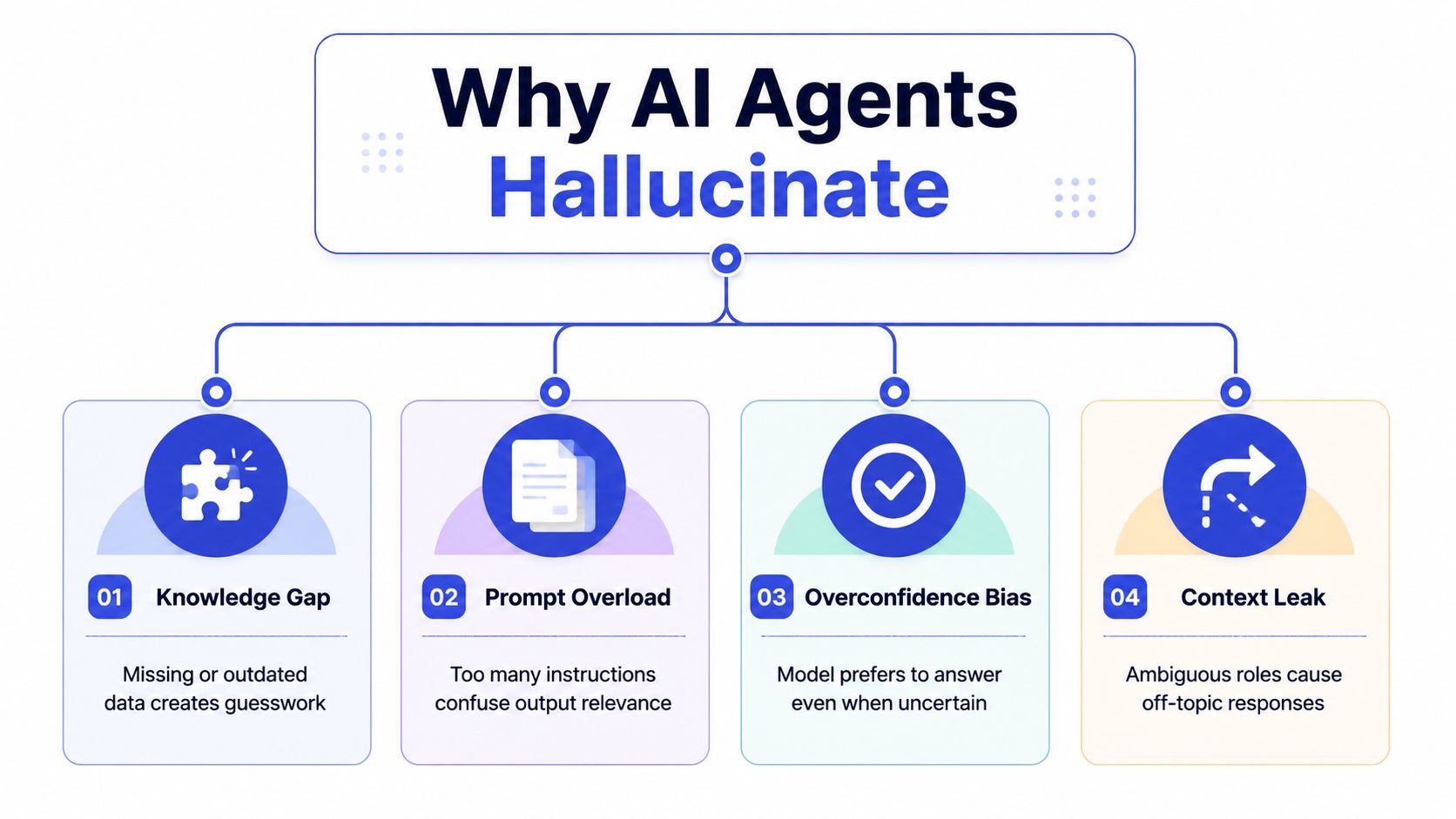
A useful way to think about it is simple. The model can only answer safely when the knowledge is current, the prompt is precise, the retrieval is relevant, and the output space is constrained. If any one of those layers is loose, the system starts guessing.
Practical rule: if a customer-facing answer would be embarrassing for a human rep to say out loud without checking, the agent should not be allowed to improvise it either.
That's why prevention works best as a stack, not a single fix. The knowledge base, prompt, retrieval logic, validation rules, and monitoring loop each close a different failure mode. Get one layer right and you reduce errors. Get all of them right and you stop the same mistake from repeating.
Why AI Agents Hallucinate in the First Place
The first root cause is missing or stale knowledge. If the model can't find a current refund policy, product detail, or shipping rule, it will often try to complete the answer from pattern memory. That's how you end up with a confident but fictional return window, a made-up warranty clause, or a pricing explanation that contradicts the live site.
The other three failure modes are easier to miss
Ambiguous prompts create another kind of drift. If the system message says the assistant should “be helpful” but doesn't define what it's allowed to answer, the model fills in the blanks itself. In support workflows, that usually shows up as off-brand wording, overconfident promises, or answers that sound plausible but don't match the business policy.
Weak retrieval is a third problem. The agent may have access to documents, but if it pulls the wrong passage or only one snippet from a large page, it can stitch together an answer that sounds coherent and still misses the point. That's how support bots quote the wrong plan tier or answer a policy question using a blog post instead of the actual help center.
Unbounded generation is the fourth cause. If the model is always forced to answer, even when it doesn't have enough evidence, it will guess instead of abstaining. In customer support, that habit is dangerous because a fluent guess often looks more trustworthy than a cautious refusal.
The key diagnostic question is not “is the model smart enough?” It's “which layer let the wrong answer through?” Once you can answer that, the fix stops being guesswork and becomes engineering.
Grounding the Agent with Your Real Knowledge
The strongest practical defense is retrieval-grounded generation. A peer-reviewed study summarized in the evidence base found that when chatbot systems used trusted internal information, hallucination rates were 0% for GPT-4 and 6% for GPT-3.5, compared with 6% and 10% when they used Google-based information. For questions outside the trusted internal source, the Google-based hallucination rates rose to 19% for GPT-4 and 35% for GPT-3.5, while conventional chatbots were about 40%. The point is blunt, grounding matters more than model size when the goal is factual support answers. See the peer-reviewed evidence on retrieval-grounded systems and hallucination reduction for the full context.
Build the knowledge base from the sources customers actually ask about
Start with the pages that already settle most support questions. That usually means FAQs, pricing pages, product docs, help center articles, policies, and any internal pages that define exceptions. If a topic changes often, it belongs in the retrieval set, not in the model's memory.
Chunking matters next. Practical guidance recommends 200 to 800 tokens per chunk, with smaller pieces for dense legal or policy copy. That size keeps the passage focused enough for retrieval without shredding the meaning. Use several relevant sources instead of one, rank the best passages first, and require the agent to cite the chunk it uses for each factual claim.
A clean information architecture helps here too. If pricing lives on one page, policy on another, and product specs in a third place, retrieval has a better chance of finding the right evidence fast. For teams that are still untangling customer and product data, a practical MDM guide for AI can help frame the data ownership problem before you wire the agent to the sources.
Ground the answer in the system of record, not in whatever the model remembers from pretraining.
In practice, this is the part where many SMBs get a big win quickly. You train the agent on your website, pricing, and FAQs, then keep retraining as those sources change. If you're integrating multiple customer data sources, the internal guide on customer data integration is useful because retrieval gets much better when the source content is consistent.
Grounding is necessary, but it doesn't solve everything. A well-fed model can still drift if the prompt tells it to answer too broadly or if the guardrails don't force a refusal when evidence is missing.
Writing System Messages That Constrain the Model
A good system message does three jobs at once. It defines the agent's role, it limits the scope, and it tells the model what to do when it's not sure. Without that structure, the model will improvise, especially on edge-case support questions where the user's wording is vague.
Use a job description, not a personality essay
Keep the opening of the system message brutally simple. One sentence should define what the agent is and what it handles. For example, “You are a customer support assistant for orders, shipping, returns, and product questions, and you must answer only from approved company sources.” That kind of statement helps the model stay inside the lane.
Then list the exclusions. Payment disputes, account changes, refund approvals, or any legal wording should trigger a handoff instead of a free-form answer. The model shouldn't guess on those topics even if it sounds confident, because a confident answer is still a guess when the situation is critical.
If you want a deeper background on how prompts work in practice, the prompt engineering guide is a solid reference point for structuring instructions before you start tuning behavior.
Add refusal behavior and low-temperature settings
For factual support queries, keep temperature low so the model doesn't wander. High creativity settings make sense for brainstorming, not for a refund policy or a shipping deadline. If the setup allows it, use a prompt template that says, “If you can't find evidence in the provided sources, say you don't know and escalate.”
A useful structure looks like this:
Role: define the support domain in one sentence.
Allowed topics: list the exact categories it may answer.
Blocked topics: name the cases that must go to a human.
Refusal rule: instruct the model to decline when evidence is missing.
Escalation capture: ask for order number, question summary, and any relevant details before handoff.
The best prompts also prevent the model from over-answering. If a user asks a broad question, the agent should narrow it before responding or refuse until it has enough detail. That's especially important for support tickets where the wrong assumption can create a second problem that takes longer to unwind than the first one.
Adding Validation Filters and Smart Escalation
Even strong retrieval and a tight system message won't eliminate every bad answer. That's why the next layer is a validation gate that checks whether the response has enough evidence to leave the model. BotsCrew recommends explicit refusal conditions such as a confidence cutoff below 0.7 or no evidence found, and also recommends chunking, multiple sources, and requiring citations for every factual claim. In practice, that means the agent should not “best effort” its way through a weak answer. It should stop.
Put a filter in front of anything customer-facing
The cleanest setup is a two-step check. First, the model drafts the answer. Then the filter verifies whether the answer is supported by retrieved passages and whether the confidence stays above the threshold you set. If either check fails, the system refuses or escalates instead of sending a shaky reply.
Structured output helps too. If the agent has to return fields like answer, cited source, confidence, and escalation reason, your support team can inspect and route the result without guessing what the model meant. OpenAI community guidance around claim extraction and claim-to-context pairing fits this pattern well, because it forces the system to match each claim to actual evidence before the response goes out.
High-risk topics should skip the debate entirely. Pricing disputes, refunds, account actions, and policy exceptions should default to human review. That's not a failure mode, it's the correct outcome. The agent is doing its job by knowing when to stop.
Make escalation collect the right context
A smart handoff should not just dump the conversation into a queue. It should gather the user's question, order number, and a short summary of what the agent already tried. That context saves the human rep from asking the same questions again and reduces the chance that the customer has to repeat themselves.
If you need a practical workflow for that handoff, the guide on how to escalate an issue is worth keeping close because the quality of the handoff often matters more than the fact that the handoff happened.
Escalation is cheaper than a wrong promise. In support, that trade-off usually wins.
For teams that want a broader governance lens, the enterprise AI compliance help resource is useful because validation filters are really a policy enforcement layer as much as a technical one.
Monitoring, Retraining, and Closing the Loop
A hallucination you notice is annoying. A hallucination nobody logs is a system problem that keeps repeating. The monitoring job is to make mistakes visible, easy to categorize, and cheap to fix before they spread across more conversations.
Track the metrics that expose risk, not just volume. That means unsupported answer rate, escalation rate, deflection rate, and customer satisfaction on AI-handled chats. If the unsupported answers go up, the agent is likely drifting from the knowledge base or the retrieval layer is pulling weak evidence. If the escalation rate drops too low, the agent may be answering questions it should be handing off.
Review transcripts on a schedule, then fix the source
In the first month, review transcripts weekly. After that, monthly is usually enough unless the product, policy, or pricing changes often. The goal is to catch repeated failure patterns, not to perform random spot checks for theater.
When you find a wrong answer, fix the source of truth first. Edit the help page, the FAQ, or the policy document that misled the model, then retrain the agent against the updated source. If the same mistake appears again, treat it as a retrieval or chunking issue, not just a bad answer. The support team shouldn't have to correct the same hallucination twice.
For teams using dashboards, the workflow should be boring in the best way. A wrong answer appears, someone marks it, the source page gets updated, retraining runs, and the next transcript no longer shows the same error. The AI agent monitoring guide is helpful here because monitoring only matters when it leads to a concrete correction loop.
Practical rule: if a repeated hallucination survives two review cycles, the problem is no longer the model. It's your process.
This is the part often missed. They instrument the agent, but they don't close the loop. The value comes from turning every caught mistake into a source correction, a retrieval improvement, or a refusal rule so the same error doesn't get a second chance.
Your First-Week Prevention Checklist
Start with the knowledge base. Audit your FAQs, pricing, policies, and product pages today, and remove anything stale or contradictory. Tomorrow, add the refusal rule to the system message so the agent can say no when evidence is missing.
By midweek, set the confidence threshold and make sure low-confidence answers don't go live. Then wire escalation to the support inbox or CRM so humans get the question, the order number, and a clean summary instead of a raw dump. Before the week ends, review a batch of transcripts and fix the source pages behind any recurring errors.
Keep the plan tight:
Day 1: audit the approved sources.
Day 2: constrain the system message and refusal behavior.
Day 3: set the confidence and evidence filters.
Day 4: validate escalation routing and handoff context.
Day 5: review transcripts and patch source content.
Day 6: retrain on the updated knowledge base.
Day 7: check whether the same mistake still shows up.
That stack is what separates a chatbot people trust from one they work around. Ground the answer, constrain the model, force a refusal when evidence is thin, and keep correcting the source of truth.
If you want to ship a support agent that stays useful without making things up, Chatgrow gives you the pieces to train on your site content, route hard questions to humans, and keep retraining as your knowledge changes. It's a practical way to put grounding, escalation, and monitoring into one workflow so your team can spend less time cleaning up bad answers and more time handling the conversations that need a person.
Related Posts
Continue Reading
More articles from the ChatGrow Team.