Blog
Average Handle Time Formula Explained with Examples
By
Nelson Uzenabor

Your dashboard is open. Queue volume looks busy, service level is wobbling, and one number keeps staring back at you: AHT. If you're a new support manager, average handle time can feel like one of those metrics everyone expects you to understand before anyone explains what it means.
That confusion is normal. AHT looks simple, but teams often use it badly. Some managers treat it like a speed contest. Some agents hear “lower AHT” and think they need to rush customers off the phone. Some reports leave out wrap-up work, so the number looks cleaner than reality. Then AI enters the workflow, and now you also have to ask what counts as handle time when a bot drafts summaries, routes cases, or resolves part of the interaction before a human joins.
The useful way to think about AHT is this: it's not a score for talking fast. It's a way to measure how much total handling effort a customer interaction requires. That makes it helpful for staffing, scheduling, coaching, and spotting friction in your process. It also means the number needs context. A shorter interaction isn't always a better one.
Table of Contents
Introduction to Average Handle Time and Why It Matters
It is 10:15 on a Monday. Wait times are climbing, agents are still finishing notes from the last rush, and a senior leader asks a simple question: do we need more people, or does the work itself take too long? Average handle time helps you answer that.
Average handle time matters because it translates customer demand into workload. A queue can look busy for two very different reasons. You might have a high volume of contacts, or each contact might require more effort to handle. AHT helps separate those two problems so managers can staff properly, coach well, and spot friction in the process.
Industry references such as the Genesys definition of AHT describe it as a standard contact-center measure because it captures the full handling cycle of an interaction. That common definition gives managers a fair way to compare teams and time periods, as long as everyone is measuring the same pieces of work.
Consistency is the key.
If one team counts only live conversation and another team also counts the work that happens after the customer leaves, the comparison breaks. The number may look precise, but the decision built on it will be shaky. AHT is useful only when the rules behind it are clear.
The management question AHT answers
At its simplest, AHT answers one practical question:
How much agent time does the average customer interaction consume from start to finish?
That question matters because agent time is your operating capacity. A cashier line works the same way. If each customer takes longer to serve, the line grows even if the store does not get more shoppers. In a contact center, longer handling time affects staffing, schedules, service level, and the pressure your team feels hour by hour.
Managers use AHT to guide decisions such as:
Staffing for the amount of work arriving in each shift
Scheduling so busy periods are covered by enough capacity
Coaching when one agent needs skill support and another is being slowed by process friction
Workflow design when tools, policies, or handoffs add avoidable effort
For a wider metric set, Chatgrow's guide to customer service key performance indicators shows how handling time fits beside customer satisfaction, resolution, and queue performance.
Why AHT gets misused
New managers often treat AHT like a stopwatch. That is where problems start. A lower number can reflect efficient work, but it can also reflect rushed conversations, weak diagnosis, or unfinished tasks pushed into another channel.
A better way to use AHT is as a quality-balanced efficiency lever. Sometimes you want it to fall. Sometimes you should accept it rising. If agents spend a little longer solving the issue correctly, preventing a repeat contact, or using AI-generated notes to improve accuracy before closing the case, that extra time may improve the operation more than a shorter interaction would.
This matters even more now that support work spans voice, chat, and email, with AI helping before, during, and after the interaction. As workflows change, managers need to ask a sharper question: which parts of the effort still belong inside handle time, and which parts have been removed or shortened by automation?
That is why AHT works best inside a broader measurement system. The Prompt Builder success metrics framework is useful here because it connects operational measures to outcomes instead of rewarding speed alone. AHT matters most when it helps you balance efficiency with a good customer result.
What Average Handle Time Really Measures
A new manager listens to a six minute customer call and assumes the handle time was six minutes. The report later shows nine. Nothing is broken. The report is counting the rest of the work the call created.
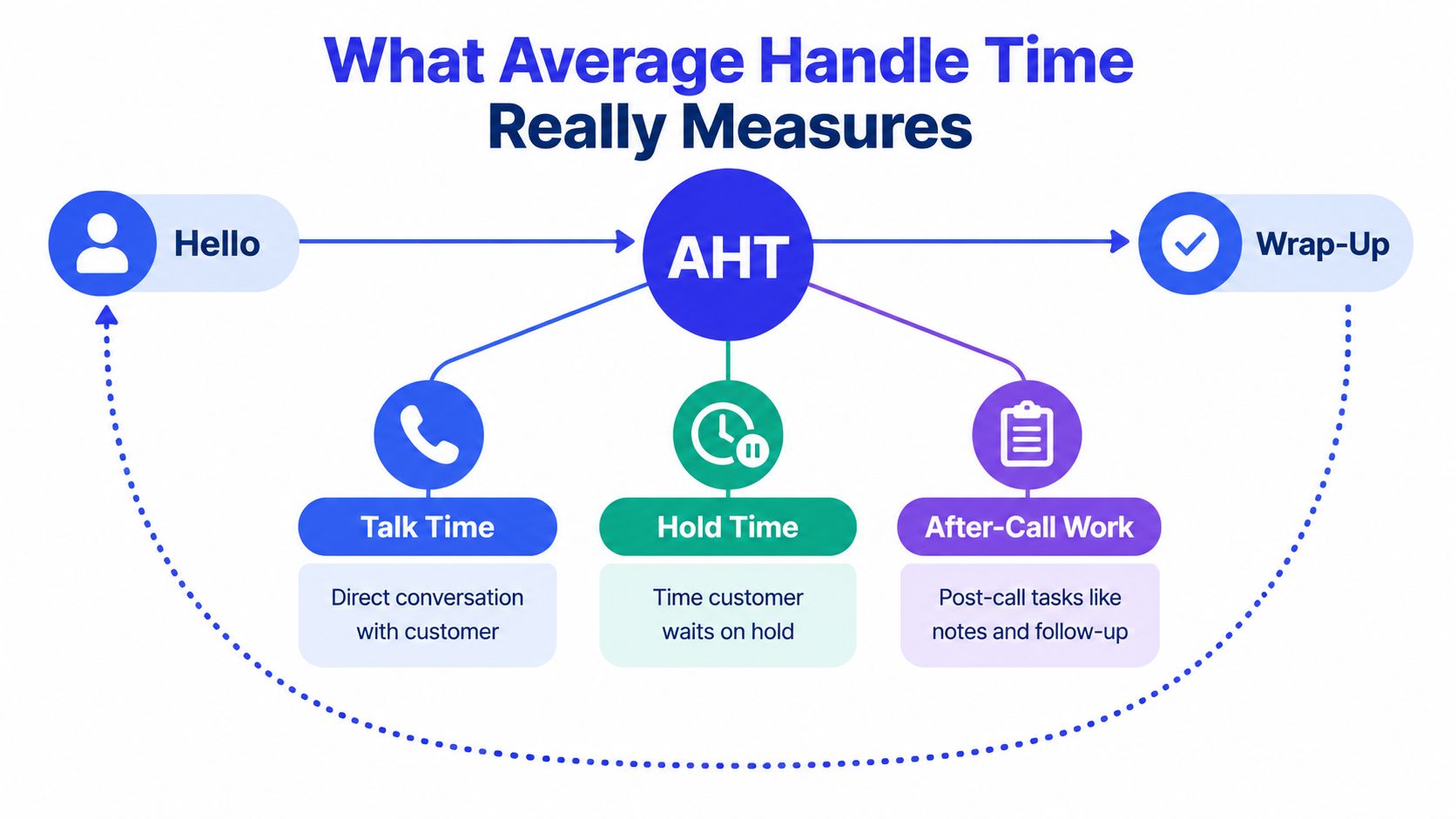
AHT measures the full handling cycle for one customer contact. For a phone call, that usually includes the live conversation, any time the customer spends on hold, and the wrap-up work the agent completes afterward. If you only look at the time the customer can hear, you miss part of the labor your team is paying for.
A restaurant table works like this. Serving the meal is only the visible part. The job also includes checking on an order, fixing a missing item, and closing the bill. Contact-center work follows the same pattern. The customer experiences one moment. Operations carries the whole workload.
The three building blocks
For voice support, AHT usually combines three parts:
Talk time. The agent is actively speaking with the customer.
Hold time. The customer is waiting while the agent checks details, confirms policy, or works with another team.
After-call work. The live conversation is over, but the case still needs notes, codes, updates, or follow-up tasks.
Each piece answers a different management question. Talk time shows how long the conversation itself lasts. Hold time shows how much of that effort is hidden from the agent's voice but still felt by the customer. After-call work shows the admin load that follows the interaction.
Leave one out and you are measuring something narrower than handle time.
That point matters because AHT is easy to misuse as a speed score. An agent who spends a little longer documenting the issue well, sending the right follow-up, or confirming the fix may raise AHT and still improve the operation. Fewer repeat contacts, cleaner records, and better handoffs often save more time later than a rushed close saves now.
Why new managers get tripped up
The word "handle" sounds smaller than the work really is. It suggests the visible conversation. In practice, the issue is still being handled until the required work tied to that customer contact is finished.
A simple rule helps. If the agent is still doing required work because that customer reached out, that time belongs somewhere in handle time.
AI makes this more interesting, not less. If a tool writes summaries, fills fields, or suggests next steps during the interaction, some work may shift out of after-call time and into the live contact. In chat and email, agents may also manage several threads at once, which changes how "handling" feels compared with a single phone call. The definition stays steady. The workflow underneath it changes.
That is why managers should read AHT as an efficiency-and-quality signal, not a race clock. If automation cuts note-taking, lower AHT may reflect a real gain. If a complex issue needs a longer conversation to prevent a callback, a higher AHT can be the better result.
Teams trying to spot where handle time expands across modern channels often need interaction-level evidence, not just one average on a dashboard. This overview of analytics for X and Discord shows the kind of channel analysis that can surface those patterns.
The unit rule that prevents bad math
One final caution. Every time input has to use the same unit.
Seconds must be added to seconds. Minutes must be added to minutes. If one system exports hold time in seconds and another exports after-call work in minutes, the final AHT can look neat and still be wrong.
The Standard Average Handle Time Formula and How It Works
A new manager looks at yesterday's dashboard and sees one agent with a higher AHT than the rest of the team. The first reaction is often, “Why is this person slower?” The formula helps you ask a better question. “What work filled that time, and did it improve the outcome?”
The standard formula is:
AHT = (Total Talk Time + Total Hold Time + Total After-Call Work Time) / Total Number of Calls
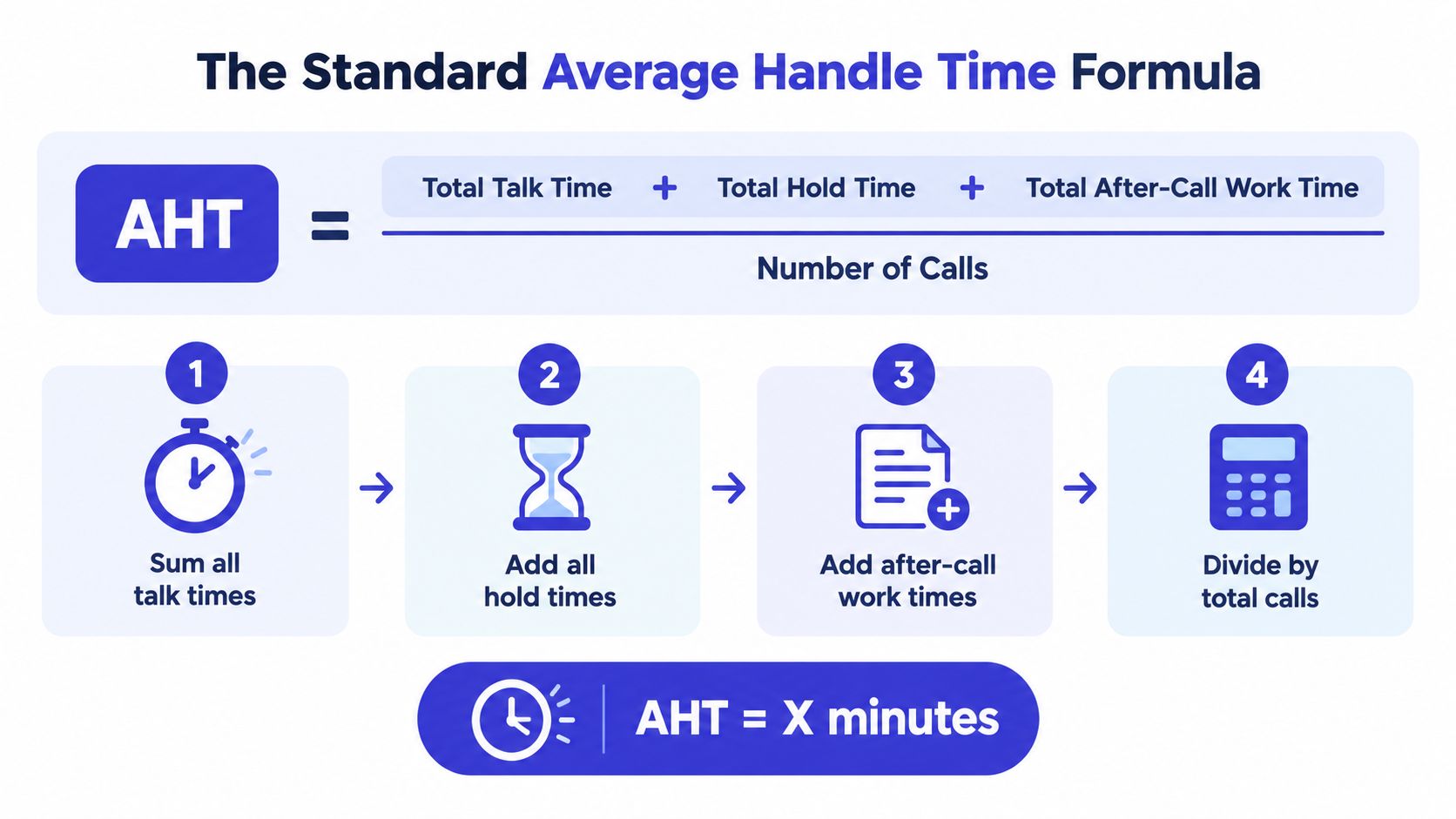
At its simplest, AHT works like cost per item at a store. You add up the full effort spent on calls, then divide by how many calls created that effort. The result is the average handling time per call.
Read the formula in two parts
Start with the top line, the numerator.
That is all handling time for the period:
talk time
hold time
after-call work time
Then look at the bottom line, the denominator.
That is the number of calls tied to that same period. If the top line covers Monday, the bottom line has to cover Monday too. If the top line covers one queue, the bottom line has to cover that queue too.
A worked example
Say a team logged:
50,000 minutes of talk time
10,000 minutes of hold time
15,000 minutes of after-call work
12,500 total calls
The math looks like this:
Total handle time = 50,000 + 10,000 + 15,000
Total handle time = 75,000 minutes
AHT = 75,000 / 12,500
AHT = 6.0 minutes
This example matters because it shows why AHT is more than conversation length. A six-minute AHT does not mean agents talked for six minutes. Part of that time may have been hold time while checking an order, or wrap-up time needed to document the case correctly.
That distinction matters in coaching. An agent with longer after-call work may need better tools or a simpler workflow. An agent with longer talk time may be handling more complex issues, or may need help guiding calls more clearly.
Why totals come first
AHT is a ratio. Ratios behave well when you combine raw totals first.
Suppose Queue A handled 20 calls at 4 minutes AHT, and Queue B handled 200 calls at 8 minutes AHT. The true combined AHT is not the simple average of 4 and 8. Queue B carried far more volume, so it should carry more weight in the result.
Use this method instead:
Add all talk time
Add all hold time
Add all after-call work time
Add all calls
Divide total time by total calls
That gives you one weighted average based on actual workload, not a neat-looking but misleading average of averages.
What the formula helps you see operationally
The formula is simple. The interpretation is where managers earn their keep.
If AHT drops because agents skip notes, rush troubleshooting, or transfer too early, the lower number is not a win. If AHT rises because agents resolve harder issues in one contact and prevent repeat calls, the higher number may be the better result.
AI adds another layer. If a summarization tool cuts after-call work, AHT may fall without any loss in quality. If an agent spends a little longer on the live call because AI surfaces better options and the issue gets solved the first time, a modest increase in AHT can still be healthy. The formula stays the same. What changes is where the work happens.
Spreadsheet example
If your spreadsheet has:
Column A for talk time
Column B for hold time
Column C for after-call work
Column D for call count
You can calculate AHT for the full period with:
=(SUM(A:A)+SUM(B:B)+SUM(C:C))/SUM(D:D)
If your time fields are stored in minutes, the answer comes out in minutes. If they are stored in seconds, the answer comes out in seconds.
Here's a quick explainer if you want a visual walkthrough before building your own sheet:
SQL example
If your warehouse stores one row per day per queue, the logic looks like this:
The field names may differ in your system. The math does not. Add the full time burden for the same slice of calls, then divide by the matching call count.
How the Formula Changes Across Voice Chat and Email
The standard formula is easy to understand on the phone. It gets trickier once your team works across chat, email, and AI-assisted workflows.
The biggest mistake is using one voice-style formula for everything. That creates distorted comparisons. A phone call has live talk and hold. An email thread usually doesn't. A chat may involve pauses that don't behave like phone hold time. AI can also shorten live interaction time while adding summarization, review, or handoff steps behind the scenes.
Recent guidance points out that phone AHT usually includes talk time, hold time, and after-call work, while chat and email versions may exclude hold time and instead use total handle or resolution time divided by chats or emails (Parloa discussion of channel-specific AHT).
A simple comparison table
Channel | Numerator Includes | Denominator | Common Pitfall |
|---|---|---|---|
Voice | Talk time, hold time, after-call work | Total calls | Leaving out after-call work because it happens after disconnect |
Chat | Active chat handling time and post-chat work | Total chats | Treating idle chat gaps exactly like phone hold time |
Active handling or resolution work and follow-up tasks | Total emails or email interactions | Measuring calendar elapsed time instead of work effort |
What to count when AI helps
Many modern teams get stuck.
If AI drafts a summary, routes the case, or prepares a handoff before the human agent joins, some of the effort has shifted. The customer may experience a faster live conversation, but the total workflow may now include machine-assisted prep and review.
A practical way to handle this is to separate the workflow into two lenses:
Human-only handle time for coaching, staffing, and agent performance reviews
End-to-end operational handle time for process design and automation analysis
That split keeps you from unfairly comparing a fully manual phone queue with an AI-assisted email queue.
A fair rule for omnichannel teams
Use the denominator that matches the work unit the team handles. Calls for voice. Chats for live chat. Emails or email interactions for email.
Use a numerator that reflects the work required in that channel. If your email team spends time reading, researching, writing, and logging follow-up, that work belongs in the numerator. If your chat team has no true hold state, don't force one into the formula.
For teams redesigning asynchronous support, Chatgrow's write-up on email management service is useful because it highlights how email workflows differ from live channels and why process design matters as much as raw speed.
If two channels create different kinds of work, they deserve different AHT definitions.
That doesn't make reporting messier. It makes reporting honest.
Common Calculation Mistakes That Skew Your AHT
A new manager pulls two AHT reports before the weekly review. One says the voice team is improving. The other says the same team is getting slower. The agents did not change their behavior overnight. The math changed.
That happens more often than new managers expect. AHT can look like a performance metric, but it only helps if the calculation matches the work. If the formula is off by even a little, coaching decisions, staffing plans, and channel comparisons start drifting in the wrong direction.
Five errors managers make all the time
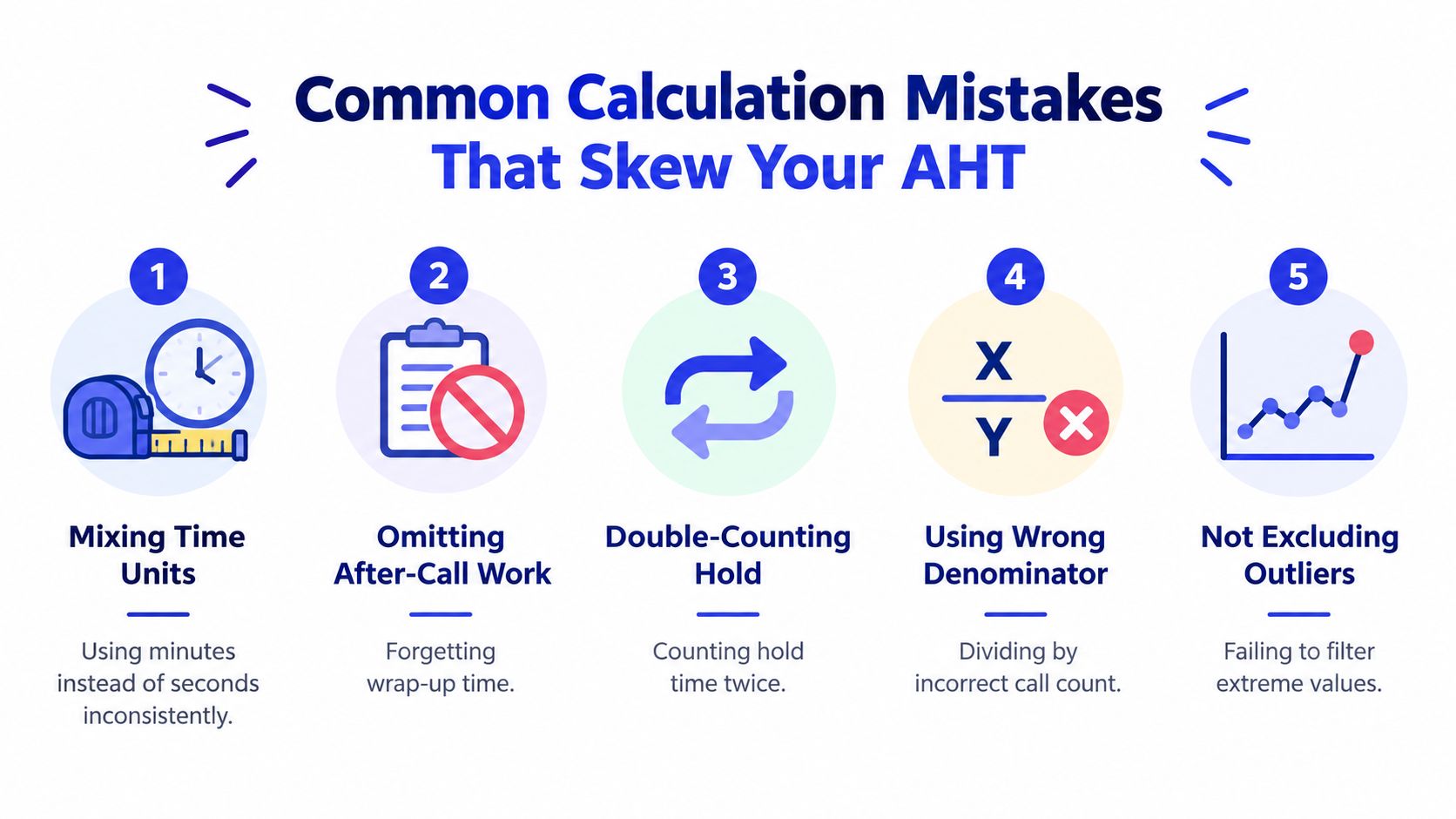
These mistakes work like a crooked measuring tape. You still get a number, but you should not trust what it says.
Mixed time units. One system exports seconds. Another exports minutes. If you add them together without converting, the final AHT is distorted before analysis even begins. Convert every input to the same unit first.
Missing after-call work. Many reports stop the clock when the customer leaves. If agents still have to document the issue, set follow-up tasks, or finish compliance notes, that work belongs in the total. Leaving it out makes AHT look lower than the job really is.
Double-counted hold time. Some platforms include hold inside connected time and also show it in a separate field. If you add both, you count the same minutes twice. Check the platform definition before building the formula.
Wrong denominator. A voice report may divide by answered calls, while a digital report divides by all logged interactions. That mismatch makes channel comparisons look more precise than they are. Pick one work unit per channel and stay consistent.
Averaging averages. This is a classic reporting trap. If one queue handled 20 contacts at 4 minutes and another handled 200 contacts at 8 minutes, you cannot average 4 and 8 and call it the team AHT. Add the raw handle time totals together, then divide once by total volume.
The mistake behind the mistake
Some AHT problems start in the spreadsheet. Others start in management behavior.
If supervisors push hard for a lower number without checking resolution quality, agents often learn to make work disappear from the visible interaction. They may end a call quickly and create a callback task. They may transfer too early. In chat or email, they may send a fast reply that does not fully solve the issue, which invites the customer back.
The report then shows a lower AHT, but the customer journey gets longer.
That is why AHT works best as a quality-balanced efficiency lever, not a speed contest. If an agent spends one extra minute solving the issue clearly, confirming next steps, and preventing a repeat contact, that higher AHT may be the better operational result. The same logic applies when AI takes over part of the workflow. A shorter human conversation can still hide added review time, correction time, or follow-up time somewhere else in the process.
A quick audit checklist
Before sharing AHT with leaders, check the calculation the way a trainer checks a scorecard:
Confirm field definitions so talk time, hold time, and wrap-up time mean what your team thinks they mean
Verify time units across exports, dashboards, and BI tables
Match the date range so the total handle time and total contact count cover the same period
Check inclusion rules for transfers, reopened cases, consults, and abandoned contacts
Review workflow changes if AI tools now draft notes, suggest replies, or complete part of the post-contact work
Spot-check real interactions against the report so the math matches what agents do
A useful AHT number measures the work you want to improve, not just the time you can see.
Benchmarks and When a Higher AHT Is Actually Better
A new support manager pulls up the dashboard, sees a higher AHT than expected, and assumes the team is moving too slowly. That reaction is common. It is also where many teams start using AHT the wrong way.
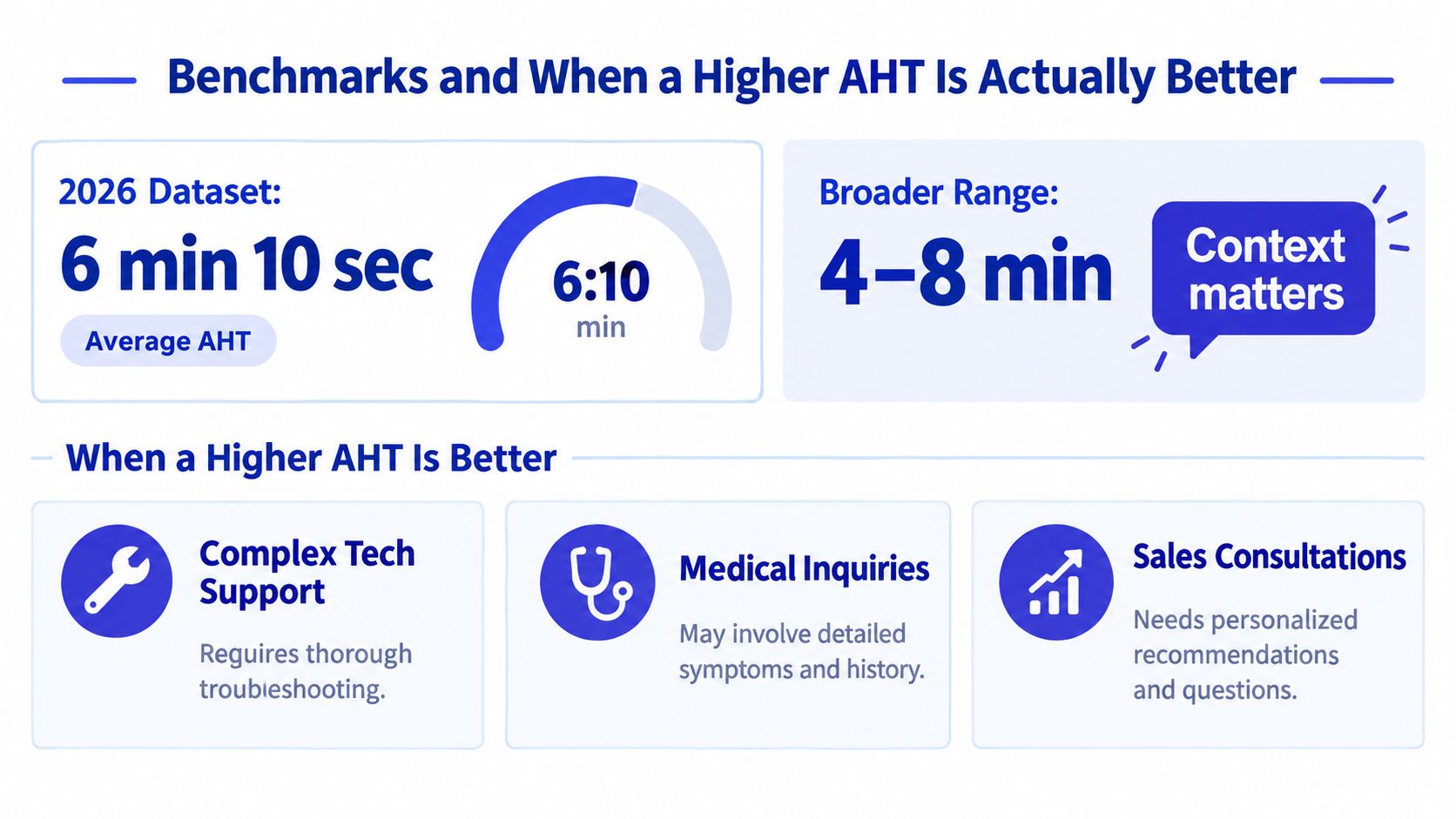
Benchmarks can help, but only as rough guardrails. As noted earlier, published averages vary widely across teams and channels, so a single number does not tell you whether your operation is healthy. AHT works better as a quality-balanced efficiency measure. It shows how much effort each contact takes, then asks whether that effort produced a better outcome.
Why one benchmark can mislead you
Comparing all contacts to one benchmark is like judging every doctor visit by the same appointment length. A quick prescription refill and a careful diagnosis are both valid visits, but they should not take the same amount of time.
The same is true in a contact center. A password reset, a billing dispute, and a technical troubleshooting case create very different kinds of work. Channel matters too. Voice often includes real-time explanation and hold time. Chat may involve juggling multiple conversations. Email can look slower per case, yet include more research and fewer interruptions.
A higher AHT may reflect useful work, such as:
Complex issues that need careful diagnosis before the agent can solve them
Verification or compliance steps that protect the customer and the business
Consultative conversations where a better explanation prevents confusion later
AI filtering simple contacts first, which leaves human agents with the harder cases
That last point matters more now. When AI handles routine questions, the average human-handled contact often becomes more difficult by default. If you do not account for that shift, your AHT can rise even while the overall operation becomes more efficient.
When you should allow AHT to rise
Allow AHT to rise when the extra time removes future work.
For example, a billing agent may spend an extra minute checking the full account history and explaining the fix clearly. The call is longer, but the customer does not need to call back tomorrow. A technical support agent may take more time to document the resolution properly, which helps the next agent and shortens similar cases later. In chat or email, an agent may send a fuller answer with clearer steps, reducing back-and-forth.
Those are good trades.
What you want to avoid is empty time: long holds, repeated verification, confusing transfers, or agents searching through scattered systems. Higher AHT is acceptable when it buys clarity, resolution, or better downstream efficiency. It is a warning sign when it reflects friction.
Read AHT next to first-contact resolution, repeat contact rate, and customer satisfaction.
That combination gives managers the full picture. If AHT rises while repeat contacts fall and quality scores improve, the team may be doing better work, not slower work.
Proven Ways to Reduce Average Handle Time Without Hurting Quality
The safest way to reduce AHT is to remove friction, not rush people. When managers focus on cleaner workflows, agents usually get faster without sounding hurried.
Cut the right part of the numerator
Different parts of AHT need different fixes:
Reduce talk time with better guidance. Strong knowledge bases, saved replies, decision trees, and clearer product documentation help agents answer cleanly the first time.
Reduce hold time with smarter routing. If the customer reaches the right person sooner, the agent spends less time hunting for answers or transferring the issue.
Reduce after-call work with templates and automation. Structured notes, CRM defaults, and AI-generated summaries can shrink wrap-up burden.
Use AI where the work is repetitive
AI changes AHT most when it removes low-value repetition.
For example, Chatgrow can train AI support agents on your website, FAQs, and product content so they can answer common questions, qualify leads, and collect details before escalation. In workflows where a human still needs to step in, tools like the ones discussed in Chatgrow's guide to real-time agent assist can help by surfacing context during the conversation rather than forcing agents to search while the customer waits.
Protect quality while improving speed
Don't celebrate a lower AHT until you check whether quality held up.
Use a review habit like this:
Look at AHT trends by queue or topic
Check whether first-contact resolution stayed healthy
Review repeat contacts for the same issue
Sample interactions to see whether agents sound clear, complete, and calm
Adjust workflows before adjusting targets
The best AHT improvements feel almost boring. Fewer pauses. Cleaner notes. Better routing. Less duplicate work. Customers usually notice the difference even when they never hear the term average handle time formula.
If you're trying to improve AHT without pushing agents to rush, Chatgrow offers AI support agents that answer common questions, qualify leads, and pass clean summaries to your team when a human should take over. That makes it easier to reduce repetitive handling work, especially across chat and web support, while keeping your reporting focused on both speed and resolution quality.
Related Posts
Continue Reading
More articles from the ChatGrow Team.


