Blog
Email Management Service: The Complete SMB Guide
By
Nelson Uzenabor

Your team starts the day by checking email, then moves to Teams, Slack, text messages, and a helpdesk queue. A promising lead waits in a shared inbox while three people assume someone else will respond. A customer repeats the same problem across channels. By evening, the founder is still clearing messages that should have been filtered, assigned, or answered automatically.
That isn't an inbox-organization problem. It's an operations problem involving triage, ownership, customer response, and lead qualification. A well-designed email management service gives your team a controlled way to decide what deserves attention, who should handle it, when a human must intervene, and which conversations should enter a sales or support workflow.
Table of Contents
Why Email Management Has Become a Business Survival Skill
The pressure is no longer limited to email. Microsoft's 2025 Work Trend Index reports that the average employee receives 117 emails and 153 Teams messages daily, while 40% check email before 6 a.m. and communication occupies 60% of the workday. Those figures describe a cross-channel context-switching problem, not a folder problem. (Microsoft's 2025 Work Trend Index findings)

A sales manager might see a new inquiry in Gmail, a follow-up question in Teams, and a contact-form notification in a CRM. A support lead might receive an urgent customer message after hours, answer from a personal account, and leave the rest of the team without a reliable record. The business doesn't just lose time. It loses visibility and accountability.
Traditional inbox advice, such as labels, folders, and scheduled checking, still helps individuals. It doesn't solve shared ownership. A label can't decide whether a pricing inquiry is a qualified opportunity, assign it to the right salesperson, create a CRM task, or escalate it when nobody responds. A dedicated email management service can coordinate those decisions across the communication system.
Operational rule: Every important message needs a clear owner, a defined next action, and an escalation path.
The business case becomes clearer when you examine what employees are processing. Survey and industry findings linked by Clean Email indicate that only 24% of business emails are important, while 40% of employees have 50 or more unread emails and email overload can reduce productivity by up to 40%. (Clean Email's email productivity statistics report) The practical conclusion is straightforward: automation should prioritize valuable conversations, not merely make the inbox look cleaner.
For an SMB, that means managing email as a triage layer between incoming demand and human capacity. Routine questions can receive approved answers. Sales inquiries can be qualified and routed. Complaints can reach a person quickly. Internal messages can wait without competing with revenue-sensitive conversations. The objective isn't inbox zero. It's protecting attention for work that affects revenue, retention, and customer trust.
What an Email Management Service Actually Does
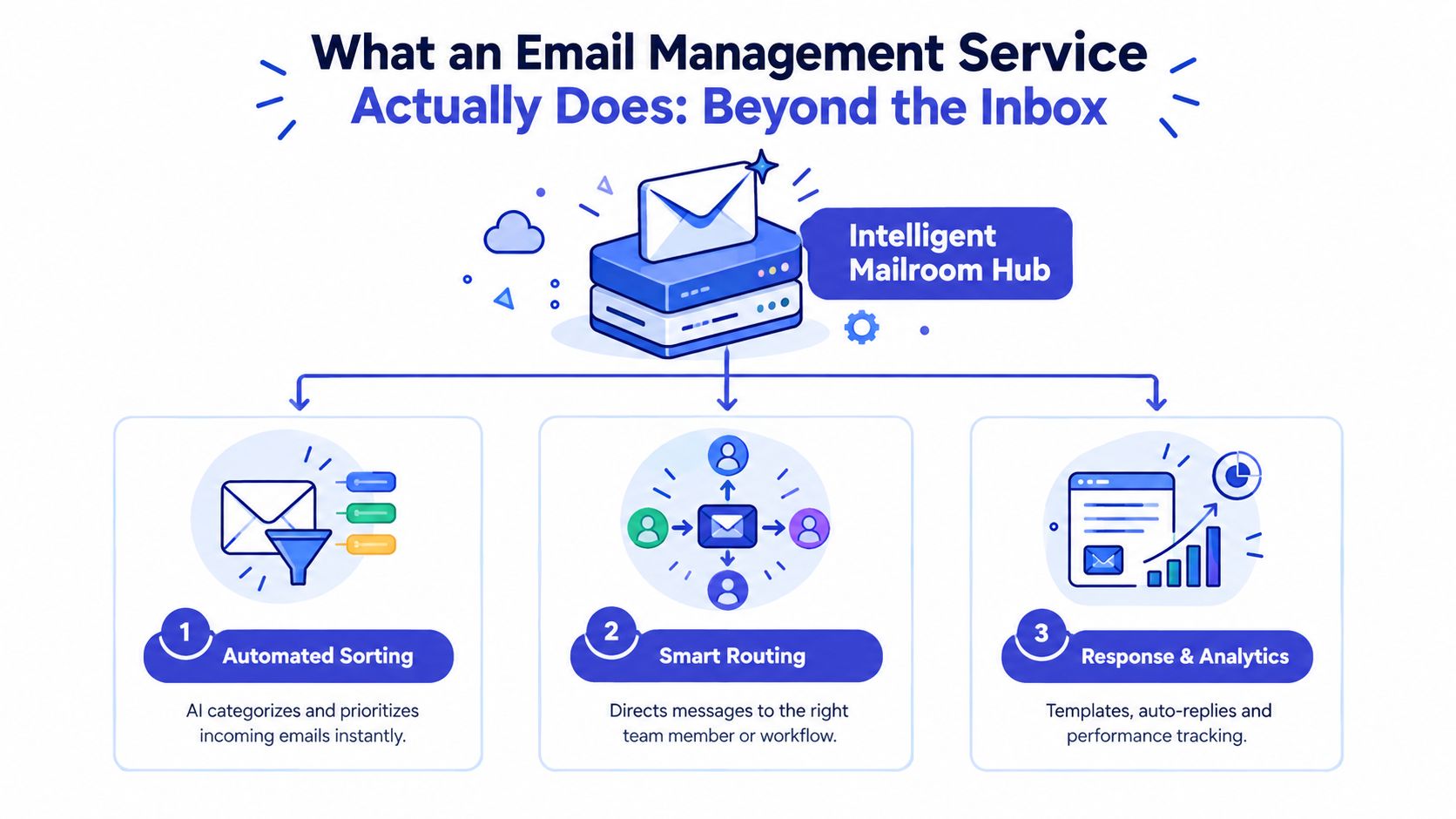
Think of an email management service as a digital mailroom. A physical mailroom doesn't hand every envelope to the chief executive. It sorts deliveries, identifies priority items, routes documents to departments, records what arrived, and escalates exceptions. A business email platform should perform the same work for digital communication.
The first layer is intake. The service connects to business addresses, shared inboxes, contact forms, support channels, and sometimes collaboration tools. It then applies rules or AI-based classification to identify the message's likely intent, urgency, customer, account, and workflow.
The core functions to evaluate
Automated sorting: Categorize invoices, support requests, sales inquiries, internal requests, newsletters, and low-value notifications. Keyword rules work for predictable messages, while intent detection is more useful when customers describe the same need in different language.
Priority and escalation: Flag messages involving outages, cancellations, purchase intent, legal concerns, or dissatisfied customers. Set response timers and escalation rules so urgent conversations don't depend on one employee remembering to check a queue.
Shared inbox control: Assign conversations, show status, prevent duplicate replies, and preserve the full history. A shared inbox should answer “who owns this?” without a meeting or internal chat.
Response automation: Use approved templates for recurring questions, acknowledgments, scheduling, document requests, and status updates. Automation should prepare or send a response only within clearly defined boundaries.
Analytics: Track volume, response time, unresolved conversations, assignment patterns, authentication failures, and outcomes. A dashboard should help you improve the workflow, not display attractive charts.
Business integrations: Sync conversations with a CRM, helpdesk, order system, calendar, or marketing platform. If a lead remains trapped in an inbox, the workflow is incomplete.
A basic Gmail or Outlook account gives you messages, search, folders, and individual productivity features. A management platform adds workflow logic and shared accountability. That's the difference between storing communication and operating it.
Before automation, clean the inputs. Remove obsolete contacts, document consent and suppression practices, standardize naming, and define the fields your team needs. These practical list management tips are useful because inaccurate or poorly maintained lists undermine every downstream rule.
A response system also needs a consistent communication style. Define greeting, tone, sign-off, handoff language, and escalation wording before saving templates. Teams can use this resource on opening greetings for emails to create a consistent starting point without making every reply sound identical.
The service earns its place when it reduces decisions, not when it adds another dashboard. If employees still copy messages between systems, manually notify colleagues, and search for ownership, you've purchased an inbox with extra steps.
Real-World Use Cases That Drive Revenue and Retention
The fastest return usually comes from conversations that already have a business consequence. Don't begin by automating every newsletter, internal announcement, or low-priority notification. Start with support, sales inquiries, or account communication, where a missed message can affect a customer or an opportunity.
Support becomes a managed queue
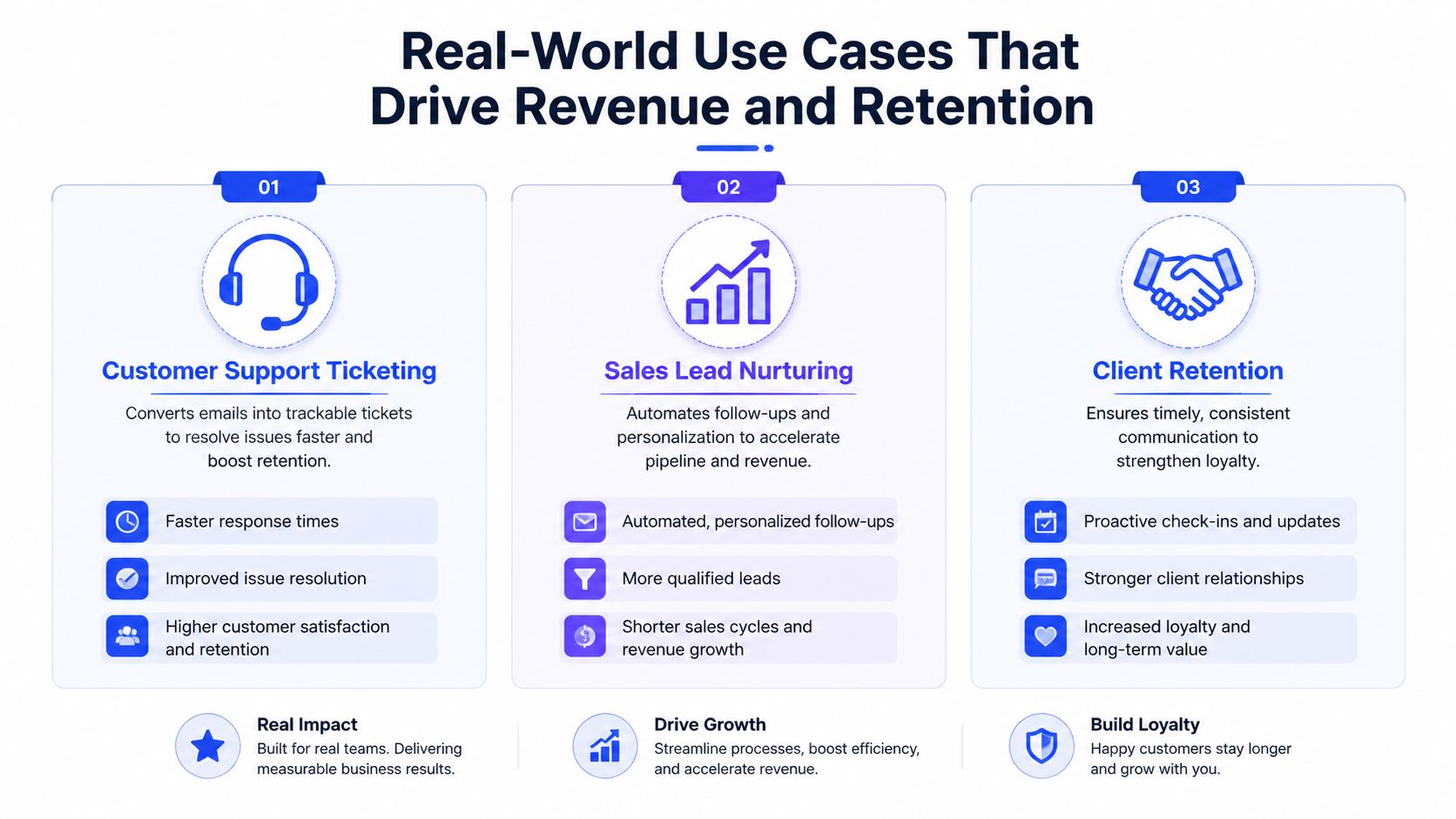
A support address should function like a ticket queue, even if your business doesn't need a heavyweight helpdesk yet. The service can detect the request type, attach the conversation to a customer record, assign the right person, send an acknowledgment, and escalate unresolved cases.
This prevents two expensive failures. First, a customer doesn't need to repeat the issue because the full thread remains available. Second, two employees don't unknowingly write competing replies. Track first-response time, time to resolution, reopened conversations, escalation volume, and customer feedback. These measures tell you whether automation is removing friction or moving it elsewhere.
Lead qualification starts before the sales call
Most SMBs don't need every inquiry treated as a sales opportunity. A useful email management service extracts buying signals such as product interest, timeline, location, budget context, existing tools, and the problem the prospect wants to solve. It can then route high-intent messages to sales while placing exploratory inquiries into a controlled nurture path.
Don't let automation make an irreversible decision from one keyword. Require enough context for a salesperson to act, and send ambiguous cases to review. A strong workflow can create a CRM record, assign an owner, schedule a follow-up task, and send a relevant acknowledgment without pretending to replace judgment.
Businesses building this workflow can use a guide to lead nurturing automation, especially when prospects aren't ready for an immediate sales conversation.
Account communication protects retention
Renewal questions, implementation concerns, billing disputes, and product complaints deserve different treatment from general support. Route them to the account owner or customer success team, preserve the account history, and use escalation rules for messages that indicate churn risk.
The service should also identify when a customer has contacted multiple channels about the same issue. That cross-channel view matters because a customer may sound calm in email while expressing serious frustration in chat. Your goal isn't to automate warmth. It's to ensure the right person sees the complete context soon enough to act.
Revenue test: If a workflow can't show what happened to a lead, customer problem, or renewal concern, it isn't a management system yet.
Internal coordination is the quieter use case. Assignment rules can route vendor requests to operations, contract questions to legal review, and hiring inquiries to the relevant manager. The result is less “who's handling this?” confusion and fewer after-hours interruptions caused by unclear ownership.
How to Choose the Right Email Management Service
Choose the workflow before choosing the vendor. Founders often compare feature lists, select the platform with the longest list, and discover later that their team doesn't know which rules to use. Write down the conversations that create risk, the systems that hold customer data, and the decisions a human must still make.
Start with the non-negotiables
A customer-support team needs reliable assignment, collision prevention, escalation, templates, and a searchable history. An e-commerce business needs order context, return and delivery routing, and connections to its store and customer records. A SaaS company usually needs product, billing, onboarding, and technical-intent classification tied to CRM or helpdesk workflows.
Criteria | SMB Support Teams | E-commerce | SaaS Companies |
|---|---|---|---|
Primary workflow | Ticket creation, assignment, escalation | Order, return, delivery, and refund inquiries | Onboarding, product questions, billing, and technical requests |
Essential integration | Helpdesk, CRM, knowledge base | Store platform, order system, support desk | CRM, product events, support desk, billing |
Automation priority | Routing and response timers | Order-aware replies and exception handling | Intent detection, account context, and technical escalation |
Human review | Complaints, sensitive cases, unresolved issues | Refund disputes, fraud concerns, delivery exceptions | Security, contracts, outages, and expansion opportunities |
Core reporting | Response time, resolution, backlog | Resolution by order type and repeat contacts | Qualification, escalation, adoption, and account health |
Per-user pricing is easy to budget when a small team handles consistent volume. Per-message or usage-based pricing can suit a lean team with fluctuating demand, but costs may become harder to forecast when campaigns, support spikes, or automated replies increase activity. Ask vendors how they count an interaction, whether internal notes consume usage, and what happens when you exceed the included allowance.
Test integration and control before buying
Connect a realistic sample workflow during evaluation. Send a support request, a sales inquiry, an attachment, a reply from another channel, and an escalation trigger. Check whether the platform preserves threading, maps the right customer, records ownership, and prevents duplicate automation.
Security deserves practical scrutiny. Ask where data is stored, how access is controlled, how encryption is applied, how long deleted records remain available, and whether the platform provides audit trails. Require role-based permissions so temporary staff can handle routine messages without accessing sensitive accounts or changing global rules.
Buying advice: A smaller platform that your team adopts is more valuable than a broad platform nobody trusts.
Score vendors against your own priorities, such as routing accuracy, integration reliability, reporting quality, mobile access, administration effort, security controls, and support. Give each criterion a weight based on business risk. A polished demo shouldn't override a failed test with your actual inbox patterns.
Implementation Essentials and Technical Setup
Implementation fails when teams treat authentication, workflow design, and adoption as separate tasks. They aren't separate. A routing system that misclassifies messages creates operational problems, while weak authentication can prevent legitimate replies from reaching customers.
Build a stable sending foundation
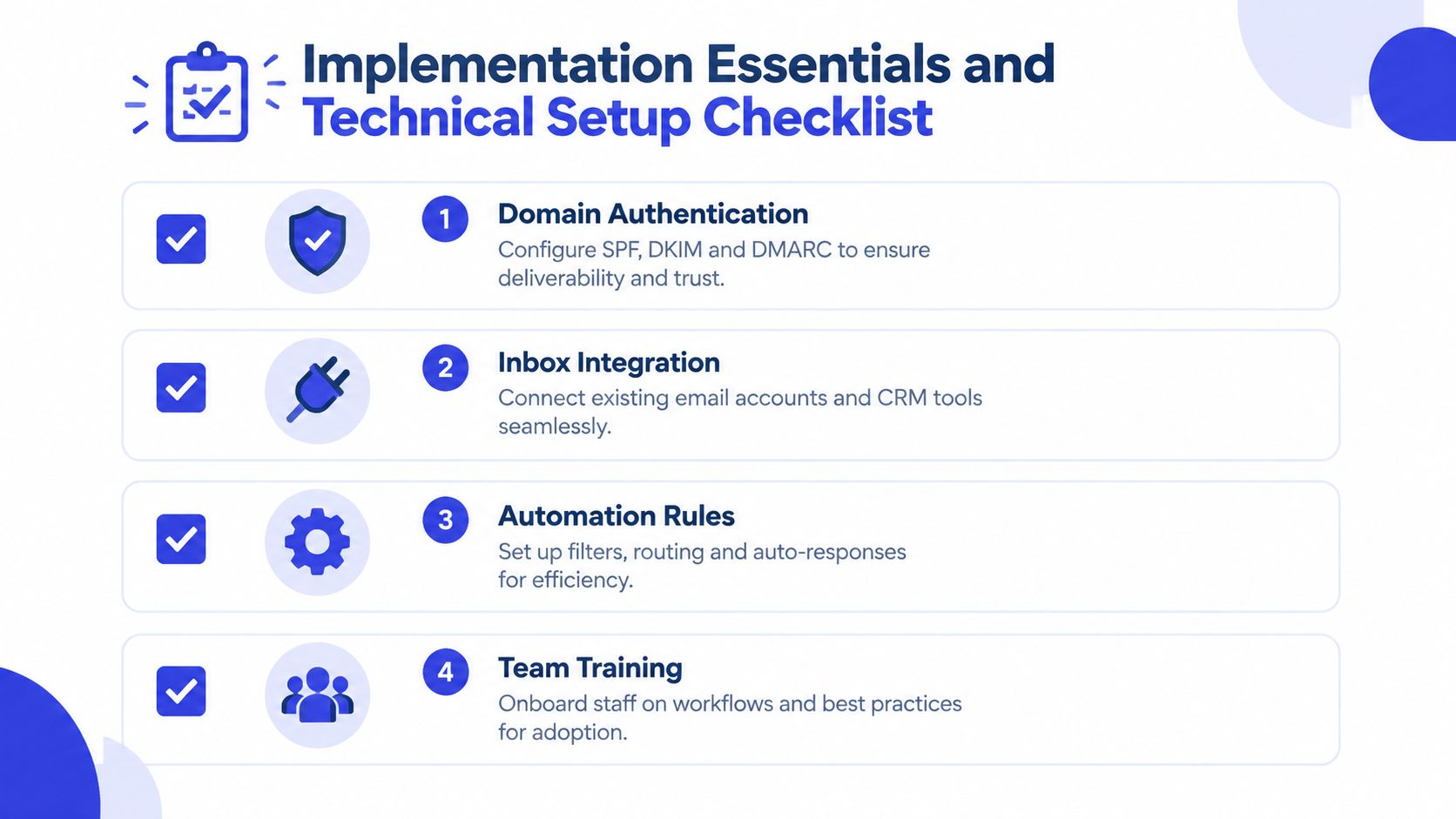
Start by inventorying every legitimate sending source. Include your business mailbox, marketing platform, support system, CRM, transactional service, and any agency or contractor that sends on your domain.
Authentication requirements are specific:
SPF: Keep the policy within the 10 DNS lookup limit, as recommended in SPF, DKIM, and DMARC implementation guidance.
DKIM: Use 2048-bit keys to strengthen message signing, following the same technical guidance.
DMARC: Roll enforcement from p=none to quarantine and then reject after you've identified legitimate sources and confirmed alignment.
DMARC isn't effective merely because a message passes SPF or DKIM. The authenticated domain must align with the visible sending domain. Stage enforcement carefully so valid customer messages don't get blocked while spoofing gaps close.
Migrate context, then simplify rules
Export historical conversations where they support customer service, account management, or compliance. Preserve timestamps, participants, attachments, tags, and ownership where possible. Don't migrate every obsolete message automatically. Excess history can make search and classification less useful.
Build the first rules around obvious categories. Route billing messages, sales inquiries, technical issues, and urgent complaints before attempting subtle sentiment or intent distinctions. Test each rule against real examples, including misspellings, forwarded threads, attachments, and replies that change the subject.
Train the team on three behaviors: claim ownership, record the next action, and escalate exceptions. Give managers permission to audit rules and adjust them as the business changes. If employees bypass the shared workflow because it feels slower, investigate the friction instead of blaming adoption.
Monitor deliverability as an operating metric
Healthy programs commonly target delivery rates around 98% to 99%, inbox placement of 95% or higher, spam complaints below 0.1%, and hard bounces below 2%, according to independent email deliverability benchmarks. These are operating thresholds, not guarantees.
Track authentication failures, bounce patterns, complaints, reputation signals, and mailbox-provider behavior across Gmail, Outlook, Yahoo, and other destinations. A sudden change needs investigation before your team increases volume or launches a campaign. The right response may involve list quality, an unauthorized sender, a broken alignment setting, or a workflow that sends irrelevant messages.
Connecting Email Management to Your Broader Automation Stack
An email management service becomes more valuable when it passes structured information to the systems your team already uses. Email should trigger a business action, not become a dead end where employees manually re-enter details.
A practical integration pattern looks like this:
Capture: A message arrives through email, a form, chat, or another supported channel.
Interpret: The system identifies intent, customer, urgency, product, and likely outcome.
Enrich: It retrieves relevant CRM, order, subscription, or helpdesk context.
Act: It replies, creates a task, updates a record, starts a nurture workflow, or routes the conversation.
Escalate: It summarizes the history and sends the human decision-maker the facts needed to respond.
Natural language processing helps classify messages that don't follow your preferred vocabulary. A customer may ask about stopping a subscription without using the word “cancel.” A prospect may express buying intent through a request for implementation details rather than a direct pricing question. Intent-based classification is more durable than a large collection of brittle keyword filters.
AI-generated responses need boundaries. Let automation handle known questions, status requests, appointment logistics, and information available in an approved knowledge base. Keep human review for complaints, exceptions, negotiations, legal or security concerns, and high-value opportunities. The best system doesn't hide the human. It gives the human better context.
For managers, a simple Gmail-friendly dashboard design can help present the right operational signals without forcing the team to interpret a crowded report. Focus on queues, ownership, response risk, unresolved intent, and business outcomes rather than vanity activity.
CRM synchronization should record meaningful events, not every internal note. A qualified inquiry might create a lead and task. A support escalation might update account health. A customer reply might pause a follow-up sequence. Teams working on customer data integration should define the source of truth for identity, consent, account status, and ownership before connecting systems.
The main trade-off is complexity. Every integration adds failure points, permissions, data mappings, and maintenance. Start with one high-value workflow, observe it under normal and exceptional conditions, then expand.
Your 90-Day Email Management Implementation Roadmap
Use a phased rollout. The first 30 days should establish the foundation: inventory sending sources, configure authentication, connect the primary inbox, define ownership, and route the clearest categories. Don't build advanced AI workflows before the basic queue works.
During the next 30 days, add templates, escalation timers, CRM or helpdesk synchronization, and role-based access. Train the team on assignment and handoff behavior, then review misrouted conversations with the people handling them.
The final 30 days should focus on scale. Add intent-based qualification, richer reporting, cross-channel context, and carefully governed AI assistance. Measure response quality, unresolved conversations, qualified leads, escalations, customer feedback, and after-hours workload. Revisit rules whenever products, teams, channels, or customer expectations change.
Email management isn't a one-time cleanup. It's a business control system that needs regular review.
Chatgrow helps SMBs deploy custom AI customer-service agents trained on their website, pricing, FAQs, and product content, with smart intent detection, lead qualification, and human escalation when a conversation needs your team. Visit Chatgrow to explore a practical way to turn inbound conversations into qualified opportunities and faster customer support.
Related Posts
Continue Reading
More articles from the ChatGrow Team.