Blog
Live Chat Support: The Ultimate Guide for 2026
By
Nelson Uzenabor

A customer lands on your pricing page, pauses, clicks into FAQs, then disappears. Another reaches checkout, gets stuck on shipping, and leaves without asking for help. A third wants a demo but doesn't want to fill out a form and wait for an email reply tomorrow. For a growing SMB, those moments add up fast.
That's where live chat support earns its place. Not as a floating widget you install because everyone else has one, but as a real operating channel for sales, service, and lead qualification. Done well, it gives buyers answers when intent is high, deflects repetitive questions before they hit your inbox, and gives your team a cleaner path to handle the issues that require a person.
Teams often get the tool decision backwards. They compare chat vendors before they've decided when chat should appear, who should answer, what should be automated, and where a conversation should escalate. Those choices matter more than the color of the chat bubble.
Table of Contents
What Is Live Chat Support and Why It Matters Now
A buyer lands on your pricing page, clicks to your integrations docs, then pauses on checkout. An email form is too slow. A sales call is too much. Live chat support gives them a way to ask one question and keep moving.
Live chat support is a real-time conversation channel on your site or app that helps visitors and customers get answers without leaving the page. For an SMB, that matters because the channel sits at the point where support, sales, and operations meet. It can calm pre-purchase hesitation, resolve simple issues before they become tickets, and collect context before a human agent ever joins.

The practical value is speed with context. Customers ask about pricing, shipping, onboarding, compatibility, returns, or account access in the moment the question appears. If the only path is email, many leave. If the only path is phone, many never start.
Live chat support is a channel, not a widget
A common mistake is treating live chat support like design furniture. Teams install the widget, write a friendly greeting, and expect results without changing routing, staffing, or knowledge access.
That setup usually fails under real volume. Chats pile up. Agents ask customers to repeat basic information. High-intent visitors get the same queue as low-value requests. The issue is not the button on the page. The issue is the operating model behind it.
Good live chat support connects three things: fast triage, clear ownership, and access to customer context. That often means automation handles the first layer, such as intent capture, FAQ answers, or account identification, while human agents take over for billing exceptions, technical troubleshooting, cancellations, and buying questions with revenue impact. SMBs that want chat to scale need a customer support strategy built around routing, service levels, and handoff rules, not just a new inbox.
Practical rule: If your chat setup makes customers repeat themselves after transfer, you have a queue problem, not a chat problem.
The Operational Impact of Immediacy
The primary shift is not that customers suddenly prefer chat as a feature. They expect a faster front door.
That changes how support should be designed. Chat can qualify intent early, collect the details an agent needs, and send the conversation to the right person or workflow before time is wasted. Email handles asynchronous issues well. Phone works for urgency and complexity. Chat fills the gap between the two, which is why it has become such a useful operating layer for growing companies.
For SMBs, the payoff is strategic as much as tactical. A well-run chat program improves response speed, but it also protects agent time, filters low-value contacts, and gives stronger buying signals to sales and success teams. A poorly run one does the opposite. It adds another queue, hides staffing problems, and creates more interruptions for the same team.
The companies that get value from live chat are usually not the ones with the flashiest widget. They are the ones that decide, in advance, what automation should handle, what humans should own, and how each conversation should move from first message to resolution.
Key Business Benefits and KPIs to Track
The value of live chat support doesn't show up in one dashboard tile. It shows up across customer experience, support efficiency, and revenue operations. If you only track chat volume, you'll miss whether the channel is helping the business or just creating more activity.
A stronger approach is to tie each benefit to a management metric. That gives you something more useful than “chat seems busy.”
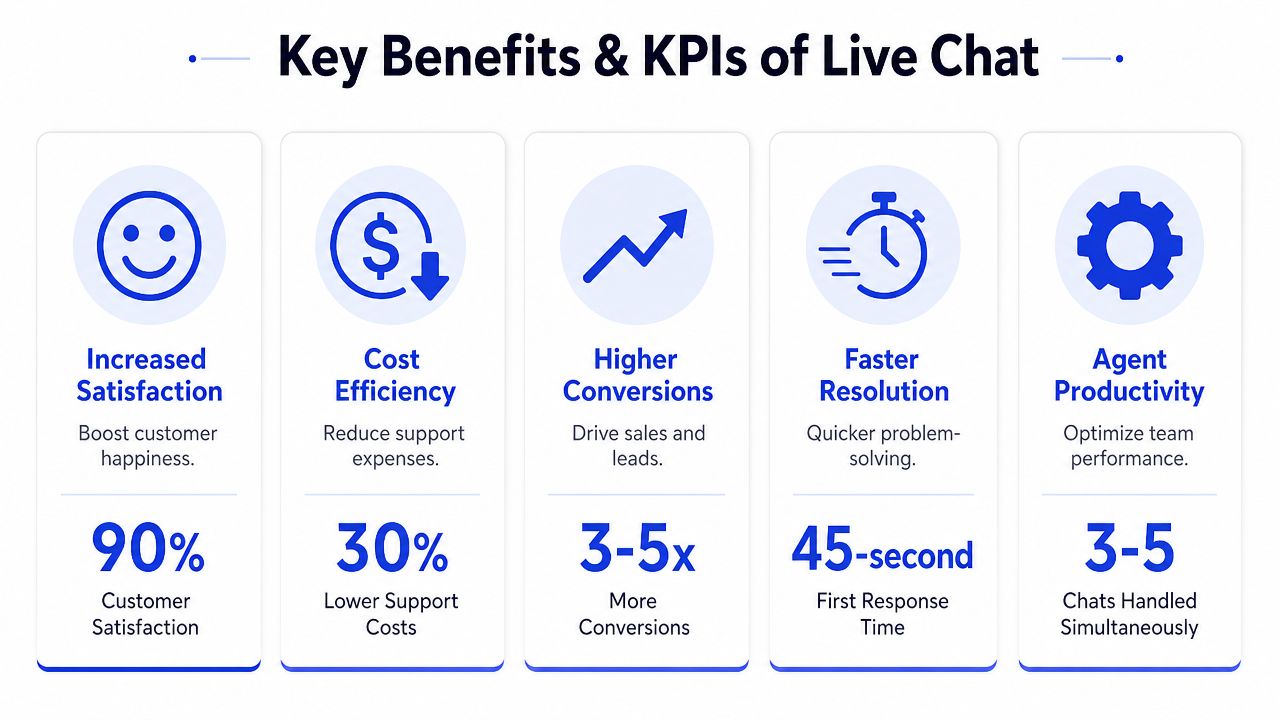
The business value shows up in several places
Sales assistance. On pricing, product, or checkout pages, chat can remove hesitation at the exact moment someone is deciding. That makes it useful not just for support, but for qualification and conversion support.
Ticket deflection. Repetitive questions that would otherwise become email tickets can be handled in chat, especially when you use automation for FAQs and simple requests.
Operational efficiency. This is one of chat's biggest practical advantages. Sprinklr notes that live chat support is one of the few support channels that can support simultaneous multi-session handling, which changes staffing economics because a single agent can manage multiple conversations at once while preserving real-time interaction. That advantage depends on response-time discipline, selective use of canned responses, and analytics that track volume, resolution patterns, and satisfaction so teams can tune staffing and scripts over time (Sprinklr on live chat support operations).
That point is often missed. Chat isn't only faster for customers. It can be structurally more efficient for the team behind it.
Here's a useful related read on how support channels fit into a broader operating model: customer support strategy for growing teams.
Later in the section, it helps to see the channel in action:
The KPIs that actually help you manage chat
Don't overbuild your reporting at launch. Start with a small set of metrics that tell you whether chat is fast, useful, and worth staffing.
First response time: Measures how quickly someone gets an initial answer. This affects trust immediately.
Average handle time: Shows whether workflows, macros, and routing are keeping conversations efficient.
First contact resolution: Tells you whether customers leave with an answer or return through another channel later.
Customer satisfaction: Use post-chat surveys carefully. They won't tell the whole story, but they'll reveal friction trends.
Chat-to-lead rate or chat-assisted conversion rate: For sales-oriented pages, this is often more meaningful than raw chat count.
Escalation rate: A high rate can signal poor bot boundaries, weak agent training, or the wrong chat placement.
Missed chats or abandoned chats: These are often early warnings that staffing and availability don't match demand.
A busy chat queue isn't proof of success. A useful chat channel resolves, qualifies, and routes with less friction than the alternatives.
The strongest teams review transcripts alongside metrics. Numbers tell you where friction exists. Transcripts tell you why.
Live Chat vs Chatbots and the Rise of AI Agents
A visitor opens chat on your pricing page at 8:40 p.m. They ask whether your setup includes migration, mention they are comparing two vendors, and want an answer before tomorrow's internal meeting. A rule-based bot can capture the question. A good human rep can read the buying signal and move the deal forward. An AI agent can often do the work in between, qualify intent, pull the right knowledge, answer the routine parts, and send a clean summary to a human if the conversation turns commercial or complex.
That distinction matters because SMBs often buy software before they decide how conversations should flow. The result is predictable. Agents waste time on repetitive questions, bots trap people in dead ends, and leads with real purchase intent sit in the same queue as simple password-reset requests.
Three different jobs, three different operating models
Live chat is the human layer. It handles exceptions, emotion, negotiation, and judgment. It allows teams to recover a frustrated customer, catch a high-fit lead, or resolve an issue that crosses billing, product, and policy.
Basic chatbots are rule-based automation. They work well for narrow tasks like order status, business hours, routing by department, and collecting a few structured details. They are cheap to run and easy to control. They also fail quickly when a customer asks an ambiguous question or describes a problem in their own words.
AI agents sit between those two. They use broader language understanding, session context, and connected knowledge to handle a wider range of repeat conversations without sounding like a phone tree in chat form. They still need guardrails, approved content, and a clear handoff path. Without that, they produce fast answers that are inconsistent, incomplete, or risky.
The strongest setup is usually hybrid. Put humans on high-value and high-risk conversations. Use bots for narrow workflows. Use AI agents for the large middle of repetitive but variable questions, where coverage and speed matter, but full human attention is too expensive to apply to every chat.
For teams mapping that automation layer, this guide to automated customer service options is a useful companion.
Comparing chat solutions
Capability | Live Chat (Human) | Basic Chatbot | AI Agent |
|---|---|---|---|
Handles emotion and nuance | Strong | Weak | Moderate |
Answers repetitive FAQs | Good, but costly time use | Strong | Strong |
Works after hours | Only if staffed | Yes | Yes |
Lead qualification | Strong | Basic form capture | Strong with intent-based questioning |
Personalization from context | Strong if systems are connected | Limited | Strong if trained on your content |
Complex problem solving | Strong | Weak | Moderate, with escalation |
Escalation quality | Manual but flexible | Often clumsy | Better when summary and context are preserved |
The choice is not tool versus tool. It is coverage versus control, and cost versus quality.
A human-only model gives you better judgment, but it gets expensive fast and usually leaves gaps after hours. A bot-only model lowers cost, but it can hurt conversion and satisfaction if it blocks people from reaching a person. AI agents improve that trade-off, especially for SMBs that have enough volume to justify automation but not enough headcount to staff chat broadly across the day.
There is also a content problem that vendors rarely emphasize. AI performs only as well as the policies, help articles, macros, and routing logic behind it. If refund rules are inconsistent, product documentation is outdated, or escalation ownership is unclear, the AI layer will expose those gaps at scale. It will not fix them.
A practical starting point works well for growing teams. Let automation greet, classify, answer common questions, and collect context. Route billing disputes, cancellation risk, technical edge cases, and qualified sales conversations to humans quickly. Review transcripts every week to see where the bot should improve, where the AI agent needs tighter boundaries, and where a person should have been involved earlier.
Use humans for judgment. Use basic bots for predictable tasks. Use AI agents where the question is common, phrased ten different ways, and still needs a useful answer in seconds.
Best Practices for Implementing Live Chat
The rollout phase is where a lot of SMBs create avoidable problems. They put chat on every page, let it pop up too aggressively, and route all conversations to the same inbox. Then they conclude that chat “doesn't work” when the issue was really deployment.
Put chat where intent is high
Start with pages where visitors are closest to a decision or most likely to get stuck.
Good starting points often include:
Pricing pages: Buyers compare plans and need clarification on fit, limits, or onboarding.
Checkout pages: Shoppers want reassurance about shipping, returns, payment, or promo issues.
Product detail pages: Questions about compatibility, availability, or use cases often appear here.
Demo or contact pages: These visitors are already signaling interest and may need one push to convert.
Help center articles for high-friction topics: Billing, cancellations, account access, and setup are common examples.
The homepage usually isn't the best starting point. Intent there is broad and vague. Chat is more valuable where uncertainty is specific.
Design for speed without sounding scripted
Customers want a fast answer, but they also want to feel understood. That balance is harder than it looks.
A few practices work well:
Use pre-chat forms selectively: Ask only for details that help routing or follow-up. Name, email, order number, and topic are often enough.
Write canned responses as building blocks: Agents should adapt them, not paste them blindly.
Create proactive triggers carefully: Trigger chat when behavior signals hesitation, not the moment someone lands on a page.
Keep welcome messages plain: “Questions about plans? We can help.” usually works better than oversized sales copy.
What doesn't work is constant interruption. If every visitor gets the same aggressive popup, people ignore it. Worse, they start associating chat with distraction rather than help.
The best proactive message answers a likely concern at the right moment. It doesn't demand attention just because the software can.
Set expectations before the first reply
Availability matters as much as speed. If your team is only online during certain hours, say so clearly in the widget. If chats received after hours become tickets, explain that too.
That single decision affects customer perception more than generally understood. Silence feels broken. A clear expectation feels managed.
Use a launch checklist before going live:
Define page placement based on visitor intent.
Set operating hours and visible status rules.
Prepare FAQs and macros for common scenarios.
Decide escalation paths for billing, technical issues, complaints, and sales.
Review transcripts weekly in the first phase to catch weak spots fast.
Chat is easy to install. It takes work to make it dependable.
Building Your Support Team with Staffing and Automation
Monday morning is usually when weak chat operations show up. Sales wants faster lead response. Support is buried in repetitive questions. One agent is juggling five chats, and the handoff from bot to human strips out the context that customer just typed. At that point, the problem is not the widget. The problem is operating model.
Live chat support becomes a staffing and workflow decision as soon as volume starts to matter. The practical questions are straightforward. Which conversations deserve a person right away? Which ones can automation handle safely? How many concurrent chats can an agent manage without quality dropping?
Zendesk frames staffing around a few operational variables: visitor volume, coverage hours, average handling time, and how many chats one agent can manage at once (Zendesk on live chat staffing variables).
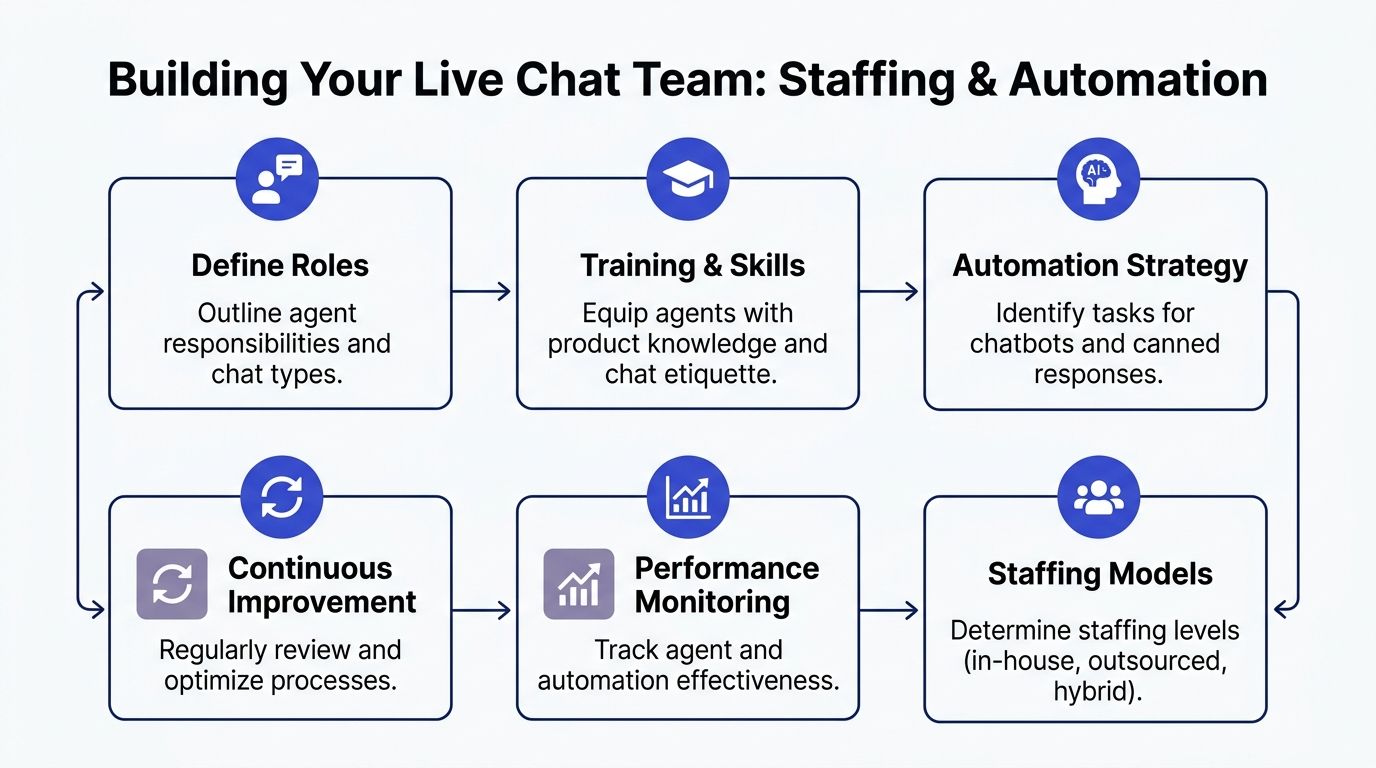
Start with demand, not headcount
Headcount comes after you understand demand. Review when chats arrive, where they start, and what customers are trying to get done. A pricing page visitor asking about plan fit is different from an existing customer locked out of an account. Those conversations should not follow the same routing or staffing plan.
Use these questions to shape the model:
When do high-intent conversations happen?
Which pages create repetitive support volume versus sales opportunities?
Which topics follow a clear script and low-risk answer path?
Which issues require judgment, empathy, or access to account history?
The answers usually point SMBs toward one of three starting models: limited-hour human chat, targeted proactive chat on high-intent pages, or automation-first intake with human escalation. Full coverage is rarely the best first move. Focused coverage during the hours and moments that matter usually produces better lead quality and fewer missed chats.
Transcript review should drive expansion. If the same issue appears every day, automate it. If escalations keep failing because customers need judgment or reassurance, staff for that gap instead of forcing more bot flows.
Give automation the structured work
Automation should handle the conversations that are frequent, predictable, and easy to verify. That reduces queue pressure and protects agent time for work that affects retention, conversion, or customer trust.
Good candidates include:
FAQ handling: Shipping, return policies, plan details, onboarding steps, and basic account access help.
Lead qualification: Capturing company size, use case, urgency, and fit before a sales rep joins.
Routing and triage: Sending billing issues to finance, setup questions to support, and partnership inquiries to the right team.
After-hours intake: Collecting the problem, preserving context, and creating a clean follow-up for the next shift.
One practical option is Chatgrow's customer support platform, along with similar AI agent systems that can use your website, help content, pricing pages, and product documentation to answer common questions and pass a concise summary to a human when needed.
That summary matters. If automation saves two minutes on intake but forces the customer to repeat the issue, the team has not improved the operation. It has only moved the work.
Keep humans on the high-judgment conversations
Human agents should own the chats where policy, nuance, or emotion can change the outcome. These are the conversations that affect churn, recovery, and qualified pipeline.
That includes:
Chat type | Best owner |
|---|---|
Refund dispute with emotion involved | Human |
Technical troubleshooting with multiple variables | Human |
Basic shipping or policy question | Automation first |
Demo qualification for a nuanced use case | Hybrid, then human |
Compliance-sensitive or account-specific issue | Human |
A hybrid model works best when the boundary is clear. Automation handles intake, repetitive questions, and low-risk guidance. Agents step in for exceptions, account-specific decisions, and conversations where tone matters as much as speed.
If an agent receives an escalated chat without a useful summary, the customer pays for your process mistake by repeating the issue.
Train for chat work, not just product knowledge
Strong chat agents write clearly under pressure. They know how to manage multiple threads, ask short diagnostic questions, and avoid turning a live conversation into a pasted script. Product knowledge helps, but chat performance usually breaks down in execution. Replies get too long. Tone turns cold. Agents miss the buying signal because they are trying to close tickets fast.
Set realistic concurrency limits. Review transcripts weekly. Coach for clarity, resolution quality, and handoff quality, not just speed.
The teams that scale live chat well do not ask automation to replace the support team. They use it to remove repetitive volume, improve first response coverage, and give agents more time for the conversations that protect revenue and move deals forward.
How to Evaluate Platforms and Measure ROI
A platform decision usually goes sideways before the contract is signed. The team sees a polished demo, checks the AI box, compares pricing tiers, and assumes the hard part is done. The core question is simpler and tougher. Will this system fit the way your support and sales teams work every day?
Choose for workflow, not feature lists
Live chat software affects more than chat volume. It shapes how conversations are routed, what context agents receive, how fast leads reach sales, and whether repetitive support work gets contained or spills into tickets and inboxes.
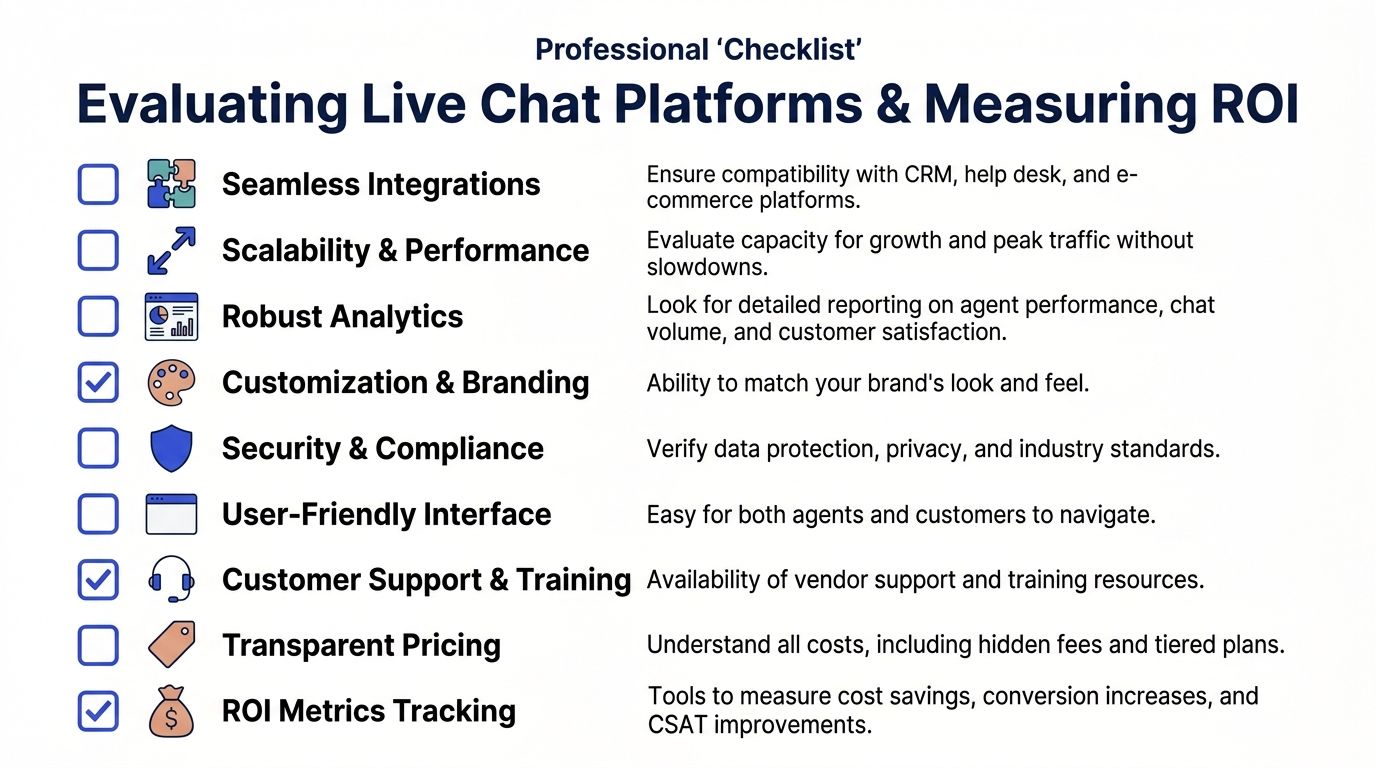
That is why feature checklists often mislead growing SMBs. A platform can look strong in a demo and still create manual work for agents because the handoff is weak, reporting is shallow, or integrations break the workflow.
Check the platform against the operating model you want to run:
Knowledge connectivity: Can it use your help center, FAQs, pricing pages, and product content without constant manual updates?
CRM and help desk integration: Can agents see customer history and create records without copying information between systems?
Escalation with context: Can it pass the transcript, intent, and key account details to the next person in a usable format?
Routing controls: Can you assign chats by topic, skill, language, account type, or team capacity?
Reporting that supports decisions: Can you see deflection, lead outcomes, missed handoffs, containment rates, and page-level performance?
Workflow flexibility: Can you adjust prompts, forms, triggers, business hours, and handoff rules to match your process?
Security and compliance fit: Can the tool handle the customer and account data your team deals with?
If your team is still comparing categories, this guide to choosing a customer support platform for growing teams is a useful starting point.
Measure ROI where it actually shows up
ROI for live chat is rarely a single number on a dashboard. It usually shows up across three areas, and each one matters for a different reason.
The first is revenue impact. Chat should help capture high-intent visitors, qualify the right leads, and reduce drop-off on pages where buyers hesitate.
The second is ticket deflection. Good automation should resolve repetitive questions before they become email threads, callbacks, or low-value tickets that eat up agent time.
The third is team efficiency. Agents should spend less time on repetitive intake and more time on cases where judgment, tone, or account context affect retention or conversion.
These gains are real only if the hybrid model is configured well. If automation answers the easy part but sends a weak handoff to a human, the cost just shifts channels. The customer repeats the issue, the agent starts cold, and your team loses the efficiency you thought you bought.
A practical ROI review should answer questions like these:
Which chats led to qualified leads, booked demos, or purchases?
Which conversations were fully resolved without agent involvement?
Which topics kept appearing because the site, help content, or policy explanation was unclear?
Which escalations failed because the summary, routing, or transcript quality was poor?
Which pages produced useful conversations, and which ones generated noise?
Good ROI comes from system quality. Faster answers matter. Better lead routing matters. Fewer repetitive tickets matter. The larger payoff is that support and sales stop working around the chat channel and start using it as part of one operating process.
Give the platform enough time to mature before judging it. Launch-week numbers are usually noisy. Results improve after you refine triggers, tighten automation boundaries, clean up knowledge sources, and coach agents on transcript quality.
Conclusion Your Next Steps with Live Chat
Live chat support works when you treat it as a managed channel, not a site add-on. The companies that get value from it make clear decisions about placement, staffing, automation, escalation, and measurement. They don't ask chat to do everything. They give it a focused job and improve it over time.
If you're starting from scratch, keep the first step small. Pick a few high-intent pages, define which questions can be automated, set clear human handoff rules, and review transcripts every week. That's enough to move from guesswork to a system you can scale.
If you want to test a hybrid model without a long setup cycle, Chatgrow lets you create AI customer-service agents trained on your website, FAQs, pricing, and product pages, then deploy them on high-intent pages with lead qualification and smart escalation to your team.
Related Posts
Continue Reading
More articles from the ChatGrow Team.