Blog
10 Chatbot Use Cases to Improve Customer Experience
By
Nelson Uzenabor

A visitor lands on your pricing page, compares two plans, then leaves because one question remains unanswered. Later, a customer checks an order after your support team has gone offline, while a new user gets stuck during setup and never reaches the product's first useful outcome. These moments look different, but they share the same operational problem: the next step is unclear, unavailable, or too expensive to handle manually.
The strongest chatbot use cases don't stop at generic question answering. They connect a defined intent to a useful action, such as recommending a product, booking a meeting, completing an intake form, checking a policy, or escalating a complex case with the right context.
Each example below evaluates the same practical points: the business problem, conversation flow, measurable outcome, implementation risk, escalation rule, and Chatgrow deployment approach. Chatgrow can be trained on website content, FAQs, pricing, and product pages, then placed on high-intent pages and refined through conversation reporting. The aim isn't to automate every interaction. It's to automate the predictable path while making human involvement faster and better informed.
Table of Contents
1. E-Commerce Product Support and FAQ Automation
A shopper asks, “Will this jacket fit someone who normally wears medium?” A useful bot doesn't respond with a broad product description. It identifies the product, checks the approved sizing information, answers the specific concern, and helps the shopper move toward purchase.
The conversation can follow a clear sequence:
Identify the item: Ask for the product name, model, or page context.
Resolve the question: Explain size, materials, features, price, shipping, or returns from approved content.
Clarify uncertainty: Ask a short follow-up if the shopper is comparing options.
Offer the next step: Provide the purchase link, collect lead details, or transfer the conversation.
Retail chatbots can retrieve information from product catalogs, CRM systems, inventory databases, and order-management tools when those integrations are available, as described in this overview of retail chatbot capabilities. Without live inventory access, the bot shouldn't guess whether an item is available. It should state what it knows and escalate or direct the customer to the current product page.
Practical rule: Treat product content as operational data. If pricing, stock, sizing, or return policies change, update the bot's training material before customers encounter the old answer.
With Chatgrow, train the agent on product pages, specifications, pricing, and FAQs. Set escalation rules for out-of-stock questions, outdated pricing signals, unusual returns, and comparisons that require a sales specialist. For stores with higher-value products, add qualification questions so a human receives the customer's product interest and buying context.
For a broader implementation guide, see AI chatbot use cases for e-commerce.

2. Lead Qualification and Sales Funnel Acceleration
A pricing-page visitor has already signaled commercial interest. The chatbot's job isn't to interrogate that visitor with a long form. It should ask the next question that helps sales determine fit, urgency, and routing.
A practical flow begins with the visitor's goal. The agent might ask what they're trying to improve, then collect only the information needed to determine fit, such as company profile, use case, implementation timeline, or preferred next step. Once the qualification threshold is met, the bot books a meeting or sends a concise summary to the sales team.
The handoff should preserve context. A sales representative should see the visitor's stated problem, relevant product interest, timeline, and unanswered concern rather than receiving a notification that says only “new lead.”
Chatgrow supports this workflow through intent-based routing, lead qualification rules, and deployment on pricing or demo pages. Begin with a simple qualification model and review which conversations escalate too often or fail to provide enough context. A qualification bar that's too low creates noise for sales. One that's too high makes the bot feel obstructive.
Useful operating controls include:
Progressive questions: Ask one necessary question at a time.
Persona routing: Send different buyer types to the right representative or flow.
Fit rules: Route by company profile, use case, timeline, or service need.
Context summaries: Include the visitor's answers in the handoff.
Research on chatbot applications identifies sales as the most common business use case at 41%, followed by customer support at 37% and marketing at 17%. Those figures come from this survey summary of chatbot statistics. For implementation guidance, see chatbots for lead generation.
3. High-Intent Landing Page Conversion Optimization
A chatbot on a homepage has to earn attention. A chatbot on a pricing, comparison, or demo page starts with useful context. The page itself tells the agent what the visitor may be deciding, so the opening message, timing, and call to action should reflect that intent.
On a pricing page, the flow might be:
A visitor spends time comparing plans.
The bot asks whether they need help choosing a plan or understanding a feature.
The visitor raises an objection about capability, fit, or implementation.
The agent answers from approved pricing and product content.
The bot qualifies the visitor and offers a demo or sales handoff.
Avoid launching the conversation immediately on every page. Trigger it after meaningful engagement, such as time spent reviewing the page, interaction with a pricing element, or exit intent. The right trigger depends on the page and audience, so test the opening message and timing rather than assuming one prompt will work everywhere.
The best landing-page chatbot often reveals a copy problem before it solves a conversion problem.
Conversation reports can show which features visitors misunderstand, which objections recur, and where the page leaves important information unstated. Use those patterns to improve the landing-page copy, not just the bot.
Chatgrow can be trained on current pricing, product, and comparison content, then deployed selectively on high-intent pages. Define what the agent can explain and when it must escalate. A visitor asking for a plan recommendation may need a bot response. A visitor requesting a custom contract or security review needs a human route.
For practical setup ideas, read how to make bots, and use AI tools for landing page copy to support related page improvements.
4. SaaS Onboarding and Feature Education

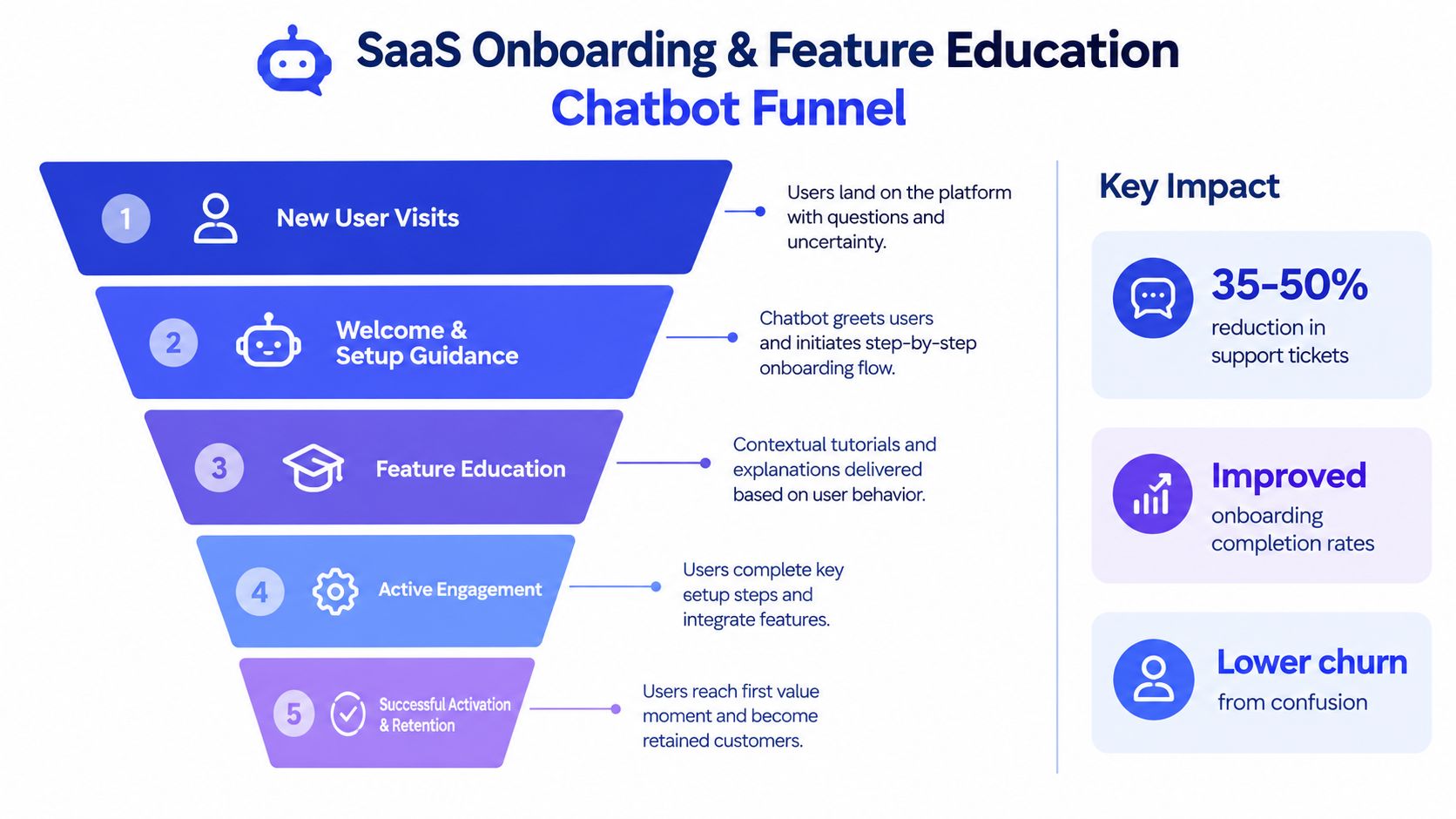
A new user usually needs one clear next step, not the entire documentation library. The chatbot should identify the user's goal, check their current setup stage, and guide them through a focused path. That keeps onboarding tied to product progress instead of turning the conversation into a general support search.
A practical flow includes:
Goal selection: Ask whether the user wants to configure a workspace, invite colleagues, connect a tool, or complete another first step.
Setup guidance: Provide a short checklist with relevant instructions or links.
Feature education: Explain one feature when the user reaches the related step, using an example that matches their goal.
Troubleshooting: Address known blockers from approved product documentation.
Escalation: Transfer technical issues with the user's progress, error details, and attempted steps.
Use progressive disclosure. Give a concise answer, one relevant help resource, and a clear next action. Save broader feature explanations for users who ask for them or reach the appropriate point in setup.
Review onboarding conversations for questions that repeatedly cause escalation. Those patterns can reveal missing documentation, confusing interface design, or a setup step that needs product attention. Chatgrow can use trained website and product content for routine questions, while conversation reports help the team locate recurring blockers.
For comparison context, see this tool comparison for product walkthroughs.
Set clear boundaries for the deployment. The bot can explain approved workflows and feature behavior, but account-specific technical failures should reach support with enough context for a human to continue. An onboarding chatbot supports product progress. It cannot compensate for an unusable interface or incomplete documentation.
5. Travel and Hospitality Booking Assistance
Travel conversations often begin with incomplete information. A guest may say, “I want a quiet hotel near the beach next month,” while a traveler asks whether a destination suits a particular itinerary. The chatbot needs to gather the missing booking details without pretending that general guidance equals live availability.
A booking flow can ask for destination, dates, party size, budget preference, and accommodation requirements. It can then recommend options from approved destination and property content. If the business has a verified booking integration, the agent may continue to availability, reservation, modification, or retrieval. If it doesn't, the bot should send the customer to the booking system or a human representative.
Keep the boundaries explicit:
Visa and documentation: Provide approved general guidance, then escalate case-specific questions.
Insurance: Explain available policy information without making an unsuitable recommendation.
Payments: Use secure booking infrastructure rather than collecting sensitive payment details in free text.
Booking errors: Transfer immediately when the reservation record or payment status is uncertain.
Chatgrow is well suited to destination guides, hotel policies, FAQs, and pre-booking questions. Its deployment should remain limited to approved content unless the travel business has verified integrations for live inventory, pricing, and booking actions. It can also collect traveler preferences and pass a structured summary to staff.
A global travel operation may need multilingual content, multiple currencies, and support across time zones. Those requirements affect the knowledge base and escalation process, not just the chatbot's wording. A polished answer that contains outdated availability or unclear cancellation terms can create more service work than it prevents.
6. Healthcare Appointment Scheduling and Patient Support
A patient may start with a new appointment request, then switch to rescheduling or cancellation. Split these intents at the beginning so each path asks only for the details it needs. A scheduling flow can collect appointment type, preferred provider, location, availability, contact details, and required intake information. It can confirm the requested action, send a reminder through an approved channel, or refer the case to staff.
The trigger for escalation must be clear. A patient describing urgent symptoms should receive the organization's approved urgent-care direction, not an improvised diagnosis. Medication changes, complex symptoms, and questions about clinical suitability belong with qualified staff or an approved clinical workflow.
Healthcare deployments should include these controls:
Privacy and security: Confirm how patient information is stored, transmitted, and accessed.
Compliance: Review whether the platform and integrations meet applicable healthcare obligations.
Disclaimers: Distinguish general information from medical advice.
Authentication: Verify identity before revealing appointment or patient details.
Human review: Route sensitive, uncertain, or ambiguous cases to staff.
Chatgrow can be configured with approved clinic content, scheduling rules, intake fields, and escalation requirements. Before collecting sensitive information, the deployment team should validate the environment, data handling, integrations, and staff handoff process. Limit the bot to administrative support unless a verified clinical workflow supports additional actions.
The practical outcome is easier access to routine care and less manual scheduling work. Clinical judgment remains outside the chatbot's authority, and unclear conversations should end with a qualified human reviewing the case.
7. Educational Institution Student Support
An admissions prospect and a current student may ask similar questions about a program, but they need different answers, permissions, and escalation paths. Educational institutions should separate these audiences instead of forcing every conversation into one general assistant.
A prospective-student flow can explain programs, application requirements, key deadlines, delivery formats, and next steps. A current-student flow may handle enrollment guidance, course-support questions, campus services, or routing to the right department. The bot should never imply that it has checked application status or financial-aid information unless a verified system integration provides that data.
Useful routing examples include:
Program discovery: Match interests to approved program information.
Application guidance: Explain requirements and direct the student to the correct application path.
Deadline questions: Answer from current institutional content.
Financial aid: Provide approved general direction and escalate policy-sensitive cases.
Course support: Link to relevant academic resources or route to faculty and support teams.
International students may need multilingual assistance, but translation doesn't remove the need for human review. Immigration, financial-aid, transfer-credit, and exceptional enrollment questions can depend on personal circumstances and changing policies.
Chatgrow can be trained on approved program pages, admissions FAQs, and institutional guidance. Assign separate flows for prospective and current students, then review conversations whenever policies or programs change. The bot's value comes from reducing navigation friction, not from improvising answers outside the institution's published knowledge.
A quarterly content review can help keep the agent aligned with new programs and policies, especially when students rely on deadline and eligibility information.
8. Insurance Quote Generation and Claims Support
Insurance workflows need structured intake, approved explanations, and clear escalation boundaries. A chatbot can collect quote details, explain policy language, guide claim submission, and direct customers to status resources. It should not present an informational response as an underwriting or coverage decision.
Design separate paths for each customer intent:
Quote intake: Ask for required details, repeat the entered information, and send the request for authorized review.
Policy explanation: Explain approved definitions, limits, and exclusions without interpreting an individual dispute.
Claims support: Identify the claim type, list the next steps, and direct customers to a secure document channel.
Status requests: Provide verified instructions or status information only when an authenticated system integration supplies it.
A controlled conversation follows five steps:
Identify whether the customer needs a quote, policy explanation, claim, or status update.
Collect only the fields required for that path.
Confirm which details the system can verify.
Give the approved next action.
Escalate disputed coverage, unusual losses, incomplete records, or regulatory concerns.
Chatgrow can use approved policy content and FAQs. Before deployment, the implementation team must define regulatory review, underwriting logic, document handling, authentication, and human oversight. Content from general marketing pages cannot support complex coverage answers presented as professional claims guidance.
Escalate when the customer disputes coverage, reports an unusual loss, provides incomplete records, raises a regulatory concern, or needs a decision outside the configured rules. Do not collect sensitive documents through an unapproved chat flow. Use secure links, authentication, and preserved conversation context so an agent can continue without asking the customer to repeat the incident.
Faster intake helps, but accurate routing and cautious wording protect both the customer and the insurer.
9. Healthcare Appointment Scheduling and Patient Support
A patient may begin with “I need an appointment,” then change the request to a reschedule or cancellation. The chatbot should split these intents early because each path requires different availability checks, confirmation fields, and staff actions.
For a new appointment, ask for the service, preferred provider or location, and suitable times, then confirm the details before sending the request to the scheduling system or staff queue. For a reschedule, verify the existing booking before offering alternatives. For a cancellation, confirm which appointment is affected and explain any applicable clinic instructions without making policy decisions outside the configured rules.
Support conversations need a separate boundary. A patient asking about a service can receive approved general information. A patient asking about symptoms, diagnosis, medication changes, or treatment should receive the organization's defined instruction and an appropriate clinical handoff. Urgent concerns require the provider's approved urgent-care or emergency direction, not an improvised assessment.
The agent should state its role clearly. It can handle access and administration, while clinical decisions remain with qualified staff and the provider's established protocol.
Chatgrow deployment should use clinic service descriptions, scheduling rules, and approved FAQs. Connect booking actions only to verified systems, protect records behind authentication, and preserve the conversation context for the receiving staff member. Set escalation rules for urgent concerns, privacy questions, accessibility needs, failed booking attempts, and requests that require a human scheduler.
This workflow reduces repeated intake and clarifies the next administrative step. It does not replace clinical review or personalized medical guidance.
10. Marketing Agency Client Service and Campaign Support
Agencies can deploy chatbot services repeatedly, but they shouldn't copy one generic agent across every client. The durable model is a repeatable delivery framework with client-specific knowledge, tone, qualification rules, and escalation agreements.
A managed-service workflow might begin when a client requests a website agent. The agency selects a suitable use case, gathers website and FAQ content, defines the desired lead fields, configures brand voice, and sets a service-level agreement for human follow-up. The chatbot then answers common questions, qualifies prospects, and books or routes appointments.
A practical agency playbook includes:
Choose a repeatable niche: Start with a client type that shares common questions and workflows.
Build a training template: Standardize the intake process for website pages, FAQs, services, and exclusions.
Customize qualification: Adapt questions to the client's ideal customer and sales process.
Separate content: Keep every client's knowledge base, tone, routing, and reporting distinct.
Report clearly: Show conversations, qualified leads, escalations, and recurring content gaps.
Chatgrow supports this model with multi-agent scaling, knowledge training, reporting, Smart Intent, and smart escalation. An agency can maintain separate client agents while giving each one appropriate content and routing behavior. The handoff should include enough detail for the client's team to act without reconstructing the conversation.
White-label presentation can fit agencies that manage client-facing services, but the agency still needs clear ownership rules. Decide who updates content, who handles escalations, who approves new flows, and what happens when a client changes pricing or services.
The chatbot becomes an operational service only when the agency can maintain it after launch.
11. Customer Retention and Win-Back Campaigns
A retention chatbot shouldn't open with a discount every time a customer becomes inactive. That approach may hide the actual reason for disengagement and train customers to wait for an offer. Start with a useful, low-pressure question that identifies friction.
For a dormant account, the agent might ask whether the customer needs help completing a task. For cancellation intent, it can ask what prompted the decision, explain relevant support options, and route account-specific issues. For post-purchase re-engagement, it can provide setup guidance, product education, or help with a next use case.
The flow should follow the customer's signal:
Detect a defined inactivity, cancellation, or support event.
Open with relevant help or feedback.
Identify the reason for disengagement.
Offer an appropriate next step.
Present an authorized retention offer only when it fits the situation.
Chatgrow can handle approved support and product information, but CRM triggers, account history, usage data, and discount authorization generally require appropriate integrations and controls. The bot shouldn't claim to see usage behavior or grant an offer unless the connected systems support those actions.
Track the reasons customers leave, not just whether they accept a retention message. Repeated complaints about setup, missing features, billing, or product fit can guide product and support improvements. Segmenting customers by lifecycle context also lets the team adjust tone and intervention type.
Retention works best when the conversation restores value. A chatbot that delays cancellation without addressing the customer's problem creates short-term activity, not durable loyalty.
12. Insurance Quote Generation and Claims Support
Insurance teams can use chatbots to collect the information needed for an initial quote, answer approved coverage questions, and prepare a claim for human review. The workflow should separate information gathering from decisions about eligibility, responsibility, or coverage.
Start with the customer's intent: requesting a quote, reporting a new incident, checking an existing claim, asking about required documents, or seeking a policy explanation. Each route needs its own approved questions, data fields, and escalation conditions.
For a quote, the bot can gather permitted details, identify missing information, and summarize the request for an agent or connected insurance system. For a new claim, it can record basic incident facts and explain how to submit supporting documents through a secure channel. A status request should verify the customer before revealing claim information. Disputed or unclear coverage questions should go to a claims professional rather than receive a definitive answer from the bot.
Escalate when:
The customer disputes a decision: Route the conversation to a claims professional.
The facts are incomplete or contradictory: Ask for clarification or transfer the case instead of forcing an answer.
Sensitive documents are needed: Use the insurer's approved secure upload process.
The matter involves regulatory or legal complexity: Follow the defined review path.
Chatgrow can deliver approved policy explanations, quote prompts, and claims FAQs. The insurer remains responsible for compliance, secure integrations, underwriting and claims rules, and human oversight. Configure the deployment so the agent summary records the customer's stated issue, policy or claim reference, requested documents, and unresolved questions.
Measure completed information captures, transfer rates, document-submission completion, and repeat contacts. A useful claims bot reduces repetition and makes the next action clear. It should never make an uncertain decision sound final.
12 Chatbot Use Cases Comparison
Use case | 🔄 Implementation complexity | ⚡ Resource requirements | 📊 Expected outcomes | 💡 Ideal use cases | ⭐ Key advantages |
|---|---|---|---|---|---|
E-Commerce Product Support & FAQ Automation | Medium, product DB training and inventory sync | Moderate, product catalog, pricing feeds, multilingual content | Faster responses (hours→seconds); support cost ↓ 40–60%; lead capture | High-volume retail sites, seasonal traffic, product FAQs | 24/7 handling, scales with traffic, captures buyer intent |
Lead Qualification & Sales Funnel Acceleration | High, sophisticated qualification logic and routing | Moderate–High, CRM integration, scoring rules, analytics | Lead volume ↑25–40%; lead quality ↑50%+; shorter sales cycles | Pricing/demo pages, B2B SaaS, high-value offers | Improves sales efficiency; delivers pre-qualified leads |
High-Intent Landing Page Conversion Optimization | Medium, trigger design, A/B testing, careful targeting | Moderate, page-specific training, CRO tooling, analytics | Conversion rates ↑15–40%; bounce rate ↓ on pricing/demo pages | Pricing, demo request, product comparison, contact pages | Captures decisions at peak intent; real-time objection handling |
SaaS Onboarding & Feature Education | Medium, staged flows and behavior-based context | Moderate, documentation, tracking, product content | Support tickets ↓35–50%; faster time-to-first-value; improved retention | New-user onboarding, feature adoption, guided tutorials | Reduces churn; accelerates user activation and value realization |
Travel & Hospitality Booking Assistance | High, multi-system booking integrations and sync | High, booking APIs, payment integration, multi-language support | Booking abandonment ↓; 24/7 global support; personalized recommendations | Flight/hotel booking sites, travel agencies, hotels | Scales across time zones; handles seasonality and personalization |
Healthcare Appointment Scheduling & Patient Support | High, HIPAA, EHR integration, security and compliance | High, secure systems, EHR access, escalation workflows | Admin workload ↓; no-shows ↓ with reminders; improved access | Clinics, telehealth, high-volume practices for scheduling/intake | Streamlines scheduling while enforcing compliance and escalation |
Educational Institution Student Support | Medium, separate flows for prospective vs current students | Moderate, program data, policy updates, authentication/FERPA controls | Admissions workload ↓30–40%; higher application completion; 24/7 support | Admissions season, enrollment, financial-aid and course queries | Handles seasonal peaks; improves applicant and student experience |
Insurance Quote Generation & Claims Support | High, underwriting rules, regulatory and security controls | High, integration with core systems, secure document handling | Quote turnaround days→minutes; higher quote completion; claims support | Quote intake, coverage explanation, claims status tracking | Fast quoting; improves claims communication; enforces compliance |
Marketing Agency Client Service & Campaign Support | Medium, per-client customization and SLA management | Moderate, templates, multi-client management, reporting dashboards | New managed-service revenue; scalable client support; improved client conversions | Agencies offering white-label bot services, SMB clients | Scalable managed service; repeatable templates; client reporting |
Customer Retention & Win-Back Campaigns | Medium, churn models, timing and messaging calibration | Moderate, CRM/usage-data integration, analytics, personalization | Churn ↓5–15%; increased CLV; actionable feedback collection | Dormant accounts, cancellation flows, subscription services | Proactive re-engagement at scale; personalized interventions and insights |
Turn the Best Use Case Into a Measurable Workflow
The right starting point usually isn't the most ambitious chatbot project. Choose one high-volume, well-documented intent where customers already ask similar questions and your team follows a recognizable response process. Product FAQs, pricing questions, appointment requests, order updates, and lead qualification often make strong starting points because the desired next action is easy to define.
Write the approved answer set before you design the conversation. Identify the pages, policies, product details, and exclusions the agent may use. Then write both the happy path and the escalation path. The happy path should move the customer toward a useful outcome. The escalation path should collect the relevant details, explain what happens next, and preserve the conversation context for the human team.
Choose a baseline metric that matches the workflow. For support, that may be response time, resolution without human intervention, ticket volume, or customer satisfaction. For sales, it may be qualified conversations, meeting bookings, or the completeness of handoff context. For onboarding, it may be completion of a defined setup action. Don't judge every chatbot by the same metric.
The available evidence shows why measurement matters. One customer-support deployment reported 70% of incoming queries fully resolved without human intervention, a 45% reduction in human-support ticket volume, and $3.2 million in annual support-cost savings. The same case reported bot-resolved CSAT on par with agent-resolved CSAT for the same issue types, as documented in this customer-support chatbot case study. Another implementation reduced response time from 10 to 12 hours to 0 to 3 seconds, automated 60% to 70% of general queries, reduced agent dependency from 100% to 30% to 40%, and cut support workload by 50%, according to this AI customer-support case study. These are individual implementation reports, not universal benchmarks.
Adoption alone doesn't guarantee value. One analysis describes a 49-point gap between organizations using chatbots and those generating measurable value, while reporting customer support as the largest deployment area at 41.82% of revenue share and lead generation at roughly 12%. Those figures appear in this analysis of chatbot adoption and value. The practical lesson is straightforward: deployment breadth matters less than workflow integration, operating discipline, and ROI measurement.
Use the same discipline when deciding whether a chatbot should remain informational or become transactional. Enterprise deployments increasingly connect agents to order status, appointment booking, support tickets, CRM records, and escalation across websites, mobile apps, WhatsApp, Teams, Slack, and voice channels. Yet practical information-seeking remains dominant, with about three-quarters of ChatGPT conversations focused on guidance, information, and writing, and 49% of messages described as simple asking rather than task completion in this coverage of enterprise chatbot trends. Don't add integrations merely because they're possible. Add them when a verified action removes a meaningful handoff or prevents repeat work.
Across these chatbot use cases, the reusable principles are consistent:
Narrow scope improves accuracy: Start with one intent and a defined answer set.
Contextual prompts outperform generic greetings: Use the page, account stage, or customer request to shape the opening.
Escalation should preserve context: Send the human team the customer's goal, answers, and unresolved issue.
Reporting should guide iteration: Use failed answers and repeated escalations to update content and flows.
Operational ownership matters: Assign responsibility for training data, policy changes, review, and follow-up.
With Chatgrow, train the agent on current website and FAQ content, define qualification and escalation rules, deploy it on the page or channel where intent is strongest, then monitor conversations and outcomes. Fix content gaps before expanding the scope. Add another agent only after the first workflow is reliable, measurable, and easy for your team to support.
Chatgrow lets you create, train, and deploy custom customer-service and sales agents using your website, pricing, FAQs, and product pages. Visit Chatgrow to set up a focused chatbot workflow, define smart intent and escalation rules, and start turning routine questions into qualified conversations and useful customer support.
Related Posts
Continue Reading
More articles from the ChatGrow Team.


