Blog
Chatbot for Lead Generation: Maximize Leads in 2026
By
Nelson Uzenabor

Your website is getting visitors. Some read your pricing page, some compare features, some linger on the demo page, and then most of them leave without giving your team anything useful to act on.
That's the problem with static forms. They treat every visitor the same. A student researching options, a competitor checking pricing, and a buyer who wants to talk this week all hit the same form and create the same kind of record. Sales gets noise, marketing celebrates volume, and pipeline quality stays uneven.
A good chatbot for lead generation fixes that. It starts a conversation when intent is highest, asks a small number of useful questions, and routes only the right people into your sales workflow. The point isn't more form fills. The point is better conversations, cleaner qualification, and faster follow-up.
Table of Contents
Why Your Website Needs More Than a Contact Form
A contact form captures data. It doesn't qualify intent, answer objections, or adapt to what the visitor is trying to do. That's why so many teams end up with a bloated list of leads that looks healthy in a dashboard but produces weak sales conversations.
The shift in the market is clear. One industry survey found that 41% of all business chatbots are used for sales purposes, and 55% of companies using digital assistants saw an increase in high-quality leads, according to Master of Code's chatbot statistics roundup. That matters because it shows where chatbots sit now. They're no longer just support widgets tucked into the corner of a site.
They're becoming part of the revenue workflow.
Practical rule: If your chatbot collects contact details but doesn't help your team decide who deserves follow-up first, it's just a prettier form.
There's also a timing advantage that forms can't match. A form waits for the visitor to do the work. A chatbot can engage when interest is fresh, answer a pricing question, clarify fit, and keep the visitor moving without forcing them into a long page scroll or a delayed email exchange.
That doesn't mean every business needs an aggressive pop-up on every page. In practice, that usually backfires. Buyers respond better when the conversation appears in the right place and asks relevant questions. Someone on a pricing page should get a different opening than someone reading a help article.
A strong chatbot for lead generation works because it combines three jobs in one interface:
Engagement: It starts the conversation while intent is active.
Qualification: It filters curiosity from buying intent.
Routing: It sends the right lead to sales, support, or nurture.
That middle step is where most implementations fail. Teams obsess over capture rate, then wonder why reps complain about junk leads. If you want better results, design the bot around lead quality first and volume second.
Crafting Your Lead Generation Chatbot Strategy
A lead generation bot usually fails before the first message is written. The failure starts in planning. Teams launch with a vague goal like “capture more leads,” then bolt the widget onto the whole site and hope the automation sorts things out.
It won't.

Start with one business outcome
Pick one primary outcome for the bot. Not three. Not five.
For most companies, that outcome is one of these:
Book demos from high-intent pages
Separate sales conversations from support questions
Pre-qualify inbound interest before a rep gets involved
Capture and nurture early-stage leads that aren't sales-ready yet
Each goal needs a different flow. A demo-booking bot can be direct. A support deflection bot should identify account issues fast and keep non-buyers away from the sales queue. A top-of-funnel bot needs lighter qualification and a softer handoff.
The biggest planning mistake is building one universal chatbot for every visitor and every page. The result is usually generic copy, weak routing, and low trust.
Define what qualified means before you build
Most articles about chatbot for lead generation focus on collecting the email. That's the easy part. The harder question is what makes a lead worth sales time.
That gap is exactly why lead quality is such an underserved topic. As noted in Nextiva's guide to lead generation chatbots, most advice stops at lead capture instead of showing teams how to reduce low-intent submissions and protect sales capacity.
Your qualification logic should reflect how your business sells. For a SaaS company, that might mean role, team size, use case, and urgency. For an agency, it might be budget readiness, service interest, and timeline. For an education business, it could be program interest, start date, and decision-maker status.
A practical qualification sheet should answer:
Who is this person? Role, company type, or buyer relationship
Why are they here? Problem, use case, or product interest
How ready are they? Timeline, urgency, or purchase stage
Where should they go next? Sales, nurture, support, or self-serve content
Don't overcomplicate this. You're not trying to run a full discovery call inside a widget. You're trying to make the next step smarter.
Choose placement based on intent
Placement changes lead quality more than is commonly recognized. The same bot can perform very differently depending on where it appears.
High-intent placement usually includes:
Pricing pages: Visitors here often want clarity, comparison, or a next step
Feature pages: Good place to ask about use case and fit
Demo pages: Strong location for short qualification before scheduling
Bottom-of-funnel landing pages: Best for campaign-specific routing
Lower-intent pages need more restraint. A blog post visitor may still become a lead, but the opening should be lighter and more helpful than sales-first.
If you're designing conversational entry points and want examples of strong interface patterns, this breakdown of AI chatbot design patterns is useful for thinking about prompt structure, quick replies, and on-page context.
Designing Conversations That Convert and Qualify
The fastest way to ruin a promising bot is to open with “How can I help you today?” It sounds polite, but it pushes too much work onto the visitor. Visitors are often reluctant to write a thoughtful answer into a blank field, especially on mobile.
Better bots feel like guided conversations. They narrow choices, reduce typing, and ask questions in an order that feels natural.
Lead with context, not a generic greeting
The opening line should reflect the page and likely intent.
On a pricing page, a better opener is: “Looking at pricing? I can help you compare plans, estimate fit, or connect you with sales.”
On a feature page, try: “Want to see whether this feature fits your workflow? I can ask a few quick questions.”
On a demo page, be more direct: “I can help route you to the right next step. A few quick questions first.”
These openings work because they tell the visitor what the bot can do and reduce ambiguity. They also set up a qualification path without making the interaction feel like a form.
Use a short qualification funnel
A lead generation chatbot should behave like a short, conditional funnel, not a long interview. BotsCrew recommends 3 to 5 exchanges to identify intent before asking for contact details, with quick replies and buttons to reduce drop-off and improve lead-scoring accuracy, as described in BotsCrew's guide to chatbot lead generation.
That sequence matters.
A strong flow often looks like this:
Identify the reason for visit
Clarify fit or use case
Check readiness or urgency
Ask for contact details only after intent is clear
Route to calendar, CRM, rep, or nurture path
The order is important. Asking for an email too early feels transactional. Asking after the visitor has received value feels earned.
Here's a simple example for a B2B software company:
“What brings you here today?”
Buttons: Compare plans / Book demo / Ask a question“Which best describes you?”
Buttons: Founder / Sales leader / Support lead / Other“What are you trying to improve?”
Buttons: Response time / Qualification / Support coverage / Routing“Want the right next step?”
Buttons: Talk to sales / Get answers first
Only then ask for email or meeting preference.
Shorter conversations usually qualify better than longer ones because they respect buyer attention and force the team to ask only what affects routing.
Effective vs. Ineffective Qualifying Questions
The wording of each question changes completion quality. Blunt questions feel like gatekeeping. Good questions feel like guidance.
Effective vs. Ineffective Qualifying Questions
Goal | Ineffective Question (Avoid) | Effective Question (Use) |
|---|---|---|
Identify intent | What do you want? | What brought you to this page today? |
Learn role | Are you the decision-maker? | Which best describes your role? |
Gauge business fit | How many employees do you have? | What kind of team would use this most? |
Measure urgency | What is your timeline? | Are you exploring options or trying to solve this soon? |
Surface use case | What problem do you have? | Which of these are you trying to improve first? |
Ask for contact info | Enter your email to continue | Want me to send this to you or connect you with the right person? |
The effective versions do two things better. They lower pressure, and they make it easier to offer buttons instead of free text. That improves consistency and makes downstream routing cleaner.
Brand voice still matters. A finance company may need a more formal tone. An e-commerce brand can be warmer. But the structure should stay disciplined: low friction, high signal, clear next step.
Integrating Your Chatbot into Your Sales Workflow
A chatbot can capture useful information and still fail if the handoff is sloppy. Many deployments commonly break at this juncture. The conversation ends, the lead gets dumped into a generic inbox or CRM list, and nobody knows what was asked, what the visitor wanted, or how urgent the need was.
That's not automation. That's delay with extra steps.
Send qualified leads somewhere useful
Modern conversational AI is already tied closely to core systems. According to ChatBot's chatbot statistics summary, AI chatbot systems can handle up to 80% of routine questions and customer inquiries, with estimated interaction costs of $0.50 to $0.70 each compared with $6 to $15 for human agent interactions. Those economics only matter if the bot hands off the right conversations cleanly.
For lead generation, that means every qualified conversation should create a usable record in the systems your team already relies on. In practice, that usually includes:
CRM creation: Send contact details, qualification answers, source page, and conversation summary into HubSpot or Salesforce
Lead status logic: Mark the contact based on qualification outcome instead of dumping everyone into the same lifecycle stage
Conversation history: Attach transcript or summary so reps don't make the buyer repeat themselves
Nurture routing: Push lower-intent leads into email workflows instead of sending them straight to sales
A rep should be able to open the record and know three things immediately: who the person is, why they came in, and what should happen next.
For teams comparing tooling and routing setups, this guide to lead qualification tools is a useful way to think about where chatbot scoring fits beside CRM rules, forms, and enrichment workflows.
Build smart escalation rules
Not every qualified lead needs the same response. Some should go straight to a booking link. Some need a rep alert in Slack or email. Others should be routed by territory, product line, or account ownership.
A practical escalation setup includes:
A threshold for sales handoff
Define the combination of answers that should trigger human follow-up.A summary payload
Send a short handoff note with role, use case, urgency, and any open question.A fallback path
If no rep is available, offer calendar booking or a clear response expectation.
If your rep has to read a full transcript to understand the lead, the handoff design is weak.
The best sales workflows treat the chatbot like a front-line qualifier, not a replacement for discovery. Its job is to reduce dead-end conversations and give sales a better starting point.
Measuring Performance and Optimizing for Better Leads
A lot of chatbot dashboards look busy and say very little. Conversation counts rise, engagement looks strong, and the team assumes the bot is working. Then sales says the leads are thin, or marketing can't connect the bot to pipeline.
Performance measurement has to start with lead quality.
A useful market signal exists here. Master of Code's lead generation chatbot guide notes that some well-tuned implementations have been reported to double website conversions, while only 36% of marketers currently use AI chatbots for day-to-day marketing tasks. The opportunity is real, but only for teams that tune the funnel instead of treating launch as the finish line.
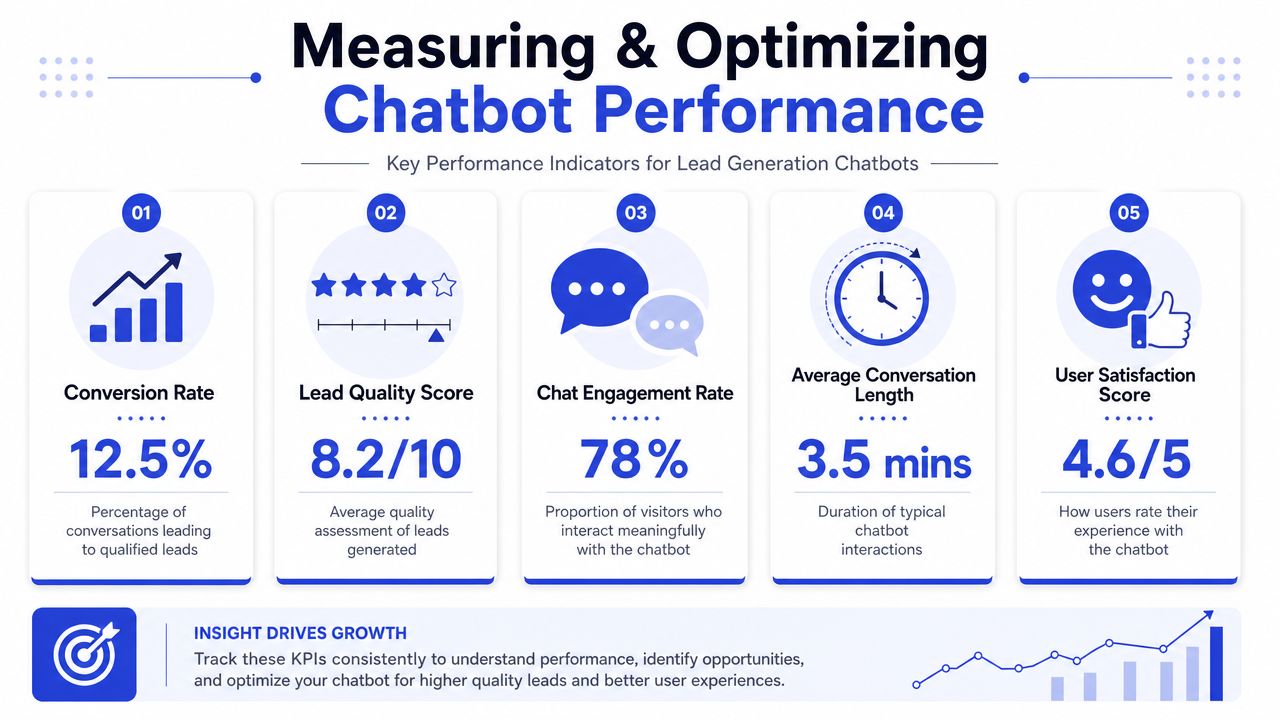
Start with a visual KPI review during your weekly check-in.
Track quality metrics, not vanity metrics
The metrics that matter most are usually simple:
Conversation start rate: Are visitors engaging where the bot appears?
Lead capture rate: Of those who start, how many provide contact details?
Qualification rate: Of captured leads, how many match your routing criteria?
Sales acceptance: Does the sales team treat these leads as worth follow-up?
Pipeline contribution: Are qualified chatbot leads progressing into real opportunities?
That third metric matters more than raw capture volume. If the bot drives many submissions but few sales-worthy conversations, the flow is misaligned.
You should also watch for segmented differences. A pricing-page bot may produce fewer leads than a sitewide bot, but those leads may be much cleaner. That's usually a trade worth making.
For teams trying to tighten reporting between chatbot events, CRM stages, and sales outcomes, a practical reference is this guide to customer data integration.
Here's a useful walkthrough for thinking about optimization in practice:
Find the drop-off and fix one thing at a time
Most underperforming bots have one obvious leak. It's usually one of these:
The opener is too generic
The bot asks for email too soon
The qualification sequence is too long
The button choices are unclear
The handoff isn't compelling enough
Review transcripts and identify where people abandon the flow. Then test one change at a time. Change the opener on the pricing page. Shorten one question. Replace a free-text prompt with buttons. Offer “get answers first” before “book demo.”
Don't run optimization by instinct alone. Pair transcript review with CRM outcomes. The best-performing flow isn't always the one that captures the most contacts. It's the one that sends the most useful conversations into the pipeline.
Common Pitfalls and How to Avoid Them
The common assumption is that chatbot performance problems are mostly copy problems. They aren't. Weak copy can hurt results, but most failures come from strategy and operations.
The biggest mistakes happen early
One mistake is making the bot too eager. It opens instantly, interrupts reading, and asks for contact details before the visitor has enough confidence to share them. That behavior can inflate starts while hurting actual qualification.
Another is making the bot too open-ended. Free-text-first experiences sound flexible, but they often create messy data and uncertain routing. Short guided choices work better for most lead flows.
A third mistake is failing to provide an escape hatch. Visitors need a clear path to a person, a contact page, or a direct next step when the bot can't help. If they feel trapped in the flow, trust drops fast.
A practical pre-launch checklist looks like this:
Check mobile behavior: Make sure the widget doesn't block key page elements.
Review question order: Ask for contact details after intent is clear.
Test odd inputs: Vague wording, incomplete replies, and off-topic questions should not break the flow.
Verify routing: Every qualified path should reach a monitored destination.
A chatbot that captures unqualified leads faster doesn't improve sales performance. It just creates a new bottleneck.
Compliance belongs in the flow
Compliance is usually treated as a legal cleanup task after launch. That's a mistake. As covered in Salesforce's chatbot lead generation guidance, consent language, data minimization, and CRM synchronization should be part of the design from the start, especially on high-intent pages where visitors want speed but may not expect extensive profiling.
In practice, that means:
Ask only for data you'll use
Add clear consent language before collecting personal details
Sync only the fields that belong in the CRM
Set retention rules for chat transcripts and lead records
Coordinate with legal and operations before rollout
Trust affects conversion. If the bot feels invasive, vague about data use, or too aggressive with profiling, buyers notice.
Frequently Asked Questions About Lead Generation Chatbots
Can a chatbot replace my contact form
It can replace many contact-form use cases, but not all of them. Some visitors still prefer a simple form. The better approach is usually to let the chatbot handle qualification on high-intent pages while keeping a form available as a fallback.
How many questions should a lead gen chatbot ask
Keep it short. In most cases, a small set of qualification questions works better than a long intake flow, especially when each answer affects routing.
Do I need AI for this to work
Not always. A rule-based flow can work well if your qualification paths are clear. AI helps when visitors ask varied questions, use messy language, or need more natural responses before handoff.
What should I optimize first after launch
Start with lead quality. Review the opening prompt, the first two qualification questions, and the handoff step before you worry about anything else.
If you want to turn your website into a real qualification channel instead of another inbox, Chatgrow gives you a practical way to do it. You can train an AI agent on your site content, define qualification logic, deploy it on high-intent pages, and route strong prospects to your team with context-rich summaries. It's a solid fit for businesses that want faster responses, cleaner handoffs, and better lead quality without building the entire system from scratch.
Related Posts
Continue Reading
More articles from the ChatGrow Team.


