Blog
How to Make Bots That Convert Visitors Into Customers
By
Nelson Uzenabor

You're probably staring at the same problem I see on SMB sites every week. A founder wants the inbox under control, sales wants faster responses on pricing questions, and support is tired of answering the same shipping or login issues over and over. The question isn't whether to add a bot, it's whether you can turn those repetitive conversations into qualified leads, cleaner handoffs, and fewer after-hours misses.
Table of Contents
The Moment a Small Business Realises It Needs a Bot
At 11pm, the same founder is still refreshing the inbox. The messages are painfully familiar. Someone wants pricing, someone wants shipping clarity, someone wants to know whether the free trial includes a credit card, and another hot lead has gone cold because nobody answered before dinner. That's the moment most small businesses stop thinking about chat widgets and start thinking about how to make bots that protect revenue.
What changes when the bot is tied to income
A useful bot doesn't exist to look busy on a website. It sits on high-intent pages, answers the questions people ask before they buy, and captures enough context to hand a real conversation to sales or support when it matters. The job is narrower than many teams expect, which is a good thing, because narrow bots are easier to train, easier to trust, and easier to maintain.
This is why the old idea of “just add live chat” falls short. A live chat box waits for a human, while a well-designed bot can work from a curated knowledge base, handle repetitive questions instantly, and qualify the visitor without making them repeat themselves three times. That distinction matters for SMBs, because the cost of a missed after-hours question is usually not theoretical, it's a lost opportunity.
The modern idea of bot-building traces back to 1966, when Joseph Weizenbaum created ELIZA, widely recognised as the first chatbot, and then to 1972 with PARRY, which added a personality layer to conversational behavior and pushed bot design past simple templates (PMC review of early chatbot history). That history matters because today's bots still inherit the same core lesson, structure beats improvisation.
A bot that knows exactly what it owns is easier to improve than one that tries to answer everything.
For a small business, that usually means one of two outcomes. Either the bot deflects repetitive questions so the team can focus on real sales work, or it qualifies the visitor and routes the lead to the right person with context intact. If it can't do either, it's decoration.
Define What the Bot Must Do Before You Touch a Tool
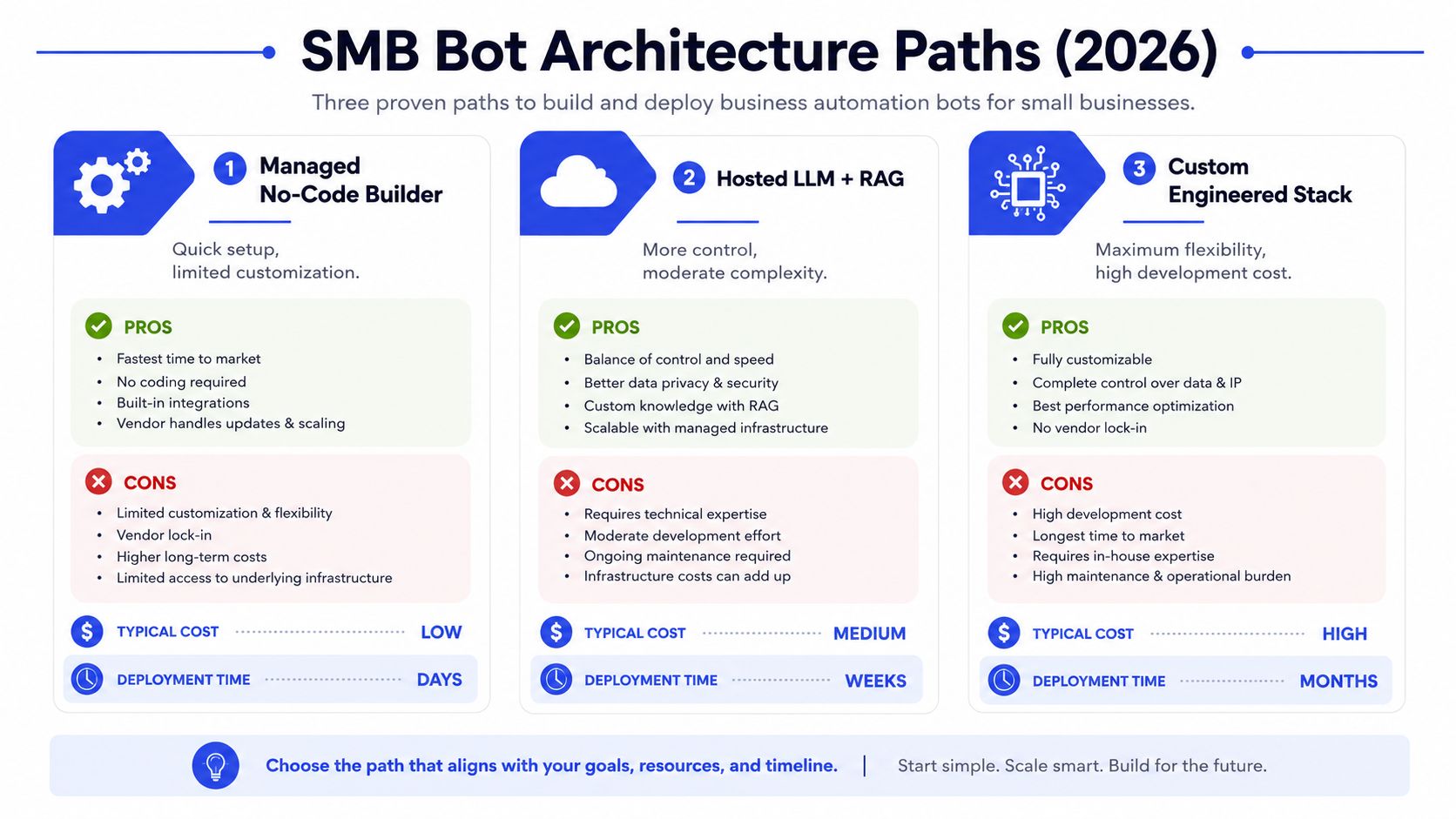
The fastest way to waste time is to open a platform before you've written the mission. A bot should begin with a short brief that names the jobs it must do, the jobs it must refuse, and the point at which it should hand off to a human. That brief becomes your filter for everything else, from knowledge sources to escalation logic.
Two useful briefs look very different
A SaaS company usually needs the bot to explain pricing tiers, qualify trial requests, and surface objections. An e-commerce store has a different shape, it needs shipping answers, returns policy coverage, and sizing help, while wholesale enquiries move to a person. Those are not the same workflow, so they shouldn't share the same design assumptions.
A practical way to scope the mission is to write a tiny decision matrix.
Question | If yes | If no |
|---|---|---|
Does the bot answer a repeat question? | Add it to core intents | Leave it out |
Does the answer come from a verified page? | Include the source | Don't train on it |
Does a human need to approve the next step? | Escalate | Keep it automated |
Can success be measured clearly? | Launch the use case | Rework the scope |
That framing keeps the bot from turning into a “do everything” assistant that does nothing well. It also forces source curation, which is where many teams cut corners. A pricing page, FAQ, return policy, or product page is far more reliable than a generic content dump pulled from the whole site.
A good one-page brief should be short enough that a vendor, an in-house marketer, and a support lead can all read it without interpretation games. If the business can't agree on the top three intents, it's too early to build.
Choosing Architecture That Fits a Small Team
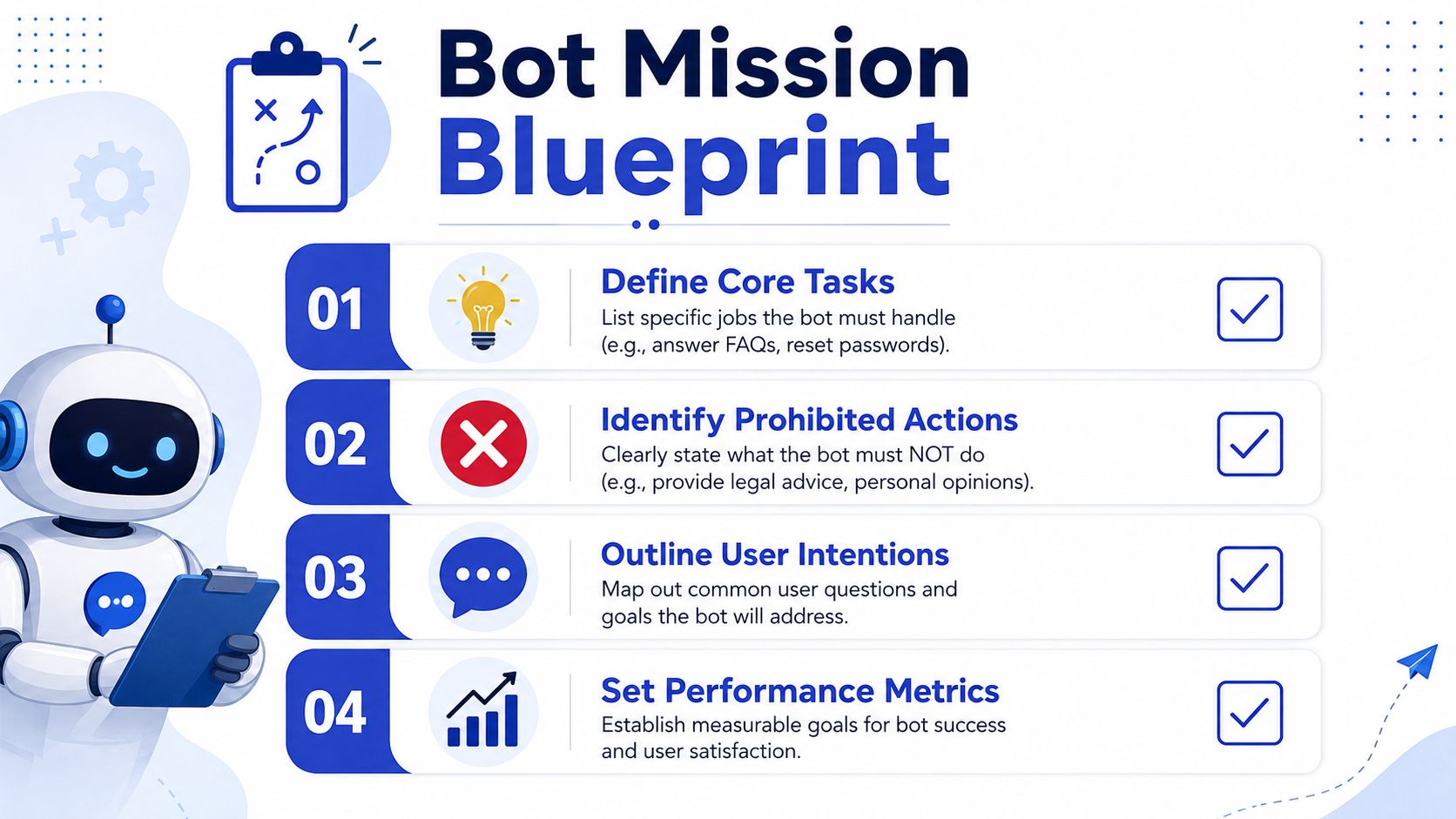
SMBs don't need the same stack, and pretending they do creates expensive confusion. A solo founder with a few dozen FAQs needs speed and simplicity. A SaaS company with a larger help centre and more ownership over its content may want retrieval over a knowledge base. A more technical team might want deeper control, but only if they're ready to operate it.
Three routes, three levels of responsibility
A managed no-code builder is the fastest path when the goal is to launch on a small set of pages. Setup is simple, maintenance is light, and the trade-off is limited customization. That's often enough for lead qualification on a pricing page or support deflection on a high-traffic FAQ.
A hosted LLM with retrieval gives more control because the bot can search your own content before it answers. It works best when you have a cleaner content library and someone who can own updates. Guidance like Webclaw's guide to agent tools is useful, because it frames the tool layer as part of the workflow rather than as a shiny feature list.
A custom engineered stack adds the most flexibility. It also adds the most operational burden, because embeddings, retrieval, and monitoring all become someone's job. For many SMBs, that level only makes sense when the content volume is high or the bot is central to the product experience.
If the team can't explain who updates the answers, the architecture is too complex.
The oldest bot repository on GitHub appeared only four days after GitHub launched in 2008, and bot code repositories went from almost 100 in 2008–2009 to more than 4,000 by April 2016, which is a good reminder that bot-building scaled into ecosystems rather than isolated projects (Kollanyi's research). That's also why a no-code builder can be the right starting point for SMBs, while a custom stack usually belongs to teams with a clear technical owner.
If you want a practical starting point, this internal guide on no-code chatbot builder choices fits the same decision tree. The default for most SMBs is simple, launch on a few high-intent pages first, then graduate only when the answer library or routing complexity demands it.
Training the Bot on Your Real Knowledge
The bot gets useful when it stops guessing. That starts with training it on the pages your buyers use, not every page your marketing team has ever published. For most SMBs, the core set is small, pricing, product specs, FAQs, shipping policy, returns policy, and a few high-intent landing pages.
Build the knowledge set from verified pages only
Long pages should be split into small, topic-focused chunks before they go into the bot. That makes retrieval cleaner and reduces the chance that the agent mashes together two unrelated answers. The practical guidance for deployment recommends chunking documents, converting them into embeddings, and storing them in a vector database for similarity search, then testing the top expected queries before launch (FastBots guidance).
A pricing page is a good training source because the answers are usually stable and specific. A knowledge base is another strong source, provided it's maintained. If you need a working definition of the source type itself, this internal explainer on what a knowledge base is fits how organizations should think about it, as structured content that can be verified and refreshed.
Train the bot so it can distinguish between similar questions. “How much does Pro cost?” should map to the pricing section. “Is there a free trial?” should map to the trial policy. “Why is your enterprise tier so expensive?” should trigger a fuller explanation or a handoff, because that's more than a factual lookup.
Smart intent is about meaning, not keywords
The better bots do not rely on exact phrasing. They interpret Smart Intent, which means they infer what the visitor is trying to do even if the question is messy or incomplete. That's what keeps the bot from sounding brittle when someone types fast, makes a typo, or uses a different phrase than the one on your website.
Source attribution matters here. If the bot can point back to a verified page, it can stay grounded. If it can't find a match with enough confidence, it should say it doesn't know and hand the question off. That's far better than inventing an answer and eroding trust.
Train the bot on what your site already proves, not on what your team hopes is true.
The best setup is usually boring on purpose. Verified source material, a narrow list of intents, and a fallback path that protects the customer experience. That's how the agent stays helpful without drifting into improv.
Defining Intents and Escalation That Actually Help Your Team
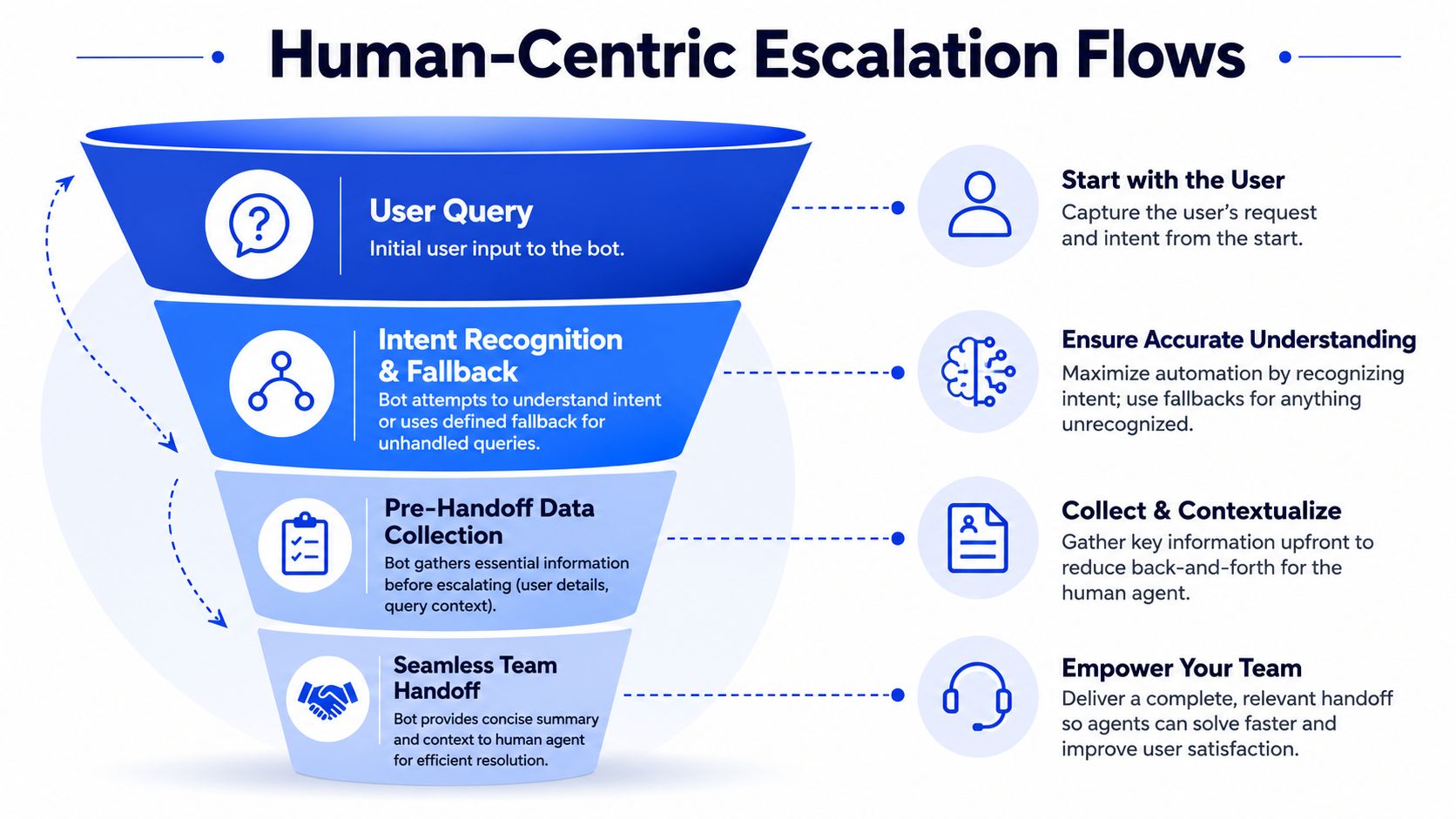
A handoff that lands in a blank contact form wastes everything the bot just learned. A good escalation package does the opposite, it gives the human team the visitor's intent, the original question, and the context needed to respond fast. That's the difference between automation that helps and automation that just moves work around.
A useful handoff beats a generic contact form
A generic “Contact us” flow usually asks the visitor to start over. The user repeats the issue, the rep guesses at the intent, and the business loses time. A smarter flow captures whether the visitor is asking about pricing, a refund, account access, wholesale, or a product detail, then routes the note to the right inbox or Slack channel with a tight summary.
That summary should be short and concrete. Include the intent, any relevant page the visitor was on, and the exact question they asked. If the issue is pre-sales, the sales team should see it. If it's a support problem, the support queue should get the handoff. If it's sensitive or ambiguous, the bot should escalate immediately rather than trying to stretch its own confidence.
The recent industry survey showing 67% of consumers in 2025 expect an AI chatbot to immediately answer simple questions makes the escalation problem sharper, because bad fallback handling is no longer a small annoyance, it's visible friction (Lovable's deployment guide).
Set the rules before customers force them on you
A few trigger patterns show up across e-commerce, SaaS, and agencies:
Pricing objections: route to sales when the visitor is comparing tiers or asks for custom terms.
Refund requests: escalate fast, because policy nuance matters and the tone has to be right.
Account access issues: hand off when the bot can't verify identity or reset access safely.
Wholesale or partnership enquiries: bypass the standard support flow entirely.
Low-confidence answers: stop the bot before it starts guessing.
If you want a clearer way to think about ownership and response quality, the internal post on chatbot analytics aligns with the same discipline, because escalation quality only improves when the team can see where the bot is failing.
The right design rule is simple. The bot should save the human time, not create a second queue of messy context.
Testing, Deploying, and Measuring the First 30 Days
Launch day is the start of QA, not the end of it. The teams that get value from bots don't treat rollout as a one-time event. They test against real questions, watch live traffic, and fix the places where the bot drifts or misunderstands the customer.
Start with the queries people actually ask
A practical test set should include the obvious questions, the awkward ones, and the partially formed ones. The guidance for chatbot deployment recommends validating the top expected queries, starting with one high-intent page or use case, and tracking resolution rate, escalation rate, and user satisfaction while the bot iterates (FastBots guidance).
That test set should live alongside your rollout notes, not in somebody's head. Make the internal team run through it before the bot goes live, then watch live traffic on one channel first. A staged rollout usually makes more sense than turning on every channel at once.
Use transcripts, not vibes, to judge health
The first warning sign is repeated fallback language. If the bot keeps saying it doesn't understand, the intent map is too thin or the knowledge source is too weak. Another warning sign is a handoff summary that no longer matches what the user asked, which usually means the bot has drifted after a product or policy change.
That's also where a performance testing mindset helps. PageSpeed Plus's testing framework is a good reference for the discipline of checking behavior before the user feels the failure, and that same idea applies to bot operations even though the channel is different (PageSpeed Plus testing framework).
A sensible 30-day rhythm looks like this:
Week one: watch transcripts daily and fix the worst misunderstandings.
Week two: check whether the right intents are being captured.
Week three: review whether escalation summaries are useful to humans.
Week four: decide whether to expand to another page or channel.
The actual goal is not just answers. It's stable answers that stay correct after the first week of enthusiasm fades.
Common Pitfalls and a Sustainable Optimisation Loop
Most bot failures are predictable. Teams train on a full sitemap instead of a curated set of pages. They ignore fallback handling. They launch and never revisit the content after pricing, product, or policy changes. Then they blame the platform when the bot starts sounding stale.
The teams that win keep the loop small and visible
A sustainable operating rhythm is easy to describe and hard to skip. Review transcripts weekly, refresh source pages monthly, expand intents quarterly, and assign one internal owner who has time to act. That owner does not need to be technical, but they do need enough authority to update sources, fix escalation paths, and decide when the bot should stop answering.
The other common mistake is trying to make the bot replace a person instead of supporting one. If the business really needs outbound follow-up, a bot can qualify and route the lead, but a human still has to close the loop. That's why some teams pair the bot with Hire SDRs when they need consistent sales follow-up after the first conversation.
A bot that gets reviewed and retrained keeps getting better, while a neglected one quietly becomes part of the problem.
The late-2010s and early-2020s made chatbots technically mature and widely available as AI gained prominence, but maturity doesn't mean “set and forget” (PMC review of chatbot evolution). The bot's real value comes after launch, when the business keeps its answers current and its escalation paths clean.
For SMBs, e-commerce stores, SaaS teams, and agencies building bots for clients, that ongoing review loop is the difference between a cost centre and a conversion asset. The bot doesn't need to be magical. It needs to stay accurate, stay scoped, and keep doing the unglamorous work of answering, qualifying, and handing off without friction.
If you want a bot that answers from your actual pages, qualifies visitors on high-intent pages, and escalates cleanly when a human should take over, Chatgrow is built for that workflow. It lets you train custom agents on your website content, deploy them quickly, and keep them current as your business changes, so you can turn more conversations into customer actions. Visit Chatgrow to see how it fits your support and lead qualification setup.
Related Posts
Continue Reading
More articles from the ChatGrow Team.