
Blog
Insurance Agents Software: A Guide to Boosting Agency ROI
By
Nelson Uzenabor

A lot of agency principals reach the software decision at the same point. The book is growing, the team is busy, and everyone is still holding the operation together with spreadsheets, inbox folders, calendar reminders, and whatever notes were left in the management system years ago. Quotes get turned around, but not always fast enough. Renewals happen, but only because somebody remembered to check. Follow-ups depend too much on individual memory.
That setup works until it doesn't. One missed document, one lead that never got called back, one producer who keeps private notes in a notebook, and the cracks start costing real money.
Insurance agents software is supposed to fix that, but the market is crowded and the demos all look polished. The practical question isn't "Which platform has the longest feature list?" It's "Which system will reduce wasted work, tighten compliance, and give the agency more selling capacity?"
The timing matters. The global insurance agency software market was valued at $3.4 billion in 2023 and is projected to reach $6.7 billion by 2032, growing at a CAGR of 7.8%. That isn't a fad. It's a sign that agencies are moving core operations into systems that can handle quoting, servicing, documentation, and workflow at scale.
Table of Contents
Beyond Spreadsheets and Sticky Notes
The agency that waits too long to modernize usually shows the same symptoms. Producers re-enter the same client data in multiple places. CSRs search email threads to figure out what was promised. Renewal work piles up in batches because nobody trusts the reminders. The office stays busy, but the busyness isn't the same thing as control.
I've seen owners mistake motion for productivity. If five people touch the same account across email, a spreadsheet, a carrier portal, and a paper file, the agency hasn't built redundancy. It's built drag.
Practical rule: If your team needs memory and workarounds to complete routine policy servicing, your process isn't stable.
Insurance agents software matters because it centralizes the routine work that usually creates hidden losses. It gives the team one place to track client interactions, policy details, tasks, documents, renewal activity, and pipeline status. More important, it creates consistency. The same account doesn't get handled three different ways depending on who picked up the phone.
That consistency is where software starts paying off. Not in a flashy dashboard. In the quiet reduction of avoidable mistakes, duplicate work, slow handoffs, and unrecorded conversations.
Agencies don't need more tech for its own sake. They need a better operating rhythm. The right platform gives them that by replacing scattered habits with repeatable workflows the whole team can follow.
What Is Insurance Agent Software Really
Insurance agents software isn't one tool. It's the agency's operating system. If you think of the agency as a living business, this software acts like the digital nervous system. A prospect comes in, the system records the contact, moves the lead toward a quote, ties the policy to servicing activity, logs communications, tracks commissions, and keeps the account visible at renewal.
Your operating system, not just another app
That distinction matters because many first-time buyers shop as if they're choosing a single isolated app. They compare a CRM here, a quoting tool there, maybe an e-signature add-on, and assume they can stitch everything together later. Sometimes they can. Often they end up with four partial tools and no clean workflow.
A useful way to frame it is this: your software should reflect how the agency operates on an ordinary Tuesday. New business, endorsements, remarketing, certificates, billing questions, claims follow-up, and renewals all have to live inside the same operational picture.
For a plain-language overview of how an agency management system fits into an agency, that resource is worth reviewing before you sit through vendor demos.
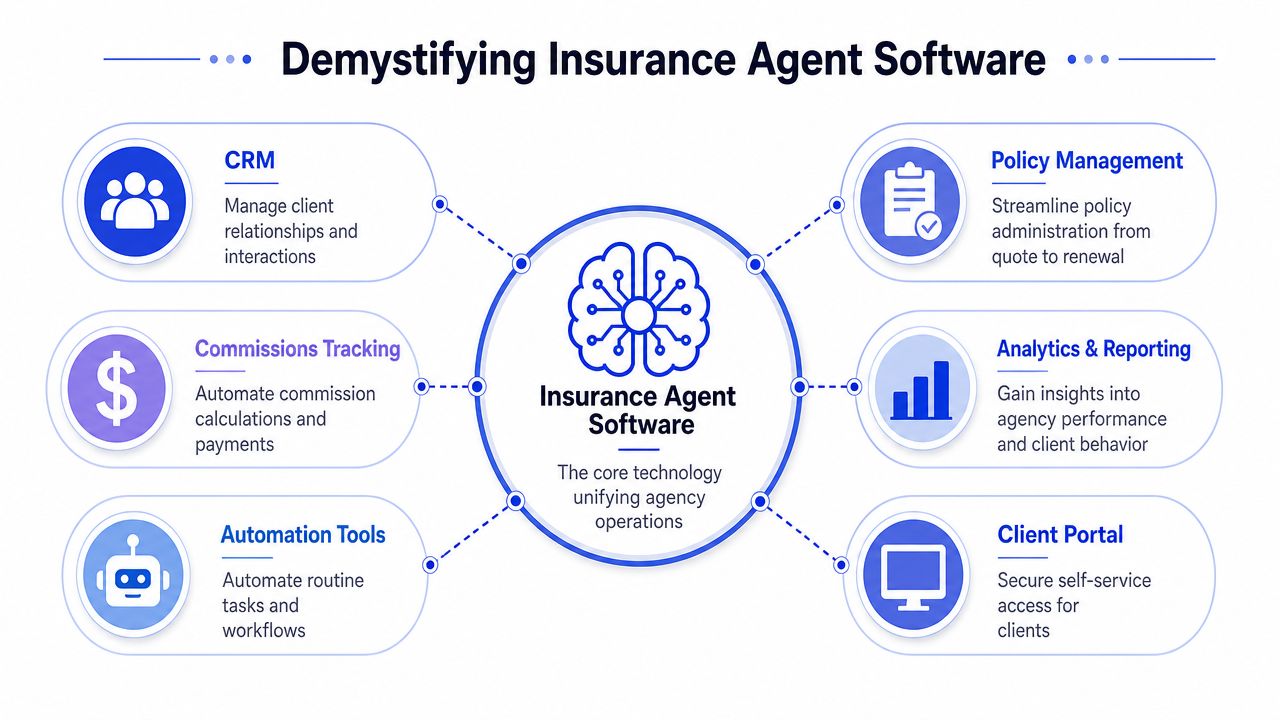
The three categories most agencies need to understand
Most buyers can simplify the market into three buckets:
Agency Management System The AMS is the core record system. It holds policy data, client records, documents, notes, tasks, and servicing workflows. If the agency loses track of what happened on an account, the AMS should be where the answer lives.
CRM A CRM handles the relationship side of the business. It tracks prospects, follow-up cadence, pipeline stage, marketing touches, and sales accountability. Some platforms combine CRM and AMS functions well. Others are stronger on one side than the other.
Quoting and comparative raters These tools focus on speed at the front end. They help producers or account staff move from intake to quote more efficiently, especially when they need to work across multiple carriers.
The best setups don't necessarily use the most products. They use the fewest products needed to create one reliable flow of information.
A software stack that looks impressive in a demo can still fail if staff have to re-key data or check three systems to answer a simple client question.
That is the standard to use. Not feature density. Operational coherence.
The Core Features That Drive Agency Growth
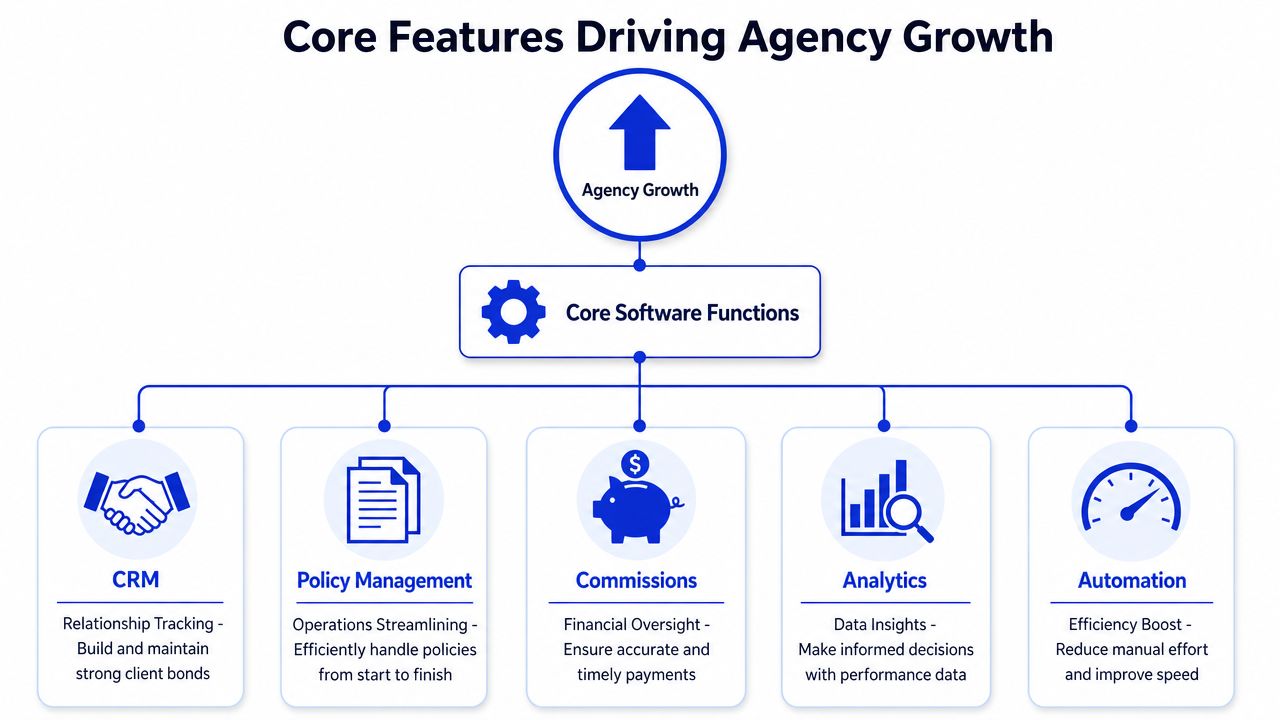
Good insurance agents software doesn't drive growth because it looks modern. It drives growth because it removes friction from the exact moments where agencies usually lose revenue: lead response, policy servicing, renewals, and cross-sell follow-up.
A visual map helps before getting into the details.
CRM that prevents lead leakage
A strong CRM does one thing exceptionally well. It makes it hard for a prospect to disappear.
When an agency uses inboxes and individual memory as the sales system, lead handling gets uneven fast. One producer calls immediately. Another waits until tomorrow. Someone else leaves no note, so the next person has no idea whether the lead is warm, cold, or already quoted.
A CRM fixes that by forcing a record of contact attempts, next steps, and ownership. It also supports more disciplined handoffs between marketing, producers, and service staff. If your current process allows "I thought someone else handled it," you don't have a process.
Policy workflows that stop the service scramble
Policy management features matter because they reduce operational churn after the sale. That's where many agencies underinvest. They buy for quoting speed but ignore what happens over the life of the account.
The systems worth considering should support:
Renewal tracking: Staff should know what is coming due and what action is required.
Document management: Endorsements, applications, forms, and signed records should be tied to the account.
Task routing: Work should move to the right person without hallway conversations or side notes.
Client history: Anyone handling the account should understand prior conversations and service issues.
That operational discipline shows up in retention. Agencies using integrated AMS platforms with automated renewal notifications and commission tracking achieve 35% higher client retention rates and 25% faster cross-sell conversion compared to those using siloed tools.
The second-order effect is just as important. When routine service work becomes more orderly, experienced staff spend less time cleaning up basic process misses and more time handling higher-value conversations.
A short video can help if you want to see how agencies think about workflow modernization in practice.
Quoting, commissions, and AI-assisted intake
Quoting tools earn their keep on speed and consistency. The best ones reduce duplicate entry and keep the intake process structured enough that staff don't forget critical underwriting details. If you're evaluating options, it's useful to look at an example of insurance quoting automation success to understand what a smoother quote journey can look like in practice.
Commission tracking sounds less exciting, but it often determines whether principals trust the system. If commission data lives outside the main workflow, reconciliation becomes a side project. If it lives inside the platform, producers and managers get cleaner visibility into production and payout status.
Then there is AI-assisted intake, where agencies need judgment. AI can help with early lead qualification, basic question handling, and routing inquiries to the right human. But agencies should evaluate those tools as part of a broader service workflow, not as a novelty purchase. A useful benchmark comes from outside insurance as well. Teams looking at support automation often compare workflows with broader customer service stacks, and this guide to a customer support platform is a good example of how to think about routing, handoff, and knowledge coverage beyond a simple chatbot widget.
Calculating the Real ROI of Your Software Investment
Most software purchases get justified the wrong way. The owner asks whether the subscription cost seems reasonable, watches a demo, and compares feature lists. That skips the central question. What is the agency already losing by staying with the current setup?
Start with the cost of inaction
One of the clearest ways to look at this is the 27-hour waste problem. Agents waste 27 hours monthly on decision-making and inefficient tech stacks that only work in demo scenarios. That number gets attention, but its true value is what it helps you calculate.
If those hours are spread across producers, account managers, and service staff, the loss isn't just payroll time. It also includes delayed response, slower remarketing, inconsistent follow-up, and lower capacity for revenue-generating work.
Stop treating software as an expense line and start treating process waste as the baseline cost.
The easiest way to frame ROI is to calculate three buckets of loss in your current agency:
Labor drag Count time spent re-entering data, searching for information, checking status manually, and fixing preventable mistakes.
Revenue leakage Look at slow lead response, weak renewal follow-up, and missed cross-sell opportunities caused by poor visibility.
Management overhead Include the owner or operations manager's time spent chasing updates, reconciling reports, and compensating for broken workflows.
For a broader way to measure service outcomes after deployment, this guide to customer service key performance indicators is a useful complement to an insurance-specific ROI discussion.
A simple ROI worksheet for agency owners
You don't need a finance model with twenty tabs. Start with a one-page worksheet.
ROI input | What to calculate |
|---|---|
Wasted time | List recurring manual tasks by role and estimate monthly hours lost |
Delayed sales activity | Identify where lead follow-up or quote turnaround stalls |
Renewal friction | Note how often staff rely on memory or side lists instead of system prompts |
Error cleanup | Record how often the team fixes missing documentation or duplicate entry |
Owner intervention | Estimate the hours leadership spends checking on routine work |
Then ask a harder question. If software removed only part of that waste, would the gain justify the investment? In many agencies, the answer is yes well before every feature is fully used.
The software that wins isn't always the most advanced one. It's the one your team adopts thoroughly enough to remove recurring operational waste.
How to Choose the Right Insurance Software
Software selection goes wrong when agencies buy for the demo and not for the day-to-day. A vendor shows polished dashboards, smart automation, and an elegant pipeline. None of that matters if your staff won't use it, your carriers don't connect cleanly, or the implementation turns into six months of confusion.
What separates a usable platform from a shelfware purchase
The first filter is fit. A small personal lines agency, a life-focused shop, and a commercial lines operation don't carry the same workflow complexity. The right platform should match your current business while leaving room for the next phase of growth.
I usually tell principals to evaluate five things before they get emotionally attached to a product:
Workflow fit: Can the system support how your team sells and services policies?
Integration quality: Does it connect to carrier workflows and your existing tools without constant manual work?
Ease of use: Will experienced staff and newer hires both work in it without resistance?
Reporting trust: Can you pull management visibility from it, or will you still need shadow spreadsheets?
Vendor support: When the rollout gets messy, will you have real help?
If you're considering automation-heavy options or AI-enabled workflows, it also helps to understand the wider market of AI customer service software so you can separate practical operational tools from shiny add-ons.
Buy the platform your team can run every day, not the one that performs best in a guided demo.
Key software evaluation criteria
Use a structured question set with every vendor. That makes side-by-side comparison far easier than relying on memory after multiple demos.
Criteria | Key Question to Ask |
|---|---|
Agency fit | Which agency types and lines of business does your platform handle best? |
Implementation | Who owns onboarding, and what does the rollout process look like for a team our size? |
Data migration | What data can you import from spreadsheets, legacy systems, and document files? |
Integration | Which carrier and third-party connections are standard, and which require extra work? |
User adoption | How do you train staff who have different technical comfort levels? |
Reporting | Which operational and production reports are available out of the box? |
Permissions | How do you control access by role, office, or producer? |
Compliance support | How are notes, documents, and user actions recorded for audit purposes? |
Customization | What can we configure ourselves, and what requires vendor services? |
Data ownership | If we leave, how do we export our records and documents? |
Support model | What happens when we need help after go-live? |
The strongest buying move isn't negotiating price first. It's making vendors show how a live account moves from lead to quote to policy to service to renewal inside their system.
Navigating Deployment Security and Compliance
Implementation problems usually have less to do with software quality and more to do with rollout discipline. Agencies try to convert every workflow at once, migrate messy data without cleanup, and assume the team will "figure it out" after a few training sessions. That approach creates distrust before the platform has a chance to prove itself.
Rollout without breaking daily operations
A better rollout is phased and boring. That is a compliment.
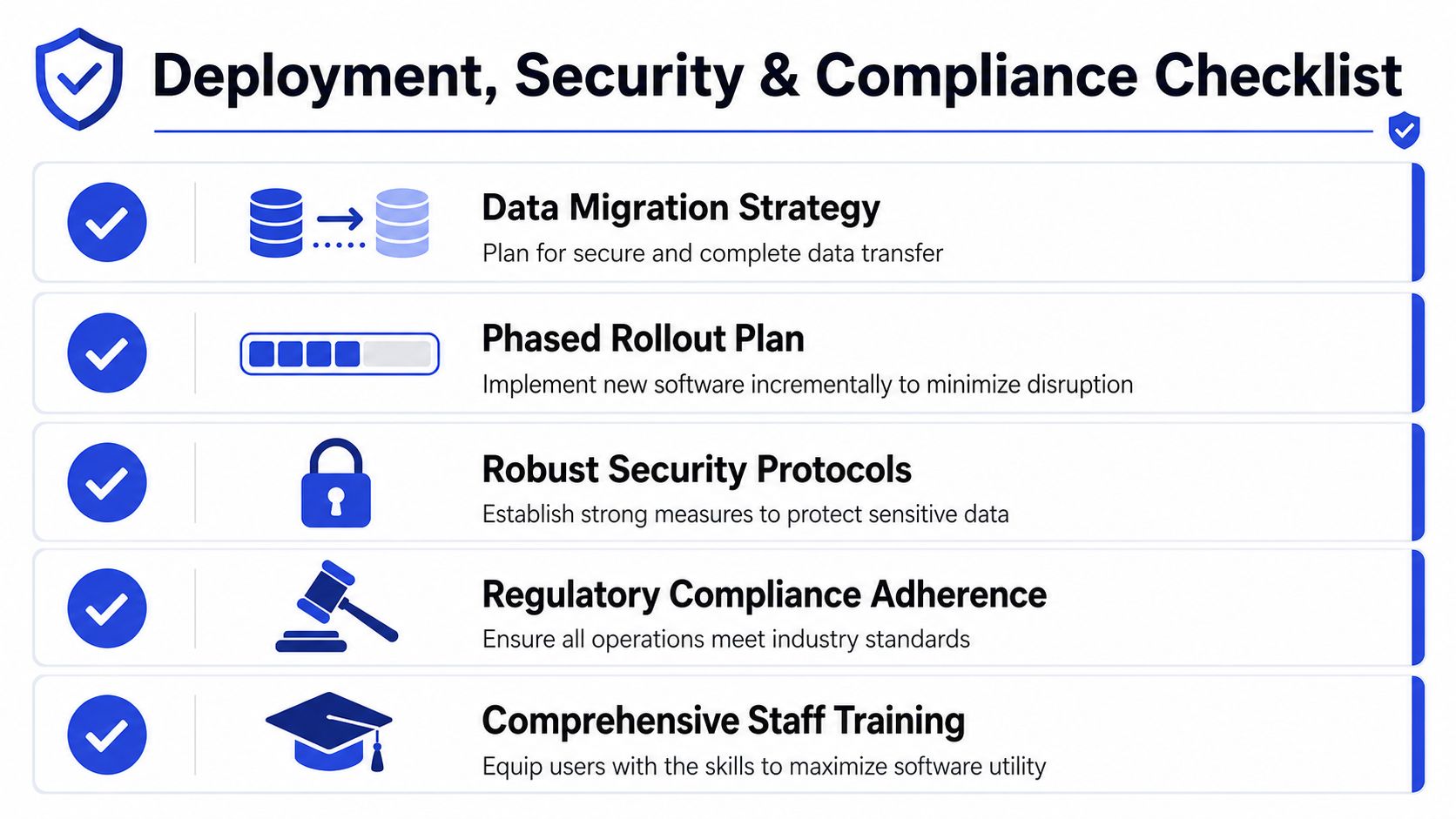
Start with one line of business, one office, or one workflow cluster. Clean the data before importing it. Decide which fields are mandatory. Set rules for notes, document naming, and task ownership. Then train people on the specific actions they perform every day, not on every feature the platform includes.
The agencies that handle this well also make training part of operations instead of treating it like a one-time event. That matters because the platform only works when the staff uses it consistently enough to produce complete records.
Compliance is now broader than licensing paperwork
Compliance needs to be built into the workflow, not taped on afterward. Modern systems should maintain audit-ready records of client interactions, documents, authorizations, and servicing activity. If your software can't show who did what, when it happened, and what the client approved, you are taking avoidable risk.
That risk is expanding as agencies adopt AI tools. Underwriters now ask for five categories of documentation to determine liability and premium pricing: agent scope, model supply chain records, pre-deployment testing, production monitoring, and incident logs. This catches many agencies off guard because they evaluate AI tools on convenience and ignore whether they can document governance.
Here is the practical takeaway:
Document scope clearly: Define what the AI tool is allowed to do and what must go to a human.
Keep records on the model supply chain: Know what underlying tools or vendors are involved.
Retain testing evidence: Save what you reviewed before deploying the tool.
Monitor production use: Track how the system behaves once live.
Log incidents: Record errors, complaints, and corrective actions.
Compliance used to mean keeping your paperwork organized. Now it also means proving your automation is governed.
That shift is one of the biggest reasons to evaluate insurance agents software as infrastructure, not just convenience.
Your Next Steps From Trial to Transformation
A first software investment shouldn't begin with a broad replacement project. It should begin with one clear operational problem. Usually that's lead follow-up, renewal discipline, or scattered client records.
Use a simple sequence:
Calculate your current waste Put numbers around time lost, delayed work, and cleanup effort.
Pick one bottleneck first Fix the process that causes the most repeated friction across the team.
Run a low-risk trial Test with a defined workflow, a small user group, and clear adoption expectations.
That approach keeps the decision grounded. You are not buying software to "go digital." You're buying a better way to run the agency.
If part of your roadmap includes AI-assisted intake or after-hours question handling, test it in a narrow lane first so you can evaluate quality, escalation, and recordkeeping before expanding.
The agencies that get real transformation out of software don't start bigger. They start cleaner.
Frequently Asked Questions
How long does implementation usually take
It depends on the complexity of your agency, the quality of your existing data, and how many workflows you want to change at once. A focused rollout moves faster than a full operational overhaul. Agencies usually do better when they phase deployment instead of trying to migrate every process on day one.
Can we migrate from spreadsheets or an older system
Usually, yes. The hard part isn't whether data can move. The hard part is whether the data is clean enough to be useful after migration. Before importing anything, review duplicate records, missing contact details, inconsistent policy naming, and document organization. Bad data imported quickly is still bad data.
Should a small or midsize agency choose cloud-based or on-premise software
Most small and midsize agencies now lean toward cloud-based platforms because they are easier to access across offices and remote teams, and they reduce the burden of maintaining local infrastructure. On-premise systems can still make sense in specific environments, but they require more internal oversight and usually create more friction when you want modern integrations.
What compliance feature matters most if we are choosing between vendors
Auditability. You need to know whether the platform records client interactions, document history, user actions, and authorization status in a way your team can retrieve later. Intelligent compliance audit trails in modern AMS can reduce preparation time for regulatory audits by up to 70% and lower the risk of fines from undocumented interactions by 90%. That has direct operational value, not just regulatory value.
Will better software automatically improve production
No. Software amplifies discipline. If producers don't log activity, if service staff work outside the system, or if management tolerates side processes, even a strong platform will underperform. Good deployment, clear rules, and repeat training matter as much as the product itself.
What is the biggest mistake first-time buyers make
They buy too broadly and implement too loosely. A better approach is to define the exact workflow problem, assign ownership, measure adoption, and expand once the first use case is stable.
If you're ready to test AI-assisted support or lead qualification without turning your whole tech stack upside down, Chatgrow is a practical place to start. You can train an agent on your site content, FAQs, and service information, deploy it quickly, and use the trial period to see how well it handles routine questions and escalates higher-intent conversations to your team.
Related Posts
Continue Reading
More articles from the ChatGrow Team.


