Blog
What Is a Customer Support Platform? a 2026 Guide
By
Nelson Uzenabor
Most businesses don't shop for a customer support platform because they love software. They shop because support has started slipping through the cracks.
It usually starts small. One customer sends an email. Another replies to an Instagram DM. A third fills out a website form, then follows up in chat because nobody answered fast enough. Your team scrambles, copies links into Slack, forwards screenshots, and hopes the person handling the issue has the full story. Sometimes they do. Often they don't.
That's the point where support stops being “busy” and starts becoming operational risk. If one customer asks for a refund, another needs onboarding help, and a third is ready to buy but has a last-minute objection, a shared inbox won't hold the system together anymore.
Table of Contents
The Support Chaos Before the Calm
A small business can run on hustle for a while. Support often lives in a patchwork of Gmail, social DMs, a contact form, maybe WhatsApp, maybe a founder's personal inbox, and a few saved replies in someone's notes app. That setup works right up until volume, staff changes, or product complexity push it past its limit.
Then the symptoms show up fast.
One agent answers the same question three different ways. A loyal customer gets asked to repeat their order number twice. A lead with buying intent waits too long because the team treated their message like a routine support request. Nobody is trying to create a bad experience. The system is doing it for them.
What fragmented support really costs
The primary cost isn't only slower replies. It's lost context.
When customer history lives in separate tools, your team can't see the full conversation path. They see a single message, not the relationship behind it. That leads to clumsy handoffs, inconsistent answers, and a support process that depends too much on memory.
Practical rule: If your support quality depends on one team member remembering what happened last week, you don't have a system. You have tribal knowledge.
This is why the category has grown so aggressively. The customer service software market was valued at about $14.9 billion and is projected to reach $68.19 billion by 2031, with a 20.94% CAGR from 2024 to 2031, according to AnswerConnect's customer service statistics summary. That same market summary says North America held the largest share in 2021 and is expected to keep that lead through 2030. Buyers aren't treating support software like a nice extra anymore. They're treating it like infrastructure.
What order looks like
A customer support platform fixes the hidden problem first. It creates one operational record of the customer, the conversation, and the next action.
That doesn't mean every ticket gets solved automatically. It means your team stops guessing. The platform becomes the place where messages enter, get routed, get answered, get escalated, and get measured.
For most SMBs, that's the moment support shifts from reactive cleanup to a repeatable process.
What Exactly Is a Customer Support Platform?
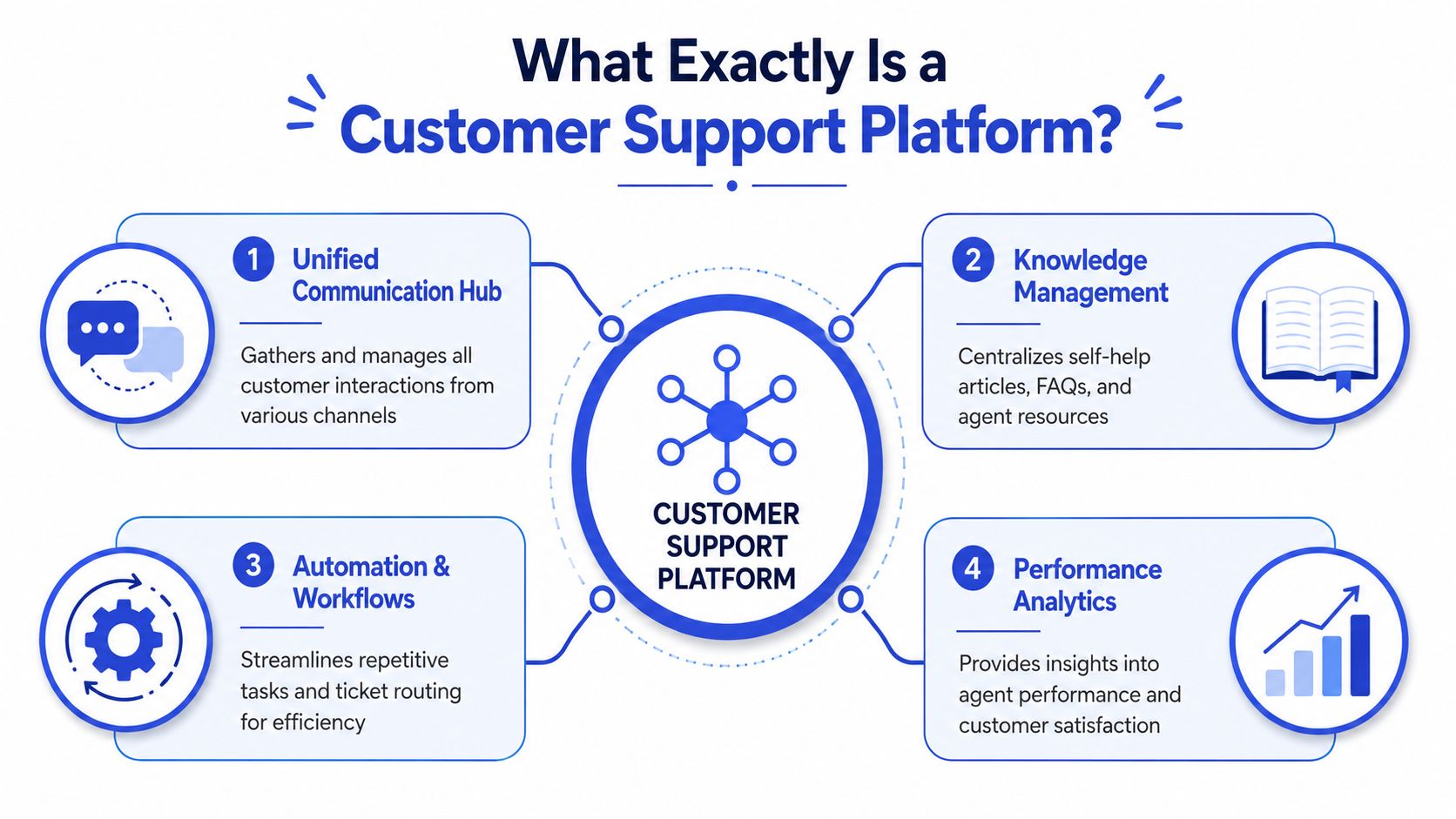
A customer support platform is the system your team uses to receive, organize, answer, route, and learn from customer conversations across channels.
For an owner choosing software, the more useful definition is this: it is the operating layer for customer service. It gives your team one place to manage the request, the customer record, and the next step.
A central kitchen is a better comparison than a stack of inboxes
A busy restaurant does not let each server cook meals their own way. Orders go through the kitchen, ingredients live in one place, and the team works from the same standards. That is how the business stays consistent during a rush.
A customer support platform plays the same role for service operations.
Email, chat, contact forms, and social messages feed into one system. Your team can see who the customer is, what they asked before, what they bought, and what happened last time. Instead of rebuilding the situation from scratch on every ticket, agents work from shared context and a defined process.
That matters more than the feature list. For an SMB or agency moving beyond a shared inbox, the buying question is not "Does this tool have chat, automation, and reports?" The better question is "Will this system help us make the same good decision every time a customer reaches out?"
What the platform organizes
At a practical level, a support platform brings together four layers of work:
Conversations: Messages from email, chat, forms, and social channels.
Customer context: Order history, account details, prior tickets, notes, and other records pulled in through customer data integration across your support stack.
Knowledge: Help articles, internal SOPs, policy docs, and approved answers.
Workflow: Routing rules, assignments, escalations, tags, and reporting.
That mix is what separates a platform from a mailbox. A shared inbox stores messages. A support platform stores the message, the surrounding history, and the rules for what should happen next.
Here's the difference in plain terms:
Setup | What happens when a new customer message arrives |
|---|---|
Shared inbox | Someone notices it, guesses who should handle it, and replies manually |
Support platform | The system logs it, adds context, routes it, and preserves the record |
Some teams get distracted by the technical side here. The architecture matters less than the operating result. According to Daffodil's architecture walkthrough for a customer support AI agent, these systems are often built in layers such as interface, language processing, context management, orchestration, and integrations. For a buyer, the practical takeaway is simpler: the platform should understand the request well enough to keep the conversation coherent and connect it to the systems your business already uses.
A good customer support platform helps your team produce consistent answers, cleaner handoffs, and a record you can trust when something goes wrong.
That consistency is usually the first payoff.
The Core Components of Any Good Platform
Buyers often get pulled toward AI copilots, auto-replies, and glossy dashboards. Start lower in the stack. If the basic operating system for support is weak, the advanced layer just speeds up confusion.
For an SMB leaving a shared inbox, four components matter first. I use them as a screening framework because each one solves a failure point that shows up early in implementation.
The four pieces every platform needs
1. Unified ticketing
Every request needs one record, one owner, and one place to see what happened. That sounds simple until the same customer emails support, opens chat, and replies to an old thread two days later. If those interactions sit in separate places, your team wastes time piecing the story together and customers get duplicate or conflicting responses.
A good ticketing layer works like an air traffic control tower. It does not answer the question by itself. It makes sure nothing important circles overhead without a landing plan.
2. Multi-channel intake
You do not need to turn on every channel a vendor offers. You do need to capture the channels your customers already use and feed them into the same process. For some SMBs, that is email plus a website form. For others, it includes chat, WhatsApp, or social DMs.
The trade-off is operational complexity. Every new channel can increase convenience for customers, but it also creates another stream your team has to staff, route, and measure. Add channels based on demand, not because the feature exists.
3. Reporting that reflects the work
Reporting should help a manager answer practical questions fast. What is driving volume? Which issue types consume the most time? Where do handoffs slow down? Which inboxes or teammates are overloaded?
You do not need a wall of charts. You need visibility clear enough to make staffing, training, and process decisions with confidence.
4. A knowledge base
Many teams cut corners and pay for it later. Without a maintained knowledge base, answers drift between agents, onboarding takes longer, and automation has nothing reliable to reference.
The best knowledge base is not a library no one opens. It is a working manual. It should hold customer-facing help content, internal SOPs, policy rules, and approved answers for recurring edge cases.
Why the knowledge layer carries more weight than it seems
Modern support tools increasingly depend on a centralized knowledge base plus retrieval-augmented generation, or RAG, to keep AI responses tied to real documentation. As explained in Cobb AI's guide to AI knowledge bases for customer service, the system pulls the relevant policy, FAQ, or product document first, then generates a reply from that material. In plain terms, the system checks your playbook before it speaks.
That design choice matters because many support mistakes come from recall problems, not bad judgment. An agent forgets an exception. An automated reply pulls from stale copy. A customer receives an answer that sounds polished but breaks your policy.
When you evaluate a platform, test the knowledge layer with hard questions, not easy ones. Ask whether the system can cite approved documentation, whether agents and automation rely on the same source, and whether repeated tickets lead to better articles, macros, or workflows over time.
Customer context matters just as much. If account history, plan details, or past purchases sit in another tool and sync poorly, even a strong ticketing system will produce weak decisions. That is why customer data integration for support teams is an operating issue, not just a systems issue.
The platform becomes reliable when ticket flow, knowledge, and customer context stay aligned.
That is the filter I would use before comparing any vendor's feature list.
Advanced Features That Separate Good from Great
Once the basics are in place, the next question isn't “Does this platform have AI?” It's “Where does AI remove work without creating new risk?”
That distinction matters. Some advanced features reduce queue pressure and improve response quality. Others look impressive in a sales demo but create cleanup work for your team later.

Where AI actually earns its keep
The strongest use case for AI in support is handling predictable, repetitive, low-risk work. That includes answering common questions, collecting details before handoff, suggesting replies, summarizing conversations, and routing requests to the right queue.
The business case is already strong. A Salesmate roundup of customer service statistics reports that 95% of organizations using AI say they see time and cost savings, 92% say generative AI improves service quality, AI-powered support can cut operational costs by 30%, and automating simple requests can reduce response times by 69%. The same source says up to 60% of support tickets could be handled through self-service resources, though only 36% are currently resolved that way. It also cites a benchmark where 84% of organizations say AI speeds up issue resolution, and 55% report up to 25% faster resolution times.
That's why modern support stacks increasingly combine self-service, AI triage, and human escalation. If you want a practical overview of how these systems work, AI customer support is worth understanding as an operating model, not just a feature.
What smart escalation looks like in practice
Good automation doesn't try to win every conversation. It knows when to step aside.
A strong platform should let you define handoff rules such as:
High-risk questions: Billing disputes, cancellations, legal concerns, or sensitive account changes should move to a person.
Low-confidence answers: If the system can't match the question cleanly to trusted content, it shouldn't bluff.
High-value opportunities: A support conversation that turns into a buying question may need sales or a senior rep, not a generic answer bot.
One useful benchmark for platform maturity is whether escalation includes context. A poor handoff says, “Human needed.” A good handoff includes the customer's question, relevant account details, previous steps, and a summary of what the AI already tried.
Better automation feels like a skilled dispatcher. It doesn't replace the team. It gets the right work to the right person with less friction.
The other advanced feature that separates strong platforms from average ones is proactive support. That can mean surfacing common failure patterns, suggesting articles before a ticket is submitted, or flagging conversation trends that point to a product problem. Those features don't just reduce tickets. They help support influence operations, product, and revenue.
How to Compare Different Types of Platforms
Buyers often waste time comparing products that were built for different operating models. A better approach is to start with the job your support team needs the software to do over the next 12 to 24 months.
That matters because a platform choice is less like buying a laptop and more like choosing a floor plan. If the layout fights how your team works, every process around it gets slower.
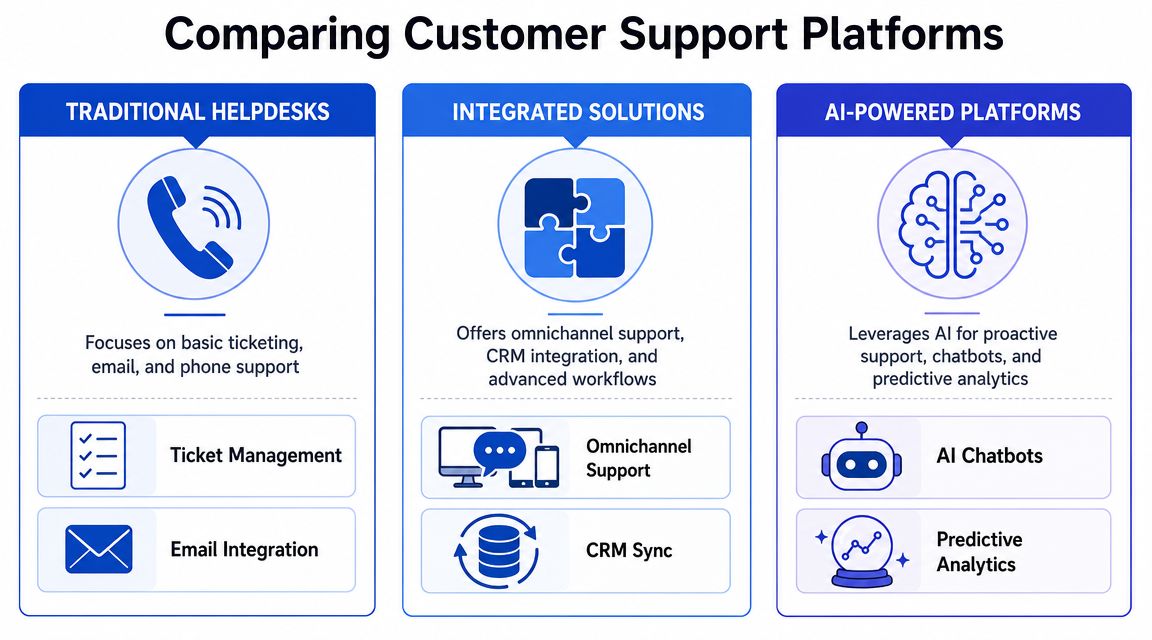
Three categories cover most of the market, and each one solves a different primary problem.
Traditional helpdesks
Think Zendesk, Help Scout, Freshdesk, or Front, depending on how your team is organized.
These tools usually fit best when support still runs mainly through email tickets, assigned ownership, saved replies, and queue management. They bring order fast, which is why they are often the right first step for SMBs replacing a shared inbox.
Best fit: SMBs with straightforward support flows
Main strength: Clear ticket ownership and repeatable agent process
Main trade-off: Cross-channel history can feel added on rather than built in
Integrated solutions
This category includes platforms that more closely integrate support with CRM, onboarding, and account management, such as HubSpot Service Hub or Salesforce Service Cloud.
The upside is shared customer context across teams. Sales can see support history. Support can see deal stage, account notes, or renewal risk. The trade-off is heavier setup, more admin work, and a higher chance that a small team buys a large system before it has a clear reason to use all of it.
If your business already runs on a CRM and support needs to work inside that system, this route can make sense. If not, it can turn into expensive sprawl.
Platform type | Usually works best for | Watch out for |
|---|---|---|
Traditional helpdesk | Teams replacing a shared inbox | Limited cross-channel continuity |
Integrated solution | Businesses already invested in a CRM stack | Higher complexity and setup overhead |
AI-powered platform | Teams prioritizing self-service and automation | Governance matters more than the demo suggests |
AI-powered platforms
These platforms put more weight on automated answers, knowledge-based responses, routing, and deployment across web chat, messaging, and other digital channels. Some sit beside your current tools. Others aim to become the main support layer.
They are a strong fit when the team handles a large volume of repeat questions, needs coverage outside business hours, or wants support conversations to help with lead qualification as well. ChatGrow fits in this group as one example. It lets businesses train custom support agents on website and knowledge content, deploy them to customer-facing channels, and escalate conversations with summaries when human follow-up is needed.
The practical comparison question across all three categories is continuity. Customers do not care which internal system owns the conversation. They care whether they have to repeat themselves.
That is why channel coverage alone is a weak buying criterion. Email, chat, and social support look good on a pricing page, but the true test is whether the platform keeps one usable history as customers move between channels. If that breaks, the team may look organized inside the tool while the customer experience still feels fragmented.
One useful filter is to map your support model before comparing vendors. A clear customer support strategy for SMB teams makes it easier to see whether you need tighter ticket control, deeper CRM alignment, or more automation first.
Choose the category that matches your current bottleneck, not the flashiest demo. That decision usually saves more time and money than any individual feature.
Your Action Plan for Choosing and Implementing a Platform
A platform decision goes wrong when owners buy for features before they've defined the support job clearly. The cleanest rollout starts with constraints, not demos.
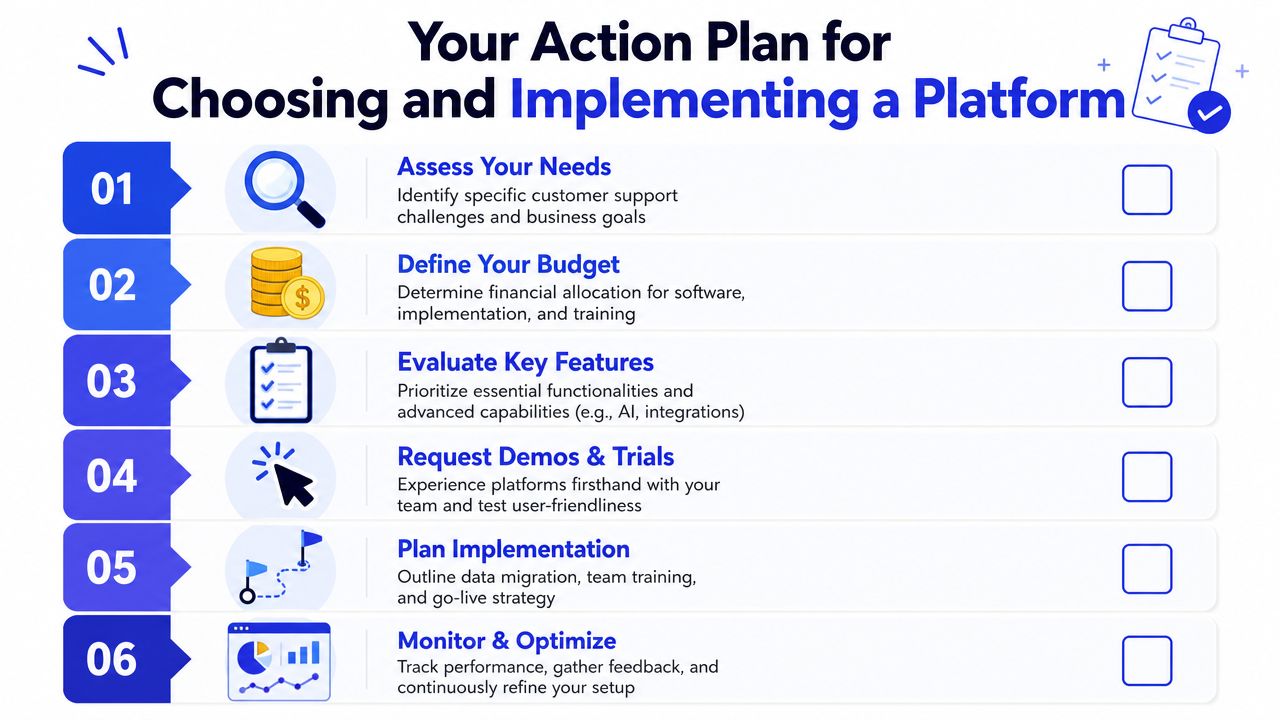
A practical shortlist checklist
Use this to narrow your options fast:
Start with channel reality: Where do customers already contact you today, and where do you want them to contact you next?
Check setup burden: If the platform needs heavy admin work before value appears, a small team may never fully adopt it.
Look for usable escalation controls: You need clear rules for what automation handles and what goes to a person.
Test knowledge management: If updating articles and approved answers is annoying, the system will decay.
Review pricing structure: Predictable pricing beats a cheap starting tier that becomes confusing after rollout.
For a broader planning lens, a documented customer support strategy helps you avoid buying software that doesn't match your service model.
A simple rollout plan
The rollout itself doesn't need to be dramatic. For most SMBs, I'd use a four-part sequence.
Train
Load your help docs, policy pages, FAQs, and common replies. Clean obvious contradictions first. Bad input creates bad support.Deploy
Start with one or two high-volume channels. Don't launch everywhere at once unless your team already has tight process discipline.
Before you go further, this overview is a useful visual reference:
Measure
Watch which questions get resolved cleanly, which ones escalate, and where customers drop out or rephrase because the answer didn't land.Iterate
Tune routing, expand the knowledge base, and tighten handoff rules. Most value comes from the second and third rounds of refinement, not day one.
What to measure after go-live
I'd keep the first dashboard simple:
First response time: Are customers getting acknowledged faster?
Containment or deflection: Which routine questions no longer require an agent?
Escalation quality: When the system hands off, does the agent have enough context to act?
Customer friction signals: Reopened issues, repeated questions, and channel switching usually reveal process gaps.
The governance question matters as much as the KPI dashboard. According to Toma's overview of AI support agent positioning, the important issue isn't only whether AI can answer questions. It's how businesses define escalation points, training boundaries, and guardrails so they can quantify containment and conversion without damaging trust.
If you can't explain when the AI should stop and a human should step in, you aren't ready to scale automation.
That's the rule that keeps ROI and reputation aligned.
Frequently Asked Questions
Do small businesses really need a customer support platform?
Not on day one. A shared inbox can work for a small team with low volume and simple requests.
The tipping point is easy to spot. Customers start repeating their story across email, chat, and social. Teammates ask, "Who replied to this?" Response times slip because nobody has a full view of the conversation. At that stage, a platform is less about adding features and more about getting control.
What should I prioritize first, ticketing or AI?
Start with ticketing, ownership, and a usable knowledge base.
AI performs best when the underlying operation is clean. If your policies are inconsistent, your articles are outdated, or your team handles the same issue three different ways, automation will spread the confusion faster. Get the workflow stable first. Then add AI where it reduces repetitive work without creating risk.
How important are integrations?
They matter when agents need context to solve issues without switching tabs all day.
If support depends on order history, subscription status, CRM notes, or account details, integrations save time and reduce avoidable back-and-forth. Without them, the platform works like a mailbox with labels. With them, it becomes the working record your team can act from.
How long does implementation usually take?
Implementation time follows process clarity more than software setup.
A straightforward rollout can happen quickly if your support rules are documented, your content is current, and one person owns the rollout. It takes longer when refund policies are vague, macros live in personal docs, and nobody agrees on escalation rules. In practice, the software is rarely the slow part. Internal alignment is.
How should I think about pricing?
Use a cost-to-value lens, not just the lowest monthly number.
Some platforms charge per seat. Others charge by ticket volume, automation usage, or feature tier. ChatGrow pricing is one example of a predictable SMB-oriented model, but the true test is whether the pricing still fits once you add staff, channels, and automation. Cheap at five agents can get expensive at fifteen if key workflows sit behind higher tiers.
When should AI escalate to a human?
Escalate when the answer affects trust, money, or judgment.
That includes billing disputes, cancellations, upset customers, edge cases, and any conversation where the system has low confidence. A good platform lets you set those rules in advance, like a front desk that knows when to route a guest straight to the manager instead of trying to improvise.
If you're evaluating your first customer support platform and want something built around AI agents, knowledge-based answers, lead qualification, and human handoff, Chatgrow is one option to review alongside more traditional helpdesk and CX tools.
Related Posts
Continue Reading
More articles from the ChatGrow Team.


