
Blog
What Is Customer Service Automation? a 2026 Guide
By
Nelson Uzenabor

Customer service automation is software that classifies incoming requests, answers routine ones instantly, and routes the rest to the right human with full context. In 2026, 85% of companies use AI or automation in customer service in some form, while 74% of businesses use chatbots for customer service and 68% use AI-powered support tools, up from 58% and 42% in 2024.
If you've ever watched the same order-status question hit your inbox again and again, you already know why this matters. The useful version of automation isn't a gimmick that replaces your team, it's a system that clears repetitive work, keeps customers moving, and hands off edge cases without making anyone start over.
Table of Contents
Customer Service Automation Solves
A founder at 11 p.m. does not need a lecture on software categories. They need the inbox to stop filling up with “Where is my order?”, “Can I change my address?”, and “Do you ship to my country?” while they are trying to finish payroll or get some sleep.
Customer service automation works best when you see it as a workflow system, not a chatbot. It reads incoming requests, handles the predictable ones on its own, and passes the rest to a person with the conversation still intact.
What it removes from the queue
The best fit is repetitive, high-volume work where the answer is stable and the decision boundary is narrow. That is why automation is useful for FAQs, after-hours coverage, lead qualification, and routing, especially for SMBs that do not have a full team on every channel.
Practical rule: if a request can be answered from a current policy, a known order status, or a fixed workflow, automation should usually touch it before a human does.
That does not mean everything should be automated. Emotional complaints, billing disputes, unusual exceptions, and anything that needs judgment still belong with a person. The point is to move the routine part out of the way so support becomes a place for real problem-solving, not copy-paste work.
The working mental model
A message comes in, the system recognizes the intent, it answers or escalates, and then it performs the action or hands it off with context. That is the same logic behind many help desk workflows, and it is why teams often pair a support stack with this help desk automation guide when they start mapping the process.
The valuable shift is from message handling to workflow handling. Once a request is treated as a sequence of steps, the system can classify intent, pull the right information, decide whether to respond or route, and preserve the thread for a human when the case falls outside the rules.
That broader view matters because teams outgrow the “FAQ bot” phase quickly. They need one system that can cover chat, email, and the other places customers already ask for help, while keeping a consistent record underneath. If you are building the content layer that supports those answers, build an AI knowledge base with current policies and clean source material.
How the Technology Behind Automation Works
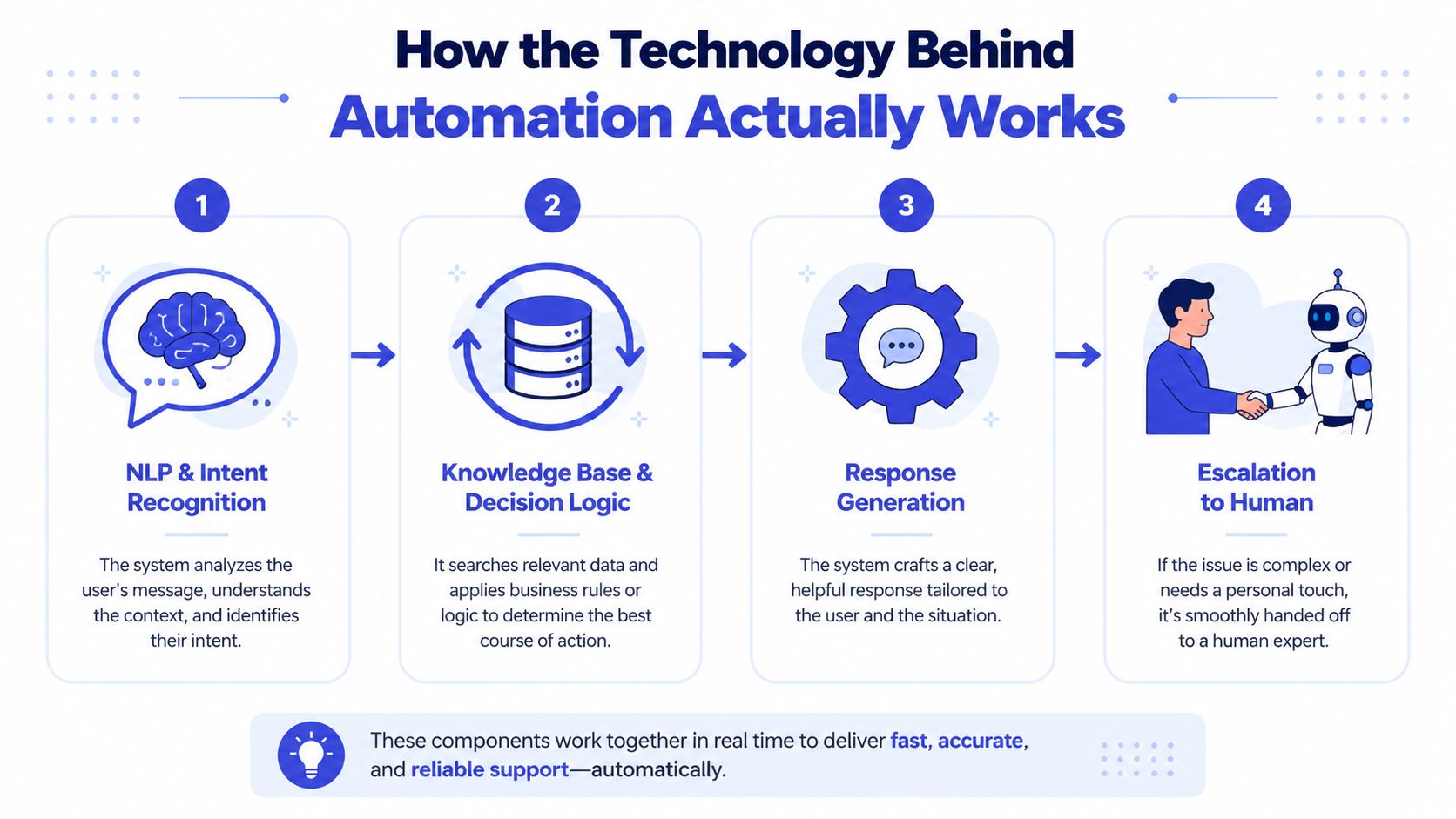
Automation operates in four layers. It listens, retrieves, decides, and acts. If one layer is weak, the whole system feels clumsy to the customer, even when the interface looks polished.
Intent recognition and knowledge retrieval
The first layer is NLP, or natural language processing. It reads the customer's message and classifies intent, so “my package hasn't arrived” and “where's my order” end up in the same bucket. That step matters because the system cannot route or answer a request until it has a clear sense of what the customer is asking for.
After the intent is identified, the system searches your knowledge source. That can include FAQs, help center articles, website pages, or policy documents. If you are building that layer from scratch, build an AI knowledge base with clean source material, current policies, and content that is easy for the system to retrieve. The answer quality usually rises or falls with the quality of that content.
Routing, actions, and escalation
The next layer is ticketing and routing. The system tags the issue, creates the ticket, and sends it to the right queue or person. In many setups, the same flow also triggers back-office actions, which is where RPA-style automation comes in, for example updating a record or starting a downstream task without manual entry.
The core pipeline looks like this in plain language:
Customer message arrives.
Intent is recognized through keywords, NLP, or both.
A response is generated from a knowledge source or workflow rule.
A task is executed or an escalation happens if the request is outside policy.
A clean handoff separates useful automation from frustrating automation. If the system cannot finish the job, the human should receive the full context, not a blank thread that forces the customer to repeat everything. Weak escalation design is one of the fastest ways for support operations to break down.
For teams comparing tool stacks, Chatgrow's customer service automation software overview shows how the pieces fit together in practice, and this help desk automation guide helps teams map the workflow before they configure the tools.
The system should feel like one conversation, not a sequence of disconnected systems asking the customer to repeat themselves.
Manual Support vs Automated Support Compared
Manual support and automated support are not moral opposites. They're different operating modes, and each one wins in different situations. Manual support is strong when the issue is messy, emotional, or unusual. Automated support wins when the issue is repetitive and stable.
Dimension | Manual Support | Automated Support |
|---|---|---|
First response | Depends on queue load and staff availability | Instant for covered intents |
Cost per ticket | Higher, because every contact uses agent time | Lower on repeatable, high-volume work |
Agent workload | Heavy on repetitive questions | Focuses agents on edge cases and exceptions |
Customer experience | Strong on empathy, weaker on speed | Strong on speed and consistency, weaker if escalation is poor |
After-hours coverage | Limited unless staff are on shift | Always on for covered workflows |
Where each one wins
Manual support still matters for complaints, complex troubleshooting, and sensitive conversations. Those are the moments where a human can read tone, adjust language, and make a judgment call that software shouldn't fake.
Automated support wins when customers keep asking the same thing. Think order tracking, password resets, appointment reminders, shipping updates, and basic qualification flows. Those are the jobs that clog support teams and delay everyone else.
Where automation can lose
Automation loses when it's built as a dead end. A bot that answers a little too confidently, then traps the customer in a loop, does more harm than a slower human queue. It can also lose when the answer is technically correct but operationally useless, because the customer still needs a person to finish the task.
The point isn't to automate everything. The point is to automate the boring, repeatable parts so people spend their time where judgment, nuance, or empathy matter.
Where Automation Fits in a Real Customer Journey
Customer service automation makes the most sense when it's tied to a real journey, not just a support desk. That means looking at where customers ask questions, where they hesitate, and where they're most likely to drop off if nobody answers quickly.
E-commerce support after the sale
An e-commerce brand can automate order status, return policies, and shipping FAQs around the clock. A customer types “Where's my order?”, the system recognizes the intent, checks the order source, and answers with the tracking context. If the request becomes a damaged-item dispute, the bot should hand it to a person with the order details already attached.
SaaS onboarding and pricing questions
A SaaS company often sees the same early questions repeat across chat and email. Pricing, trial extensions, onboarding steps, and setup confusion can all be routed through a structured flow before a sales rep or support agent steps in. That keeps the human team focused on qualified prospects and tricky implementation cases.
Travel lead capture after office hours
Travel agencies often get high-intent messages outside business hours. Automation can capture those leads, ask a few qualification questions, and send the details to a human for follow-up. That's especially useful when the customer is ready to book, but the office is closed.
Here's the practical boundary: automate the stable parts of the journey first, then leave room for emotional or revenue-sensitive moments to reach a person fast. A good handoff should preserve intent, context, and urgency, not just open a ticket. If support handoffs are a team sport in your organization, these best practices for support handoffs are worth keeping close.
Step-by-Step Implementation for Small and Medium Businesses
A small team usually does not stumble because the chatbot itself is poor. The failure usually starts earlier, when the team tries to automate too many cases at once, launches with thin knowledge content, or forgets to design a clear handoff to a person.
Start with the tickets already in your inbox.
Pull a sample of incoming support conversations and sort them by volume and judgment level. The first good candidates are high-frequency, low-complexity intents, because automation can handle them reliably without a long approval chain or a lot of exception handling.
That is why many teams begin with order status, FAQs, password help, or appointment requests. These are predictable enough to automate, but still valuable enough that customers notice the difference right away. A good first use case also gives you a clean baseline for comparing intent recognition, escalation quality, and re-contact patterns later.
Build the knowledge source before the bot
Automation works like a librarian that can only answer from the books on the shelf. If the shelf is messy, the responses will be messy too.
Clean up your website, pricing page, policies, and FAQ content before you launch anything customer-facing. If the knowledge source is inconsistent, the bot will only turn inconsistency into scale. This is also the point where teams often compare their content structure with a platform view, such as Chatgrow's customer service automation software page, to see how training, deployment, and escalation can sit in one workflow.
Launch narrow, then expand
Start on one or two channels, usually website chat and email. Keep the first rollout tight, then test the handoff, the routing, and the customer-facing language before widening the scope. If the system cannot escalate cleanly, do not add more intents yet.
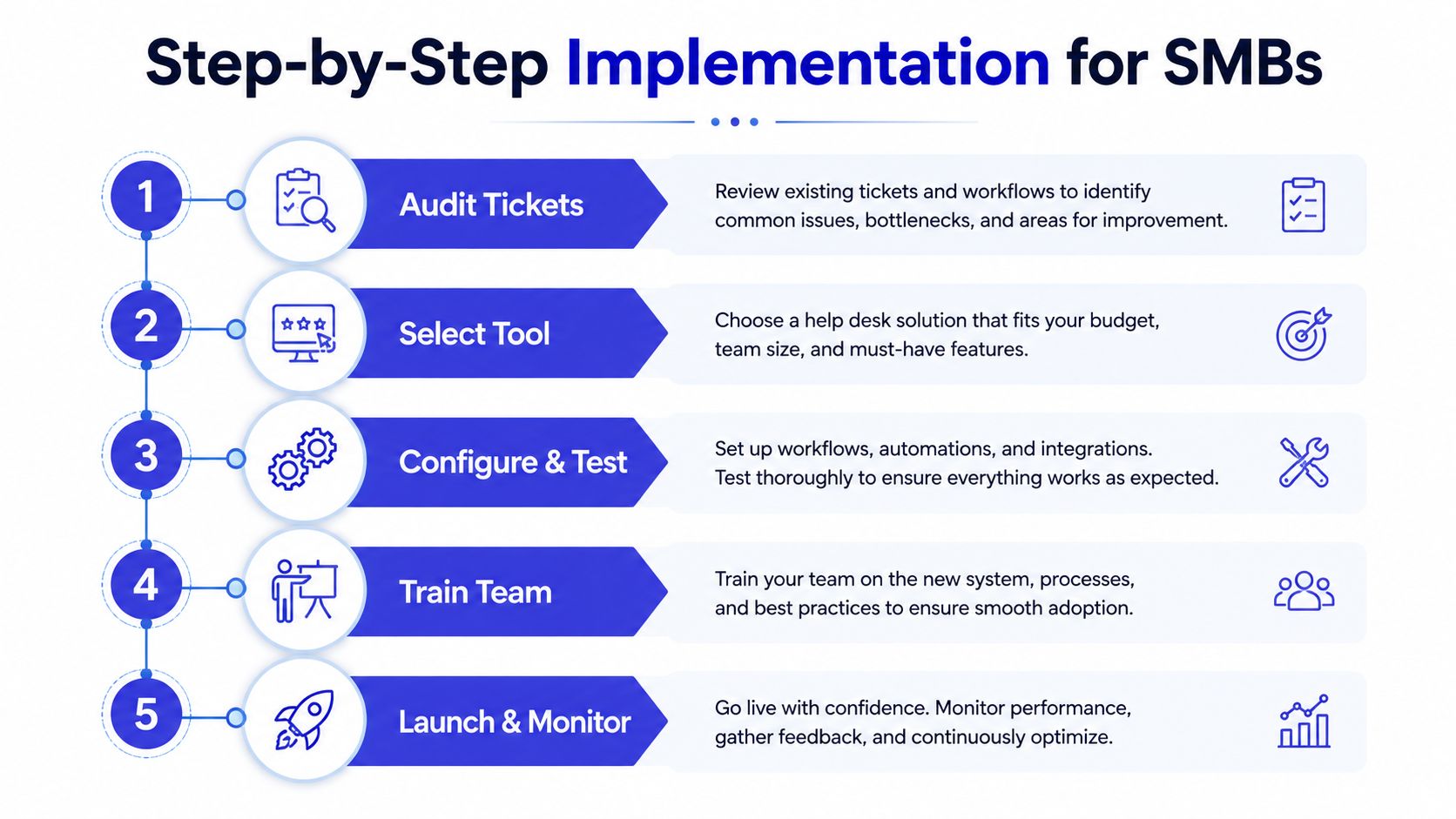
A practical rollout usually looks like this:
Audit tickets for repeated questions and narrow intents.
Select one channel where customers already ask for help.
Configure the knowledge source and test common requests.
Train the team on handoffs and exception handling.
Launch and monitor the outcomes closely.
Once the workflow is live, the human side matters as much as the bot side. If a customer needs a person, the transfer should carry the intent, the context, and the urgency with it, not just open a blank ticket. For teams that want a clearer operating model, best practices for support handoffs are worth keeping close.
Measuring Success Beyond Deflection and Speed
Ticket deflection and average handle time are useful, but they can lie to you. A bot can “deflect” a lot of contacts by sending customers away unsolved, and a short interaction can still be a bad interaction if the person has to come back twice.
The metrics that tell the truth
The better measurement set starts with confirmed resolution rate. That tells you whether the customer got what they needed, not just whether the conversation ended.
Then look at re-contact rate. If customers keep returning with the same issue, the automation probably missed the intent, gave an incomplete answer, or failed to hand off properly. That's a red flag, even when the dashboard looks efficient.
You also need CSAT after bot interactions, escalation quality, and, where relevant, conversion or lead quality. A good escalation should give the human useful context. If the agent has to ask the same questions again, the automation didn't remove work, it just moved it.
Practical rule: high deflection with rising re-contact is not success. It usually means the system is closing conversations too early.
How to read the dashboard
Use the dashboard to spot patterns, not just totals. If one intent resolves cleanly and another produces repeated follow-ups, the issue may be the knowledge source, the routing logic, or the language the bot uses to frame the next step. That's why automation should be treated like an optimization system, not a static feature.
For a closer look at dashboards and support data, Chatgrow's customer service analytics guide is a useful companion. It's especially helpful if you want to see how conversations, handoffs, and outcomes fit into one measurement loop.
Common Pitfalls and How to Avoid Them
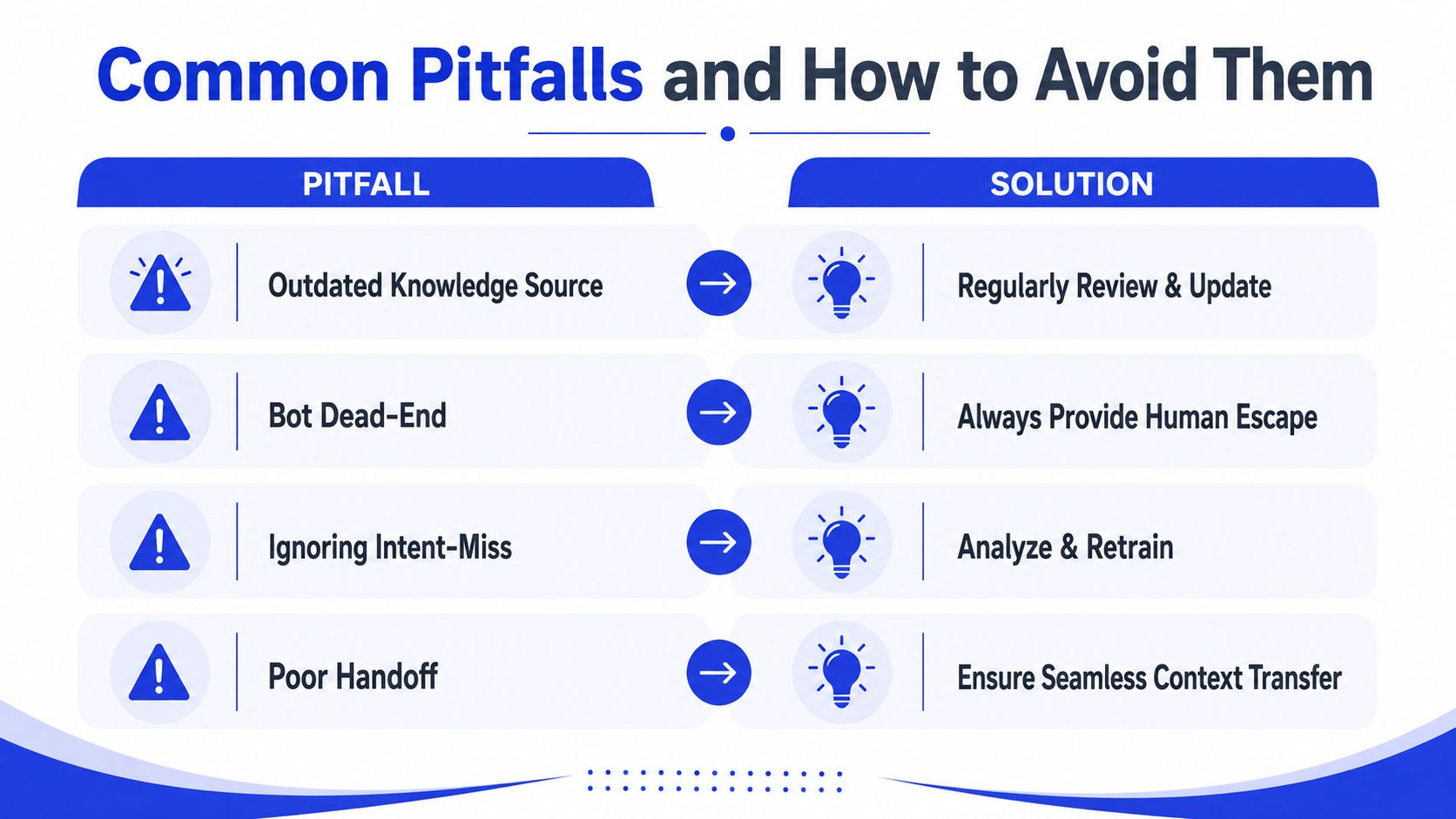
Most automation failures are predictable. The bot didn't suddenly become “bad.” The team gave it stale content, weak rules, or no way out when the customer needed a person.
Four failure modes you can spot early
Outdated knowledge source. The symptom is a bot confidently giving old policy or pricing details. The fix is regular review and update cycles for the source content.
Bot dead-end. The symptom is a customer repeating themselves or getting stuck in loops. The fix is a visible human escape path on every important flow.
Ignoring intent-miss cases. The symptom is a rise in unresolved conversations that technically “ended.” The fix is to inspect missed intents and retrain the logic around them.
Poor handoff. The symptom is an agent asking the customer to start over. The fix is a full context transfer, including the transcript and any captured details.
Where the boundary should stop
Not every conversation is fit for automation. Pre-sales qualification can work well when the questions are structured, but emotionally charged service cases need a faster route to a person. The same goes for situations where trust is fragile and the customer needs accountability more than speed.
Automation should accelerate the right conversations, not flatten every conversation into the same path. If the system can't recognize where its own limits are, it will damage experience while looking efficient on paper.
Bringing It All Together and Getting Started
Customer service automation is easiest to understand when you see it as one connected loop. A customer reaches out, the system classifies the intent, the stable cases resolve instantly, the unstable cases escalate cleanly, and the team learns from what happened.
That loop is the whole point. It's not about replacing support reps. It's about removing repetitive work, preserving context, and making sure the person who steps in next has enough information to solve the problem quickly.
A simple mental checklist
Before you automate anything, ask four questions. Is the request repetitive enough to standardize? Is the answer grounded in current content or a known workflow? Is escalation obvious when the system can't help? And are you measuring outcomes beyond just how many tickets disappeared?
If the answer is yes, automation probably belongs there. If the answer is no, the issue may need a person, a policy fix, or better source content before software can help.
Where a platform fits
Chatgrow is one option in this space. It trains support agents on website pages, FAQs, pricing, and product content, then deploys them across channels to answer routine questions, qualify leads, and escalate with concise context when a human is needed. That makes it useful for SMBs that want the workflow in one place instead of stitching together separate tools.
A few quick questions usually come up at this point.
Is automation only for large teams? No. Small teams often feel the benefit sooner because repetitive support volume eats a bigger share of their time.
Does automation replace human support? No. It shifts humans toward exceptions, complaints, and higher-value conversations.
What should you automate first? Start with the most repetitive request that customers ask every day and that your team already knows how to answer consistently.
If you're ready to turn repetitive tickets into a cleaner support system, visit Chatgrow and see how it handles classification, routing, escalation, and lead qualification in one workflow. It's a practical way to test customer service automation on the conversations your team is already handling today.
Related Posts
Continue Reading
More articles from the ChatGrow Team.


