Blog
Zendesk Jira Integration: A Step-by-Step Guide for 2026
By
Nelson Uzenabor

If your support team is still copying ticket details into an email, then waiting for engineering to ask for the same screenshot or reproduction step, you already know the core problem. The issue usually isn't a missing tool. It's a broken handoff between Zendesk and Jira that turns every escalation into extra admin, fuzzy ownership, and delayed fixes.
A solid Zendesk Jira integration gives support agents a cleaner path to engineering, and it gives developers a ticket that already has context. The difference shows up on day two, not day one. That's when teams find out whether the integration creates a trustworthy workflow, or just another noisy place to manage work.
Table of Contents
Why Your Support and Dev Teams Need a Better Bridge
A support agent gets a ticket from a customer whose issue smells like a bug. They open Jira in another tab, copy the summary, paste the description, attach a screenshot, then send the issue over to engineering. Ten minutes later, a developer replies asking for the browser version, the exact impact, and whether the customer already tried a workaround. That information was in Zendesk the whole time, but it never reached Jira in a usable form.
That's the core failure. The team doesn't need more chatter between systems. It needs a bridge that preserves context without forcing agents to become translators. Zendesk's official Jira integration is built as a structured setup, with a Zendesk Support app, a Jira app, and a middleware layer rather than a simple point-to-point connector, which is the right shape for a workflow that has to survive real use, not just a demo Zendesk Jira integration architecture and setup guide.
Practical rule: if an engineer has to re-ask for the same facts, the escalation path is still broken.
The business case is simple. Support moves faster when ticket context is transferred cleanly. Engineering moves faster when issues arrive with the right fields, status, and ownership. A good integration reduces copy-paste, keeps audit history in one place, and makes it easier to tell whether a customer problem is being worked, waiting, or solved.
Support ops leaders usually feel this pain first. They see the queue, the follow-up churn, and the tickets that bounce between teams because nobody trusts the handoff. A better bridge doesn't eliminate judgment, but it does remove the daily friction that makes escalation feel heavier than it should.
Choosing Your Zendesk Jira Integration Path

A lot of teams make the wrong choice here by assuming they need custom middleware on day one. In practice, the simplest path usually works best for the first version of the workflow, especially if support and engineering already live in standard cloud tools. Zendesk's official Jira Cloud app is free to install in the Zendesk Marketplace and supports Jira Cloud plans at Standard tier or higher, which makes it the most practical starting point for many SMB and mid-market teams 2026 Zendesk to Jira automation guide.
Define your support software role before choosing an integration path. If Zendesk is the system of record for customer conversations and Jira is where engineering owns delivery, the connection should preserve that split instead of trying to merge every workflow into one tool. A clear support platform setup keeps the handoff cleaner and makes it easier to decide what belongs in the ticketing layer versus what belongs in engineering work. this overview of a customer support platform
Native connector
The native path fits straightforward escalation, status visibility, and reliable field sync. Zendesk's setup flow is admin-driven, starts from the Jira app marketplace, asks for the Zendesk subdomain, and ends with a configuration screen that controls which ticket details appear in linked Jira issues Zendesk Jira integration setup. That setup is easier to standardize, easier to train, and easier to support after the initial rollout.
It also reduces the number of places where the workflow can drift. When the connector stays close to the vendor-supported path, permissions are easier to reason about, and troubleshooting usually starts with configuration instead of custom code. For teams that need dependable escalation without building a full integration layer, that is usually the safer choice.
Marketplace apps and custom middleware
Third-party apps make sense when you need deeper transformation rules, more complex routing, or tighter control over what data moves in each direction. The trade-off is complexity, not just cost. Richer automation can fit better when support-to-engineering handoffs sit inside a broader operating model, such as customer intelligence workflows or cross-functional service operations, especially if support insights also feed reporting and prioritization. For that strategic layer, Supercenter's customer intelligence resource is a useful companion read.
Custom middleware is the last option, not the first. It gives you flexibility, but it also adds ownership overhead, maintenance work, and more chances for sync drift. If the use case is a standard escalation pattern, the official connector or a tightly scoped marketplace app is usually the cleaner choice, especially once permissions, field mapping, and audit expectations start to matter in day-to-day operations.
Connecting and Authenticating Your Instances

Start with admin access on both sides. Zendesk's official setup requires the Jira account URL, an administrator account, and OAuth-style acceptance in the Jira authorization flow before the connection can be saved in Zendesk Admin Center Zendesk Jira connection guide. If you don't have the right permissions, you'll spend your time chasing access instead of validating the integration.
The cleanest setup sequence
Begin in Jira's app marketplace, install the Zendesk app, then enter the Zendesk subdomain and approve the authentication prompt. After that, move into Zendesk Admin Center to finish the configuration and save the connection there Zendesk Jira setup guide. That sequence matters because it keeps the admin who installs the app from becoming the permanent human middle layer for every future change.
A dedicated integration user is worth setting up early. Zendesk documents that option, and it matters operationally because automated escalation activity shouldn't look like it came from a random admin account Zendesk Jira integration guide. Clean attribution makes audit trails easier to trust and reduces confusion when the original installer leaves the team.
What to verify before you move on
Use a small, deliberate first pass rather than opening everything at once. A narrow connection is easier to debug, and the setup is much less fragile when you're validating one Zendesk account, one Jira project, and one path through the flow.
Don't widen scope until you can explain exactly which account created the Jira issue, which fields moved, and where the back-reference lives.
ContextFlow integration management is useful here if your team needs a visual way to track the connection lifecycle, permissions, and handoff states without guessing which instance owns which step.
Configuring Field Mapping and Sync Rules
The connection is only the pipework. The essential work is deciding which fields should move, which ones should stay behind, and how a Zendesk ticket should translate into a Jira issue without creating noise for either team. Zendesk and Jira do not share the same lifecycle language, so the mapping has to be defined deliberately instead of assuming that “Open” and “In Progress” mean the same thing Zendesk Jira field and status setup.
Map the fields that drive action
Start with the fields engineering needs to act on the issue. Summary, description, issue key, assignee, and status are the minimum set many implementation guides recommend for a controlled rollout, because they give developers enough context without filling Zendesk with Jira-specific clutter Zendesk Jira implementation guidance. Keep the first mapping narrow. Add custom fields only when a real support or engineering decision depends on them.
The quickest mistake is syncing too much. Internal notes, attachments, and private comments can create confusion or expose data if your process only needs public-facing updates. Scope by organization, label, or ticket status instead of exposing a broad slice of every field just because the connector can move it Zendesk Jira implementation guidance. A cleaner model also makes escalation easier to trust, especially when a support team uses an AI-assisted intake step to gather missing details before the handoff. For teams that are trying to keep customer and issue records aligned, customer data integration practices is a useful reference for setting ownership boundaries.
Make status mapping explicit
Zendesk ticket states and Jira issue states rarely line up cleanly. Zendesk's New, Open, Pending, and Solved need intentional mapping against Jira's To Do, In Progress, Waiting for Customer, and Done, or tickets will look stuck even while the work is moving Zendesk Jira integration guide. Define one-to-one or one-to-many mappings on purpose. Do not let the integration guess.
Status sync breaks down fast when the teams use different words for the same reality. A ticket can be “solved” in support terms while engineering still has an open fix in progress, so the mapping should reflect the handoff rather than mirror the label.
The safest check is a real test ticket. Send a low-risk case through the create or link flow, then confirm four things, summary quality, description fidelity, link visibility, and back-reference clarity Zendesk Jira integration guide. If those four controls look right, the sync logic is probably ready for production use. If they do not, the problem is usually not the connector itself, it is a field that was left ambiguous or a status that was mapped too broadly.
Use the same discipline you would apply anywhere customer records cross system boundaries, and keep the field ownership rules simple enough that agents can follow them without checking a playbook every time. For teams that also need to improve code review processes, improve code review processes is a useful reminder that clean handoffs depend on clear ownership, not just automation.
Building Advanced Workflows and Automation
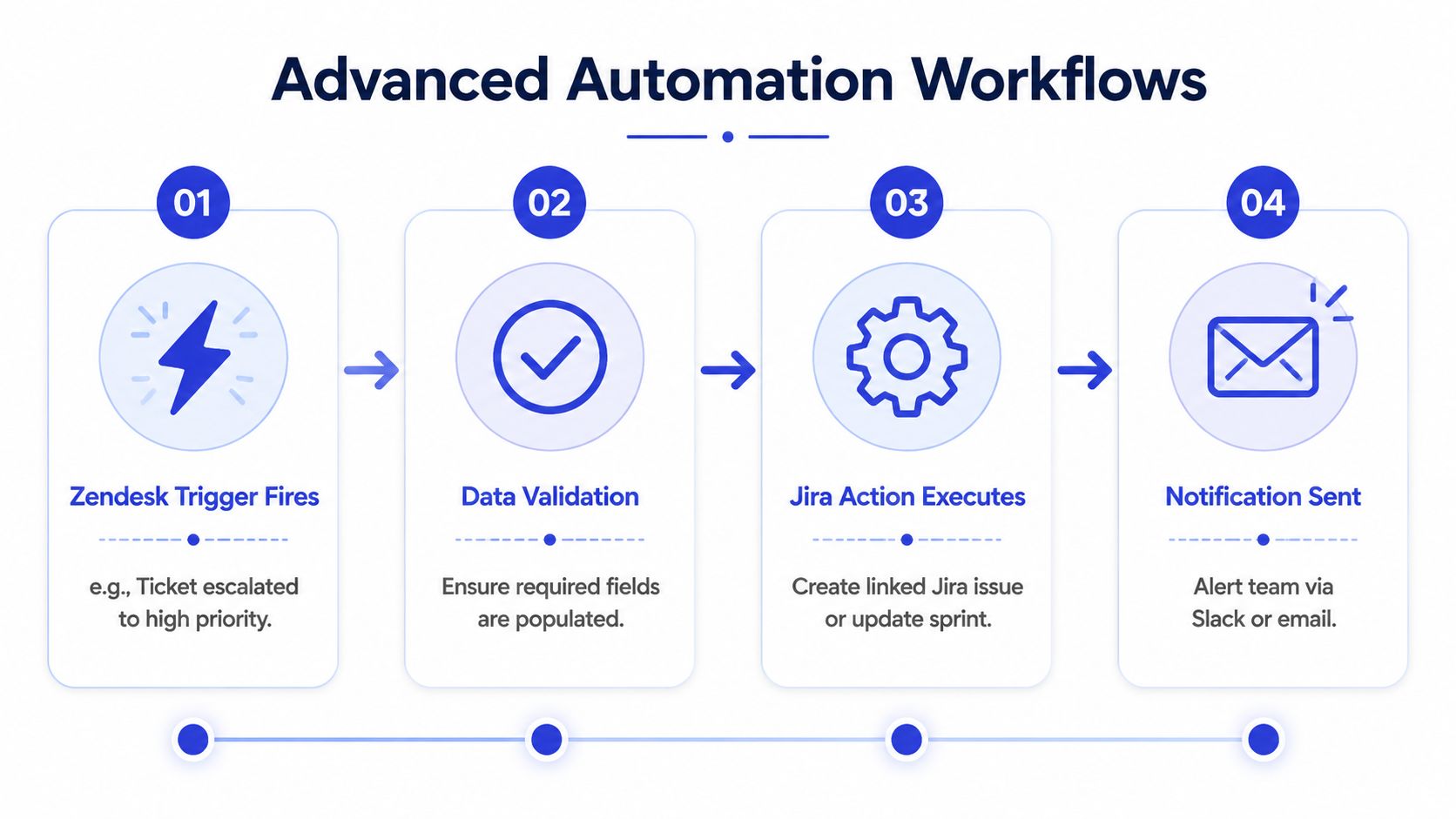
Once field mapping is stable, support teams can stop treating Jira as a manual destination and start using it as a controlled output from Zendesk. A common pattern is trigger-based creation, where a tagged ticket, a tier-three escalation, or a specific priority level opens the Jira path automatically 2026 Zendesk automation guide. That's the point where the integration stops being a shortcut and starts becoming part of your operating model.
Trigger the right work, not all the work
The rule should be narrow enough that support agents trust it. If a tag or group assignment creates a Jira issue, everyone needs to know exactly what qualifies and what doesn't. Broad triggers generate duplicate issues, create noise for engineers, and make it harder to tell which ticket is the source of truth.
This is also where an AI layer can help, but only if it's doing structured intake rather than freeform summarization. A support assistant can ask for missing details, turn a conversational complaint into a concise escalation summary, and hand engineering a cleaner issue than the original transcript. Chatgrow fits best in that front-end role, where it captures context before the support agent pushes the case downstream.
Keep bidirectional sync disciplined
Bidirectional sync is valuable, but it needs ownership rules. If comments, status updates, and links move in both directions without a clear source of truth, teams can end up with duplicate ownership or ambiguous history. That concern shows up often in implementation work, especially when sync direction can be permanent and should be tested in a sandbox first Zendesk Jira integration maintenance note.
The cleanest workflows are the ones where support knows what engineering owns, engineering knows what support can see, and nobody has to guess who last changed the record.
For teams that want to automate escalation logic more broadly, workflow automation best practices are a useful model for keeping triggers, validation, and notifications from turning into an ungoverned mess.
The internal benchmark to watch is whether the Jira issue stays readable when it comes back into Zendesk. If the support team can follow the journey without logging into a second tool, the automation is doing real operational work. For adjacent support workflows, help desk automation concepts are a good reference for designing clean routing and escalation logic.
Managing Permissions Security and Scope
The strongest argument for a tight permission model is simple. Support agents don't need to see every Jira artifact to escalate a customer issue, and exposing too much engineering detail creates more confusion than value. Practical guides on Zendesk and Jira setup consistently point to admin access, authentication, and the choice between creating or linking issues, but the core operational question is how to keep that power narrow enough for day-to-day support work Zendesk Jira permission and scope guidance.
Start with a small rollout
Scope the first rollout to one support group, one Jira project, and a limited status set. That keeps failures contained and makes it easier to spot when a mapping or permission rule is wrong. It also reduces the chance that a support agent will accidentally trigger work in the wrong engineering queue.
Keep visible fields minimal. Summary, status, assignee, and key updates are usually enough for support to know whether a case is moving, waiting, or solved. If agents can see every Jira detail from the start, they'll spend time interpreting engineering metadata instead of helping customers.
Define what agents can do
Decide upfront whether agents can create new issues, link to existing ones, or only escalate through a controlled workflow. The official setup allows admins to choose which linked Jira details appear in Zendesk, and that choice becomes a governance lever, not just a UI preference Zendesk Jira setup and configuration. Once the scope is set, document it so team leads know where the guardrails are.
Operational rule: if a support agent can't explain why a Jira issue was created, the permission model is too loose.
A narrow scope is not a sign of immaturity. It's how you keep escalation useful while protecting data hygiene, reducing workflow noise, and avoiding accidental disclosure of internal engineering context. Teams that start small usually build trust faster, because the integration behaves predictably before it expands.
Testing Maintenance and Troubleshooting FAQs
Before a rollout is considered live, send a low-risk ticket through the full loop and inspect the result. Check whether the Jira issue shows the right summary and description, whether the link back to Zendesk is visible, and whether status updates come back as expected when Jira moves forward Zendesk Jira test flow guidance. If any of those pieces are off, fix the mapping before you invite more agents into the process.
Quick validation checklist
Create a test ticket: Use a low-risk case so you can confirm the flow without affecting real escalations.
Verify field quality: Make sure the summary and description in Jira match what support intended to send.
Check link visibility: Confirm the back-reference is visible in both systems.
Confirm status propagation: Move the Jira issue and see whether the configured Zendesk update arrives.
Review attribution: Make sure the update is coming from the dedicated integration user, not a personal admin account.
Common questions
Why aren't comments syncing?
Usually because the field mapping or sync rule is too narrow. In bidirectional setups, comment visibility should be checked alongside the object type being synced, since over-broad rules can also pull in content you didn't intend to expose Zendesk Jira scope guidance.
What happens if my Jira instance changes?
Zendesk documents a migration path that includes link migration and reconnecting the app on the new Jira instance, so you're not starting over from scratch Zendesk Jira migration process.
How do I handle a failed issue creation error?
Check admin authorization first, then confirm the Jira project scope and field mappings. Most failures come from permission gaps or a required field that wasn't passed through cleanly.
How do I know the integration is healthy over time?
Use the same test pattern periodically, and keep an eye on whether the support team still trusts the audit trail. If tickets are getting retyped or manually corrected downstream, the integration has drifted.
Chatgrow helps support teams build a cleaner first response before a Jira escalation ever starts, so engineering gets structured context instead of a raw transcript. If you want a faster way to qualify issues, capture the right details, and route conversations into a trustworthy workflow, visit Chatgrow and see how it fits alongside your Zendesk Jira integration.
Related Posts
Continue Reading
More articles from the ChatGrow Team.