Blog
AI Agent for Business: A Practical Guide for 2026
By
Nelson Uzenabor

Your team is already feeling the strain. Support emails pile up overnight, high-intent website visitors leave before anyone replies, and good leads disappear because nobody qualified them fast enough. Most SMBs don't need another dashboard. They need a system that can answer, route, qualify, and escalate without adding headcount every time volume spikes.
That's where an AI agent for business becomes useful. Not as a novelty widget, but as an operational layer that handles repeatable work at all hours and hands humans conversations that require judgment. For owners and operators, the key question isn't “What is AI?” It's “Where does this save time, protect revenue, and improve customer experience without creating a mess?”
Table of Contents
Beyond Chatbots The Rise of Autonomous Business Agents
A familiar pattern shows up in growing companies. The owner answers sales questions in the morning, the support team spends lunch clearing repetitive tickets, and by evening the website is still collecting unanswered questions from buyers who were ready to act. The business isn't short on demand. It's short on coverage.
Traditional chatbots helped a little, but they were usually glorified decision trees. They could point someone to an FAQ page, yet they often failed when a customer asked a real question in plain language or needed a multi-step answer. If you've seen that happen, it's worth reviewing how chatbots in business evolved from scripted helpers to more capable systems.
An AI agent for business changes the job description. Instead of waiting for exact keywords, it can interpret intent, pull relevant information, and move a conversation toward an outcome like solving a support issue, qualifying a lead, or collecting details for a handoff.
That shift isn't theoretical. Among organizations already adopting AI agents, 66% report measurable value through increased productivity, 57% report cost savings, and 54% report improved customer experience, according to PwC's AI agent survey. PwC also notes the market was estimated at USD 7.63 billion in 2025 and projected to reach USD 182.97 billion by 2033 in the same survey summary.
Practical rule: If a task happens often, follows recognizable patterns, and still consumes skilled employee time, it's a candidate for an agent.
For SMBs, that's the main story. AI agents have moved beyond experimentation. They're starting to look more like business infrastructure, especially in customer-facing workflows where speed and consistency matter.
What Exactly Is an AI Agent for Business
An AI agent for business is easiest to understand if you stop thinking about software menus and start thinking about roles. The agent isn't just a chat window. It's closer to a digital employee with a narrow job, a defined playbook, and access to the tools it needs to do useful work.
Think of it as a digital employee
A good mental model is this:
Brain: The language model handles understanding and response generation.
Memory: The agent keeps track of conversation context, company knowledge, and sometimes prior interactions.
Planner: It decides the next best step based on the goal, not just the last message.
Toolbelt: It connects to systems like your CRM, help desk, booking flow, or internal docs.
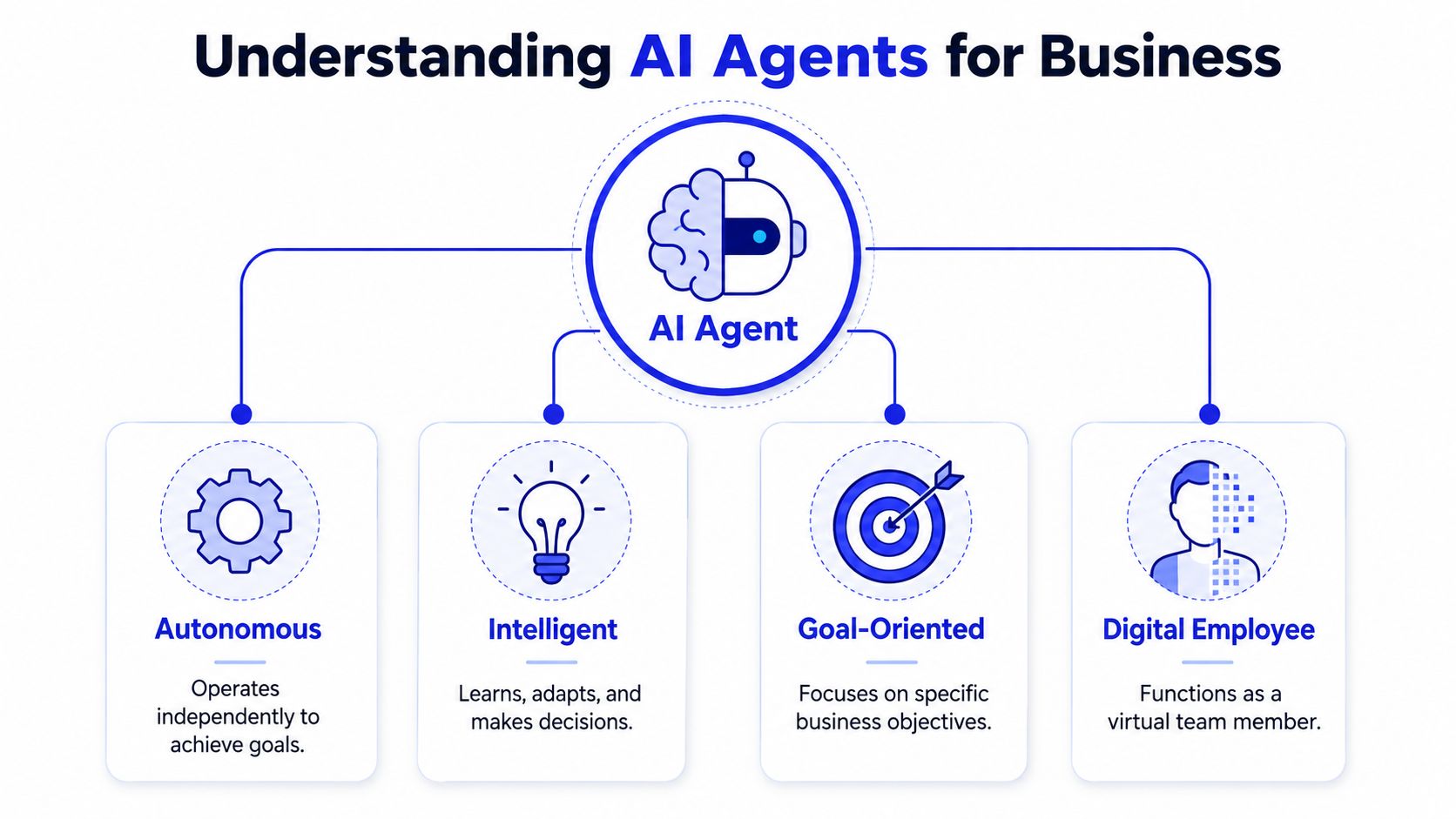
That combination is what makes the system useful in practical applications. If a prospect asks about pricing, implementation time, and whether you integrate with their stack, an agent can answer in one thread, ask a follow-up, capture lead details, and route the conversation correctly. A basic chatbot usually breaks somewhere in the middle.
What makes an agent different from a chatbot
Older bots followed scripts. They worked when the user followed the script too. The moment someone phrased a question differently, combined multiple requests, or wanted a recommendation instead of a canned answer, the experience went sideways.
An agent behaves differently because it's goal-oriented. It tries to complete a job. That could mean resolving a shipping question, identifying whether a lead fits your ICP, or gathering the missing details your team needs before a callback.
Here's the practical distinction:
System | Best at | Struggles with |
|---|---|---|
Rule-based chatbot | Repetitive FAQs with fixed paths | Nuance, context, multi-step tasks |
AI agent | Open-ended conversations and workflow execution | Poor source data, unclear policies, weak integration setup |
A chatbot answers a question. An agent works the problem.
That difference matters because business conversations are rarely neat. Customers ask one thing and mean another. Leads compare plans, timelines, and fit in the same exchange. Support cases often need context from prior steps. The more your workflow depends on judgment, routing, and context, the more an agent makes sense.
The mistake is assuming every AI conversation tool is an agent. Many are still wrappers around a chat interface with shallow business logic. If it can't use your knowledge, apply your rules, and take action inside your systems, it's not really acting as a business agent.
Key Use Cases and Tangible Business Benefits
The value of an AI agent for business shows up fastest in places where volume is steady and response time matters. Customer support, lead qualification, and sales coverage are the three patterns that usually produce the clearest operational payoff for SMBs.

One reason these use cases keep moving up the priority list is that businesses now see agents as more than a support add-on. According to this AI agent statistics roundup, 90% of businesses view AI agents as a competitive advantage, and the same source says they're expected to automate 15% to 50% of business tasks by 2027, while Gartner forecasts they'll automate 20% of digital interactions by 2028.
Customer support that never closes
Support is the cleanest starting point because the work is often repetitive. Customers ask about order status, pricing details, return policies, onboarding steps, compatibility, or account access. Those interactions matter, but they don't always need a person first.
A capable agent can:
Handle routine questions instantly: It answers from your FAQs, help center, and product pages.
Collect context before escalation: It asks for order details, account information, or the exact issue.
Route smartly: It sends a concise summary to the right team instead of dumping a raw transcript.
This changes the team's workload. Staff spend less time copy-pasting familiar answers and more time on exceptions, edge cases, and customer recovery.
Lead qualification without the back and forth
Sales teams lose time when every inquiry gets the same manual treatment. Some people are ready to buy. Others are researching. Others are poor fit from the start. An agent can sort that traffic early.
A strong qualification flow often includes:
Fit questions about company size, use case, budget, or urgency.
Intent signals such as pricing interest, demo requests, or implementation timeline.
Routing logic that books, flags, or escalates based on the answers.
That's useful because it shortens the path between interest and action. The agent doesn't replace the salesperson. It gives the salesperson a cleaner queue.
Later in the conversation, video can help teams think through deployment and workflow design:
Sales coverage for every visitor
Many sites have a quiet leak. Visitors land on pricing, service, or product pages with buying intent, then leave because nobody engaged them at the right moment. Forms help, but forms are passive. Agents are not.
The practical advantage isn't only automation. It's presence at the exact point a buyer hesitates.
That's why deployment location matters. Pricing pages, comparison pages, demo pages, and service detail pages often deserve more attention than the homepage. If the agent can answer objections, explain packaging, and capture contact details while interest is fresh, you create more opportunities from the traffic you already have.
The common thread across all three use cases is simple. The best agent deployments don't try to do everything. They take one high-frequency business process and make it faster, cleaner, and easier to scale.
Your Implementation Checklist for a Successful Launch
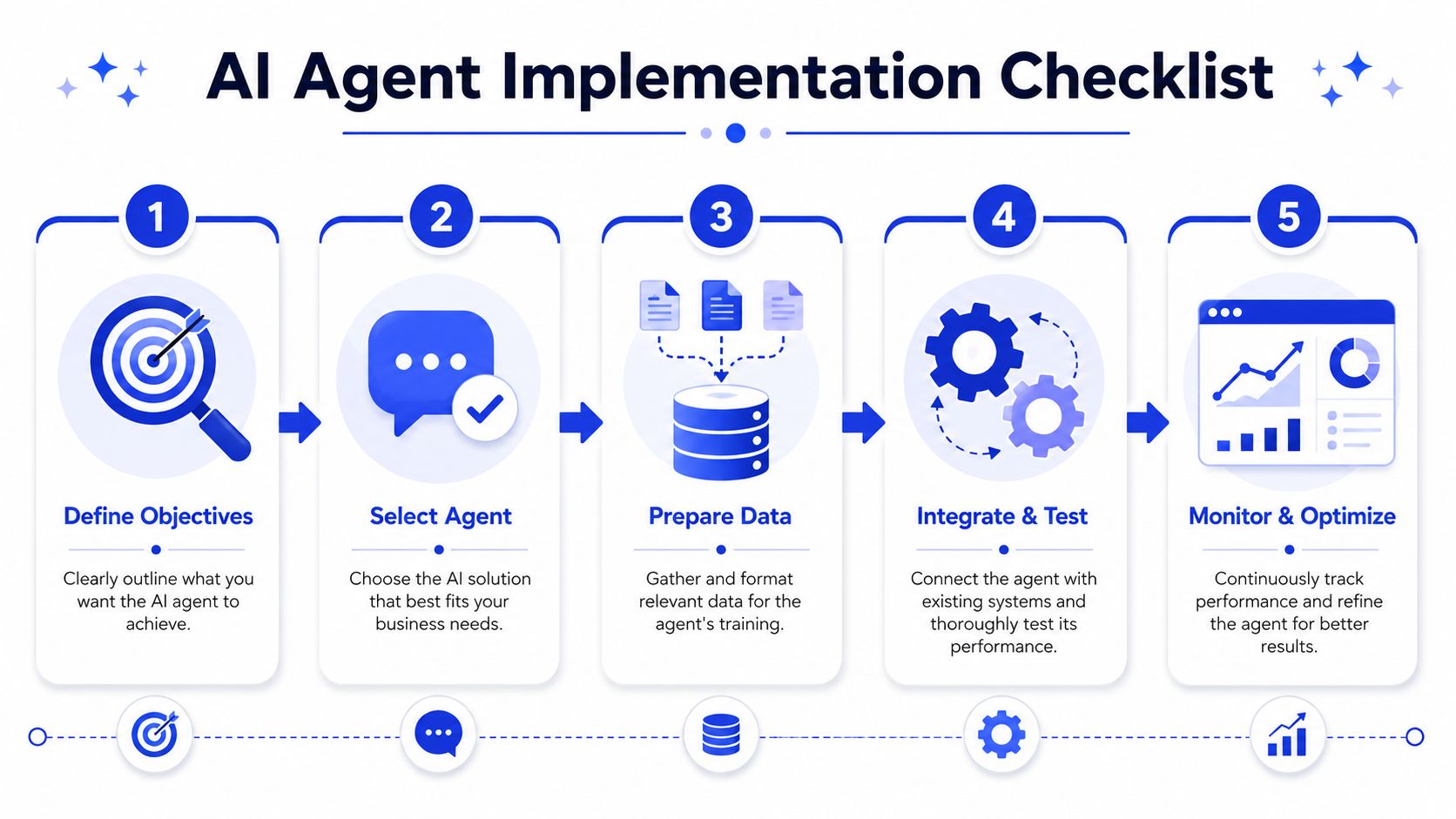
Most AI projects become harder than they need to be because teams start too wide. They try to automate all support, all sales, and all internal knowledge at once. A successful launch usually starts with one narrow workflow, one clear goal, and one clean knowledge source.
Start with the narrow problem
Choose the task that hurts enough to matter and repeats enough to automate. Good examples include after-hours FAQ handling, inbound lead triage, or first-response support on a specific product line.
Don't begin with “we need AI.” Begin with a business sentence such as “we need faster responses on our pricing page” or “we need support to stop answering the same setup question all day.” That gives the project boundaries.
Build the knowledge base and rules
An agent is only as useful as the material and policies behind it. Feed it the pages customers already rely on: pricing, product details, FAQs, service descriptions, return policies, help docs, and any internal guidance that should shape responses.
Then define the operating rules:
Escalation rules: Which topics always go to a human.
Qualification criteria: What makes a lead worth routing immediately.
Brand voice boundaries: Formal, casual, concise, technical, or consultative.
Off-limit topics: Billing disputes, legal claims, or custom commitments without approval.
If your data lives across multiple systems, cleaning up connections early saves pain later. In this context, a practical guide to customer data integration for AI workflows is useful, especially if your website, CRM, and support docs all say slightly different things.
Deploy where intent is highest
Not every page deserves an agent first. Put it where the conversation has commercial or operational value. In most SMBs, that means pages where visitors are already deciding, comparing, or trying to solve a problem now.
A sensible rollout often looks like this:
Phase one: Pricing or contact pages.
Phase two: Help center or account support pages.
Phase three: Broader site coverage after the first workflows perform reliably.
One practical option is Chatgrow, which lets businesses train agents on website content, pricing, FAQs, and product pages, then define lead qualification rules and deploy those agents to high-intent pages. That's useful when you want business teams to launch without building a custom stack from scratch.
Monitor before you expand
A launch isn't the finish line. It's the start of operational tuning. Read transcripts, review failed answers, and watch where users ask for humans. Those moments tell you whether the issue is weak source content, poor prompts, missing guardrails, or a workflow that should never have been automated.
Field note: Teams get better results when they treat the first version like a service rep in training, not a finished system.
The companies that get value fastest are usually the ones that stay disciplined. They launch one use case, tighten it, then extend coverage deliberately.
Measuring Success and Calculating ROI
If you can't show the business effect of the agent, the project will eventually lose support. That's true even when people like the technology. Leaders fund outcomes, not demos.
There's a clear strategic reason to be strict about this. Microsoft's guidance on AI agent planning notes that use cases lacking direct support for executive strategy have a 70% failure rate in adoption, and it also stresses that teams need measurable success criteria and a baseline performance measurement established before development in order to track impact accurately in its business strategy framework for AI agents.

Pick metrics tied to business outcomes
Start with numbers your business already cares about. For support, that could mean how many conversations the agent resolves without human intervention. For sales, it might be the number of qualified leads passed to the team. For service businesses, it may be booked consultations or reduced response lag.
Useful KPI categories include:
Support efficiency: Ticket deflection, first-response coverage, escalation quality.
Revenue contribution: Qualified leads captured, booked demos, conversions from agent-assisted sessions.
Experience quality: Customer satisfaction feedback, complaint reduction, transcript quality.
Operational cost: Time saved by support or sales staff on repetitive tasks.
If you already use reporting tools, connect those dots. Review agent performance next to your CRM stages, ticket queues, or appointment data. If you need a framework, this guide to chatbot analytics and reporting is a practical starting point.
Use a before and after model
The cleanest ROI calculation is usually simple:
Area | Before launch | After launch |
|---|---|---|
Support | Manual handling of repeat questions | Agent resolves routine conversations first |
Sales | All inbound leads reviewed manually | Agent filters and routes based on fit |
Coverage | No after-hours response | Agent engages visitors continuously |
That table isn't about abstract transformation. It's about comparing labor, speed, and outcomes against your old process.
A few rules make ROI tracking much more reliable:
Establish the baseline first. Know your current response times, lead flow, and manual workload.
Separate assisted value from fully automated value. Some gains come from full resolution. Others come from better handoffs.
Read the transcripts behind the numbers. A high conversation count means little if the answers are weak.
Review at a fixed cadence. Weekly works well during launch. Monthly usually works once the workflow is stable.
If the metric doesn't tie back to revenue, cost, or customer experience, treat it as secondary.
That discipline prevents a common mistake. Teams celebrate engagement metrics while missing the bigger question of whether the system is reducing effort or increasing business value.
How to Choose the Right AI Agent Vendor
A vendor demo can make almost any AI agent look polished for 20 minutes. The harder question is what happens on day 20, when your team needs to update pricing, route a refund request, or connect the agent to an older CRM that was never built for modern automation.
That is the essential buying test.
The best vendor for an SMB is usually the one that fits daily operations with the least friction. Model quality matters, but operating fit decides whether the agent saves time or creates a new layer of admin work.
Compare vendors on operational fit
Use a scorecard before you book a second call. It keeps the discussion grounded in execution instead of features that look good in a sales environment.
Criterion | What to Look For | Why It Matters |
|---|---|---|
Ease of Training | Can a business user update the agent from your site, FAQs, product pages, and internal docs without technical help? | If updates depend on a developer or the vendor's support team, content gets stale fast. |
Integration Capabilities | Does it connect to your CRM, help desk, forms, scheduling tool, or ecommerce stack with minimal custom work? | An agent that cannot read or write to core systems stays stuck at basic Q&A. |
Scalability | Can you launch with one workflow and expand to other channels or departments later? | A good first project should not force a rebuild six months later. |
Analytics and Reporting | Can you see conversation outcomes, escalation reasons, drop-off points, and business results? | If reporting stops at chat volume, you will struggle to judge performance or defend spend. |
Brand Voice Customization | Can you control tone, guardrails, approved claims, and escalation language? | Sales and service teams need consistent answers, especially in regulated or high-trust categories. |
A strong vendor conversation sounds practical. Ask how the system handles missing information. Ask how a handoff works when the agent is unsure. Ask who owns updates after launch: your staff, the vendor, or an outside consultant. Those answers tell you more than a polished interface ever will.
Price the integration work before you sign
Integration is where projects get expensive.
Many SMBs already have years of process trapped inside older tools, custom fields, spreadsheets, and partial workarounds. An AI agent has to operate inside that reality. If customer status lives in one system, inventory in another, and pricing exceptions in a third, the vendor's "quick setup" promise can fall apart fast.
That is why I advise clients to ask for a working review of the exact systems they use, not a generic product demo. Have the vendor show how the agent pulls data, what triggers an action, where logs live, and what breaks if one source is late or incomplete.
Ask these questions before procurement gets involved:
Which data sources need cleanup before launch?
Which integrations are native, and which require middleware or custom API work?
How are changes synced when customer, product, or booking data updates?
What can your team manage directly without waiting on a developer?
What monitoring exists if an integration fails without notification?
Vendors sell the demo. Your team has to live with the workflow.
For businesses running on older ERP, CRM, or support platforms, integration quality often matters more than headline AI features. A vendor that handles your operating environment cleanly will usually produce better ROI than one with a stronger demo and weaker implementation discipline.
Common Pitfalls and How to Avoid Them
The biggest mistake is treating an AI agent for business like a microwave. Plug it in, press start, and expect perfect output forever. That's not how these systems behave in production.
Bad data breaks good automation
If your pricing page says one thing, your FAQ says another, and your team answers differently in email, the agent will reflect that confusion. According to Anaplan's enterprise AI agent guidance, outdated or inconsistent data causes a 40% to 60% increase in flawed agent decisions, and agents fed with strictly unified, semantically consistent data reduce hallucination rates by 35% compared with fragmented sources.
The fix is boring but necessary. Create one approved source for each critical topic, review it regularly, and retire conflicting content.
Unclear goals create busywork
Some teams launch an agent because they feel they should have one. That usually leads to vague conversations, weak routing, and no clear win. Tie the agent to one business job. Reduce repetitive support load. Qualify inbound leads. Improve after-hours coverage. Pick one.
Agent drift is real
Your business changes. Prices change. Policies change. New objections show up. If nobody reviews transcripts and refreshes the knowledge base, quality slips.
A practical maintenance rhythm looks like this:
Weekly: Review failed answers and unusual escalations.
Monthly: Update key pages, FAQs, and qualification logic.
Quarterly: Reassess whether the workflow still matches the business process.
Good agents aren't set and forget. They're managed systems.
If you want a practical way to launch without stitching everything together manually, Chatgrow lets you create AI agents trained on your website, FAQs, pricing, and product pages, then deploy them for support and lead qualification with reporting and human handoff built in. It's a useful fit for SMBs that want to start with a focused workflow, prove ROI, and expand from there.
Related Posts
Continue Reading
More articles from the ChatGrow Team.