Blog
Chatbots in Business: Drive Sales & Automate Support
By
Nelson Uzenabor

Your team is answering the same questions every day. Customers want order updates, pricing details, refund policies, booking help, or a quick answer before they buy. Meanwhile, your staff is juggling those repeat conversations on top of the work that moves the business forward.
That's where chatbots become useful. Not as a flashy AI experiment, but as a practical front line for support and sales. The key question isn't whether a bot can say hello on your website. It's whether it can answer accurately, route people correctly, collect the right details, and make life easier for both customers and staff after it goes live.
A lot of articles stop at the benefits. That's only half the story. In practice, the hard part starts after launch. You need to know if the bot is solving real problems, when it should hand off to a person, and how to prevent bad answers from hurting trust.
Table of Contents
Why Every Business Is Talking About Chatbots in 2026
It is 8:40 p.m. A potential customer lands on your site, asks a pricing question, then leaves because no one replies. At 8:43 p.m., another visitor wants to know whether you serve their area. By morning, both conversations are gone, and your team starts the day buried under routine questions that should have been handled hours earlier.
That is the pressure pushing chatbots into everyday business operations. Owners are not adopting them because the technology sounds impressive. They are adopting them because response time affects revenue, customer trust, and staff workload.
A chatbot helps at the front of the conversation. It can answer common questions, collect the details your team needs, and guide people to the next step without making them wait for office hours. For many businesses, that first layer of coverage works like adding a front-desk system that never takes a break.
A primary reason chatbots keep coming up in 2026 goes beyond speed. Businesses have learned that launching a bot is the easy part. The harder question is whether it genuinely improves the customer experience or subtly frustrates people. A bot that answers fast but gives weak guidance can hurt trust just as easily as a slow inbox can. That is why the conversation has shifted from "Should we have a chatbot?" to "How do we make sure it performs well after launch?"
This shift also explains why chatbots now sit in the same operational category as live chat, help centers, and CRM workflows. They are becoming part of the service stack, not a novelty on the website. If you are comparing options for faster customer communication, it helps to review the advantages of live chat for customer conversations alongside chatbot use.
Competitors are paying attention for a simple reason. The business that responds first often gets the sale, the booking, or the chance to solve a problem before a customer gives up.
And speed alone is not the full story. The businesses getting the best results are the ones treating chatbots like an ongoing business system. They review conversations, watch handoff quality, fix weak answers, and set rules for when a human should step in. That long-term discipline is why chatbots are getting more attention now than they did a few years ago.
How a Business Chatbot Actually Works
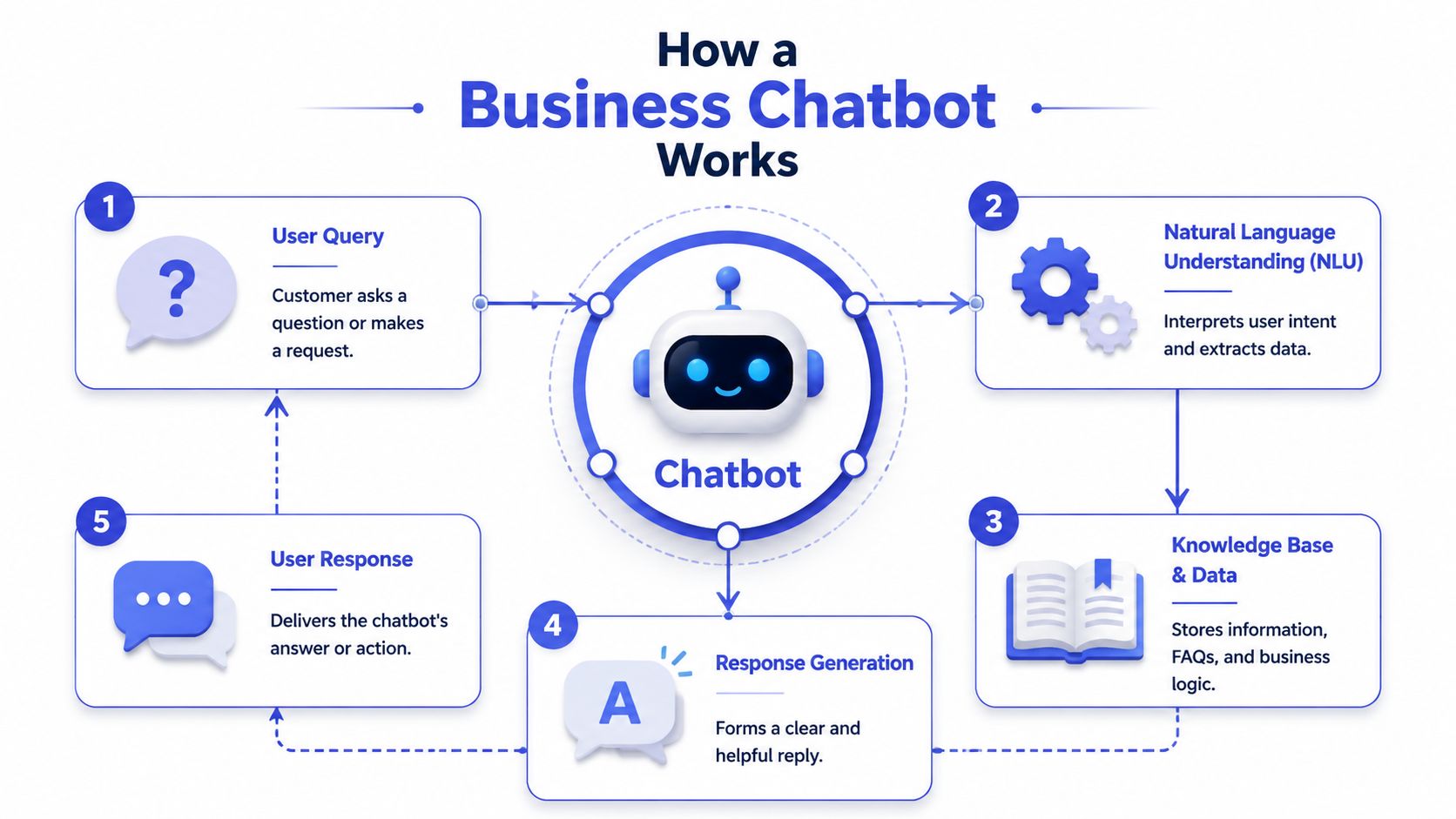
A business chatbot is easiest to understand if you think of it as a digital front-desk employee. It greets visitors, listens to what they need, asks a follow-up question if something is missing, checks the right source of information, and gives an answer or routes the conversation.
That sounds simple on the surface. Underneath, the quality of the experience depends on the logic behind the bot.
Two kinds of chatbot logic
Some bots follow strict rules. They work like a phone tree on a website. A customer clicks “pricing,” then “billing,” then “refunds,” and the bot serves a prewritten answer. These bots are predictable, but they're rigid. If the customer asks something unexpected, the experience can break quickly.
AI chatbots are more flexible. Instead of waiting for the perfect button click, they interpret the user's message in natural language. A person can type, “I need to change my booking,” and the bot can infer the intent even if the wording doesn't match a canned script.
For a non-technical owner, this distinction matters because it affects how much friction your customers feel. A rule-based bot is like a receptionist who only follows a laminated checklist. An AI chatbot is more like a trained staff member who understands the request, asks for the missing detail, and knows where to look next.
The core workflow behind the reply
A high-performing chatbot combines intent recognition, dialogue management, and knowledge-base access. It first interprets the user's goal, then decides whether it needs more context, retrieves the right data, and generates a natural-language response, as described in this research overview of chatbot architecture.
Here's what that means in plain language:
It identifies the goal
The bot tries to understand what the person wants. Are they asking for order status, a refund policy, product advice, or a demo request?It checks for missing information
If the request needs specifics, the bot asks for them. For example, “Can you share your order number?” or “Which plan are you asking about?”It pulls from a source of truth
That source might be your FAQ, help center, pricing page, product docs, or an external system.It generates the answer
The bot turns the information into a clear response that sounds natural instead of robotic.It escalates if needed
If the question is too complex or sensitive, the conversation should move to a person with useful context attached.
A chatbot doesn't fail because it uses AI. It fails when it misunderstands intent, misses context, or has nothing trustworthy to retrieve.
This is why setup quality matters so much. If your source content is messy, outdated, or incomplete, the bot won't magically fix that. It will reflect it. If you want to understand the design side in more detail, this guide on AI chatbot design patterns and setup decisions is a useful companion.
The Core Benefits of Using Chatbots for Business
A business owner usually feels the value of a chatbot in a very ordinary moment. A customer asks a simple question at 9:30 p.m. A sales lead wants a quick pricing clarification before booking a call. A support inbox fills up with the same order-status request for the fiftieth time that week.
Those moments look small. Together, they shape workload, revenue, and customer trust.
The practical benefit of a chatbot is simple. It gives your business a reliable first response layer. Like a good front desk, it handles the predictable traffic quickly, sends people in the right direction, and brings in a person when the issue needs judgment or care.
Operational relief
A large share of incoming messages follow familiar patterns. Customers ask about shipping, returns, appointment times, account access, and basic product details. Those conversations matter, but many do not require a skilled employee to start from scratch every time.
A chatbot reduces that repetition. It can collect the key details, answer the standard question, and pass along only the exceptions. That changes how your team spends its hours. Staff can focus on damaged orders, unusual requests, unhappy customers, or high-value prospects instead of copying the same answer into twenty threads.
That kind of relief matters after launch, not just on a feature list. If the bot is doing its job, your queue should become cleaner, handoffs should become more focused, and your team should spend less time acting like a search engine for your own policies.
A better buying experience
Sales friction often comes from delay, not disinterest.
A visitor may be ready to buy but still has one unresolved question. Which plan fits a team of five? Is same-day shipping available? Does the service integrate with their current system? If no answer arrives while intent is high, the visitor leaves and the opportunity cools off.
A chatbot helps keep that momentum. It can answer straightforward buying questions, suggest the next step, and gather lead details while the person is still engaged. For a small business, that is the digital equivalent of having a helpful employee available at the counter even when the owner is busy with something else.
Support and sales often overlap here. A fast answer to a product question can prevent confusion for an existing customer and remove hesitation for a new one. The mechanism is the same. Reduce uncertainty, and people move forward more easily.
Service quality at scale
Customers usually do not measure service quality by your internal effort. They measure it by how easy it was to get an answer.
A chatbot improves that first layer of service in a few practical ways:
Faster initial response
People get immediate help for common questions instead of waiting in a queue for a basic reply.After-hours coverage
Your business can still answer questions, capture leads, and guide visitors to a next step when nobody is online.More consistent answers
The bot pulls from approved information, which lowers the chance of a rushed staff member sending outdated policy details or inconsistent pricing language.Less customer effort
People can ask directly instead of hunting through menus, FAQs, or contact forms.
Consistency is useful, but it has a condition. The bot must be fed accurate content and clear rules. If your return policy is outdated in the source material, the chatbot will repeat that mistake at scale. That is why strong businesses treat chatbot quality like process quality. They review answers, monitor failure points, and check whether the bot is helping or frustrating people.
That long-term view is where true business value shows up. A chatbot should not only answer more messages. It should improve the quality of the customer journey, reduce strain on the team, and create results you can measure after the novelty wears off.
Real-World Chatbot Use Cases Across Industries
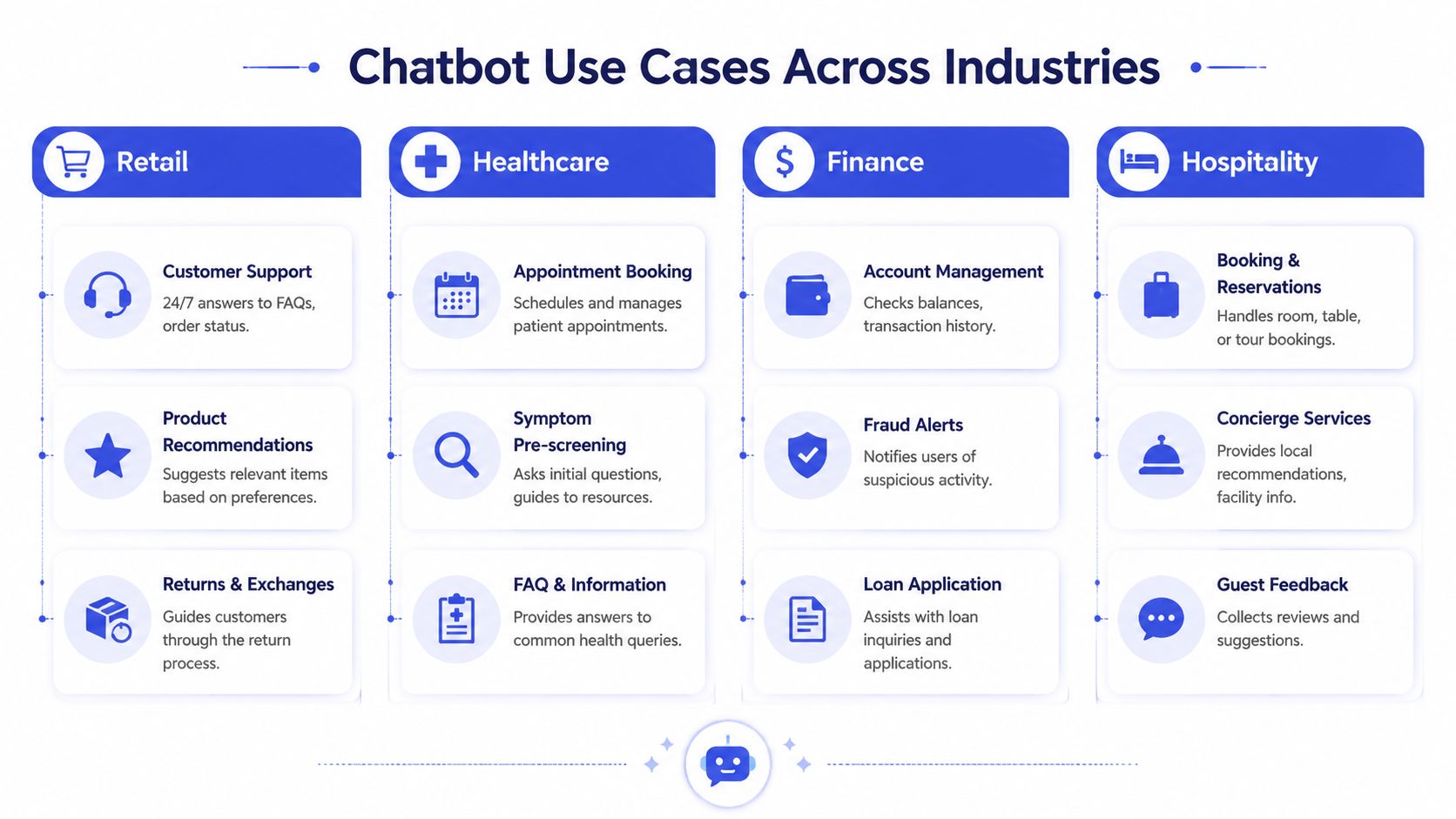
The easiest way to judge chatbots in business is to look at the situations where teams lose time, leads, or patience. The use case should feel boring in a good way. It should remove a repeat problem that staff shouldn't have to solve manually every time.
E-commerce and retail
An online store gets a steady stream of “Where is my order?” messages. The owner knows these are important, but they also know the answer usually follows the same pattern. Customers want tracking, shipping status, return instructions, or help choosing between products.
A chatbot can take that first layer. It can answer shipping and returns questions, point people to the right policy, and help narrow product choices based on what the customer says they need. The owner doesn't eliminate support. They stop spending prime hours on repetitive lookups.
SaaS and digital services
A software company faces a different problem. New users often ask setup questions at the exact moment they're deciding whether the product feels easy or frustrating. If nobody responds, onboarding slows down and confidence drops.
A chatbot helps by acting like an in-app guide or website assistant. It can explain plan differences, direct users to documentation, answer basic product questions, and capture demo interest for the sales team. The value here isn't novelty. It's reducing the time between confusion and clarity.
When a product has a learning curve, the first answer often matters more than the perfect answer five hours later.
Agencies and consultants
An agency website attracts a mix of visitors. Some are ideal clients. Others are students, job seekers, or businesses that aren't a fit. Without a filter, someone on the team has to sort through those conversations manually.
A chatbot can qualify leads before a human gets involved. It can ask about budget range, project type, timeline, and service need, then route qualified inquiries to booking while directing everyone else to the right resource. That creates a cleaner pipeline and saves the agency from treating every contact like a full discovery call.
Education and training
A school, training provider, or coaching business tends to receive recurring questions around enrollment, schedules, requirements, fees, and course fit. Prospective students often ask these questions at night or on weekends, when admissions staff aren't available.
A chatbot can answer those common questions, point students to the right course pages, and collect inquiry details for follow-up. The institution gets a steadier intake process, and prospective students get help when interest is highest.
Across all these examples, the pattern is the same:
The question repeats
The answer follows a known path
A delayed response hurts the outcome
A human should still handle exceptions
That's where chatbots work best. Not as a replacement for expertise, but as a reliable first responder.
Implementing Your First Chatbot A Simple Roadmap
The biggest mistake first-time buyers make is trying to automate everything at once. A better approach is narrower. Pick one recurring job, build the bot around it, and expand once the basics work.
Start with one business goal
Don't begin with features. Begin with a pain point.
For some businesses, the goal is reducing repetitive support traffic. For others, it's qualifying leads on service pages. An e-commerce store may want help with order questions. A SaaS company may want faster answers on pricing and product setup.
Write the goal in one sentence. “We want the chatbot to answer routine pre-sales questions and collect qualified demo requests.” That gives you something concrete to measure later.
A simple first-use checklist helps:
Pick one lane
Support, lead qualification, booking assistance, or onboarding guidance. Choose one.Define the handoff point
Decide which requests stay with the bot and which should go to a person.Name the success action
That might be a resolved FAQ, a booked meeting, or a completed lead capture.
Build from the content you already have
Most small businesses already have the raw material for a chatbot. It's scattered across FAQ pages, help docs, pricing pages, service pages, onboarding docs, and saved support replies.
The job is to turn those into a usable knowledge source. Clean up outdated wording. Remove contradictions. Make sure policy answers are current. If two pages disagree, the bot won't know which one reflects the actual business rule.
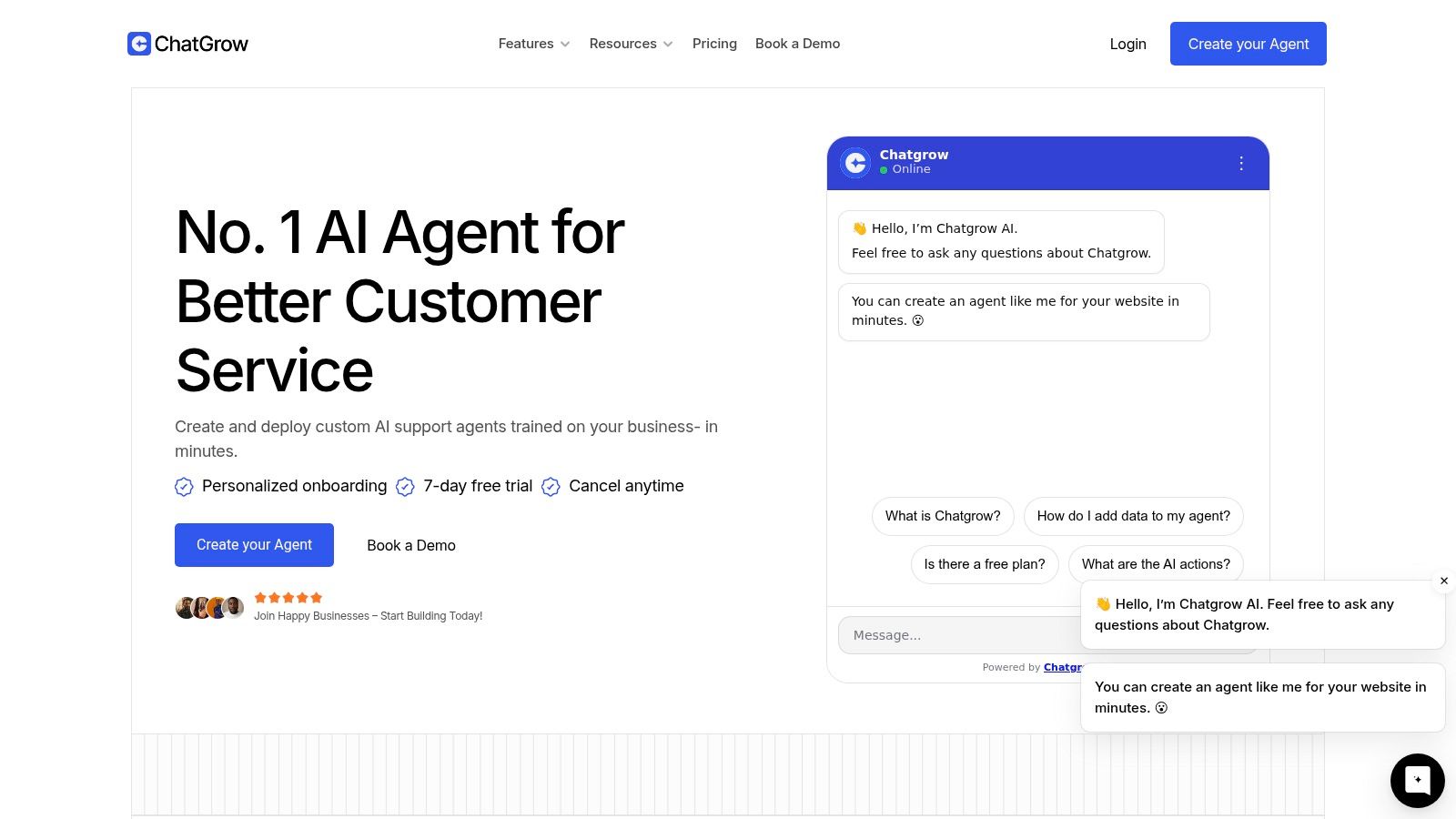
Some platforms simplify this step by training on existing website content and business documents. Chatgrow, for example, lets businesses create and deploy support agents trained on website pages, FAQs, and product content, then configure lead qualification and escalation paths. The point isn't that you need a complex build. It's that your content quality shapes the bot's quality.
Launch small and refine quickly
Your first launch doesn't need to cover every page on the site. Start where intent is strongest. Pricing, contact, support, product, or booking pages are usually better candidates than low-intent blog traffic.
After launch, by watching real conversations closely, owners learn what customers ask, not what they assumed customers would ask.
A useful way to think about this stage is “test the front desk”:
Read failed conversations
Look for wrong answers, vague answers, and loops.Add missing content
If the bot can't answer a common question, update the source material.Tighten escalation rules
Make sure billing disputes, complaints, and edge cases reach a human fast.
After you've seen a few rounds of real usage, this product walkthrough gives a clearer sense of what deployment can look like in practice:
The roadmap is straightforward. Choose one job, train on trustworthy content, deploy in a focused place, then improve based on actual conversations. That's how a chatbot becomes useful instead of decorative.
Key Metrics to Measure Chatbot Success
A chatbot can stay busy all day and still do a poor job for the business.
Picture a front-desk employee who greets every visitor, answers some questions halfway, and sends others in the wrong direction. The lobby looks active, but the activity does not mean the business is running better. Chatbot measurement works the same way. Volume is easy to see. Value takes a little more thought.
The clearest test is simple. Did the chatbot help the customer finish the job they came to do, and did it do that in a way that supports your business goal?
That question matters after launch because actual work starts once customers begin using the bot. Early reporting often focuses on counts such as total chats or containment rate. Those numbers have some use, but they can hide problems. A bot may keep conversations away from your team while also frustrating buyers, missing qualified leads, or creating extra cleanup for support.
What to measure instead of vanity metrics
Start with the outcome tied to the bot's role.
A support bot should help customers get correct answers and reach a person smoothly when the issue needs human judgment. A sales bot should gather the right information, not just more information. An onboarding bot should reduce confusion and help users reach the next milestone with less friction.
A good rule is straightforward:
Judge a chatbot by how many customer jobs it finishes well and how cleanly it hands off the rest.
That leads to a healthier scorecard:
Task completion over conversation volume
A five-message chat that solves the issue is better than a twenty-message chat that goes in circles.Handoff quality over low escalation rates
Passing a complex case to a person is often the right outcome. What matters is whether the customer arrives with context attached.Customer feedback over internal opinion
Teams often overestimate clarity because they already know the product, policy, and process.
If you want a practical model for tracking these patterns, this guide to chatbot analytics for support and lead qualification gives a useful framework.
Essential Chatbot Performance KPIs
Metric | What It Measures | Why It Matters |
|---|---|---|
Task completion rate | Whether the user finished the intended job, such as getting an answer, booking, or submitting lead details | Shows whether the bot is producing the outcome it was built for |
Escalation rate | How often the chatbot passes the conversation to a person | Helps you check whether the bot's scope is set too wide or too narrow |
Escalation quality | Whether the handoff includes the right context, summary, and customer details | Reduces repetition and gives human staff a better starting point |
Customer satisfaction | How users felt after the interaction | Reveals frustration that raw activity numbers can miss |
Lead qualification rate | How often conversations produce leads that meet your fit criteria | Shows whether the bot is helping sales quality, not just filling the CRM |
Answer accuracy review | Whether responses match current policies, pricing, and product reality | Protects trust and lowers avoidable follow-up work |
One more practical point. These metrics work best as a group.
A rising completion rate looks good until you notice customer satisfaction falling. A low escalation rate sounds efficient until you review transcripts and find the bot should have handed off sooner. Looking at the measures together helps you spot whether the chatbot is providing effective help, eroding trust, or merely redistributing tasks from one part of the business to another.
A small team does not need a huge dashboard. It needs a short review habit, run consistently. That is usually enough to show whether the bot is improving service, creating qualified demand, or adding hidden friction.
Common Chatbot Pitfalls and How to Avoid Them
Monday morning. A customer asks your chatbot a simple billing question. The bot gives an old answer, repeats itself when the customer pushes back, and never shows a clear way to reach a person. What looked like a time-saver now creates extra support work and weakens trust.
That is why the true challenge starts after launch.
A chatbot needs supervision in the first 30 to 90 days, and then an ongoing review routine after that. If you want it to help the business, you need to keep it accurate, safe, and useful in real conversations, not just in a demo. A chatbot works like a new front-desk hire. You would not put someone in front of customers on day one and never coach them again.

Where trust breaks down
The biggest chatbot failures are usually ordinary, not dramatic.
A bot repeats the same question because it cannot interpret the reply. It gives a polished answer based on old policy language. It sounds certain when the right response should be, “I'm not sure.” Or it keeps a frustrated customer inside automation when the issue clearly needs a person.
Customers rarely separate that experience from your brand. If the bot feels careless, the business feels careless.
Three patterns deserve close attention:
Looping conversations
The bot keeps circling the same step instead of helping the customer make progress.Confident but inaccurate answers
The wording sounds professional, but the content does not match your current offer, policy, or process.Poor handoff design
The customer cannot easily reach a human, or the handoff happens without the context your team needs.
A simple governance routine
Good governance is less like a big compliance project and more like store maintenance. Small checks done consistently prevent bigger problems later.
Review conversation logs each week. Look for repeated failure points, especially where customers rephrase the same question, abandon the chat, or ask for a person. Update the source content behind the bot. Test a few common journeys yourself. Ask your support and sales teams where the bot creates confusion, because they see the downstream effects first.
Watch closely after launch. The first few weeks reveal whether the chatbot is reducing work or creating more of it.
One rule matters more than many teams expect. Give the bot clear permission to admit uncertainty and escalate. A modest answer builds more trust than a confident guess.
The goal is not a bot that handles everything. The goal is a bot that handles the right tasks well, protects customer confidence, and steps aside at the right moment. That is what turns a chatbot from a novelty into a durable business tool.
If you want a practical way to put this into action, Chatgrow helps businesses build website support and lead qualification agents trained on their own content, then monitor conversations so teams can refine accuracy, escalation, and performance over time.
Related Posts
Continue Reading
More articles from the ChatGrow Team.