Blog
AI Customer Service Platform: The Complete 2026 Guide
By
Nelson Uzenabor

The most popular advice about an AI customer service platform is also the least useful: automate as much as possible, then reduce the support team. That framing turns a service operation into a deflection contest and ignores what customers need when a problem is urgent, sensitive, or commercially important.
A production deployment works differently. The platform handles repetitive questions, identifies intent, gathers context, qualifies leads, and sends complex conversations to the right person with a useful summary. Humans remain responsible for judgment, empathy, exceptions, and decisions that carry risk. The operational question isn't whether AI replaces support. It's where AI can improve speed without weakening trust, and how the team designs that boundary.
The category has moved well beyond a niche experiment. An independently compiled industry summary places the AI customer service market at $12.06 billion in 2024, with a projected rise to $47.82 billion by 2030 at a 25.8% CAGR (Azumo's AI customer service statistics). That growth makes platform selection important, but implementation design matters more. A poorly grounded agent can create more work than it removes, while a narrowly scoped system with reliable escalation can become valuable quickly.
Table of Contents
What an AI Customer Service Platform Actually Does
An AI customer service platform is an operating layer between customer conversations, company knowledge, business systems, and human support staff. It doesn't just generate replies. It interprets a request, checks relevant information, selects a response or action, and decides whether the conversation should continue automatically or move to a person.
That distinction separates a modern platform from a basic rule-based chatbot. A simple bot may match keywords to scripted answers. A more capable system can understand that “I can't get into my account after changing phones” may require identity verification, troubleshooting, and possibly an account specialist. Agentic systems take this further by acting on behalf of users through connected workflows, then escalating when the required action exceeds their authority or confidence.
The useful division of labor
The strongest deployments assign work according to complexity and consequence:
Routine inquiries: The AI answers approved FAQs, explains policies, surfaces documentation, and handles recurring questions outside business hours.
Qualification and routing: It identifies buying intent, gathers requirements, and sends sales or support conversations to the right queue.
Agent assistance: It summarizes conversation history, retrieves relevant knowledge, and suggests responses while the human retains control.
Complex resolution: A human handles exceptions, disputes, sensitive account issues, emotionally charged conversations, and decisions that require judgment.
This model reflects the workforce evidence. Gartner's 2025 survey found that 55% of organizations kept staffing stable despite higher volumes, 20% reduced headcount because of AI, and 42% created specialized AI roles (Call Centre Helper's report on the Gartner survey). Those findings point toward workforce redesign, governance, and knowledge management rather than a simple replacement plan.
Operational rule: If the business can't define what the AI may do, what it must never do, and how it hands off context, it isn't ready for broad automation.
The market is also shifting toward systems that can perform tasks, not merely chat. Cisco's 2025 global research projects that 68% of customer service and support interactions with technology vendors will be handled by agentic AI by 2028 (Call Centre Helper's coverage of the research). That's a projection, not a present-day outcome, but it highlights the direction of platform design. Buyers should ask how an agent authenticates a request, invokes a workflow, records an action, and escalates safely.
For a lightweight starting point, an AI reply tool can help teams organize response generation and reduce repetitive drafting. A full customer service platform goes further by connecting replies to knowledge, routing, reporting, and human handoff. The difference is operational control.
How Modern AI Customer Service Platforms Are Built
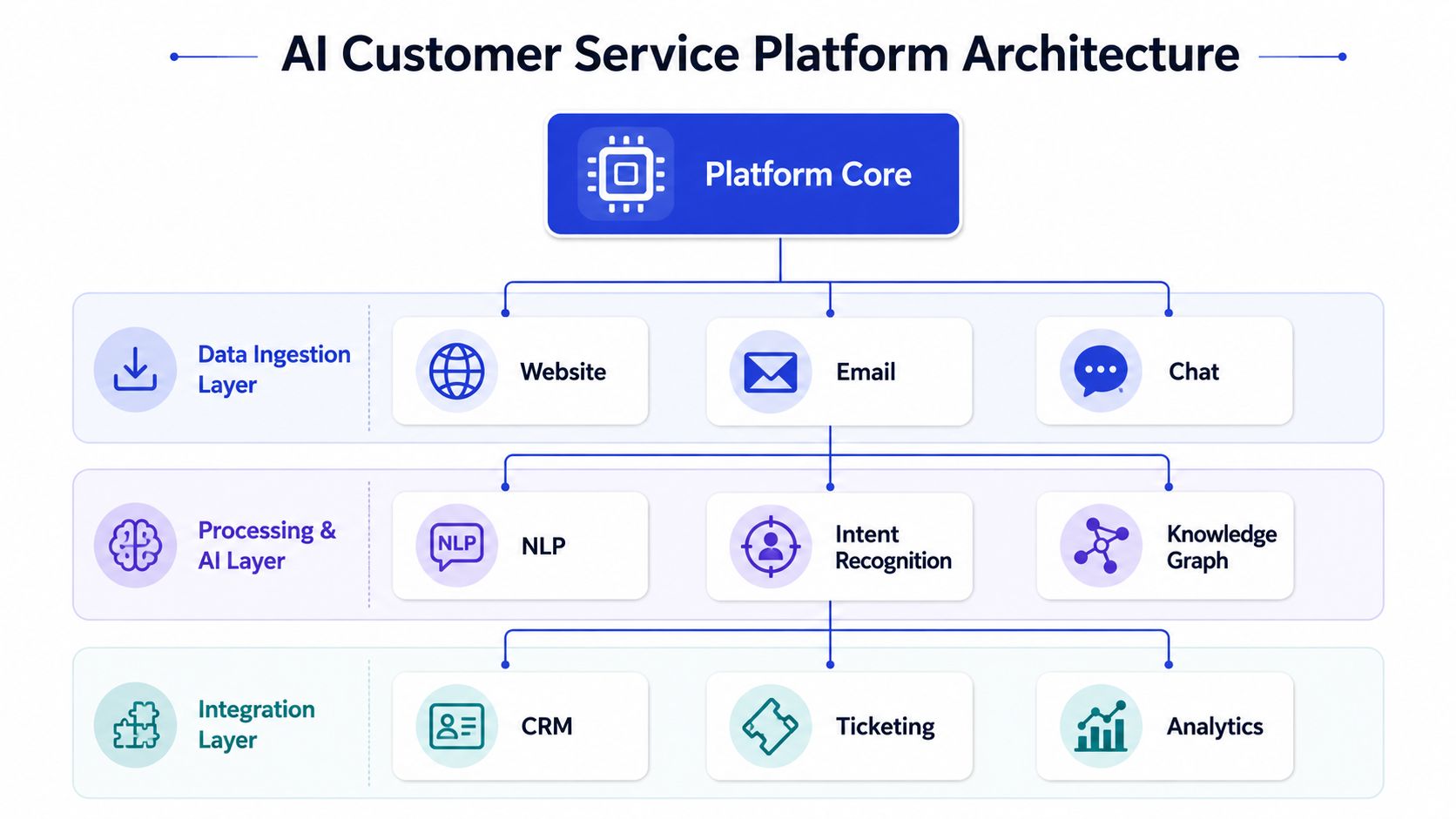
Production platforms usually work as layered systems rather than a single chatbot sitting on a website. Research on contact-center architecture describes a combination of multi-channel data ingestion, real-time and batch processing, machine learning inference, and agent-facing dashboards, a design that supports scalable routing, ongoing retraining, and resolution under changing workloads (research on contact-center architecture).
The layers buyers should understand
Data ingestion collects the material the platform needs to answer accurately. That may include website pages, product documentation, FAQs, pricing details, prior conversations, email, chat, and customer records. If this layer contains outdated policies or contradictory pages, the model can produce polished but unreliable answers.
Processing and AI inference turns raw conversations into decisions. Natural language processing identifies meaning, intent classification determines what the customer wants, and knowledge grounding limits answers to approved information. Retrieval quality matters here. A fluent answer isn't useful if the system retrieved the wrong policy.
Workflow and integration connects interpretation to action. CRM, ticketing, order management, billing, scheduling, and analytics systems allow the platform to retrieve context or trigger approved processes. The integration should also write the outcome back to the system of record, otherwise agents inherit a fragmented conversation.
Agent-facing dashboards make the human side workable. An agent needs the conversation, the AI's reasoning signals or confidence indicators, relevant customer details, escalation reason, and recommended next action in one place. Without that context, a handoff just transfers the customer's effort from the bot to the employee.
A practical way to evaluate architecture is to ask what happens when load changes, knowledge changes, or the request falls outside the approved scope. Real-time processing supports immediate routing, batch analysis identifies recurring gaps, and feedback from resolved conversations can improve classification and content over time.
Teams also need a clear data integration plan. This customer data integration guide is useful when mapping the systems that hold customer identity, conversation history, transactions, and support outcomes. The objective isn't to connect everything indiscriminately. It's to give the AI the minimum reliable context required for each workflow.
Key Features That Separate Good Platforms from Great Ones
Feature lists often reward breadth. Production results usually depend on a smaller set of capabilities working together. A platform that answers simple questions beautifully but loses context during escalation isn't strong enough for a serious support operation.
Evaluate the decision path, not the demo
Start with intent classification. The system should distinguish a pre-sales question from a technical incident, a refund request from a policy question, and a low-risk FAQ from a high-priority complaint. It should use conversation context, not just isolated keywords.
Next, examine knowledge grounding. Good answers should come from approved sources, show appropriate restraint when information is missing, and respect product, pricing, and policy boundaries. The platform must make content updates manageable because stale knowledge creates repeat contacts and agent corrections.
Human escalation is the most revealing test. A useful handoff includes the customer's goal, relevant identifiers, actions already attempted, sentiment or urgency signals, and the reason automation stopped. The customer shouldn't have to repeat the entire story.
Platforms such as Chatgrow illustrate the feature pattern to look for, including Smart Intent, smart escalation, lead qualification, training from business content, and deployment on relevant pages. Other tools may provide similar capabilities through different architectures, so compare behavior in realistic conversations rather than accepting feature names at face value.
Feature Category | Must-Have Indicators | Nice-to-Have Add-ons | Impact on Outcomes |
|---|---|---|---|
Intent and context | Context-aware classification, clarification questions, priority signals | Sentiment and predictive intent | Better routing and fewer misdirected conversations |
Knowledge grounding | Approved sources, source controls, update workflow, fallback behavior | Automated content-gap suggestions | More accurate answers and fewer corrections |
Human handoff | Context summary, reason for escalation, queue routing, preserved transcript | Warm transfer and agent suggestions | Less repetition and faster human resolution |
Workflow action | Controlled integrations, permissions, audit trail | Multi-step autonomous workflows | More complete resolution instead of passive deflection |
Channels | Consistent behavior across the channels customers use | Voice and multilingual extensions | Wider coverage without fragmented service |
Reporting | Resolution quality, escalation accuracy, satisfaction, failure reasons | Conversation-level trend analysis | Better optimization decisions |
Feedback loop | Review tools, correction workflow, retraining controls | Automated quality scoring | Continuous improvement without uncontrolled changes |
Measure what customers experience
Deflection alone can hide failure. A customer may stop replying because the answer was wrong, not because the issue was resolved. Collect structured and open-ended feedback after meaningful interactions, and use a Formcarry user feedback collection approach when you need a flexible way to capture comments outside the support platform.
The best platforms also support lead qualification without making the conversation feel like a form. Ask only for information that changes routing or follow-up. Then test whether the resulting summary gives the salesperson or agent enough context to act immediately.
Real-World Use Cases Across Business Types
The same AI customer service platform can support very different workflows, but configuration should follow the business model. A small company doesn't need an autonomous system for every channel on day one. It needs one dependable use case tied to a visible bottleneck.

Small and medium-sized businesses
An SMB often starts with after-hours questions, pricing queries, availability, and lead qualification. Train the agent on the public website, FAQs, service boundaries, and sales criteria. Route requests involving discounts, custom requirements, complaints, or purchase urgency to a human with a concise summary.
The mistake is launching on every page before the team knows which questions the AI can answer reliably. High-intent service or product pages usually provide clearer context and make it easier to judge whether the conversation improved conversion or reduced unnecessary support work.
SaaS companies
A SaaS team can use AI for onboarding guidance, account navigation, documentation lookup, and initial technical triage. The agent might explain how a feature works, identify the user's plan, suggest a documented troubleshooting step, and create an appropriately categorized ticket when the issue appears product-specific or unresolved.
Escalation should be stricter for account access, security, billing disputes, data loss, and incidents affecting multiple users. The agent can gather browser details, error text, workspace information, and recent actions, but it shouldn't improvise a technical diagnosis outside the approved knowledge base.
E-commerce brands
Order status, shipping policies, returns, exchanges, sizing, and product questions are natural starting points. With controlled access to order information, the agent can answer status questions and explain the next step. A human should handle exceptions such as damaged goods, disputed deliveries, unusual refund requests, or emotionally charged complaints.
The workflow should preserve order identifiers and prior actions during escalation. Otherwise, automation may shorten the first response while increasing total resolution effort.
Digital agencies
Agencies need separation between client knowledge bases, brand voices, escalation destinations, and reporting. Each agent should be trained on the relevant client's content rather than a blended repository. A travel agency may prioritize itinerary questions and booking qualification, while an educational institution may need carefully bounded answers about programs, requirements, and admissions processes.
Start with one repeatable deployment pattern, then adapt it per client. Successful expansion comes from reviewing actual failed answers, missing content, misrouted conversations, and handoff quality, not from activating every available feature.
Implementation Steps from Training to Deployment
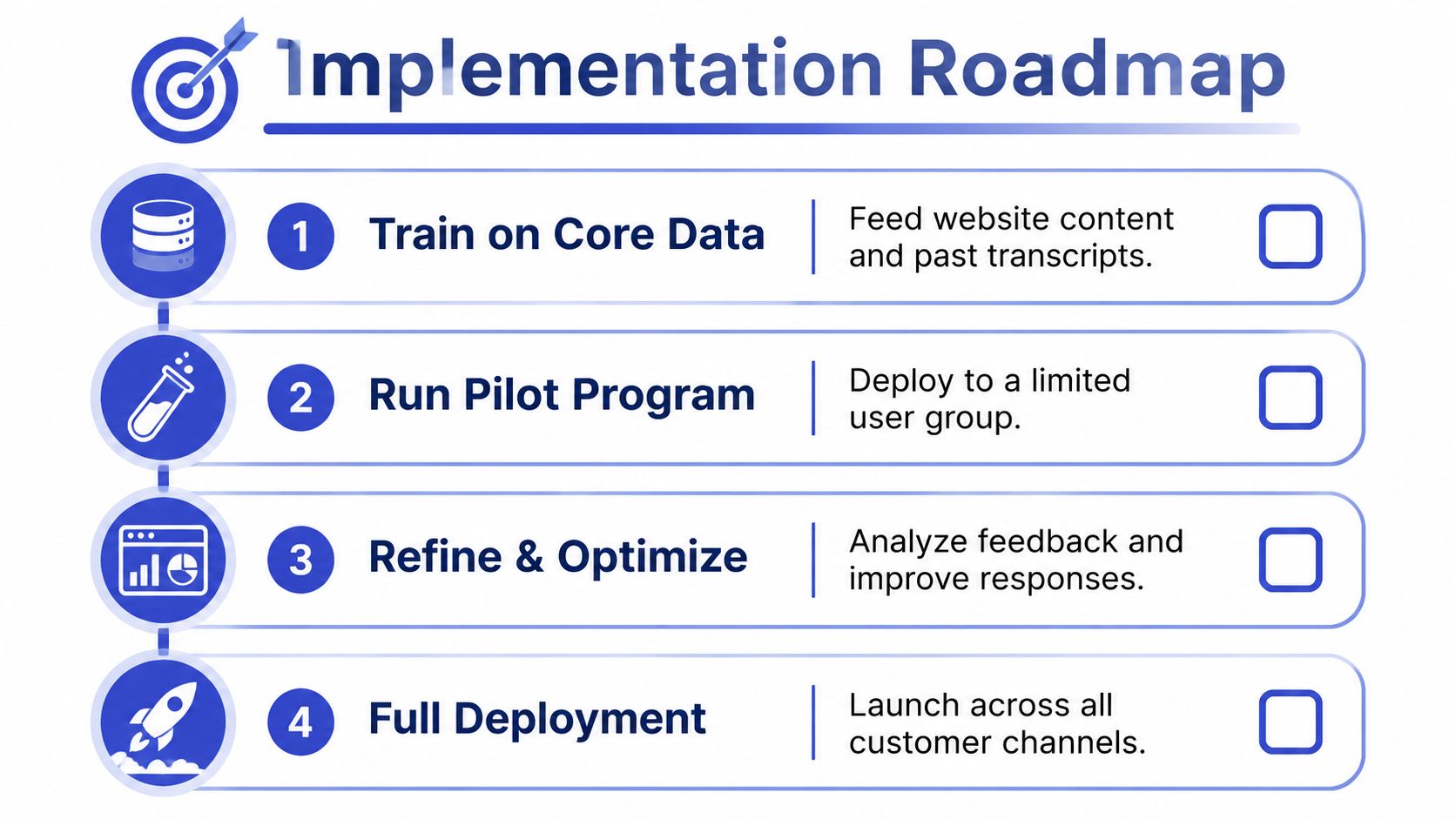
Implementation succeeds when the team treats the platform as a managed operational process rather than a one-time installation. The sequence below keeps scope controlled and makes failure visible before customers encounter it at scale.
1. Train on reliable core data
Collect the pages and documents the AI is allowed to use. Include product pages, pricing, FAQs, policies, support documentation, and representative conversation history. Remove duplicates, resolve contradictions, and identify content that requires human approval.
For teams planning custom chatbot training, the important lesson is that training isn't just uploading more files. It means defining source authority, testing how the system retrieves information, and deciding what it should say when no approved answer exists.
2. Define boundaries and qualification
Write the rules before deployment. Specify which questions the agent can answer, which actions it can perform, what information it may collect, and which conditions trigger a handoff.
Create qualification fields that support a real decision, such as use case, urgency, product interest, account status, or requested service. Avoid collecting information merely because the form allows it.
3. Pilot on a narrow surface
Deploy first to a limited page group, channel, or audience. High-intent pages are often useful because the customer's context is clearer and the business can inspect conversations closely. Keep human oversight active during the pilot and review both successful answers and abandoned conversations.
4. Refine, then expand
Use conversation reviews to update content, intent labels, escalation triggers, and response tone. A useful review queue includes unanswered questions, corrections made by agents, repeated customer rephrasing, and cases where customers requested a person.
This chatbot training resource can support the practical work of organizing training inputs and improving agent behavior. Keep changes controlled, record what changed, and verify that a knowledge update didn't create new errors elsewhere.
A deployment checklist should include:
Scope: Approved topics, channels, pages, and actions are documented.
Knowledge: Content owners are assigned and outdated material has a review path.
Escalation: Triggers, queues, business hours, and fallback contacts are tested.
Transparency: Customers can tell when they're interacting with AI and can request a human.
Measurement: Resolution, satisfaction, escalation quality, and agent impact are tracked from launch.
Governance: Someone owns ongoing review, retraining, permissions, and incident response.
Metrics and Evaluation Criteria That Actually Matter
Conversation volume is easy to report and easy to misunderstand. A platform can handle many conversations while frustrating customers, producing weak handoffs, or shifting work to agents. Evaluation should connect automation to resolution quality and the customer's next action.
Independent 2026 benchmarks place median tier-1 automation at 41.2%, with top-quartile deployments near 58.7% (AIssist's 2026 AI customer service benchmark). These figures are useful reference points, not promises. Moving beyond partial deflection requires accurate intent classification, grounded knowledge, and escalation design that prevents the AI from trapping customers in an unproductive loop.
Build a balanced scorecard
Track tier-1 automation alongside resolution quality. Ask whether the customer received a correct answer or completed the intended task, not just whether a human was absent.
Track escalation accuracy by reviewing whether the platform sent the conversation to the right team and included enough context. An escalation that reaches the wrong queue is an automation failure even if the transfer itself worked.
Monitor customer experience through satisfaction feedback, repeat contact, abandonment, and requests for a human. Pair those measures with agent outcomes such as time spent reconstructing context, correction frequency, workload mix, and confidence in the AI's summaries.
A practical scorecard might look like this:
Resolution quality: Was the customer's stated need addressed?
Automation suitability: Did the AI handle the case, or should it have escalated earlier?
Handoff completeness: Could the human continue without asking the customer to start over?
Knowledge accuracy: Did the answer reflect current approved information?
Customer response: Did the interaction produce useful feedback or a successful next step?
Team impact: Did agents gain time for complex work, or inherit more cleanup?
For deeper measurement planning, use this guide to customer service key performance indicators as a reference for organizing operational metrics.
Review trends, not isolated wins
Review performance by intent, channel, page, customer segment, and escalation reason. A strong overall rate can conceal poor handling of one commercially important workflow. Conversely, a modest automation rate may still be valuable if it removes repetitive work and produces better-qualified human conversations.
Set a regular review rhythm. Compare automation gains with satisfaction, repeat contacts, correction effort, and staffing needs. The right target is optimal routing, not maximum deflection.
Common Pitfalls and How to Avoid Them
The most damaging mistake is presenting the service as AI-only. A 2025 U.S. consumer survey found that 93.4% preferred a human over AI for customer service, 88.8% said companies should always offer a human option, and 49.6% would cancel a service over AI-driven customer service (Kinsta's survey coverage). Those results make the risk clear. Customers may welcome faster answers, but they don't want an automated dead end when the issue matters.
Pitfall one, treating escalation as failure
Escalation is a designed outcome, not necessarily a platform defect. Define triggers for account security, billing disputes, sensitive complaints, regulated matters, complex technical incidents, and repeated failed attempts. Make the transfer visible, preserve the transcript, and send a summary that states what the customer needs and what the AI already did.
Don't force customers through repeated menus before offering a human. If the customer asks for a person, the platform should respect that request according to the business's operating policy.
Pitfall two, allowing confident answers without grounding
A polished answer can still be wrong. Restrict the system to approved knowledge, configure a clear fallback, and review questions that produce uncertainty or repeated rephrasing. Brand voice matters, but tone can't compensate for inaccurate policy or invented product details.
Teams should also explain the interaction clearly. Transparency about AI involvement gives customers a realistic expectation and makes the handoff feel like part of the service design rather than a hidden failure.
Pitfall three, assuming staffing disappears
The Gartner findings cited earlier show a more complicated workforce picture. Most surveyed organizations kept staffing stable, while some created specialized AI roles and a smaller share reduced headcount because of AI. Those roles may involve knowledge management, prompt and workflow governance, quality review, escalation operations, or analytics.
The practical standard: Automate repetition, not responsibility.
A balanced design protects trust while improving capacity. Let AI answer what is well documented, gather information that helps a person act, and stop when uncertainty or consequence rises. Review the system as you would review a new support employee, with training, permissions, quality checks, coaching, and a clear route to human judgment.
Chatgrow lets businesses create, train, and deploy custom support agents using website content, FAQs, pricing, and product pages, with intent understanding, lead qualification, and context-rich human escalation. If you're ready to test a focused AI workflow on high-intent pages, visit Chatgrow and start with a narrow deployment you can measure and improve.
Related Posts
Continue Reading
More articles from the ChatGrow Team.


