
Blog
Customer Service for Small Business: Your 2026 Guide
By
Nelson Uzenabor
Your inbox has three unanswered refund questions. A customer sent a Facebook message last night asking whether an item is back in stock. Someone left a voicemail about a missed appointment. Your team chat has a note from sales asking whether support can “just handle” lead qualification too. If you're running a small business, this is familiar. Customer service rarely arrives in one tidy queue. It shows up everywhere, often at the same time, and usually when you're already overloaded.
Most owners try to solve that by working longer hours or adding another channel. Both approaches break down fast. Small businesses win because they feel personal, responsive, and accountable. But that same personal approach becomes hard to maintain once volume grows, hours are limited, and customers expect answers outside business hours.
The job isn't choosing between efficiency and warmth. It's building a service system that protects the human moments your customers remember, while removing the repetitive work that drains your team.
Table of Contents
Why Great Customer Service Is Your Unfair Advantage
A lot of founders assume customer service becomes important only after they grow. In practice, it's one of the few advantages a small business has from day one. Large companies can outspend you. They usually can't out-care you.
That edge is easy to lose when support becomes chaotic. One local retailer I advised had the owner answering Instagram DMs, a manager checking email between shifts, and a part-time employee returning calls from sticky notes at the register. Everyone was trying hard. Customers still got inconsistent answers because no one owned the system.
The gap small businesses have to close
Small businesses face a real tension. Many customers want human interaction, but many small teams can't staff round-the-clock support. That's not a failure of effort. It's an operating constraint. The challenge is preserving the personal tone customers value while making response handling more consistent and less dependent on whoever happens to see the message first.
According to Talkdesk's small business customer service analysis, 78% of small business customers prefer human interaction, yet 65% of small businesses lack resources for 24/7 human support. That gap explains why so many owners feel stuck. They know what customers want. They just can't deliver it manually at all hours.
Practical rule: If your team is answering the same question over and over, that isn't “personal service.” It's a broken allocation of human time.
What customers actually remember
Customers rarely remember that you answered a shipping question manually. They remember whether the answer was clear, whether they had to chase you, and whether someone took ownership when the issue was more nuanced.
That's why customer service for small business shouldn't be framed as “human versus automation.” The better framing is human where it counts, automation where it helps.
Here's what tends to work:
Use people for judgment-heavy interactions. Complaints, billing disputes, damaged orders, sensitive requests, and loyalty-building follow-ups belong with a person.
Use systems for repetitive requests. Order status, business hours, appointment reminders, policy questions, and lead capture don't need to interrupt your best staff all day.
Protect brand tone intentionally. Fast replies that sound cold can hurt just as much as delayed replies.
Small businesses don't need enterprise complexity. They need a service model that gives customers quick answers, gives staff clear responsibility, and keeps the personal touch available for the moments that build trust.
Defining Your Service Goals and Key Metrics
Customer service feels emotional when you're in the middle of it. A customer is upset. A message is urgent. A team member is doing their best. But if you manage service on gut feel alone, you'll miss the patterns that matter.
Think of your service operation like a small boat dashboard. You don't need dozens of instruments. You do need the few that tell you whether you're on course or drifting.
Start with a small dashboard
The importance of customer service is often underestimated by many owners. Customer service influences loyalty directly, and speed is more critical than typically assumed. According to Nextiva's customer service statistics, 96% of consumers globally say customer service is important in their choice to remain loyal to a brand, and 90% want immediate responses, often defined as no more than 10 minutes.
That doesn't mean every small business needs to reply in minutes on every channel. It does mean you should define what “good” looks like for your business and track whether you're delivering it.
This visual is a useful way to frame your dashboard:
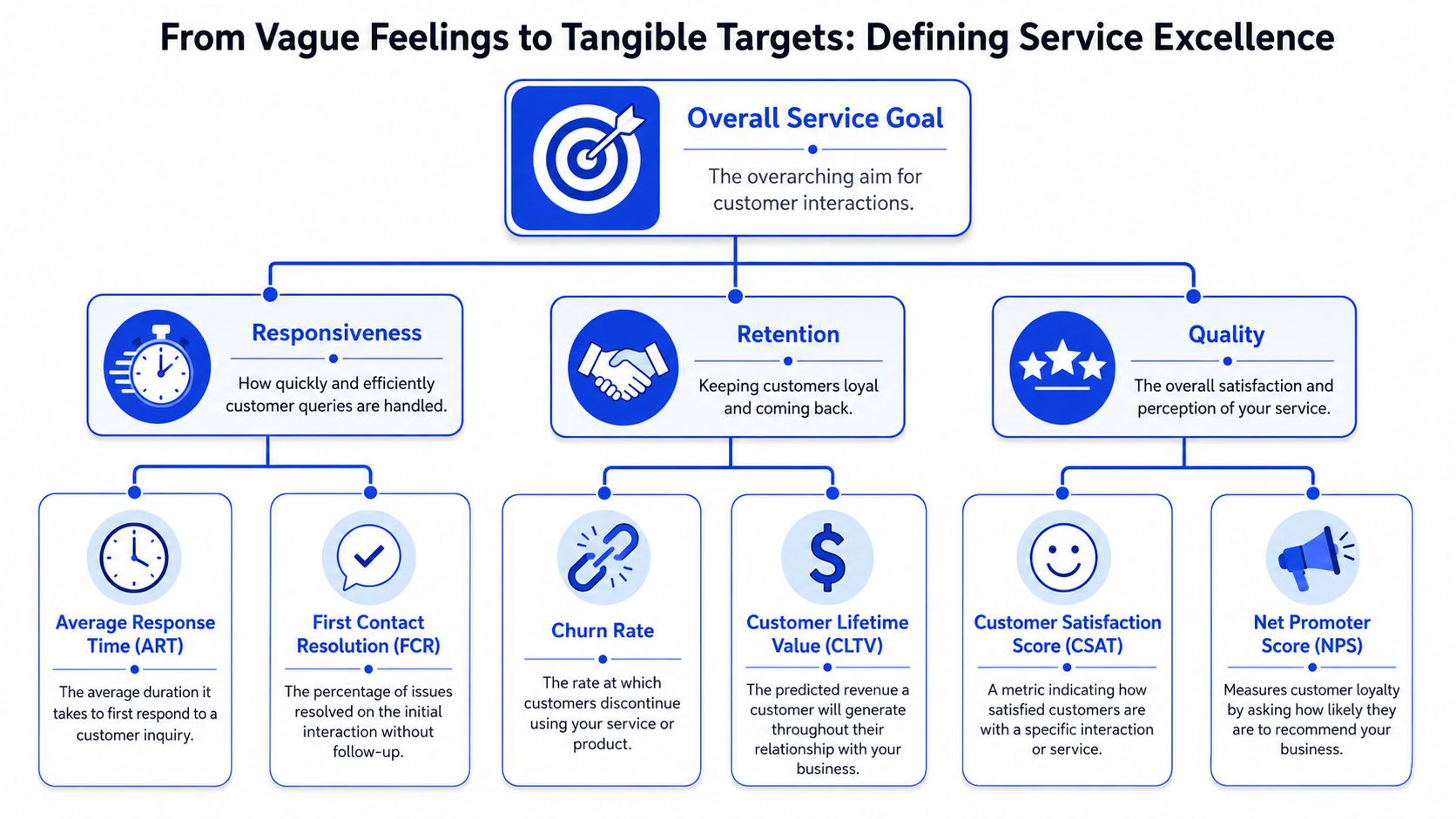
If you want a deeper KPI breakdown, this guide to customer service KPIs is a solid companion.
The only metrics most small businesses need first
You don't need to track everything in that graphic at once. For most small teams, three metrics are enough to create discipline.
Metric | What it tells you | How to track it simply |
|---|---|---|
First response time | How quickly customers hear back | Timestamp incoming messages and first replies in your inbox, help desk, or spreadsheet |
First contact resolution | Whether issues get solved without back-and-forth | Tag tickets resolved in one interaction |
CSAT | How customers felt about the interaction | Send a short “Was this helpful?” survey after resolution |
A few practical notes matter here.
First response time is your pressure valve. If this number drifts up, customer frustration usually rises before your team says anything.
First contact resolution reveals process issues. Low performance here often means agents lack information, authority, or both.
CSAT keeps speed honest. Fast but vague replies create more work later.
A small business with three clean metrics usually manages service better than a bigger team tracking fifteen poorly.
For teams just getting started, write down targets in plain language. Examples include replying to email within one business day, answering chat quickly during working hours, or resolving routine requests without a second touch whenever possible. The target matters less than the consistency.
What doesn't work is vague language like “provide amazing service.” Staff can't operate from slogans. They can operate from response expectations, ownership rules, and visible numbers reviewed every week.
Choosing the Right Support Channels for Your Business
Small businesses often copy larger brands and try to support customers on email, phone, live chat, Facebook, Instagram, WhatsApp, and website forms at the same time. That looks customer-friendly from the outside. Operationally, it's how service quality falls apart.
The strongest customer service for small business usually starts with fewer channels run well.
Why being everywhere creates weak service
Every channel creates three kinds of work. Someone has to monitor it. Someone has to answer it. Someone has to keep the answers consistent across channels.
If you spread a small team too thin, you get the same pattern every time. Email responses lag because everyone's watching live chat. Phone calls go to voicemail because one person is handling in-store customers. Social DMs get casual, incomplete answers that conflict with your formal policies. The business looks available but feels unreliable.
A better approach is to choose channels based on customer behavior and operational fit, not on what competitors happen to offer.
Customers don't reward you for offering seven channels. They reward you for making one or two of them dependable.
For teams sorting this out, this overview of multi-channel support can help you map channel sprawl before it becomes a service problem.
A simple channel selection matrix
Use two filters. First, ask what your customers need. Second, ask what your team can realistically support well.
Channel | Best for | Watch-outs |
|---|---|---|
Non-urgent issues, documentation, returns, B2B inquiries | Easy to neglect if no one owns the inbox | |
Phone | Urgent issues, high-trust purchases, older or local customer bases | Expensive in staff time, hard to scale without structure |
Live chat | Pre-purchase questions, simple support, fast triage | Needs prompt coverage and clear escalation rules |
Social DMs | Light inquiries, brand engagement, simple redirects | Poor fit for complex support and policy disputes |
Contact form | Organizing inbound requests into a single queue | Adds friction if the form is too long |
Different business models usually land in different places:
Ecommerce brands often do best with email plus live chat, with social used as a light front door rather than a full support desk.
Local service businesses often need phone plus text or email because urgency and scheduling matter.
SaaS companies usually benefit from chat plus email because customers need fast troubleshooting and documented follow-up.
Agencies and consultancies often need a contact form plus email, with direct calls reserved for active clients.
A useful rule is to master two primary channels and one overflow channel. Primary channels get staffed, measured, and documented. Overflow channels redirect people politely into the main system.
That might sound less accommodating. In practice, it creates a calmer customer experience because people know where to go and what kind of response to expect. Clear access beats scattered availability.
Staffing and Building Simple Support Workflows
Even if your business has one founder, one operations person, and one part-time assistant, you already have a support team. It may not look formal, but customers still experience it as a system.
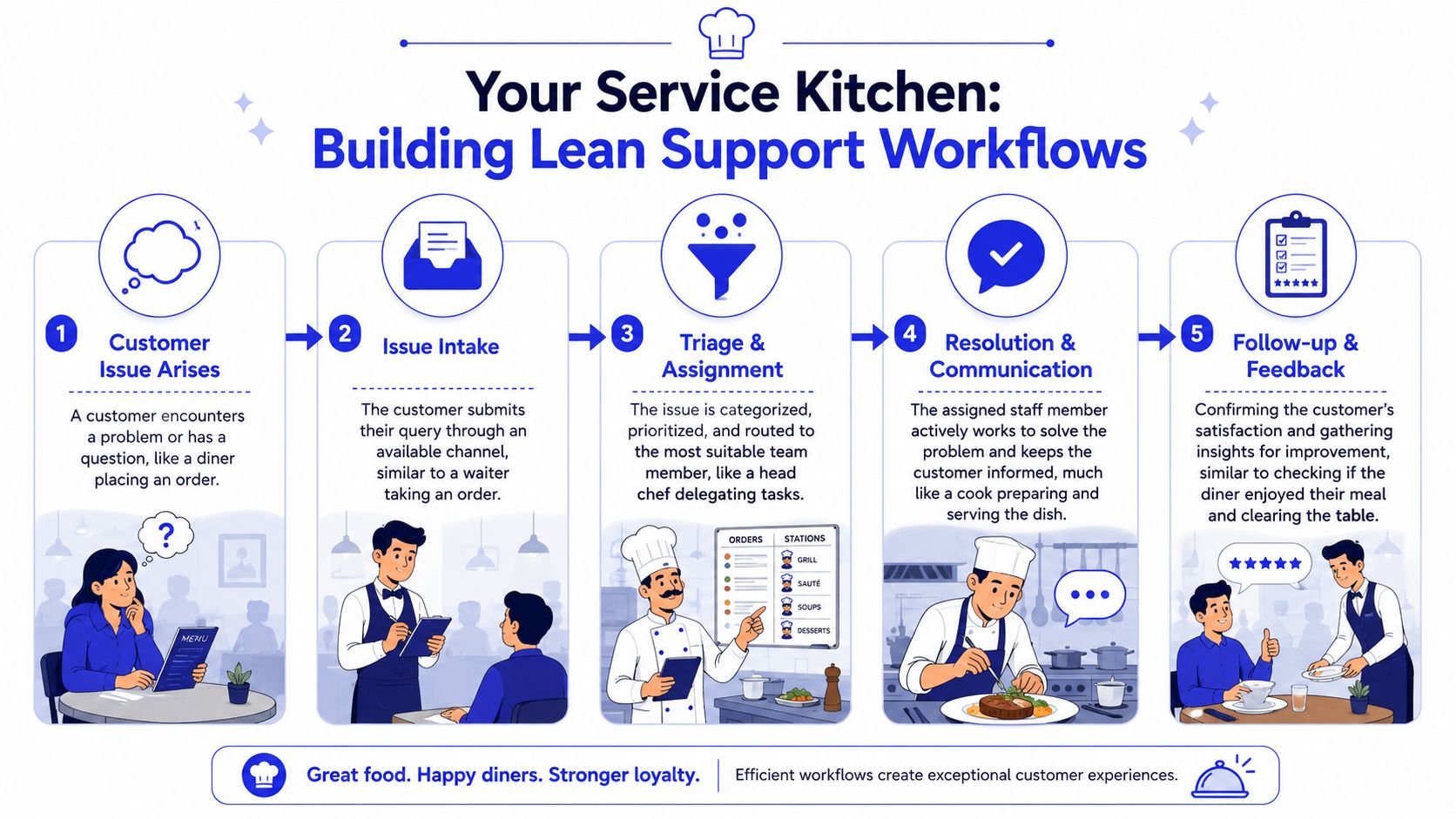
The easiest way to explain workflow design is a food truck kitchen. A great food truck doesn't succeed because everyone improvises. It succeeds because orders come in, get sorted, get cooked in a known sequence, and go out consistently.
Run support like a tight kitchen
Support breaks when roles are fuzzy. In small businesses, that usually sounds like this:
“Whoever sees it answers it.”
“I thought accounting handled refunds.”
“Sales said they'd call the customer back.”
“I didn't want to reply because I wasn't sure what we usually do.”
Those aren't people problems first. They're workflow problems.
This process map shows the operating model small teams need:
A basic workflow that works
You don't need complicated software to build this. You need a sequence and an owner.
A workable support flow looks like this:
Intake
Every request enters one defined place. That might be a shared inbox, help desk, or website form. Avoid letting customer issues live in random DMs and personal text threads.Triage
Someone checks whether the issue is routine, urgent, revenue-related, or sensitive. This can be one person wearing multiple hats, but the triage step needs to exist.Assignment
The issue goes to the right person. Billing to finance. Delivery issue to operations. Product question to support or sales.Resolution
The assigned person replies, solves the issue, and documents the outcome.Escalation if needed
If the issue crosses a threshold, it moves up fast instead of bouncing around.
A simple escalation path often works better than a perfect one. For example:
Issue type | First owner | Escalate when |
|---|---|---|
FAQ or basic policy | Front-line support | Customer asks for exception |
Order or scheduling issue | Operations or support | Delay, error, or repeat complaint appears |
Billing or refund dispute | Finance or owner | Customer challenges policy or charge |
Reputation risk | Owner or manager | Public complaint or emotionally charged case |
Operator's note: Escalation should happen because the issue needs judgment, not because the front-line person is nervous.
What belongs in your internal playbook
Every small business should keep a lightweight service playbook. A Google Doc is enough to start. If your team grows, move it into Notion, Confluence, or your help desk knowledge base.
Include these basics:
Approved answers for common questions such as shipping, returns, availability, onboarding, and cancellations
Decision rights so staff know what they can approve without asking
Tone examples that sound like your brand, not generic scripts
Escalation rules for complaints, public posts, and legal or billing sensitivity
Channel rules that define where issues start and where they get moved
What doesn't work is over-scripting. Customers can hear canned language instantly. The playbook should standardize decisions and facts, not force every message to sound robotic.
Automating Support with AI for 24/7 Service
Once the workflow is stable, automation stops feeling risky and starts feeling obvious. AI works best when it sits on top of a clear process, not when it's asked to rescue a messy one.
The practical use case for small businesses is straightforward. Let automation take the repetitive traffic so people can focus on the interactions where context, empathy, and judgment matter.
Automate the repeatable work
Many owners hesitate. They worry that using AI means downgrading service. In reality, the opposite is often true when implementation is disciplined.
According to SCORE's guide to automating customer service without losing the human touch, customer service automation for small businesses can resolve up to 80% of routine inquiries without human intervention, with a 30% reduction in customer support costs for SMBs adopting chatbots, while 87% of service decision-makers report that AI frees representatives to handle more complex issues.
Those routine inquiries are usually the same ones clogging up your day:
Status questions such as order tracking, appointment details, business hours, or account access
Policy questions about returns, cancellations, shipping, or pricing
Lead qualification where prospects ask whether you're a fit, what you offer, or how to get started
Basic troubleshooting that follows known steps
When those are handled instantly, customers get speed and your team gets time.
For a broader operating view, Voicedial.ai's automation insights offer a useful look at how teams divide simple interactions from human-only cases.
Keep humans on the moments that matter
Small businesses shouldn't automate emotional labor. That's the mistake that makes service feel cheap.
Keep a person involved when the issue includes:
frustration or disappointment
money disputes
unusual edge cases
account-specific nuance
a high-value buyer or long-term client
a public reputation risk
This is the core trade-off. AI is excellent at consistency, availability, and recall across known information. Humans are better at negotiation, exception handling, reassurance, and relationship repair.
Used well, automation protects the human touch because it prevents your staff from spending their best energy on repetitive queue-clearing.
If your best people spend the day answering “Where is my order?” they have less capacity left for “I'm upset and I need someone to fix this.”
How to implement AI without making service feel robotic
The quality of the setup determines the quality of the experience. Generic bots often fail because they answer from broad internet patterns instead of your actual business rules. Better systems are trained on your own site content, FAQs, product pages, pricing details, and support documentation.
That means the implementation checklist matters more than the tool category:
Start with one use case. Pick website chat, after-hours support, or lead qualification first.
Train on business-specific content. Include FAQs, policies, product pages, help docs, and common objections.
Define escalation triggers. Complaint language, refund requests, repeated misunderstanding, or “speak to a person” should move the case to a human.
Review transcripts weekly. You'll spot missing answers, weak wording, and recurring friction fast.
Tune for brand voice. Short, clear, helpful responses usually outperform overly polished corporate language.
If you're exploring implementation, this walkthrough on how to create an AI agent is a practical starting point.
What doesn't work is turning on automation everywhere at once. Start where your volume is repetitive, where response delays are common, and where the answer set is stable. That's how AI becomes an extension of your service team instead of an obstacle between you and the customer.
Calculating the ROI of Your Customer Service
Many owners still treat customer service as overhead. That's understandable when payroll is tight and support doesn't always look tied to revenue in a clean way. But weak service costs money in both visible and hidden forms.
Some losses are obvious, like refunds, churn, or hours wasted on repeated follow-up. Others show up later, when a prospect chooses a competitor because your team was slow, confusing, or hard to reach.
To frame the economics, keep this benchmark in mind. According to the earlier statistics from Nextiva, businesses globally lose an estimated $3.7 trillion annually due to poor customer experiences, and a customer is four times more likely to switch to a competitor if the problem is service-based. You don't need a global budget for that lesson to apply. Poor service pushes revenue away.
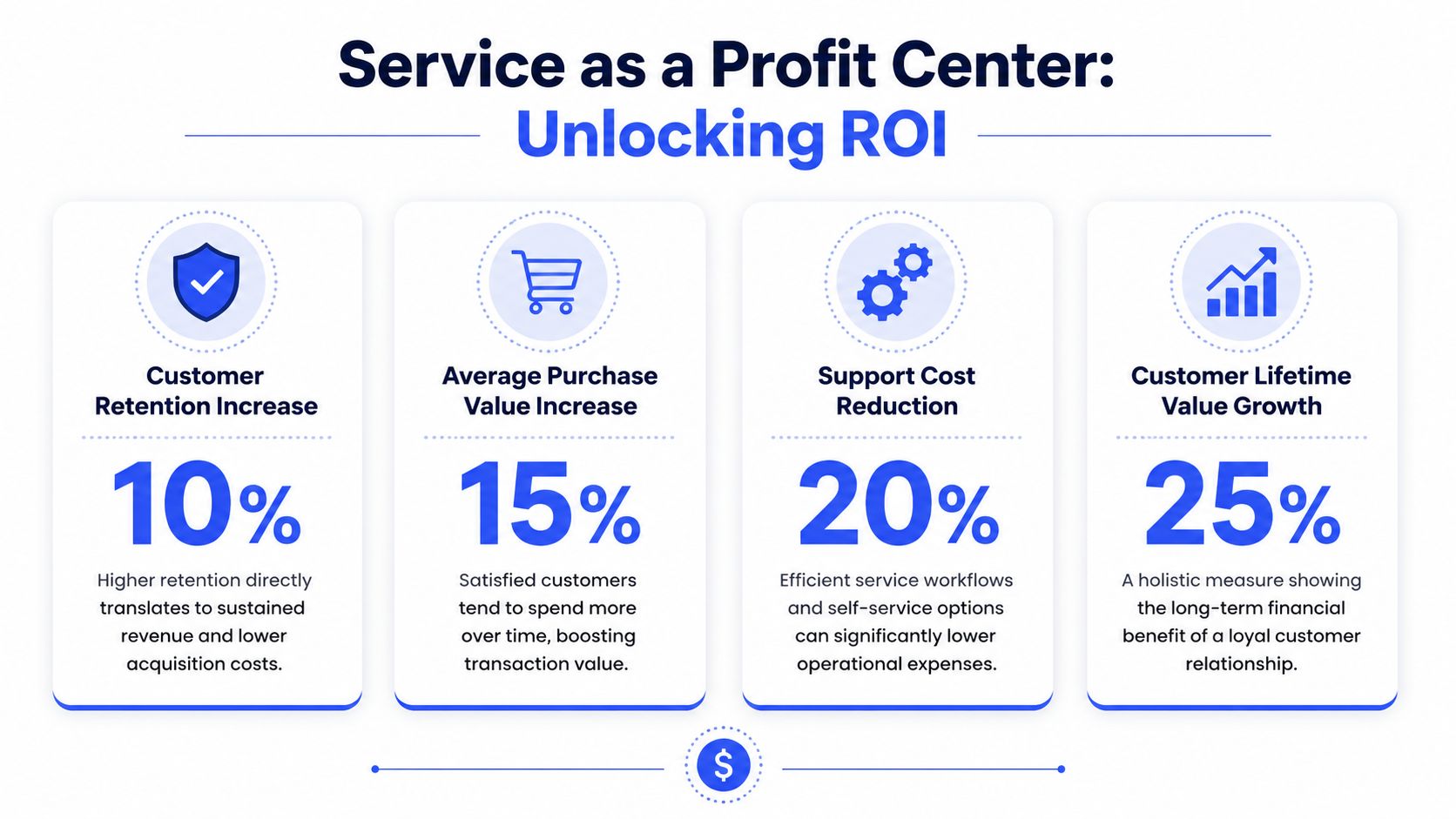
This visual is a helpful way to think about service as an economic lever:
Measure returns in three buckets
For a small business, ROI usually shows up in three places.
ROI bucket | What to measure | Example questions |
|---|---|---|
Labor efficiency | Time saved on repetitive inquiries | Did automation or better workflows reduce manual handling? |
Retention protection | Fewer lost customers after service issues | Are fewer people disappearing after support friction? |
Revenue support | Faster answers leading to more conversions or repeat orders | Are pre-purchase questions getting answered before the buyer leaves? |
The video below gives a useful business lens on service economics:
A practical ROI formula for small teams
Use simple math first. You don't need a finance team for this.
Service ROI = financial gains from improved service minus service investment, divided by service investment
Break financial gains into components such as:
Time recovered from fewer manual replies
Revenue protected from customers who stayed instead of leaving after a bad experience
Revenue assisted from support helping convert undecided buyers
A few examples of useful internal calculations:
Time savings value = hours saved each month x hourly team cost
Retention value = customers retained x average customer value
Support-assisted sales value = closed sales where support played a clear role
The biggest mistake here is trying to make the model perfect. A directional ROI model is enough to justify better staffing, better workflows, or selective automation. If service quality is reducing missed opportunities and lowering repetitive workload, it's contributing to profit whether your accounting system labels it that way or not.
Your Quick-Start Action Plan
Most businesses don't need a full support overhaul. They need the next few right moves. The checklist depends on your stage, staffing, and channel complexity.
This visual breaks the stages down cleanly:

The solopreneur
If you're still the main point of contact, focus on control before scale.
Choose one primary inbox. Route customer questions to a single support email or contact form. Stop managing support from scattered personal accounts.
Write your top FAQ answers. Include pricing basics, delivery timing, policies, and common objections. This becomes the base for future self-service.
Set a visible response expectation. Put it on your contact page and auto-reply. Customers get less frustrated when they know the window.
Create a handoff rule for yourself. Decide when an issue needs a phone call, refund review, or scheduled follow-up instead of more back-and-forth.
The growing team
Once you have a few people involved, consistency matters more than heroic effort.
Assign channel ownership. One person owns email, another monitors chat during set hours, and one manager handles escalations.
Build a lightweight playbook. Put approved answers, refund rules, and escalation triggers into one shared document.
Tag incoming issues by type. You'll quickly see whether volume comes from shipping, billing, product confusion, or lead questions.
Review support patterns weekly. A short review beats an occasional big audit.
If you run an online store, these essential strategies for ecommerce support are worth reviewing because ecommerce teams often hit service complexity early.
The scaling business
At this stage, service needs structure, not just effort.
Formalize workflows. Define intake, triage, assignment, escalation, and closure steps across every primary channel.
Introduce automation on repetitive traffic. Start with routine questions, after-hours coverage, and lead qualification rather than sensitive cases.
Measure a small KPI set weekly. First response time, first contact resolution, and CSAT usually give enough visibility to manage well.
Protect frontline judgment. Give agents authority to solve low-risk issues without waiting for manager approval every time.
Customer service for small business gets easier when each stage builds on the last one. First centralize. Then standardize. Then automate selectively. That's the order that preserves quality.
If you're ready to handle routine support and lead qualification without losing your brand voice, Chatgrow makes it easy to train a custom AI agent on your website, FAQs, pricing, and product pages. You can launch quickly, automate repetitive conversations, and escalate the right cases to your team so your people stay focused on the interactions that build trust and revenue.
Related Posts
Continue Reading
More articles from the ChatGrow Team.


