Blog
Your Customer Support Strategy for Growth in 2026
By
Nelson Uzenabor
Your inbox is full, live chat is blinking, a high-intent buyer is waiting on a pricing question, and your team is buried in tickets that mix urgent problems with routine requests. That's where a lot of support leaders are right now. Not because they don't care, but because most support operations were built to react, not to drive growth.
A workable customer support strategy changes that. It gives your team a way to answer faster, route smarter, prevent avoidable issues, and turn support conversations into moments that protect revenue. When support is set up well, it doesn't just reduce backlog. It helps more prospects convert, keeps customers from churning, and gives the business a direct signal on where friction is costing trust.
Table of Contents
What Is a Modern Customer Support Strategy?
Most companies still treat support like cleanup. Something breaks, a customer writes in, an agent replies, the ticket closes, and everyone moves on to the next fire. That model feels efficient on paper, but it leaves money on the table because it assumes support starts only after a customer is already frustrated.
A modern customer support strategy is the operating model behind customer conversations. It defines how you prevent issues, how you respond when customers need help, how you route work across people and tools, and how you connect support outcomes to retention and conversion. It's less like a policy document and more like a blueprint for how the company shows up when customers are trying to buy, use, renew, or expand.
The old cost-center view breaks down quickly in fast-moving businesses. Support sees objections before sales does. Support hears renewal risk before success does. Support spots broken onboarding flows before product does. If you only measure the team by tickets closed, you miss the value of that signal.
Support has to get ahead of demand
The strongest teams don't wait for every issue to become a ticket. They identify repeat failure points, publish answers where customers are already looking, and trigger outreach when they see patterns that usually lead to frustration.
Accenture's guidance on predictive service design makes that shift explicit. Support leaders should identify triggers for predictive problem detection and define proactive communication moments, instead of only answering tickets faster. That's a practical change, not a philosophical one. It means asking which contacts can be prevented, which incidents need early warning, and which customer moments deserve an answer before the question arrives.
Practical rule: If the same issue keeps showing up in tickets, that's no longer a support problem alone. It's a design, content, or process problem.
Growth changes how you design support
When support is built for growth, the priorities change:
You design for conversion: pricing questions, implementation concerns, and security objections need immediate, accurate answers.
You design for retention: recurring issues, billing confusion, and broken handoffs need fast resolution before customers lose confidence.
You design for prevention: known friction points should trigger better onboarding, clearer documentation, and proactive messages.
You design for escalation quality: the handoff from automation to a human has to include enough context that customers don't repeat themselves.
That last point matters more than is often realized. Customers will tolerate automation for straightforward questions. They won't tolerate a messy handoff when the issue is sensitive, urgent, or high value. A modern strategy accepts both truths at once. Use automation where speed wins, and use humans where judgment, empathy, or commercial nuance matters most.
The Core Components of a Winning Support Strategy
A support strategy works when the pieces connect. If channels are fragmented, your SLA means little. If workflows are loose, KPI reviews become guesswork. If personas are vague, your team writes generic replies that don't move the conversation forward.
Strategy is a system, not a queue
Five components show up in every support operation that scales cleanly.
Component | What it controls | What good looks like |
|---|---|---|
Support channels | Where customers contact you | Clear channel purpose and clean ownership |
Service levels | How fast and how reliably you respond | Expectations match business reality |
Customer personas | Who needs help and what they care about | Answers reflect context, not scripts |
Workflows | How work gets routed, solved, and escalated | Low friction, little duplication |
KPIs | How you know the system is working | Metrics connect operations to outcomes |
You don't need a giant enterprise stack to get this right. You do need discipline.
Five parts that have to work together
Support channels come first because they shape the whole intake model. Email, chat, contact forms, in-app messaging, and help centers all serve different jobs. Chat is often best for pre-sales questions, order concerns, and simple product guidance. Email works better for issues that need attachments, longer context, or cross-functional follow-up. The mistake is offering every channel without deciding what belongs where.
Service levels are the promises you can keep repeatedly. That includes first response expectations, escalation targets, and ownership rules. Weak teams publish aggressive targets and miss them. Strong teams set realistic standards, then route work so urgent issues don't sit behind low-value queue noise.
Support strategy fails when every ticket enters the same line with the same priority, even though the business impact is completely different.
Customer personas keep support from sounding generic. A first-time trial user needs different guidance than a long-term account admin. An e-commerce shopper asking about shipping isn't asking the same question as a buyer comparing plans before checkout. Good support teams tag conversations by customer type so workflows, macros, knowledge base suggestions, and escalation rules reflect actual context.
Support workflows determine whether your team scales or burns out. A sound workflow covers intake, categorization, routing, triage, ownership, escalation, and closure. It also decides what should be automated. Routine order status, refund policy, login help, and feature availability questions should not consume the same human attention as account risk, billing disputes, or implementation blockers.
KPIs are where strategy gets real. If you only look at volume, your team will optimize for speed over quality. If you only look at satisfaction, you can miss operational bottlenecks that are getting worse unnoticed. The system needs both.
For most SMB and mid-market teams, this stack gets much stronger once customer data is connected. Bringing plan details, order history, lifecycle stage, and prior contacts into one view helps agents respond with context and helps automation avoid robotic dead ends, making customer data integration for support workflows operational, not theoretical.
A winning support strategy isn't one brilliant idea. It's the steady alignment of channels, service levels, customer context, workflows, and measurement.
Choosing KPIs That Drive Growth Not Just Ticket Counts
A lot of support dashboards look busy and still tell you very little. Ticket volume is up. Average reply time is down. Backlog moved. None of that answers the core question: did support reduce friction in a way that keeps customers and helps buyers move forward?
Why ticket metrics mislead teams
Think about your KPI set like a car dashboard. Speed matters, but speed alone won't tell you if the engine is overheating or if you're about to run out of fuel. Support metrics work the same way.
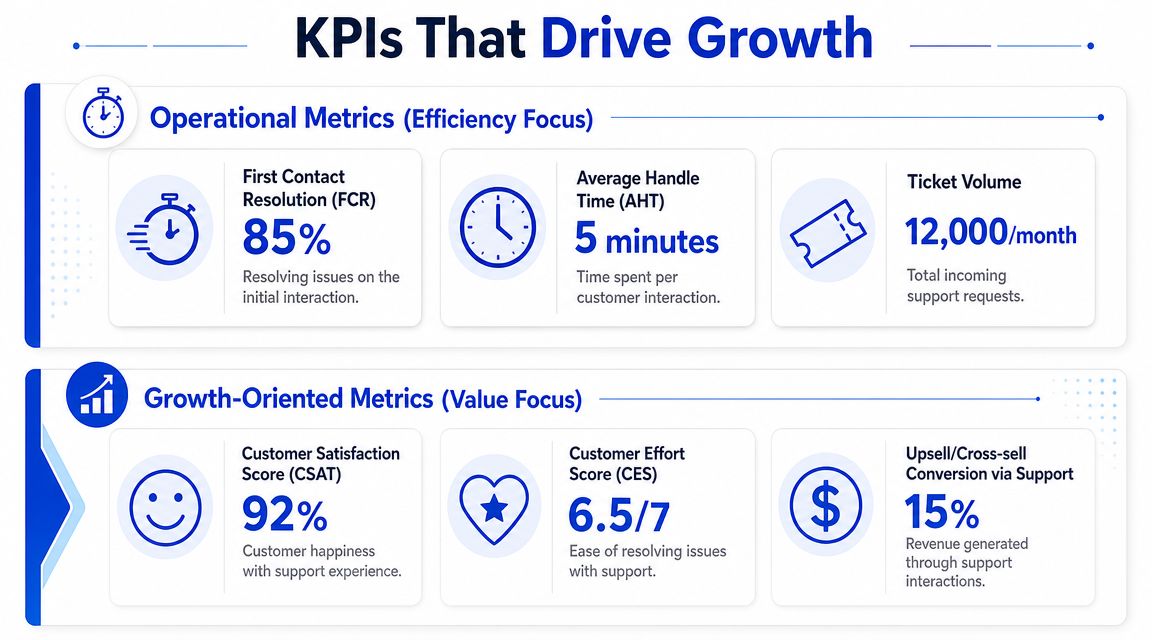
Industry guidance on customer service KPIs recommends treating First Call Resolution, average queue time, average hold time, CSAT, NPS, and CES as complementary control signals. Operational metrics expose routing and process problems. Experience metrics show whether customers felt the effort was low and the outcome was worth it.
That distinction matters because teams often overcorrect in one direction.
Operational-only teams chase handle speed, close tickets fast, and create repeat contacts.
Experience-only teams celebrate strong satisfaction scores while queues gradually become unstable.
Growth-minded teams use both sets together, then connect them to complaint themes, channel mix, and customer segments.
Build a balanced scorecard
A practical scorecard usually has two layers.
Operational layer
First Call Resolution: A direct signal of whether the issue was solved in the first interaction.
Average queue time and hold time: Useful for spotting staffing or routing problems before they damage customer trust.
Channel mix and complaint categories: Helpful for deciding where self-service, automation, or staffing changes will have the biggest impact.
Experience layer
CSAT: Best used at the interaction level to catch agent, workflow, or queue issues quickly.
NPS: Better for the broader relationship and loyalty picture.
CES: Often the most revealing metric when customers say the answer was fine but the process felt painful.
Don't let one “headline KPI” run the team. Support breaks when a single number becomes a target and everyone games the path to reach it.
A useful review habit is to pair metrics that challenge each other. If FCR drops while CSAT stays flat, your team may be creating hidden repeat work that customers haven't fully punished yet. If queue time rises and CES worsens, the issue may be process friction rather than knowledge quality. If complaint categories cluster around one workflow, the right fix might sit in product, billing, or onboarding, not support.
This is also where support becomes a growth function. Pre-sales chat, onboarding questions, cancellation requests, and upgrade-related conversations should be visible in reporting, even if they don't look like traditional support work. Those interactions influence conversion and retention directly. If your dashboard can't show that, the strategy is too narrow.
A 4-Step Roadmap to Implement Your Support Strategy
Most support plans fail for a simple reason. Teams jump from “we need better support” straight to buying tools. Tools matter, but they only help once you've decided what problem the system is supposed to solve.
Step 1 and Step 2
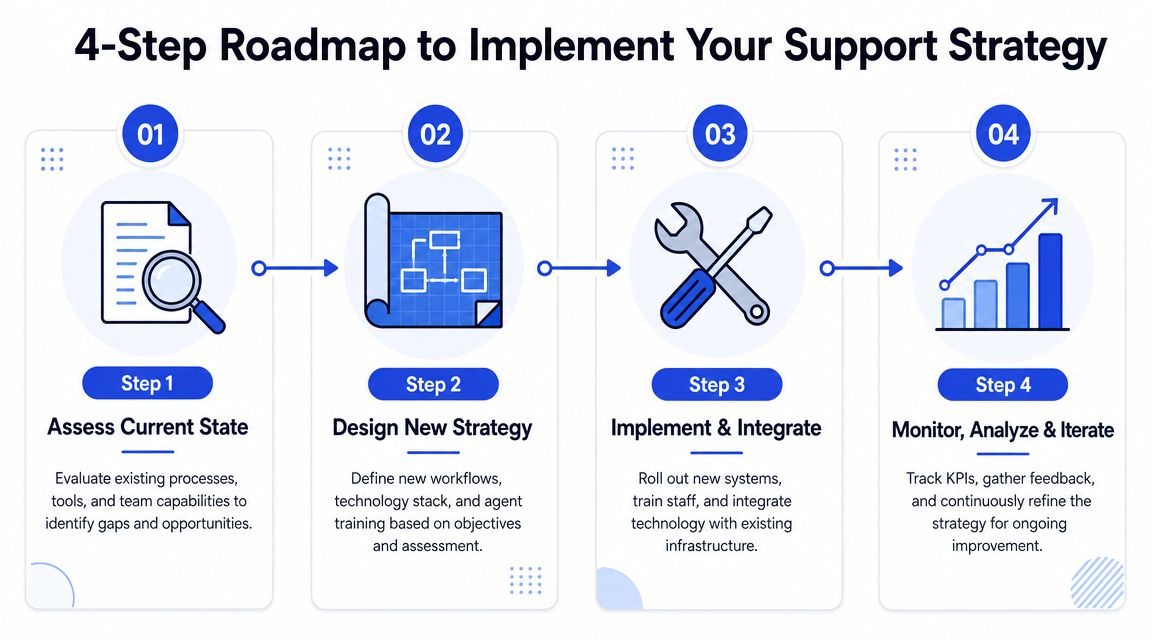
1. Assess current state
Start with an audit that's brutally practical. Pull a sample of recent conversations across channels. Look for repetitive questions, handoff failures, response delays, missing knowledge, and avoidable contacts. Then compare that with what the business needs from support.
Ask questions like these:
Where does revenue get stuck: pricing pages, checkout, onboarding, renewals, billing disputes?
Which contacts should never reach a human first: password help, order status, policy questions, basic feature discovery?
Where do customers repeat themselves: between bot and human, between email and chat, or across multiple teams?
Which queue segments deserve different treatment: high-intent leads, active trials, strategic accounts, or urgent service disruptions?
This is also the stage to review demand patterns. Guidance on forecasting and predictive analytics for support operations recommends using historical volume patterns to match staffing to demand, because contact volume changes by hour, day, month, and season. That same data also informs automation choices, especially for routine inquiries that shouldn't consume live-agent time.
2. Design the operating model
Once the audit is clear, define the future state. This includes channels, ownership, service levels, escalation rules, and a knowledge plan.
A simple planning frame works well:
Decision area | What to define |
|---|---|
Channel role | Which questions belong in chat, email, forms, or self-service |
Routing logic | How conversations get tagged and assigned |
Escalation path | What triggers human handoff and who owns it |
Knowledge design | Which answers should be documented, embedded, or automated |
Review rhythm | How often you inspect KPIs, QA, and feedback |
Step 3 and Step 4
3. Implement tools and workflows
Now choose software that supports the model instead of distorting it. Your help desk, CRM, live chat, knowledge base, analytics layer, and AI tooling should share context cleanly. If the AI layer can't access relevant documentation or customer signals, it won't reduce effort. It will just create extra cleanup work for humans.
Build workflows around issue types, not team habits. For example, refund requests may need policy checks and account verification. Trial-user questions may need fast pre-sales guidance plus product education. Shipping questions may need direct access to order history. These are different jobs and should not enter the same generic path.
A workflow is good when a new agent can follow it consistently and an experienced agent rarely needs to work around it.
4. Train, launch, and iterate
Rollout is where many otherwise smart strategies get lost. Teams announce a new process, publish a few macros, and hope the queue behaves differently. It won't. Agents need training on judgment, not just buttons. They need to know when to trust automation, when to override it, and how to escalate with useful summaries instead of vague notes.
During launch, watch for three signals:
Adoption quality: are agents using the intended paths or slipping back into inbox triage habits?
Customer friction: are there repeat contacts, poor handoffs, or unanswered edge cases?
Knowledge gaps: which issues still require custom explanation every time?
Then refine. The first version of a customer support strategy should be stable, not perfect. Tight loops beat big rewrites. Review transcripts, update knowledge, tune routing, and keep adjusting staffing to demand patterns. That's how support systems mature without turning brittle.
Scaling Support and Conversion with AI Agents
AI has changed the economics of support, but only when it's used in the right places. If you deploy it as a wall between the customer and a human, you'll create frustration faster than savings. If you deploy it as a fast first layer for common questions, intent capture, and clean escalation, it becomes one of the most practical ways to scale both service and conversion.

The shift is already underway. Salesforce's customer service statistics report that 30% of service cases were resolved by AI in 2025, with that share expected to reach 50% in 2027, and service teams using AI agents expect average reductions of 20% in service costs and case resolution times. Those numbers don't mean humans are disappearing. They mean repetitive work is being pulled out of the queue so people can focus on exceptions, judgment calls, and relationship-heavy conversations.
Where AI agents actually help
The best AI use cases are the least glamorous ones. FAQs, order questions, account basics, policy clarification, simple troubleshooting, and knowledge retrieval are ideal because the customer usually wants speed more than a crafted human response.
For growth-focused teams, AI also helps in places support leaders used to ignore:
High-intent pages: visitors asking about pricing, setup, integrations, or eligibility are often trying to decide now.
After-hours coverage: unanswered questions don't pause just because your team is offline.
Lead qualification: a support-style conversation can collect intent, use case, urgency, and contact details without forcing a form too early.
Escalation summaries: the human should receive context, not a blank thread and a frustrated customer.
One option in this category is automated customer service with Chatgrow, which lets teams train AI agents on website content, FAQs, and product information, then deploy them on customer-facing pages. In practice, tools like this are most useful when they handle common questions consistently and pass concise context to a person when the conversation needs nuance.
A short walkthrough helps make the operating model concrete:
How to keep trust during handoff
The hard part isn't answering easy questions. The hard part is knowing when to stop automating.
Customers still want a human when the issue is sensitive, commercially important, or emotionally loaded. Refund conflicts, account access problems, implementation blockers, contract questions, and repeated failed attempts all belong on a clear escalation path. The AI should collect the facts, summarize the issue, and route it to the right person. It should not pretend to understand more than it does.
A few rules keep this clean:
Set boundaries early: tell customers what the assistant can handle and when a human will step in.
Pass context forward: include the customer's goal, prior steps, and relevant account details in the escalation.
Keep brand voice consistent: the bot and the human shouldn't feel like two unrelated companies.
Review failed conversations: escalation misses usually expose knowledge gaps, weak prompts, or bad routing logic.
When teams get this right, AI doesn't replace support. It protects the human team from repetitive load and makes the human moments sharper. That's what allows support to scale without becoming slower, colder, or more expensive as the business grows.
From Cost Center to Conversion Engine
The companies that get support right don't treat it as the department that absorbs complaints. They treat it as the function that removes friction at the exact moments when buyers hesitate and customers reconsider. That shift changes how you staff, what you automate, which metrics you watch, and how seriously leadership takes the queue.
The pressure behind that shift is clear. Helply's customer support trends benchmark says 83% of customers expect to interact with someone immediately when they contact support, and 64% of CX leaders plan to increase AI investment to meet that demand. Speed isn't a premium feature anymore. It's table stakes. If support can't respond at the pace customers expect, conversion and retention suffer before anyone labels it a support problem.
What the strongest teams do differently
They don't ask only how to close tickets faster. They ask which questions should be answered instantly, which problems should be prevented, and which conversations deserve a skilled human because the commercial risk is too high for a generic flow.
That's why modern support works best as a blended system:
Self-service handles known, repeatable questions
AI triage answers routine inquiries and captures intent
Human support focuses on exceptions, emotion, and value-heavy decisions
KPI reviews connect speed and quality to loyalty and effort
Proactive outreach prevents avoidable contacts before trust drops
The most expensive ticket is usually the one you could have prevented, or the one that sat unanswered while a buyer compared you with someone faster.
Support also gains greater influence when it's connected to revenue teams. Pre-sales chat, upgrade questions, billing confusion, onboarding friction, and cancellation signals all belong in the same operational view. If they're split across tools and teams, no one sees the full customer journey clearly enough to improve it.
For many SMBs, one of the simplest starting points is live chat with stronger routing and clearer ownership. These live chat advantages for business growth become more meaningful when chat is tied to knowledge, lead qualification, and escalation instead of acting like a floating widget with no workflow behind it.
A strong customer support strategy doesn't just make the queue manageable. It gives your business a repeatable way to convert faster, retain longer, and serve customers without making them work for answers.
If you want to put that model into practice, Chatgrow gives businesses a way to create AI support agents trained on their website, FAQs, and product content, then deploy them for instant answers, lead qualification, and smart escalation. It's a practical fit for teams that need round-the-clock coverage without turning support into a maze.
Related Posts
Continue Reading
More articles from the ChatGrow Team.


