Blog
What Is Agentic Workflow? a Practical Explainer
By
Nelson Uzenabor

You're probably dealing with some version of this right now.
A customer asks where their order is, why the tracking page looks wrong, and whether they can switch to a faster option. Your support inbox has the answer spread across your FAQ, your ecommerce platform, your shipping portal, and maybe a Slack message from someone on ops. Meanwhile, a new lead lands on your pricing page and wants to know which plan fits their team, whether onboarding is included, and if someone can contact them today.
Most businesses respond to that chaos with one of two things. They either hire more people to manually juggle tabs, or they install a basic chatbot and hope it can absorb the load. That second option usually breaks the moment a conversation stops looking like a canned FAQ.
That's where people start asking, what is an agentic workflow?
In simple terms, it's not one bot answering one question. It's a coordinated digital team that can understand a goal, decide what needs to happen, use the right tools, and move a task forward with minimal hand-holding. Think less “chat widget” and more command center. One part interprets the request. Another checks the right system. Another drafts the response. Another decides whether a human should step in.
For a founder or marketer, the important part isn't the AI jargon. It's the business outcome. Better support coverage. Faster lead qualification. Less repetitive work for your team. Fewer dropped conversations when things get slightly messy.
Table of Contents
Beyond the Chatbot The Rise of Agentic Workflows
A normal chatbot is like a front-desk receptionist with a laminated script. If the customer asks a familiar question in a familiar way, it does fine. If the request crosses departments or needs judgment, the experience falls apart.
Take a support issue that sounds simple on the surface: “My order says delivered, but nothing arrived. Also, I think the product I bought is wrong.” That single message can require policy knowledge, order history, shipment status, and a decision about replacement or refund. A basic bot usually gives a generic answer, loops the user through menu options, or hands off too early without useful context.
An agentic workflow handles that same situation more like a trained internal team.
One digital worker interprets the issue and separates shipping from product confusion. Another checks the knowledge base for delivery and replacement rules. Another looks at the order record. Another prepares the next best action, such as a response draft, a refund path, or a clean escalation note for a human agent.
A good way to think about it is this: a chatbot answers messages. An agentic workflow moves work forward.
That difference matters because most real customer conversations aren't single-step tasks. They're mini-projects. A customer wants an answer, but the business often needs to gather facts, apply policy, and decide what happens next.
This is why agentic workflows are getting attention. They don't just react. They coordinate.
Why SMBs care now
Large companies have had complex automation for years, but smaller teams usually didn't have the time or engineering resources to build it. That's changing. Platforms aimed at support and sales now make it possible to create specialized AI behavior without stitching together a custom system from scratch.
For an SMB owner, this means you can start thinking in terms of digital employees instead of a single catch-all bot.
Support coverage: Handle routine but multi-step tickets without making customers repeat themselves.
Sales responsiveness: Engage buyers when intent is high, not hours later when the moment has passed.
Team efficiency: Let humans focus on exceptions, judgment calls, and relationship-building.
Consistency: Keep answers aligned with your current website, pricing, and policies.
The big shift is practical. You're no longer asking, “Can AI reply to chats?” You're asking, “Can AI help my business complete customer-facing workflows from start to finish?”
The Core Components of an Agentic Workflow
If you strip away the buzzwords, an agentic workflow has the same structure as a strong project team. There are specialists, a manager, a shared workspace, and a rule for when leadership steps in.
That's why the concept feels less mysterious once you map it to how a business already operates.
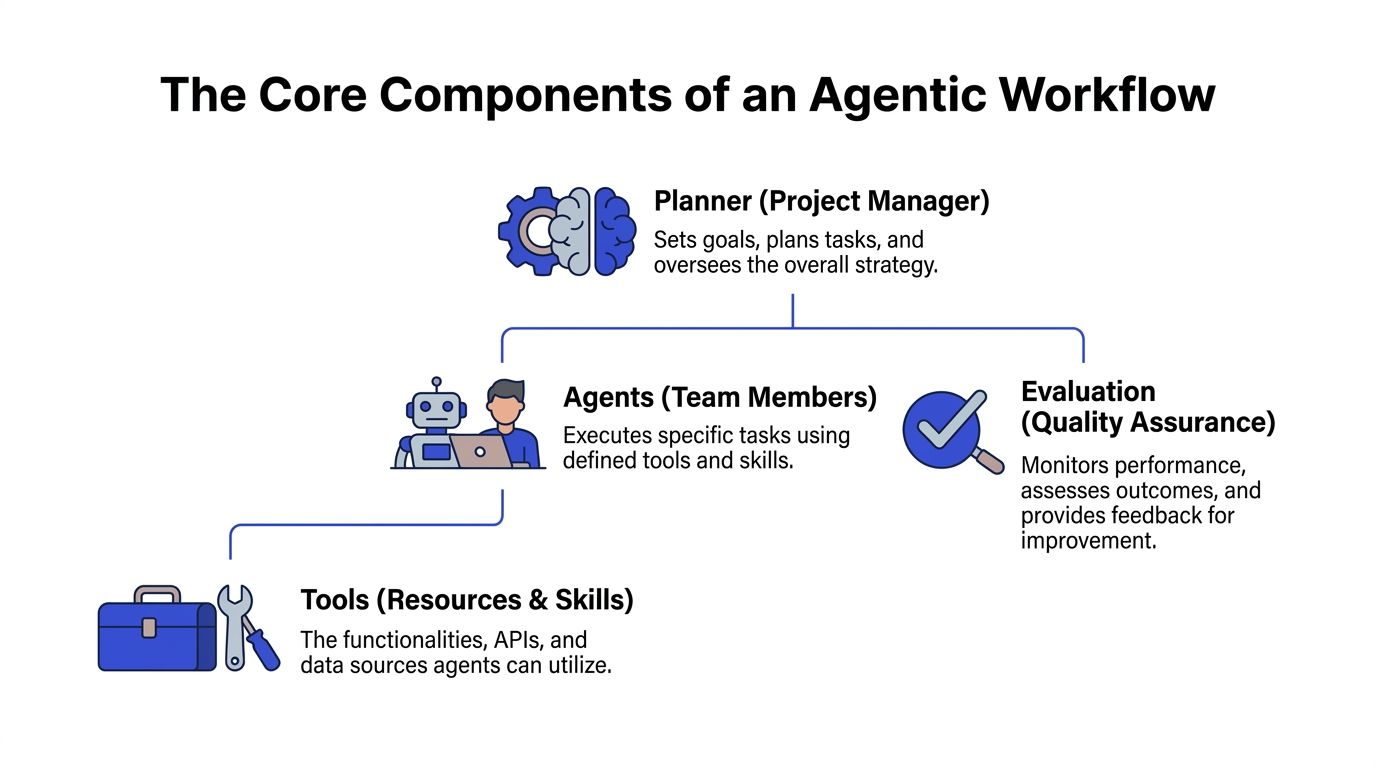
Agents act like specialists
Think of agents as team members with a clear job.
One agent might be good at reading customer intent. Another might specialize in searching your help content. Another might collect lead details and format them for your CRM. Another might write a polished response in your brand voice.
The key idea is specialization. A single general-purpose bot often becomes sloppy because it tries to do everything at once. Specialist agents tend to be easier to configure, easier to evaluate, and easier to trust.
Here's a simple way to picture it:
Triage agent: Figures out what the customer wants.
Knowledge agent: Pulls relevant answers from FAQs, docs, and policy pages.
CRM or order agent: Checks records in the right business system.
Communication agent: Writes the reply, follow-up, or summary.
Orchestration is the manager
Specialists without coordination create chaos. That's where orchestration comes in.
Orchestration is the project manager of the system. It decides which agent should act first, what information gets passed along, and what “done” looks like for the workflow. In technical terms, this is the logic that routes tasks, sequences actions, and checks whether the goal has been reached.
Without orchestration, you don't have a workflow. You just have disconnected AI tricks.
Practical rule: If you can't describe who does what next, you don't have an agentic workflow yet. You have a tool pile.
A strong orchestrator also helps with common edge cases. If the customer changes topics mid-conversation, the workflow can reroute. If a tool returns incomplete information, the workflow can ask a clarifying question instead of guessing.
Context and state keep everyone aligned
At this point, many explainers get abstract, so let's keep it grounded.
Context is the information the workflow needs right now. That includes the customer's last message, previous messages, product details, policy content, and records from your systems.
State is the memory of what has already happened in the workflow. Which agent already checked the order? Did the customer confirm the email address? Has the system already asked a follow-up question?
In the project-team analogy, context and state are the shared document or task board everyone updates. Without them, each agent starts fresh and the customer gets repetitive, frustrating interactions.
That's why a good agentic setup doesn't just answer with confidence. It keeps track of progress.
Escalation protects the customer experience
Not every decision should be automated. Some situations need a person.
Escalation is the rule set for when the workflow stops trying to solve the issue alone and passes it to a human with useful context attached. That might happen when the customer asks for a manager, when policy exceptions are involved, or when the workflow can't reach a reliable answer.
The important part isn't only that it escalates. It's how it escalates.
Good escalation: “Customer reports order marked delivered but not received, confirmed shipping address, asked for replacement policy, order details checked, recommended next step attached.”
Bad escalation: “Customer needs help.”
One of the clearest lessons from agentic systems used in more demanding environments is that human oversight still matters. The workflow should reduce toil and structure decisions, not pretend uncertainty doesn't exist.
Traditional Automation vs Agentic Workflows
Traditional automation still has value. If a form is submitted and you want a record created in a spreadsheet or CRM, a fixed rule works well. It's predictable, tidy, and easy to audit.
The problem starts when the task depends on judgment, incomplete information, or changing paths. Customer support and sales conversations are full of that.
One follows a script, the other pursues a goal
Traditional automation works like an assembly line. A trigger happens, then a preset action runs. If the input matches expectations, everything looks efficient. If it doesn't, the process stalls or breaks.
An agentic workflow behaves more like a capable operations team. You give it an objective, such as “resolve this support request” or “qualify this inbound lead.” It can choose among approved actions, use different tools, ask follow-up questions, and adapt when the conversation takes a turn.
That's the leap. You move from instruction-following to goal-seeking.
If your business currently relies on rigid automations, it helps to read this broader view of automated customer service before designing anything more advanced.
Automation vs. Agentic Workflow at a Glance
Attribute | Traditional Automation (e.g., Zapier) | Agentic Workflow (e.g., Chatgrow) |
|---|---|---|
Primary model | Trigger and action | Goal and coordinated actions |
Behavior | Fixed path | Adaptive path |
Best for | Repetitive admin tasks | Conversations and multi-step decisions |
Handling variation | Weak when inputs change | Can ask questions and reroute |
Use of tools | Usually predefined and linear | Can select from available tools based on need |
Memory of progress | Limited to workflow steps | Maintains context across the interaction |
Escalation | Often manual or simplistic | Context-rich handoff to humans |
Failure mode | Breaks when a rule is missing | Tries alternate paths, then escalates |
Customer experience | Efficient when simple | More natural when issues are messy |
A useful test is to ask yourself this question: Does the system only know what to do when I've mapped every step in advance? If the answer is yes, you're looking at automation, not an agentic workflow.
Traditional automation is great for moving data. Agentic workflows are better at moving decisions toward an outcome.
Neither approach replaces the other. Most growing businesses will use both. Fixed automations handle clean back-office tasks. Agentic workflows handle the messy middle where customers ask, compare, hesitate, change direction, or need help that touches multiple systems.
Agentic Workflows in Action for Support and Sales
Theory makes sense quickly once you watch the workflow behave like a team instead of a widget.

The smart support resolution
A customer writes: “The item I received seems defective. I bought it recently, and I need to know if it's covered.”
A basic bot might answer with a generic return policy link. That's not useless, but it pushes the work back onto the customer.
An agentic workflow can take a different path:
Triage agent reads the message and identifies the issue as a warranty or return question, not a shipping issue or a pre-sale question.
Knowledge agent checks the company's policy pages and help articles for eligibility rules, required documentation, and return steps.
Order agent verifies that the purchase exists and pulls the relevant record.
Communication agent drafts a response that explains the likely next step and asks only for the missing detail needed to proceed, such as a photo or order email.
Escalation logic decides whether a human should approve the final message or whether the workflow can send it directly.
The customer sees one coherent conversation. Internally, several jobs happened in sequence.
That's a good support workflow. It doesn't just answer. It reduces friction.
The high-intent lead qualifier
Now switch to sales.
A buyer lands on your pricing page and asks: “We're comparing options for our team. Can this work for multiple locations, and how quickly could we get started?”
Speed matters. The lead is active now, not tomorrow morning.
An agentic workflow can behave like a sharp SDR paired with a solutions consultant:
It recognizes high purchase intent from the page context and the wording of the question.
It asks smart follow-ups, such as team structure, use case, and timeline.
It draws from product pages, pricing details, and onboarding information.
It determines whether the lead looks informational, qualified, or urgent.
It creates a structured summary for the sales team with the conversation attached.
If you want a business-focused look at how this model works, this guide on AI agents for business is useful background.
The win isn't that AI chatted with someone. The win is that your sales team receives a warmer, better-documented opportunity.
Where founders usually get confused
Many people assume the “agentic” part means the AI is acting freely without boundaries. That isn't the goal.
A business-ready workflow should have clear guardrails:
Approved knowledge only: It should answer from your real content and systems.
Defined actions only: It should use allowed tools, not invent new ones.
Clear handoff rules: It should know when to stop and bring in a human.
Reviewable outputs: Your team should be able to inspect what happened.
That's why agentic workflows are best understood as controlled autonomy. They aren't random. They're structured to handle variation without losing the process.
How to Implement a Simple Agentic Workflow with Chatgrow
The easiest way to get started is not to build a giant AI operation. Start with one narrow support flow and one narrow sales flow.
That gives you a small digital team you can understand, test, and improve.

Step one build your specialist agents
Begin with separation of roles.
Create one agent focused on support. Train it on your FAQ, help center, shipping details, returns policy, and common troubleshooting content. Its job is to answer post-sale questions and collect missing details when needed.
Create a second agent focused on sales. Train it on product pages, pricing pages, feature explanations, onboarding information, and common objections. Its job is to help buyers understand fit and move qualified conversations forward.
Mixed-purpose agents often answer in vague ways; a specialist is easier to tune.
If you want the practical setup path, this walkthrough on how to create an AI agent is a good companion to the workflow design ideas here.
Step two define handoffs and routing
Once the specialists exist, define when one should take over from the other.
A visitor who asks “Where is my order?” should not end up in a sales sequence. A buyer who asks “Which plan fits a growing team?” should not get a returns-policy response.
Intent routing becomes the backbone of the workflow. In plain language, you're teaching the system:
Support intent: Order status, returns, refunds, technical issues, account help
Sales intent: Pricing, features, fit, setup, buying questions
Mixed intent: A conversation that starts as support and turns commercial, or the other way around
A practical rule is to map the top conversation types you already see in your inbox or live chat, then assign each to the right specialist. Don't start with edge cases. Start with your most common paths.
Step three set smart escalation rules
This is the part frequently skipped, and it's often the difference between “helpful” and “annoying.”
Set explicit rules for when a human should take over. That can include repeated failure to answer clearly, a direct request for a person, or any issue involving exceptions, complaints, or sensitive account changes.
A useful escalation package usually includes:
Conversation summary: What the customer asked and what the workflow learned
Relevant context: Order details, intent, product discussed, and any missing information
Suggested next step: Refund review, sales follow-up, troubleshooting, or manager callback
Start with a two-agent system and strong escalation. That setup is often more valuable than a complicated flow with weak handoffs.
The practical mindset is simple. Your first workflow doesn't need to feel magical. It needs to be dependable. If it can correctly route conversations, answer routine questions, and escalate cleanly, you've already built something useful.
Measuring Success and Best Practices for Agentic Systems
An agentic workflow should earn its place. If it doesn't improve customer handling, reduce manual effort, or surface better sales opportunities, it's just a fancier interface.
That means success needs to be measured in operational terms, not novelty.

What success looks like in practice
For support, one useful lens is workflow completion. Did the system help resolve the issue, collect what was needed, or deliver a useful handoff?
For sales, a stronger lens is conversation quality. Did the workflow identify intent clearly, ask relevant questions, and pass along a lead your team wants to act on?
Good measures often include:
Successful workflow completion: The task reached a useful endpoint without confusion.
Escalation quality: Human agents received enough context to continue without redoing discovery.
Resolution speed: Customers moved toward an answer faster than with manual triage alone.
Lead qualification quality: Sales receives cleaner, better-structured inbound context.
Conversation drop-off patterns: You can see where users disengage, hesitate, or get frustrated.
Notice what's missing. Vanity metrics. A long chat session isn't automatically a good one.
Best practices that keep the system useful
The businesses that get value from agentic workflows usually do a few things well.
Start small: Pick one support flow and one sales flow first. Don't try to automate every conversation type at once.
Feed it clean knowledge: Outdated pricing pages and messy policy docs create bad outputs.
Review failures regularly: Escalated and unresolved conversations are your best training material.
Protect sensitive actions: Keep refunds, exceptions, and account changes behind clear approval rules.
Tune for clarity: If users ask the same follow-up repeatedly, the workflow is likely being too vague.
The fastest way to improve an agentic system is to study where it got stuck, not where it looked impressive.
A final best practice is to assign ownership. Someone on your team should review transcripts, notice patterns, update source content, and refine routing logic. Agentic systems aren't “set and forget.” They're more like a new team member. They improve when managed well.
Conclusion The Future is Agentic
The simplest answer to what is agentic workflow is this: it's a way to turn AI from a single responder into a coordinated system that can pursue an outcome.
That matters because business conversations rarely stay neat. Customers ask layered questions. Leads change direction mid-chat. Support requests touch policies, records, and judgment calls. A basic bot can only go so far because it's built to reply, not to coordinate.
Agentic workflows change the model. They break work into roles, route tasks intelligently, keep context alive, and involve humans at the right moment. That's why the “digital employee team” analogy works so well. You're not buying one clever answer machine. You're designing a small command center for customer-facing work.
For SMBs, this is the key shift. Capabilities that once felt custom-built and enterprise-only are now becoming accessible through simpler platforms and guided setup. You don't need a research lab mindset to use them well. You need a clear workflow, decent source material, and a practical view of where automation should stop and people should step in.
The businesses that benefit most won't be the ones chasing the most advanced terminology. They'll be the ones that use agentic workflows to solve ordinary but expensive problems: delayed support, dropped leads, inconsistent answers, and wasted team time.
Done right, this isn't about replacing human relationships. It's about giving your business a reliable digital team that handles the repetitive and the multi-step so your people can focus on judgment, empathy, and growth.
If you want to put these ideas into practice without building everything from scratch, Chatgrow gives you a straightforward way to create AI support and sales agents, train them on your real business content, route conversations by intent, and escalate cleanly when a human should step in. It's a practical starting point if you're ready to turn chat from a passive widget into a working customer command center.
Related Posts
Continue Reading
More articles from the ChatGrow Team.


