
Blog
How to Automate Customer Support: A Guide for 2026
By
Nelson Uzenabor

Your inbox is full of the same questions again. Where's my order? How do I reset my password? Do you support this integration? Meanwhile, the conversations that need human judgment sit too long, prospects leave before anyone replies, and your team spends the day copy-pasting answers they've already written a hundred times.
That's usually the point where small and midsize businesses start looking into support automation. Not because they want a flashy chatbot, but because the current setup has stopped scaling. The painful part is that many organizations approach automation as a tool purchase when it's really an operating model change. If you automate customer support well, the result is faster service, cleaner handoffs, less repetitive work, and better visibility into what customers keep asking. If you do it badly, you create a polite dead end that annoys customers and makes agents distrust the system.
The safest path is phased, narrow, and practical. Start with repetitive demand. Keep humans easy to reach. Build around a central system that connects knowledge, routing, escalation, and reporting instead of treating automation as one widget on your website. That's how SMBs get ROI without taking on unnecessary risk.
Table of Contents
What Is Customer Support Automation and Why It Matters Now
Customer support automation is the use of software, rules, AI, and connected workflows to handle repeatable parts of support without requiring a person to manually do every step. That includes answering common questions, collecting context before a handoff, routing requests, triggering follow-ups, and surfacing the right information to agents.
That definition matters because too many teams reduce automation to “put a chatbot on the site.” A chatbot can be part of the solution, but it isn't the whole solution. Real support automation reaches across your help center, ticket queue, website, CRM, inbox, and internal processes. It becomes the system that handles predictable work so people can handle exceptions, judgment calls, and emotionally sensitive cases.
The business case is straightforward. According to a customer support automation ROI study, businesses that automate customer support can reduce the cost per customer interaction by up to 40% while improving first-response times by over 90% for common queries. That combination matters because cost and speed usually pull in opposite directions when you rely only on headcount.
What changes when automation is done well
Good automation doesn't replace your support team. It changes what they spend time on.
Instead of answering the same shipping, billing, login, and policy questions all day, agents can focus on:
Complex cases: Refund disputes, technical edge cases, account-specific issues
Retention moments: Customers who are frustrated, confused, or at risk of leaving
Revenue-adjacent work: Upsell questions, high-intent pre-sales conversations, onboarding friction
Quality improvement: Fixing broken articles, spotting product confusion, improving workflows
Practical rule: Automate the question, not the relationship. Routine answers belong in the system. Trust-building conversations still need a person.
Why this matters more for SMBs than for large enterprises
SMBs feel support inefficiency earlier. A large company can hide process problems behind specialized teams and extra staffing for a while. A smaller company usually can't. One overloaded founder, one support lead, or one generalist inbox becomes the bottleneck for the whole customer experience.
That's why support automation often pays off fastest in smaller organizations. It gives coverage outside business hours, reduces queue drag, and creates consistency when different people answer the same question in different ways.
There's another advantage that gets overlooked. Automated support creates a record of what customers ask repeatedly, where they get stuck, and which requests need human intervention. Used properly, support stops being a reactive function and starts feeding product, marketing, onboarding, and sales with live operational insight.
What doesn't work is deploying automation as a shield. If customers can't escape to a person, if answers feel generic, or if the bot has no real knowledge behind it, the system becomes one more obstacle. The point isn't to intercept customers. The point is to resolve straightforward issues quickly and escalate the rest cleanly.
The Four Core Components of Support Automation
Automation works best when you treat it like a support team's set of superpowers, not a single feature. Most SMBs don't need an enormous program on day one. They need to know which parts exist, what each part does, and where to start.
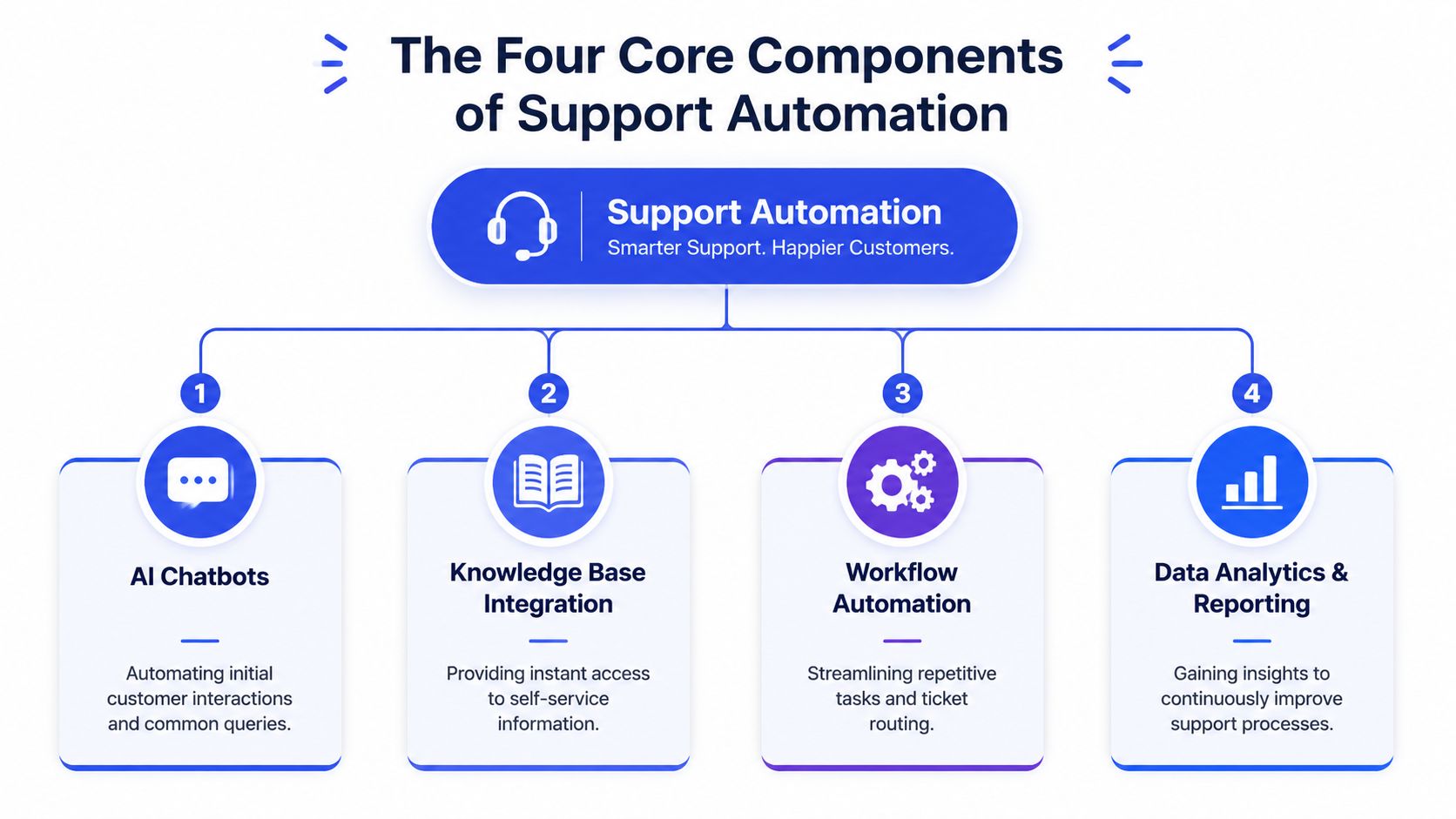
Automation is a system, not a bot
If you only add a bot, customers may get an answer faster. If you connect the bot to knowledge, workflows, and reporting, your operation gets stronger. That distinction matters.
A useful way to think about it is this:
Component | What it handles | Where teams go wrong |
|---|---|---|
AI chatbots | First contact and common questions | They script too much and don't allow graceful escalation |
Knowledge base | Self-service answers and source material | Articles are outdated or written for insiders |
Workflow automation | Routing, tagging, follow-up, internal tasks | Rules become messy and nobody maintains them |
Analytics and reporting | Performance feedback and gap detection | Teams track activity, not outcomes |
The four pillars in practice
AI chatbots and self-service knowledge sit at the front door. They handle repetitive questions, guide customers to the right article, and keep basic requests out of the queue. This works well for order status, return policies, pricing questions, account basics, and feature explainers. It works badly when the bot is trained on thin content or when every answer sounds detached from the way your team speaks.
Automated routing and escalation decide where a conversation should go next. A technical product issue shouldn't land with billing. A sales-qualified lead shouldn't wait in the general support queue. A good system captures intent, gathers the minimum necessary context, and sends the case to the right person with a clean summary.
For teams trying to connect support events to account data, purchase history, or CRM records, this guide on customer data integration for support systems is worth reviewing because most routing problems are really context problems.
Internal support workflows are where a lot of hidden ROI lives. These are automations customers never see. Think ticket tagging, follow-up reminders, handoff notes, transcript summaries, task creation, and status-change triggers. They don't look exciting in demos, but they remove a surprising amount of low-value admin from an agent's day.
The best automation projects usually start by removing repetitive internal work, because agents adopt those wins faster than they trust customer-facing AI.
Proactive support and analytics push the model further. Instead of waiting for customers to ask, the system can surface help in the right place and time. That might mean showing setup guidance on an onboarding page, reminding customers about a missing document, or flagging recurring questions that point to a broken process.
Most SMBs should implement these pillars in that order. Front-line answers first. Smarter handoffs second. Internal workflow cleanup third. Proactive support after the basics are stable. That sequence keeps risk low and prevents the common mistake of launching something broad before the foundation is reliable.
A Practical Roadmap to Automate Your Customer Support
The safest rollout is phased. Don't start by trying to automate every channel, every language, every ticket type, and every edge case. Start with one repetitive problem and one place customers already come for help.
A narrow launch gives you cleaner feedback, fewer surprises, and a support team that can still catch mistakes before they spread.
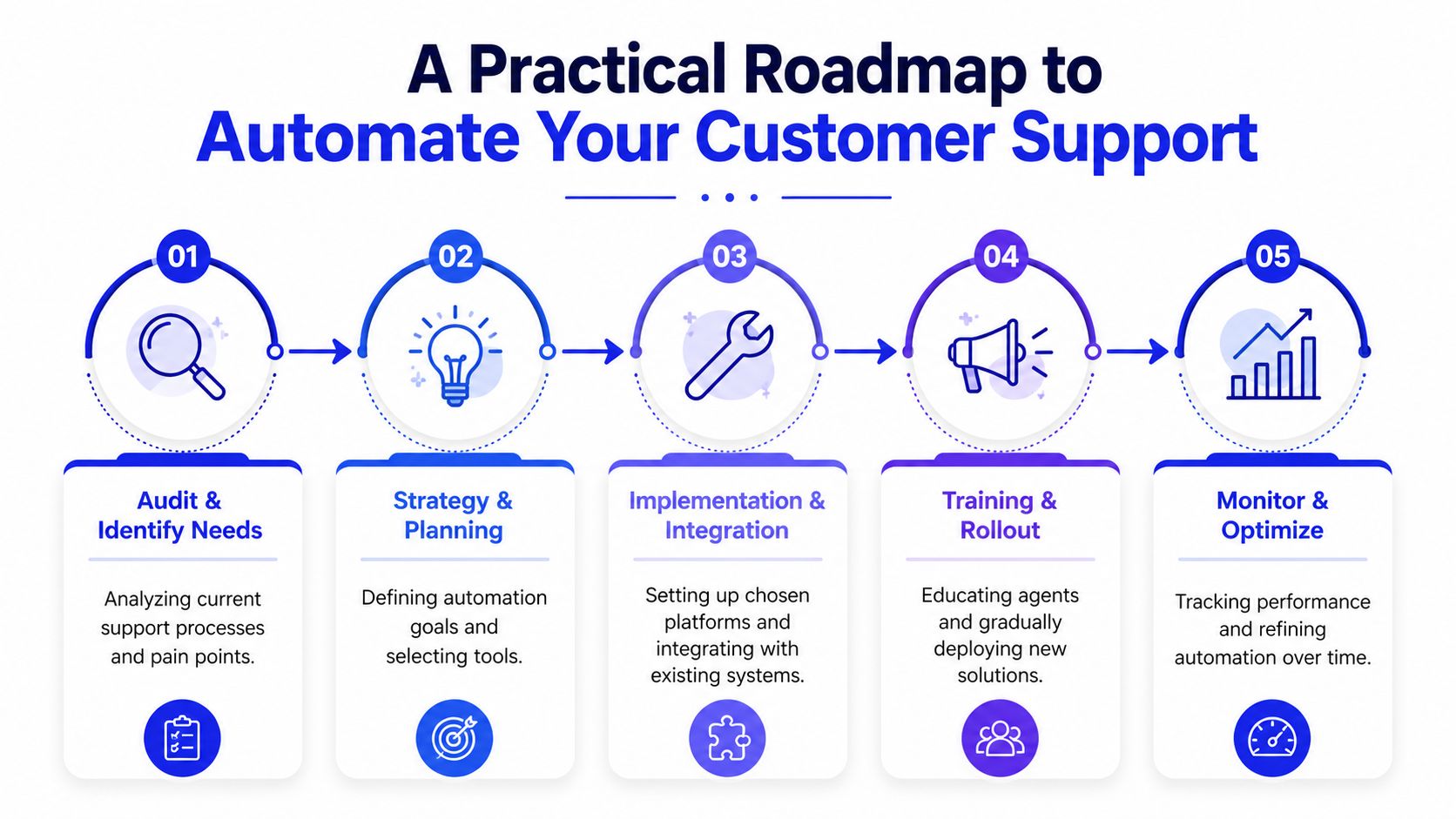
Stage one and two
Stage 1 is audit and identify. Pull a sample of recent tickets, chats, emails, and form submissions. You're looking for repetition, not volume for its own sake. The pattern usually shows up fast: a small group of question types eats a large share of team time.
Review each recurring category and ask:
Is the answer stable: Does the response stay mostly the same each time?
Is the question high-frequency: Does it come up often enough to justify setup effort?
Is the issue low-risk: Can the system answer it without legal, financial, or emotional downside?
Is there already source material: Do you have usable help articles, policy pages, docs, or canned replies?
If the answer to all four is yes, that category is a strong automation candidate.
Stage 2 is start small. Choose one channel and one goal. Website chat is often the easiest starting point because intent is visible. Customers are already on a pricing page, help page, checkout page, or product page. You don't need to boil the ocean. Answering common pricing, shipping, return, or onboarding questions well is enough for a first launch.
Operator note: If your first automation target includes emotion, ambiguity, or exceptions, the project will feel harder than it needs to. Start with straightforward demand.
Stage three through five
Stage 3 is build and train. Use a no-code platform that can ingest your actual website content, FAQs, product pages, support docs, and internal guidance. The key is source quality. If your content is vague, outdated, or contradictory, the agent will inherit those flaws.
Keep the first version constrained. Give it a defined scope, clear escalation rules, and an approved tone. It should know what it can answer and when it should pass the conversation to a person.
A short implementation video can help teams visualize what a phased setup looks like in practice.
Stage 4 is deploy and test. Put the agent where intent is strongest. For e-commerce, that might be shipping, returns, or checkout-related pages. For SaaS, onboarding and pricing pages tend to surface repeat questions clearly. For a service business, lead capture pages often work well.
During early rollout, review live conversations closely. Look for failure patterns such as:
Confident but incomplete answers
Poor handoff summaries
Answers pulled from outdated content
Missed intent when users phrase questions differently
Conversations that should have gone to a human earlier
Don't treat these as proof the idea failed. Treat them as setup feedback.
Stage 5 is measure and iterate. Every week, review unresolved queries, escalations, conversation transcripts, and knowledge gaps. Tighten the training material. Rewrite weak articles. Add missing snippets. Adjust escalation thresholds. Remove automations that create friction.
This stage is where weak projects stall. Teams launch, glance at a few conversations, and move on. Strong projects assign ownership. Someone has to maintain knowledge, monitor failure cases, and improve the system continuously. Automation is lighter than hiring for every repetitive request, but it still needs an operator.
A practical roadmap to automate customer support isn't about speed alone. It's about reducing risk while building confidence. The best SMB rollouts feel boring in the right way. A small launch works. The team trusts it. Customers get answers faster. Then you expand.
Measuring Success and Proving Your Automation ROI
Most support automation projects fail in one of two ways. Either the team never measures whether the system is helping, or they track too many numbers and lose the story. You don't need a complicated dashboard at the start. You need a small set of metrics that tell you whether the automation is resolving work, reducing friction, and protecting customer experience.
The metrics that matter first
Start with automation rate. That tells you how many conversations the system resolves without needing a human. On its own, that number can be misleading. A high automation rate isn't impressive if customers are abandoning conversations because the answers aren't useful.
That's why escalation rate matters alongside it. If escalation is too high for simple queries, the bot probably isn't well trained. If it's too low, the system may be trapping customers who should be handed off.
Then look at first response time, ticket volume by category, and customer satisfaction on automated interactions. Together, these show whether automation is reducing queue pressure while still giving customers a workable experience.
For teams building a better KPI framework, this breakdown of customer service key performance indicators is a useful reference for choosing metrics that support operational decisions rather than vanity reporting.
Don't ask, “How many conversations did the bot touch?” Ask, “Which work disappeared from the human queue, and what did that allow the team to do better?”
How to report results without overcomplicating it
A simple weekly report is enough for most SMBs. Use one view for leaders and one for operators.
Leader view
Operational impact: Which question categories are now handled automatically
Queue impact: Whether human backlog is improving for higher-complexity work
Customer impact: Whether wait times and handoff quality are moving in the right direction
Risk signals: Complaints, failed answers, compliance concerns, or repeat escalations
Operator view
Top unanswered questions: Gaps in knowledge or training
Escalation reasons: Cases the system shouldn't attempt to solve alone
Content issues: Articles or pages causing weak responses
Workflow issues: Routing errors, duplicate tickets, bad tags, or poor summaries
A useful pattern is to compare automated categories against a pre-launch baseline. Not with a pile of invented precision, but with concrete operational observations. Are agents spending less time on order tracking? Are account managers getting fewer repetitive setup questions? Are fewer leads being lost after hours because no one was online to respond?
The strongest ROI cases usually combine hard measurement with visible workflow relief. If leaders can see that repetitive work is leaving the queue and agents can feel that the handoffs are cleaner, you don't need much persuasion. The value is obvious.
Automation in Action for E-commerce SaaS and SMBs
The shape of support automation changes by business model. The principles stay the same, but the first use case should match the type of demand you get most often.
E-commerce
An online store usually starts with transactional questions. Customers want order updates, return instructions, shipping policies, sizing guidance, or stock availability. Those requests come in bursts, especially during promotions and seasonal peaks, and they drain the team because the answers are repetitive but time-sensitive.
A good e-commerce setup handles the first layer instantly. It answers policy questions, directs customers to the right self-service step, and gathers order context before a human gets involved. Staff stop spending the day replying to near-identical messages and can focus on exceptions like damaged items, delivery failures, or angry customers who need reassurance rather than a template.
SaaS
SaaS support has a different pattern. Users don't just ask about policies. They ask how the product works, why a setting behaves a certain way, where to find a feature, and what to do next during onboarding.
That makes knowledge quality the deciding factor. If your docs are clear and current, an automated agent can answer a large share of product education questions inside the app, on the docs site, or on pricing and onboarding pages. If your docs are stale, automation will amplify confusion.
In SaaS, support automation often doubles as onboarding support. That's useful, but only if product, support, and documentation owners keep the content aligned.
The handoff logic also matters more. Technical issues, account permissions, and billing disputes should move to the right team fast, with enough context attached that the customer doesn't have to restate everything.
Service businesses
For agencies, consultants, local service providers, and similar SMBs, support automation often blends with lead qualification. The same system that answers common questions can also screen inquiries before they reach the calendar.
That might include asking about timeline, type of project, service fit, or location. The purpose isn't to create a robotic gatekeeper. It's to reduce low-fit back-and-forth and make sure the owner or sales lead spends time on the conversations most likely to move forward.
This approach works especially well when website traffic includes a mix of existing client questions, new business inquiries, and general information requests. The system can route each one differently. Existing clients get support paths. Prospects get qualification. Low-intent visitors get useful answers without taking up the team's time.
Across all three models, the same rule holds. Start with the question types that are repetitive, easy to verify, and safe to automate. Leave edge cases, emotionally charged situations, and sensitive account decisions with people.
How to Choose Your Customer Support Automation Platform
Most platforms look similar in a feature list. They all mention AI, chat, automation, integrations, analytics, and scale. The difference shows up after setup, when you learn whether the system fits the way your team works.
The wrong platform creates hidden operating cost. It takes too long to train, needs constant technical intervention, makes analytics hard to trust, or can't connect to the systems where your support context lives.

What to evaluate before you buy
Use these criteria before you commit:
Decision area | What to look for | Warning sign |
|---|---|---|
Setup speed | No-code or low-code deployment, clear onboarding | Long implementation with heavy vendor dependence |
Training quality | Can train on your website, docs, FAQs, and business content | Generic answers unless you custom-build everything |
Integrations | Website, CRM, help desk, forms, and relevant internal tools | Data lives in silos and handoffs lose context |
Escalation logic | Human fallback, summaries, intent capture, routing control | Customers get stuck in loops |
Reporting | Clear visibility into conversations, gaps, and outcomes | Lots of activity data, little operational insight |
Pricing model | Predictable enough for SMB planning | Hard-to-forecast usage costs |
If you're comparing categories of tooling, this overview of AI customer service software options helps frame the trade-offs between broad platforms and SMB-focused tools.
What good fit looks like for SMBs
For smaller teams, the best platform usually isn't the one with the longest enterprise checklist. It's the one your team can launch quickly, understand easily, and improve without opening a major systems project.
Look for a platform that supports a central operating model:
One place to manage knowledge
One place to review conversations
One place to tune escalation and routing
One place to see what customers keep asking
That centralization is what turns automation from a website widget into a support system. It also reduces the risk of drift, where the bot says one thing, the help center says another, and agents improvise a third version.
A platform like Chatgrow fits this model well for SMBs because it's designed around fast setup, custom training on business-specific content, and clear performance reporting without requiring a heavyweight implementation. That matters when the person owning support is also running operations, managing vendors, or closing sales.
The practical test is simple. If your team can't update the knowledge, review results, and adjust behavior without outside help, adoption will slow down. Choose software that your operators will maintain.
Avoiding Common Pitfalls and Ensuring Compliance
Support automation goes wrong when teams treat launch as the finish line. The risky part isn't turning the system on. The risky part is letting it run with weak guardrails, stale information, and no clear ownership.
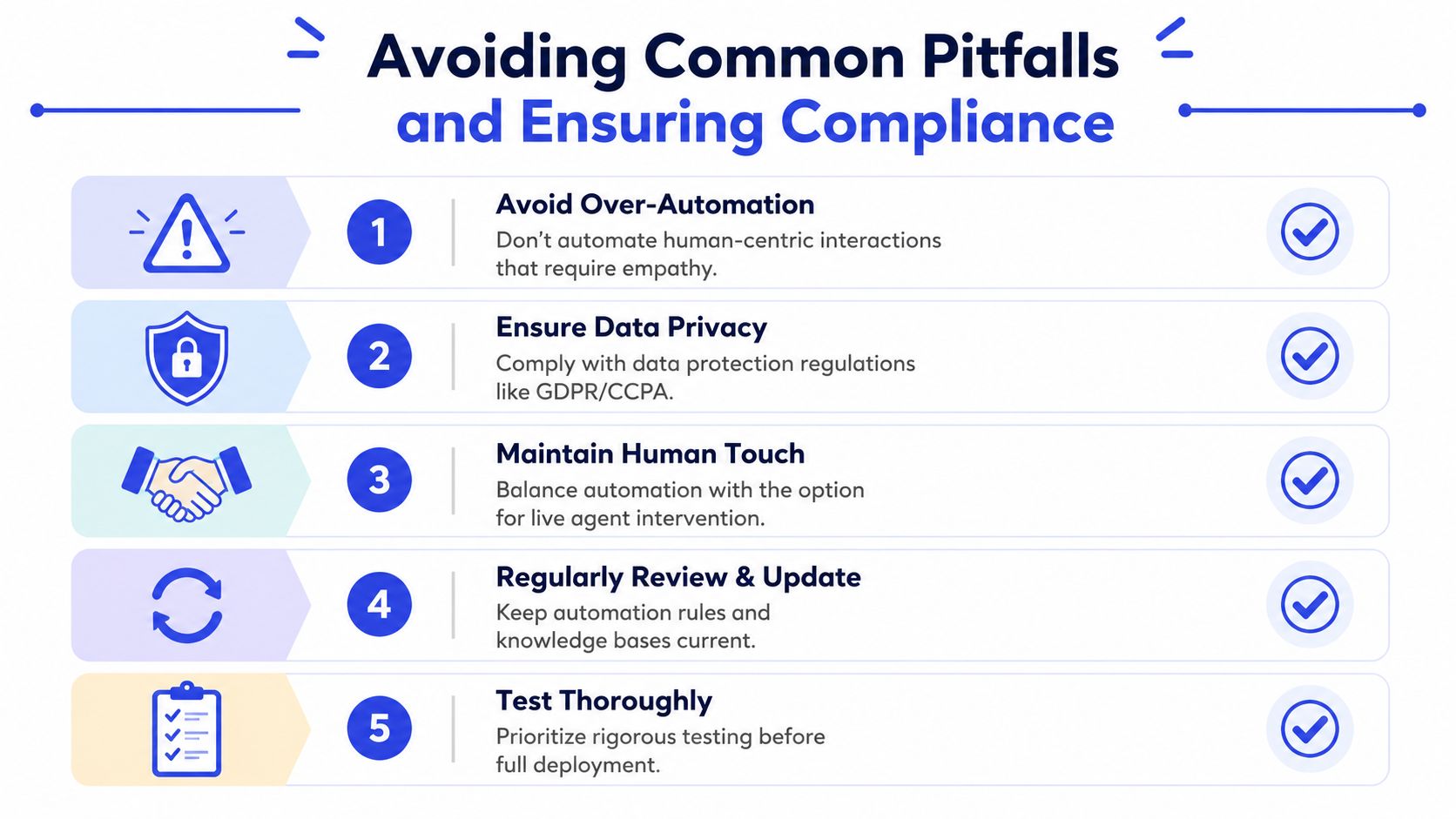
The mistakes that break trust
The first mistake is over-automation. Not every interaction should be handled by AI. Refund disputes, sensitive complaints, account-specific exceptions, and emotionally charged situations often need a person early. If customers feel trapped, trust drops fast.
The second mistake is bad brand fit. A support agent that sounds generic or overly cheerful in serious situations creates friction. Your automated voice should be clear, restrained, and consistent with how your real team communicates.
The third mistake is hiding the handoff. Customers should know when they're talking to an automated system and how to reach a human when needed. Make escalation visible. Don't force users to guess the magic phrase that reaches a person.
If you wouldn't make a new support rep answer customers without training, you shouldn't deploy an automated agent without clear knowledge, limits, and review.
A simple rollout checklist
Use this checklist before and after launch:
Define boundaries: List what the system should answer, what it should collect, and what it must escalate.
Review knowledge sources: Remove outdated articles, conflicting policy pages, and vague documentation.
Make human support reachable: Add a clear path to contact a person for complex or sensitive issues.
Disclose automation: Tell users they're interacting with AI in a straightforward way.
Protect customer data: Limit unnecessary personal data capture and review how stored conversation data is handled under privacy requirements such as GDPR and CCPA.
Assign an owner: One person should monitor conversations, update content, and manage failure cases.
Test edge cases: Try unusual phrasing, ambiguous questions, and escalation scenarios before broad rollout.
Compliance is mostly discipline. Know what data the system receives, where that data is stored, who can access it, and how long it remains available. Keep your legal and privacy teams involved if you operate in regulated environments or handle sensitive customer information. Even SMBs need this habit. A smaller company isn't exempt from customer expectations around transparency and responsible data use.
The safest automation strategy stays humble. It answers what it knows, escalates what it doesn't, and gets better through review. That's how you automate customer support without damaging the customer relationship you're trying to improve.
If you want a low-risk way to put this into practice, Chatgrow is built for exactly this style of rollout. You can train a support agent on your website, FAQs, pricing, and product pages, deploy it on high-intent pages, qualify leads, and monitor performance from one place. For SMBs that need speed without a complicated implementation, it's a practical starting point.
Related Posts
Continue Reading
More articles from the ChatGrow Team.


