
Blog
AI Powered Sales Assistant
By
Nelson Uzenabor

Your reps are busy, your CRM is half-updated, and your best leads don't wait for business hours. A prospect lands on your pricing page at night, asks a high-intent question, and leaves before anyone answers. Another books a call, but the rep walks in cold because product details, customer stories, and prior interactions are scattered across tools.
That's the point where a lot of SMB teams start looking at an AI powered sales assistant. Not because of its perceived novelty, but because the current workflow is leaking revenue in boring, expensive ways. Slow response times, inconsistent follow-up, weak qualification, and admin work pile up fast when a small team is trying to scale.
Used well, an AI powered sales assistant doesn't replace your reps. It protects their time, keeps leads warm, and makes your process more consistent. Used poorly, it just automates confusion. The difference comes down to implementation, measurement, and governance.
Table of Contents
Tired of Admin Work and Leaky Sales Funnels?
A common SMB sales day looks productive from the outside. Reps are sending emails, updating contact records, chasing meeting times, and replying to basic questions that should already live in the CRM or knowledge base. But very little of that is actual selling.
That gap is often underestimated. Sellers spend only 28% of their week selling, according to Pipedrive's AI sales assistant overview. The rest gets eaten by coordination, research, data entry, and follow-up tasks that keep the engine running but don't directly move deals forward.
The leak shows up in small moments. A visitor asks whether your service integrates with their stack. Nobody answers until morning. A rep promises a follow-up case study, then spends too long digging through folders. A lead form gets submitted, but qualification notes stay in someone's inbox instead of the CRM.
Most funnel problems don't start with bad reps. They start with slow systems and inconsistent execution.
An AI powered sales assistant helps when the issue is operational drag, not lack of effort. It can qualify inbound interest, answer common pre-sales questions, route conversations, log context, and tee up handoffs before a human rep steps in. That matters more for SMBs than for large enterprises because a small team feels every missed handoff and every delayed response immediately.
There's also a market reality behind the shift. The AI sales assistant software market was estimated at $2.447 billion in 2024 and is projected to reach $24.21 billion by 2035, with a projected 23.16% CAGR during 2025 to 2035, according to Market Research Future's AI sales assistant software market report. That's not just tool hype. It reflects how sales teams are treating these systems as operating infrastructure.
For SMBs, that's the right lens. Don't buy one because the category is growing. Buy one if it closes the gap between lead interest and rep action.
What Is an AI Powered Sales Assistant Really
A small sales team gets this wrong all the time. They buy a bot to answer site questions, then wonder why pipeline quality does not improve. The problem is the tool was set up like a help desk widget, not a sales workflow.
An AI powered sales assistant is software that handles specific sales jobs across qualification, routing, follow-up support, and data capture. It works best when it sits inside the systems your team already uses, so reps are not bouncing between chat transcripts, inboxes, calendars, and the CRM to piece together what happened.
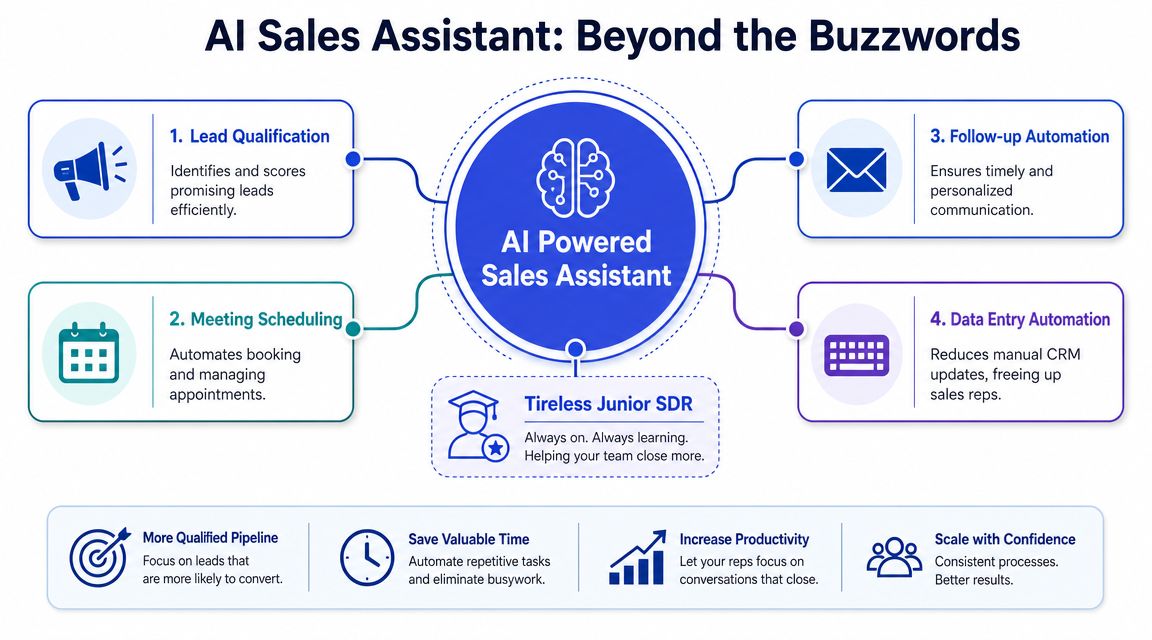
It is a sales workflow layer, not a FAQ widget
The practical distinction is simple. A basic bot answers a question. A sales assistant collects intent, asks the next useful question, records the answer, and pushes the conversation toward an outcome such as qualification, routing, or meeting booking.
That matters for SMBs because headcount is limited. If one assistant can cover first response, capture buying context, and keep records clean, each rep gets more time for live selling instead of cleanup.
Teams also get better results when the assistant is designed for conversion points instead of dropped onto every page with the same script. A focused chatbot for lead generation strategy on pricing, demo, and comparison pages will usually outperform a generic site-wide bot.
Context matters more than personality
Vendors love to demo fluent replies. In production, fluent replies are not the hard part. Useful context is the hard part.
A sales assistant becomes valuable when it can pull from CRM fields, meeting history, lead source, product interest, territory rules, and handoff logic. That is what lets it ask better qualification questions, route correctly, suggest the right follow-up, and save clean notes for the rep who picks up the deal.
For SMBs, this is the buying test I use. If the assistant cannot write back to your CRM, trigger the next step, and preserve conversation context, it is just another inbox to monitor.
Practical rule: If reps still have to copy answers into the CRM by hand, you bought extra work, not efficiency.
Define it by the jobs it owns
The cleanest way to evaluate an AI powered sales assistant is to list the jobs it will handle from day one. Not every team needs the same setup. A services firm may care most about lead qualification and routing. A SaaS company may care more about pre-demo qualification, objection handling, and booking support.
Start with a short list:
Pre-sales response for high-intent inbound traffic
Qualification capture before a rep spends calendar time
Routing and handoff based on territory, segment, or fit
CRM updates so next steps do not depend on memory
Rep support for fast answers, approved messaging, and follow-up prep
Escalation rules for pricing, technical questions, or exceptions
That framing keeps the conversation grounded. SMB teams do not need abstract AI theory. They need to know what the assistant will do, where it will sit in the funnel, and what should improve if it is working.
Core Features and Benefits for Modern Sales Teams
A rep finishes two demos, opens the CRM to log notes, sees three new inbound leads, and gets pulled into a pricing question on Slack. That is where an AI powered sales assistant earns its keep. The best tools do not win on flashy prompts. They win by reducing response gaps, keeping data clean, and helping reps stay in selling mode.
For SMBs, I look for three gains first: more inbound coverage, less admin work, and faster access to approved answers. Tie each feature to one measurable result. If a vendor cannot explain what metric should move, the feature is probably nice to demo and hard to justify.
Here's the high-level view:
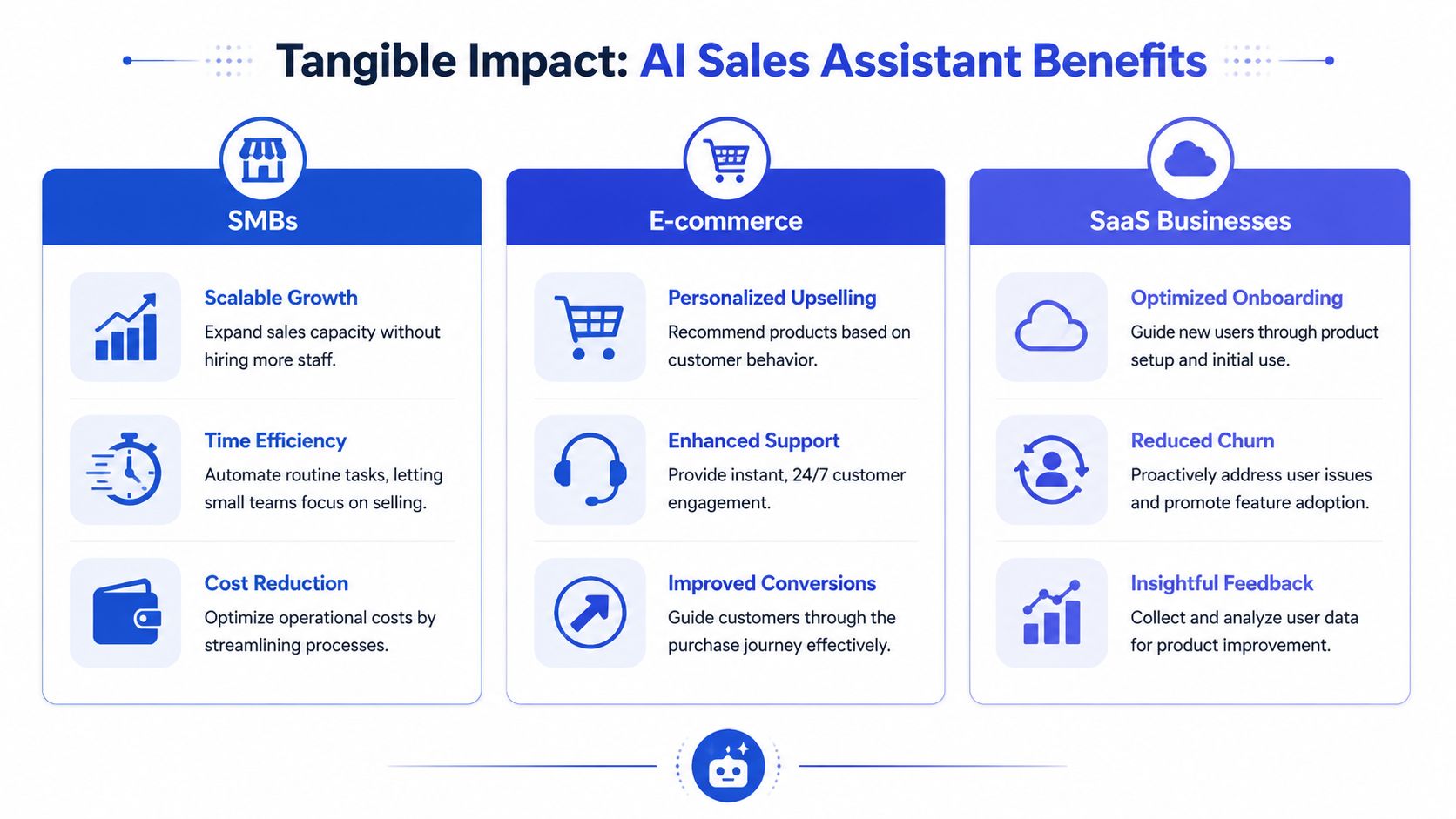
It captures and qualifies leads when your team is offline
Inbound does not wait for business hours. High-intent visitors hit your pricing, demo, or comparison pages at night, on weekends, and during rep meetings. A useful assistant starts the conversation, answers basic buying questions, collects qualification details, and routes the lead without asking the buyer to wait.
That gives SMB teams a practical way to extend coverage without hiring for every hour of the day. It also improves speed to lead in the part of the funnel where response time matters most. Teams that use the assistant this way often pair it with a more focused chatbot approach for lead generation instead of dropping the same generic bot on every page.
The operational benefits are straightforward:
Faster first response for high-intent visitors
Better rep time allocation because low-fit leads get filtered earlier
Stronger handoff context so reps start with declared need, budget, timing, or use case
The trade-off is simple. If the qualification flow is too shallow, reps still waste time. If it is too long, conversion drops. SMB teams usually get better results with five to seven useful questions than with a long form disguised as chat.
It cuts admin drag inside the systems reps already use
A lot of value comes from work nobody celebrates. That is usually the work worth automating first.
An AI powered sales assistant should save conversation summaries, update contact fields, prompt follow-up tasks, coordinate meetings, and surface missing data before the rep touches the record. Those are small actions, but they stack up across the week. The gain is not just time saved. It is fewer dropped details, more consistent pipeline hygiene, and less dependence on rep memory.
Common admin tasks worth automating include:
CRM updates after chats, calls, or emails
Meeting scheduling and reminder workflows
Follow-up prompts based on stage changes or inactivity
Account enrichment before outreach
Conversation summaries that give reps a clean starting point
This is also where weak implementations show up fast. If the assistant logs incomplete fields, writes bad summaries, or triggers the wrong task, ops spends its time cleaning up automation instead of benefiting from it. Good workflow design matters more than the feature count.
Before evaluating vendors, ask a hard question: which manual tasks are slowing revenue work today?
It gives reps faster answers without making them search five systems
Sales velocity drops when reps have to hunt for pricing guidance, product details, customer proof, or approved messaging in the middle of a live conversation. A good assistant cuts that search time. It pulls the right answer from enablement docs, product content, case studies, and internal guidance while the rep is still in context.
Snowflake shared a concrete example from its own environment. Its internal Knowledge Assistant saves sales teams 10 to 15 minutes per question by surfacing answers from documentation, enablement materials, and more than 800 customer stories, according to Snowflake's write-up on its AI assistant for sales.
That kind of support matters in a few common moments:
Sales situation | What the assistant helps with | Why it matters |
|---|---|---|
Pricing objections | Pulls approved context and next-step prompts | Keeps reps from improvising risky answers |
Industry-specific questions | Finds relevant proof points or documentation | Improves confidence and consistency |
Demo follow-up | Drafts or prompts timely replies | Reduces lag between interest and action |
A short demo is useful here because the difference is easier to see than describe.
The strongest assistants feel normal inside the workflow. Reps get the answer, the record gets updated, and the next action is clear. For an SMB team, that is the standard to hold. Better coverage, cleaner execution, and more selling time.
Your Practical Implementation Checklist
A typical SMB rollout breaks in the first two weeks. Marketing adds the assistant to the site. Sales expects qualified meetings. Ops finds out the bot cannot see the right pages, writes junk into the CRM, and hands reps conversations with no context.
That is not a tooling problem. It is a setup problem.
Keep the first rollout tight. One funnel, one goal, one handoff path. If you start with every channel, every product line, and every edge case, you will spend a month debugging instead of improving pipeline coverage.
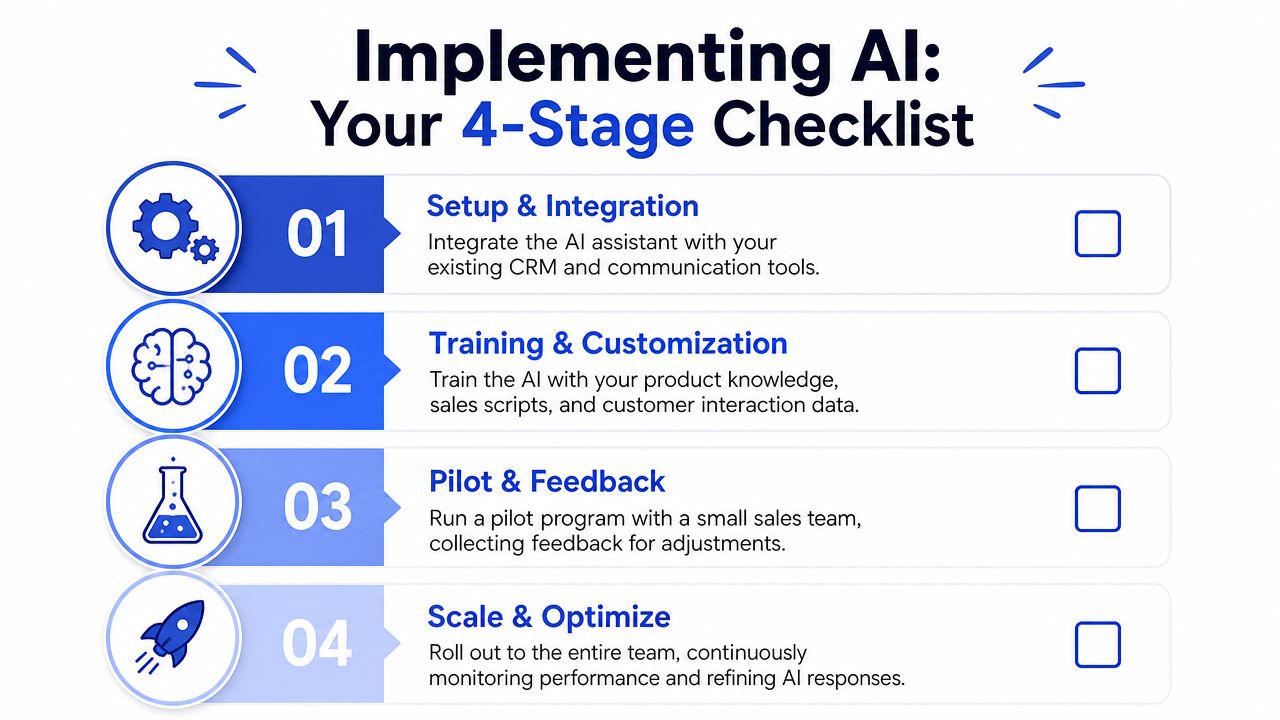
Stage 1 setup and integration
Start with the operating model. Decide what the assistant is supposed to do in business terms. Qualify inbound demo requests, book meetings after hours, answer product questions, or route support traffic away from sales. If the team cannot state the job in one sentence, the rollout is too broad.
Then connect the systems that affect that job. That usually means CRM, calendar, inbox, help docs, pricing pages, and product content. The point is not to connect everything. The point is to connect the few systems needed to produce a useful answer and a clean handoff.
Use this stage to answer four setup questions:
Where will it run on your site or in your channels
What information can it read from approved sources
What fields can it write into the CRM
Who approves changes across sales, ops, and marketing
Earlier research on AI sales assistants has noted the same pattern. Integrations matter because an assistant that cannot read context or log outcomes becomes another tab for reps to manage.
If your stack has duplicate fields, outdated pricing docs, or broken ownership rules, clean those up before launch. The assistant will expose those issues fast.
Stage 2 training and customization
At this point, SMB teams either get value or get noise.
Upload only approved material first. Product pages, pricing guidance, objection handling, qualification criteria, routing rules, and examples of acceptable answers. Skip the temptation to dump every file from Drive into the knowledge base. More content is not better if half of it is old, contradictory, or written for another audience.
A practical training set includes:
Current product and service pages
Pricing and packaging rules
Common objections and approved responses
Disqualification criteria
Escalation triggers for human follow-up
For teams refining intake logic, these examples of lead qualification tools and workflows are a useful benchmark for what good routing and handoff design looks like.
One rule matters more than teams expect. Train the assistant on limits, not just answers. It should know when to stop, when to qualify, and when to hand the conversation to a rep.
Stage 3 pilot and feedback
Pilot in one place where intent is already high. A demo page works. A pricing page can work too. A low-intent blog page is usually a poor starting point because it creates a lot of conversation volume without telling you much about pipeline value.
Read the transcripts yourself. Sales managers should too. Look for weak qualification, vague answers, missed routing opportunities, and cases where the assistant asks too many questions before offering help. Those are the failure points that hurt adoption.
Review the pilot against a short checklist:
Are response times better for high-intent leads
Are reps receiving enough context at handoff
Are qualification decisions more consistent
Are there any answers that create brand or compliance risk
During the pilot, fewer conversations with better handoffs beat higher chat volume every time.
Stage 4 scale and optimize
Scale by use case. Do not scale because the demo looked good.
Once the first motion works, add one adjacent path at a time. Another product line. Another high-intent page. Another channel. Keep the logic separate enough that you can tell which workflow is producing qualified meetings and which one is wasting rep time.
The operating cadence can stay simple:
Review a sample of conversations every week
Update source content when messaging or pricing changes
Tighten escalation rules
Remove prompts that slow down qualification
Audit CRM write-back quality
For SMBs, this is the implementation advantage. A smaller team can make changes quickly, spot bad handoffs fast, and tie the rollout to a handful of pipeline outcomes instead of a long enterprise program. The teams that get value are usually the ones that treat the assistant like a revenue workflow that needs maintenance, not a widget that runs itself.
Measuring Success with the Right KPIs and ROI
A common SMB scenario looks like this. The assistant handles more inbound conversations, the dashboard shows higher activity, and the team still misses quota because booked meetings are weak and reps do not trust the handoffs.
That is a measurement problem, not a tooling problem.
If the goal is revenue support, the scorecard has to stay close to pipeline creation, sales efficiency, and conversion quality.
The wrong metrics to obsess over
Activity metrics are easy to collect and easy to misuse. Chats handled, messages sent, and conversations started can help with troubleshooting, but they do not show whether the assistant is improving the sales motion.
Broad AI adoption has not translated into consistent commercial return for every company. As summarized in Pipedrive's overview of AI sales assistant adoption and ROI, many teams are still working out how to turn usage into measurable value. That gap is where SMB teams usually get stuck. They buy the tool, turn it on, and stop short of defining what success should look like in the pipeline.
Use output metrics as secondary indicators. Put business metrics first.
The metrics that matter
Track a short set of measures that a sales manager, founder, or head of revenue would use to decide whether the rollout should continue.
Lead response time
Measure how fast high-intent inbound leads get a useful first response, especially outside rep working hours.Lead qualification rate
Track the share of assistant conversations that become sales-ready, based on your own criteria.Sales-qualified leads created
Count qualified handoffs that reach reps with enough context to take the next step without re-asking basic questions.Meeting quality and show rate
Review whether booked calls are relevant, prepared, and worth rep time.Pipeline created from assistant-influenced conversations
Tie assistant activity to opportunities created, not just chat volume.Conversion lift on high-intent pages
Compare pricing, demo, or comparison pages with and without assistant support over a defined period.
One warning from experience. If qualification logic is loose, meeting volume can rise while close rates fall. That looks like progress in the dashboard and creates extra cleanup work for the sales team.
Numbers alone are not enough. Rep feedback matters because they see the cost of bad handoffs before it shows up in conversion reports. If reps keep saying the assistant sends vague, repetitive, or poorly matched leads, treat that as an ROI issue.
If you need cleaner attribution across chat, CRM, and follow-up workflows, this guide to customer data integration for conversational workflows is a useful operational reference.
A simple ROI model SMBs can defend
For SMBs, the cleanest model is still the best one:
ROI = (value of new pipeline generated + value of sales time saved) - tool cost
That gives you two clear tests. Did the assistant create more qualified pipeline? Did it free up rep time that the team then used for selling work such as follow-up, demos, and outbound activity?
Stay conservative with assumptions. If pipeline influence is uncertain, count only the portion you can defend. If saved time is not being redirected into revenue-producing work, do not score it as full return.
Often, teams overstate the case. Time saved has value only if the operating model changes with it. If reps still spend that time on manual triage, poor handoffs, or CRM cleanup, the assistant reduced friction but did not improve output.
A monthly review can stay simple:
KPI | Current trend | What to ask |
|---|---|---|
Response speed | Improving or flat | Are we covering high-intent traffic faster? |
Qualification quality | Strong or noisy | Are reps getting leads worth their time? |
Pipeline influenced | Growing or unclear | Can we tie usage to real opportunity creation? |
Time saved | Visible or vague | Is rep capacity being redeployed into selling work? |
For SMBs, that is the practical bar. If response speed improves, qualification stays tight, and assistant-influenced pipeline rises without creating extra rep cleanup, the rollout is working. If one of those breaks, fix the workflow before expanding the program.
Advanced Integration and Channel Strategies
Once the foundation is stable, placement matters more than volume. One generic assistant on the homepage usually underperforms compared with targeted assistants on pages where buyer intent is obvious.
High-intent pages are the first place to get specific. Pricing pages need objection handling and qualification. Comparison pages need differentiation. Demo pages need scheduling support and routing. Product pages often need answer depth. Each motion is different, so the prompts, knowledge, and escalation rules should be different too.
A smart next step is connecting assistant behavior to your customer data flow. If you're planning cross-channel follow-up, this guide to customer data integration for conversational workflows is a useful operational reference.
Here are practical channel plays that tend to work:
Website assistants by page intent
Use one logic path for pricing, another for service pages, and another for support-heavy product pages.Email follow-up support
Let the assistant draft or trigger next steps based on form submissions, abandoned demo flows, or inbound questions.SMS or messaging handoff
Useful when prospects want quick scheduling or status updates without opening email.Social DM triage
Helpful for brands getting inbound product or service questions through social channels that need qualification before a rep gets involved.
The key is consistency across channels. The assistant shouldn't promise one thing on the website and another in follow-up. Shared knowledge, shared rules, and clean write-back into the CRM matter more than channel count.
Common Pitfalls and Governance FAQs
The biggest mistake teams make is treating an AI powered sales assistant like a set-it-and-forget-it widget. It isn't. It's a live part of your revenue process, which means errors can spread fast if you don't review outputs, tighten rules, and maintain source quality.
That matters even more as governance becomes a real buying concern. Worldwide spending on AI governance software is projected to reach $7.5 billion by 2028, up from $890 million in 2023, and a KPMG survey found 44% of organizations had experienced at least one AI-related incident in the prior year while only 53% felt sufficiently prepared to address AI risks, according to Nooks' overview of AI-powered sales assistants and governance.
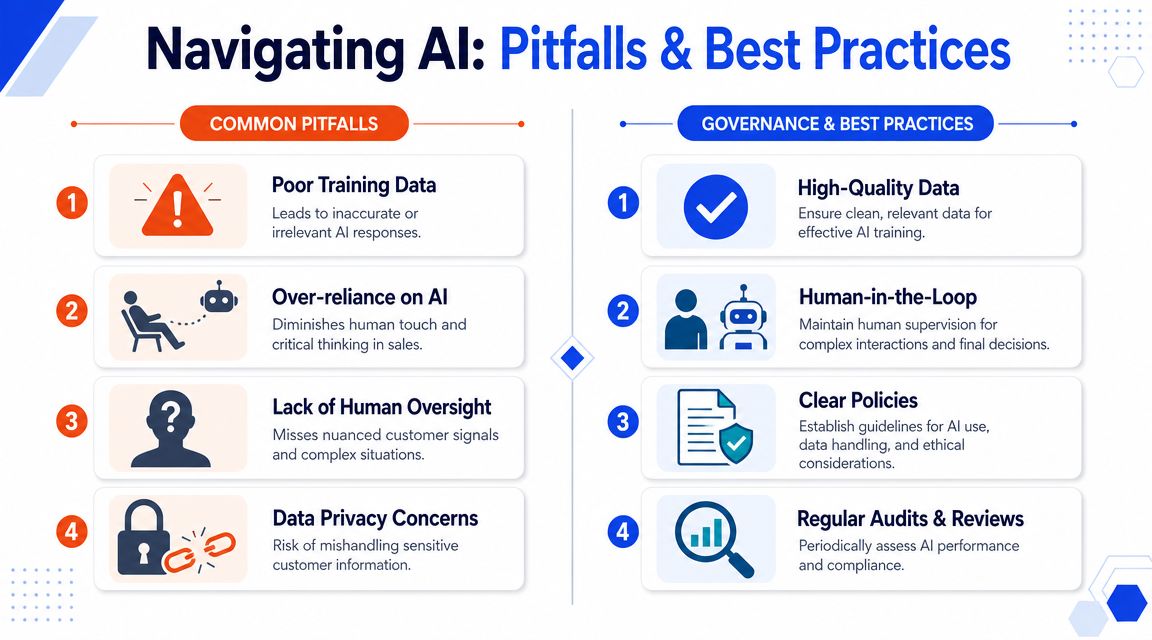
Where teams get this wrong
Most failures come from ordinary operational shortcuts:
Weak source content that gives the assistant outdated or vague answers
No escalation path when pricing, compliance, or edge-case questions come in
Over-automation that removes judgment from moments that need a human
No transcript review so errors repeat unnoticed
No ownership across sales ops, marketing, and frontline reps
Governance is not a legal department project only. Sales ops owns a big part of it because workflow design determines what the assistant can say and do.
Governance questions buyers should ask early
A few questions belong in every evaluation:
How do we prevent non-compliant claims?
Use approved knowledge sources, restricted claims, and clear answer boundaries.What happens when the assistant is uncertain?
It should escalate or narrow the question, not improvise.Can we audit what it said and why?
You need logs, transcript review, and clear ownership for updates.How do we protect brand consistency?
Train on approved tone, messaging, and disallowed language, then review outputs regularly.
For SMBs, governance doesn't need to be bureaucratic. It does need to be explicit. If the assistant talks to prospects, it needs rules, review, and accountability.
If you want to put this into practice without a long rollout, Chatgrow gives SMBs a straightforward way to train and deploy an AI sales assistant on your website, qualify leads, answer FAQs, and escalate cleanly to your team. It's a practical fit for companies that want faster response coverage and better handoffs without turning implementation into a six-month ops project.
Related Posts
Continue Reading
More articles from the ChatGrow Team.


