Blog
A Chatbot for Retail: Your 2026 Implementation Guide
By
Nelson Uzenabor
Retail and e-commerce already account for about 29.8% of the global chatbot market in 2025, according to Grand View Research's chatbot market analysis. That same report values the overall market at USD 9.56 billion in 2025 and projects USD 41.24 billion by 2033. For a small retailer, that changes the conversation.
A chatbot for retail isn't a novelty widget anymore. It's a front-line service channel, a sales assistant, and, if it's set up properly, a practical way to answer customer questions without adding headcount for every spike in demand.
Most articles stop at use cases. That's useful, but incomplete. The harder question is operational: how do you keep a retail chatbot helpful after launch, when prices change, inventory shifts, promotions expire, and customers ask messy real-world questions? That's where many projects succeed or fail.
Table of Contents
Why Retail Chatbots Are No Longer Optional in 2026
By 2026, the question for many retailers is no longer whether to add a chatbot. It is whether the bot can answer with current inventory, pricing, delivery, and policy information without creating more work for the team.
That is what makes this moment different from the first wave of chatbot adoption. Early retail bots often sat on top of a static FAQ and produced shallow answers that frustrated shoppers. The newer standard is operational. Shoppers ask if a size is in stock, whether curbside pickup is available today, or how fast a replacement can ship. A useful bot needs live access to the same systems your staff checks manually.
For SMBs, that changes the buying decision.
A chatbot is no longer just a website feature that covers basic support after hours. It is part of your sales and service workflow. If it cannot pull fresh product data, reflect current promotions, and hand off cleanly when a case gets messy, it will lose trust fast. If it can, it reduces response time, protects staff capacity, and keeps more shoppers from dropping off while they wait.
What a retail chatbot actually is
The practical definition is simple. A retail chatbot handles repeatable customer conversations using your store content and, in the better setups, your live business systems.
That usually includes:
Answering product questions: Size, materials, compatibility, shipping, and returns.
Helping shoppers move forward: Recommending products, narrowing options, and reducing hesitation.
Supporting post-purchase service: Order status, return steps, and policy clarification.
A retail chatbot earns its place when it works with current store data and removes repeat work from your team.
Why 2026 feels different
Customer expectations changed first. Fast answers are now part of the shopping experience, not a bonus. If one store answers a product question in the session and another replies the next day by email, the faster store has a real advantage.
The technology also matured enough to expose a gap between good bots and expensive dead weight. SMBs can now buy tools that connect to ecommerce platforms, help desks, and order systems without a custom build. The trade-off is that not every vendor handles updates well. Some are easy to launch but hard to maintain, especially when catalogs, policies, and promotions change every week.
That is why retail chatbots feel necessary in 2026. The issue is not AI hype. The issue is operational coverage. Stores need a reliable way to answer routine questions at scale, outside business hours, and across more than one channel, without forcing staff to keep correcting the bot.
The retailers getting value from chatbots are usually doing one thing right. They treat the bot like an operational system that needs live data, ownership, and regular tuning, not a one-time install.
The Tangible Business Value of a Retail Chatbot
The business case gets real when you stop thinking about chatbots as customer service decoration and start treating them like workflow automation tied to revenue.
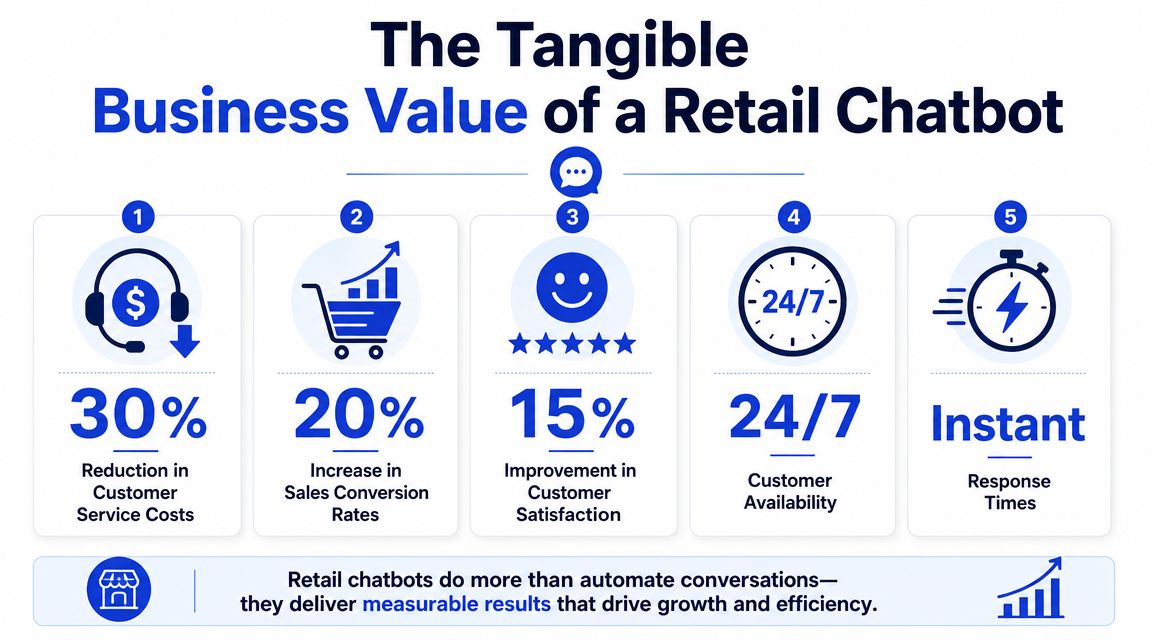
According to this 2025 chatbot statistics roundup, retail spending on chatbots is expected to grow from $12 billion in 2023 to $72 billion by 2028. The same source says chatbots can handle up to 70% of conversations from start to finish, reduce customer support costs by 30%, and cut response times by 80%. It also reports that shoppers who engage with AI chat complete purchases 47% faster, and 12.3% of shoppers using AI-powered chat make a purchase versus 3.1% of those who do not.
Cost savings are only the first layer
Most owners first look at support cost. That's fair. If a bot can take care of repetitive questions like shipping windows, return policy basics, stock checks, and order status, your team spends less time copying the same answer into tickets all day.
But the main advantage is capacity. When the chatbot handles the straightforward cases, your human team can work on issues that require judgment:
Escalations with context: Damaged orders, replacement requests, exception handling.
Sales conversations: Bulk orders, product fit, pre-purchase objections.
Retention moments: Frustrated customers who need a skilled person, not a script.
Revenue impact is usually underestimated
Retailers often buy a bot to reduce support volume. They keep it if it helps conversion.
That happens when the chatbot shows up at the right point in the buying journey. A shopper asks whether a product is in stock, whether sizing runs small, whether pickup is available, or whether a bundle is better than a single item. A good bot shortens the path to a decision.
Practical rule: If your chatbot only answers policy questions, you're using a fraction of its value.
Speed changes buyer behavior
Fast answers matter because hesitation kills carts. If a visitor has to leave the product page to search your help center, open a contact form, or wait for email support, you create room for doubt.
A bot helps when it keeps the shopper in flow. The answer appears where the question happens. That's especially useful on product pages, cart pages, and shipping or returns pages where uncertainty tends to stall purchases.
Here's where SMB owners often see value first:
Business area | What the chatbot does | Why it matters |
|---|---|---|
Support load | Handles repeat questions | Frees staff for complex cases |
Sales assistance | Answers pre-purchase objections | Helps buyers move faster |
After-hours coverage | Responds when staff is offline | Captures intent that would otherwise be lost |
Lead qualification | Collects details before handoff | Makes follow-up easier |
Customer experience | Delivers immediate replies | Reduces friction and frustration |
The economics make sense when the bot does both jobs. It lowers support effort and helps customers buy.
Essential Chatbot Use Cases for Modern Retailers
Use cases make more sense when you follow the customer journey rather than listing features in isolation. The best chatbot for retail supports the shopper before the order, during the decision, and after the purchase.

Before purchase
A visitor lands on a product page with a basic question. Maybe they want to know if a jacket is waterproof, whether a supplement is vegan, or which laptop sleeve fits their device. Without chat, they bounce between tabs or leave.
With a bot, the conversation stays inside the store experience.
Common pre-purchase use cases include:
Product discovery: Helping shoppers narrow options based on needs or preferences.
Product comparison: Explaining differences between similar items in plain language.
Availability questions: Confirming whether something is in stock or available in a nearby location.
Lead capture for considered purchases: Collecting email, phone, or product interest when the shopper isn't ready yet.
If you want a broader look at ecommerce-specific conversational flows, this guide on AI chatbots for ecommerce is a useful companion.
During the buying moment
The bot becomes more than support. It can reduce checkout hesitation by handling the last-minute concerns that stall conversion.
That usually means answering questions like:
Does this promo apply to my cart?
How long will shipping take?
Can I buy online and pick up in store?
What happens if the size doesn't fit?
For physical retail, the same principle works in-store. A QR code on shelf signage or product tags can open a bot that answers product questions, checks stock, or surfaces related items without requiring a staff member for every simple interaction.
A short demo helps make that concrete:
After the order
Post-purchase is where many retail teams get buried. Customers ask where the package is, whether they can return an item, how to exchange a size, or whether an order can still be changed.
A chatbot is especially useful here because the questions are frequent, repetitive, and time-sensitive. When the bot can pull the current order status or explain the next step clearly, customers feel informed instead of ignored.
The post-purchase bot doesn't need to be clever. It needs to be accurate.
A practical before-and-after comparison looks like this:
Stage | Without chatbot | With chatbot |
|---|---|---|
Product question | Customer searches FAQ or leaves | Customer gets answer on page |
Cart hesitation | Customer delays purchase | Bot resolves objection in session |
Order tracking | Support inbox fills with repeats | Bot handles routine status checks |
Return request | Customer hunts policy pages | Bot guides the next action |
That's why the strongest implementations don't treat the chatbot as a popup. They treat it as part of the retail operating model.
Your Step-by-Step Retail Chatbot Implementation Roadmap
The fastest way to waste money on a chatbot is to start with software instead of workflow. SMB retailers do better when they define what the bot should handle, where the answers live, and when a human should step in.
A retail chatbot's core pipeline involves input recognition, intent analysis, data retrieval from systems like product catalogs and CRMs, response generation, and continuous learning, as explained in Couchbase's overview of retail chatbot architecture. That sounds technical, but the business meaning is straightforward. The bot has to understand the question, pull the right data, answer clearly, and improve from real conversations.
Start with the business problem
Don't begin with “we need AI.” Begin with one or two concrete jobs.
Good starting goals look like this:
Reduce repetitive support tickets from order tracking, returns, shipping, and store policy questions.
Increase conversion on high-intent pages by answering purchase-blocking questions.
Capture and qualify leads for products that need follow-up from staff.
Bad starting goals are broad and fuzzy. “Improve customer engagement” sounds nice, but it doesn't tell your team what to build.
Map the knowledge and live systems
Operational reality sets in. Your bot will only be as useful as the information it can access.
Static knowledge sources usually include FAQs, shipping policy pages, return policy pages, product detail pages, and sizing guides. Live systems usually include your ecommerce platform, CRM, inventory system, promotions, and order status tools.
A workable setup often starts with two buckets:
Information type | Examples | Update need |
|---|---|---|
Static content | Policies, brand FAQs, care instructions | Review on schedule |
Live data | Inventory, pricing, order status, promotions | Needs real-time or frequent sync |
For conversation design patterns, AI chatbot design guidance is useful when you're deciding how much structure versus flexibility the experience should have.
One practical option for SMBs is a platform like Chatgrow, which trains agents on website content, FAQs, pricing, and product pages, then supports escalation and ongoing retraining. That kind of setup is usually a better fit than a custom build when your team wants fast deployment and non-technical updates.
Design for handoff before launch
A chatbot should not pretend to solve everything. It should know when to step aside.
Build escalation around moments that require a person:
Account-specific exceptions: Missing refunds, damaged shipments, fraud concerns.
High-value sales help: Wholesale requests, bundle pricing, product fit consultations.
Repeated failure signals: The user asks the same thing twice, expresses frustration, or says the answer is wrong.
If a customer has to fight the bot to reach a person, the chatbot is hurting service, not improving it.
Before launch, test the bot against real queries from support inboxes and live chat transcripts. Include typos, vague phrasing, incomplete product names, and messy edge cases. Retail customers rarely ask clean textbook questions.
A lean implementation sequence looks like this:
Choose one primary channel first: Usually the website, especially product pages, help pages, and cart-related pages.
Launch with narrow coverage: Start with high-frequency intents before expanding.
Review transcripts weekly: Look for unanswered questions, bad handoffs, and outdated answers.
Expand only after stability: Add channels and workflows once the core use cases work reliably.
That approach keeps the project grounded in customer behavior rather than AI theater.
Measuring Chatbot Performance and Proving ROI
If you can't measure what the chatbot is doing, you won't know whether to expand it, retrain it, or cut it back. Retail teams often look at message volume first because it's easy to see. It's also one of the least useful standalone metrics.
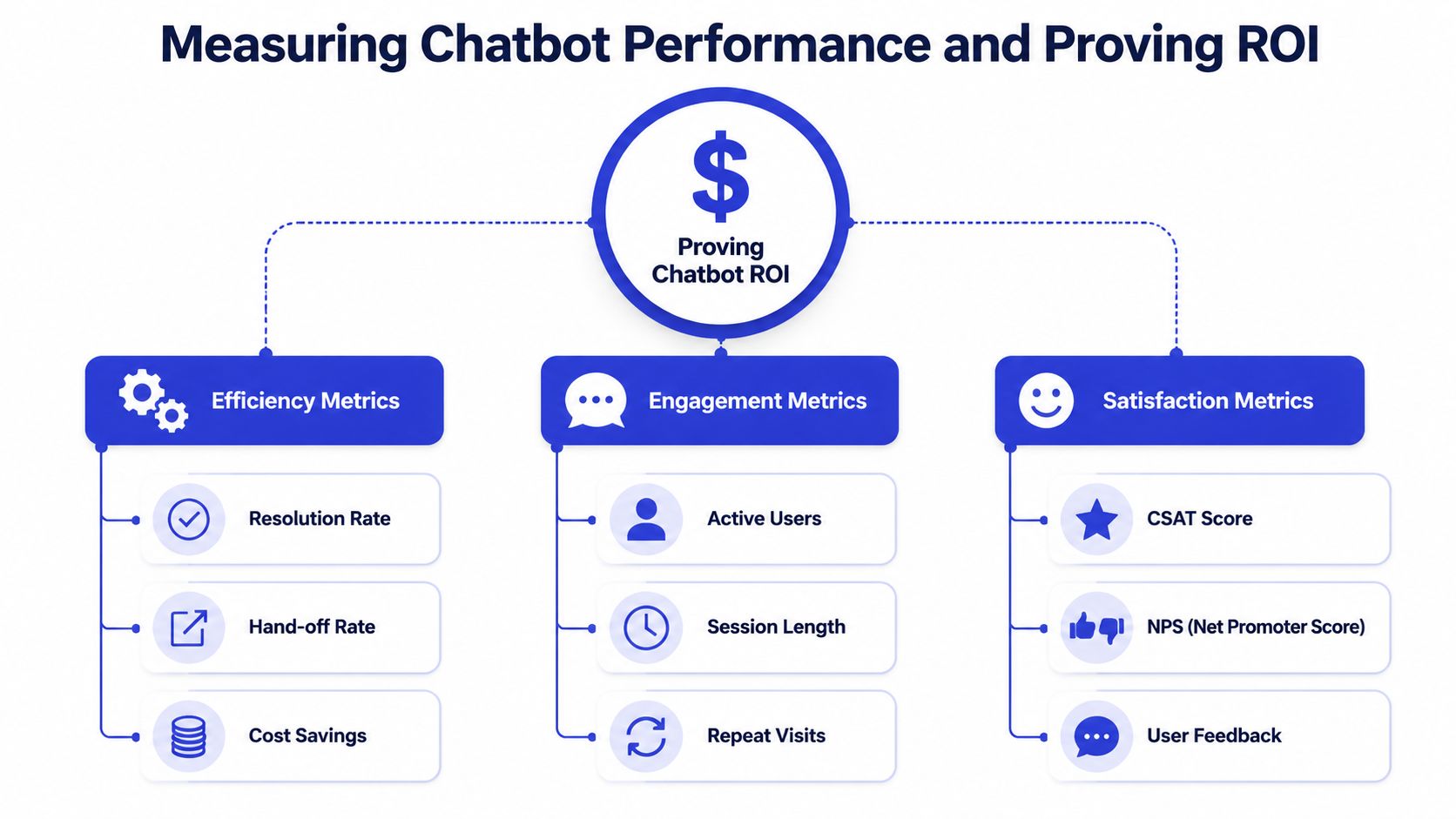
The more meaningful approach is to measure whether the bot is solving problems, shortening response cycles, and supporting sales. Voyado's guidance on retail AI agents recommends tracking engagement rate, resolution time, conversion impact, drop-offs, and CSAT, and it stresses that success depends on tight integration with live product, pricing, and inventory data.
Track the metrics that change decisions
A simple framework works better than a giant dashboard. I usually group performance into three buckets: efficiency, commercial impact, and customer experience.
Efficiency metrics tell you whether the bot is reducing workload.
Resolution time: How quickly the bot gets the user to a useful answer.
Handoff rate: How often the conversation needs a human.
Drop-offs: Where users abandon the interaction.
Commercial metrics show whether the chatbot affects revenue-related behavior.
Conversion impact: Whether product-page or cart conversations lead to more completed purchases.
Lead capture quality: Whether escalated conversations include enough detail for useful follow-up.
Intent coverage: Which pre-purchase questions are getting answered.
Customer experience metrics keep you honest.
CSAT: Did the customer feel the interaction helped?
Engagement rate: Are people using the bot when it appears?
Repeat usage patterns: Do customers come back to it because it works?
For retailers connecting support, sales, and backend systems, customer data integration for chatbots matters because analytics are only useful when the conversation data connects to the rest of your operation.
Tie performance back to operations
The mistake I see most often is treating chatbot reporting like a marketing dashboard. The more useful view is operational.
If drop-offs spike on product pages, review catalog answers. If handoffs rise around returns, inspect your return flow and policy wording. If customers engage but conversion doesn't move, your bot may answer questions well but appear on the wrong pages or too late in the session.
The goal isn't more chatbot conversations. The goal is fewer unresolved customer moments.
A lightweight monthly review can cover:
Review area | What to inspect | Action to take |
|---|---|---|
Accuracy | Wrong or incomplete answers | Update content or integration |
Friction | Repeated customer confusion | Rewrite flow or add quick replies |
Escalation | Poor handoff summaries | Improve intake questions |
Revenue support | Product-page and cart interactions | Adjust placement and prompts |
That's how ROI becomes visible. Not as a vague AI success story, but as a working part of support and conversion.
Common Pitfalls and How to Optimize Your Bot
Most chatbot failures don't come from the model itself. They come from lazy operations. A retailer launches the bot, uploads some FAQs, and assumes it will stay useful while the business changes underneath it.
That doesn't work.
A key challenge often overlooked is keeping a chatbot accurate when product and inventory data change constantly. Intermedia's discussion of chatbots in retail makes the point clearly: the bot is only useful if it stays synced with live systems, especially when customers expect real-time information.
The stale data problem
This is the operational issue that deserves more attention than it gets. If your bot gives yesterday's price, last week's stock status, or an old return rule, the problem isn't just a wrong answer. It erodes trust.
Retail changes constantly:
Products go out of stock
Promotions start and stop
Shipping timelines shift
Store hours change
Policies get updated
If your bot relies on static training alone, it will drift out of date. That's why integration matters so much. The bot needs access to the systems where truth lives.
A practical optimization approach looks like this:
Pitfall | What happens | Better approach |
|---|---|---|
Static-only training | Outdated answers | Connect live systems where possible |
No content owner | Bot degrades quietly | Assign someone to review changes |
Weak escalation | Customer gets trapped | Offer clear human handoff paths |
Robotic tone | Brand feels generic | Train responses to match your voice |
Other failure points that frustrate shoppers
Some issues have nothing to do with data. They come from poor experience design.
First, many bots overtalk. They answer simple questions with long paragraphs when the customer wants one line and a link. In retail, brevity matters. If a shopper asks whether an item is available in blue, they don't want a mini essay about your collection.
Second, some bots hide the path to a human. That usually happens because the business is trying too hard to force containment. The short-term metric may look better, but customer frustration rises.
Third, teams forget brand voice. A chatbot for retail should sound like your store, not like a generic software demo. Friendly is fine. Artificially cheerful when a refund is delayed is not.
Keep the bot narrow, current, and easy to escape. Those three traits matter more than flashy AI phrasing.
Privacy matters too. If the bot handles customer data, order details, or account-related context, someone on your team needs to review what gets collected, how long it's stored, and where it flows after handoff. That discipline is part of chatbot upkeep, not a separate legal afterthought.
The SMBs Checklist for Choosing a Chatbot Vendor
Most SMBs don't need the most advanced chatbot vendor. They need one they can operate without friction. The wrong platform creates dependence on developers for every content change. The right one lets your team update answers, inspect conversations, and keep data current without turning every revision into a mini project.
The biggest buying mistake is choosing based on demo polish. Demos are controlled. Your day-to-day reality is not. You need to know how the tool behaves when inventory changes, promotions expire, product names are inconsistent, and customers ask vague questions.
Questions worth asking on every demo
Ask the vendor to show the messy parts, not just the smooth ones.
How do content updates work? Can your team edit training data and responses without technical help?
What live systems can it connect to? Catalog, pricing, inventory, CRM, order data, and support tools matter more than flashy avatars.
How does human escalation work? You want a clean handoff with summary context.
What reporting is included? You need visibility into conversations, failures, and outcomes.
How does pricing scale? Predictability matters for SMB budgets.
Here's a practical checklist you can use during evaluation:
Evaluation Criteria | What to Look For | Why It Matters for SMBs |
|---|---|---|
Ease of training | Non-technical updates to FAQs, product content, and responses | Your team can keep the bot current without waiting on a developer |
Live data integration | Connections to ecommerce, inventory, CRM, pricing, and order systems | The bot stays accurate when retail data changes |
Human handoff | Escalation rules, transcript summary, agent routing | Customers don't get stuck in dead-end chat loops |
Channel support | Website first, then messaging or other channels as needed | You can start narrow and expand without replacing the platform |
Analytics | Visibility into engagement, resolution, drop-offs, and customer feedback | You can prove value and find what needs fixing |
Brand control | Editable tone, response style, and guardrails | The bot sounds like your business, not generic software |
Pricing clarity | Transparent plans, usage limits, and upgrade logic | Budgeting stays predictable as volume grows |
Onboarding and support | Real setup help, documentation, and responsiveness | SMB teams usually need a fast path to launch and iteration |
A final filter helps: ask yourself who will own the bot internally. If no one owns content freshness, escalation logic, and transcript review, even a good vendor will disappoint. Software doesn't replace operational ownership.
For most SMB retailers, the strongest vendor choice is the one that supports three things well. Fast setup. Reliable integrations. Simple ongoing maintenance.
If you want a practical option to evaluate, Chatgrow lets businesses train AI support agents on website content, pricing, FAQs, and product pages, then deploy them with escalation and reporting. It's worth considering if you want a retail chatbot that your team can keep current without turning maintenance into a development project.
Related Posts
Continue Reading
More articles from the ChatGrow Team.


