
Blog
Chatbot Integration with CRM: A Practical 2026 Guide
By
Nelson Uzenabor

A prospect lands on your pricing page late at night, asks whether your product supports their use case, and gets a useful answer from the chatbot. They share their email, explain what they need, and signal that they're ready to talk. The next morning, sales opens the CRM and finds nothing.
That failure has little to do with the chatbot's ability to answer questions. It comes from the gap between a conversational interface and the systems that run the business. Chatbot integration with CRM only creates value when the conversation becomes a contact update, a qualified lead, an open case, a routed task, or another downstream action someone can act on.
The distinction matters because CRM-connected assistants are moving beyond FAQ automation. One industry summary reported that 77% of CRM leaders were already using AI in their customer-service stack, while 91% of customer-service leaders felt executive pressure to implement AI. Yet only 10% of organizations had reached mature deployment, which points to a practical reality: adoption is widespread, but reliable execution is still uneven. (AI customer-service chatbot statistics)
This guide focuses on the work that determines whether an integration survives launch: choosing the right connection method, mapping fields cleanly, defining qualification and escalation rules, restricting access, testing edge cases, and monitoring the handoff after deployment. For broader context on planning an AI integration with CRM guide, it's useful to distinguish the strategic layer from the field-level plumbing. A practical overview of customer data integration also helps frame why a conversation needs to travel with its context instead of becoming an isolated transcript.
Table of Contents
Why Chatbot Integration With CRM Is the Real Bottleneck
A standalone chatbot can answer a product question, retrieve an FAQ, or collect an email address. A working CRM integration does more. It identifies the person, checks whether a record already exists, attaches the conversation to the correct account or case, and triggers the next step without asking an employee to copy and paste the details.
That difference becomes obvious in after-hours sales. A visitor asks about pricing, mentions a particular integration, and requests a demo. If the bot only stores the transcript in its own dashboard, the sales representative starts the next conversation cold. If the bot writes the intent, contact details, source information, and concise summary into the CRM, the representative can begin with the customer's actual concern.
Practical rule: If nobody can see or act on the conversation inside the system they already use, the integration isn't finished.
The market data reflects how normal this architecture has become. One 2026 industry statistic set reported that 76% of AI chatbots integrate with CRM systems, while another reported that 89% of enterprises integrate chatbots with CRM systems. The same source said 75% of AI CRM users primarily use chatbots for customer service, and placed the global customer-service automation market at $6.68 billion in 2026. (AI CRM industry statistics) Those figures describe adoption, not quality. A connector can exist while the underlying workflow remains broken.
The integration plumbing decides the outcome
Most failed projects have a familiar shape. The team connects the chatbot, sees a contact appear in the CRM, and declares success. Later, it discovers that the contact's existing account wasn't matched, the opportunity never changed stage, the escalation reason was discarded, or the support case lacked the transcript needed by the agent.
The hard part is not teaching an AI model to respond naturally. It's deciding which CRM object owns each event, which fields are authoritative, what the bot may read, and what it must write back. It's also designing a handoff that gives a human enough context to continue without forcing the customer to repeat themselves.
That's why the rest of the implementation should be treated as an operational project, not a widget installation. The connection method affects maintenance. Field mapping affects data quality. Qualification rules affect pipeline. Authentication affects risk. Testing and monitoring determine whether silent failures are caught before they become normal.
Choosing Your Integration Path
There are four practical ways to connect a chatbot to a CRM. The right choice depends less on technical sophistication than on how much control your team needs and who will own the integration after launch.
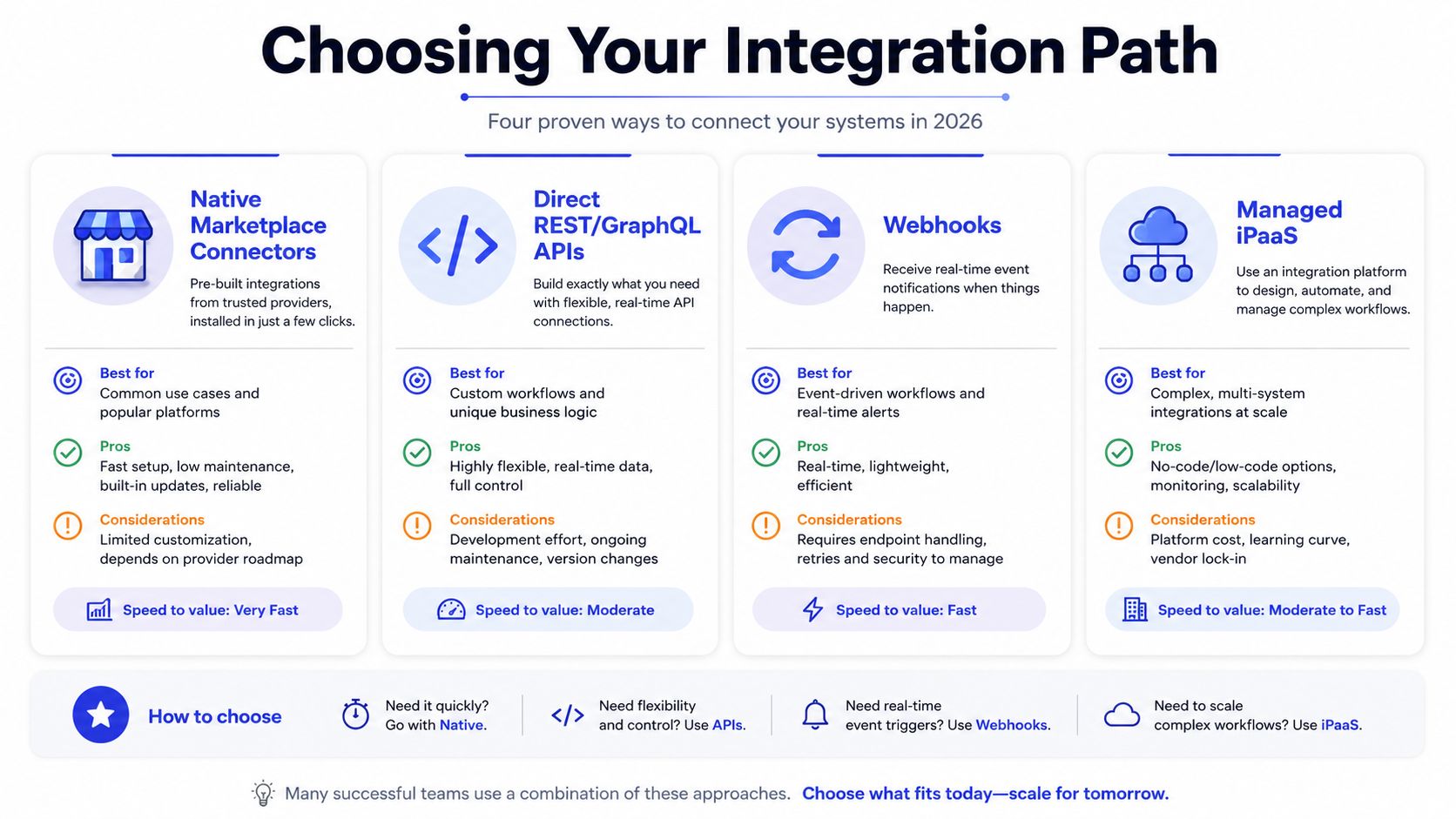
Native marketplace connectors
Native connectors in marketplaces such as HubSpot, Salesforce, and Zoho usually offer the quickest route to a first sync. They're a strong fit for an SMB with standard objects, conventional lead capture, and limited engineering capacity.
The trade-off is control. You may be able to create contacts and log conversations, but not handle a custom object, apply nuanced deduplication, or update a complex opportunity workflow. Maintenance is often lighter at first, although a vendor change can alter the connector's behavior without matching your internal process.
Direct REST or GraphQL APIs
A direct API integration gives an engineering team precise control over authentication, retries, matching logic, field transformations, and error handling. It fits companies with custom CRM schemas, multiple business systems, or workflows where a chatbot event must trigger several coordinated actions.
The cost is ownership. Your team must maintain credentials, monitor API changes, handle rate limits, preserve idempotency, and document the integration for whoever inherits it. Teams comparing platform capabilities can use this guide to evaluating API integration platforms before committing to a build.
Webhooks
Webhooks work well when the chatbot needs to notify another system as events happen. A completed conversation, escalation, qualification event, or case update can send a structured payload to an endpoint that processes it.
They're fast and flexible, but they aren't a complete data model by themselves. You'll need signing or authentication, replay handling, duplicate protection, and a plan for missed events. Webhooks are best when your team understands event-driven workflows and can operate the receiving service.
Managed iPaaS platforms
Zapier, Make, and n8n reduce the engineering burden by providing visual workflows, field transformations, and prebuilt actions. They suit teams that need useful automation quickly and can accept some limits around complex branching, high-volume reliability, or custom observability.
They can also create fragile chains if nobody owns them. A renamed CRM property, expired credential, or changed chatbot payload can stop the workflow while the front-end experience continues working.
Approach | Time to first sync | Best for |
|---|---|---|
Native connector | Fastest | Standard SMB workflows with limited custom logic |
Direct API | Slower | Custom objects, complex routing, and engineering-owned systems |
Webhooks | Fast for event flows | Teams comfortable operating event-driven integrations |
Managed iPaaS | Fast to moderate | Marketing and operations teams without dedicated integration engineers |
A simple decision rubric works well:
Choose native when standard contact, lead, case, and activity records are enough.
Choose an API when your CRM schema or downstream actions are central to the business process.
Choose webhooks when events must move in real time and your team can operate the receiving layer.
Choose iPaaS when speed and accessibility matter more than deep customization.
The best path is rarely the most technical one. It's the path your team will still maintain when the initial excitement has passed.
Mapping Chatbot Data to CRM Fields
Field mapping isn't a checkbox. It's the point where conversational language becomes structured business data, and small mistakes at that boundary can make a clean-looking integration operationally useless.
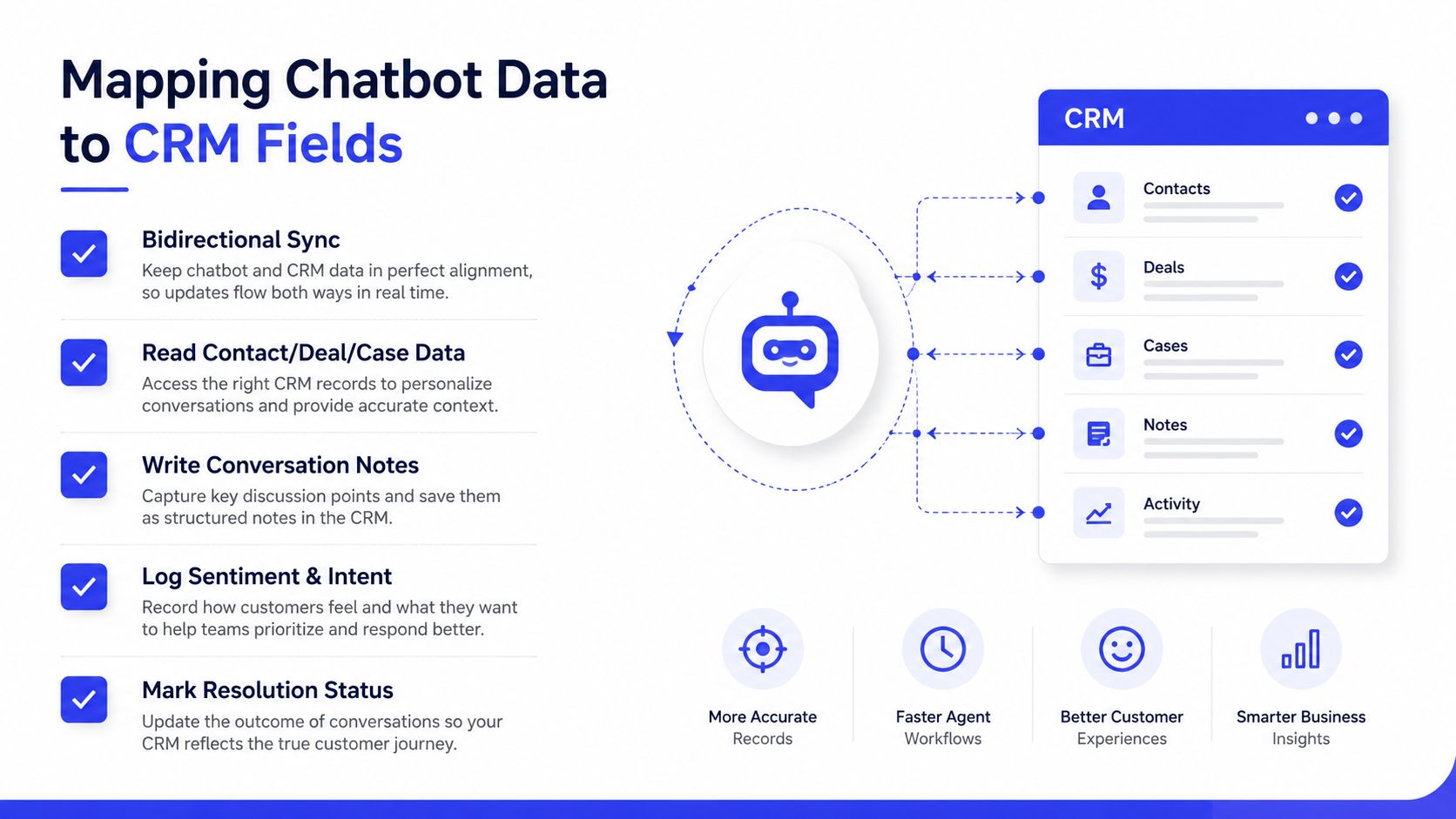
Start by defining the direction of every field. The chatbot should be able to read contact, account, case, opportunity, and custom-object data when that context improves the reply. It should also write back conversation notes, sentiment, intent labels, resolution status, and workflow triggers. This bidirectional model is recommended in practical CRM integration guidance, along with mapping chatbot variables to CRM properties and validating a full conversation in a sandbox before production. (Customer-support chatbot CRM integration guidance)
Start with the record that owns the conversation
Don't begin with the transcript. Begin with identity and ownership.
For a HubSpot workflow, map the bot-captured email to the Contact record, then store the conversation's origin in a property such as bot_source. If the email already exists, update the existing contact instead of creating another record. Intent can sit in a dedicated property, while the transcript belongs in an activity or note that sales can find without opening a separate chatbot dashboard.
In Salesforce, the equivalent may involve matching the Contact, creating a Task, and associating that Task with the correct Campaign or opportunity context. The association matters. A task attached to the wrong contact is worse than a missing task because it creates false confidence.
For Zoho, push the transcript as a Note against the Lead record and preserve the intent and escalation reason as structured fields. A note is useful for context, but it shouldn't be the only place where routing data lives. Automations need predictable properties, not text they must interpret again.
Validate the boundaries in a sandbox
Run one complete conversation from first message to CRM write-back before allowing production traffic. Include a known contact, a new contact, an escalation, a refusal to provide information, and an interruption or timeout.
Check that the integration handles empty values, unusual capitalization, duplicate emails, long messages, and fields with incompatible formats. A sandbox conversation catches errors such as a bot variable being sent to a CRM property that expects a different data type, or a transcript being written without the record association needed by the service team.
Teams connecting customer-support systems should apply the same discipline when joining related workflows, such as a Zendesk and Jira integration. The record relationship and ownership rules matter as much as the transport mechanism.
Six fields are frequently forgotten:
UTM data: Preserve campaign attribution instead of losing the acquisition context.
Referring page: Record the page that shaped the visitor's intent.
Consent timestamp: Store when the person agreed to the relevant communication or data use.
Language: Give the receiving team enough context to continue appropriately.
Escalation reason: Explain why the bot handed the conversation over.
Chat duration: Add operational context without treating duration as a success metric by itself.
Designing Lead Qualification Rules and Handoff
A chatbot shouldn't escalate every conversation to sales. It should identify the conversations where a human can create value, then transfer enough context to make that intervention useful.
Qualification inputs can include the visitor's page intent, UTM source, answer patterns, company size, product interest, and stated timeline. These signals should produce a clear outcome, such as nurture, support routing, sales review, or immediate booking. Avoid opaque scoring that nobody can explain when a lead is misrouted. A lead-scoring workflow guide can help teams turn these signals into explicit rules.
The handoff payload should travel as a compact operating brief:
Identity: Name, email, company, and existing CRM record ID when available.
Intent: The product, plan, service, or problem the visitor discussed.
Evidence: The relevant transcript excerpt, not an undifferentiated message dump.
Context: Last URL, UTM source, and timestamp.
Action: The recommended next step, such as call, ticket review, or booking.
A Slack notification can create awareness, but it doesn't establish ownership. A CRM Task creates accountability. An automatic round-robin assignment can work for balanced sales teams, but only when territory, availability, and record ownership rules are already reliable.
Handoff standard: The representative should understand who the person is, what they want, and why the conversation matters before opening the transcript.
Chatgrow is one option for teams that want Smart Intent to flag high-intent conversations and smart escalation to collect required details and write a concise summary into the CRM. The useful test isn't whether the summary sounds polished. It's whether the receiving employee can use it during the first moments of follow-up without asking the customer to start over.
Two qualification examples
An ecommerce store places a bot on a pricing page. A visitor asks about bulk pricing, confirms they're buying for a business, and provides an email address. That combination should create or update the customer record, save the product interest and source, and route the conversation to a sales or wholesale queue. A visitor asking only about shipping should receive support treatment unless another buying signal appears.
A SaaS team uses a bot inside a demo-request funnel. The visitor identifies a company use case, asks about an integration, and indicates that multiple teammates will use the product. The workflow can create a qualified lead, attach the summary to the record, assign a CRM Task, and offer a booking action. If the visitor only wants documentation, the bot can answer and log the intent without interrupting a salesperson.
The rules should be visible to marketing, sales, and support. If only the integration builder understands them, the business can't tell whether a routing decision reflects strategy or a configuration accident.
Authentication, Permissions, and Data Security
Security decisions for an SMB integration should be concrete. Start by identifying which system owns the connection and which actions the chatbot needs to perform.
Use OAuth 2.0 on the CRM side when the platform supports it and when the connection needs delegated, revocable access. OAuth lets the team disconnect or reauthorize the integration without sharing a user's password. A dedicated service account is preferable to an employee's personal login because ownership survives staff changes and permissions can be reviewed separately.
API keys can be appropriate for a tightly controlled internal service or a simple connector, but store them in a secrets manager rather than in source code, spreadsheets, or chatbot configuration visible to broad teams. Signed webhooks are useful when the CRM receives events from the chatbot. The receiver should verify the signature, reject unexpected payloads, and prevent duplicate processing.
Give the bot narrow access
Apply least privilege. If the bot only needs to read contact context, create a task, and write a note, it shouldn't receive broad administrative scopes. Separate read and write permissions where the CRM allows it, and document each permission alongside the workflow that requires it.
Plan key rotation before launch. Keep the replacement credential ready, switch the integration, verify a test conversation, and revoke the old credential. This procedure prevents a routine rotation from becoming an outage.
Decide how transcripts handle personal data
Document where transcripts are stored, who can access them, and how long the business retains them. Decide whether the bot should redact sensitive fields before writing data into the CRM, especially when visitors may paste payment details, account credentials, health information, or other information the sales record doesn't need.
The privacy notice should describe the chatbot's role, the data it collects, and the possibility of human escalation in language customers can understand. A leaked API key remains one of the most avoidable failure modes in chatbot-CRM work. Restrict access, avoid shared credentials, log authentication events, and test revocation before real customer traffic depends on the connection.
Testing, Launching, and Monitoring the Integration
Testing shouldn't end when the first sandbox conversation succeeds. Treat launch as the beginning of an observation cycle, because a workflow that passes a clean test can still fail when customers use unexpected language, omit fields, or arrive through a different campaign.
Before launch, run a conversation that touches every mapped field. Replay a webhook to confirm that duplicate events don't create duplicate records. Simulate an authentication failure and verify that the system raises an actionable alert instead of silently discarding the event. Check behavior under realistic concurrent activity, especially if the CRM or middleware applies limits.

Watch the first live conversations
During the initial live period, monitor the operational chain rather than a single chatbot metric:
Handoff volume: Are escalations reaching the intended queue?
Sync latency: Does the CRM receive updates while the conversation is still useful?
Error rate: Are failed requests grouped by authentication, validation, matching, or rate-limit cause?
Qualification-to-opportunity conversion: Do routed conversations create meaningful pipeline activity?
Resolution rate: Did the customer's issue reach a satisfactory outcome?
Deflection can look healthy while customers abandon unresolved conversations. Resolution is the stronger operating signal because it accounts for whether the problem was handled, not merely whether a human was avoided. The conversational AI CRM integration guidance also warns against relying on deflection metrics when escalation design and downstream activation remain weak.
Set alerts for silent failures. For example, notify the owner when conversations are completing but CRM write-backs stop, when an unusual share of records lacks an owner, or when the webhook receiver returns repeated validation errors. An integration health dashboard should show the event count entering the workflow, the records created or updated, the failures, and the retry outcome.
The Chatgrow reporting view can help teams spot changes in conversation patterns and escalation behavior without leaving the product. Pair that view with CRM reports, because chatbot activity alone can't confirm that a lead was assigned, a ticket was opened, or an opportunity moved.
Troubleshooting and Best Practices for Long-Term Success
Three patterns repeatedly undermine chatbot-CRM projects.
Dead-end flows collect useful information but never create a record, task, case, or follow-up event. The fix is to define a terminal action for every important intent. A conversation can resolve, escalate, create a lead, update an existing case, or enter a nurture path. It shouldn't disappear into a transcript store.
Shallow sync updates a contact while leaving the business process untouched. A new email address may reach the CRM, but the opportunity stage, case status, owner, or campaign association remains unchanged. Fix this by mapping the object that owns the work, then testing the downstream action as part of the same conversation.
Deflection obsession treats fewer human conversations as proof of success. That can hide unresolved requests, repeated contacts, and exhausted agents who inherit poorly documented escalations. Track resolution, recontact behavior, handoff quality, and business actions alongside containment.
A healthy integration changes the CRM, not just the chatbot dashboard.
Keep the system maintainable with a few operating habits:
Review real conversations quarterly: Retrain intent handling from actual customer language and failed handoffs.
Audit mappings after schema changes: Compare chatbot variables with CRM properties whenever fields, objects, or workflows change.
Keep summaries concise: Limit escalation summaries to the information an employee needs to act, rather than copying every message.
Assign an owner: Someone should receive alerts, review failures, and approve changes.
Treat it as a product: Update rules, knowledge, routing, and monitoring as customer needs evolve.
Academic and industry work on CRM AI integration highlights data mapping, synchronization, configuration complexity, and minimal-disruption requirements as persistent constraints, which is why “plug-and-play” promises deserve scrutiny. (Research on CRM AI integration challenges) Implementation guidance also identifies people, technology, and organizational barriers, including data quality, privacy, governance, and employee resistance. (Research on chatbot implementation barriers)
A chatbot-CRM integration earns attention only when it changes something downstream, a lead is routed, a ticket is opened, a task is owned, or a deal is moved. Build the plumbing around those outcomes, then keep watching for them after launch.
Chatgrow helps SMB SaaS and ecommerce teams train AI customer-service agents on their own website, pricing, FAQ, and product content, qualify high-intent conversations, and send concise escalation summaries into the team's workflow. Visit Chatgrow to set up an agent, define your qualification and handoff rules, and turn after-hours chats into organized next actions.
Related Posts
Continue Reading
More articles from the ChatGrow Team.


