
Blog
CRM for Travel Agency: The Complete 2026 Buyer's Guide
By
Nelson Uzenabor

If you're still running travel sales out of a crowded inbox, a spreadsheet, and a memory that's already too full, you know the pattern. A lead comes in on WhatsApp, someone else replies by email, a quote sits unfinished, and by the time the traveler asks about the balance due, the file is buried under three other departures. That's not a sales problem. It's an operations problem.
A CRM for travel agency work fixes that by connecting the whole booking lifecycle, from inquiry to quote, booking, payment, and post-trip follow-up. The agencies that treat CRM as the operational spine of the business stop losing context between handoffs and start managing revenue, service, and repeat business in one place. If you want a simple reminder of why travelers still value human help, this piece on save time with a travel advisor is worth reading.
Table of Contents
Why Travel Agencies Need a Dedicated CRM
A small agency day starts innocently enough. One advisor is answering new inquiries, another is chasing supplier confirmations, and the owner is trying to remember which traveler asked for a late checkout, a dietary note, or a revised quote. By mid-afternoon, the inbox has become the system of record, which means the business is one accidental deletion away from losing track of a booking.
A dedicated travel CRM solves that by turning scattered communication into a structured workflow. It keeps inquiry status, traveler history, booking details, payment stages, and service notes tied to the same file, so no one has to rebuild the story every time a client replies. That matters because travel is a long-cycle business, and every missing detail creates a real risk, from duplicate work to missed payments.
The operational pain is predictable
Travel agencies don't usually fail because they can't sell. They fail because they can't keep operational context intact while the volume of conversations grows. That's why a generic contact list isn't enough. You need a system that knows the difference between a lead, a quote, a confirmed trip, and a post-trip service issue.
Practical rule: if your team still asks, “Who owns this file?” more than once a day, the business needs a CRM that reflects your process, not your inbox.
Travel CRM also matters because the category is no longer fringe software. Independent market studies place the travel-agency CRM market at $4.71 billion in 2025, with a projection to reach $10.0 billion by 2035, implying a 7.8% CAGR over 2026 to 2035, and another report values the broader market at $522 million in 2022 with a projected 14.9% CAGR from 2019 to 2033, with North America as the largest region (WiseGuyReports market view). That growth is what you'd expect when CRM becomes part of how agencies manage revenue, not just leads.
Don't confuse convenience with control
A calendar, shared inbox, or spreadsheet might feel efficient early on. It won't scale with multi-step itineraries, deposits, supplier payments, and follow-up service. If the agency wants fewer mistakes and better follow-through, CRM has to sit between the inquiry and the trip, not beside it.
The strongest agencies use it to make handoffs boring. That's the point.
What a CRM for Travel Agency Does
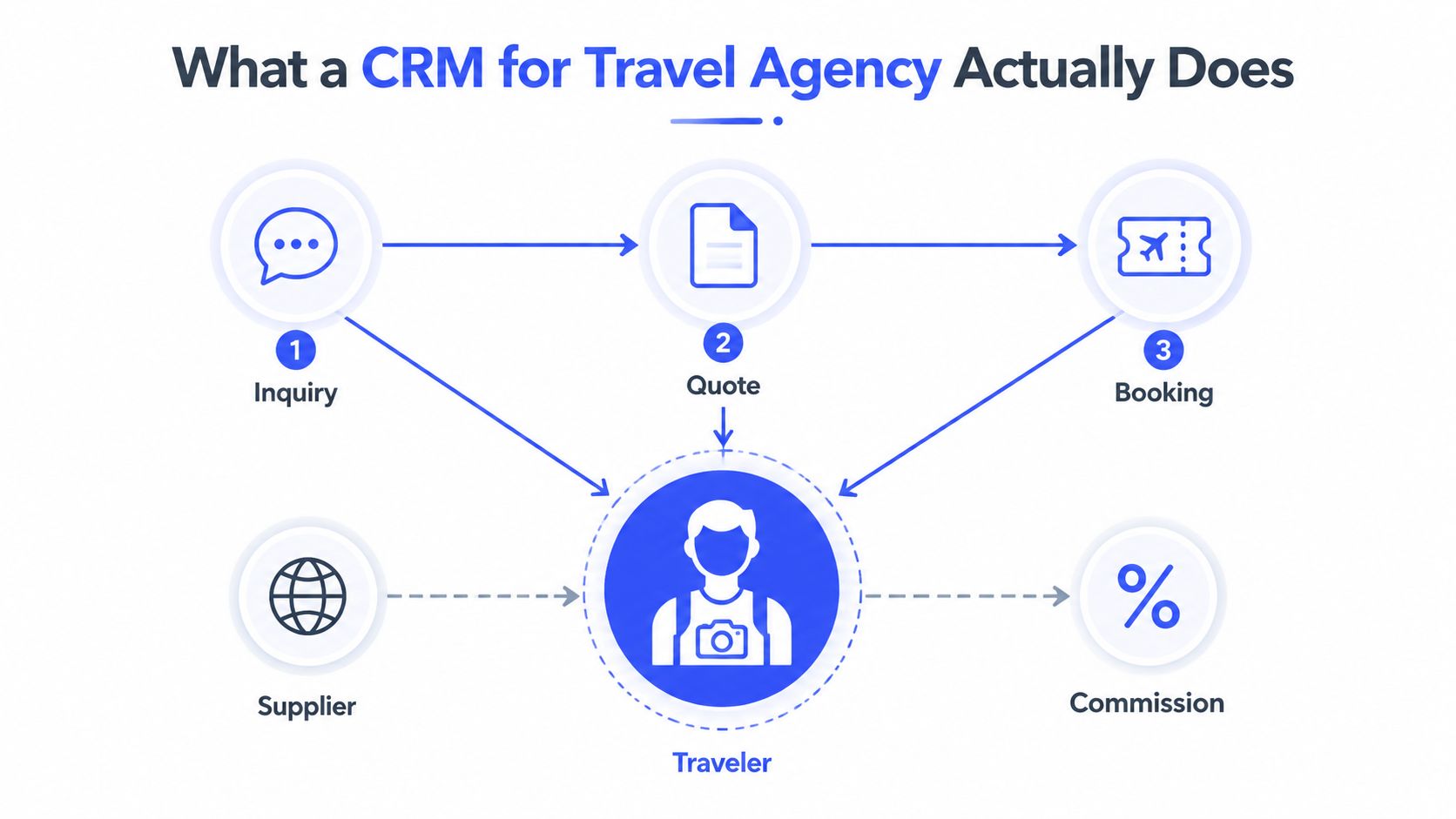
A travel CRM is a control layer, not a contact book with a better interface. It keeps the operational objects of a travel business connected, including Inquiry, Quote, Booking, Traveler, Supplier, and Commission. Each one carries different data, and the core job of the system is to keep those records linked so an advisor can see the full trip without rebuilding it every time the client gets in touch.
The workflow is the product
An inquiry usually arrives through a form, email, or chat. The CRM should attach it to the right traveler record, capture the source, and create the working file the advisor will use from that point on. The quote then becomes a tracked stage, not a PDF lost in a desktop folder, and the booking turns into a live record tied to status, supplier data, and financial fields.
That workflow is where generic CRMs fall short. They can store names, but they do not track how a travel file moves from interest to quote to booking to service. Agencies lose time and margin in those handoffs, especially when a team has to keep asking who owns the file, which version is current, and whether the supplier has responded.
A CRM built for travel also has to fit the inventory side of the business. That is why tools that help streamline travel booking inventory matter alongside lead handling and trip records. If the CRM cannot keep availability, trip details, and commercial status aligned, the team ends up stitching the process together by hand.
The traveler record has to be richer
Travel decisions depend on detail. The CRM needs to store family and group relationships, preferences, supplier notes, booking history, and communication history in one place. That is what lets an advisor give a relevant next recommendation instead of starting from zero on every conversation.
A strong travel CRM also protects the context around repeat business. If a traveler prefers a certain cabin type, avoids specific suppliers, or has past service issues, those details should stay visible where the team works. The record should make it obvious who the traveler is, what they booked last time, and what stage the current trip is in.
A travel CRM works only if it can answer three questions fast, who is this traveler, what did they book last time, and where is the current trip in the pipeline?
That is the operational difference. Generic CRMs manage relationships. Travel CRMs manage relationships inside a booking lifecycle, which is a harder job and the one agencies need to get right.
Must-Have Features for Travel Agency Operations
The feature list for a travel CRM gets bloated fast, so keep it simple. If a system can't manage traveler detail, automate booking stages, surface revenue data, and connect to the systems you already use, it's not built for real agency work. Travel guidance also makes the minimum stack clear, hotel APIs, GDS or flight APIs, tour and activity APIs, and transfer APIs are not luxury extras, they're part of how modern travel systems stay synced (Technoheaven travel software guide).
Rich traveler records and booking lifecycle automation
The first cluster is the record layer. You need fields for family groups, dietary preferences, document storage, deposit tracking, and booking history because those details drive follow-up and reduce avoidable mistakes. Travel CRM guidance specifically calls out richer data such as arrival and departure variations, supplier payments, balances, and document uploads, because travel files don't behave like ordinary sales leads (InsideA travel CRM features).
The second cluster is automation. A useful CRM sends reminders for document requests, payment milestones, and pre-departure tasks without waiting for someone to remember them. It should also support itinerary edits without forcing the team to rebuild documents each time the traveler changes a flight or room type.
Reporting and integrations decide whether the system pays for itself
Travel and hospitality retention has been cited at 55%, described as the lowest among major industries, while operators tracking CRM metrics see an average 29% increase in sales revenue (AtlasPerk reporting guidance). That's why reporting can't be decorative. You need inquiry-to-booking conversion, repeat-client rate, revenue per advisor, response time, and source tracking.
The same guidance also points to inquiry-to-booking conversion benchmarks of 25%–40% and travel email click-to-open performance benchmarked at 6.34%, which are useful only if the CRM logs the funnel cleanly (AtlasPerk reporting guidance). If the reporting layer can't break those numbers out by source or advisor, it's too weak for an agency that wants to improve.
For a practical inventory lens on the booking side, the breakdown in streamline travel booking inventory is a solid reference point. It reinforces the same point, inventory, availability, and workflow need to live in the same operating view.
CRM Deployment Options Compared
There are four realistic ways to run this stack. Most agencies should choose based on process complexity, not brand recognition. The wrong decision is buying the biggest platform first and hoping it behaves like a travel system.
Option | Best For | Pros | Cons |
|---|---|---|---|
Generic CRM customized for travel | Agencies with an internal ops lead and fairly disciplined processes | Broad ecosystem, flexible objects, strong general reporting | Heavy setup, travel workflows need custom fields and redesign, easy to misconfigure |
Travel-vertical CRM | Boutiques and tour operators that want travel-specific workflows out of the box | Booking-aware data model, supplier and commission logic, faster adoption | Less flexible than a broad CRM, may feel opinionated |
All-in-one booking and CRM suite | Agencies that want one vendor across sales, trip management, and service | Fewer handoffs, tighter integration between booking and CRM records | Harder to swap modules, can be expensive to customize later |
CRM plus AI overlay | Agencies with an existing system that mainly need faster lead response and FAQ handling | Low disruption, quick value on after-hours inquiries, keeps CRM intact | Doesn't replace poor process, still depends on a good base CRM |
Pick the model that matches your process maturity
A generic CRM only works if someone on your team is willing to do real configuration and ongoing cleanup. That's fine for a small agency with a strong operations owner, but it's a poor choice if nobody has time to maintain fields, automations, and reporting rules.
A travel-vertical CRM is the cleaner choice when your files already follow travel logic. You won't need to force the team to think like a SaaS sales department, which is exactly where generic systems become clumsy.
An all-in-one suite makes sense when the business wants fewer vendors and can accept the platform's opinions. It's especially useful when quotes, booking components, supplier records, and service follow-up need to stay in one environment.
The CRM plus AI overlay approach fits agencies that already have a core system and just need better front-end response speed. That model preserves the investment already made in records and workflows while improving how fast leads get answered.
Using AI Chat Agents for 24-7 Support and Lead Qualification
An AI chat agent should sit in front of your CRM, not replace it. Its job is to answer common questions, qualify intent, and hand off a usable summary so a human can move quickly. That matters most after hours, when travelers often browse, compare, and ask simple questions before they're ready to speak with someone.
The setup should be boringly disciplined. Train the agent on your website, pricing, FAQs, and product pages. Then define the questions it can answer, the lead fields it must capture, and the triggers that send a conversation to a human. If you want a working model for this kind of front-end qualification, the workflow in chatbot for lead generation is the right kind of pattern to borrow.
Build the handoff before you deploy the bot
The biggest mistake is deploying an AI chat window with no escalation logic. You don't want a bot to improvise on trip policy, room categories, or refund terms. You want it to recognize intent, ask a few clean qualifying questions, and then route the lead with context.
That context should include the traveler's need, destination interest, timing, and any obvious budget or group details the bot can extract. If the traveler asks something the bot can't answer safely, the handoff should be concise and readable, not a transcript dump.
Keep the bot on high-intent pages
The best placements are the pages where travelers already show intent, such as itinerary pages, destination pages, pricing pages, and contact pages. That's where 24/7 coverage protects revenue without forcing your team to monitor every conversation manually.
Operational rule: if the bot can't capture a lead in a format your sales team can actually use, it's just adding noise.
Smart Intent recognition and brand-voice responses matter because bad tone kills trust fast in travel. The bot should sound like your agency, not like a generic help desk. It should also be retrained when offers, FAQs, or supplier details change, or it will start giving stale answers.
The Travel Agency CRM Buyer's Checklist
A buyer's checklist should be strict. If the CRM misses the basics, polished demos will not save the rollout. Travel teams need a system that handles the actual file, not just a demo record.
Score vendors against travel-specific reality
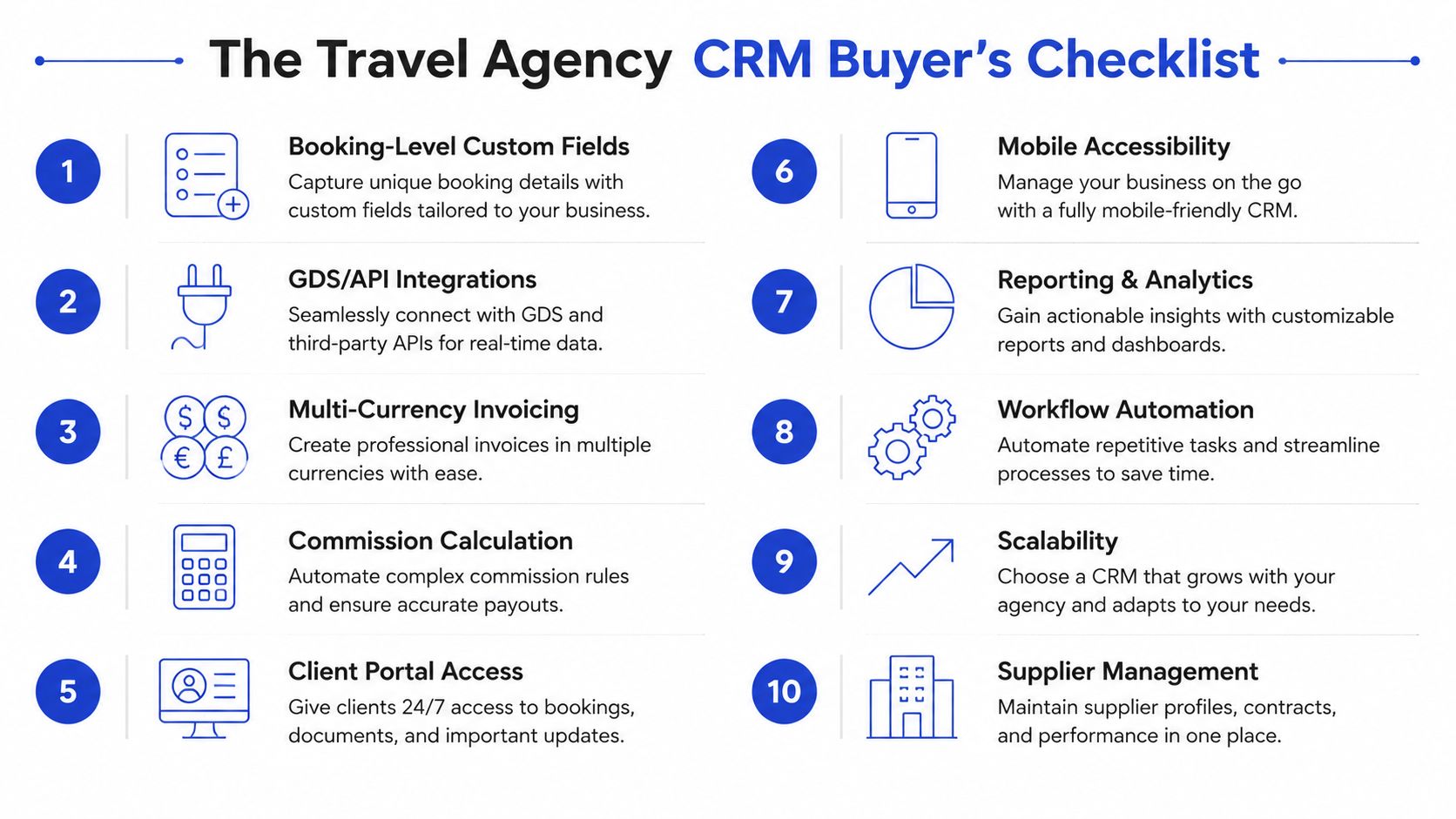
Use these ten criteria and score each one from weak to strong before you buy:
Booking-Level Custom Fields. Can it track the actual trip details your advisors need?
GDS/API Integrations. Does it connect cleanly to the booking stack you already use?
Multi-Currency Invoicing. Can it support cross-border trips without manual workarounds?
Commission Calculation. Does it track supplier payments and agency commissions clearly?
Client Portal Access. Can travelers review key trip information without email chains?
Mobile Accessibility. Can advisors update records while on the road or at trade events?
Reporting and Analytics. Can it show source, advisor, and repeat-client performance?
Workflow Automation. Can it trigger reminders, tasks, and payment nudges?
Scalability. Will it still work when your file volume and team size grow?
Supplier Management. Can it keep supplier details and booking components organized?
Treat this as an operational filter, not a feature wish list. Travel CRMs need richer objects than standard sales software, and the wrong platform pushes your team back into spreadsheets. Industry guidance points to the gaps generic tools leave behind, including multi-currency invoicing, payment schedules tied to booking stages, and itinerary editing without rebuilding documents. That is the baseline for a serious crm for travel agency workflow, and it is where travel-specific platforms usually beat generic ones (InsideA travel CRM features).
For small businesses that need a cleaner service workflow, customer service software for small business is a useful reference point for how process discipline matters more than flashy interfaces.
Ask one hard question before signing
If the vendor says the system is “customizable,” ask who will do the customizing and how long it will take. That answer tells you whether you are buying software or a project.
Pricing Models and How to Model ROI
CRM pricing in travel looks straightforward until you put it into an operating budget. Per-user pricing, per-booking or transaction pricing, and flat enterprise pricing all sound tidy on a sales page. The actual cost shows up in setup, training, migration, and integrations, and those line items decide whether the system gets used or ignored.
A useful ROI model starts with the revenue levers you can measure, conversion rate by source, revenue per advisor, repeat-client rate, and recovered leads from faster response. Those are the numbers that show whether the CRM is helping the business close better work and keep more of it.
Model the total cost, not just the license cost
The license fee is often the smallest line item. If a generic CRM needs custom objects, booking fields, travel-specific automations, and commission logic, implementation costs rise fast because you are rebuilding the process while you configure the software.
For a realistic three-year view, include software subscription, setup, migration, training, integrations, and ongoing admin time. That gives you a clearer picture of what the system costs to run and who will need to keep it maintained.
A travel agency that also needs cleaner service workflows should apply the same discipline used in customer service software for small business. Workflow fit matters more than a long feature list, and generic tools often look cheaper only before the implementation work starts.
Use one simple question to test the business case
If the CRM helps your team respond faster, quote more cleanly, and stop losing booking context, it earns its keep. If it does not make those three jobs easier, it is too expensive no matter how polished the dashboard looks.
Migration Tips and a 90-Day Implementation Plan
A migration fails fast when an agency tries to move everything at once. Start with the traveler records that drive bookings and service, clean those first, decide what deserves to move, and leave dead data behind. If you bring duplicates, stale booking notes, and half-finished files into the new system, you recreate the same mess in a different interface.
The data work should start with a full audit of contact quality, booking history, and supplier records. Then separate records that need active migration from records that can be archived safely. If you want a practical framework for tying customer records together across systems, this piece on customer data integration covers the main patterns. Travel CRM guidance also points to phased migration and reporting on source conversion, advisor revenue, and repeat-client rate, which is why the baseline has to be set before go-live (DMCQuote small-agency CRM guidance).
The 90-day rollout should stay disciplined
Days 1 to 30 are for cleanup and design. Remove duplicates, standardize traveler names, define the booking fields your team uses, and map the stages from inquiry to post-trip service. At the end of this phase, the new CRM should reflect your real workflow, not a vendor template.
Days 31 to 60 are for parallel run and training. Run the old process and the new CRM side by side so advisors can compare outputs without losing live business. Build a short playbook during this phase, one page for lead intake, one for bookings, one for payment reminders, and one for escalation rules.
Days 61 to 90 are for go-live and optimization. Shut down the legacy path for new work, watch closely for duplicates and missing supplier details, and check whether follow-ups are firing on time. Then fix what is broken instead of pretending the first setup will be perfect.
The most common failure modes are predictable, duplicate traveler records, lost booking history, and missed supplier commissions. You avoid them by assigning one owner for data quality and one owner for process adoption. That split keeps the migration from becoming everybody's job and nobody's responsibility.
Match the stack to the agency shape
A solo advisor should keep the stack lean, one CRM, simple automations, and no heavy customization. A small agency with two to ten advisors should prioritize booking-level fields, shared reporting, and clear ownership of leads and payments. A mid-size tour operator needs stronger workflow design, supplier logic, and more serious reporting, because the volume of moving parts is higher.
If you want a light front-end layer on top of an existing CRM, an AI chat agent is the cleanest addition. It can qualify inquiries, answer after-hours FAQs, and hand off structured leads without forcing a wholesale replacement of your core system. For agencies ready to do that, Chatgrow is built for custom support agents that handle common questions, qualify leads, and escalate cleanly, which makes it a practical overlay for travel teams that want faster response without rebuilding their whole stack.
Start with your data audit, pick the booking fields that matter, and decide how leads should move before you demo another platform. If your current process cannot survive a week without heroics, put CRM at the center of operations and fix the workflow at the source.
Related Posts
Continue Reading
More articles from the ChatGrow Team.