Blog
Customer Service Personalization That Converts in 2026
By
Nelson Uzenabor
A shopper lands on your pricing page, clicks into a plan comparison, and opens chat with one specific question. The bot replies with a cheerful greeting, asks for a name, and drops a canned FAQ that ignores the page, the plan, and the buying intent sitting right in front of it. That's the moment trust is often lost, and sometimes the lead, because the interaction feels generic when it should feel useful.
Customer service personalization only works when support systems respond to what the customer has done, not what a script expects them to say. That's the difference between a polite bot and a support experience that helps a visitor choose, upgrade, renew, or solve a problem without friction. It also explains why brands keep investing in personalization even as customers keep judging it more harshly than internal dashboards suggest, a gap that Deloitte's 2024 research makes hard to ignore.
Table of Contents
A Pricing Page Question That Changes Everything
A trial user lands on a SaaS pricing page, opens the enterprise FAQ, checks a few feature pages, then asks the widget whether the higher tier includes onboarding support. A generic reply like “Thanks for reaching out, how can I help?” misses the point. It ignores the page, the browsing trail, and the obvious next step, which is usually a qualified answer or a smooth handoff.
That kind of miss happens in e-commerce too. A shopper reviews shipping details, compares bundles, and asks whether a product can arrive before the weekend, then gets a response that treats them like a first-time anonymous visitor. The gap is not just annoying, it breaks momentum, and in high-intent moments momentum is the whole game.
Deloitte's 2024 personalization research shows why the gap matters. Brands said they personalize 61% of customer experiences on average, while consumers recognized only 43% as personalized, which means companies are overestimating how visible their efforts really are. Deloitte also found that brands planned to increase personalization spending by an average of 29% in 2024, a clear signal that this is now an operating priority, not a side experiment. Deloitte's 2024 personalization research
Practical rule: If the customer is already on a pricing, renewal, or troubleshooting page, the first response should reflect that context before it asks for anything else.
For support teams at SMBs, e-commerce stores, SaaS companies, and agencies, that's the bar. A chat thread should feel like it belongs to the page the customer is on, not like it was copied from a help desk macro. The strongest live chat flows do this well, which is one reason many teams pair support workflows with live chat advantages rather than treating chat as a separate channel.
The rest of this guide stays close to that moment. It defines what personalization is, shows where the revenue connection comes from, and then gets into the plumbing, the trade-offs, and the trust boundaries that keep personalization helpful instead of creepy.
What Customer Service Personalization Actually Means
Customer service personalization is the practice of shaping support around the customer's context, not just their identity. A first name in a greeting is a detail, but it's not personalization on its own. Real personalization changes routing, tone, timing, and content based on what the customer is trying to do right now.
Think of a barista who remembers your order versus one who reads from a script. The first one doesn't just know your name, they know the pattern, the preference, and the small details that make the exchange faster and easier. Support should work the same way, except the “order” might be a billing issue, a product comparison, or a renewal question.
Three layers that teams confuse
Rule-based personalization is the simplest layer. It uses if-then logic, like showing a different answer to a logged-in customer than to a visitor, or changing the greeting when the customer is already in a support thread.
Segmentation-based personalization goes a step further. It groups people by shared traits or behaviors, then serves a response that fits the segment rather than the individual. That can work for common use cases, but it still risks being too broad if the customer's live intent has changed.
Hyper-personalization is the most dynamic layer. IBM describes it as using AI and machine learning with real-time data analytics, omnichannel integration, and behavioral triggers to tailor experiences at the individual level. In practice, that means the system notices current intent and adapts the next best action, whether that's surfacing a relevant article, changing the reply tone, or escalating with a concise summary. IBM's hyper-personalization overview
If you want a practical resource that maps this idea to e-commerce execution, a practical AI ecommerce plan can help teams think about where personalization belongs in the buying journey, especially when support and conversion overlap.

The distinction matters because service personalization isn't a veneer. It's a design principle. When it's done well, the system responds to the current situation, not just the customer record, and that's what makes the interaction feel earned instead of automated.
Why Personalized Support Is a Revenue Engine, Not Just Hygiene
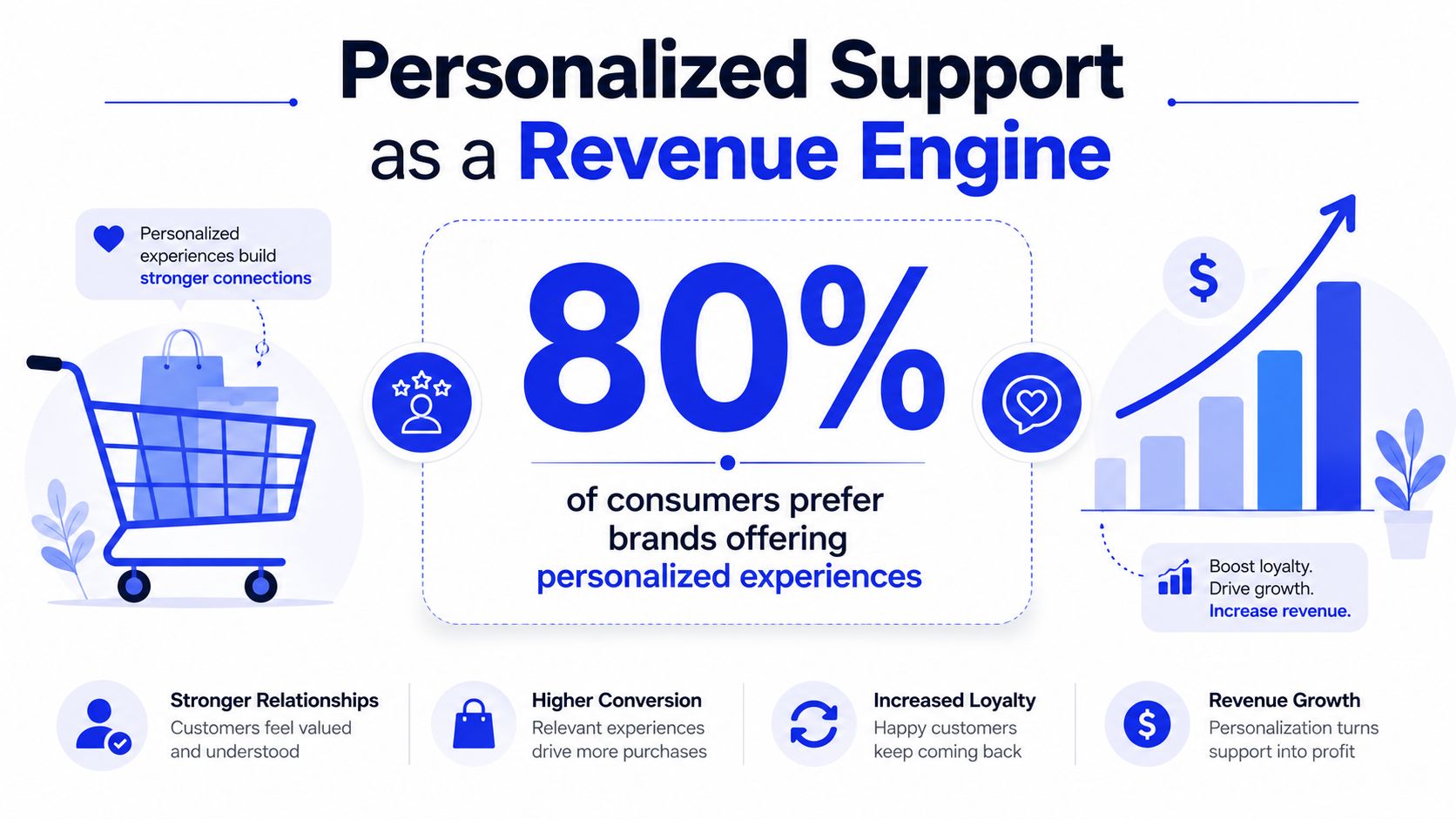
Personalized support pays when it reduces friction at decision points. Deloitte reports that 80% of consumers prefer brands offering personalized experiences and spend 50% more with those brands, which is a strong sign that personalization isn't just about delight, it changes buying behavior. Deloitte also says brands planned to increase personalization spending by 29% in 2024, which tells you where budget owners believe the advantage lies. Deloitte's personalization strategy overview
That's the part many support teams miss. They think of personalization as a satisfaction layer sitting on top of service. In reality, support is often the last meaningful step before a customer buys, renews, upgrades, or walks away.
The revenue connection shows up in service moments
When a visitor asks about pricing, plan limits, shipping windows, or product fit, the response is already part of the sales motion. A generic answer forces the person to keep digging. A contextual answer can move them forward, answer the objection, or route them to a human who can close the loop.
Related industry statistics show that personalization can lift sales by 10% to 15% in many cases, according to McKinsey as cited by ServiceNow, while businesses that excel at personalization are 71% more likely to report improved customer loyalty. Those figures matter in support because loyalty and revenue usually live in the same workflow. ServiceNow's personalization discussion citing McKinsey
Customers rarely separate “service” from “decision help” when they're near a purchase.
In SaaS, that shows up during trial-to-paid conversion and renewal conversations. In e-commerce, it shows up in order issues, delivery questions, and post-purchase flows that either keep the buyer engaged or send them looking elsewhere. In both cases, the support team can either protect momentum or break it.
The practical takeaway is simple. If your personalized replies don't help a customer decide, resolve, or continue, they're just decorative. The right goal is a support flow that makes the next step obvious, useful, and easy to take.
Unifying Data Into a Single Customer Profile
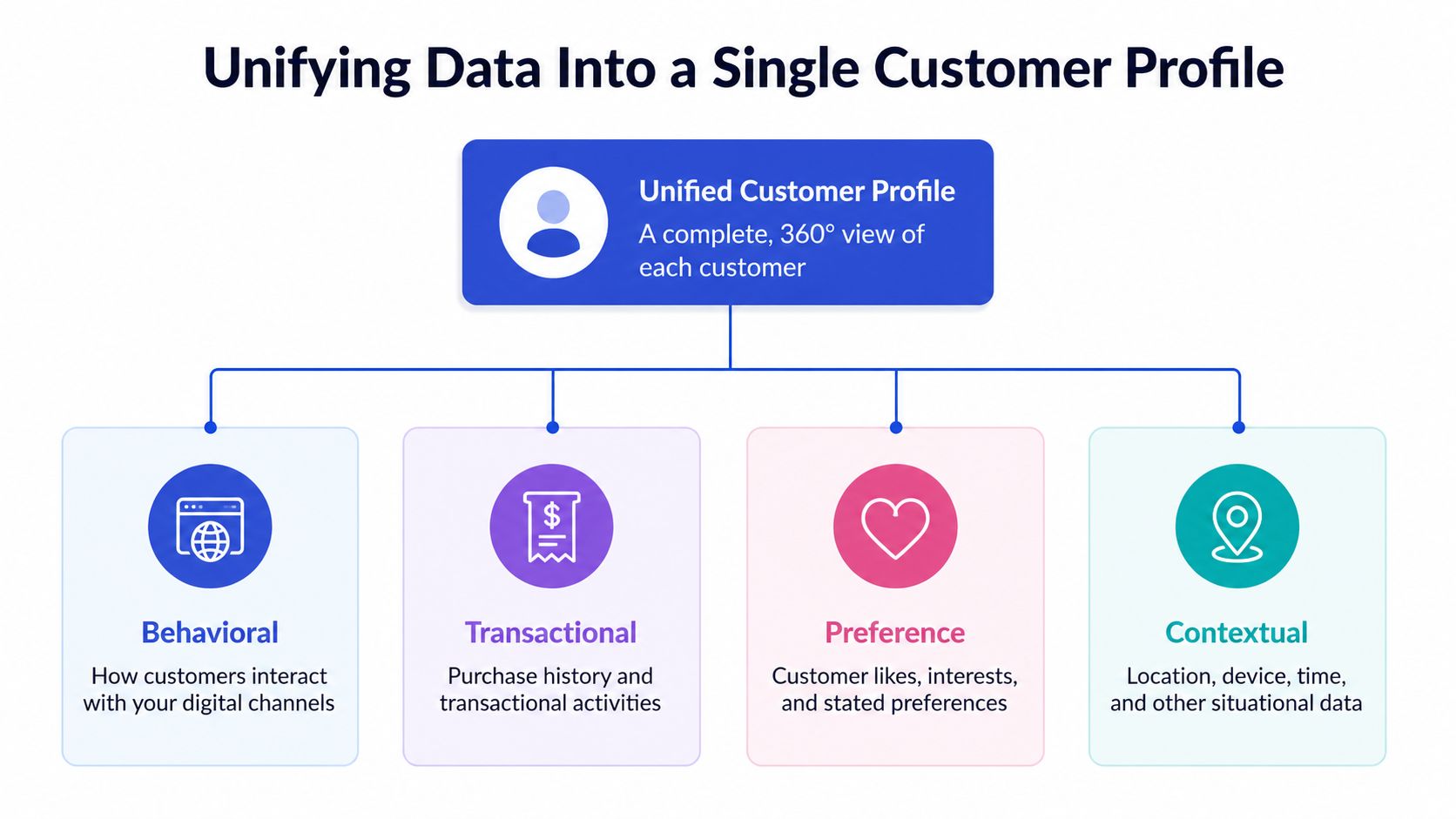
Personalization falls apart when the customer data is scattered across systems. A support agent shouldn't have to guess whether the visitor has already read the pricing page, opened a ticket, bought once before, or abandoned checkout. Customer service personalization works best when behavioral, transactional, preference, and contextual signals are pulled into a single profile, so the reply reflects the customer's actual path.
That means collecting data from the web, app, CRM, help center, and service channels, then unifying it into a view that the automation layer and the human team can use. BlueConic's framing is useful here because it centers on unifying what the customer has done, not just who they are. BlueConic on customer personalization
What the profile needs to answer
The profile should tell you what page the person is on, what they've clicked, what they've bought, what they prefer, and what context is shaping the conversation. That's enough to make the first response relevant without overreaching into unnecessary data collection.
A SaaS trial user is a good example. They read three feature pages, open two pricing documents, and then ask the support widget whether enterprise plans include onboarding. A generic reply gives them a link. A unified profile lets the system answer the question directly, surface the right plan comparison, and hand off to sales with the browsing history already attached.
Operational rule: map each journey stage to one data source and one KPI, then test whether the personalized path beats a generic baseline.
Where the build usually breaks
The failure point is often not collection, it's fragmentation. Web analytics knows the behavior, CRM knows the account, the help desk knows the history, and none of them are talking to each other in real time. The customer ends up repeating themselves, and the agent still lacks context.
A smarter build connects those systems around a current signal. If the customer is on a pricing page, that page view should matter more than an old demographic tag. If the visitor mentions renewal, that intent should override a broad segment label. For a deeper implementation view, the data-integration piece becomes much easier once teams standardize the handoff between systems, which is why many operators start with customer data integration before layering in more aggressive automation.
A unified profile doesn't need to be perfect. It needs to be current, accessible, and good enough to change the next response. That's what turns support data into a live service advantage.
Personalization Strategies by Business Type
Different businesses need different personalization rules because the customer journey is different. A local SMB often needs fast, lightweight answers on site. An e-commerce brand needs browsing-aware help tied to orders and post-purchase flows. SaaS teams need plan-aware support that knows the difference between trial, renewal, and expansion. Agencies need to isolate each client's content, voice, and data so one account doesn't bleed into another.
That's why the question is not “Should we personalize?” Instead, the question is “Which signals matter most for our business model?” If you want a quick way to pressure-test the interaction layer, try for form building can be useful when teams are designing intake flows that capture the right context without making the customer repeat everything later.
Personalization Priorities by Business Type
Business Type | Primary Signals | Key Channel | Top Priority |
|---|---|---|---|
SMB | Site pages, FAQ paths, pricing page visits | Website chat | Fast answers that feel specific without heavy setup |
E-commerce | Browsing behavior, order history, shipping context | Chat and post-purchase flows | Reduce friction and keep purchase momentum intact |
SaaS | Trial activity, plan views, renewal timing, product usage | In-app support and pricing pages | Qualify intent and route high-value questions correctly |
Agencies | Client-specific knowledge, tenant boundaries, branded content | White-labeled support agents | Keep knowledge isolated and responses on-brand |
What each team should optimize for
SMBs usually win with simpler scope. Their biggest gains come from training an AI agent on their own site, their FAQ, and their pricing pages, then letting it handle common questions without bouncing people around. The temptation is to add more data than the team can maintain, but small teams usually need clarity more than complexity.
E-commerce teams should pay close attention to browsing and order context. If someone asks about returns, delivery, or availability, the answer should reflect the product they're looking at and the order they already placed. SaaS teams need a stronger escalation path, because plan comparison and renewal questions often need a clean handoff to sales or customer success.
Agencies have a different challenge. They're often managing multiple client properties, so the personalization system has to respect per-tenant boundaries. That means one client's knowledge base, tone, and escalation rules can't leak into another's support experience.
The right strategy is the one that matches the moment. Personalization that fits the journey will usually outperform a fancier setup that ignores how the buyer moves.
Building the Personalization Stack From Data to Escalation
The cleanest way to build a personalized support flow is to move in layers. Start with the data sources, then add intent recognition, then train the agent on your content, then automate the common questions, and finally define what gets escalated to a human. Chatgrow is one example of this kind of stack, since it's built to train on website, pricing, FAQ, and product content, classify intent, and forward concise summaries when a human needs to step in.
Step one starts with the content the system can trust
Train on the pages that already shape buying decisions. Pricing, product pages, help docs, and policy pages usually matter more than generic brand copy because they answer the actual questions customers ask. If the content is thin or outdated, the agent will confidently repeat the wrong thing.
Step two is intent recognition
The system has to understand whether the customer wants to compare plans, fix a bug, check shipping, or request a human. Smart intent handling turns a vague message into a usable route, which is what lets the reply change instead of defaulting to a catch-all answer. That's where current context beats static tags.
Step three is the response logic
Once intent is clear, the agent can answer directly, ask one useful follow-up, or pass the thread along. A pricing-page question should not trigger a long brand intro. A renewal question should not get buried under a generic FAQ tree. The response should be short, relevant, and tuned to the stage.
Best practice: automate the high-frequency questions first, then measure whether the escalations that remain are actually better qualified.
Step four is escalation with context
When the question is high intent or the issue crosses a policy boundary, the human handoff needs a summary. That summary should include the page context, the customer's stated goal, and any qualification details already captured. A support rep shouldn't have to reconstruct the conversation from scratch.
The practical payoff is easy to see. A trial user asks about enterprise plans. The agent confirms the need, surfaces the relevant plan comparison, and passes the lead with a note that includes the pages viewed and the question asked. That saves time for support, shortens the path for sales, and keeps the customer from repeating themselves.
The build order matters because each layer depends on the one before it. If the content is weak, the intent won't matter. If the escalation is sloppy, the personalization won't survive the handoff.
Personalization Without the Surveillance Feeling
Most personalization guides stop at relevance and never ask whether the experience feels watched. That's a mistake. If the customer gets the sense that the system knows too much, the interaction can feel invasive even when the answer is accurate. The trust cost is real, especially in regulated or privacy-sensitive markets.
The safer design is to use data minimization first. Personalize from the context the customer already gave you in the session, like the current page, the product mentioned, the stated intent, and the path they've chosen. Only reach into longer-term history when it adds clear value to the response.
Use the least amount of context that still helps
If someone is on the billing page and asks about renewal, the system already has enough to be useful. It doesn't need to reveal that it knows every prior visit if that history doesn't change the answer. That restraint makes the exchange feel more like informed service and less like tracking.
Consent prompts and retention rules matter too. If your organization stores chat data, customer history, or behavioral traces, the policy should be visible enough that people understand what's being collected and why. Regional privacy rules vary, so the operational standard has to be stricter than “we can probably use this.”
Make the trade-off legible in the chat
Customers should be able to see when the experience is being personalized and what that means. A short, plain explanation inside the flow does more to build trust than a long privacy page nobody reads. Keep the wording simple, and don't ask for more than you need.
Practical rule: if a reply would feel creepy when read back later, it's using too much context.
The support leader's job is to protect relevance without drifting into surveillance. That usually means using current-session signals first, storing only what's useful, and being explicit about how the data helps the customer. The result is a personalization model people are more likely to accept because it feels proportional.
Measuring What Personalized Support Is Actually Worth
Personalization only earns its keep when the metrics line up with the experience. Support teams should measure whether the system recognized intent correctly, resolved common questions automatically, escalated the right cases, and helped convert or retain the customer when the moment mattered. The measurement model needs to be tied to the workflow, not just to satisfaction surveys.
A useful KPI framework is to track intent recognition accuracy, automated resolution rate, average response time, escalation quality, conversion rate on high-intent pages, and retention or repeat-purchase lift. The escalation quality piece is easy to overlook, but it matters because a handoff is only good if the summary is complete enough for a human to continue without starting over. For a broader KPI structure, customer service KPIs can help teams map service outcomes to business outcomes.
Start with a baseline before rollout
The fastest mistake is to launch personalization and assume any change is an improvement. Baselines tell you whether the new path is better than the generic one. Run a small pilot, compare against the old flow, and only scale once the numbers and the conversation quality both improve.
Use a short operational checklist
Map the top intents: Start with the questions that show up most on pricing, product, shipping, or renewal pages.
Tag the key signals: Capture the page, the plan, the product, or the account state the customer already revealed.
Train the agent narrowly: Use your own help center, pricing pages, and product docs before expanding the knowledge base.
Define escalation triggers: Decide what should go to a human, and require a summary with context attached.
Review one week of transcripts: Look for generic replies, repeated follow-ups, and missed intent signals.
That checklist is enough to get moving without a platform migration. Once the flow works on the highest-intent pages, the next step is usually better content, cleaner escalation, and tighter routing, not more complexity.
If you want to put customer service personalization into a workflow that answers faster, qualifies better, and escalates cleanly, Chatgrow is built for that. It trains on your website, pricing, FAQs, and product pages, then uses Smart Intent and smart escalation to keep the conversation relevant. Visit Chatgrow to see how it fits into your support and conversion stack.
Related Posts
Continue Reading
More articles from the ChatGrow Team.


