Blog
Customer Service Platform: The Complete 2026 Guide for SMBs
By
Nelson Uzenabor

A prospect lands on your pricing page at 2 AM. They want to know whether your product integrates with their existing stack, whether onboarding includes human help, and what happens if something breaks. Your team is offline, the chatbot only returns a generic greeting, and the prospect leaves. By morning, the opportunity is gone, with no useful conversation record for anyone to recover.
That failure isn't primarily a staffing problem. It's an operations problem. A modern customer service platform gives a small business one system for answering questions, qualifying demand, organizing support, and escalating sensitive or complex issues without forcing every interaction through a human inbox.
Table of Contents
Core Features That Define a Modern Customer Service Platform
Building Trustworthy AI Support That Customers Actually Rely On
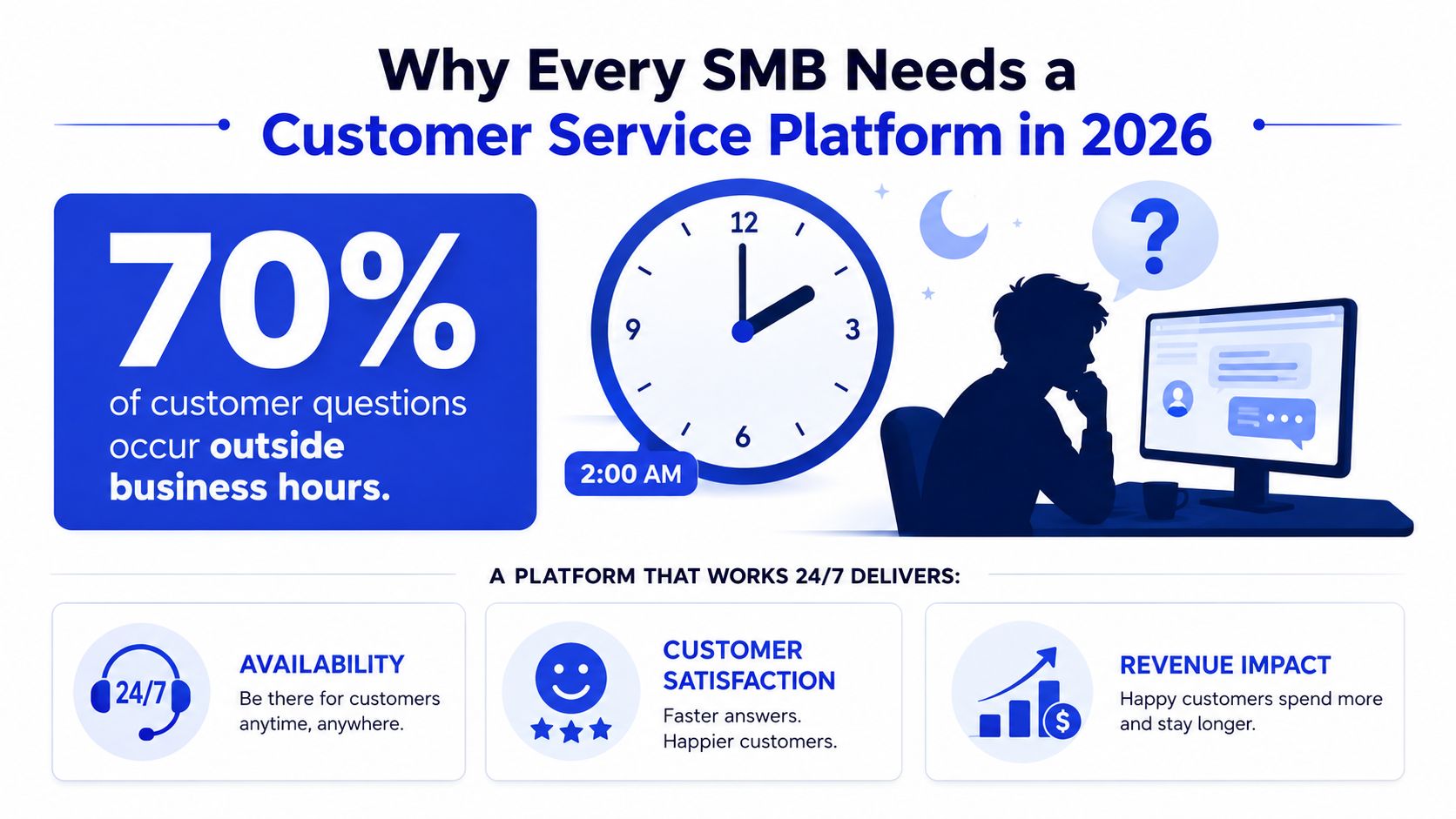
Why Every SMB Needs a Customer Service Platform in 2026
SMBs rarely lose customers because they lack effort. They lose them because the right information isn't available at the moment a buyer needs it. A founder checks email between meetings, an agent searches an outdated document for an answer, and a sales inquiry waits in the same queue as a routine password question. Customers experience that internal disorder as delay and uncertainty.
The platform model changes the operating design. Instead of treating support as a mailbox that humans empty, the business creates a connected layer across its website, messaging channels, knowledge sources, CRM, and team workflows. An AI agent can answer routine questions, identify buying intent, collect context, and send the cases that require judgment to an appropriate person.
The market direction reinforces that shift. The global customer service software market rose from $10.95 billion in 2025 to a projected $13.06 billion in 2026, and it's forecast to reach $26.3 billion by 2030 at a 19.1% CAGR, according to Mordor Intelligence's customer self-service software market research. A separate market analysis estimated customer self-service software at $18.07 billion in 2024, with a projection of $57.21 billion by 2030 at a 21.6% CAGR from 2025 to 2030 (Global Industry Research).
The business case is broader than ticket reduction
A customer service platform supports three revenue-critical jobs:
Protecting demand: Visitors get immediate answers on pricing, product, and compatibility pages instead of waiting for office hours.
Controlling workload: Repetitive questions move to self-service while people concentrate on exceptions, relationships, and judgment calls.
Preserving context: Every escalation carries the conversation history, customer details, and attempted resolution, so the customer doesn't have to start over.
This matters particularly in ecommerce, where service quality is part of the buying experience. For a broader view of how support, convenience, and post-purchase experience shape mastering ecommerce in 2026, connect platform decisions to the entire customer journey rather than treating support as a separate department.
Founders should also be realistic about what a platform won't fix. It won't repair inaccurate pricing, contradictory policies, weak product documentation, or an escalation process nobody owns. It will expose those weaknesses faster. That's useful, provided you treat the system as operational infrastructure, not as a magic bot.
Start by mapping the questions customers ask before and after purchase. Then decide which answers an agent can provide safely, which conversations should qualify leads, and which situations must reach a human immediately. A practical customer support strategy makes those decisions before software configuration begins.
Core Features That Define a Modern Customer Service Platform
A modern customer service platform coordinates ticketing, knowledge management, and AI agents in one operating workflow. Each component must share context reliably. Otherwise, the business has several disconnected tools and no dependable control over customer conversations.
Ticketing and routing create operational control
Every conversation needs an owner, a priority, and a next action. Ticketing captures requests from supported channels, preserves history, and routes cases by intent, customer type, urgency, or topic. Without clear rules, a shared inbox remains a shared inbox, even with a more expensive interface.
Look for:
Intent-based assignment: Billing questions should reach billing, technical incidents should reach technical support, and qualified buying conversations should reach sales.
Priority rules: A service outage, cancellation request, or high-value prospect should not sit behind a routine FAQ.
Conversation history: Agents need the original question, previous replies, relevant customer details, and promises already made.
AI agents and knowledge sources handle repeatable work
An AI agent should answer from controlled business content, not from plausible-sounding guesses. Train it on approved website pages, product documentation, pricing information, policies, and FAQs. Set explicit boundaries for topics it must not answer, and define the conditions that require human review.
Keep those rules auditable. Your team should be able to see which source informed an answer, what the agent refused to handle, and why a conversation was escalated. That record protects the brand when a customer challenges an answer and helps operators correct weak content instead of silently adjusting prompts.
A knowledge base turns scattered internal information into reusable answers. It also gives human agents a dependable reference when the AI transfers a case.
Escalation is the safety mechanism
A useful escalation workflow gathers information before forwarding the case. It should capture the customer's goal, relevant identifiers, steps already attempted, the agent's answer, and the reason human review is necessary. A concise summary lets the human continue the conversation instead of questioning the customer again.
Practical rule: If a human receives an escalation without context, the automation has only moved the work. It has not improved the operation.
Reporting connects activity to decisions
Dashboards should show more than conversation volume. Track unresolved intents, repeated questions, escalation reasons, first response time, handoff quality, and pages where visitors ask for help. These reports show where documentation, product design, or staffing needs attention.
Some platforms combine AI support with lead qualification and deployment controls. Chatgrow lets businesses train custom agents on website content, pricing, FAQs, and product pages, then define qualification and escalation behavior before deployment. The buying question is whether these components share context, preserve an audit trail, and support a clear operating process.
Response Time Benchmarks and Channel Strategy
Speed expectations vary by channel, so an SMB shouldn't promise the same response standard everywhere. Ringly's customer service response-time benchmarks place live chat at roughly 30 seconds to 2 minutes, email at 1 to 8 hours, and phone at 20 to 60 seconds, depending on the industry.
Channel | Expected Response Time | Best Use Case |
|---|---|---|
Live chat | 30 seconds to 2 minutes | High-intent questions, product guidance, qualification |
1 to 8 hours | Detailed requests, documentation, non-urgent follow-up | |
Phone | 20 to 60 seconds | Urgent issues, sensitive cases, complex conversations |
The design implication is straightforward. Put instant routing, knowledge retrieval, and escalation controls on channels where customers are actively trying to make a decision or solve an immediate problem. Don't use email-style workflows for live chat. A customer who opens a conversation on a pricing page isn't asking for a reply tomorrow.
Match the channel mix to the customer's job
Live chat and messaging are especially valuable when customers need a quick answer while browsing, comparing, or troubleshooting. Email remains useful when the issue requires attachments, a detailed explanation, or a record that can be reviewed later. Phone deserves priority when emotion, urgency, or complexity makes text inefficient.
A platform should preserve context when a conversation changes channels. If a chat becomes a phone call, the agent should see the prior questions and answers. If a phone interaction generates a follow-up email, the customer shouldn't have to reconstruct the issue.
Use multi-channel support guidance to design around customer intent rather than adding every available channel. More channels create more operating obligations. A small team is usually better served by a reliable mix of high-intent chat, organized email, and a clearly owned escalation path than by a fragmented presence everywhere.
AI can absorb the first interaction on chat, identify the request, retrieve a relevant answer, and ask only the questions needed for routing. Human agents then step in when the customer's situation falls outside approved knowledge, involves account risk, or requires discretion.
The goal isn't maximum automation. It's appropriate speed at the point of need, with a human path that feels like a continuation rather than a reset.
Building Trustworthy AI Support That Customers Actually Rely On
Fast answers aren't enough. An AI agent can respond instantly and still damage the brand if customers can't tell where the answer came from, why the system refused a request, or what information reached the human team.
The buying conversation has started to move toward transparent AI decisions, explainability, memory-rich interactions, and autonomous self-service, as summarized in coverage of Zendesk's 2026 CX trends. Salesforce reported that service teams estimate AI handles 30% of cases today and could reach 50% by 2027, a projection that makes governance an operating requirement rather than an abstract ethics discussion.

Build transparency into the conversation
Customers don't need a technical explanation of the model. They do need a clear experience:
Source boundaries: The agent should answer from current, approved business content.
Visible uncertainty: When the system lacks enough information, it should say so and offer a human path.
Clear handoff: The customer should know when a human has become responsible for the case.
Traceable decisions: Your team should be able to review what the agent saw, what it answered, and why it escalated.
Smart intent technology helps the agent interpret the customer's goal instead of matching isolated keywords. A question such as “Can I change this after checkout?” could refer to an address, a subscription, a booking, or a product configuration. The correct response depends on context.
Escalation should also create a concise summary. Include the customer's objective, relevant details, prior answers, and unresolved risk. This protects the customer from repetition and gives the human agent a defensible starting point.
Treat governance as daily operations
Create approval rules for pricing, refunds, legal commitments, security questions, and sensitive account changes. Review failed answers and escalations regularly. Update the knowledge source whenever policies or product information change, and keep an audit trail that shows who approved important changes.
Teams that want practical safeguards should also review guidance on preventing AI hallucinations. The central principle is simple: deploy AI where it can be confidently useful, and make uncertainty visible where it can't.
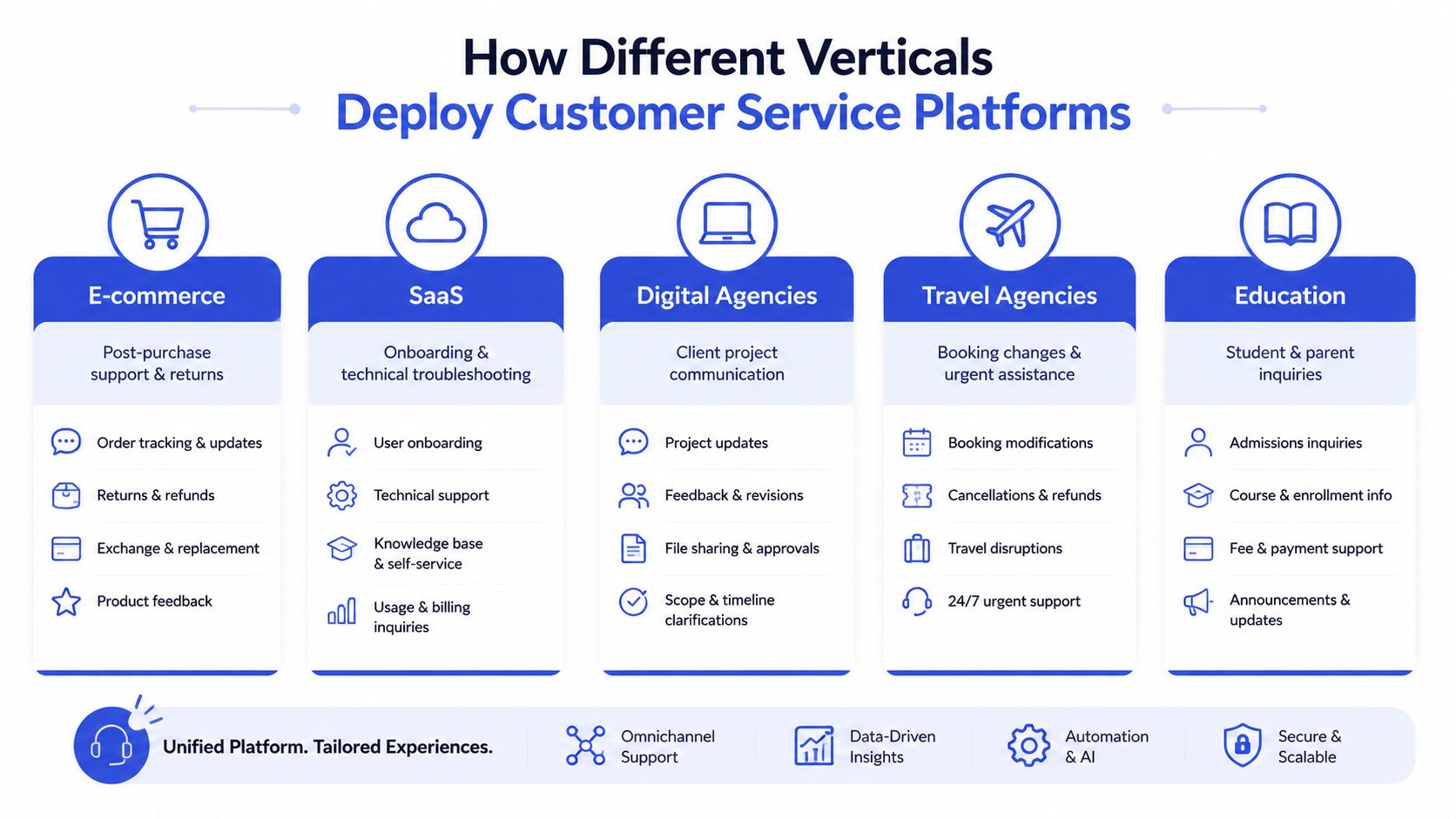
How Different Verticals Deploy Customer Service Platforms
An ecommerce store trains its agent on product pages and checkout flows. A SaaS company trains it on documentation and onboarding. The platform may be the same, but its boundaries, permissions, and escalation rules must match the business.
Ecommerce
An ecommerce agent should stay close to the product and checkout journey. Train it on product specifications, shipping policies, returns, availability guidance, and care instructions. On product pages, it can answer comparison questions and identify purchase intent. After purchase, it can handle routine order and return questions, while routing disputes, exceptions, and account-sensitive requests to staff.
Keep delivery dates and refund commitments tied to current policies or connected operational data. A fast answer that invents a promise creates a trust and margin problem.
SaaS
A SaaS deployment needs separate handling for onboarding, troubleshooting, billing, and account administration. The agent can guide new users through setup, explain feature behavior, point them to relevant documentation, and collect diagnostic context before escalation.
For technical issues, request the environment, affected feature, observed behavior, and steps already attempted. The escalation record should preserve those details so support and engineering can act without restarting the investigation.
Digital agencies
Agencies can deploy separate agents for client websites, each trained on the client's content, offers, brand voice, and qualification rules. The agency should control approved knowledge changes while giving the client visibility into escalations and recurring questions.
That arrangement becomes a managed service only when ownership is written down. Decide who updates knowledge, handles escalations, reviews transcripts, and approves changes. Keep those decisions auditable so the agent remains brand-safe after launch.
Travel agencies and education
Travel agencies should prioritize booking changes, itinerary questions, cancellation policies, and urgent assistance. Make escalation prominent because exceptions often involve time-sensitive decisions and customer stress.
Educational institutions need a different tone and permission model. Agents can answer admissions, enrollment, scheduling, and general policy questions. Authorized staff should handle personal records, sensitive student matters, and parent concerns.
Across every vertical, set the agent's boundaries around customer intent, business risk, and escalation ownership. Define what the AI may answer, what data it may use, and when a human must take responsibility. The deployment is ready only when those decisions are clear in both the customer experience and the audit record.
Your Evaluation Checklist and Deployment Roadmap
Choose a platform by testing its operating behavior, not by counting features on a sales page. Ask whether your team can train it from existing content, control what it says, connect the channels customers already use, and review every important handoff.
Evaluate the system against real work
Use a representative set of questions from your inbox, website chats, sales calls, and support team. Then score the platform on these criteria:
Training effort: Can nontechnical staff update answers from approved website and product content?
Channel fit: Does it support the channels where customers already ask for help?
Qualification logic: Can it identify buying intent and collect the details sales needs?
Escalation quality: Does the human receive a concise, accurate summary with the conversation attached?
Governance: Can you set approval rules, review transcripts, and audit changes?
Reporting: Can you see unresolved intents, response performance, and escalation patterns?
Commercial clarity: Are usage limits, storage, team access, and renewal terms understandable?
A third-party ECORN customer service review can broaden your comparison, but your own test conversations matter more than generalized rankings. A platform that works for a large contact center may be unnecessarily complex for a founder-led support team.
Deploy in controlled stages
Select one agent and one purpose. Start with pre-sales questions, onboarding, or a defined FAQ group. Avoid launching across every workflow at once.
Clean the source material. Remove duplicate policies, outdated prices, contradictory instructions, and pages nobody should use as an authority.
Define boundaries. List topics the agent can answer, topics requiring qualification, and topics requiring immediate human review.
Create escalation summaries. Specify the fields your team needs, such as customer goal, account context, attempted steps, and unresolved issue.
Place the agent on high-intent pages. Pricing, product, booking, and signup pages usually provide clearer feedback than low-intent traffic.
Review conversations and revise. Look for unanswered questions, misleading phrasing, unnecessary handoffs, and missing source content.
Chatgrow's stated deployment model follows this practical sequence: train an agent on business content, define lead qualification, deploy it to selected pages, and iterate through reporting. Its offering includes personalized onboarding and a 7-day free trial, so an SMB can test a focused workflow before expanding.
Measuring ROI and Scaling Your Customer Service Operations
A customer service platform earns its place when it improves a business metric that leadership already cares about. Track first response time, unresolved conversations, escalation quality, qualified leads, support workload, and customer satisfaction. Don't rely on conversation volume as proof of success. More conversations can mean stronger engagement, or it can mean customers can't find clear answers.
For AI pre-qualification, the operational effect can be substantial. In an analysis of 131 merchants, manually handled tickets reached a first human reply after a median of 4.1 hours, while AI pre-qualified tickets reached the team in 0.9 hours (Chatarmin's analysis of AI in customer service). The useful lesson isn't to promise the same result for every business. It's to measure whether triage, context extraction, and routing move the right cases to the right people faster.
Scale without losing control
Expand only after the first workflow is stable. Add agents by department, product line, language, or client site, but keep shared governance rules for tone, prohibited commitments, privacy, and escalation. Assign an owner for source updates. If nobody owns the knowledge, the agent will eventually represent yesterday's business.
Multimodal support is also becoming more important for complex issues. Recent CX coverage describes the convergence of text, speech, images, and video, while Zendesk's 2025 CX trends report highlights voice AI's growing role in complex interactions. Prepare by deciding which problems need screenshots, voice context, visual troubleshooting, or a human conversation.
Retention depends on the full experience, not just faster replies. Pair platform metrics with practical guidance on how to improve customer retention naturally, especially through reliable follow-up, accurate answers, and clear ownership after escalation.
Start with one high-intent workflow, audit it closely, and expand only when the evidence supports expansion. That approach gives an SMB the efficiency of AI without surrendering trust, accountability, or brand control.
Chatgrow lets businesses create, train, and deploy custom AI customer service agents using their website, pricing, FAQs, and product pages, with lead qualification and context-rich human escalation built into the workflow. Visit Chatgrow to test a focused support use case, review how the agent handles real customer questions, and decide whether it belongs in your operating stack.
Related Posts
Continue Reading
More articles from the ChatGrow Team.


