Blog
Scale Customer Support for SaaS: 2026 Framework
By
Nelson Uzenabor

Most SaaS teams don't realize their support operation is broken until the same week three things happen at once. A new customer can't finish setup because of permissions. A long-time account emails twice about billing and gets two different answers. Engineering gets dragged into a “bug” that turns out to be a missing help article.
That's the point where support stops feeling like an inbox problem and starts looking like an operating problem.
I've seen the same pattern in scaling teams again and again. Early on, everyone answers whatever comes in. Founders reply from their personal inbox. Product managers jump into edge cases. Engineers handle technical questions with no triage. It works for a while because volume is low and context is tribal. Then the customer base grows, the product surface area expands, and the cracks show fast.
That pressure is getting worse because SaaS itself is more entangled inside everyday operations. One industry compilation reported that companies used an average of 106 SaaS applications, with large enterprises averaging 131, and SaaS still accounted for 85% of all business software by the end of 2025 according to this SaaS statistics roundup. More apps means more setup questions, integration issues, access problems, and “which system owns this?” confusion.
Support has to do more than close tickets. It has to preserve momentum for users who are trying to adopt the product, fix friction before it turns into churn, and surface the patterns product teams need to address.
The companies that scale customer support for SaaS well don't win because they hired more agents. They win because they designed a system. Clear channels. Strong self-service. Smart automation. Tight escalation. Useful metrics. Real staffing decisions. That's the playbook that turns support from reactive cleanup into a growth engine.
Table of Contents
Introduction From Cost Center to Growth Engine
Monday, 9:07 a.m. The queue looks under control. Response times are acceptable, agents are active, and nobody is panicking in Slack. By noon, the same onboarding issue has created 14 tickets, one expansion account is waiting on an answer from engineering, and two agents have given different instructions for the same workflow. That is not a busy support team. It is an unstructured operating system.
I have seen this pattern more than once in SaaS. Support looks productive from the outside because messages are moving. Under the surface, the team is absorbing product friction, patching process gaps, and spending expensive human time on work that should never have reached an agent.
That cost shows up everywhere. New customers take longer to get value. Trial users stall before activation. Existing accounts lose confidence when answers vary by agent or channel. Revenue feels the impact long before finance labels support as inefficient.
In a subscription business, support is tied to retention and expansion whether leadership admits it or not. Customers do not contact support because they want a conversation. They contact support because something is blocking progress, delaying adoption, or creating doubt at a key moment in the account lifecycle.
Practical rule: If support only measures speed, it becomes a faster way to process recurring failure.
The teams that scale well treat support as an operating function, not a cleanup crew. The job is not only to answer tickets. The job is to control how demand enters the system, how work gets routed, what gets solved once, and what gets fed back to product, onboarding, and engineering. This shift changes what you build.
That usually leads to a few hard decisions.
You stop hiring your way out of repetitive demand and start removing the causes behind it. You protect technical specialists from low-value triage, even when that feels slower in the short term. You accept that some automation improves service quality, while bad automation hides queue pressure and frustrates customers who need a real answer.
The operating playbook is simple:
Centralize intake: Put support demand into one system, even if customers contact you through multiple channels.
Separate repeatable from diagnostic work: Repetitive questions belong in self-service, guided workflows, or automation. Edge cases belong with trained humans.
Route by business impact, not inbox order: A broken billing flow or blocked onboarding step should outrank a low-risk how-to question.
Use support data as product data: Repeat contacts usually point to friction, unclear UX, or missing guidance. They are rarely random noise.
This is the shift that changes support from overhead into a growth input. A well-run support function reduces churn risk, shortens time to value, protects expansion revenue, and gives product teams a steady stream of evidence about where customers get stuck. When that system is in place, support stops masking the underlying problem and starts helping the business remove it.
Building Your Framework Channels and Self-Service
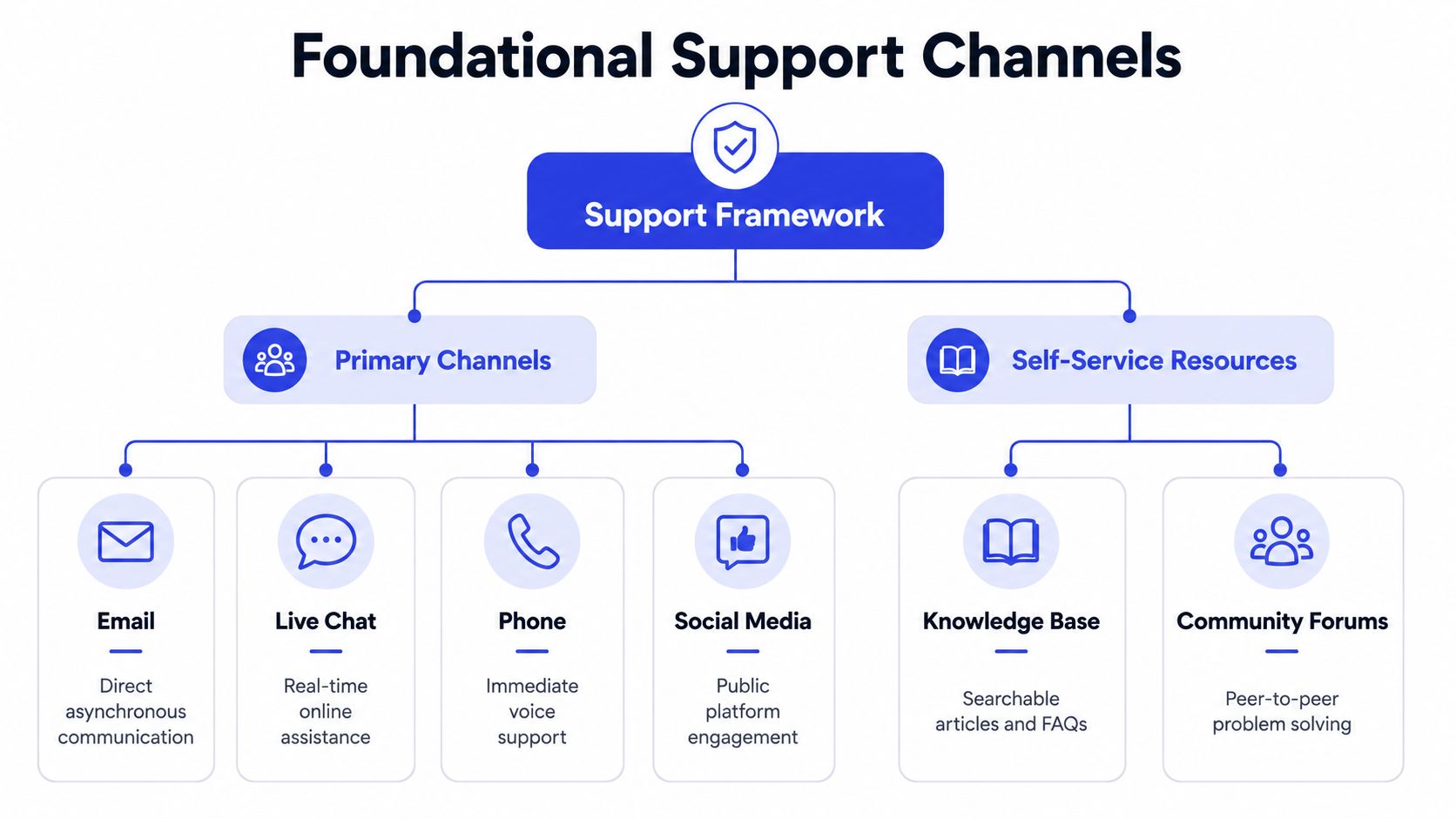
The first structural decision is channel design. Channels are often added incorrectly. They turn on email, then chat, then social replies, then maybe phone, and hope agents can keep context in their heads.
Customers won't tolerate that for long. A 2025 review found that 79% of customers expect consistent, connected interactions across touchpoints, and it identifies a unified omnichannel ticketing system as a core part of strong support strategy in this customer support trends review.
Choose fewer channels, then connect them well
You don't need every channel on day one. You need the right mix for your product and customer base.
A simple way to choose:
Channel | Best use | Common mistake |
|---|---|---|
Detailed, asynchronous issues | Letting it become the default for everything | |
Live chat | Fast questions during onboarding or usage | Treating chat like email with long delays |
Phone | High-stakes or emotionally charged issues | Offering it without staffing for real-time quality |
Social media | Public triage and brand protection | Trying to resolve complex account issues publicly |
For many SMB SaaS companies, email plus in-app chat is enough to start. Phone makes sense when deal size is higher, workflows are more sensitive, or the product is operationally critical for customers.
If your team is still deciding whether chat belongs in the mix, this guide on live chat support for growing teams is useful for thinking through where it helps and where it creates noise.
Good channel strategy doesn't maximize availability. It reduces customer effort.
That means one queue, one customer record, and one place agents can see prior context.
Build Tier 0 before you add headcount
Most support leaders underinvest in Tier 0, the self-service layer customers hit before a human gets involved. That's usually because documentation feels less urgent than the queue. It isn't.
Strong customer support for SaaS is built on searchable help articles, FAQs, setup guides, and clear troubleshooting paths. If those assets are weak, every simple question turns into labor.
Your self-service foundation should include:
Getting started guides: First-login, setup, permissions, and initial configuration.
Task-based articles: “How to connect X” beats “Integrations overview.”
Billing and account docs: Plan changes, invoices, seats, cancellations, and roles.
Troubleshooting flows: Known errors, likely causes, and exact next steps.
Release notes written for users: Not just product announcements.
What a usable knowledge base looks like
A good knowledge base isn't a document dump. It's built around how customers search when they're blocked.
That means articles should be organized by user goal, not by internal team structure. “Set up SSO” is better than “Security settings.” “Invite teammates” is better than “User administration.”
Use this review checklist:
Can a new customer find setup help in under a minute?
Do articles match the language customers use in tickets?
Does each article include prerequisites, steps, and what success looks like?
Is there a clear escalation path when self-service doesn't solve it?
The easiest way to prioritize content is to mine recent conversations. Look at repeated contacts, reopened issues, and any question agents answer by pasting the same text. That's documentation debt.
Teams that do this well make self-service a living part of support operations. They update it after launches, after policy changes, and after any issue that generated confusion.
The Power of Proactive Support and Automation
Reactive support always looks necessary. It rarely looks scalable.
If your system waits for customers to get stuck, open a ticket, explain the problem, and sit in queue, you're paying for friction after it already damaged the experience. That model gets worse as complexity grows, especially when teams are already stretched.
Industry guidance points to a better setup. SaaS support works best when it combines self-service with structured escalation, using knowledge bases, FAQs, and chatbots to reduce wait times while AI handles repetitive questions and routes complex cases to the right associate, according to this SaaS support operations guide.
Reactive support scales badly
The hidden cost of reactive support isn't just queue volume. It's interruption.
Agents lose time switching between simple requests and technical investigations. Customers repeat context. Engineers get dragged into underqualified bug reports. Managers step in to smooth over delays instead of fixing the system.
A 2025 support trends review reported that 77% of customer service reps said workload and issue complexity had increased versus the prior year, as covered in the earlier support trends source. That's exactly why automation matters. Not because humans should disappear, but because humans should stop doing low-value triage.
Where automation actually helps
Automation works when it removes repetitive work and improves context before handoff.
It fails when teams use it as a wall between customers and real help.
The best uses are straightforward:
Instant answers to known questions: Account access, billing basics, feature availability, setup paths.
Workflow guidance in the moment: Help inside onboarding, imports, integrations, and admin setup.
Routing based on intent: Sales question, technical issue, account change, or bug report.
Pre-collection of details: Browser, workspace, user role, error message, steps taken.
If you're evaluating what modern AI support should do in production, this breakdown of AI customer support workflows is a practical reference.
Automation should reduce effort for both sides. If customers have to fight the bot before reaching a person, the system is broken.
What to automate first
Start with problems that are common, narrow, and well-documented.
Good first candidates include onboarding check-ins, password or access guidance, plan and billing questions, integration prerequisites, and post-release “what changed?” prompts. These are predictable enough for automation and important enough to matter.
A useful pattern is event-triggered support. When a user stalls during setup, surface help before they open a ticket. When a feature changes, push a short explainer in the app. When an integration fails on a known step, present troubleshooting immediately.
This kind of support does more than deflect tickets. It protects activation. It also keeps agents available for the cases where judgment, empathy, or technical analysis matter.
Here's a simple benchmark for whether automation is helping. Agents should spend less time gathering basics and more time resolving exceptions. If that isn't happening, your automation layer is probably answering the wrong questions.
A practical walkthrough of the shift toward AI-assisted support is below.
Done right, proactive support changes the customer experience early in the journey. Customers don't remember that a ticket was “deflected.” They remember that they got unstuck quickly and kept moving.
Designing Intelligent Workflows and Escalation Paths
Once self-service and automation are in place, the next failure point is handoff quality.
Many teams still escalate by forwarding noise. A chatbot collects partial detail. A Tier 1 rep asks for the same thing again. A specialist joins with no timeline, no reproduction steps, and no clue whether the issue is urgent or just annoying. Customers experience that as incompetence, even when the team is working hard.
A ticket should get smarter as it moves
Every handoff should add context, not lose it.
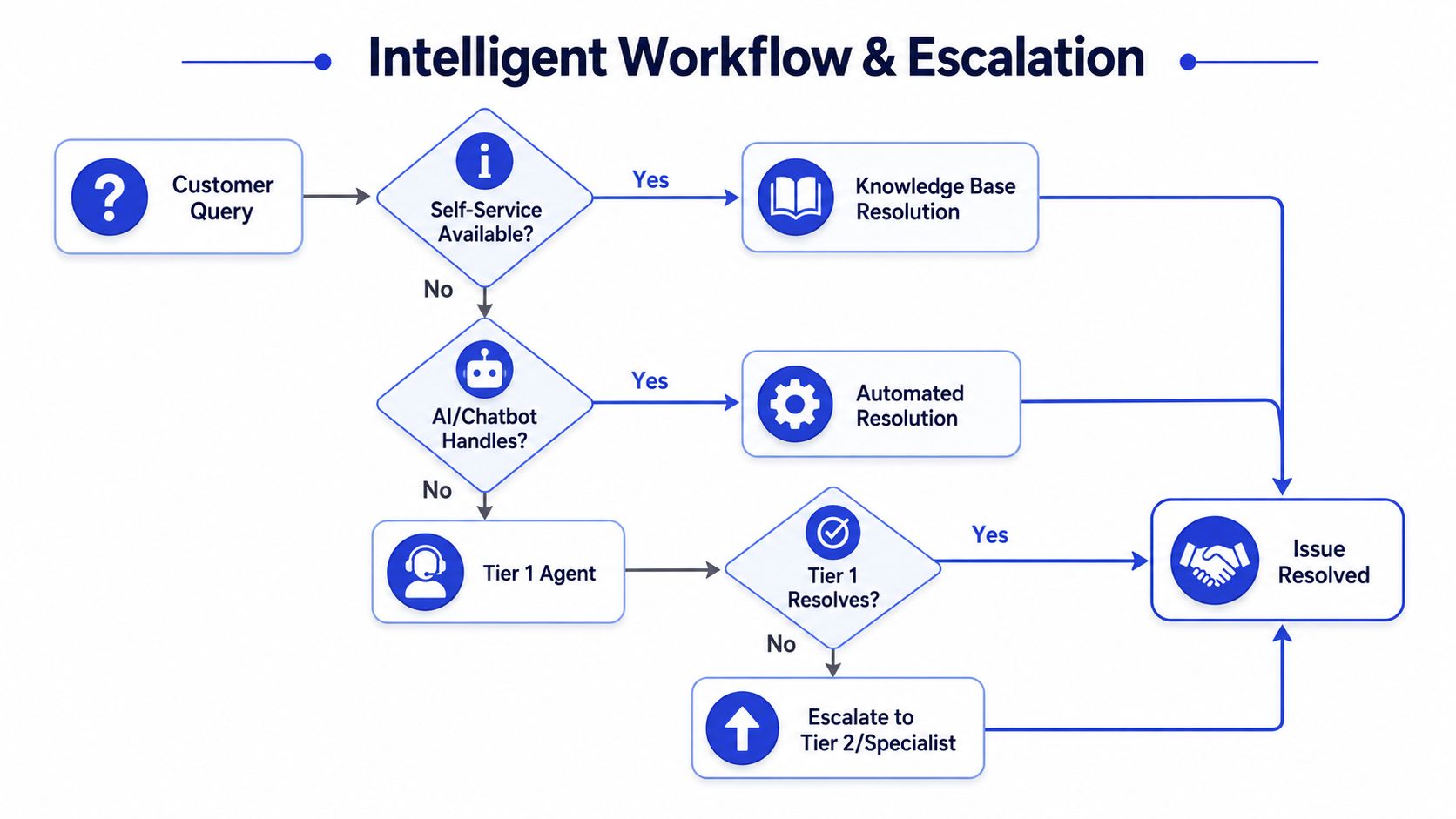
That means your workflow needs defined stages with required fields. By the time a ticket reaches a human, the system should already know the customer account, relevant page or feature, issue type, urgency, and whether self-service was attempted.
A clean support path looks like this:
Customer inquiry enters one queue
Self-service is offered when a known answer exists
Automation gathers missing details
Tier 1 handles standard operational issues
Tier 2 or specialists take technical cases
Engineering receives validated bug reports only
Integrated context matters greatly. If your agents can't see account history, prior conversations, plan details, and product activity in one place, they'll ask customers to reconstruct the story. That slows resolution and damages trust. A connected support stack matters for exactly this reason, and this guide on customer data integration for support teams covers the operational side well.
Define escalation by condition, not by emotion
Escalation rules should be objective.
If Tier 1 agents escalate because a ticket “feels hard,” queues become political. Specialists get flooded. Tier 1 stops learning. Engineering starts ignoring support because too many reports are low quality.
Use clear triggers instead:
Escalate to Tier 2 when the issue requires log analysis, API behavior review, advanced configuration help, or platform-specific troubleshooting.
Escalate to engineering when the team has reproducible steps, expected versus actual behavior, affected feature, customer impact, and enough evidence to rule out configuration error.
Escalate to account management or success when the issue is really about rollout risk, stakeholder alignment, or adoption failure.
The fastest support teams aren't the ones that rush tickets forward. They're the ones that qualify them properly before they move.
The handoff fields that matter
You don't need a giant form. You need the right fields.
Use a short required set for every escalation:
Field | Why it matters |
|---|---|
Customer account | Tells the next owner who is affected |
Issue category | Improves routing and reporting |
Steps to reproduce | Prevents restarts and guesswork |
Actual vs expected result | Clarifies whether this is confusion or failure |
Severity | Separates inconvenience from outage risk |
Attachments or evidence | Screenshots and errors reduce back-and-forth |
Previous actions taken | Prevents duplicate troubleshooting |
If agents fill these consistently, escalations stop feeling like tossed grenades. They become actionable work items.
That's the shift. Intelligent workflow design isn't about bureaucracy. It's about preserving customer context and protecting specialist attention.
Measuring Success with KPIs That Drive Retention
A lot of support dashboards are full of motion and empty of insight.
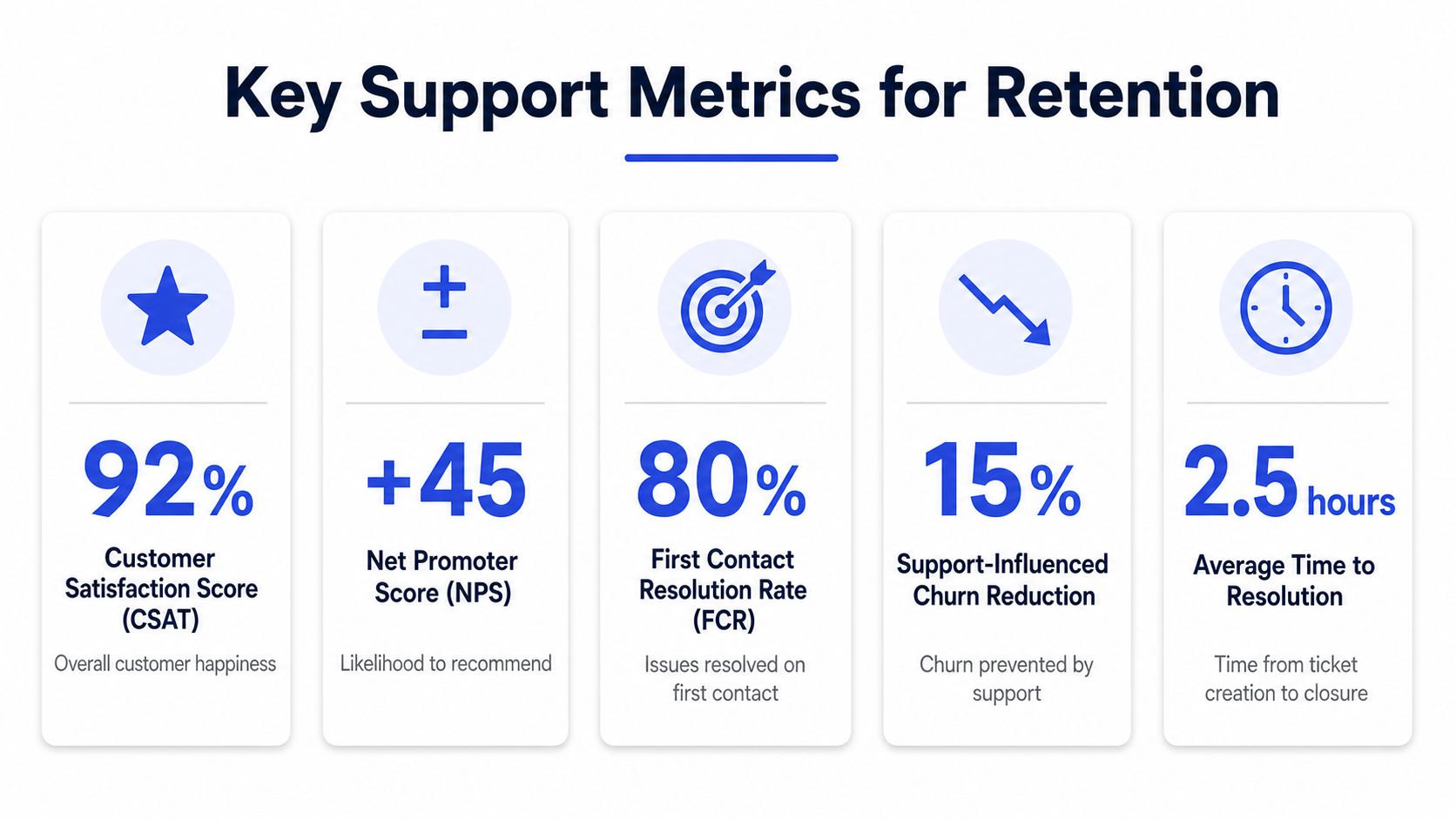
Tickets closed. Queue size. Agent activity. Those metrics can be useful, but they don't tell you whether support is reducing friction or just processing it faster. For customer support for SaaS, the metric set has to reveal both service health and product friction.
The most useful metrics are first reply time, first contact resolution, resolution rate, customer satisfaction, and contact rate, because they show efficiency and where customers get stuck. Zendesk and Front both frame these as practical operating metrics, and a rising contact rate at a specific product step often points to UX or documentation failure rather than a pure support staffing issue in this SaaS support metrics guide.
Track metrics that expose friction
Here's the core set I'd keep on one operating dashboard:
First reply time: How long customers wait before hearing from you.
First contact resolution: Whether the issue was solved in the initial interaction.
Resolution rate: Whether tickets are reaching closure, not aging out.
Customer satisfaction: Whether customers felt the interaction helped.
Contact rate: How often customers need help at specific points in the journey.
The trap is treating these as isolated support metrics. They're cross-functional signals.
If first reply time worsens, the problem may be staffing, routing, or channel overflow. If first contact resolution drops, agents may lack permissions, documentation, or training. If contact rate spikes after a workflow change, product likely shipped friction into the experience.
How to read the signals correctly
Not every bad metric means the support team is underperforming.
Sometimes a slower first reply time is the result of one major incident. Sometimes lower satisfaction is tied to a product outage that support didn't cause. Sometimes rising ticket volume means your go-to-market motion improved and more customers are onboarding at once.
The value comes from reading metrics in combination.
A few examples:
Pattern | Likely interpretation |
|---|---|
First reply time up, backlog up | Capacity or routing issue |
Contact rate up on one feature | Product or documentation friction |
CSAT down, resolution rate stable | Answers are arriving, but not solving the real problem |
First contact resolution down after launch | Agents weren't prepared for the change |
Operator's view: Contact rate is often the most underrated metric on the board because it tells you where the product is making people ask for help.
A simple operating review
Weekly review beats occasional deep dives.
Use one standing review with support, product, and engineering. Look at the top contact drivers, major escalations, any repeated bug themes, and whether a recent launch changed ticket mix. Keep it practical. Which issues need a doc update? Which need a workflow fix? Which need product work?
That's when support starts influencing retention directly. It doesn't just answer the queue. It identifies the moments that create drag in the customer journey and gets them fixed.
Scaling Your Team with Smart Staffing and SLAs
It is 8:10 a.m. on a Monday. The queue doubled over the weekend, one enterprise customer is waiting on an integration issue, trial users are piling up with setup questions, and your only technical support rep is already tied up in Slack with engineering.
That is the moment weak staffing plans get exposed.
Support gets expensive fast when coverage is built reactively. Hiring another rep can reduce pressure for a month, but it does not fix bad queue design, unclear ownership, or an SLA model that promises more than the team can deliver. In SaaS, those mistakes show up in retention. Slow responses delay onboarding, unresolved billing issues block expansion, and repeated integration friction creates churn risk long before an account manager hears about it.
Pick the team model that matches your stage
Org design should follow ticket complexity, product surface area, and account mix.
Early on, generalists usually win. A small team can move faster when the same person handles onboarding questions, billing issues, and basic troubleshooting. Customers get fewer handoffs, and the team learns the product faster because everyone sees the same patterns.
That breaks once complexity splits in two directions. One stream is high-volume operational work. Password resets, invoices, permissions, common setup problems. The other is high-context work that needs technical judgment or account knowledge. API issues, enterprise configurations, security reviews, and integration failures. At that point, choose a model deliberately:
Generalist pod model: Best for smaller teams with uneven volume and a product that still has a manageable support surface area.
Tiered model: Best when simple tickets are crowding out technical work and queue prioritization needs more structure.
Specialist model: Best when enterprise, integrations, compliance, or platform support has become a distinct function.
Premature specialization creates its own mess. Too many narrow roles increase handoffs, training gets fragmented, and customers start repeating context in every conversation. I have seen teams add specialists before they had clean routing. The result was slower resolution with a bigger headcount.
Staff to ticket shape, not just ticket count
Volume matters, but mix matters more.
A queue of 50 password resets is a different staffing problem from 50 tickets tied to a broken Salesforce sync. Headcount planning should account for how much work each ticket creates, how often escalations happen, and which issues carry revenue risk if they sit too long.
Use a simple staffing lens:
Ticket type | Best coverage model | Why |
|---|---|---|
Repetitive, low-risk questions | Automation or Tier 1 generalists | Fast handling, low judgment required |
Product how-to and onboarding friction | Generalists with strong macros and docs | Good balance of speed and context |
Technical troubleshooting | Tier 2 or specialists | Requires product depth and cleaner diagnosis |
Revenue or security-sensitive issues | Senior in-house ownership | Higher risk, stronger judgment needed |
Support leaders earn credibility with finance and product. Staffing decisions should be tied to business impact, not just service goals. If an issue blocks activation, renewal, or expansion, it deserves a different response model from a routine request.
SLAs should reflect operating reality
A good SLA is a service commitment the team can keep.
Teams often write SLAs as if every ticket deserves the same urgency. That looks customer-friendly on paper and fails in production. A trial user asking a how-to question should not consume the same response path as a paying customer with a broken integration or an account locked out before payroll runs.
A workable SLA framework should define:
First response targets by segment or priority
Resolution targets by issue type
Clear severity rules
Business hours and after-hours coverage
Named ownership at each handoff point
Keep acknowledgement and resolution separate. Fast acknowledgement buys confidence. Resolution depends on diagnosis, routing, and whether support has what it needs from product or engineering. If those two promises get blended together, customers hear one thing and experience another.
Plain language matters here. Customers should know when they will hear back, what qualifies as urgent, and how escalations work. Internally, the SLA should make queue priority obvious enough that a new manager can step in during an incident and make the same call your best lead would make.
Coverage is usually the real scaling constraint
Many SaaS teams can cover one region well. The problem starts when customers expect help at night, on weekends, or in multiple languages.
There are four common options:
Approach | Strength | Trade-off |
|---|---|---|
In-house local team | Strong product knowledge and tighter feedback loops | Limited hours, expensive to extend |
Follow-the-sun hiring | Broader direct coverage | Harder coaching, management, and consistency |
Outsourced after-hours coverage | Faster expansion of hours and language support | Quality control depends on documentation and QA |
Automation-first overnight support | Low marginal cost for routine requests | Urgent edge cases need clear escalation rules |
Hybrid usually works best. Keep account-sensitive, technical, and revenue-critical work in-house. Use automation for repetitive requests. Add external coverage where the main problem is time zone reach or language availability, not product judgment.
The mistake is treating all tickets as equal and staffing every hour with the same talent mix. That inflates cost without improving outcomes.
Set SLA tiers around customer risk
The cleanest SLA systems reflect impact, not internal org charts.
A practical model might look like this:
P1: Service outage, broken core workflow, security issue, or a blocker affecting multiple users. Immediate acknowledgement, rapid escalation, tight internal incident ownership.
P2: Major feature not working for one account, billing access blocked, integration failure with a workaround unclear. Fast first response, same-day specialist review.
P3: Standard troubleshooting, onboarding help, workflow questions. Standard response target with strong Tier 1 ownership.
P4: Feature requests, minor bugs, informational questions. Lower urgency, clear expectation setting.
The point is not bureaucracy. The point is protecting capacity for issues that affect retention and revenue while still giving lower-priority requests a predictable experience.
Smart staffing and useful SLAs work together. One defines who should handle the work. The other defines how fast and with what level of urgency. When both are designed around ticket complexity and customer impact, support stops acting like a cost center with a queue and starts operating like a revenue protection function.
Conclusion Your First 90 Days to Better SaaS Support
Monday starts with a billing complaint from a high-value account, three duplicate bug reports from different channels, and an onboarding question that should have been answered in the help center. By Friday, the inbox feels bigger, engineering is frustrated by low-quality escalations, and no one can say which issues put revenue at risk. That is the point where support needs an operating system, not more heroics.
The first 90 days should reduce chaos, expose product friction, and create clear ownership.
Days 1 to 30 stabilize the basics
Start by cleaning up intake.
Map every active support channel, who monitors it, where conversations live, and where context disappears. If the same customer can email, chat, and message your team in-app without a shared history, agents will waste time and customers will repeat themselves. Fix that before adding new tooling.
Then publish the first version of self-service. Use the answers agents already send every day. Setup, billing, permissions, and common troubleshooting issues usually give the fastest return because they generate repetitive demand and affect early retention. Set weekly reviews for first response time, resolution time, reopen rate, and top ticket drivers so the team builds a habit of operating from evidence.
Days 31 to 60 add automation and routing
Add automation where the risk is low and the volume is high.
Good starting points are account access, billing basics, onboarding steps, and known how-to questions. Bad starting points are edge-case bugs, angry renewals, or anything that needs product judgment. The trade-off matters. Every workflow you automate saves agent time, but weak automation also creates second contacts, escalations, and customer distrust.
Use structured forms and mandatory fields so tickets arrive with enough context to route correctly. Then formalize handoffs between Tier 1, Tier 2, and engineering. Every escalation needs an owner, a clear problem statement, reproduction details when relevant, and the business impact. If support cannot explain why an issue matters, engineering will treat it like queue noise instead of a retention risk.
This is also where staffing decisions stop being theoretical. If customers need coverage outside your core hours or across languages, decide whether in-house hiring can handle that within budget. If not, use a hybrid model and keep product judgment, escalations, and account-sensitive work close to the internal team, as noted earlier.
Days 61 to 90 make it operational
By this stage, the goal is consistency.
Review ticket categories every week and cut or merge the ones agents are using inconsistently. Add articles for repeated questions. Flag workflows with rising contact rates and send that pattern to product with examples, not vague complaints. Support becomes much more valuable when it shows where friction starts, who it affects, and what it likely costs in activation, expansion, or retention.
Then set SLAs your team can meet. Publish response targets by priority, align queue ownership to those targets, and audit misses. A missed SLA on a low-impact question is a planning issue. A missed SLA on a blocker for a paying account is a revenue issue.
A practical 90-day checklist looks like this:
Consolidate channels: One support system, one queue view, one customer record.
Launch self-service: Publish answers for the questions agents repeat every week.
Automate repetitive demand: Use bots, forms, and routing rules for high-volume, low-risk work.
Define handoffs: Clarify what stays in Tier 1, what moves to specialists, and what reaches engineering.
Track useful KPIs: Review speed, resolution quality, reopen rate, CSAT, and contact drivers.
Set realistic SLAs: Match urgency to customer impact, not internal org charts.
Choose a coverage model: Staff in-house where product judgment matters. Add external coverage where time zone reach or language availability is the constraint.
Strong customer support for SaaS comes from disciplined operations. The best teams use support to protect revenue, surface product friction early, and scale service quality without scaling headcount at the same rate.
If you want to put this playbook into action faster, Chatgrow helps you deploy AI support agents trained on your docs, FAQs, pricing, and product content, then route qualified conversations to your team with the right context. It gives you a practical way to cover common questions around the clock, reduce repetitive support work, and create a cleaner escalation path without rebuilding your whole stack first.
Related Posts
Continue Reading
More articles from the ChatGrow Team.