Blog
Your Guide to Digital Customer Service in 2026
By
Nelson Uzenabor

Consumers now default to digital support, especially younger buyers. For an SMB, that changes more than channel preference. It changes response time expectations, staffing pressure, and how service work gets organized day to day.
Digital customer service is the practical system behind that shift. Customers want to send a message, get an answer quickly, pick the conversation back up later, and reach a person when the issue needs judgment. If support still runs through a shared inbox, a phone line, and whoever is available, delays and dropped context show up fast.
That is why digital service has become a growth and retention issue, not just a support decision.
Small businesses do not need an enterprise stack to get results. They need a phased rollout. Start with one or two high-friction customer journeys, such as order questions, appointment changes, or common pre-sales requests. Add the channels customers already use, set clear handoffs to a human, and measure whether response time and resolution improve. A strong live chat setup for small business support is often one of the simplest places to start.
The payoff is straightforward. Fewer repetitive tickets reach your team, customers get faster answers, and owners get better visibility into what is driving service volume. AI can help, but only when it is applied to specific tasks your business can support and monitor.
Table of Contents
The New Standard for Customer Experience
Customer expectations changed faster than most SMB service teams did. People now expect fast answers, clear updates, and consistent help across every digital touchpoint. They do not separate your site, chat, inbox, help content, and follow-up process into different departments. They experience it as one service system.
That shift matters because every gap is visible. A customer might place an order on your website, ask a question in chat, and wait two days for an email reply that ignores the earlier conversation. That kind of disconnect does more than frustrate people. It drives repeat contacts, slows resolution, and makes your team spend time recovering from avoidable mistakes.
What small businesses get wrong
Many SMBs add digital channels one at a time without deciding how those channels should work together. Live chat gets installed. A shared inbox gets set up. Someone writes a basic FAQ. On paper, that looks like progress. In practice, it often creates a patchwork service model that depends on employees remembering context instead of the system carrying it forward.
The warning sign is simple.
If customers have to repeat the same issue every time they switch channels, the experience is still fragmented.
A better standard is continuity. Customers should be able to start with self-service, move into messaging, and reach a person with the full conversation history intact. Speed matters, but speed by itself does not fix broken handoffs. Good digital service also needs context, ownership, and a clear next step when automation reaches its limit.
What good looks like in practice
For most SMBs, a strong setup includes four basics:
A clear starting point: one or two primary contact options customers can find immediately
Useful self-service content: up-to-date answers for common questions, policies, and account or order issues
Human escalation with context: a team member can step in without asking the customer to start over
Simple operational visibility: a way to track response times, repeat questions, dropped conversations, and handoff quality
This does not require a big-budget transformation. It requires a phased rollout with discipline.
Start by fixing the highest-volume customer requests. Then connect those requests to one knowledge source, one routing process, and one escalation path. Once that foundation is stable, AI tools can help handle routine questions, summarize conversations, and surface patterns your team should act on. That is how SMBs improve service without creating another pile of software no one fully uses.
Understanding Digital Service Channels
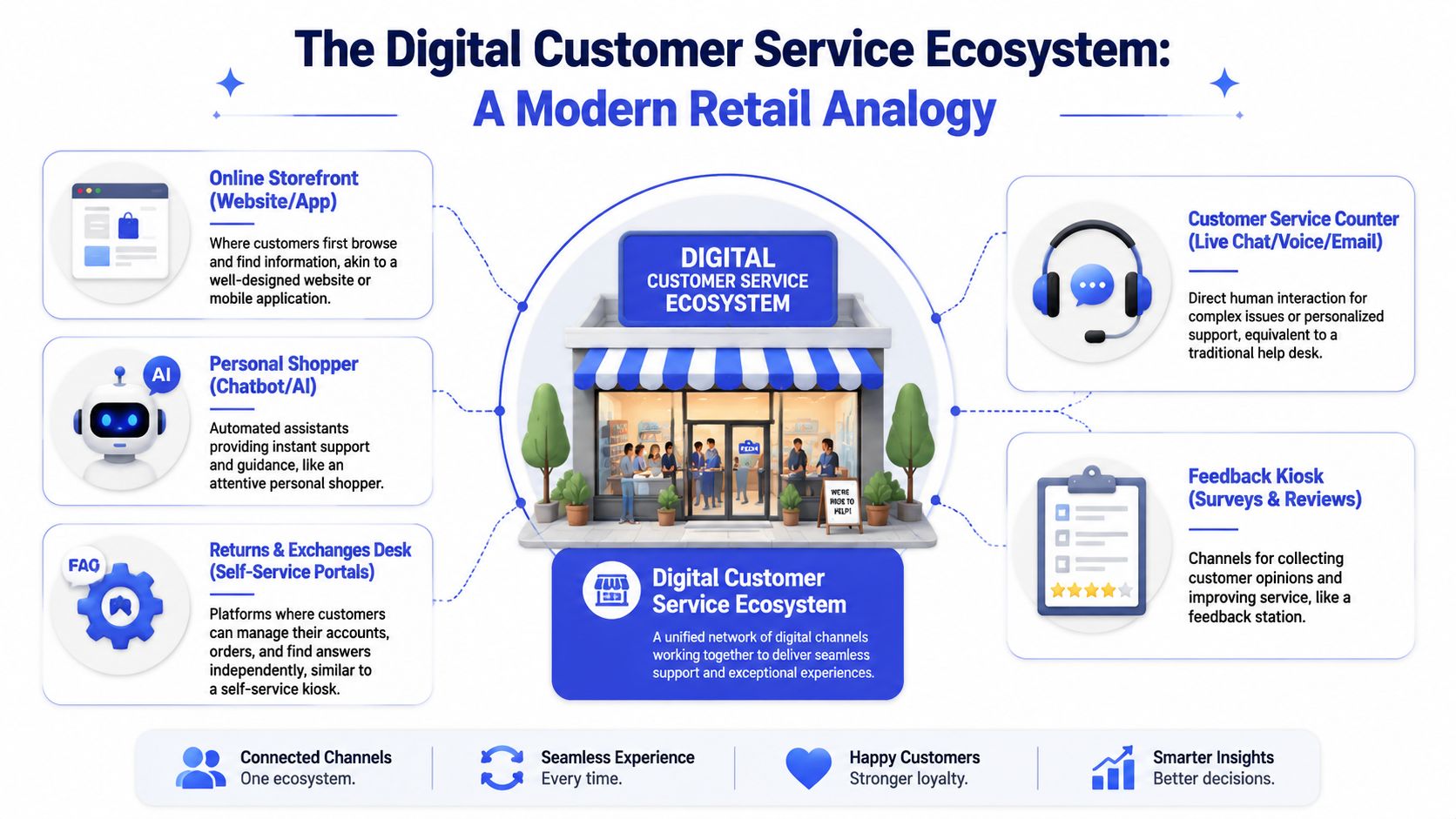
Digital service channels should work as one operating system for customer help. Each channel has a job, a response expectation, and a clear handoff path. SMBs get better results when they design that system intentionally instead of adding new inboxes whenever a problem appears.
Channel roles should be explicit
Customers do not care how your team is organized internally. They care about getting an answer through the fastest sensible path. Your job is to decide which channel handles which type of request, what gets automated first, and when a person should step in.
For many SMBs, the practical setup looks like this:
Channel | Best use | Common mistake |
|---|---|---|
Live chat | High-intent questions during browsing or checkout | Staff it inconsistently |
Detailed issues, documentation, follow-up | Let it become the default for everything | |
Social or messaging apps | Quick support and light engagement | Treat it like marketing only |
Self-service portal or FAQ | Repeat questions, order info, policy lookups | Never update it |
AI agent | Common questions, routing, lead qualification | Expect it to solve every case |
That mix is manageable because each option serves a different purpose. Live chat reduces hesitation during a sale. Email handles issues that need records or internal review. Self-service absorbs repeat questions. AI covers the first layer, especially outside business hours, and sends qualified cases to the right queue.
If you are still deciding where chat fits, this guide to the advantages of live chat gives a useful operational view.
Real-time channels and delayed-response channels
Digital channels behave differently, and that affects staffing, service levels, and customer expectations.
Real-time channels include live chat and active messaging conversations. Customers use them when they want immediate help, usually during checkout, onboarding, booking, or an urgent support issue. These channels need tighter coverage windows and clearer ownership because a slow reply feels like abandonment.
Asynchronous channels include email and some messaging threads where a reply can come later. They work better for account changes, billing reviews, documentation requests, and cases that require someone to check details before responding.
Small teams often make one of two mistakes. They push every request into email, which slows down high-intent conversations. Or they try to treat every channel like live chat, which burns team time on issues that do not need instant back-and-forth.
A better approach is to match the request to the channel. Use fast channels to remove buying friction and resolve simple issues quickly. Use delayed-response channels for work that needs review, approval, or documentation.
What SMB rollout looks like in practice
Start with one or two primary channels, not five. Then define three things for each one: what it is for, who owns it, and what happens if the issue is not resolved there.
That is where modern AI tools become useful for a smaller business. AI can answer common questions, collect order or account details, suggest help articles, and route conversations before a team member gets involved. It should support the service flow you already defined, not replace judgment on complicated cases.
The goal is a channel setup that gives customers a clear next step, keeps context attached to the conversation, and lets your team spend time where human judgment pays off.
Business Benefits and Key Performance Indicators
A lot of service technology gets sold with vague promises. SMB owners don't need vague promises. They need to know whether digital customer service will lower workload, improve response quality, and help the business keep up without hiring reactively.
Where the ROI actually shows up
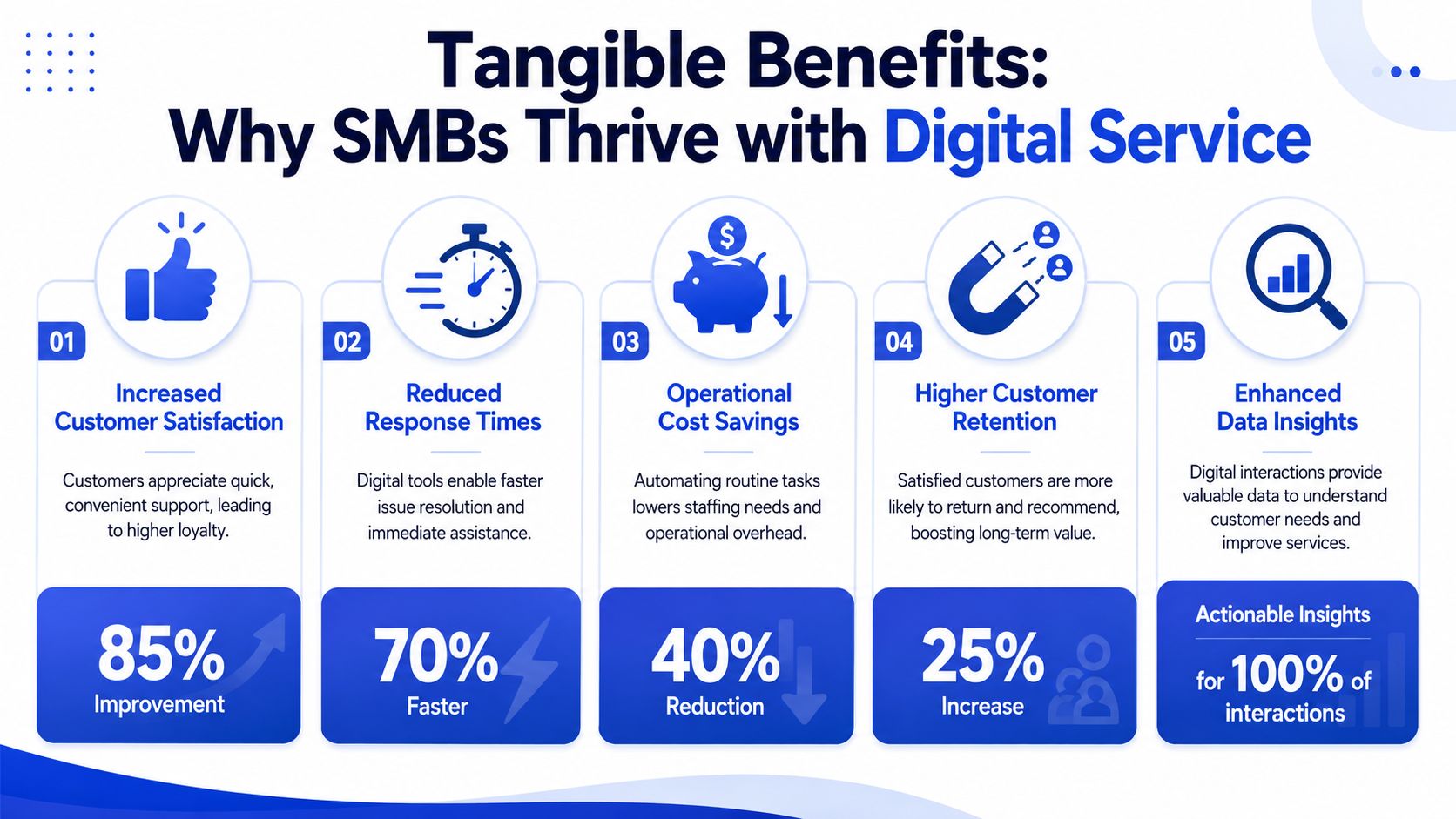
The clearest ROI usually appears in four places.
First, routine work gets removed from the human queue. Password questions, shipping policies, pricing clarifications, and booking basics don't need your best people every time.
Second, coverage improves. Digital channels and automation let customers ask for help when your team isn't online. That matters for ecommerce, SaaS, agencies, and any business with website traffic outside business hours.
Third, your team gets more focused. Instead of answering the same simple questions all day, they spend time on edge cases, revenue conversations, and situations where judgment matters.
A short explainer on digital support operations can help frame this before you set targets:
Finally, the operation becomes more visible. Digital interactions create records you can review, tag, and improve. You can't optimize what you never capture.
Which KPIs matter for SMBs
Not every metric deserves a dashboard tile. Start with the measures that change decisions.
According to expert guidance summarized in this discussion of omnichannel metrics for digital customer service, teams should track chat volume, containment, concurrency, agent utilization, CSAT, NPS, and customer effort, and tune them for asynchronous interactions as well.
For SMBs, I'd group them like this:
Customer outcome metrics: CSAT, customer effort, and first-contact resolution. These tell you whether people got help.
Automation metrics: containment and escalation patterns. These show whether self-service and AI are helping or merely deflecting.
Team efficiency metrics: concurrency, agent utilization, and response timing. These reveal staffing pressure and workflow design issues.
If containment rises while customer satisfaction or first-contact resolution drops, the system is probably hiding friction instead of removing it.
That trade-off matters. A chatbot that blocks customers from reaching a person can make your numbers look tidy while making the experience worse. Good digital customer service treats containment as an operational control, not a vanity metric.
For a small team, one practical review cadence works well. Check your top conversation reasons each week, review failed or escalated interactions, and adjust routing, help content, or prompts based on what customers asked.
Putting AI Agents to Work in Your Business
AI is now part of digital customer service whether a business has fully planned for it or not. Customers expect it. Teams are experimenting with it. The key question is whether you'll use it in a controlled way that improves operations.
According to AmplifAI's customer service statistics roundup, 88% of contact centers use AI in some capacity, but only 25% have fully integrated automation into daily workflows. The same source reports that AI agents have cut cost per call by 50%, and that 30% of service cases were resolved by AI in 2025, with that figure projected to reach 50% by 2027. It also notes that 81% of consumers believe AI has become part of modern customer service.
What AI should handle first
The best SMB use cases are narrow and repetitive. Start with the questions your team can answer in one or two sentences today.
Good first candidates include:
Order and policy questions: shipping, returns, availability, billing basics.
Product guidance: plan comparisons, feature availability, eligibility questions.
Lead qualification: collecting budget, timeline, use case, location, or team size before a sales follow-up.
Routing tasks: directing the customer to the right person, page, or workflow.
That's where tools like AI customer support platforms fit well. A business can train an agent on its own website, FAQs, pricing pages, and product information, then deploy it where customers already hesitate or ask repetitive questions.
What works and what usually fails
AI works when you treat it like an operations tool, not a magic employee.
It works when:
your knowledge base is current
answers map to real customer intent
escalation is easy
someone owns review and retraining
It usually fails when:
the business uploads messy content and hopes for the best
the AI is forced to answer questions outside its scope
customers can't reach a human
nobody reviews transcript quality
Start with high-volume, low-risk questions. That's where AI earns trust fastest and creates room for your team.
A common SMB mistake is launching AI on every page with broad instructions like “help users with anything.” That creates weak answers and unnecessary escalations. A better approach is to deploy on high-intent pages first. Pricing, checkout, demo booking, and account-help pages usually give the clearest early signal.
The payoff isn't just lower workload. It's cleaner service capacity. When AI handles the predictable questions well, your team can spend more time on exceptions, recovery, and sales conversations that benefit from human judgment.
Designing Smart Escalation and Analytics Flows
Automation only earns trust when customers can escape it cleanly. If your AI can't solve an issue, the handoff has to feel like progress, not punishment.
Build escalation before you automate more
A strong digital customer-service stack is built around intent detection, context retention, and knowledge retrieval, because those are the mechanisms that reduce waiting and routing friction, as explained in Talkdesk's guide to digital customer service.
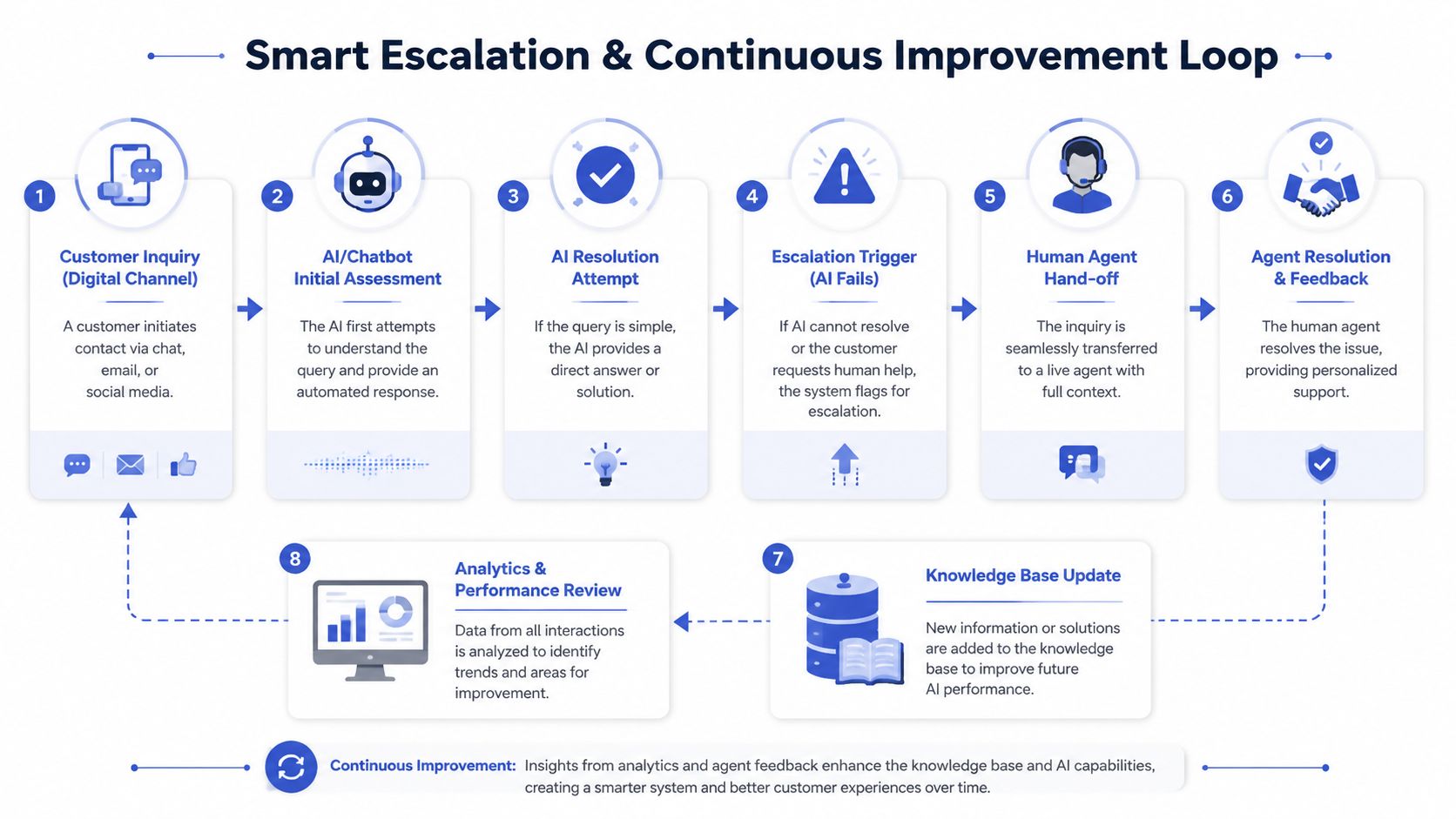
That sounds technical, but the operating principle is simple. The system should understand what the customer is trying to do, keep the conversation history, and pull the most relevant information quickly. When it can't resolve the issue, it should escalate with context intact so the customer doesn't need to start over.
A practical escalation flow looks like this:
Detect intent early. Is this billing, delivery, account access, plan selection, or something else?
Collect key details. Order number, account email, product name, urgency, preferred follow-up method.
Attempt a bounded resolution. Answer only if confidence is high and the knowledge source is current.
Escalate with a summary. Pass the issue, transcript, and gathered details to a human.
Close the loop. Use the resolved case to improve content or routing.
If your CRM, help desk, and chat tool don't share enough information for that handoff, customer data integration for support workflows becomes a priority before you expand automation further.
Use analytics to improve the system
The most useful analytics aren't flashy. They answer operational questions.
Where does the AI get stuck most often
Which intents trigger escalations repeatedly
Which help articles are missing, unclear, or outdated
Which conversations should have gone to a person sooner
Good escalation design protects customer trust. Good analytics protect the business from repeating the same service mistake at scale.
Many SMBs can outperform larger teams. A small business often reviews conversations faster, updates content faster, and changes routing rules without weeks of approval. If you create a habit of reviewing failed interactions and feeding them back into the knowledge base, the system gets better steadily instead of drifting.
Your SMB Digital Service Rollout Checklist
Most SMBs don't need a transformation program. They need a rollout they can finish.
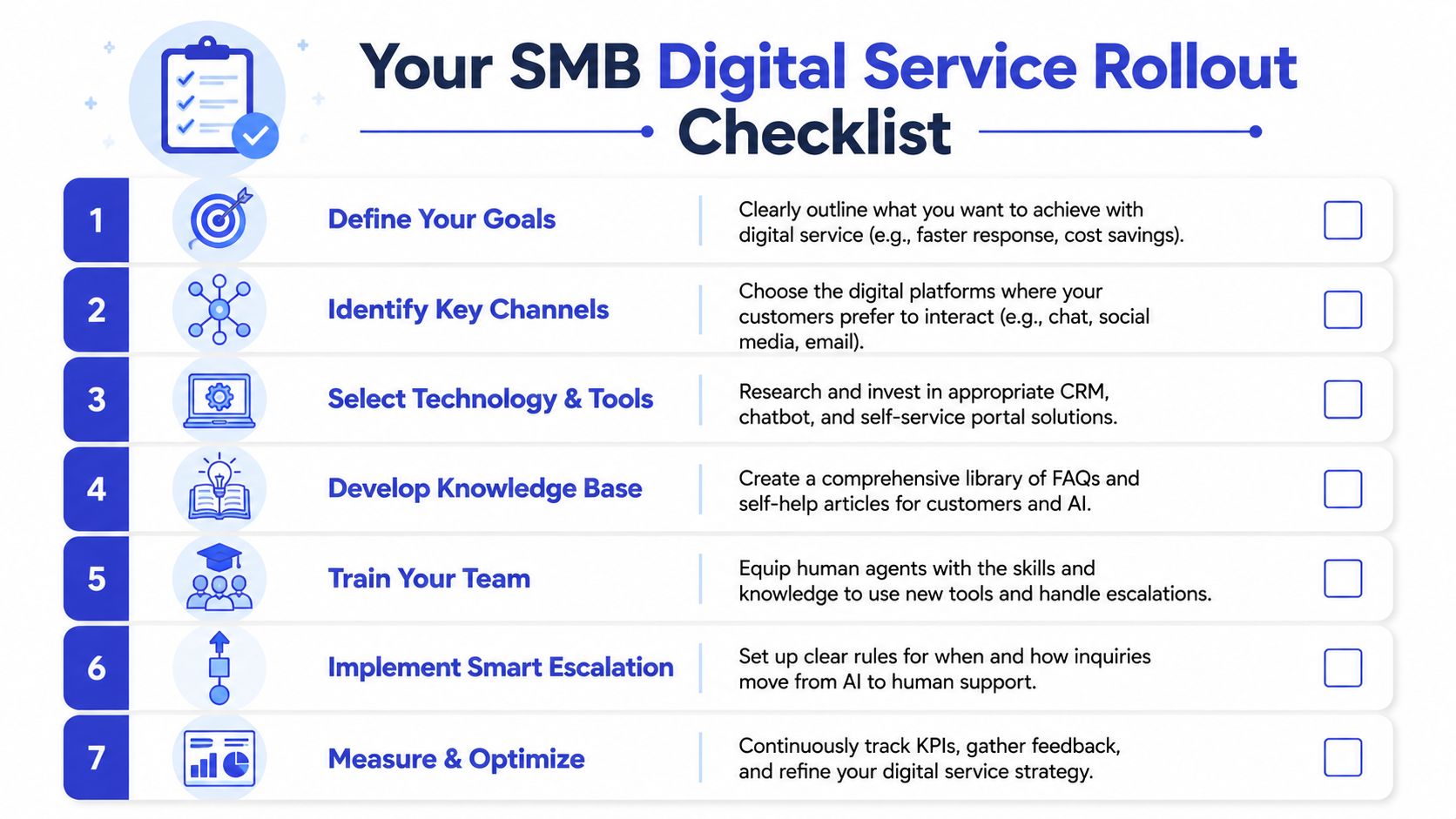
A phased rollout that stays manageable
Use this checklist as an operating sequence, not a wish list.
List your most common questions. Pull them from inboxes, chat logs, sales calls, and team memory. Don't overcomplicate it. Start with the top issues that repeat and consume time.
Choose one primary channel. If customers need help while browsing, start with chat. If issues are detailed and documentation-heavy, tighten up email and self-service first.
Clean up your source content. Product pages, shipping information, returns policies, onboarding docs, and pricing pages need to be current. Automation amplifies clarity, but it also amplifies bad documentation.
Deploy on high-intent pages first. Put digital service where customers hesitate, compare plans, abandon carts, or ask pre-sale questions.
Define escalation rules before launch. Decide which topics should always go to a human, what details must be collected, and who owns follow-up.
Track a small KPI set. Start with containment, CSAT, response time, and first-contact resolution. Add more only when you can act on them.
Review conversations every week. Look for failed intents, unclear answers, repeated escalations, and content gaps. Then update the system.
Here's the key discipline. Don't launch across every channel in week one. Roll out one journey, learn from real conversations, then expand. That approach keeps costs predictable, avoids team overload, and gives you a better chance of building digital customer service that works.
Frequently Asked Questions
What if my budget is very limited
Start with one channel and one use case. For most SMBs, that means website chat tied to a focused FAQ or AI agent for common pre-sale and support questions. You don't need a large stack on day one. You need a clean first workflow that reduces repetitive work.
Which channel should I start with first
Pick the channel closest to revenue or service pressure. If customers ask questions before buying, start with chat on pricing, product, or checkout pages. If your team spends hours answering long-form support questions, improve email workflows and self-service first.
How much time does it take to manage an AI agent each week
The answer depends on how often your products, policies, or offers change. In most SMB setups, the core work is reviewing failed conversations, updating source content, and refining escalation rules. If the business already maintains its website and FAQs regularly, ongoing management stays much easier.
Do I need a full knowledge base before I begin
No. You need enough accurate content to support your first use case. Start with the pages and documents your team already uses to answer common questions. Then expand the knowledge base based on real conversation gaps.
Will AI replace my support team
Not in any healthy SMB setup. AI should remove repetitive work, collect context, and handle simple requests quickly. Human agents still matter for judgment, empathy, exceptions, complaints, and high-value sales conversations.
What's the biggest rollout mistake
Launching automation without defining the human fallback. When customers get stuck in loops, trust drops fast. Build the handoff path first, then expand AI coverage after you know the experience is safe.
If you want to put this into practice, Chatgrow gives SMBs a straightforward way to train and deploy AI support agents on their own website content, FAQs, pricing pages, and product information, then add smart escalation and lead qualification as the workflow matures.
Related Posts
Continue Reading
More articles from the ChatGrow Team.