
Blog
How to Escalate an Issue: A Practical Playbook for 2026
By
Nelson Uzenabor

A customer is upset, the frontline agent is stuck, engineering says they need better reproduction steps, and your AI bot may have made the situation worse by answering with confidence when it should have handed off. That's usually the moment people say they need to “escalate an issue.”
The prevailing approach still treats escalation like an exception. It isn't. It's a core operating process. In B2B SaaS, approximately 35% of customer support tickets require escalation when initial-tier issues remain unresolved, and the average time to escalation can stretch to 45 to 90 minutes when structured triage criteria are absent, according to Count's escalation pattern analysis. If your process is vague, tickets sit, agents hesitate, and customers repeat themselves.
The fix isn't to escalate faster. The fix is to escalate cleaner, later when appropriate, and earlier when risk is obvious. That means clear triggers, a documented matrix, disciplined handoffs, automation that helps instead of hides problems, and a separate path for systemic failures such as broken workflows, brittle automations, and vendor-side defects.
Table of Contents
The Triage Framework When to Escalate an Issue
The first mistake teams make is treating escalation as a feeling. An agent senses a ticket is “getting serious,” so they send it upward. Another agent tries to hold onto a nearly identical issue for hours. That inconsistency creates queue chaos.
Define escalation before you try to manage it. In practice, an issue should count as escalated when it leaves the original owner's authority, skill range, or time window and moves to another resolver or decision-maker.
Use triggers, not intuition
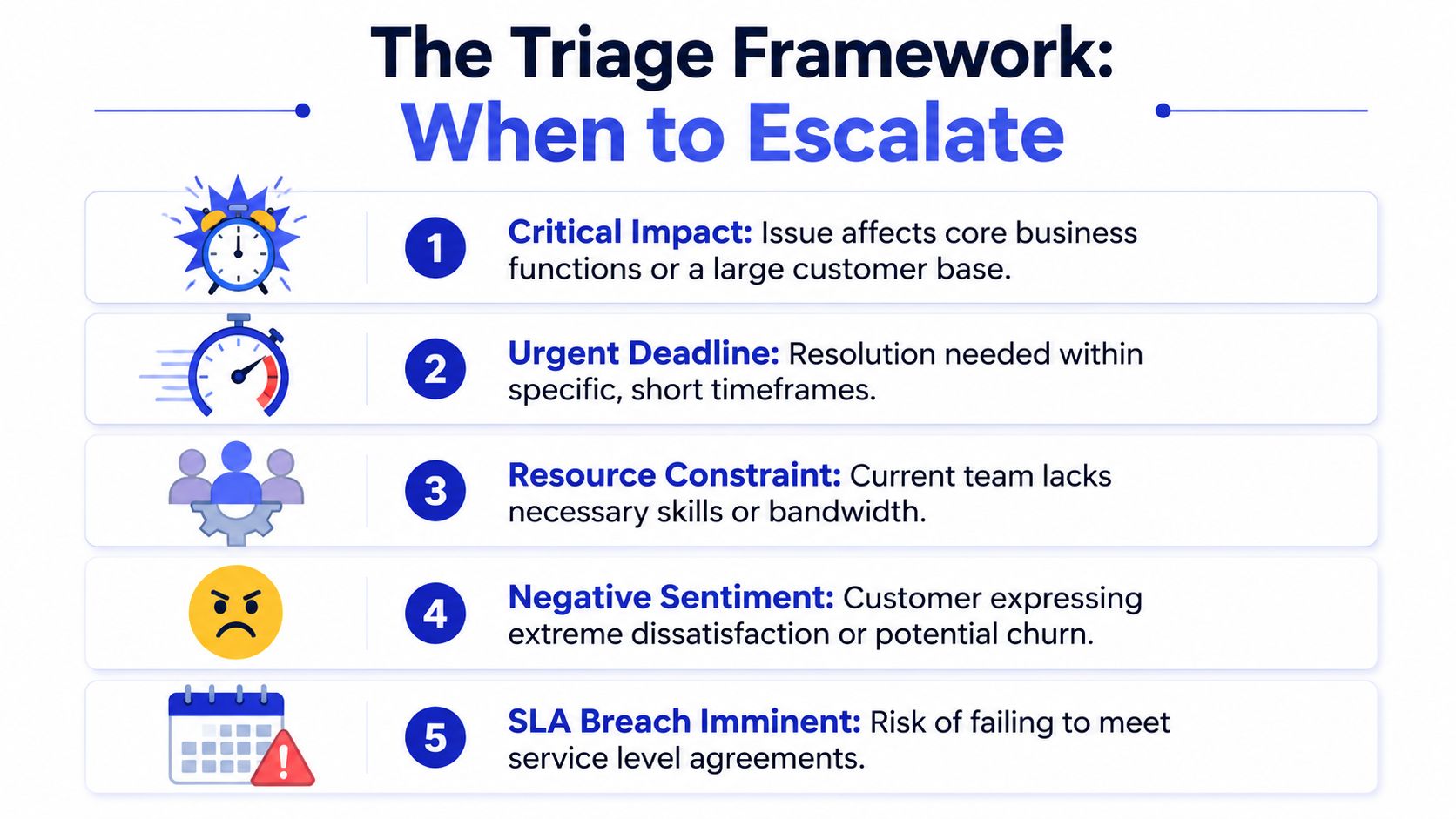
A workable triage framework usually starts with a short list of essential triggers:
Elapsed time: If the issue is unresolved after a defined period, it must be reviewed for escalation.
Customer sentiment: Strong frustration, churn risk, or an explicit demand for senior review should change priority.
Business impact: Revenue-blocking, workflow-blocking, or multi-user incidents should bypass normal queue logic.
Skill mismatch: If the current owner can't test, verify, or approve the next step, the ticket shouldn't stay parked.
SLA risk: If a team is likely to miss a commitment, the ticket needs intervention before the breach, not after.
One useful benchmark comes from Nextiva's customer escalation management guidance: customer escalation is most frequently triggered by resolution times exceeding 24 hours or CSAT scores below 2.5 out of 5, with 62% of escalations in the SaaS sector linked to unresolved service quality complaints. For smaller teams, that doesn't mean copying those exact thresholds blindly. It means picking thresholds your team can enforce every day.
Build a simple triage rule set
For most SMB support teams, I'd keep the first version plain:
Escalate immediately when the issue affects core product use, billing access, security perception, or multiple customers.
Escalate after due diligence when the agent has checked known fixes, confirmed the issue, and still can't move it forward.
Escalate on customer risk when language shifts from confusion to distrust, refund pressure, or cancellation intent.
Escalate on ownership gaps when the issue clearly belongs to engineering, finance, infrastructure, or an outside vendor.
Practical rule: If an agent can still make progress, don't escalate yet. If they're waiting on authority, expertise, or another system, escalate now.
A lot of complaint handling problems start one step earlier than escalation. The complaint wasn't categorized properly, so it never had a fair shot at being resolved at the front line. If your team still mixes product bugs, refund disputes, and onboarding confusion into one bucket, tighten that up first with a better customer complaint handling process.
What doesn't work
Two patterns fail over and over:
Premature escalation: Agents pass difficult tickets upward to reduce pressure, not because the next team can act.
Heroic retention: Strong agents keep issues too long because they want to solve everything themselves.
Neither is disciplined support. Good triage gives agents permission to own what they should own and move what they shouldn't.
Designing Your Escalation Matrix
Once your triggers are clear, the next problem is routing. A team can know that it needs to escalate an issue and still send it to the wrong person. That's where the matrix matters.
An escalation matrix is just a map of who owns what, in what order, with what fallback path. If you don't define backup ownership, tickets don't escalate. They drift.
Separate functional from hierarchical escalation
This distinction is where many teams get sloppy. Atlassian's escalation policy guidance gets this right: a strong escalation policy must distinguish between functional escalation to a team with higher technical expertise and hierarchical escalation to management, and it must define who receives the handoff if the primary responder is unavailable.
Functional escalation is for capability gaps. Hierarchical escalation is for urgency, risk, approvals, or executive visibility.
Here's the practical difference:
Escalation type | Use it when | Typical destination |
|---|---|---|
Functional | The current owner lacks the technical skill, system access, or specialist knowledge | Senior support, engineering, billing ops, vendor support |
Hierarchical | The issue needs policy approval, customer diplomacy, legal review, or senior accountability | Team lead, manager, director, executive sponsor |
If your agents send every angry customer to a manager, managers become a human spam filter. If they send every product defect to a lead instead of engineering, leads become ticket routers instead of leaders.
A quick visual can help when you're drafting your own structure:
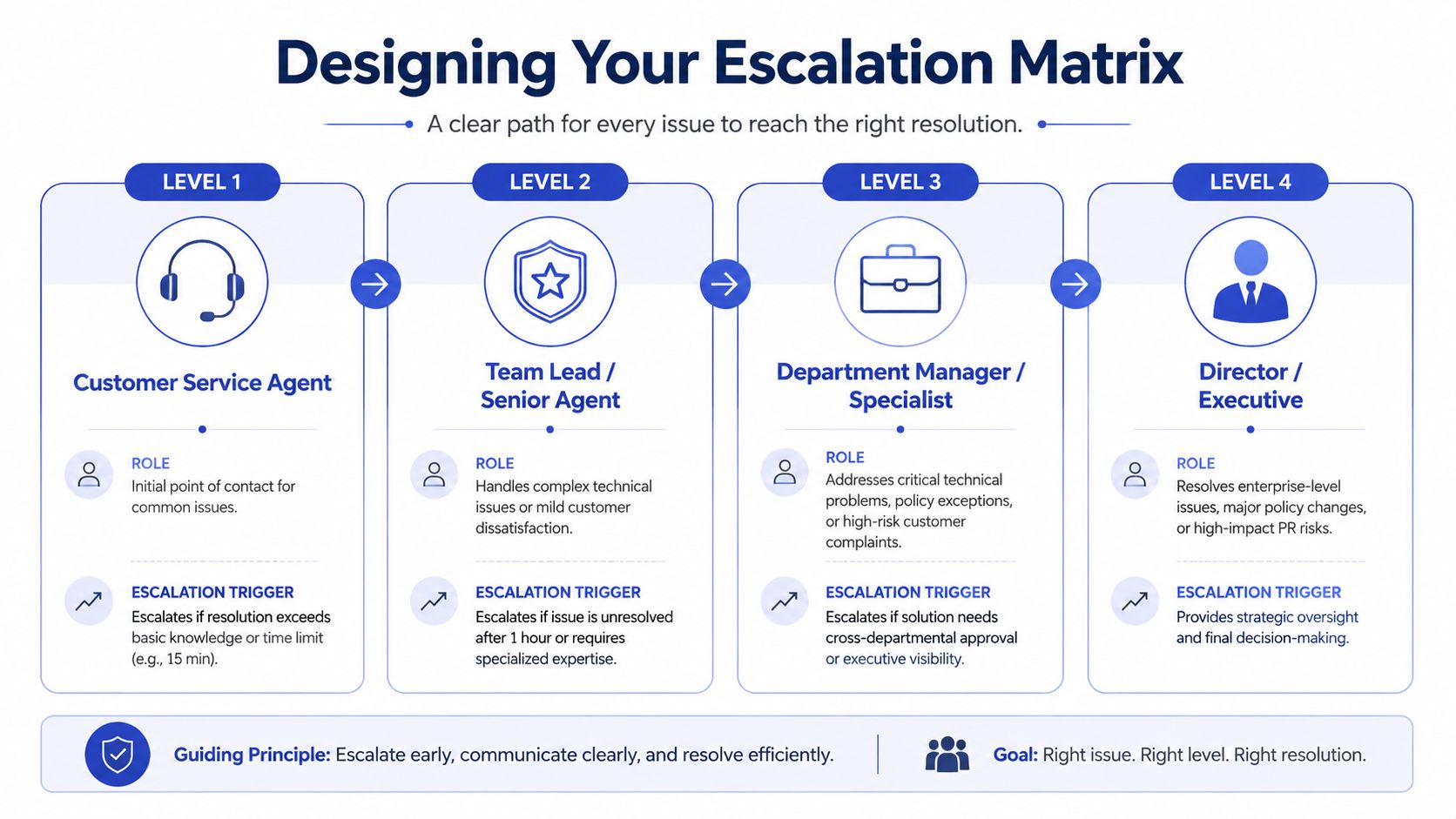
A practical four-level matrix
For a fast-growing tech company, a simple four-level model usually holds up:
Tier 1: Frontline support handles known issues, FAQs, standard troubleshooting, and low-risk account requests.
Tier 2: Senior agents or specialists handle advanced troubleshooting, edge cases, and customers showing early signs of churn.
Tier 3: Cross-functional specialists handle product defects, billing disputes requiring policy interpretation, vendor dependencies, and infrastructure-related failures.
Tier 4: Leadership handles legal exposure, major accounts, public-risk incidents, and exceptions that change policy or commitments.
Clean matrices reduce “hot potato” routing. Every transfer should answer one question: who can act next?
Map issue types to owners
Don't build the matrix around job titles alone. Build it around issue categories.
For example:
Billing error: Support verifies, finance reviews, manager approves exceptions if policy allows.
Product bug: Support reproduces, engineering investigates, product gets visibility if pattern repeats.
AI misfire: Support captures the conversation, automation owner reviews intent logic, engineering or vendor gets looped in if it's platform-level.
Enterprise complaint: Support owns communications, account team aligns messaging, leadership joins if contractual risk appears.
The matrix should also include fallback owners. People go offline, change shifts, or get pulled into live incidents. If you haven't named backup contacts, your matrix is incomplete.
The Perfect Handoff Playbook
Most escalations fail at the handoff, not the decision to escalate. The receiving team opens the ticket and finds three vague lines: “Customer still having issue. Tried basic troubleshooting. Please advise.” That's not an escalation. That's a context dump.
I've seen tickets burn hours because the first agent did real work but recorded none of it. The next owner repeated the same questions, the customer got irritated, and the team blamed the volume. The actual problem was a dirty transfer.
What due diligence looks like
PartnerHero's escalation management guidance calls out the most common pitfall clearly: teams escalate too quickly instead of challenging associates to work the problem within reasonable limits. Their guidance also notes that ideal processes require proof of due diligence, such as exploring solutions for 30 to 120 minutes, before transfer.
That doesn't mean every issue should sit for two hours. It means the first owner should prove they used their lane properly before involving the next one.
A clean pre-handoff checklist looks like this:
Problem statement: One sentence describing what is broken, not a pasted transcript.
Customer impact: What the customer cannot do right now.
Steps already taken: Tests run, articles checked, settings verified, workaround attempts.
Evidence collected: Screenshots, timestamps, error text, environment details, account context.
Specific ask: What the next team needs to decide, verify, or fix.
Don't escalate a mystery. Escalate a defined question.
A copy-paste escalation summary
Use this format inside your ticketing system, inbox, or Slack-to-ticket workflow:
Customer:
Issue:
Business impact:
What changed:
Troubleshooting completed:
Evidence attached:
Current hypothesis:
Requested next action:
Customer expectation set:
That last line matters. If the first agent hasn't told the customer what happens next, the handoff already feels broken from the customer's side.
What a good transfer sounds like
A strong handoff message to the customer is short:
Ownership clarity: “I'm involving our product specialist because this needs a deeper review than frontline support can provide.”
Progress recap: “I've attached the steps we already ran so you won't need to repeat them.”
Expectation setting: “You'll get the next update from us after specialist review.”
If your team needs a starting format, it helps to standardize the language with a support ticket response template so agents don't improvise under pressure.
What doesn't work is apologizing five times, escalating vaguely, and making the customer explain the issue again.
Automating Escalation with AI
Manual escalation breaks in predictable ways. Agents miss warning signs. Tickets sit in queues because nobody wants to overreact. Handovers lose detail because the system depends on people writing perfect notes while juggling ten conversations.
AI can improve that process, but only if you treat automation as structured triage, not as a shield between the customer and the truth.

What automation should handle
The best use of AI in escalation is narrow and operational:
Intent detection: It identifies whether the customer has a billing issue, product defect, access problem, or vendor-related incident.
Information collection: It gathers order details, timestamps, affected workflow, screenshots, and steps already attempted.
Trigger monitoring: It flags sentiment shifts, repeated failed answers, or account-specific requests.
Structured routing: It sends the ticket to the right queue with the right context packet already attached.
That's different from trying to auto-resolve everything. If the model doesn't know, it should surface uncertainty early.
One practical reference for operational design is SystemSculpt's walkthrough on setting up AI approval workflows. It's useful when you need rules for when automation can proceed on its own and when a person must approve or take over.
The hard part is escalating the automation itself
Many teams lack a playbook in such circumstances. The issue isn't a difficult customer or a weak agent. The issue is that the system answered incorrectly, routed badly, or enforced the wrong logic.
That gap matters. According to Atlassian Team Playbook's clean escalations page, 68% of customer support escalations in SMBs stem from rigid automation logic rather than human error, yet most guidance doesn't address how to escalate these algorithmic failures to engineering without blaming the support agent.
When that happens, use a separate escalation path with different questions:
Failure type | Route to | What to include |
|---|---|---|
Wrong answer from AI | Knowledge owner or automation manager | Prompt, source used, expected answer, customer impact |
Wrong workflow trigger | Ops or automation admin | Trigger rule, conversation path, failed branch |
Suspected model or platform bug | Engineering, then vendor if needed | Repro steps, logs, timestamps, confidence behavior |
A bad AI answer is not a coaching issue by default. Sometimes the process is broken, the content is stale, or the platform logic failed.
One option in this category is AI customer support software that supports intent-based handoff and escalation summaries. The value isn't that it replaces judgment. The value is that it captures enough structured context for humans to take over without starting from scratch.
What works and what doesn't
What works:
Build explicit escalation triggers for low confidence, repeated asks, and account-specific exceptions.
Store failed AI conversations for review by support, ops, and product.
Treat automation defects as product issues with owners and deadlines.
What doesn't work:
Telling agents to “just monitor the bot.”
Letting the AI continue after the customer has clearly asked for a human.
Treating every automation failure as user error.
Setting SLAs and Measuring Success
A customer reports that your billing page is failing for enterprise renewals. Support confirms it. Ops finds nothing wrong in the internal workflow. Engineering suspects the payment processor. Two hours later, the customer still has no clear update because every team is waiting on someone else.
That is an SLA problem, not just an escalation problem.
If your team cannot answer how long issues sit at each tier, how often they bounce, and who owns the next update, the process is running on memory and goodwill. That breaks fast when the issue crosses team boundaries or depends on an external vendor such as your AI provider, payments platform, or identity service.
Start with tier-specific commitments
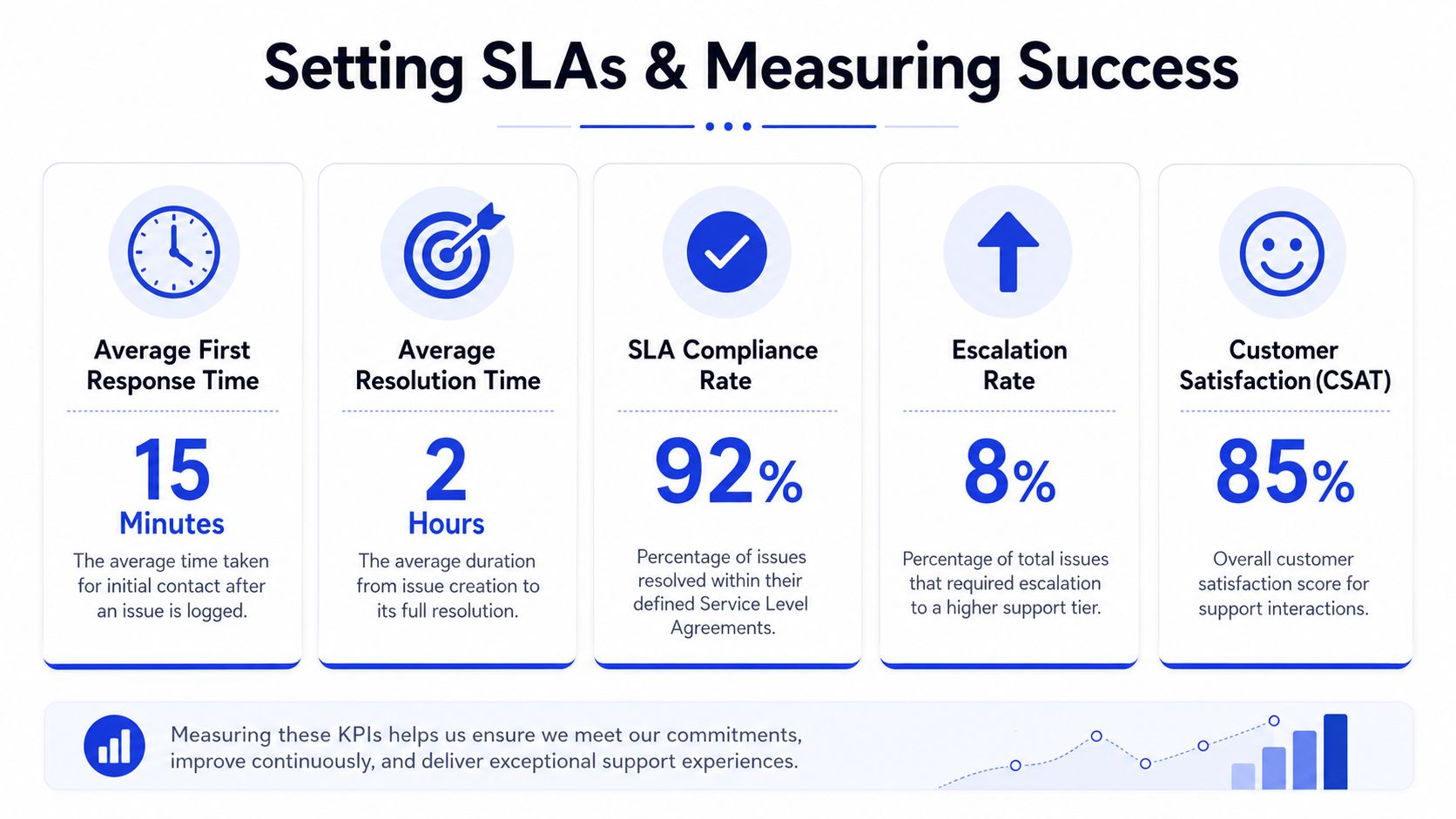
Good SLAs match the kind of work being done at each level. Tier 1 handles acknowledgment, initial diagnosis, and customer communication. Higher tiers handle root cause, cross-functional coordination, and fixes that may depend on engineering roadmaps or outside vendors.
In practice, that means setting different clocks for different moments:
Acknowledgment SLA: how fast the customer gets a real response after escalation
Acceptance SLA: how fast the receiving team confirms ownership
Update SLA: how often the customer or frontline agent gets progress updates
Resolution target: the expected time to fix, workaround, or close with a clear next step
These should vary by issue type. A locked account, duplicate charge, or outage needs a faster path than a reporting discrepancy or feature question. A suspected internal defect also needs a different target than a suspected vendor-side failure, because your team controls one and can only press on the other.
One rule I always keep: never promise the customer the same resolution window you use internally. Internal teams slip. Vendors miss targets. Give yourself enough room to keep the customer informed without breaking trust on every hard case.
Measure handoff quality, not just speed
Teams often track escalation volume because it is easy to count. It is a weak health metric on its own. A higher escalation rate can mean poor training, but it can also mean agents are correctly identifying systemic issues earlier.
The better metrics are the ones that expose friction:
Time to escalation: how long the issue stayed in the wrong queue before someone moved it
Acceptance time by receiving team: whether engineering, ops, finance, or vendor management is picking cases up on time
Escalation reopen rate: whether the issue actually got solved or just reassigned
SLA breach rate by tier: where work is getting stuck
Vendor-dependent resolution time: how long platform or provider issues remain open after internal confirmation
Customer update compliance: whether someone kept the customer informed while the back-end teams worked
That last one matters more than many leaders expect. Customers usually tolerate a slower fix better than a silent queue.
For teams building more formal support governance, a broader strategic guide to BPO SLAs is useful for pressure-testing how service commitments should map to ownership and reporting.
Review escalations by failure pattern
The closed ticket is only the starting point. The useful question is why the case needed escalation at all.
Review patterns in weekly operations meetings:
Which escalations were appropriate and timely?
Which sat too long in Tier 1 because the trigger was too vague?
Which should have gone straight to ops, finance, security, or an external platform vendor?
Which cases exposed a broken process rather than an isolated support miss?
Which AI or automation escalations point to stale content, bad routing, or a platform defect?
Fast-growing teams frequently miss the bigger win. They review agent behavior, but they do not review workflow failures. If the same issue keeps reaching Tier 2 because a refund rule is unclear, a bot hands off too late, or your AI provider intermittently returns the wrong classification, the fix belongs in process design, not agent coaching.
Strong escalation programs reduce repeat work because they turn recurring incidents into queue rules, playbook changes, vendor tickets, and product fixes. That is how SLAs become an operating system instead of a reporting exercise.
Frequently Asked Questions About Escalations
Edge cases are where escalation policies usually collapse. The rules sound clean until a vendor issue, a failing bot, or an angry enterprise customer lands in the queue at once. These are the situations that need explicit answers.
Should I escalate to a manager or a specialist first
Choose the person who can act, not the person with the highest title. If the issue needs technical diagnosis, route it functionally. If it needs a policy exception, contract interpretation, or customer diplomacy, escalate hierarchically.
A specialist can fix what a manager can't. A manager can approve what a specialist shouldn't.
When should I escalate an issue to an external vendor
Escalate to the vendor when your team can reproduce the problem, isolate it to the platform layer, and define what internal remediation cannot solve. Don't wait until your team is exhausted and the customer is already angry.
That delay is common. Arcadia's referenced data says 74% of SMBs wait too long to escalate platform-level bugs to vendors because they fear damaging the relationship, leading to an average 4.2-day revenue loss per unresolved incident. The practical takeaway is simple: diplomacy matters, but delay costs more.
Escalating to a vendor isn't a sign your team failed. It's a sign your team found the actual boundary of control.
How do I handle a customer who asks to escalate immediately
A customer request matters, but it shouldn't override your process automatically. Confirm the issue, summarize what's already known, and explain what kind of escalation is happening.
If they want “a manager,” ask what outcome they expect. Sometimes they need authority. Sometimes they need technical certainty. Those are different paths.
What should be included in an escalation packet
Use a minimum packet. If one of these is missing, the issue usually bounces:
Question | Short Answer |
|---|---|
What is the issue | State the exact failure in one sentence |
Who is affected | Name the account, user group, or system impacted |
What has been tried | List tests, checks, and workarounds already completed |
What is the impact | Explain what the customer cannot do or what risk exists |
What is needed next | Ask for a decision, investigation, fix, or approval |
What expectation was set | Note the promised update window and owner |
How do I escalate a broken workflow instead of a person
Name the failure as a system problem. Don't frame it as “support missed this” if the underlying issue is a brittle automation rule, a stale knowledge base, or an approval path with no owner. The escalation should go to the process owner with evidence of the failure path.
That's especially important in AI-enabled support. If the bot answered incorrectly because the content was incomplete or the routing logic was wrong, the right escalation target may be ops, engineering, or the platform vendor, not the frontline agent.
If you're building or cleaning up your escalation process, Chatgrow is one way to structure the messy parts. It lets teams train AI agents on their own support content, collect key details during triage, and hand off conversations with concise summaries when human follow-up is needed. That's useful when you want fewer dropped contexts, cleaner routing, and a clearer line between issues the AI can handle and issues that should move to a person fast.
Related Posts
Continue Reading
More articles from the ChatGrow Team.


