Blog
How to Handle Customer Complaints: 2026 Expert Playbook
By
Nelson Uzenabor
Customer complaints are one of the few places where retention risk, process failure, and brand trust show up in plain language.
Handled well, a complaint gives you three wins at once. You can recover the customer in front of you, identify what broke behind the scenes, and stop the same issue from hitting the next ten customers. Handled poorly, the cost is not limited to one refund or one tense email. You lose future revenue, create repeat contacts, and force your team to spend time cleaning up preventable problems.
Strong complaint handling is an operating discipline. Small businesses do best when they treat it that way from the start. That means clear intake rules, response targets your team can hit, escalation paths that do not depend on guesswork, and scripts that lower tension without sounding robotic.
AI helps most when it supports that operating model. With a solid workflow, AI can send instant acknowledgment, capture the facts your team needs, tag urgency, draft replies, and route cases to the right person. Without that foundation, automation only speeds up confusion.
This guide is built for teams that need more than theory. You'll see a practical framework, SLA examples, triage logic, de-escalation scripts, and a modern setup for using AI support agents without losing human judgment where it matters most.
Table of Contents
Why Every Complaint Is a Gift in Disguise
A complaint is one of the few moments when a customer tells you, in plain language, where your operation failed them and gives you a chance to recover the account.
Many unhappy customers leave without complaint. The ones who complain are giving you usable signal. They are showing you where expectations broke, what part of the journey caused friction, and whether your team can restore trust under pressure.
That has real operating value. A complaint can expose a broken refund rule, a weak handoff between sales and support, confusing billing language, poor delivery communication, or onboarding gaps that looked fine internally but fail in live use. If you run an SMB, that kind of feedback is cheaper than a consultant and more honest than an internal status meeting.
Speed still matters, but not because fast replies look good on a dashboard. Speed lowers uncertainty. A quick acknowledgment tells the customer that someone owns the case, that they will not need to restart the story with three different people, and that a fix is already being worked. Teams that also offer live chat support for urgent customer questions often catch frustration earlier, before it turns into a cancellation request or public complaint.
The first response has a simple job. Confirm the issue, show ownership, and set the next update time.
That is why complaint handling should be treated as a retention and improvement system. Strong teams do two things at once. They protect the relationship in front of them, and they capture the complaint in a way that helps prevent the next one. In practice, that means every case needs both a human response and an operational record.
I have seen small support teams make this shift quickly once they stop treating complaints as isolated fires. The goal is not to improvise a polite reply and hope the problem disappears. The goal is to run a repeatable process: acknowledge fast, triage correctly, resolve with clear ownership, and log the root cause so the same issue does not keep draining time next month.
Handled well, a complaint is not just damage control. It is a live test of your service standards, your escalation discipline, your scripts, and your workflow. It also gives you the raw material for better SLAs, better automation rules, and better AI support prompts later in the process.
A Five-Stage Framework for Complaint Resolution
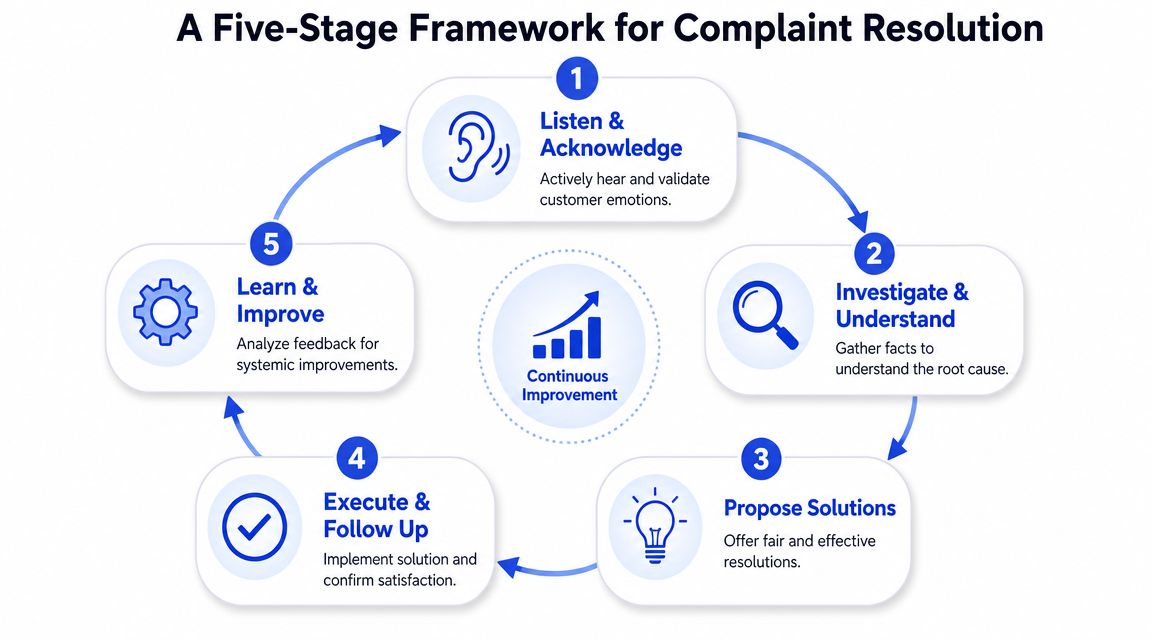
Most complaint handling breaks down because there's no shared workflow. One agent improvises, another over-investigates, a manager gets pulled in late, and nobody captures what should change afterward. A better model is a closed-loop process.
Mints Design's complaint management guidance describes a five-stage control loop: intake and recording, triage and acknowledgement, investigation and root-cause analysis, resolution and corrective action, and follow-up plus continuous improvement. It also warns that the biggest operational risk sits at the front. If intake is weak, complaints get lost before anyone can fix them.
Start with structured intake
A complaint is not “an angry email in the inbox.” It is a record that needs fields, ownership, and status.
Capture these basics every time:
Who is affected: Customer name, contact details, account or order reference
What happened: Complaint category, customer's own words, channel used
When it happened: Dates, timestamps, and sequence of events
What supports it: Screenshots, invoices, chat logs, shipment details, call notes
What happens next: Assigned owner, priority level, promised next update
If you skip structure here, your team ends up searching Slack, email threads, inbox folders, and browser tabs just to reconstruct the issue. That slows down everyone and irritates the customer.
Move from response to root cause
After intake, triage decides how fast and how high the issue should move. Not every complaint deserves the same path. A public accusation, a billing error affecting renewal, and a cosmetic UX complaint should not sit in the same queue with the same timer.
Investigation is where many teams drift. They gather too much, too late, and involve too many people. Good investigation answers four things:
What happened
Why it happened
What the customer needs now
What must change so it doesn't happen again
The strongest complaint teams solve the customer's immediate problem and the business's underlying problem in the same workflow.
Resolution should lead to a clear corrective action. That might be a refund, replacement, account correction, service recovery, manual workaround, or policy exception. The customer should know what was done, what to expect next, and who owns any remaining action.
Follow-up is where the loop closes. Confirm the fix worked. Ask whether the issue is fully resolved from the customer's perspective. Then tag the case for trend review. If the same complaint keeps appearing, it isn't a service issue anymore. It's a product, policy, or process issue.
Building Your Triage and Escalation Playbook
A complaint queue without triage becomes first in, first out. That sounds fair. It usually isn't.
The useful distinction is not “VIP versus non-VIP.” It's severity and urgency. Severity asks how much damage the issue can cause. Urgency asks how fast that damage can spread or intensify. A private refund question might be low urgency but moderate severity. A public post claiming your team ignored a safety or billing issue is high on both.
Prioritize by severity and urgency
Use a simple matrix:
Priority Level | Description | First Response Time | Resolution Target |
|---|---|---|---|
Critical | Public, reputation-sensitive, legal-risk, account lockout, payment failure, or issue blocking core service | Immediate acknowledgment | Fast-track with continuous updates until resolved |
High | Customer can't complete a purchase, use the service, access an order, or receive a promised outcome | Same business day | Resolve as quickly as the responsible team can act |
Medium | Friction, confusion, partial failure, repeat complaint, or unresolved follow-up | Within your standard support window | Resolve in normal operations with clear next steps |
Low | Minor inconvenience, feature request framed as complaint, isolated dissatisfaction with limited business impact | Within your standard support window | Bundle with routine queue management |
This table is intentionally operational, not theoretical. It gives your team a starting point even if you don't have enterprise tooling.
For channels where customers expect real-time interaction, a fast acknowledgment matters even more. If you're reviewing your support stack, the practical trade-offs in live chat support workflows are worth studying because chat changes both customer expectations and queue design.
Use SLAs that your team can actually hit
ECI Solutions' summary of complaint resolution guidance cites the Legal Ombudsman benchmark to acknowledge complaints within two working days and aim to conclude the full process within eight weeks. The more important operational lesson is not the exact benchmark. It's that delaying acknowledgment while searching for a perfect fix makes the complaint worse.
For SMBs, the right SLA is one your team can consistently meet. A missed aggressive target erodes trust faster than a realistic target that's clearly communicated.
Build SLAs around these moments:
Acknowledgment SLA: When the customer first hears back
Ownership SLA: When a named person takes the case
Update SLA: When the customer receives progress if resolution takes time
Resolution SLA: When the issue should be fixed or formally concluded
Don't promise a finish date until you know who has to act, what systems are involved, and whether a third party is in the chain.
Define escalation before you need it
Escalation should be rules-based, not personality-based. If your process depends on who happens to be online, cases will stall.
Escalate immediately when:
The complaint is public and could affect reputation
The issue involves money such as refunds, duplicate charges, or contract disputes
The customer is blocked from using a paid product or time-sensitive service
The complaint repeats after a prior resolution attempt
The issue crosses teams such as support, billing, operations, and product
The frontline agent lacks authority to offer the needed remedy
A good escalation packet is short. Summary, timeline, customer impact, evidence, action already taken, requested decision. Senior people don't need the whole thread. They need the case distilled.
The Right Words Using Scripts That De-escalate
Language changes outcomes. Not because customers want polished phrases, but because wording signals whether your business is defensive, indifferent, or in control.
That matters more than many teams realize. In the earlier section, the service risk was already established. When a complaint is tied to service quality, poor handling pushes customers toward competitors. The frontline response is not just etiquette. It's retention work.
The opening script that lowers tension
The first reply has three jobs. Acknowledge the issue, validate the frustration, and show ownership.
Use a structure like this:
“Thanks for flagging this. I'm sorry you've had this experience. I understand why that's frustrating. I'm reviewing the details now and I'll take ownership of getting this moved forward. Here's what I need from you, and here's what happens next.”
That works because it avoids two common mistakes. It doesn't debate the customer's version before you have facts. And it doesn't offer a hollow apology with no action attached.
For written channels, keep the message short. For phone or chat, mirror the customer's pace without copying their emotional intensity.
If your team needs help drafting replies consistently, tools like an AI reply generator for support responses can speed up first drafts, but agents still need judgment before sending.
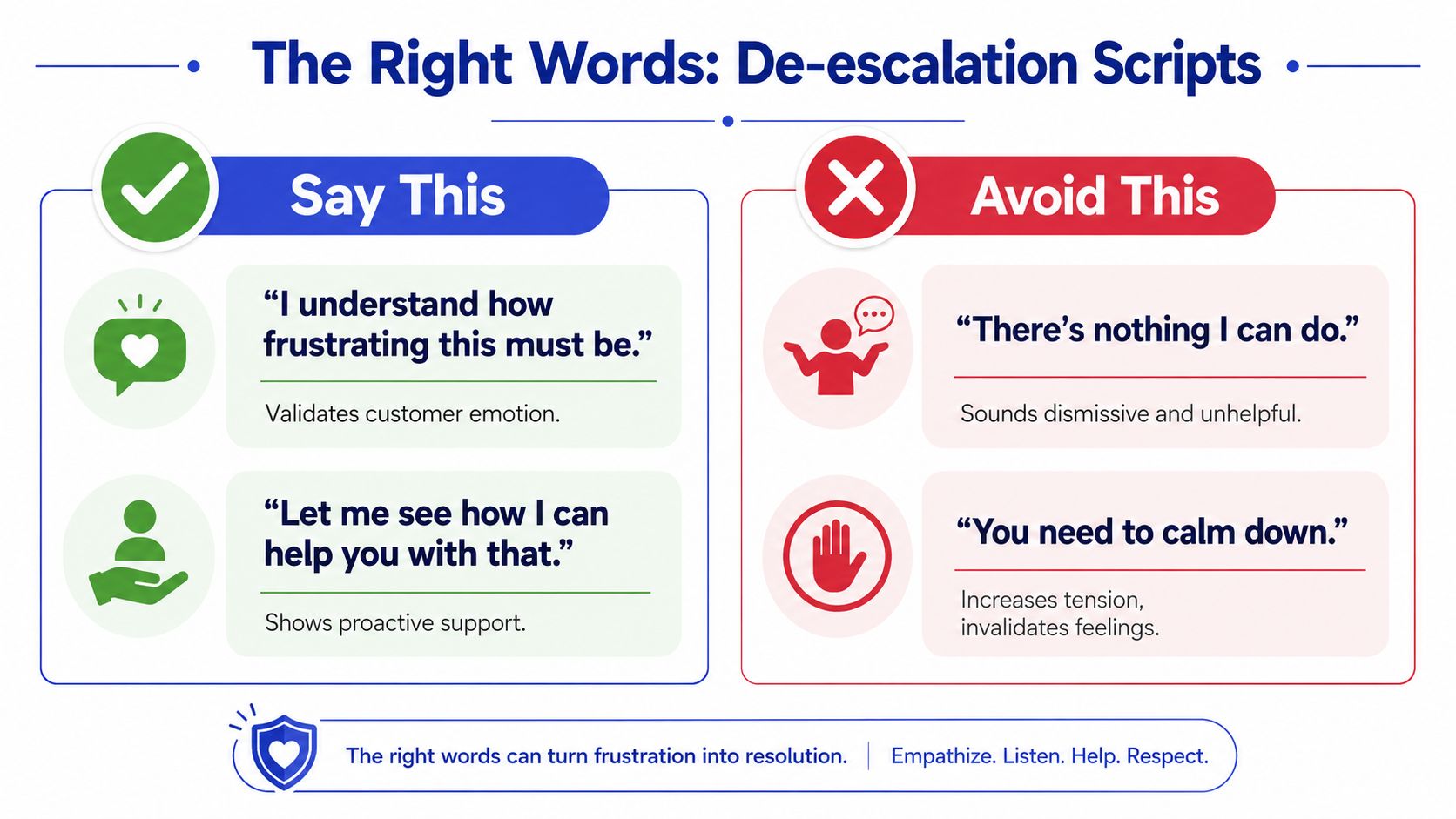
Say this and avoid this
Use language that communicates ownership and momentum.
Say this: “I can see why this caused frustration.”
Avoid this: “That's just our policy.”
Say this: “Let me check the full history so you don't have to repeat yourself.”
Avoid this: “Can you explain everything again?”
Say this: “Here's what I can do right now.”
Avoid this: “There's nothing I can do.”
Say this: “I'm escalating this with the details attached so you won't lose context.”
Avoid this: “You'll need to contact another department.”
Say this: “I can't confirm that yet, but I can confirm the next update time.”
Avoid this: “I'm sure it'll be fixed soon.”
What de-escalates isn't performative empathy alone. It's empathy plus competence. Customers calm down when they feel understood and see progress.
A closing script that confirms the fix
Too many interactions end when the team does the action, not when the customer recognizes the issue as resolved.
Use a close like this:
“We've completed the correction on our side. You should now be able to access your account and use the service normally. If anything still looks off, reply directly to me and I'll keep the case open. I'd also like to confirm that this resolved the issue from your perspective.”
That last line matters. Businesses often close tickets based on internal completion. Customers judge closure based on whether their problem is gone.
Automating Your Workflow with AI Support
AI is most useful at the front of the complaint workflow, where speed, consistency, and structured data matter most.

The wrong way to use AI is as a wall between the customer and a real solution. Customers notice that quickly. The better use is to make the first minutes of complaint handling fast and organized. That means instant acknowledgment, basic fact collection, intent detection, and clean handoff when a human is needed.
For teams building this capability, it helps to think in terms of automated customer service workflows rather than chatbot scripts. The workflow matters more than the interface.
What AI should handle first
AI does well with repeatable complaint tasks that follow known paths.
Examples include:
Intake collection: Order number, email, account ID, affected product, screenshots, timeline
Category tagging: Billing issue, login problem, delivery delay, refund request, service quality complaint
Immediate acknowledgment: Confirm receipt and tell the customer what happens next
Simple resolutions: Status checks, policy clarification, known incident messaging, routine next-step instructions
Routing: Send the case to billing, support, operations, or account management with a concise summary
AI saves time without sacrificing quality. It prevents the “please repeat everything” problem and shortens the path to a useful human interaction.
A practical build looks like this:
Customer submits complaint in chat, email form, or website widget.
AI acknowledges immediately and gathers structured details.
AI checks whether the issue matches a known self-serve or standard resolution path.
If yes, it completes that path and records the case.
If no, it escalates with a summary, evidence, sentiment cue, and recommended priority.
Here's a visual example of what that handoff mindset looks like in practice:
Where human agents still matter most
Humans should handle cases where judgment, negotiation, or emotional repair matters.
That usually includes:
Public complaints that need reputation awareness
Compensation decisions that require discretion
Complex failures involving multiple systems or teams
Repeat complaints where prior trust is already damaged
Sensitive cases involving contracts, safety, compliance, or vulnerable customers
AI should reduce waiting and admin. Humans should handle nuance, exceptions, and trust repair.
The best mixed model is simple. Let AI handle speed and structure. Let people handle accountability and recovery. When those roles are clear, customers get faster responses and better outcomes.
Turning Complaint Data into Proactive Improvements
Closing tickets is not the finish line. If the same issue keeps returning, your team is doing support work that operations, product, billing, or onboarding should have already prevented.
That matters because bad experiences have outsized consequences. Heretto's summary of customer experience research notes that 32% of consumers said they would stop doing business with a brand they loved after just one bad experience in its discussion of customer experience and complaint handling gaps. The obvious implication is service recovery. The more useful implication is prevention.
Track the signals that change decisions
Teams commonly track volume. Fewer track what helps them act.
Focus on measures that reveal operational weakness:
First response time: Are customers hearing back fast enough to trust the process?
Time to ownership: How long until one person clearly owns the issue?
Resolution time by category: Which complaint types drag because the workflow is broken?
Reopen rate: Which “resolved” cases weren't resolved?
Complaint volume by source: Are problems entering through email, chat, social, or reviews?
Complaint volume by category: Are billing, fulfillment, onboarding, or access issues rising?
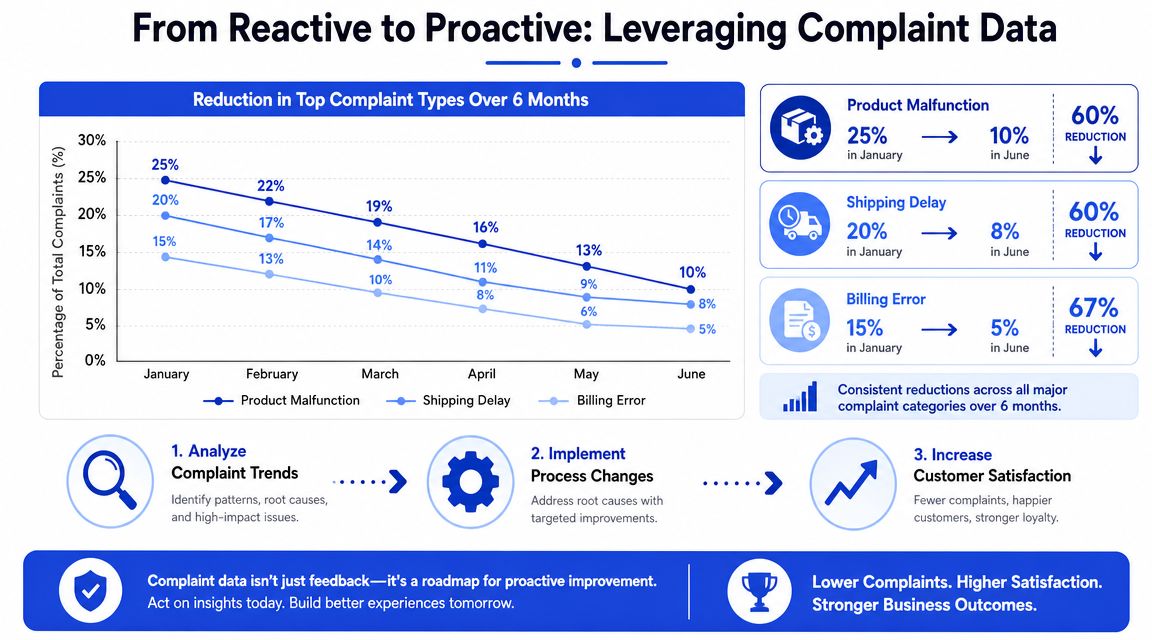
A complaint dashboard should help someone make a decision this week. If it only tells you that agents were busy, it isn't useful.
Turn recurring complaints into fixes
Once patterns appear, assign them to the team that can remove the cause, not just answer the symptom.
For example:
Billing complaints repeating: Review invoice wording, renewal notices, checkout messaging, and refund flow
Access issues recurring: Audit login instructions, password reset path, and account provisioning steps
Order status complaints piling up: Tighten fulfillment updates and customer-facing tracking communication
Service complaints clustering around one handoff: Rewrite internal ownership rules between teams
One complaint can be handled by support. A recurring complaint needs process correction. That's the point where customer experience leadership stops being reactive and starts shaping the business.
A strong complaint process doesn't just rescue individual customers. It removes the reasons future customers would complain.
The practical test is simple. After each monthly review, ask: what did we change because of complaint data? If the answer is “nothing,” you're recording pain, not learning from it.
If you want a faster way to acknowledge complaints, capture clean case details, and route issues to the right human without losing context, ChatGrow gives SMBs a practical way to deploy AI support agents around the clock. You can train an agent on your site, FAQs, pricing, and product information, automate common complaint intake and routine replies, and use smart escalation to pass complex cases to your team with concise summaries. That helps you respond faster without turning complaint handling into a robotic dead end.
Related Posts
Continue Reading
More articles from the ChatGrow Team.


