Blog
What Is a Live Chat? Your 2026 Explainer for Support & Sales
By
Nelson Uzenabor

A visitor is on your pricing page right now. They're interested, but one unanswered question is slowing them down. Maybe they want to know if you integrate with their tool, whether shipping is available to their region, or if they can speak to someone before buying.
If your only option is a contact form, that moment often passes. Live chat exists to catch that moment while the buyer is still engaged.
For many businesses, the question isn't just what is a live chat. It's whether live chat still matters when bots, AI agents, and automation are reshaping customer service. It does, but its role has changed. Live chat is no longer just a little chat box in the corner of a website. It's a strategic channel for support, lead qualification, and sales, especially when human agents and AI work together.
Table of Contents
What Is Live Chat and How Does It Work
A simple way to understand live chat is this. It's like having a helpful store clerk standing near the aisle where customers hesitate. The customer doesn't need to leave the store, find a phone number, or wait for an email reply. They just ask, and someone answers in real time.
That's the core answer to what is a live chat. It's a real-time conversation channel placed inside a website or mobile app, usually as a small widget in the corner of the screen. People click it, type a question, and begin an immediate conversation with a support rep, sales rep, or automated assistant.
What the customer experiences
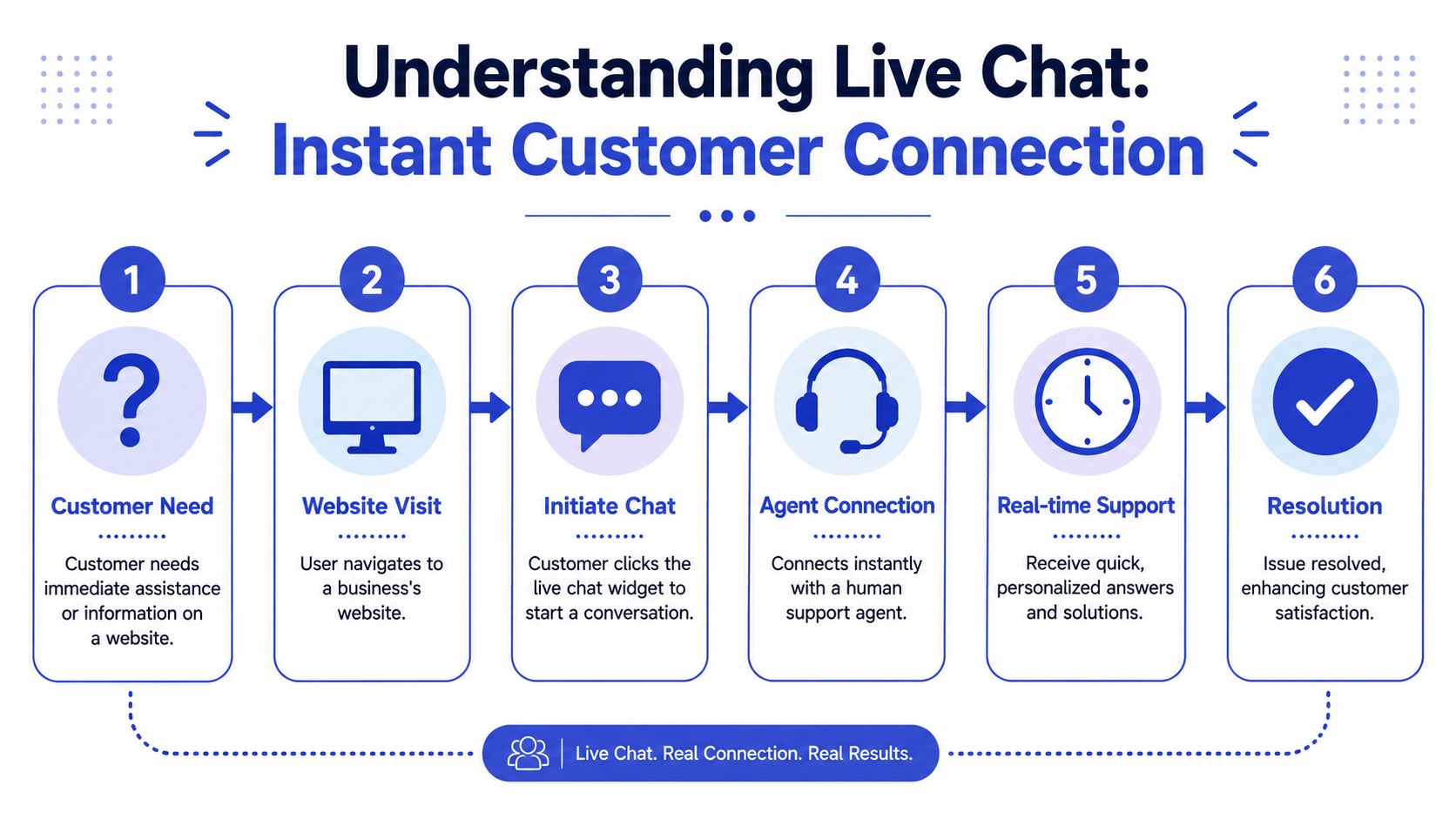
From the visitor's point of view, live chat feels simple:
They land on a page and have a question.
They click the chat widget instead of hunting for contact details.
They get an answer right away, or at least a clear response that the conversation has started.
That speed is a big reason the channel matters. In a survey of U.S. online adults, 53% said they had used live chat to get help from a company, and 58% of those users said they used it specifically for customer service. Preference data in the same source shows 41% of consumers prefer live chat for support, compared with 32% for phone and 23% for email, according to Nextiva's live chat statistics roundup.
What happens behind the scenes
The technology sounds more mysterious than it is. A business adds a chat widget to its site or app. When a visitor opens it, the system starts a live messaging session and routes that conversation to the right destination.
Behind that simple interface, the system has to keep the conversation stable and current. As Ably's explanation of live chat features notes, live chat is a synchronous, text-based support channel that depends on low-latency messaging, automatic reconnection, and presence handling so messages arrive in real time and sessions recover cleanly if the network drops.
Practical rule: If the chat feels delayed, broken, or forgetful, customers stop treating it like a conversation and start treating it like a form.
The three-step version
If you're a business owner, this is the plain-English version of how it works:
Step | What happens | Why it matters |
|---|---|---|
Click | The visitor opens the widget and starts typing | Low friction means more people ask before leaving |
Session starts | The platform creates a live conversation tied to that visitor | Context stays together instead of getting scattered across emails |
Agent responds | A human, bot, or AI agent replies in real time | Fast answers move support and sales forward |
That's why live chat feels different from email. Email is more like leaving a note at the front desk. Live chat is closer to speaking to someone while you're still standing at the counter.
Live Chat vs Chatbots vs AI Agents
A lot of business owners lump these tools together. That's understandable because they all appear in a chat window. But they are not the same thing.
Live chat usually means a human-to-human conversation.
Chatbots usually follow fixed rules.
AI agents aim to understand intent, answer naturally, and pull from business knowledge.
Early in evaluation, it helps to think of them this way. A live chat agent is like a skilled staff member at the desk. A chatbot is like a phone menu turned into text. An AI agent is more like a digital teammate that can handle routine conversations and know when to hand things off.
Here's a side-by-side view:
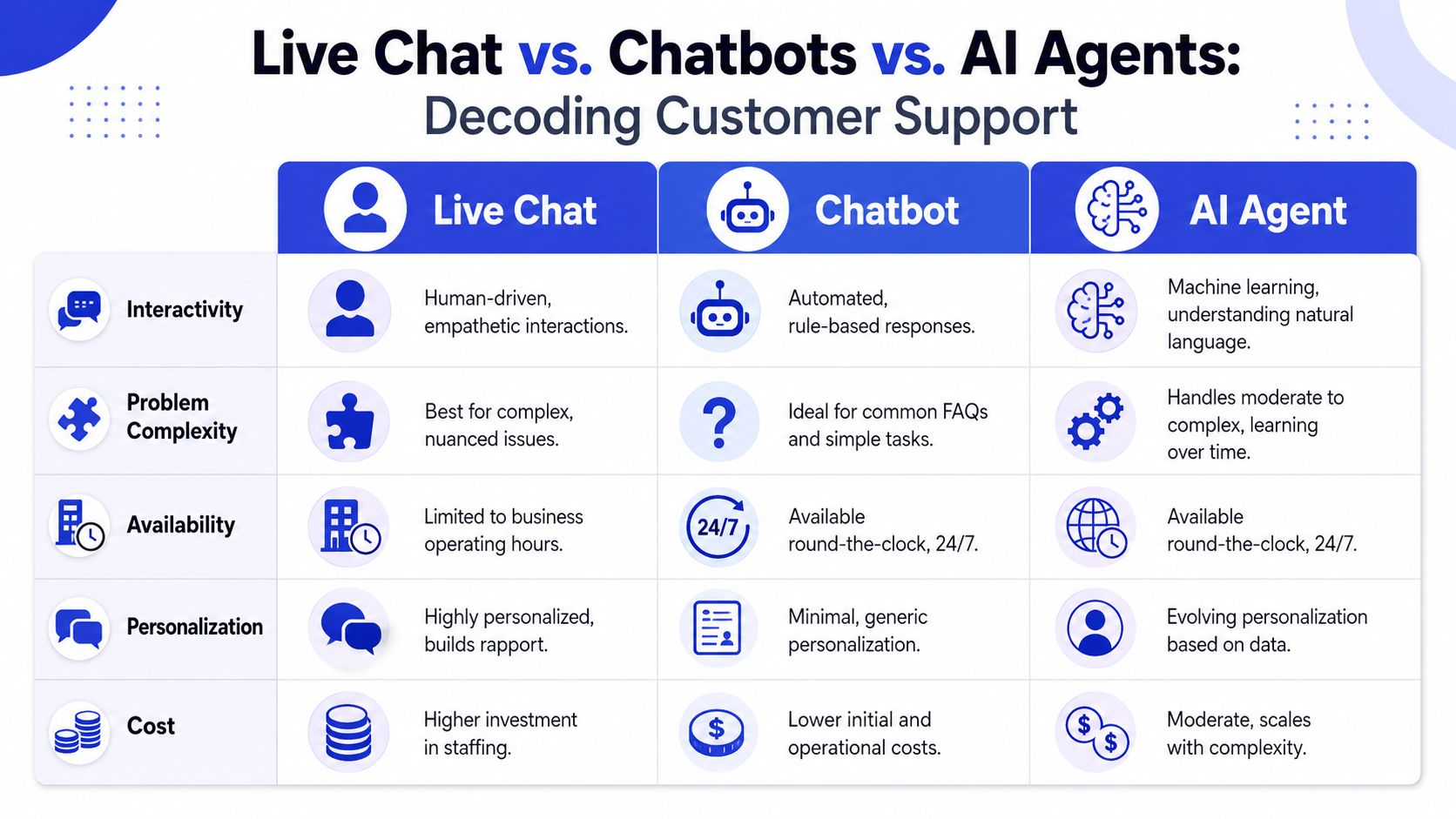
A simple comparison
Type | Main strength | Best fit | Limitation |
|---|---|---|---|
Live chat | Human judgment and empathy | Complex questions, objections, edge cases | Needs staffing and coverage |
Chatbot | Speed on repetitive scripts | FAQs, basic routing, simple status checks | Struggles when users go off-script |
AI agent | More natural automation with context | Repetitive support, lead qualification, first-line conversations | Needs training, oversight, and escalation paths |
This short video gives a useful visual way to think about the differences in modern support setups:
Where businesses get confused
The confusion usually comes from the interface. All three can live inside the same widget. A visitor may not care whether the first response came from a person, a scripted bot, or an AI system. They care whether the answer is fast, accurate, and helpful.
That's why the most useful model today is hybrid. A first layer handles simple questions and collects context. A second layer steps in when the issue becomes nuanced, sensitive, or sales-critical.
Front's overview of live chat makes this point clearly: live chat works best when paired with AI agents that handle repetitive requests, because teams need shared context and coordination rather than just a widget. If you want a deeper look at that operating model, this guide to automated customer service is a practical next read.
The winning setup isn't human or AI. It's human where judgment matters, AI where speed and consistency matter.
How to choose the right mix
Use live chat alone if your volume is modest and every conversation tends to be high value.
Use a chatbot if your main need is simple routing, office hours, and repeat answers.
Use a hybrid live chat and AI model if you want round-the-clock first response, lead capture, and smooth handoff to people during business hours.
That hybrid approach is quickly becoming the prevalent meaning of live chat in practice. Not just a chat box, but a managed conversation channel.
Key Business Benefits and Use Cases
A visitor lands on your pricing page at 9:14 p.m. They are interested enough to compare plans, but one question stops them: does setup take a day, a week, or a month? If no answer appears at that moment, the visitor often leaves and keeps shopping.
That is the business value of live chat. It gives customers a fast path to clarity while buying intent is still high. For the business, that usually means better support coverage, more captured leads, and fewer sales lost to avoidable uncertainty.
Earlier in the article, we noted that many customers prefer live chat because it feels faster and easier than older support channels. The practical takeaway is simple. People use chat when they want to keep moving.

Boosting Customer Support Efficiency
Support teams spend a surprising amount of time answering the same few questions. Order status. Billing options. Password resets. Return policies. Live chat shortens that cycle because customers can ask at the point of confusion, and the business can answer before the issue turns into a longer email chain or a phone queue.
It also changes how a team handles volume. One agent can usually manage several chat conversations at once, especially when AI handles the first layer, gathers details, and passes the conversation to a person only when judgment is needed.
A retailer during peak season is a good example. A shopper wants to know whether a gift will arrive before Friday. A quick answer in chat can save the sale and prevent a support ticket later. The same channel serves both service and revenue.
The chat window itself matters here. A well-placed web chat widget for your site works like a digital front-desk clerk. It greets visitors, answers routine questions, and sends complex issues to the right person instead of letting them wander.
Increasing Sales and Conversions
The impact on sales is where many owners change their view of live chat. They start treating it less like a help desk add-on and more like an active sales channel.
That shift makes sense. On high-intent pages, buyers rarely need a long conversation. They usually need one missing piece of information: pricing details, shipping timing, implementation requirements, contract terms, or whether a plan fits their situation. If that answer arrives quickly, hesitation drops.
If a buyer is close to a decision, a fast, relevant answer often matters more than a polished script.
Good teams use chat carefully. They offer help on pricing pages, checkout flows, and product pages where uncertainty tends to appear. The goal is not to interrupt. The goal is to remove friction before it turns into abandonment.
In a hybrid model, AI can handle the first question instantly and collect context, while a human steps in when the conversation turns strategic, account-specific, or high value. That is a modern sales motion, not just a support tactic.
Automating Lead Qualification
Live chat also helps before a salesperson ever joins the conversation. It can ask a short set of qualifying questions, collect contact information, and route the lead based on fit and urgency.
For a SaaS company, that may mean team size, current tools, and purchase timeline. For a service business, it may mean budget range, project scope, and location. For a travel agency, it may mean destination, dates, and traveler count.
A useful lead-qualification flow does three jobs:
Spot buying intent by identifying visitors who are actively evaluating options
Collect context so the sales team does not start from zero
Route the conversation well when the question becomes specific, sensitive, or sales-critical
Live chat then becomes more than support. It becomes part of revenue operations.
That is the larger shift many businesses miss at first. Live chat is no longer just a small box in the corner of a website. In a modern human and AI setup, it becomes a managed conversation channel that helps customers get answers, helps teams focus their time, and helps the business capture demand instead of losing it.
Essential Live Chat Features to Look For
Not every live chat tool is built for the same job. Some are lightweight messaging widgets. Others are full conversation platforms with routing, analytics, AI, and CRM connections.
The easiest way to evaluate software is to ask a simpler question. What job does this feature do for the business?

Features that reduce response time
Some features exist to help your team reply faster without sounding robotic.
Canned responses help agents answer common questions consistently.
Department routing sends billing, sales, and support questions to the right people.
Availability settings prevent customers from thinking someone is online when no one is.
These aren't flashy features, but they matter. NICE's live chat overview notes that one agent can manage multiple concurrent sessions and that context preserved across CRM, knowledge-base, and routing integrations is part of what gives live chat its effectiveness. The same source cites 73% customer satisfaction versus 61% for email and 2.8x higher conversion likelihood in one cited benchmark.
Features that improve conversation quality
Speed alone isn't enough. The chat also needs memory and context.
Look for these capabilities:
Feature | Job it does |
|---|---|
CRM integration | Shows customer history so agents don't ask the same questions twice |
Knowledge-base connection | Pulls consistent answers from your documented policies and product info |
Transcript history | Lets staff continue the conversation without making the customer repeat themselves |
Good live chat feels like your team remembers the customer. Bad live chat feels like starting over every time.
Features that support growth
As volume grows, you'll want more than a basic widget.
Proactive chat triggers can open on pages where buying intent is high.
Analytics dashboards help you track response times, outcomes, and common topics.
Escalation workflows make sure complex issues reach a human with the right summary.
If you're comparing tools, a web chat widget guide can help you evaluate the front-end experience. One option in this category is Chatgrow, which lets businesses train AI support agents on website content, FAQs, and product pages, then deploy them on high-intent pages with escalation to human teams when needed.
Best Practices for Live Chat Implementation
A live chat rollout works best when it starts with a narrow goal. If you launch it everywhere for everyone, you'll learn less and create more noise.
Set one clear goal first
Pick the first job you want chat to do. That might be reducing repetitive support questions, catching pricing-page leads, or helping buyers at checkout. Keep the goal concrete enough that your team can recognize success when it happens.
Once that goal is clear, write a short list of the questions chat should handle well. That list becomes your setup guide for prompts, canned responses, routing, and escalation.
Put chat where intent is strongest
You don't have to place chat on every page. Many businesses get more value by focusing on pages where hesitation affects revenue or support volume.
Good candidates often include:
Pricing pages where buyers compare plans
Checkout pages where last-minute concerns appear
Help pages where customers are already looking for answers
High-value service pages where visitors may want to ask before booking
Train for tone and handoff
Whether the first response comes from a person or an AI layer, the voice should match your business. Clear, direct, calm answers usually work better than overfriendly scripts.
You also need a handoff rule. Decide when the system should escalate and what information it should collect before the transfer. A good setup includes conversation summaries, customer details, and the page the visitor came from. This guide to customer data integration is useful if you're planning those handoffs across tools.
Customers don't mind automation. They mind being trapped in it.
Match your speed to customer expectations
Live chat creates an expectation of immediacy, so response planning matters. Industry benchmarks reported by Replyco's live chat statistics roundup show an average wait time of 22.8 seconds and an average response time of 44.6 seconds.
If you can't reply quickly during certain hours, say so in the widget. It's better to set an honest expectation than to appear available and then leave someone waiting.
Measuring Live Chat Success and ROI
A live chat channel should be measured like any other business system. Not by whether it exists, but by whether it improves outcomes you care about.
Support metrics
Start with the questions your support lead will ask.
Response time asks whether customers are getting help quickly enough.
Resolution quality asks whether conversations resolve the issue.
Customer satisfaction asks how people felt after the interaction.
If response time is strong but satisfaction is weak, the team may be answering fast without being useful. If satisfaction is solid but volume is overwhelming, you may need better routing or more automation on repetitive topics.
Sales and lead metrics
For sales use cases, look at what happens after the conversation.
A few useful measures are chat-to-lead rate, lead quality, booked demos, completed purchases, and assisted conversions. These metrics tell you whether the chat is helping buyers move forward or just creating extra activity.
Operational metrics
Operations metrics show whether the channel is sustainable.
Track chats per agent, common topics, transfer rate, and chat duration. Those numbers help you spot whether your agents are carrying too much manual load, whether your automation is handling the right conversations, and where your knowledge gaps are.
A practical review cycle works well here:
Read transcripts to find recurring questions
Update flows and knowledge sources to reduce repeat friction
Review outcomes monthly against the original business goal
That last step is what turns live chat from a widget into a managed channel.
Frequently Asked Questions About Live Chat
Is live chat too expensive for a small business
Not necessarily. Many tools now scale by usage, seat count, or automation level, so small businesses can start with a limited setup. The bigger cost question is operational. If your team spends too much time answering the same questions manually, a focused live chat setup can be cheaper than continuing with fragmented support.
Will a chat widget slow down my website and hurt SEO
A well-built widget shouldn't create a noticeable problem for users. What matters more is how the tool is implemented and whether it loads efficiently. From a business standpoint, a chat tool that helps visitors stay engaged and get answers can support better on-site experience, but you still need to monitor site performance after installation.
Can live chat work on mobile apps too
Yes. Live chat isn't limited to websites. It can also be embedded in mobile apps. The same idea applies in both places. The user is already in your product or digital storefront, and they can ask for help without leaving the experience.
If you're exploring a hybrid live chat and AI approach, Chatgrow is one option to evaluate. It lets businesses train AI support agents on their own site content, FAQs, and product information, deploy them on high-intent pages, and escalate conversations to humans when needed. That makes it useful for teams that want faster first responses, better lead qualification, and a more modern answer to what live chat should do today.
Related Posts
Continue Reading
More articles from the ChatGrow Team.


